Element UI 表格某行突出悬浮效果
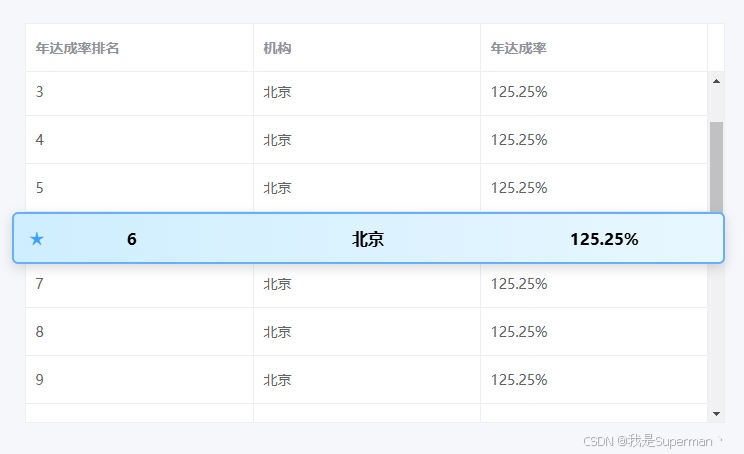
代码
html
<!DOCTYPE html>
<html lang="zh">
<head>
<meta charset="UTF-8">

<title>Element UI 2 浮层高亮行</title>

<!-- Element UI 2 CDN -->
<link rel="stylesheet"
href="https://unpkg.com/element-ui@2.15.14/lib/theme-chalk/index.css">

<script src="https://unpkg.com/vue@2/dist/vue.js"></script>
<script src="https://unpkg.com/element-ui@2.15.14/lib/index.js"></script>

<style>

body {
    padding: 40px;
    background: #f5f7fa;
}

/* 容器 */
.wrapper {
    position: relative;
    width: 700px;
    margin: auto;
    padding-left: 13px;
}

/* 浮层 */
.floating-row {

    position: absolute;

    left: 0;
    right: 0;

    height: 48px;

    display: flex;

    align-items: center;

    background: linear-gradient(
        to right,
        #cfeeff,
        #e8f7ff
    );

    border: 2px solid #66b1ff;

    border-radius: 6px;

    box-shadow:
        0 4px 12px rgba(0,0,0,0.15);

    font-weight: bold;

    z-index: 999;

    pointer-events: none;

}

/* 星标 */
.star {

    position: absolute;

    left: 16px;

    font-size: 18px;

    color: #409EFF;

}

/* 模拟列对齐 */
.floating-cell {

    flex: 1;

    text-align: center;

}

</style>

</head>

<body>

<div id="app">

<div class="wrapper">

<el-table
    ref="table"
    :data="tableData"
    border
    height="400"
    style="width: 100%">

    <el-table-column
        prop="rank"
        label="年达成率排名">
    </el-table-column>

    <el-table-column
        prop="org"
        label="机构">
    </el-table-column>

    <el-table-column
        prop="rate"
        label="年达成率">
    </el-table-column>

</el-table>

<!-- 浮层 -->
<div
    v-show="floatingTop !== null"
    class="floating-row"
    :style="{ top: floatingTop + 'px' }">

    <span class="star">★</span>

    <div class="floating-cell">
        {{ currentRow.rank }}
    </div>

    <div class="floating-cell">
        {{ currentRow.org }}
    </div>

    <div class="floating-cell">
        {{ currentRow.rate }}
    </div>

</div>

</div>

</div>

<script>

new Vue({

    el: "#app",

    data() {

        return {

            targetIndex: 5,

            floatingTop: null,

            currentRow: {},

            tableData: []

        };

    },

    mounted() {

        // 生成数据
        for (let i = 1; i <= 20; i++) {

            this.tableData.push({

                rank: i,

                org: "北京",

                rate: "125.25%"

            });

        }

        this.$nextTick(() => {

            this.updateFloating();

            // 监听滚动
            const body =
                this.$refs.table.$el.querySelector(
                    ".el-table__body-wrapper"
                );

            body.addEventListener(
                "scroll",
                this.updateFloating
            );

            window.addEventListener(
                "resize",
                this.updateFloating
            );

        });

    },

    methods: {

        updateFloating() {

            const table =
                this.$refs.table.$el;

            const rows =
                table.querySelectorAll(
                    ".el-table__body tbody tr"
                );

            const target =
                rows[this.targetIndex];

            if (!target) return;

            const wrapperRect =
                table.getBoundingClientRect();

            const rowRect =
                target.getBoundingClientRect();

            this.floatingTop =
                rowRect.top -
                wrapperRect.top +
                table.scrollTop;

            this.currentRow =
                this.tableData[
                    this.targetIndex
                ];

        }

    }

});

</script>

</body>
</html>