用图片预览demo试一下。
libs.versions.toml内容如下:
Groovy
[versions]
agp = "8.9.1"
coreKtx = "1.13.1"
junit = "4.13.2"
junitVersion = "1.3.0"
espressoCore = "3.7.0"
lifecycleRuntimeKtx = "2.7.0"
activityCompose = "1.13.0"
kotlin = "2.1.20"
#导航
navigation = "2.8.9"
appcompat = "1.7.0"
material = "1.12.0"
fragmentKtx = "1.7.1"
composeCompiler = "2.1.20"
composeBom = "2025.02.00"
hilt = "2.56.1"

[libraries]
androidx-core-ktx = { group = "androidx.core", name = "core-ktx", version.ref = "coreKtx" }
androidx-appcompat = { group = "androidx.appcompat", name = "appcompat", version.ref = "appcompat" }
google-material = { group = "com.google.android.material", name = "material", version.ref = "material" }
androidx-fragment-ktx = { group = "androidx.fragment", name = "fragment-ktx", version.ref = "fragmentKtx" }
junit = { group = "junit", name = "junit", version.ref = "junit" }
androidx-junit = { group = "androidx.test.ext", name = "junit", version.ref = "junitVersion" }
androidx-espresso-core = { group = "androidx.test.espresso", name = "espresso-core", version.ref = "espressoCore" }
androidx-lifecycle-runtime-ktx = { group = "androidx.lifecycle", name = "lifecycle-runtime-ktx", version.ref = "lifecycleRuntimeKtx" }
androidx-activity-compose = { group = "androidx.activity", name = "activity-compose", version.ref = "activityCompose" }
androidx-compose-bom = { group = "androidx.compose", name = "compose-bom", version.ref = "composeBom" }
androidx-compose-ui = { group = "androidx.compose.ui", name = "ui" }
androidx-compose-ui-graphics = { group = "androidx.compose.ui", name = "ui-graphics" }
androidx-compose-ui-tooling = { group = "androidx.compose.ui", name = "ui-tooling" }
androidx-compose-ui-tooling-preview = { group = "androidx.compose.ui", name = "ui-tooling-preview" }
androidx-compose-ui-test-manifest = { group = "androidx.compose.ui", name = "ui-test-manifest" }
androidx-compose-ui-test-junit4 = { group = "androidx.compose.ui", name = "ui-test-junit4" }
androidx-compose-material3 = { group = "androidx.compose.material3", name = "material3" }
hilt-android = { group = "com.google.dagger", name = "hilt-android", version.ref = "hilt" }
hilt-android-compiler = { group = "com.google.dagger", name = "hilt-android-compiler", version.ref = "hilt" }

[plugins]
android-application = { id = "com.android.application", version.ref = "agp" }
kotlin-android = { id = "org.jetbrains.kotlin.android", version.ref = "kotlin" }
#导航
navigation-safeargs = { id = "androidx.navigation.safeargs.kotlin", version.ref = "navigation" }
kotlin-compose = { id = "org.jetbrains.kotlin.plugin.compose", version.ref = "kotlin" }
hilt = { id = "com.google.dagger.hilt.android", version.ref = "hilt" }
app/build.gradle.kts内容如下:
Kotlin
plugins {
    alias(libs.plugins.android.application)
    alias(libs.plugins.kotlin.android)
    alias(libs.plugins.kotlin.compose)
    id("org.jetbrains.kotlin.kapt")
    alias(libs.plugins.hilt)
}

android {
    namespace = "com.example.testnavigation"
    compileSdk = 36

    defaultConfig {
        applicationId = "com.example.testnavigation"
        minSdk = 29
        targetSdk = 36
        versionCode = 1
        versionName = "1.0"

        testInstrumentationRunner = "androidx.test.runner.AndroidJUnitRunner"
    }

    buildTypes {
        release {
            isMinifyEnabled = false
            proguardFiles(
                getDefaultProguardFile("proguard-android-optimize.txt"),
                "proguard-rules.pro"
            )
        }
    }

    buildFeatures {
        compose = true
        viewBinding = true
    }

//    composeOptions {
//        kotlinCompilerExtensionVersion = libs.versions.composeCompiler.get()
//    }

    compileOptions {
        sourceCompatibility = JavaVersion.VERSION_17
        targetCompatibility = JavaVersion.VERSION_17
    }

    kotlinOptions {
        jvmTarget = "17"
    }
}

dependencies {
    implementation(libs.androidx.core.ktx)
    implementation(libs.androidx.lifecycle.runtime.ktx)
    implementation(libs.androidx.appcompat)
    implementation(libs.google.material)
    implementation(libs.androidx.fragment.ktx)
    testImplementation(libs.junit)
    androidTestImplementation(libs.androidx.junit)
    androidTestImplementation(libs.androidx.espresso.core)

    // Navigation
    val nav_version = "2.8.9"
    implementation("androidx.navigation:navigation-fragment-ktx:$nav_version")
    implementation("androidx.navigation:navigation-ui-ktx:$nav_version")

    implementation("org.jetbrains.kotlinx:kotlinx-coroutines-android:1.7.3")

    // Hilt
    implementation(libs.hilt.android)
    kapt(libs.hilt.android.compiler)

    // Compose
    implementation(platform(libs.androidx.compose.bom))
    implementation(libs.androidx.compose.ui)
    implementation(libs.androidx.compose.ui.graphics)
    implementation(libs.androidx.compose.ui.tooling.preview)
    implementation(libs.androidx.compose.material3)
    implementation(libs.androidx.activity.compose)

    debugImplementation(libs.androidx.compose.ui.tooling)
    debugImplementation(libs.androidx.compose.ui.test.manifest)
}

kapt {
    correctErrorTypes = true
    useBuildCache = true
}
build.gradle.kts内容如下:
Groovy
plugins {
    alias(libs.plugins.android.application) apply false
    alias(libs.plugins.kotlin.android) apply false
    alias(libs.plugins.hilt) apply false
}
gradle.wrapper.propeties内容如下:
Groovy
#Sat Apr 11 19:45:49 CST 2026
distributionBase=GRADLE_USER_HOME
distributionPath=wrapper/dists
distributionSha256Sum=f397b287023acdba1e9f6fc5ea72d22dd63669d59ed4a289a29b1a76eee151c6
distributionUrl=https\://services.gradle.org/distributions/gradle-8.11.1-bin.zip
networkTimeout=10000
validateDistributionUrl=true
zipStoreBase=GRADLE_USER_HOME
zipStorePath=wrapper/dists
MainActivity 显示一个图片:
Kotlin
package com.example.testnavigation

import android.content.Intent
import android.net.Uri
import android.os.Bundle
import android.widget.Button
import android.widget.ImageView
import androidx.fragment.app.FragmentActivity
import dagger.hilt.android.AndroidEntryPoint


@AndroidEntryPoint
class MainActivity : FragmentActivity() {

    override fun onCreate(savedInstanceState: Bundle?) {
        super.onCreate(savedInstanceState)
        setContentView(R.layout.activity_main2)
        val ivBaibing = findViewById<ImageView>(R.id.iv_baibing)
        val uri = Uri.parse("android.resource://com.example.testnavigation/${R.drawable.baibing}")
        ivBaibing?.setImageURI(uri)
        ivBaibing?.let{
            it.setOnClickListener {
                // 预览
                val intent = Intent(this@MainActivity, PicZoomActivity::class.java).let {
                    it.putExtra(PicZoomActivity.BUNDLE_KEY_PIC_URI, uri)
                }
                startActivity(intent)
            }
        }

        // Compose 预览按钮(启动纯 Compose Activity)
        val btnComposePreview = findViewById<Button>(R.id.btn_compose_preview)
        btnComposePreview.setOnClickListener {
            val intent = Intent(this, ComposePreviewActivity::class.java).apply {
                putExtra(PicZoomActivity.BUNDLE_KEY_PIC_URI, uri)
            }
            startActivity(intent)
        }
    }
}
布局activity_main2文件内容:
XML
<?xml version="1.0" encoding="utf-8"?>
<LinearLayout xmlns:android="http://schemas.android.com/apk/res/android"
    android:layout_width="match_parent"
    android:layout_height="match_parent"
    xmlns:tools="http://schemas.android.com/tools"
    android:orientation="vertical">
    <ImageView
        android:id="@+id/iv_baibing"
        android:layout_width="200dp"
        android:layout_height="400dp"
        tools:background="@drawable/baibing"
        android:scaleType="fitCenter"
        />

    <Button
        android:id="@+id/btn_compose_preview"
        android:layout_width="wrap_content"
        android:layout_height="wrap_content"
        android:text="Compose预览 (含传统ZoomImageView)"
        android:layout_marginTop="8dp" />
</LinearLayout>PicZoomActivity预览图片:
Kotlin
package com.example.testnavigation

import android.content.Context
import android.graphics.Bitmap
import android.graphics.BitmapFactory
import android.net.Uri
import android.os.AsyncTask
import android.os.Bundle
import android.util.Log
import android.view.View
import android.widget.FrameLayout
import android.widget.ImageView
import android.widget.LinearLayout
import android.widget.TextView
import androidx.fragment.app.FragmentActivity
import java.io.IOException

class PicZoomActivity : FragmentActivity() {
    private var img_container: LinearLayout? = null
    private var imageView: ZoomImageView? = null
    private var img_pic: ImageView? = null
    private var img_loading: TextView? = null

    private var picUri: Uri? = null
    override fun onCreate(savedInstanceState: Bundle?) {
        super.onCreate(savedInstanceState)
        setContentView(R.layout.activity_pic_room)
        init()
        val bundle = getIntent().getExtras()
        if (null != bundle) {
            picUri = bundle.getParcelable<Uri?>(BUNDLE_KEY_PIC_URI)
        }
        Log.i(TAG, "获取到图片uri: " + picUri)
        val container_lp = FrameLayout.LayoutParams(
            FrameLayout.LayoutParams.MATCH_PARENT,
            FrameLayout.LayoutParams.MATCH_PARENT
        )
        img_container!!.setLayoutParams(container_lp)
        imageView = ZoomImageView(
            this, this.bigImageViewWidth,
            this.bigImageViewHeight
        )
        img_container!!.addView(imageView, container_lp)
        img_container!!.setOnClickListener(View.OnClickListener { v: View? -> finish() })

        loadBitmapAsync(picUri!!, this.bigImageViewWidth, this.bigImageViewHeight)
    }

    private fun init() {
        img_pic = findViewById<ImageView>(R.id.img_pic)
        img_container = findViewById<LinearLayout>(R.id.img_container)
        img_loading = findViewById<TextView>(R.id.img_loading)
    }

    private fun loadBitmapAsync(uri: Uri, targetWidth: Int, targetHeight: Int) {
        var targetWidth = targetWidth
        var targetHeight = targetHeight
        if (targetWidth <= 0 || targetHeight <= 0) {
            val metrics = getResources().getDisplayMetrics()
            targetWidth = metrics.widthPixels
            targetHeight = metrics.heightPixels
        }

        val finalTargetWidth = targetWidth
        val finalTargetHeight = targetHeight
        AsyncTask.execute(Runnable {
            try {
                val bitmap: Bitmap? =
                    getSampledBitmapFromUri(this, uri, finalTargetWidth, finalTargetHeight)
                runOnUiThread(Runnable {
                    if (bitmap != null) {
                        img_pic!!.setVisibility(View.GONE)
                        img_loading!!.setVisibility(View.GONE)
                        imageView!!.setImageBitmap(bitmap)
                    } else {
                        Log.i(TAG, "load fail")
                    }
                })
            } catch (e: Exception) {
                e.printStackTrace()
                Log.i(TAG, "load fail")
            }
        })
    }

    val bigImageViewWidth: Int
        get() {
            val dm = getResources().getDisplayMetrics()
            this.getWindowManager().getDefaultDisplay().getMetrics(dm)
            return dm.widthPixels
        }

    val bigImageViewHeight: Int
        get() {
            val dm = getResources().getDisplayMetrics()
            this.getWindowManager().getDefaultDisplay().getMetrics(dm)
            return dm.heightPixels
        }

    companion object {
        private const val TAG = "PicZoomActivity"

        var BUNDLE_KEY_PIC_URI: String = "PIC_URI"

        @Throws(IOException::class)
        fun getSampledBitmapFromUri(
            context: Context,
            uri: Uri,
            reqWidth: Int,
            reqHeight: Int
        ): Bitmap? {
            val resolver = context.getContentResolver()
            val options = BitmapFactory.Options()
            options.inJustDecodeBounds = true // 只读取图片尺寸,不加载到内存

            resolver.openInputStream(uri).use { `in` ->
                BitmapFactory.decodeStream(`in`, null, options)
            }
            // 计算采样率
            options.inSampleSize = calculateInSampleSize(options, reqWidth, reqHeight)

            // 真正解码
            options.inJustDecodeBounds = false
            resolver.openInputStream(uri).use { `in` ->
                return BitmapFactory.decodeStream(`in`, null, options)
            }
        }

        private fun calculateInSampleSize(
            options: BitmapFactory.Options,
            reqWidth: Int,
            reqHeight: Int
        ): Int {
            val height = options.outHeight
            val width = options.outWidth
            var inSampleSize = 1

            if (height > reqHeight || width > reqWidth) {
                val halfHeight = height / 2
                val halfWidth = width / 2

                while ((halfHeight / inSampleSize) >= reqHeight
                    && (halfWidth / inSampleSize) >= reqWidth
                ) {
                    inSampleSize *= 2
                }
            }
            return inSampleSize
        }
    }
}
其布局activity_pic_room :
XML
<?xml version="1.0" encoding="utf-8"?>
<LinearLayout xmlns:android="http://schemas.android.com/apk/res/android"
    android:layout_width="match_parent"
    android:layout_height="match_parent"
    android:background="#80000000"
    android:orientation="vertical">
    <FrameLayout
        android:id="@+id/layout_img"
        android:layout_width="fill_parent"
        android:layout_height="fill_parent" >

        <LinearLayout
            android:id="@+id/img_container"
            android:layout_width="fill_parent"
            android:layout_height="fill_parent"
            android:layout_gravity="center"
            android:gravity="center">

            <ImageView
                android:id="@+id/img_pic"
                android:scaleType="center"
                android:layout_width="fill_parent"
                android:layout_height="fill_parent" />
        </LinearLayout>

        <TextView
            android:id="@+id/img_loading"
            android:layout_width="wrap_content"
            android:layout_height="wrap_content"
            android:layout_gravity="center"
            android:text="加载中"
            android:textColor="#666666"
            android:textSize="16sp" />
    </FrameLayout>
</LinearLayout>
ZoomImageView:
Kotlin
package com.example.testnavigation

import android.content.Context
import android.graphics.Bitmap
import android.view.MotionEvent
import android.view.animation.AccelerateInterpolator
import android.view.animation.Animation
import android.view.animation.ScaleAnimation
import android.view.animation.TranslateAnimation
import androidx.appcompat.widget.AppCompatImageView
import kotlin.math.abs
import kotlin.math.max
import kotlin.math.sqrt

class ZoomImageView(context: Context, w: Int, h: Int) : AppCompatImageView(context) {

    companion object {
        const val NONE = 0
        const val DRAG = 1
        const val ZOOM = 2
        const val BIGGER = 3
        const val SMALLER = 4
        const val OPENSCALE = 1
        const val OPENTRANS = 2
    }

    // 当前的事件
    private var mode = NONE

    // 两触点距离
    private var beforeLength = 0f
    private var afterLength = 0f

    // 缩放的比例,越大缩放的越快
    private var scaleStep = 0.06f

    // 处理拖动变量
    private val screenW: Int
    private val screenH: Int
    private var startX = 0
    private var startY = 0
    private var stopX = 0
    private var stopY = 0
    private var trans: TranslateAnimation? = null

    // Bitmap的宽高
    private var bmWidth = 0
    private var bmHeight = 0

    // 处理超出边界的动画
    private var bitmap: Bitmap? = null
    private var maxScale = 2.0f
    private var minScale = 0.5f

    // 记录初始宽度,用于缩放回弹
    private var startWidth = 0
    private var pivotX = 0.5f
    private var pivotY = 0.5f

    // 默认开启所有动画
    private var animSwitch = OPENSCALE or OPENTRANS

    private var center: FloatArray? = null

    init {
        setPadding(0, 0, 0, 0)
        screenW = w
        screenH = h
    }

    override fun setImageBitmap(bm: Bitmap?) {
        super.setImageBitmap(bm)
        startWidth = 0
        bm?.let {
            bmWidth = it.width
            bmHeight = it.height
        }
        bitmap?.let {
            if (!it.isRecycled) it.recycle()
        }
        bitmap = bm
    }

    /**
     * 释放ImageView的Bitmap
     */
    fun recycle() {
        setImageBitmap(null)
        bitmap?.let {
            if (!it.isRecycled) it.recycle()
        }
    }

    /**
     * 计算两点间的距离
     */
    private fun spacing(event: MotionEvent): Float {
        val x = event.getX(0) - event.getX(1)
        val y = event.getY(0) - event.getY(1)
        return sqrt((x * x + y * y).toDouble()).toFloat()
    }

    /**
     * 计算两点间的中心点
     */
    private fun centerPosition(event: MotionEvent): FloatArray {
        val x = event.getX(0)
        val y = event.getY(0)
        val x1 = event.getX(1)
        val y1 = event.getY(1)
        var cx = abs((x1 - x) / 2)
        var cy = abs((y1 - y) / 2)
        cx = max(x, x1) - cx
        cy = max(y, y1) - cy
        return floatArrayOf(cx, cy)
    }

    /**
     * 设置ImageView大小等于显示的内容大小
     */
    fun setRect() {
        val scale = minOf(width.toFloat() / bmWidth, height.toFloat() / bmHeight)
        val w = (bmWidth * scale).toInt() + 1
        val h = (bmHeight * scale).toInt() + 1
        val t = top
        val l = left
        layout(l, t, l + w, t + h)
    }

    /**
     * 处理各种移动回弹
     * @param disX X的偏移
     * @param disY Y的偏移
     */
    fun rebound(disX: Int, disY: Int) {
        layout(left + disX, top + disY, left + disX + width, top + disY + height)
        if (animSwitch and OPENTRANS == 0) return
        trans = TranslateAnimation((-disX).toFloat(), 0f, (-disY).toFloat(), 0f).apply {
            interpolator = AccelerateInterpolator()
            duration = 300
        }
        startAnimation(trans)
    }

    /**
     * 处理各种缩放回弹
     */
    fun reScale(): Boolean {
        var scaleX = 1f
        var scaleY = 1f
        val oldWidth = width
        val oldHeight = height
        var l: Int
        var t: Int
        var r: Int
        var b: Int

        val centerArr = center ?: return false

        if (width > startWidth * maxScale) {
            while (width > startWidth * maxScale) {
                l = left + (centerArr[0] * width).toInt()
                t = top + (centerArr[1] * height).toInt()
                r = right - ((scaleStep - centerArr[0]) * width).toInt()
                b = bottom - ((scaleStep - centerArr[1]) * height).toInt()
                setFrame(l, t, r, b)
            }
            scaleX = oldWidth.toFloat() / width
            scaleY = oldHeight.toFloat() / height
        }
        if (width < startWidth * minScale) {
            while (width < startWidth * minScale) {
                l = left - (centerArr[0] * width).toInt()
                t = top - (centerArr[1] * height).toInt()
                r = right + ((scaleStep - centerArr[0]) * width).toInt()
                b = bottom + ((scaleStep - centerArr[1]) * height).toInt()
                setFrame(l, t, r, b)
            }
            scaleX = oldWidth.toFloat() / width
            scaleY = oldHeight.toFloat() / height
        }

        if (scaleX == 1f && scaleY == 1f) return false
        if (animSwitch and OPENSCALE == 0) {
            setRect()
            onRebound()
            return true
        }
        val scaleAnim = ScaleAnimation(
            scaleX, 1f, scaleY, 1f,
            ScaleAnimation.RELATIVE_TO_SELF, pivotX,
            ScaleAnimation.RELATIVE_TO_SELF, pivotY
        ).apply {
            duration = 300
            interpolator = AccelerateInterpolator()
            setAnimationListener(object : Animation.AnimationListener {
                override fun onAnimationStart(animation: Animation?) {}
                override fun onAnimationRepeat(animation: Animation?) {}
                override fun onAnimationEnd(animation: Animation?) {
                    setRect()
                    onRebound()
                }
            })
        }
        startAnimation(scaleAnim)
        return true
    }

    /**
     * 处理超范围回弹
     */
    private fun onRebound() {
        var disX = 0
        var disY = 0
        if (height < screenH) {
            disY = (screenH - height) / 2 - top
        }
        if (width < screenW) {
            disX = (screenW - width) / 2 - left
        }
        if (height >= screenH) {
            if (top > 0) disY = -top
            if (bottom < screenH) disY = screenH - bottom
        }
        if (width >= screenW) {
            if (left > 0) disX = -left
            if (right < screenW) disX = screenW - right
        }
        rebound(disX, disY)
    }

    override fun onLayout(changed: Boolean, left: Int, top: Int, right: Int, bottom: Int) {
        super.onLayout(changed, left, top, right, bottom)
        if (startWidth == 0) {
            startWidth = right - left
            setRect()
            animSwitch = 0
            onRebound()
            animSwitch = OPENSCALE or OPENTRANS
        }
    }

    override fun onTouchEvent(event: MotionEvent): Boolean {
        when (event.action and MotionEvent.ACTION_MASK) {
            MotionEvent.ACTION_DOWN -> {
                mode = DRAG
                stopX = event.rawX.toInt()
                stopY = event.rawY.toInt()
                startX = event.x.toInt()
                startY = stopY - top
                if (event.pointerCount == 2) {
                    beforeLength = spacing(event)
                }
            }
            MotionEvent.ACTION_POINTER_DOWN -> {
                // 计算缩放中心点位置
                center = centerPosition(event)
                pivotX = center!![0] / width
                pivotY = center!![1] / height
                center!![0] = (center!![0] / width) * scaleStep
                center!![1] = (center!![1] / height) * scaleStep
                if (spacing(event) > 10f) {
                    mode = ZOOM
                    beforeLength = spacing(event)
                }
            }
            MotionEvent.ACTION_UP -> {
                mode = NONE
                setRect()
                if (!reScale()) onRebound()
            }
            MotionEvent.ACTION_POINTER_UP -> {
                mode = NONE
            }
            MotionEvent.ACTION_MOVE -> {
                when (mode) {
                    DRAG -> {
                        setPosition(
                            stopX - startX,
                            stopY - startY,
                            stopX + width - startX,
                            stopY - startY + height
                        )
                        stopX = event.rawX.toInt()
                        stopY = event.rawY.toInt()
                    }
                    ZOOM -> {
                        if (spacing(event) > 10f) {
                            afterLength = spacing(event)
                            val gapLength = afterLength - beforeLength
                            if (gapLength == 0f) {
                                // do nothing
                            } else if (abs(gapLength) > 5f) {
                                if (gapLength > 0) {
                                    if (width < startWidth * maxScale) {
                                        setScale(scaleStep, BIGGER)
                                    }
                                } else {
                                    if (width > startWidth * minScale) {
                                        setScale(scaleStep, SMALLER)
                                    }
                                }
                                beforeLength = afterLength
                            }
                        }
                    }
                }
            }
        }
        return true
    }

    /**
     * 实现处理缩放
     */
    private fun setScale(temp: Float, flag: Int) {
        val centerArr = center ?: return
        var l = 0
        var t = 0
        var r = 0
        var b = 0
        if (flag == BIGGER) {
            l = left - (centerArr[0] * width).toInt()
            t = top - (centerArr[1] * height).toInt()
            r = right + ((scaleStep - centerArr[0]) * width).toInt()
            b = bottom + ((scaleStep - centerArr[1]) * height).toInt()
        } else if (flag == SMALLER) {
            l = left + (centerArr[0] * width).toInt()
            t = top + (centerArr[1] * height).toInt()
            r = right - ((scaleStep - centerArr[0]) * width).toInt()
            b = bottom - ((scaleStep - centerArr[1]) * height).toInt()
        }
        setFrame(l, t, r, b)
    }

    /**
     * 实现处理拖动
     */
    private fun setPosition(left: Int, top: Int, right: Int, bottom: Int) {
        layout(left, top, right, bottom)
    }
}
运行:
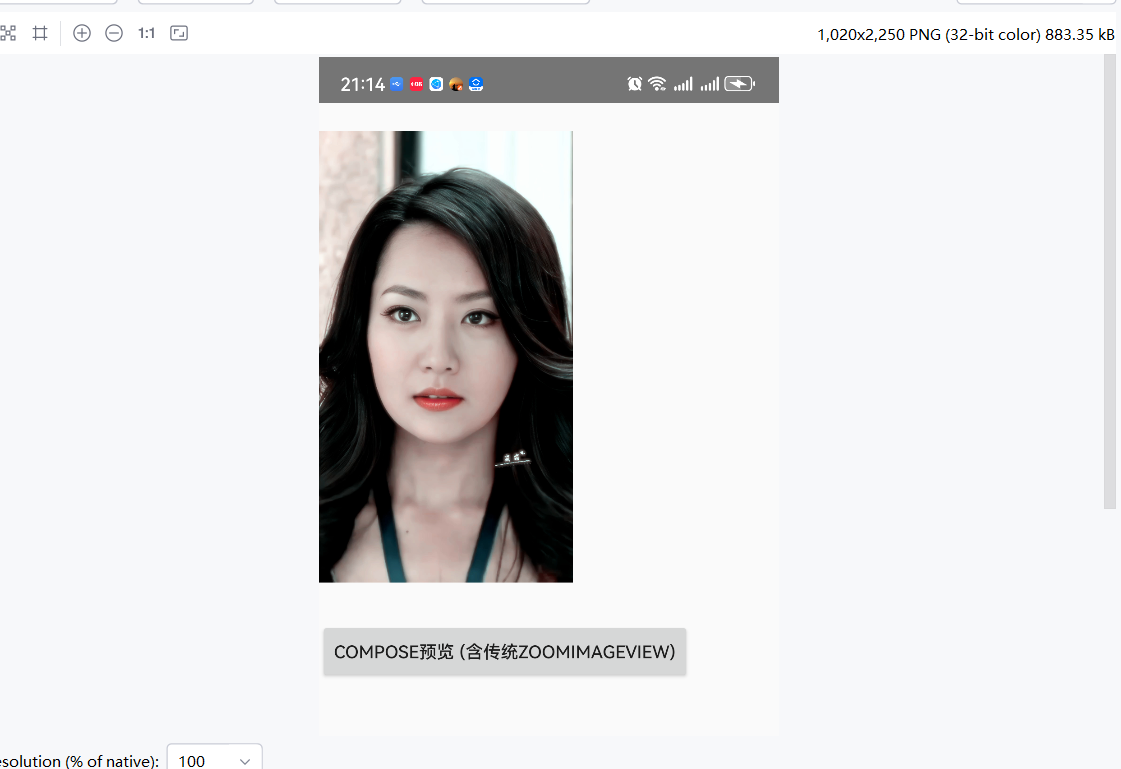
点击图片,预览:
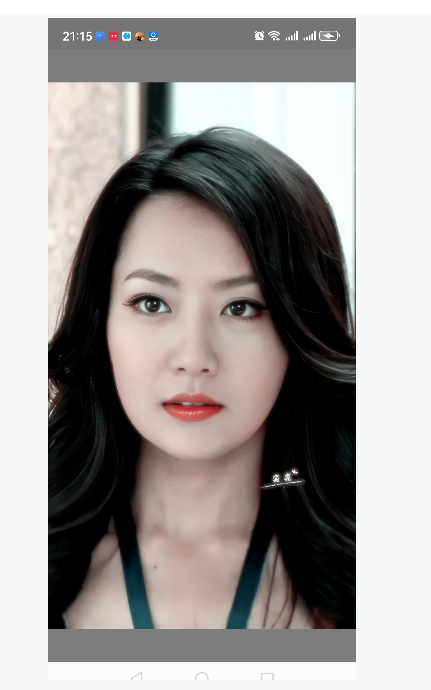
可以滑动,松手回弹:
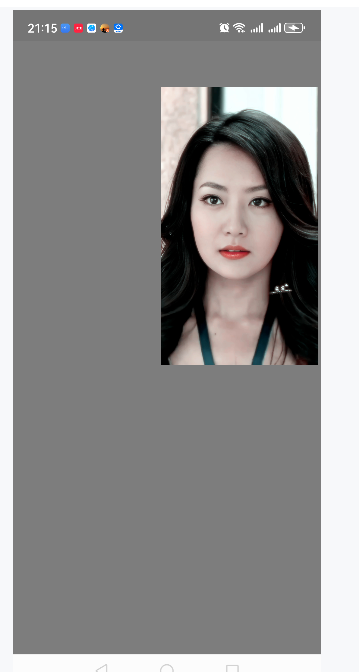
ok. 再试下compose代码和传统view混用,即compose调用ZoomImageView,ComposePreviewActivity内容如下:
Kotlin
package com.example.testnavigation

import android.content.Intent
import android.net.Uri
import android.os.Bundle
import androidx.activity.ComponentActivity
import androidx.activity.compose.setContent
import android.widget.FrameLayout
import androidx.compose.foundation.layout.Box
import androidx.compose.foundation.layout.BoxWithConstraints
import androidx.compose.foundation.layout.fillMaxSize
import androidx.compose.foundation.layout.padding
import androidx.compose.material3.Button
import androidx.compose.material3.MaterialTheme
import androidx.compose.material3.Text
import androidx.compose.runtime.Composable
import androidx.compose.ui.Alignment
import androidx.compose.ui.Modifier
import androidx.compose.ui.platform.LocalContext
import androidx.compose.ui.platform.LocalDensity
import androidx.compose.ui.unit.dp
import androidx.compose.ui.viewinterop.AndroidView

class ComposePreviewActivity : ComponentActivity() {
    private lateinit var picUri: Uri
    override fun onCreate(savedInstanceState: Bundle?) {
        super.onCreate(savedInstanceState)

        // 获取传递过来的 Uri
        picUri = intent.getParcelableExtra(PicZoomActivity.BUNDLE_KEY_PIC_URI) ?: run {
            finish()
            return
        }

        setContent {
            MaterialTheme {   // 如果没有主题,可以替换为 MaterialTheme { ... }
                ComposePreviewScreen(uri = picUri)
            }
        }
    }
}

@Composable
fun ComposePreviewScreen(uri: Uri) {
    val context = LocalContext.current
    val density = LocalDensity.current
    Box(modifier = Modifier.fillMaxSize()) {
        // 1. 使用 AndroidView 嵌入传统的 ZoomImageView(与 PicZoomActivity 一致:MATCH_PARENT + 实际区域尺寸,松手后才正确回弹到中心)
        BoxWithConstraints(modifier = Modifier.fillMaxSize()) {
            val wPx = with(density) { maxWidth.roundToPx() }
            val hPx = with(density) { maxHeight.roundToPx() }
            AndroidView(
                factory = { ctx ->
                    val dm = ctx.resources.displayMetrics
                    ZoomImageView(ctx, dm.widthPixels, dm.heightPixels).apply {
                        layoutParams = FrameLayout.LayoutParams(
                            FrameLayout.LayoutParams.MATCH_PARENT,
                            FrameLayout.LayoutParams.MATCH_PARENT
                        )
                        PicZoomActivity.getSampledBitmapFromUri(
                            ctx,
                            uri,
                            dm.widthPixels,
                            dm.heightPixels
                        )?.let { bitmap -> setImageBitmap(bitmap) }
                    }
                },
                modifier = Modifier.fillMaxSize(),
                update = { view ->
//                    view.setScreenBounds(wPx, hPx)
                }
            )
        }

        // 2. 一个 Compose 按钮,点击跳转到传统预览界面(PicZoomActivity)
        Button(
            onClick = {
                val intent = Intent(context, PicZoomActivity::class.java).apply {
                    putExtra(PicZoomActivity.BUNDLE_KEY_PIC_URI, uri)
                }
                context.startActivity(intent)
            },
            modifier = Modifier
                .align(Alignment.BottomCenter)
                .padding(16.dp)
        ) {
            Text("切换到传统预览 (ZoomImageView)")
        }
    }
}
测试下ComposePreviewActivity 预览图片:
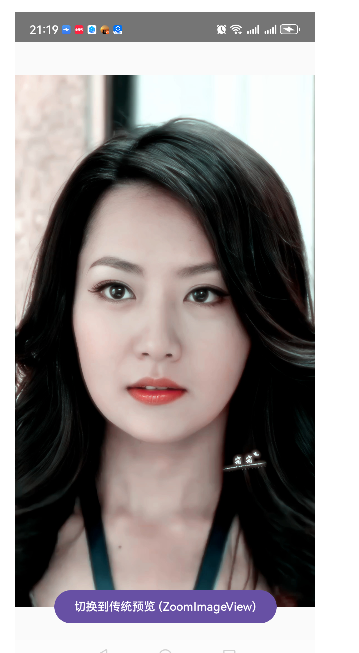
ok. 但是有个问题,手势移动图片后不回弹。先不管了,有时间再看下。