智能衣柜衣物换季应用
欢迎加入开源鸿蒙跨平台社区:
https://openharmonycrossplatform.csdn.net
一、项目概述
运行效果图
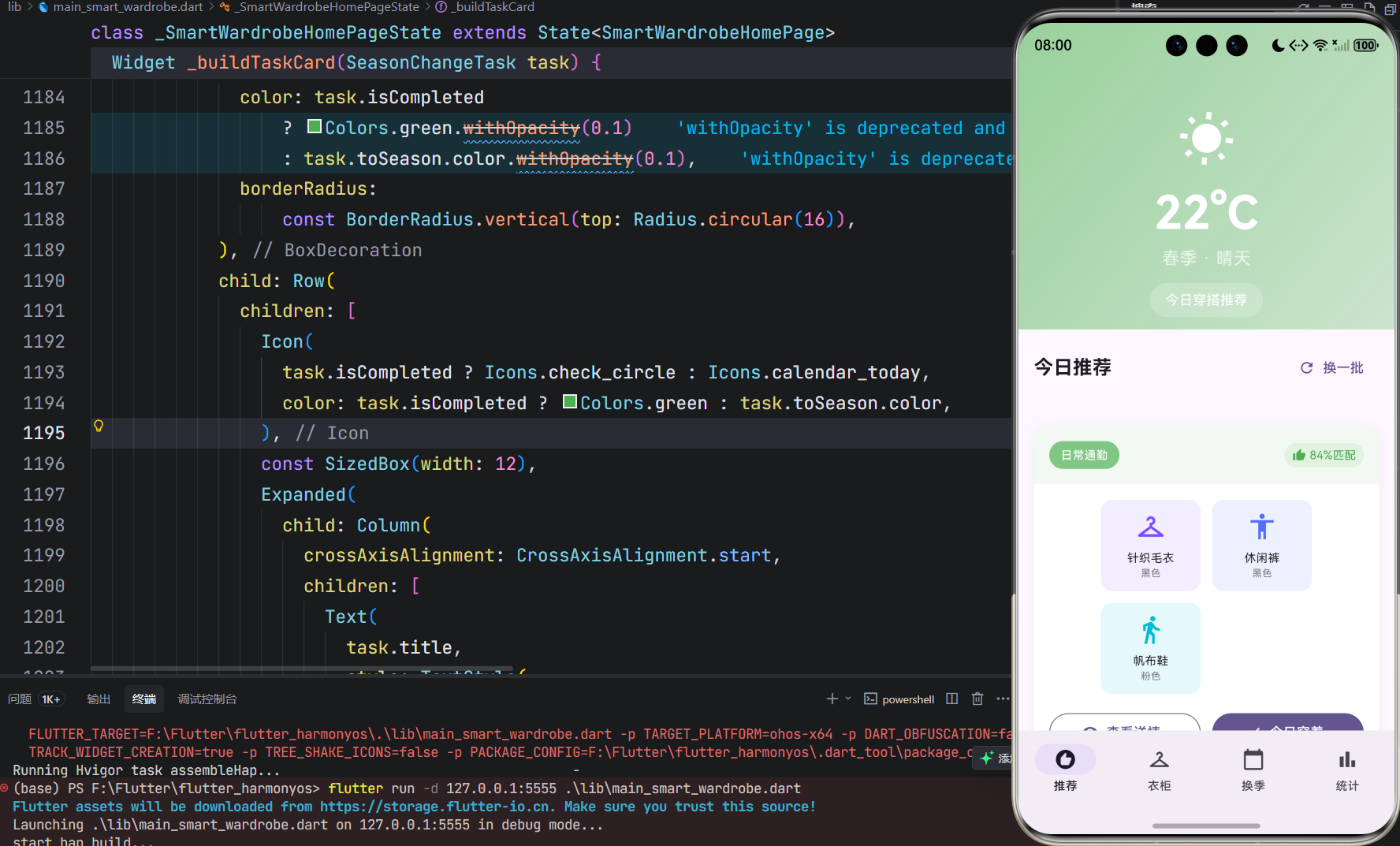
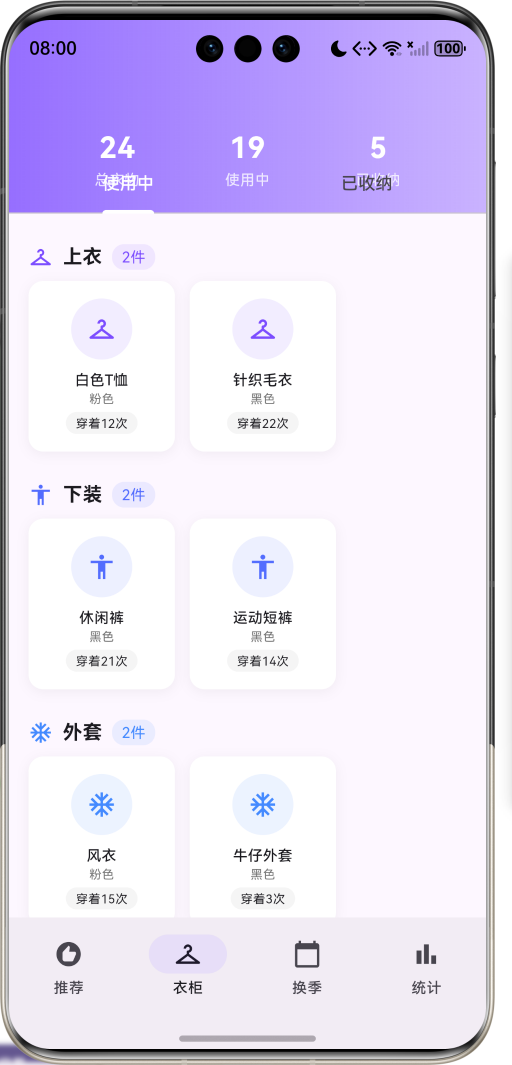
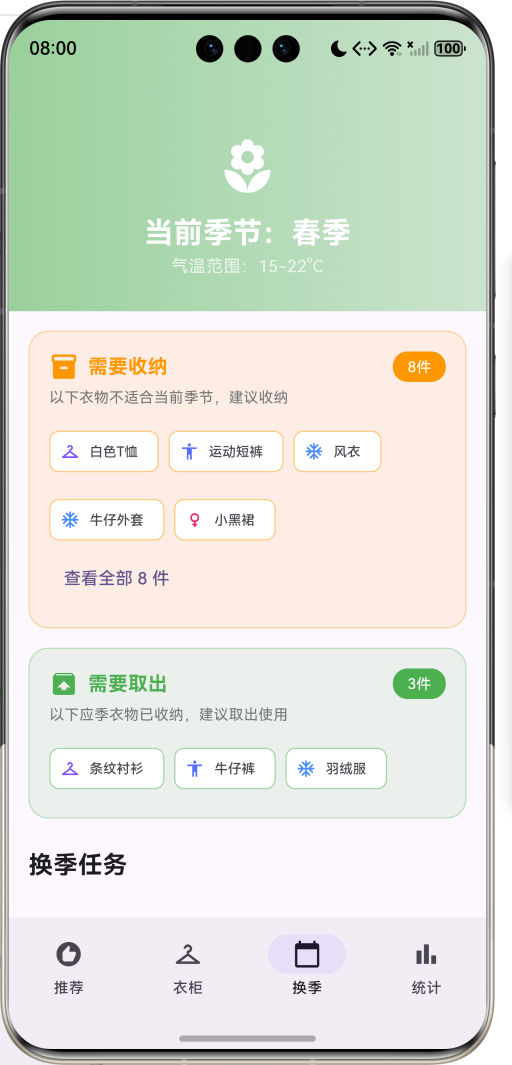
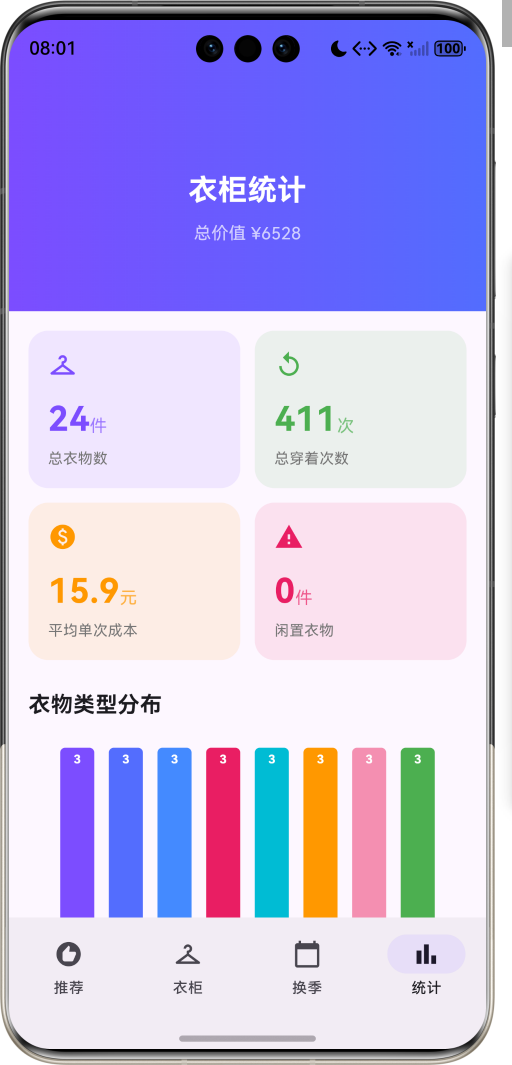
1.1 应用简介
智能衣柜衣物换季是一款生活服务类应用,为用户提供智能化的衣物管理和换季收纳服务。应用以紫色为主色调,象征优雅与品质。界面设计采用简洁现代的风格,让用户轻松管理自己的衣橱。
应用根据季节和天气自动推荐应季衣物,提供换季收纳建议,记录每件衣服的穿着频率,帮助用户科学管理衣物,提升穿搭效率,让每一件衣物都能物尽其用。
1.2 核心功能
| 功能模块 | 功能描述 | 实现方式 |
|---|---|---|
| 穿搭推荐 | 根据天气季节推荐搭配 | 智能匹配算法 |
| 衣柜管理 | 衣物分类展示管理 | 数据模型存储 |
| 换季提醒 | 收纳取出建议提示 | 季节判断逻辑 |
| 穿着统计 | 频率排行成本分析 | 数据统计分析 |
| 穿着记录 | 记录每日穿着情况 | 时间戳管理 |
| 收纳管理 | 衣物收纳状态管理 | 状态切换机制 |
1.3 衣物类型定义
| 序号 | 类型名称 | Emoji | 颜色 |
|---|---|---|---|
| 1 | 上衣 | 👔 | 紫色 |
| 2 | 下装 | 👖 | 靛蓝 |
| 3 | 外套 | 🧥 | 蓝色 |
| 4 | 裙装 | 👗 | 粉红 |
| 5 | 鞋履 | 👟 | 青色 |
| 6 | 配饰 | ⌚ | 橙色 |
| 7 | 内衣 | 💝 | 浅粉 |
| 8 | 运动装 | 🏃 | 绿色 |
1.4 季节定义
| 序号 | 季节名称 | Emoji | 颜色 | 温度范围 |
|---|---|---|---|---|
| 1 | 春季 | 🌸 | 绿色 | 15-22°C |
| 2 | 夏季 | ☀️ | 橙色 | 25-35°C |
| 3 | 秋季 | 🍂 | 橙红 | 10-20°C |
| 4 | 冬季 | ❄️ | 蓝色 | -5-10°C |
1.5 天气类型定义
| 序号 | 天气名称 | Emoji | 颜色 |
|---|---|---|---|
| 1 | 晴天 | ☀️ | 黄色 |
| 2 | 多云 | ☁️ | 灰色 |
| 3 | 雨天 | 🌧️ | 蓝色 |
| 4 | 寒冷 | 🥶 | 浅蓝 |
| 5 | 炎热 | 🔥 | 橙红 |
1.6 收纳状态定义
| 序号 | 状态名称 | Emoji | 颜色 | 说明 |
|---|---|---|---|---|
| 1 | 使用中 | ✅ | 绿色 | 当前可用 |
| 2 | 已收纳 | 📦 | 灰色 | 换季存放 |
| 3 | 已捐赠 | 🤝 | 蓝色 | 公益捐赠 |
| 4 | 已处理 | 🗑️ | 灰色 | 清理淘汰 |
1.7 技术栈
| 技术领域 | 技术选型 | 版本要求 |
|---|---|---|
| 开发框架 | Flutter | >= 3.0.0 |
| 编程语言 | Dart | >= 2.17.0 |
| 设计规范 | Material Design 3 | - |
| 自定义绘制 | CustomPainter | - |
| 动画系统 | AnimationController | - |
| 目标平台 | 鸿蒙OS / Web | API 21+ |
1.8 项目结构
lib/
└── main_smart_wardrobe.dart
    ├── SmartWardrobeApp                # 应用入口
    ├── ClothingType                    # 衣物类型枚举
    ├── Season                          # 季节枚举
    ├── WeatherType                     # 天气类型枚举
    ├── StorageStatus                   # 收纳状态枚举
    ├── Clothing                        # 衣物模型
    ├── SeasonChangeTask                # 换季任务模型
    ├── OutfitRecommendation            # 穿搭推荐模型
    ├── SmartWardrobeHomePage           # 主页面(底部导航)
    ├── _buildRecommendPage             # 推荐页面
    ├── _buildWardrobePage              # 衣柜页面
    ├── _buildSeasonChangePage          # 换季页面
    ├── _buildStatisticsPage            # 统计页面
    └── ClothingTypeChartPainter        # 图表绘制器
二、系统架构
2.1 整体架构图
Data Layer
Business Layer
Presentation Layer
主页面
SmartWardrobeHomePage
推荐页
衣柜页
换季页
统计页
天气展示
穿搭推荐
穿着记录
分类展示
衣物详情
收纳操作
收纳建议
取出建议
换季任务
统计数据
频率排行
成本分析
推荐引擎
RecommendationEngine
换季管理器
SeasonManager
统计分析器
StatisticsAnalyzer
Clothing
衣物数据
SeasonChangeTask
换季任务
OutfitRecommendation
穿搭推荐
2.2 类图设计
has
suitable for
has
transitions
contains
for
for
SmartWardrobeApp
+Widget build()
<<enumeration>>
ClothingType
+String label
+IconData icon
+Color color
+top()
+bottom()
+outerwear()
+dress()
+shoes()
+accessory()
+underwear()
+sportswear()
<<enumeration>>
Season
+String label
+IconData icon
+Color color
+String tempRange
+spring()
+summer()
+autumn()
+winter()
<<enumeration>>
WeatherType
+String label
+IconData icon
+Color color
+sunny()
+cloudy()
+rainy()
+cold()
+hot()
<<enumeration>>
StorageStatus
+String label
+IconData icon
+Color color
+active()
+stored()
+donated()
+discarded()
Clothing
+String id
+String name
+String brand
+ClothingType type
+List<Season> suitableSeasons
+String color
+String size
+DateTime purchaseDate
+double price
+int wearCount
+DateTime lastWornDate
+StorageStatus storageStatus
+double costPerWear
+int daysSinceLastWorn
+bool isNeglected
+bool isSuitableForCurrentSeason
SeasonChangeTask
+String id
+String title
+String description
+Season fromSeason
+Season toSeason
+List<String> tips
+int clothingCount
+bool isCompleted
OutfitRecommendation
+String id
+String name
+WeatherType weather
+Season season
+List<Clothing> items
+String occasion
+double matchScore
2.3 页面导航流程
推荐
衣柜
换季
统计
应用启动
推荐页
底部导航
查看天气穿搭
选择穿搭方案
记录今日穿着
浏览衣物列表
查看衣物详情
记录穿着/收纳
查看换季建议
处理收纳衣物
完成换季任务
查看统计数据
分析穿着频率
2.4 穿搭推荐流程
衣物数据 推荐引擎 推荐页 用户 衣物数据 推荐引擎 推荐页 用户 打开推荐页 获取当前季节天气 请求穿搭推荐 筛选应季衣物 返回可用衣物 匹配搭配组合 计算匹配分数 返回推荐结果 展示穿搭方案 选择穿搭 记录穿着成功
三、核心模块设计
3.1 数据模型设计
3.1.1 衣物类型枚举 (ClothingType)
dart
enum ClothingType {
  top('上衣', Icons.checkroom, Color(0xFF7C4DFF)),
  bottom('下装', Icons.accessibility, Color(0xFF536DFE)),
  outerwear('外套', Icons.ac_unit, Color(0xFF448AFF)),
  dress('裙装', Icons.female, Color(0xFFE91E63)),
  shoes('鞋履', Icons.directions_walk, Color(0xFF00BCD4)),
  accessory('配饰', Icons.watch, Color(0xFFFF9800)),
  underwear('内衣', Icons.favorite, Color(0xFFF48FB1)),
  sportswear('运动装', Icons.fitness_center, Color(0xFF4CAF50));

  final String label;
  final IconData icon;
  final Color color;
}
3.1.2 季节枚举 (Season)
dart
enum Season {
  spring('春季', Icons.local_florist, Color(0xFF81C784), '15-22°C'),
  summer('夏季', Icons.wb_sunny, Color(0xFFFFB74D), '25-35°C'),
  autumn('秋季', Icons.eco, Color(0xFFFF8A65), '10-20°C'),
  winter('冬季', Icons.ac_unit, Color(0xFF64B5F6), '-5-10°C');

  final String label;
  final IconData icon;
  final Color color;
  final String tempRange;
}
3.1.3 衣物模型 (Clothing)
dart
class Clothing {
  final String id;                      // 衣物ID
  final String name;                    // 衣物名称
  final String brand;                   // 品牌
  final ClothingType type;              // 衣物类型
  final List<Season> suitableSeasons;   // 适合季节
  final String color;                   // 颜色
  final String size;                    // 尺码
  final DateTime purchaseDate;          // 购买日期
  final double price;                   // 价格
  final int wearCount;                  // 穿着次数
  final DateTime? lastWornDate;         // 最后穿着日期
  final StorageStatus storageStatus;    // 收纳状态

  double get costPerWear;               // 单次成本
  int get daysSinceLastWorn;            // 距上次穿着天数
  bool get isNeglected;                 // 是否闲置
  bool get isSuitableForCurrentSeason;  // 是否应季
}
3.1.4 换季任务模型 (SeasonChangeTask)
dart
class SeasonChangeTask {
  final String id;              // 任务ID
  final String title;           // 任务标题
  final String description;     // 任务描述
  final Season fromSeason;      // 源季节
  final Season toSeason;        // 目标季节
  final List<String> tips;      // 收纳建议
  final int clothingCount;      // 涉及衣物数
  final bool isCompleted;       // 是否完成
}
3.1.5 衣物类型分布
30% 20% 15% 15% 10% 5% 3% 2% 衣物类型分布示例 上衣 下装 外套 鞋履 裙装 配饰 运动装 内衣
3.2 页面结构设计
3.2.1 主页面布局
SmartWardrobeHomePage
IndexedStack
推荐页
衣柜页
换季页
统计页
NavigationBar
推荐 Tab
衣柜 Tab
换季 Tab
统计 Tab
3.2.2 推荐页结构
推荐页
SliverAppBar
天气展示
穿搭推荐
天气图标
温度显示
季节标签
推荐卡片
搭配单品
匹配分数
穿着按钮
3.2.3 衣柜页结构
衣柜页
SliverAppBar
统计概览
TabBar
使用中
已收纳
分类列表
衣物卡片
类型图标
穿着次数
闲置标记
3.2.4 换季页结构
换季页
季节展示
收纳建议
取出建议
换季任务
需收纳衣物
一键收纳
需取出衣物
一键取出
任务卡片
收纳技巧
完成按钮
3.3 季节判断逻辑
3-5月
6-8月
9-11月
12-2月
获取当前月份
月份判断
春季
夏季
秋季
冬季
返回春季数据
返回夏季数据
返回秋季数据
返回冬季数据
3.4 闲置判断逻辑
否
是
否
是
是
否
检查衣物状态
状态为使用中?
非闲置
最后穿着日期存在?
新衣物
计算天数差
天数 > 90天?
标记闲置
正常使用
显示警告标识
3.5 穿搭推荐算法
开始推荐
获取当前季节
获取当前天气
筛选应季衣物
过滤已收纳衣物
按类型分组
随机组合搭配
计算匹配分数
生成推荐列表
返回推荐结果
四、UI设计规范
4.1 配色方案
应用以紫色为主色调,象征优雅与品质:
| 颜色类型 | 色值 | 用途 |
|---|---|---|
| 主色 | #7C4DFF | 导航、主题元素 |
| 辅助色 | #536DFE | 渐变、背景 |
| 春季色 | #81C784 | 春季相关 |
| 夏季色 | #FFB74D | 夏季相关 |
| 秋季色 | #FF8A65 | 秋季相关 |
| 冬季色 | #64B5F6 | 冬季相关 |
4.2 衣物类型颜色
| 衣物类型 | 色值 | 视觉效果 |
|---|---|---|
| 上衣 | #7C4DFF | 优雅紫色 |
| 下装 | #536DFE | 沉稳靛蓝 |
| 外套 | #448AFF | 清爽蓝色 |
| 裙装 | #E91E63 | 甜美粉红 |
| 鞋履 | #00BCD4 | 活力青色 |
| 配饰 | #FF9800 | 温暖橙色 |
4.3 字体规范
| 元素 | 字号 | 字重 | 颜色 |
|---|---|---|---|
| 页面标题 | 24px | Bold | 主色 |
| 衣物名称 | 15px | SemiBold | #000000 |
| 统计数字 | 28px | Bold | 主题色 |
| 状态标签 | 10px | Regular | 状态颜色 |
| 温度显示 | 48px | Bold | 白色 |
4.4 组件规范
4.4.1 天气展示界面
┌─────────────────────────────────────┐
│ [🌸] 春季 · 晴天                     │
│                                     │
│         22°C                        │
│                                     │
│    [ 今日穿搭推荐 ]                  │
└─────────────────────────────────────┘
4.4.2 穿搭推荐卡片
┌─────────────────────────────────────┐
│ [日常通勤]              [👍 95%匹配] │
├─────────────────────────────────────┤
│  [👔]      [👖]      [👟]          │
│ 白色T恤   牛仔裤   白色运动鞋        │
│                                     │
│  [ 查看详情 ]      [ 今日穿着 ]      │
└─────────────────────────────────────┘
4.4.3 衣物卡片
┌─────────────────────────────────────┐
│         [👔]                        │
│       白色T恤                        │
│        白色                          │
│     [ 穿着12次 ]                     │
└─────────────────────────────────────┘
4.4.4 换季任务卡片
┌─────────────────────────────────────┐
│ [🍂] 春季换季收纳           [完成]   │
│      将冬季厚重的衣物收纳            │
├─────────────────────────────────────┤
│ 收纳建议:                          │
│ ✓ 清洗所有冬季衣物后再收纳          │
│ ✓ 使用真空收纳袋节省空间            │
│ ✓ 放入防虫防潮剂                    │
└─────────────────────────────────────┘
五、核心功能实现
5.1 季节判断实现
dart
void _updateCurrentSeason() {
  final month = DateTime.now().month;
  if (month >= 3 && month <= 5) {
    _currentSeason = Season.spring;
  } else if (month >= 6 && month <= 8) {
    _currentSeason = Season.summer;
  } else if (month >= 9 && month <= 11) {
    _currentSeason = Season.autumn;
  } else {
    _currentSeason = Season.winter;
  }
}
5.2 闲置判断实现
dart
bool get isNeglected {
  return daysSinceLastWorn > 90 && storageStatus == StorageStatus.active;
}

int get daysSinceLastWorn {
  if (lastWornDate == null) return -1;
  return DateTime.now().difference(lastWornDate!).inDays;
}
5.3 单次成本计算
dart
double get costPerWear {
  return wearCount > 0 ? price / wearCount : price;
}
5.4 穿着记录实现
dart
void _wearClothing(Clothing clothing) {
  setState(() {
    final index = _clothes.indexOf(clothing);
    if (index != -1) {
      _clothes[index] = clothing.copyWith(
        wearCount: clothing.wearCount + 1,
        lastWornDate: DateTime.now(),
      );
    }
  });

  ScaffoldMessenger.of(context).showSnackBar(
    SnackBar(
      content: Text('${clothing.name} 已记录穿着'),
      backgroundColor: const Color(0xFF7C4DFF),
    ),
  );
}
5.5 收纳状态切换
dart
void _toggleStorage(Clothing clothing) {
  setState(() {
    final index = _clothes.indexOf(clothing);
    if (index != -1) {
      final newStatus = clothing.storageStatus == StorageStatus.active
          ? StorageStatus.stored
          : StorageStatus.active;
      _clothes[index] = clothing.copyWith(
        storageStatus: newStatus,
        storageDate: newStatus == StorageStatus.stored ? DateTime.now() : null,
      );
    }
  });
}
5.6 穿搭推荐生成
dart
void _generateRecommendations() {
  final suitableClothes = _clothes
      .where((c) =>
          c.suitableSeasons.contains(_currentSeason) &&
          c.storageStatus == StorageStatus.active)
      .toList();

  if (suitableClothes.isEmpty) return;

  final random = Random();
  final occasions = ['日常通勤', '休闲约会', '运动健身', '正式场合', '居家休闲'];

  for (int i = 0; i < 5; i++) {
    final items = <Clothing>[];
    final types = [ClothingType.top, ClothingType.bottom, ClothingType.shoes];

    for (final type in types) {
      final typeClothes = suitableClothes.where((c) => c.type == type).toList();
      if (typeClothes.isNotEmpty) {
        items.add(typeClothes[random.nextInt(typeClothes.length)]);
      }
    }

    if (items.isNotEmpty) {
      _recommendations.add(OutfitRecommendation(
        id: 'r${i + 1}',
        name: '${occasions[i % occasions.length]}穿搭',
        weather: _currentWeather,
        season: _currentSeason,
        items: items,
        occasion: occasions[i % occasions.length],
        matchScore: 0.7 + random.nextDouble() * 0.3,
      ));
    }
  }
}
5.7 图表绘制实现
dart
class ClothingTypeChartPainter extends CustomPainter {
  final List<Clothing> clothes;

  ClothingTypeChartPainter(this.clothes);

  @override
  void paint(Canvas canvas, Size size) {
    final typeCount = <ClothingType, int>{};
    for (final clothing in clothes) {
      typeCount[clothing.type] = (typeCount[clothing.type] ?? 0) + 1;
    }

    final sortedTypes = typeCount.entries.toList()
      ..sort((a, b) => b.value.compareTo(a.value));

    final barWidth = (size.width - 40) / sortedTypes.length;
    final maxCount = sortedTypes.first.value.toDouble();
    final barMaxHeight = size.height - 40;

    for (int i = 0; i < sortedTypes.length; i++) {
      final entry = sortedTypes[i];
      final barHeight = (entry.value / maxCount) * barMaxHeight;
      // ... 绘制柱状图
    }
  }
}
六、交互设计
6.1 穿搭推荐流程
衣物数据 推荐引擎 推荐页 用户 衣物数据 推荐引擎 推荐页 用户 打开推荐页 显示天气信息 请求推荐 筛选应季衣物 返回数据 返回推荐 展示穿搭方案 点击穿着 记录成功
6.2 衣物管理流程
点击衣物
切换Tab
打开衣柜页
显示衣物列表
用户操作
显示详情弹窗
查看穿着记录
记录穿着
切换收纳状态
查看已收纳
取出衣物
6.3 换季处理流程
选择收纳
选择取出
查看建议
处理收纳
处理取出
确认收纳
确认取出
更新状态
完成任务
七、扩展功能规划
7.1 后续版本规划
2024-01-07 2024-01-14 2024-01-21 2024-01-28 2024-02-04 2024-02-11 2024-02-18 2024-02-25 2024-03-03 2024-03-10 2024-03-17 2024-03-24 2024-03-31 基础UI框架 衣物管理 换季功能 天气API接入 智能推荐 照片识别 云端同步 社区分享 AI搭配建议 V1.0 基础版本 V1.1 增强版本 V1.2 进阶版本 智能衣柜衣物换季开发计划
7.2 功能扩展建议
7.2.1 真实天气接入
天气功能:
- 实时天气API
- 未来天气预报
- 穿衣指数建议
- 温度提醒通知
7.2.2 智能识别系统
识别功能:
- 拍照添加衣物
- 自动识别类型
- 颜色提取
- 品牌识别
7.2.3 社区分享
社区功能:
- 穿搭分享
- 搭配灵感
- 好友互动
- 穿搭挑战
八、注意事项
8.1 开发注意事项
-
季节判断:根据月份自动判断当前季节
-
闲置检测:超过90天未穿着标记为闲置
-
状态同步:收纳状态变更需同步更新
-
成本计算:单次成本 = 价格 / 穿着次数
-
推荐算法:筛选应季且使用中的衣物
8.2 常见问题
| 问题 | 原因 | 解决方案 |
|---|---|---|
| 推荐为空 | 无应季衣物 | 添加更多衣物 |
| 闲置标记不显示 | 天数不足 | 检查穿着记录 |
| 统计数据异常 | 数据未初始化 | 检查初始化逻辑 |
| 收纳状态不更新 | 状态未刷新 | 调用setState |
8.3 使用技巧
👕 衣柜管理技巧 👕
换季收纳
- 清洗晾干后再收纳
- 分类整理便于查找
- 真空压缩节省空间
- 标注日期和内容
穿搭建议
- 根据天气选择衣物
- 考虑场合搭配
- 注意颜色协调
- 定期更新衣柜
成本控制
- 关注穿着频率
- 计算单次成本
- 清理闲置衣物
- 理性消费购买
九、运行说明
9.1 环境要求
| 环境 | 版本要求 |
|---|---|
| Flutter SDK | >= 3.0.0 |
| Dart SDK | >= 2.17.0 |
| 鸿蒙OS | API 21+ |
| Web浏览器 | Chrome 90+ |
9.2 运行命令
bash
# 查看可用设备
flutter devices

# 运行到Web服务器
flutter run -d web-server -t lib/main_smart_wardrobe.dart --web-port 8142

# 运行到鸿蒙设备
flutter run -d 127.0.0.1:5555 lib/main_smart_wardrobe.dart

# 代码分析
flutter analyze lib/main_smart_wardrobe.dart
十、总结
智能衣柜衣物换季应用通过穿搭推荐、衣柜管理、换季提醒、穿着统计四大模块,为用户提供了一个智能化的衣物管理平台。应用支持8种衣物类型、4个季节分类、5种天气类型、4种收纳状态,让用户轻松管理衣橱。
核心功能涵盖智能推荐、换季管理、穿着记录、成本分析四大模块。衣物类型包括上衣、下装、外套、裙装、鞋履、配饰、内衣、运动装等,覆盖常见衣物分类;季节判断根据月份自动切换,确保推荐内容应季;穿着统计帮助用户了解衣物使用情况,优化衣橱配置。
应用采用 Material Design 3 设计规范,以紫色为主色调,象征优雅与品质。通过本应用,希望能够帮助用户科学管理衣物,提升穿搭效率,让每一件衣物都能物尽其用。
智能衣柜衣物换季------让每一件衣物都物尽其用