功能:用于增强Vue
本质 :包含install方法的一个对象,install的第一个参数 是Vue构造函数 ,第二个及以后的参数 是插件使用者传递的数据。
定义插件:
javascript
对象.install = function (Vue, option1, option2, option3...) {
    // 1. 添加全局过滤器。
    Vue.filter(....)

    // 2. 添加全局指令。
    Vue.directive(....)

    // 3. 配置全局混入(或者叫混合)。
    Vue.mixin(....)

    // 4. 添加实例属性或实例方法(vm和vc都可以调用)。
    Vue.prototype.$myMethod = function () {...}
    Vue.prototype.$myProperty = xxxx
}
暴露插件:
使用插件:Vue.use()
注意:
1、main.js中不要直接定义插件。
2、文件名建议命名为plugins【插件】。
3、插件中的install方法是Vue帮我们调用的,只有使用了插件,Vue才会帮我们调用install方法。
4、main.js中创建vm之前,要先使用插件【Vue.use()】。
scoped样式
脚手架当中编写样式的技巧。当多个组件的样式有冲突 时,以最后引入的组件的样式 为最终样式。
作用:
让样式在局部生效【样式仅对当前组件生效】,防止因App组件中通过import汇总组件时,同名样式冲突【比如不同组件中有相同类名等】。
写法:
html
<style scoped>案例:
plugins.js
javascript
export default {
    // 传入的第一参数是Vue构造函数,第二个及以后的参数,是插件使用者传递的数据。
    install(Vue, x, y, z) {
        console.log("你好啊!!!");
        console.log(Vue)
        console.log(Vue, x, y, z)

        // 全局过滤器
        Vue.filter('mySlice', function (value) {
            return value.slice(0, 4)
        })

        // 全局自定义指令
        Vue.directive('fbind', {
            // 指令和元素成功绑定时(一上来开始绑定)
            bind(element, binding) {
                element.value = binding.value
            },
            // 指令所在的模板被重新解析时
            update(element, binding) {
                element.value = binding.value
            }
        })

        // 定义全局混入
        Vue.mixin({
            data() {
                return {
                    x: 100,
                    y: 200
                }
            }
        })

        // 给Vue原型上添加一个属性和方法(vm和vc就能用了)
        Vue.prototype.a = 888
        Vue.prototype.hello = () => {
            alert("你好啊!!!")
        }
    }
}
main.js
javascript
// 引入Vue
import Vue from "vue";
// 引入App
import App from "./App.vue";
// 关闭生产提示
Vue.config.productionTip = false;

// 引入插件
import plugins from "./plugins";

// 应用(使用)插件【多次调用同一插件时,只生效一次】
Vue.use(plugins,1,2,3);

// 创建vm
new Vue({
    el: '#app',
    render: h => h(App)
})
SchoolList.vue
html
<template>
  <div>
    <h2 class="tip">学校名称:{{ name | mySlice}}</h2>
    <h2>学校地址:{{ address }}</h2>
    <h2>a的值是:{{ a }}</h2>
    <button @click="test">点我测试hello方法</button>
  </div>
</template>

<script>

export default {
  name: "SchoolList",
  data() {
    return {
      name: "南昌大学12345",
      address: "南昌市红谷滩新区",
    }
  },
  methods:{
    test(){
      this.hello()
    }
  }
};
</script>

<style>
.tip {
  background-color: darkorange;
}
</style>
StudentList.vue
html
<template>
  <div>
    <h2 class="tip">学生姓名:{{ name }}</h2>
    <h2>学生性别:{{ sex }}</h2>
    <input type="text" v-fbind:value="name">
  </div>
</template>

<script>
export default {
  name: "StudentList",
  data() {
    return {
      name: "张三",
      sex: "男",
      age:18
    };
  }
};
</script>

<style>
.tip {
  background-color: darkcyan;
}
</style>
App.vue
html
<template>
    <div>
        <SchoolList />
        <hr>
        <StudentList />
    </div>
</template>

<script>
import SchoolList from './components/SchoolList.vue';
import StudentList from './components/StudentList.vue';
export default {
    name:'App',
    components:{SchoolList,StudentList},
}
</script>

<style>
</style>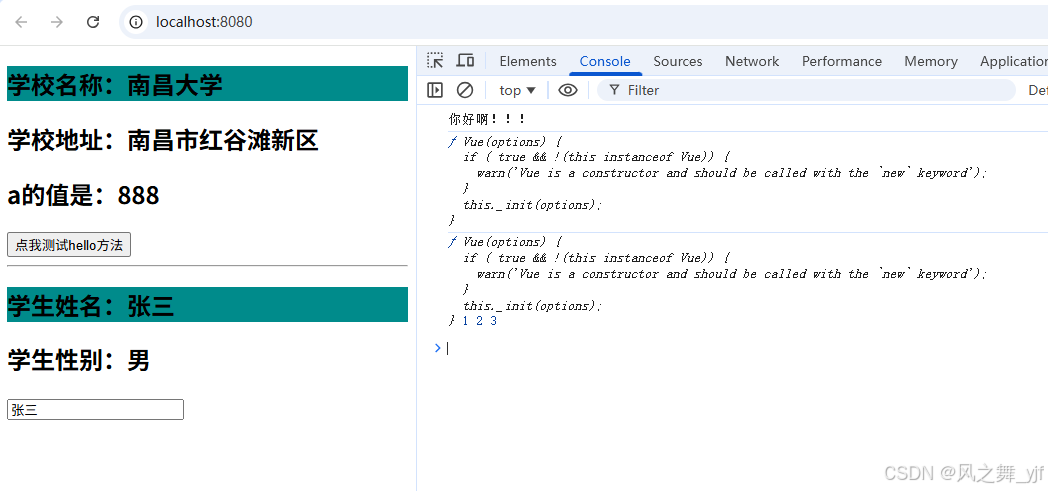
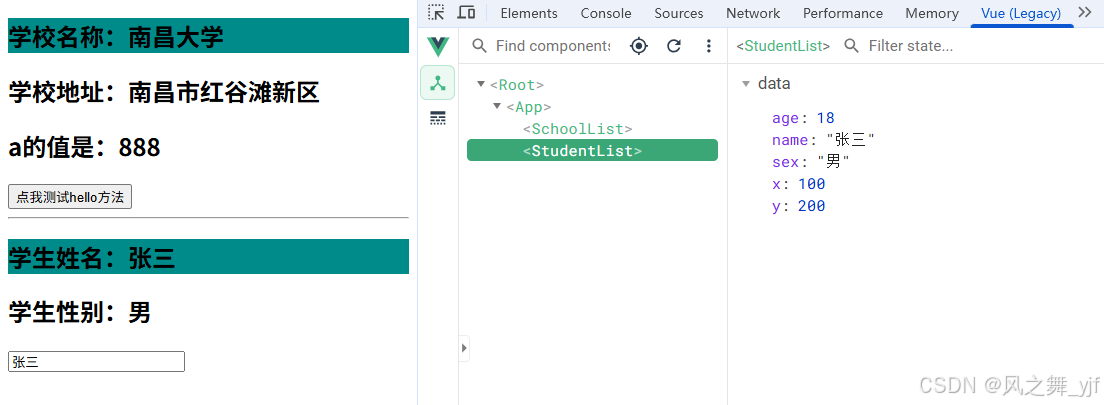
所有组件中,x、y值分别为:100、200。