存储空间分析应用
欢迎加入开源鸿蒙跨平台社区:
https://openharmonycrossplatform.csdn.net
适配的第三方库地址:
- path_provider: https://pub.dev/packages/path_provider
- cross_file: https://pub.dev/packages/cross_file
- animations: https://pub.dev/packages/animations
- shared_preferences: https://pub.dev/packages/shared_preferences
一、项目概述
运行效果图

1.1 应用简介
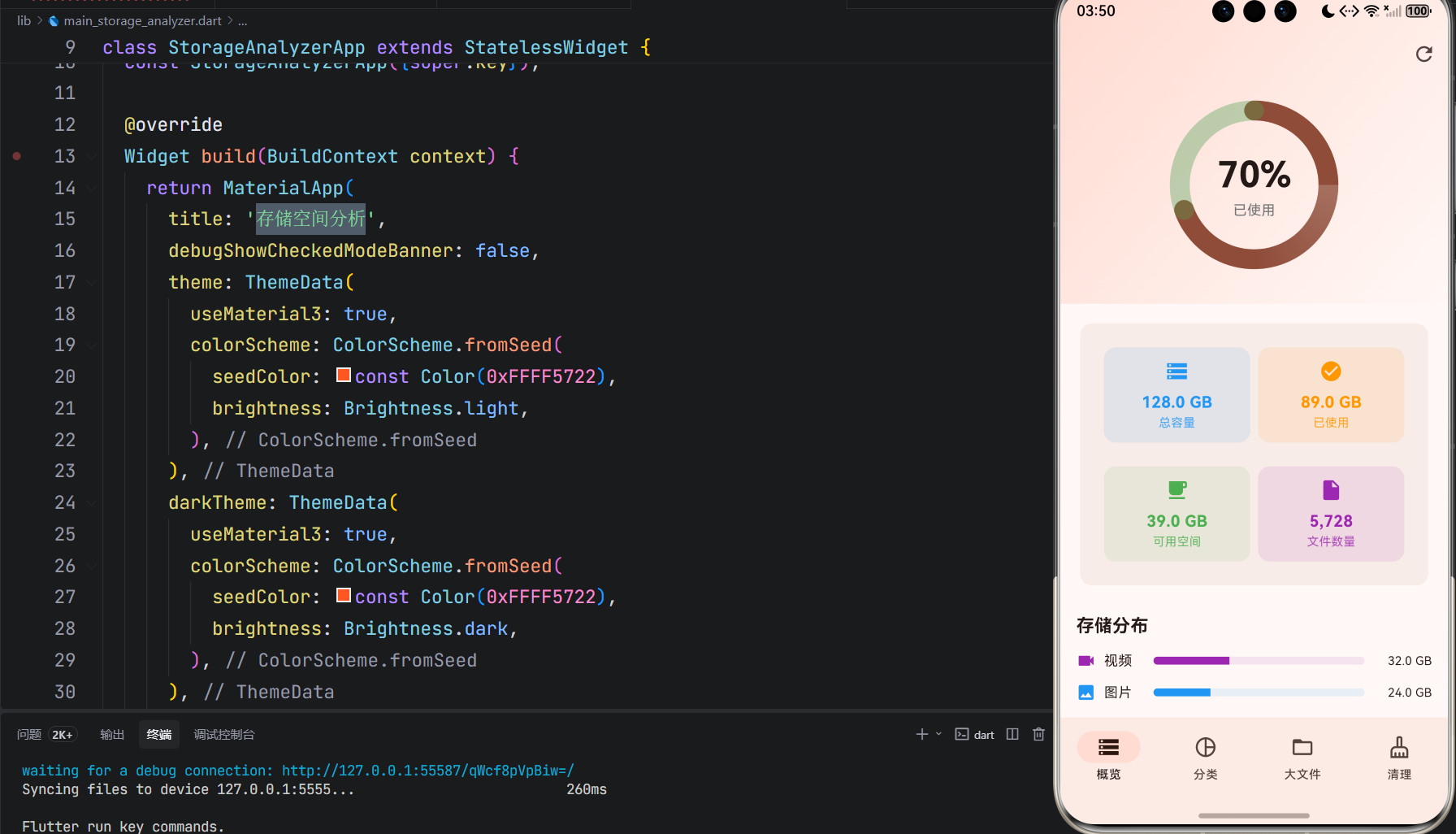
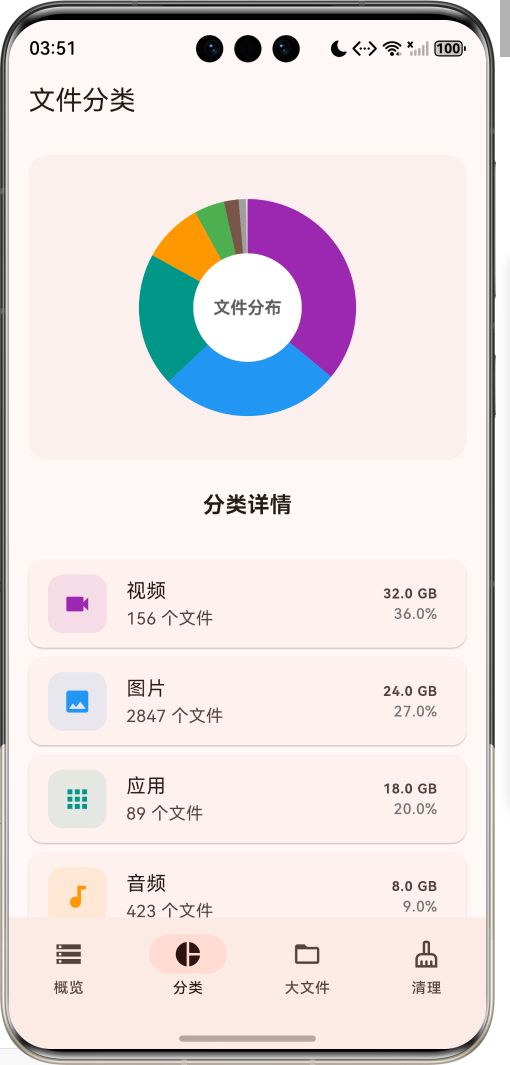
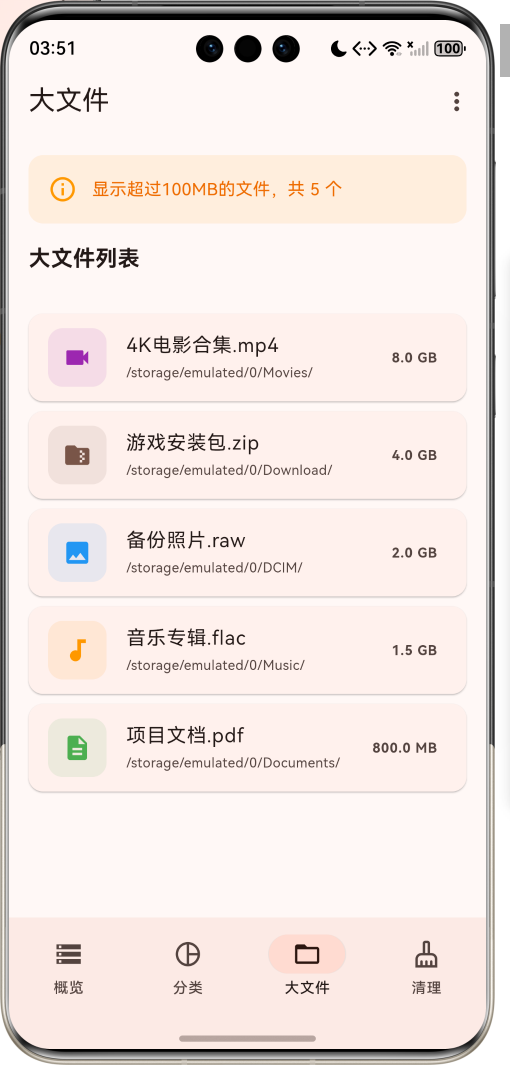
存储空间分析是一款专业的设备存储管理工具应用,支持分析存储空间使用、文件分类统计、大文件查找、空间优化建议等功能。应用以活力的橙色为主色调,象征高效与活力。涵盖概览、分类、大文件、清理四大模块,让用户轻松管理设备存储空间。
应用采用智能扫描技术,自动识别文件类型并进行分类统计,帮助用户了解存储空间使用情况。通过直观的图表展示、详细的大文件列表、智能的清理建议,让用户快速释放存储空间,保持设备流畅运行。
1.2 核心功能
| 功能模块 | 功能描述 | 实现方式 |
|---|---|---|
| 存储概览 | 显示总容量、已用、可用空间 | 系统API |
| 空间分布 | 可视化展示各类文件占比 | 饼图绘制 |
| 文件分类 | 按类型分类统计文件大小和数量 | 文件扫描 |
| 大文件查找 | 快速定位超过100MB的大文件 | 文件过滤 |
| 空间清理 | 提供缓存、重复文件等清理建议 | 智能分析 |
| 一键优化 | 自动清理可释放的空间 | 批量清理 |
| 扫描进度 | 实时显示扫描进度 | 进度动画 |
| 文件详情 | 查看文件详细信息并操作 | 详情弹窗 |
1.3 文件类型定义
| 序号 | 类型名称 | 图标 | 颜色 | 典型格式 |
|---|---|---|---|---|
| 1 | 图片 | 🖼️ | 蓝色 | jpg, png, gif, raw |
| 2 | 视频 | 📹 | 紫色 | mp4, mkv, avi, mov |
| 3 | 音频 | 🎵 | 橙色 | mp3, flac, wav, aac |
| 4 | 文档 | 📄 | 绿色 | pdf, doc, xls, ppt |
| 5 | 压缩包 | 📦 | 棕色 | zip, rar, 7z, tar |
| 6 | 应用 | 📱 | 青色 | apk, ipa, app |
| 7 | 其他 | 📁 | 灰色 | 其他格式文件 |
1.4 清理建议类型
| 序号 | 建议类型 | 描述 | 风险等级 |
|---|---|---|---|
| 1 | 缓存文件 | 应用缓存、系统缓存等临时文件 | 低 |
| 2 | 重复文件 | 重复的照片、视频、文档等 | 中 |
| 3 | 大文件 | 超过100MB的文件 | 高 |
| 4 | 空文件夹 | 无内容的空文件夹 | 低 |
1.5 技术栈
| 技术领域 | 技术选型 | 版本要求 |
|---|---|---|
| 开发框架 | Flutter | >= 3.0.0 |
| 编程语言 | Dart | >= 2.17.0 |
| 设计规范 | Material Design 3 | - |
| 存储路径 | path_provider | >= 2.1.0 |
| 文件操作 | cross_file | >= 1.0.0 |
| 动画效果 | animations | >= 2.0.0 |
| 数据存储 | shared_preferences | >= 2.2.0 |
| 目标平台 | 鸿蒙OS / Android / iOS | API 21+ |
1.6 项目结构
lib/
└── main_storage_analyzer.dart
    ├── StorageAnalyzerApp       # 应用入口
    ├── FileType                 # 文件类型枚举
    ├── StorageInfo              # 存储信息模型
    ├── FileCategory             # 文件分类模型
    ├── LargeFile                # 大文件模型
    ├── CleanSuggestion          # 清理建议模型
    ├── StorageAnalyzerHomePage  # 主页面(底部导航)
    ├── _buildOverviewPage       # 概览页
    ├── _buildCategoryPage       # 分类页
    ├── _buildLargeFilesPage     # 大文件页
    ├── _buildCleanPage          # 清理页
    ├── StorageRingPainter       # 存储环形图绘制器
    └── PieChartPainter          # 饼图绘制器
二、系统架构
2.1 整体架构图
Data Layer
Business Layer
Presentation Layer
主页面
StorageAnalyzerHomePage
概览页
分类页
大文件页
清理页
存储环形图
存储详情
快速统计
饼图展示
分类列表
大文件列表
文件详情
清理摘要
清理建议
扫描引擎
ScanEngine
文件分析器
FileAnalyzer
清理管理器
CleanManager
统计计算器
StatisticsCalculator
StorageInfo
存储信息
FileCategory
文件分类
LargeFile
大文件
CleanSuggestion
清理建议
2.2 类图设计
uses
manages
manages
manages
has
has
StorageAnalyzerApp
+Widget build()
<<enumeration>>
FileType
+String label
+IconData icon
+Color color
+image()
+video()
+audio()
+document()
+archive()
+app()
+other()
StorageInfo
+int totalSpace
+int usedSpace
+int freeSpace
+double usedPercent
+double freePercent
FileCategory
+FileType type
+int size
+int count
+double percentage
LargeFile
+String name
+String path
+int size
+FileType type
+DateTime modifiedTime
CleanSuggestion
+String title
+String description
+int size
+IconData icon
+Color color
StorageAnalyzerHomePage
+int currentIndex
+StorageInfo storageInfo
+List<FileCategory> fileCategories
+List<LargeFile> largeFiles
+List<CleanSuggestion> cleanSuggestions
+bool isScanning
+double scanProgress
+void startScan()
+String formatSize()
+void showCleanDialog()
+void showFileDetail()
2.3 页面导航流程
概览
分类
大文件
清理
打开
删除
应用启动
概览页
底部导航
分类页
大文件页
清理页
点击扫描
开始扫描
显示进度
扫描完成
查看饼图
点击分类
显示分类详情
查看大文件列表
点击文件
显示文件详情
操作选择
打开文件
删除文件
查看清理建议
点击建议
显示清理详情
确认清理
2.4 存储扫描流程
文件系统 扫描引擎 概览页 用户 文件系统 扫描引擎 概览页 用户 loop 扫描文件 点击扫描按钮 启动扫描 遍历目录 返回文件信息 分类统计 更新进度 显示进度 计算统计结果 返回扫描结果 显示完成状态
三、核心模块设计
3.1 数据模型设计
3.1.1 文件类型枚举 (FileType)
dart
enum FileType {
  image(label: '图片', icon: Icons.image, color: Colors.blue),
  video(label: '视频', icon: Icons.videocam, color: Colors.purple),
  audio(label: '音频', icon: Icons.audiotrack, color: Colors.orange),
  document(label: '文档', icon: Icons.description, color: Colors.green),
  archive(label: '压缩包', icon: Icons.folder_zip, color: Colors.brown),
  app(label: '应用', icon: Icons.apps, color: Colors.teal),
  other(label: '其他', icon: Icons.insert_drive_file, color: Colors.grey);

  final String label;
  final IconData icon;
  final Color color;
  const FileType({required this.label, required this.icon, required this.color});
}
3.1.2 存储信息模型 (StorageInfo)
dart
class StorageInfo {
  final int totalSpace;
  final int usedSpace;
  final int freeSpace;

  const StorageInfo({
    required this.totalSpace,
    required this.usedSpace,
    required this.freeSpace,
  });

  double get usedPercent => totalSpace > 0 ? usedSpace / totalSpace : 0;
  double get freePercent => totalSpace > 0 ? freeSpace / totalSpace : 0;
}
3.1.3 文件分类模型 (FileCategory)
dart
class FileCategory {
  final FileType type;
  final int size;
  final int count;
  final double percentage;

  const FileCategory({
    required this.type,
    required this.size,
    required this.count,
    required this.percentage,
  });
}
3.1.4 大文件模型 (LargeFile)
dart
class LargeFile {
  final String name;
  final String path;
  final int size;
  final FileType type;
  final DateTime modifiedTime;

  const LargeFile({
    required this.name,
    required this.path,
    required this.size,
    required this.type,
    required this.modifiedTime,
  });
}
3.1.5 文件类型分布
36% 27% 20% 9% 5% 2% 1% 文件类型存储分布示例 视频 图片 应用 音频 文档 压缩包 其他
3.2 页面结构设计
3.2.1 主页面布局
StorageAnalyzerHomePage
IndexedStack
概览页
分类页
大文件页
清理页
NavigationBar
概览 Tab
分类 Tab
大文件 Tab
清理 Tab
3.2.2 概览页结构
概览页
SliverAppBar
存储环形图
存储详情卡片
存储分布列表
使用百分比
动画效果
总容量
已使用
可用空间
文件数量
分类进度条
分类大小
3.2.3 分类页结构
分类页
饼图展示
分类详情列表
文件分布图
中心标签
分类卡片
类型图标
文件数量
占用大小
占比百分比
3.2.4 大文件页结构
大文件页
提示信息
大文件列表
文件数量统计
文件卡片
文件图标
文件名称
文件路径
文件大小
3.3 文件大小格式化逻辑
< 1KB
< 1MB
< 1GB
< 1TB
>= 1TB
输入字节数
大小判断
返回 B 单位
返回 KB 单位
返回 MB 单位
返回 GB 单位
返回 TB 单位
格式化输出
3.4 清理建议生成逻辑
开始分析
扫描缓存目录
计算缓存大小
生成缓存清理建议
扫描重复文件
对比文件哈希
生成重复文件建议
扫描大文件
过滤超过100MB
生成大文件建议
扫描空文件夹
生成空文件夹建议
汇总清理建议
返回建议列表
四、UI设计规范
4.1 配色方案
应用以活力的橙色为主色调,象征高效与活力:
| 颜色类型 | 色值 | 用途 |
|---|---|---|
| 主色 | #FF5722 (Deep Orange) | 导航、主题元素、按钮 |
| 主色容器 | #FBE9E7 | 卡片背景、进度环背景 |
| 辅助色 | #E64A19 | 强调元素 |
| 第三色 | #FF8A65 | 次要元素 |
| 背景色 | #FAFAFA | 页面背景 |
| 卡片背景 | #FFFFFF | 信息卡片 |
| 成功色 | #4CAF50 | 可用空间 |
| 警告色 | #FF9800 | 已用空间 |
| 错误色 | #F44336 | 存储不足 |
4.2 文件类型配色
| 文件类型 | 色值 | 视觉效果 |
|---|---|---|
| 图片 | #2196F3 | 蓝色 |
| 视频 | #9C27B0 | 紫色 |
| 音频 | #FF9800 | 橙色 |
| 文档 | #4CAF50 | 绿色 |
| 压缩包 | #795548 | 棕色 |
| 应用 | #009688 | 青色 |
| 其他 | #9E9E9E | 灰色 |
4.3 字体规范
| 元素 | 字号 | 字重 | 颜色 |
|---|---|---|---|
| 页面标题 | 20px | Bold | 主色 |
| 百分比数字 | 36px | Bold | #000000 |
| 存储大小 | 16px | Bold | 主色 |
| 分类标签 | 14px | Regular | #000000 |
| 文件数量 | 12px | Regular | #666666 |
| 提示文字 | 12px | Regular | #999999 |
4.4 组件规范
4.4.1 存储环形图
┌─────────────────────────────────────┐
│                                     │
│           ╭───────────╮            │
│          ╱             ╲           │
│         │               │          │
│         │     70%      │          │
│         │    已使用     │          │
│         │               │          │
│          ╲             ╱           │
│           ╰───────────╯            │
│                                     │
└─────────────────────────────────────┘
4.4.2 存储详情卡片
┌─────────────────────────────────────┐
│  ┌─────────────┐ ┌─────────────┐   │
│  │  💾 总容量   │ │  ✅ 已使用   │   │
│  │   128 GB    │ │    89 GB    │   │
│  └─────────────┘ └─────────────┘   │
│                                     │
│  ┌─────────────┐ ┌─────────────┐   │
│  │  🆓 可用空间 │ │  📄 文件数量 │   │
│  │    39 GB    │ │   5,728     │   │
│  └─────────────┘ └─────────────┘   │
└─────────────────────────────────────┘
4.4.3 分类进度条
┌─────────────────────────────────────┐
│  存储分布                            │
│                                     │
│  📹 视频   ████████████████████ 32GB│
│  🖼️ 图片   ██████████████     24GB │
│  📱 应用   ███████████        18GB │
│  🎵 音频   █████              8GB  │
└─────────────────────────────────────┘
4.4.4 大文件卡片
┌─────────────────────────────────────┐
│  ┌────┐                            │
│  │ 📹 │  4K电影合集.mp4             │
│  │    │  /storage/emulated/0/Movies│
│  └────┘                      8 GB  │
└─────────────────────────────────────┘
4.4.5 清理建议卡片
┌─────────────────────────────────────┐
│  可释放空间                          │
│                                     │
│       🧹                            │
│      15.5 GB                        │
│  建议定期清理以保持设备流畅           │
└─────────────────────────────────────┘

┌─────────────────────────────────────┐
│  ┌────┐  缓存文件               2GB │
│  │ 💾 │  应用缓存、系统缓存等       │
│  └────┘                          › │
└─────────────────────────────────────┘
五、核心功能实现
5.1 文件大小格式化实现
dart
String _formatSize(int bytes) {
  if (bytes < 1024) return '$bytes B';
  if (bytes < 1024 * 1024) return '${(bytes / 1024).toStringAsFixed(1)} KB';
  if (bytes < 1024 * 1024 * 1024) {
    return '${(bytes / (1024 * 1024)).toStringAsFixed(1)} MB';
  }
  if (bytes < 1024 * 1024 * 1024 * 1024) {
    return '${(bytes / (1024 * 1024 * 1024)).toStringAsFixed(1)} GB';
  }
  return '${(bytes / (1024 * 1024 * 1024 * 1024)).toStringAsFixed(1)} TB';
}
5.2 存储环形图绘制实现
dart
class StorageRingPainter extends CustomPainter {
  final double usedPercent;
  final Color color;

  @override
  void paint(Canvas canvas, Size size) {
    final center = Offset(size.width / 2, size.height / 2);
    final radius = min(size.width, size.height) / 2 - 15;

    // 背景圆
    final bgPaint = Paint()
      ..color = Colors.grey.withOpacity(0.2)
      ..style = PaintingStyle.stroke
      ..strokeWidth = 20
      ..strokeCap = StrokeCap.round;
    canvas.drawCircle(center, radius, bgPaint);

    // 已使用部分
    final usedPaint = Paint()
      ..shader = SweepGradient(
        colors: [color.withOpacity(0.5), color, color],
      ).createShader(Rect.fromCircle(center: center, radius: radius))
      ..style = PaintingStyle.stroke
      ..strokeWidth = 20
      ..strokeCap = StrokeCap.round;

    final sweepAngle = 2 * pi * usedPercent;
    canvas.drawArc(
      Rect.fromCircle(center: center, radius: radius),
      -pi / 2,
      sweepAngle,
      false,
      usedPaint,
    );
  }
}
5.3 饼图绘制实现
dart
class PieChartPainter extends CustomPainter {
  final List<FileCategory> categories;

  @override
  void paint(Canvas canvas, Size size) {
    final center = Offset(size.width / 2, size.height / 2);
    final radius = min(size.width, size.height) / 2 - 20;

    double startAngle = -pi / 2;

    for (final category in categories) {
      final sweepAngle = 2 * pi * category.percentage;

      final paint = Paint()
        ..color = category.type.color
        ..style = PaintingStyle.fill;

      canvas.drawArc(
        Rect.fromCircle(center: center, radius: radius),
        startAngle,
        sweepAngle,
        true,
        paint,
      );

      startAngle += sweepAngle;
    }

    // 中心空白圆
    final innerPaint = Paint()
      ..color = Colors.white
      ..style = PaintingStyle.fill;
    canvas.drawCircle(center, radius * 0.5, innerPaint);
  }
}
5.4 扫描进度实现
dart
void _startScan() {
  setState(() {
    _isScanning = true;
    _scanProgress = 0;
  });
  _scanAnimationController.repeat();

  Timer.periodic(const Duration(milliseconds: 100), (timer) {
    if (!mounted) {
      timer.cancel();
      return;
    }
    setState(() {
      _scanProgress += 0.02;
      if (_scanProgress >= 1) {
        _scanProgress = 1;
        _isScanning = false;
        _scanAnimationController.stop();
        timer.cancel();
        ScaffoldMessenger.of(context).showSnackBar(
          const SnackBar(content: Text('扫描完成')),
        );
      }
    });
  });
}
5.5 清理对话框实现
dart
void _showCleanDialog(CleanSuggestion suggestion) {
  showDialog(
    context: context,
    builder: (context) => AlertDialog(
      title: Row(
        children: [
          Icon(suggestion.icon, color: suggestion.color),
          const SizedBox(width: 12),
          Text(suggestion.title),
        ],
      ),
      content: Column(
        mainAxisSize: MainAxisSize.min,
        children: [
          Text(suggestion.description),
          Text('可释放空间: ${_formatSize(suggestion.size)}'),
        ],
      ),
      actions: [
        TextButton(
          onPressed: () => Navigator.pop(context),
          child: const Text('取消'),
        ),
        FilledButton(
          onPressed: () {
            Navigator.pop(context);
            // 执行清理
          },
          child: const Text('清理'),
        ),
      ],
    ),
  );
}
六、交互设计
6.1 扫描流程
进度显示 扫描引擎 概览页 用户 进度显示 扫描引擎 概览页 用户 loop 扫描过程 点击扫描按钮 启动扫描 开始扫描 显示进度动画 更新进度 更新进度条 显示当前进度 扫描完成 显示完成提示
6.2 文件查看流程
点击卡片
打开
删除
排序
进入大文件页
加载大文件列表
显示文件卡片
用户操作
显示文件详情
选择操作
打开文件
确认删除
执行删除
更新列表
选择排序方式
重新排序
6.3 清理流程
取消操作
查看清理建议
选择清理项
确认清理
执行清理
更新存储信息
取消
七、扩展功能规划
7.1 后续版本规划
2024-01-07 2024-01-14 2024-01-21 2024-01-28 2024-02-04 2024-02-11 2024-02-18 2024-02-25 2024-03-03 2024-03-10 2024-03-17 2024-03-24 2024-03-31 基础UI框架 存储概览功能 文件分类功能 大文件查找功能 清理功能优化 文件预览功能 云存储分析 定时自动清理 存储空间预警 多设备同步 V1.0 基础版本 V1.1 增强版本 V1.2 进阶版本 存储空间分析开发计划
7.2 功能扩展建议
7.2.1 高级分析功能
分析功能:
- 文件访问频率分析
- 冗余文件检测
- 应用数据占用分析
- 存储空间预测
7.2.2 智能清理功能
清理功能:
- 智能清理建议
- 定时自动清理
- 清理历史记录
- 清理效果统计
7.2.3 数据安全功能
安全功能:
- 重要文件保护
- 清理前备份
- 误删文件恢复
- 隐私文件加密
八、注意事项
8.1 开发注意事项
-
权限管理:确保正确申请存储读取权限
-
性能优化:大量文件扫描时需注意性能
-
数据安全:清理文件前需确认用户意图
-
兼容性:不同系统版本存储路径可能不同
-
用户体验:扫描过程需提供进度反馈
8.2 常见问题
| 问题 | 原因 | 解决方案 |
|---|---|---|
| 扫描速度慢 | 文件数量过多 | 分批扫描、后台处理 |
| 权限被拒绝 | 未申请权限 | 引导用户开启权限 |
| 存储信息不准 | 系统API差异 | 多API兼容处理 |
| 清理失败 | 文件被占用 | 提示关闭相关应用 |
| 误删文件 | 用户误操作 | 提供回收站功能 |
8.3 使用技巧
📱 存储空间分析使用技巧 📱
扫描技巧
- 定期扫描了解存储使用情况
- 扫描时保持应用在前台
- 首次扫描可能需要较长时间
清理技巧
- 优先清理缓存和临时文件
- 谨慎清理大文件和文档
- 清理前确认文件重要性
管理技巧
- 定期检查大文件列表
- 及时卸载不常用应用
- 使用云存储释放本地空间
九、运行说明
9.1 环境要求
| 环境 | 版本要求 |
|---|---|
| Flutter SDK | >= 3.0.0 |
| Dart SDK | >= 2.17.0 |
| 鸿蒙OS | API 21+ |
| Android | API 21+ |
| iOS | 12.0+ |
| 存储权限 | 必需 |
9.2 运行命令
bash
# 查看可用设备
flutter devices

# 运行到Web服务器
flutter run -d web-server -t lib/main_storage_analyzer.dart --web-port 8150

# 运行到鸿蒙设备
flutter run -d 127.0.0.1:5555 lib/main_storage_analyzer.dart

# 运行到Android设备
flutter run -d android lib/main_storage_analyzer.dart

# 代码分析
flutter analyze lib/main_storage_analyzer.dart
9.3 依赖配置
在 pubspec.yaml 中添加以下依赖(完整版需要):
yaml
dependencies:
  flutter:
    sdk: flutter
  path_provider: ^2.1.4
  cross_file: ^1.0.0
  animations: ^2.0.8
  shared_preferences: ^2.2.2
  permission_handler: ^11.3.1
  flutter_file_view: ^1.0.0
十、总结
存储空间分析应用通过智能扫描技术、直观的图表展示、便捷的清理功能,让用户轻松管理设备存储空间。应用支持7种文件类型分类、大文件查找、智能清理建议,帮助用户了解存储使用情况并快速释放空间。
核心功能涵盖存储概览、文件分类、大文件查找、空间清理四大模块。用户可以直观查看存储使用情况,了解各类文件占用比例,快速定位大文件,一键清理可释放的空间,保持设备流畅运行。
应用采用 Material Design 3 设计规范,以活力的橙色为主色调,象征高效与活力。通过本应用,希望能够帮助用户轻松管理存储空间,让设备始终保持最佳状态。
存储空间分析------智能管理,高效清理