直接上代码
python
#!/usr/bin/env python3
# -*- coding: utf-8 -*-
"""
PostgreSQL 数据字典生成器 (Python 3.11+)
生成完全离线的 HTML 文件,可直接双击在浏览器中打开。
"""

import psycopg2
import datetime
import os
import sys
from typing import List, Dict, Any

# 数据库配置(请根据实际情况修改)
DB_CONFIG = {
    "host": "127.0.0.1",
    "port": 5432,
    "database": "postgres",
    "user": "postgres",
    "password": "postgres"
}

def get_tables_and_comments(conn) -> List[Dict[str, str]]:
    """获取 public 模式下所有用户表及其注释"""
    with conn.cursor() as cur:
        cur.execute("""
            SELECT
                t.table_name,
                obj_description(c.oid, 'pg_class') AS table_comment
            FROM information_schema.tables t
            JOIN pg_class c ON c.relname = t.table_name
            WHERE t.table_schema = 'public'
              AND t.table_type = 'BASE TABLE'
            ORDER BY t.table_name;
        """)
        return [
            {"TABLE_NAME": row[0], "TABLE_COMMENT": row[1] or ""}
            for row in cur.fetchall()
        ]

def get_columns_info(conn, table_name: str, table_schema: str = 'public') -> List[Dict[str, Any]]:
    """获取指定表的所有列详细信息"""
    with conn.cursor() as cur:
        # 获取列注释(使用 pg_* 系统表查询)
        cur.execute("""
            SELECT a.attname, COALESCE(col_description(a.attrelid, a.attnum), '')
            FROM pg_catalog.pg_attribute a
            JOIN pg_catalog.pg_class c ON c.oid = a.attrelid
            JOIN pg_catalog.pg_namespace n ON n.oid = c.relnamespace
            WHERE n.nspname = %s AND c.relname = %s AND a.attnum > 0 AND NOT a.attisdropped
            ORDER BY a.attnum;
        """, (table_schema, table_name))
        comments = {row[0]: row[1] for row in cur.fetchall()}

        # 获取列基本信息
        cur.execute("""
            SELECT
                c.column_name,
                c.data_type,
                c.column_default,
                c.is_nullable,
                CASE
                    WHEN c.column_default LIKE 'nextval(%%' THEN TRUE
                    ELSE FALSE
                END AS is_auto_increment
            FROM information_schema.columns c
            WHERE c.table_schema = %s AND c.table_name = %s
            ORDER BY c.ordinal_position;
        """, (table_schema, table_name))

        columns = []
        for row in cur.fetchall():
            if row is None:
                continue
            col_name = row[0] if len(row) > 0 else ""
            columns.append({
                "COLUMN_NAME": col_name,
                "COLUMN_TYPE": row[1] if len(row) > 1 else "",
                "COLUMN_DEFAULT": row[2] if len(row) > 2 else "",
                "IS_NULLABLE": row[3] if len(row) > 3 else "NO",
                "IS_AUTO_INCREMENT": row[4] if len(row) > 4 else False,
                "COLUMN_COMMENT": comments.get(col_name, "")
            })
        return columns

def generate_offline_html(tables: List[Dict], db_name: str) -> str:
    """生成完整的离线 HTML 内容"""
    # 表清单 - 使用百分比宽度,自动适应页面
    table_list_html = '<table border="1" cellspacing="0" cellpadding="5" style="width:100%;table-layout:fixed;">\n'
    table_list_html += '<colgroup><col style="width:8%"><col style="width:25%"><col style="width:67%"></colgroup>\n'
    table_list_html += '<thead><tr><th>序号</th><th>表名</th><th>功能说明</th></tr></thead>\n<tbody>\n'
    for idx, tbl in enumerate(tables, 1):
        table_list_html += f'  <tr><td>{idx}</td><td>{tbl["TABLE_NAME"]}</td><td>{tbl["TABLE_COMMENT"]}</td></tr>\n'
    table_list_html += '</tbody>\n</table>\n'

    # 字段详情
    detail_html = ""
    for tbl in tables:
        detail_html += '<table border="1" cellspacing="0" cellpadding="5" style="width:100%;table-layout:fixed;">\n'
        detail_html += '<colgroup><col style="width:15%"><col style="width:12%"><col style="width:15%"><col style="width:8%"><col style="width:8%"><col style="width:42%"></colgroup>\n'
        comment_part = f' - {tbl["TABLE_COMMENT"]}' if tbl["TABLE_COMMENT"] else ""
        detail_html += f'  <caption><b>表名:{tbl["TABLE_NAME"]}{comment_part}</b></caption>\n'
        detail_html += '  <thead>\n    <tr><th>字段名</th><th>数据类型</th><th>默认值</th><th>允许非空</th><th>自动递增</th><th>备注</th></tr>\n  </thead>\n  <tbody>\n'
        for col in tbl.get("COLUMNS", []):
            nullable_display = "是" if col["IS_NULLABLE"] == "YES" else "否"
            auto_inc_display = "是" if col["IS_AUTO_INCREMENT"] else "-"
            detail_html += (
                f'    <tr>'
                f'<td>{col["COLUMN_NAME"]}</td>'
                f'<td>{col["COLUMN_TYPE"]}</td>'
                f'<td>{col["COLUMN_DEFAULT"]}</td>'
                f'<td>{nullable_display}</td>'
                f'<td>{auto_inc_display}</td>'
                f'<td>{col["COLUMN_COMMENT"]}</td>'
                f'</tr>\n'
            )
        detail_html += '  </tbody>\n</table>\n<br/>\n'

    # 完整 HTML
    now = datetime.datetime.now().strftime('%Y-%m-%d %H:%M:%S')
    return f'''<!DOCTYPE html>
<html lang="zh-CN">
<head>
    <meta charset="utf-8">
    <title>{db_name} 数据字典</title>
    <style>
        body {{ font-family: "宋体", "SimSun", serif; font-size: 12pt; margin: 20px; background: white; color: black; }}
        h1 {{ text-align: center; color: black; margin-bottom: 15px; font-size: 16pt; }}
        .summary {{ text-align: center; color: #666666; margin-bottom: 20px; font-size: 11pt; }}
        table {{ border-collapse: collapse; margin-bottom: 20px; page-break-inside: avoid; word-wrap: break-word; }}
        caption {{ text-align: left; font-weight: bold; font-size: 12pt; color: black; padding: 6px 0; }}
        th, td {{ border: 1px solid #000000; padding: 5px 6px; text-align: left; vertical-align: top; font-size: 11pt; word-wrap: break-word; }}
        thead th {{ background-color: #E0E0E0; font-weight: bold; }}
        .footer {{ text-align: left; margin-top: 20px; color: #666666; font-size: 11pt; }}
    </style>
</head>
<body>
    <h1>{db_name} 数据字典</h1>
    <p class="summary">生成时间:{now}</p>
    {table_list_html}
    <br/>
    {detail_html}
    <p class="footer">总共:{len(tables)} 个数据表</p>
</body>
</html>'''

def main():
    try:
        print("🔍 正在连接 PostgreSQL 数据库...")
        with psycopg2.connect(**DB_CONFIG) as conn:
            tables = get_tables_and_comments(conn)
            print(f"✅ 成功获取 {len(tables)} 张表")

            total_cols = 0
            for tbl in tables:
                cols = get_columns_info(conn, tbl["TABLE_NAME"])
                tbl["COLUMNS"] = cols
                total_cols += len(cols)

            html_content = generate_offline_html(tables, DB_CONFIG["database"])

            # 生成带时间戳的文件名
            timestamp = datetime.datetime.now().strftime("%Y%m%d_%H%M%S")
            output_file = f'{DB_CONFIG["database"]}_数据字典_{timestamp}.html'

            with open(output_file, "w", encoding="utf-8") as f:
                f.write(html_content)

            abs_path = os.path.abspath(output_file)
            print(f"🎉 数据字典已生成!")
            print(f"📁 文件路径: {abs_path}")
            print(f"📊 共 {len(tables)} 张表,{total_cols} 个字段")
            print("\n💡 提示:双击该 HTML 文件即可在浏览器中查看!")

    except psycopg2.Error as e:
        print(f"❌ 数据库错误: {e}")
        sys.exit(1)
    except Exception as e:
        print(f"💥 程序异常: {e}")
        import traceback
        traceback.print_exc()
        sys.exit(1)

if __name__ == "__main__":
    main()
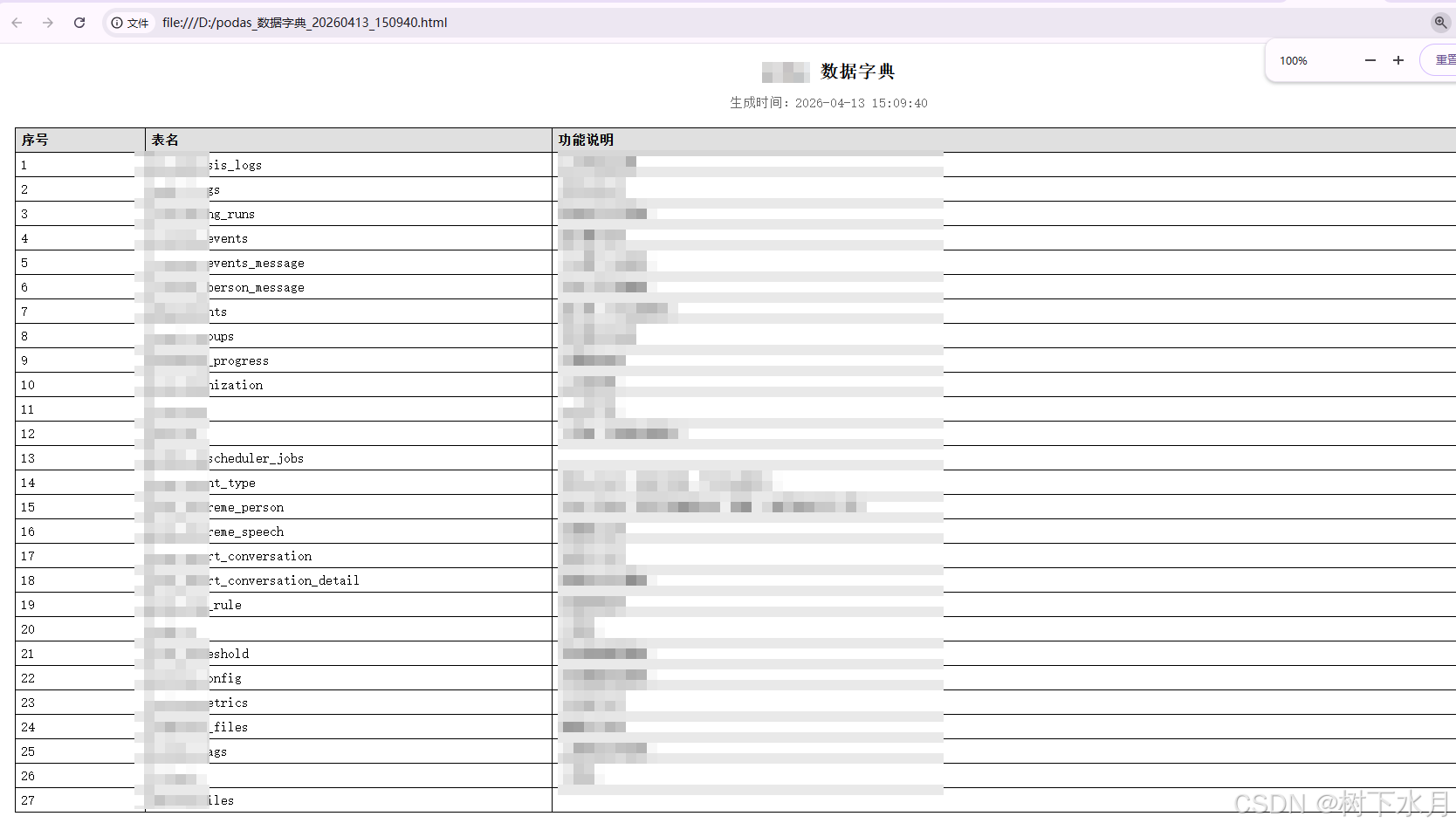
效果如下图所示: