书接上篇增加用户活跃统计后,在后台控制台增加用户活跃统计展示。
目录
创建服务层
在application/common下创建services文件夹,
然后创建UserActiveService.php文件,内容如下:
php
<?php
namespace app\common\services;

use app\common\model\UserActive;
use app\common\model\User;

/**
 * 用户活跃服务层
 */
class UserActiveService
{
    /**
     * 获取日活用户数(可选指定日期)
     * @param string $date 格式:Y-m-d
     * @return int
     */
    public static function getDayActive($date = '')
    {
        $date = $date ?: date('Y-m-d');
        $start = strtotime($date);
        $end = $start + 86400 - 1;

        return UserActive::where('active_time', 'between', [$start, $end])
            ->group('user_id')->count('user_id');
    }

    /**
     * 获取周活用户数(近7天)
     */
    public static function getWeekActive()
    {
        $start = strtotime('-6 days');
        $end = time();
        return UserActive::where('active_time', 'between', [$start, $end])
            ->group('user_id')->count('user_id');
    }

    /**
     * 获取月活用户数(近30天)
     */
    public static function getMonthActive()
    {
        $start = strtotime('-29 days');
        $end = time();
        return UserActive::where('active_time', 'between', [$start, $end])
            ->group('user_id')->count('user_id');
    }

    /**
     * 获取近N天活跃趋势
     * @param int $days 天数
     * @return array
     */
    public static function getActiveTrend($days = 30)
    {
        $trend = [];
        $startDate = strtotime("-" . ($days - 1) . " days");
        $endDate = time();

        // 单次 SQL 查询获取所有日期的活跃用户数据
        $activeData = UserActive::where('active_time', 'between', [$startDate, $endDate])
            ->field('active_time, user_id')
            ->select();

        // 按日期分组统计活跃用户数
        $dateStats = [];
        foreach ($activeData as $record) {
            $date = date('Y-m-d', $record['active_time']);
            $userId = $record['user_id'];

            if (!isset($dateStats[$date])) {
                $dateStats[$date] = [];
            }

            // 使用 userId 作为键,自动去重
            $dateStats[$date][$userId] = true;
        }

        // 生成完整的日期数组(包含没有活跃数据的日期)
        for ($i = $days - 1; $i >= 0; $i--) {
            $date = date('Y-m-d', strtotime("-$i days"));
            $count = isset($dateStats[$date]) ? count($dateStats[$date]) : 0;
            $trend[] = [
                'date'  => $date,
                'count' => $count
            ];
        }

        return $trend;
    }

    /**
     * 获取单个用户的活跃详情
     */
    public static function getUserActiveInfo($uid)
    {
        $user = User::get($uid);
        if (!$user) return [];

        // 近7天活跃次数
        $weekStart = strtotime('-6 days');
        $weekCount = UserActive::where('user_id', $uid)
            ->where('active_time', '>=', $weekStart)
            ->count();

        // 最后活跃时间
        $lastActive = UserActive::where('user_id', $uid)
            ->order('active_time', 'desc')
            ->value('active_time');

        return [
            'login_count'       => $user['login_count'],
            'active_days'       => $user['active_days'],
            'last_login_time'   => date('Y-m-d H:i:s', $user['last_login_time']),
            'last_active_time'  => $lastActive ? date('Y-m-d H:i:s', $lastActive) : '-',
            'week_active_count' => $weekCount,
        ];
    }
}
控制台增加统计数据
在admin/controller/Dashboard.php的index方法内的最下面,
增加用户活跃数据向视图传参。代码如下:
php
// 7天用户活跃折线图数据
        $this->assignconfig('activeData', array_column(UserActiveService::getActiveTrend(7), 'count'));
        return $this->view->fetch();
修改js文件
在public/assets/js/backend/dashboard.js文件中增加用户活跃数据渲染折线图。
修改legend
在原来基础上增加标题。
代码如下:
javascript
legend: {
   data: [__('Register user'), __('Active user')]
},
修改series
增加用户活跃数据渲染,代码如下:
javascript
series: [{
           name: __('Register user'),
           type: 'line',
           smooth: true,
           areaStyle: {
                normal: {}
           },
           lineStyle: {
                normal: {
                    width: 1.5
                }
          },
          data: Config.userdata
         },
         {
          name: __('Active user'),
          type: 'line',
          smooth: true,
          areaStyle: {
                normal: {}
          },
          lineStyle: {
               normal: {
                  width: 1.5
               }
          },
          data: Config.activeData
        }]
设置语言
在lang/dashboard.php文件中,在注册用户数下增加一条记录,
代码如下:
php
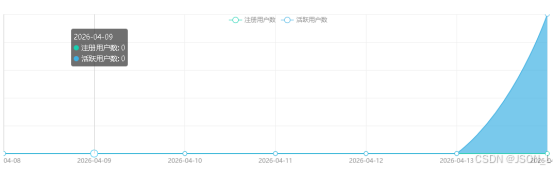
'Active user' => '活跃用户数',最终效果:
总结
这样就实现了用户活跃统计数据增加到原来的注册用户折线图中。