总结
-
终端里运行的AI Agent,用你配置的LLM作为大脑,通过工具跑命令、读写文件、操作浏览器、委派子 Agent,类似claw、claudecode等agent工具。
-
hermes支持hindsight(内置pg)保存记忆,查询hindsight的pg可以看到记忆:
SELECT text, fact_type, to_char(created_at,'MM-DD HH24:MI:SS') AS t FROM memory_units ORDER BY created_at DESC;

-
hindsight:https://hindsight.vectorize.io/
- 为AI Agent提供的长期记忆,用PG+向量检索+知识图谱存储和召回对话中抽取的事实,让Agent跨会话记住用户偏好、背景和过往交流。
- 支持三种模式使用,本地启动内嵌模式(本文)、直接用vectorize提供的api key、本地部署集群提供服务。
- 定位是一个ai的长期记忆系统,和其他竞品的差异是可以提供类似人的记忆能力。支持四类记忆类型:
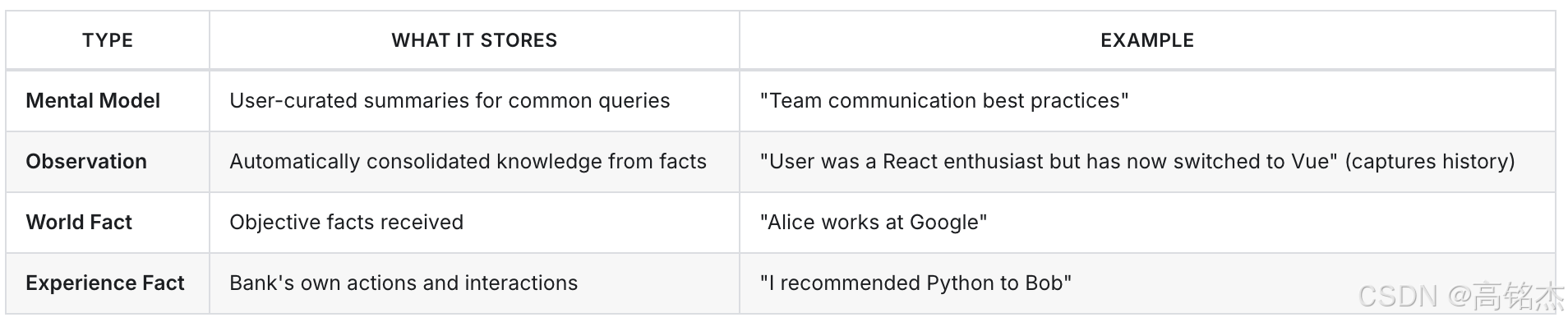
安装hermes
环境:mac m1
安装hindsight
uv pip install --python ~/.hermes/hermes-agent/venv/bin/python "hindsight-client>=0.4.22"


vim ~/.hermes/config.yaml
memory:
  memory_enabled: true
  user_profile_enabled: true
  memory_char_limit: 2200
  user_char_limit: 1375
  provider: hindsight
  nudge_interval: 10
  flush_min_turns: 6
本地验证用小模型即可,速度比较快: qwen2.5:3b(约 2GB)
$ ollama list
NAME                   ID              SIZE
qwen2.5:3b             357c53fb659c    1.9 GB     << 用这个
qwen3.5-fast:latest    c7c7753abea4    6.6 GB
qwen3.5:latest         6488c96fa5fa    6.6 GB

$ ollama show qwen2.5:3b
  Model
    architecture        qwen2
    parameters          3.1B
    context length      32768
    embedding length    2048
    quantization        Q4_K_M

  Capabilities
    completion
    tools

  System
    You are Qwen, created by Alibaba Cloud. You are a helpful assistant.

  License
    Qwen RESEARCH LICENSE AGREEMENT
    Qwen RESEARCH LICENSE AGREEMENT Release Date: September 19, 2024
...配置文件~/.hermes/config.yaml在附录。
配置记忆
hermes memory setup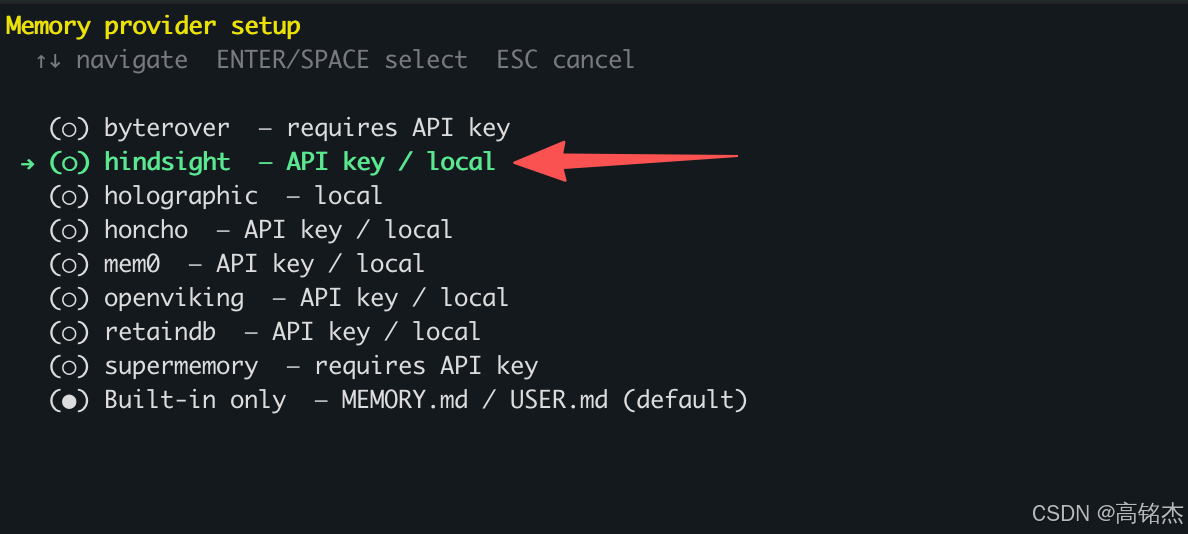
本地部署(后面分析下本地启动了什么)
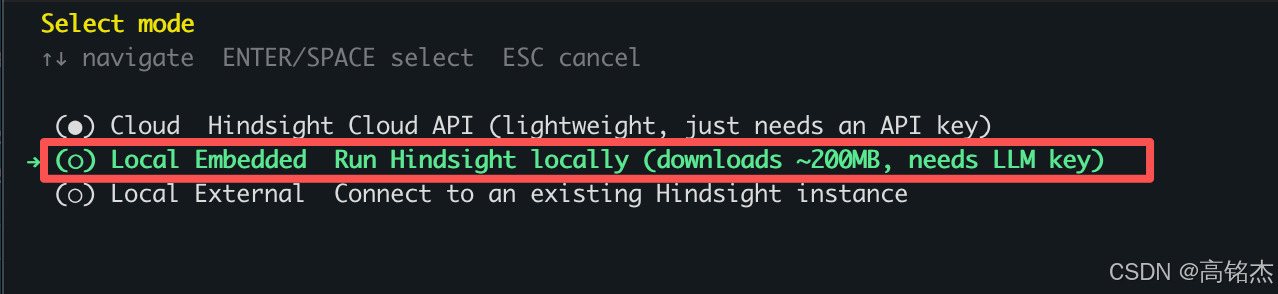
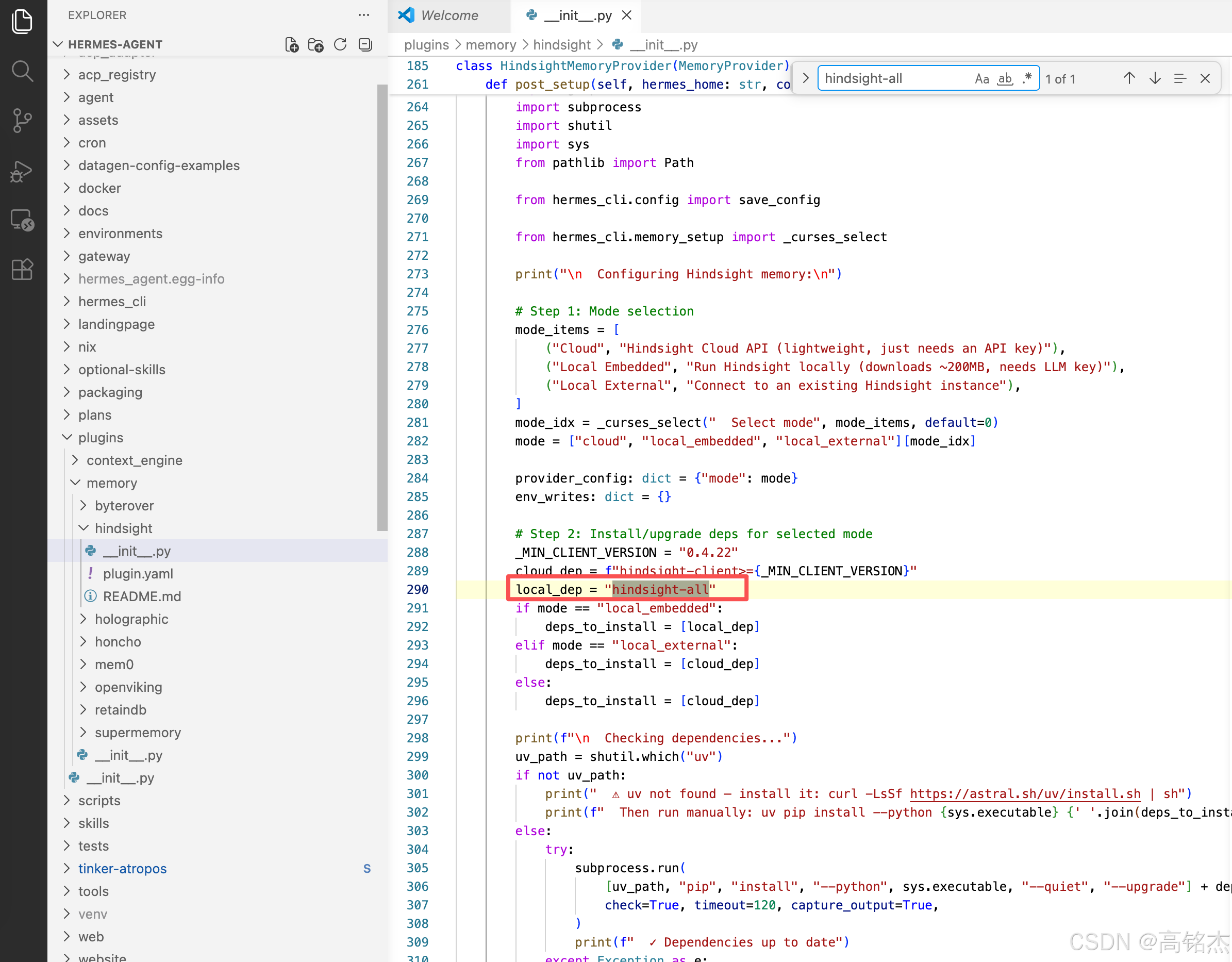
配置本地记忆会下载hindsight-all大概200MB。
/Users/wzw/root/proj/hermes-agent/plugins/memory/hindsight/__init__.py
hindsight-all安装位置
  ~/.hermes/hermes-agent/venv/lib/python3.11/site-packages/
  ├── hindsight/          124K  (核心引擎)
  ├── hindsight_api/      4.8M  (API 层)
  ├── hindsight_client/   144K  (客户端)
  ├── hindsight_client_api/ 2.8M (客户端API)
  ├── hindsight_embed/    208K  (嵌入/本地运行)
hindsight日志:tail -f ~/.hermes/logs/hindsight-embed.log
记忆测试
启动后,hermes chat可以让他记住一些信息
Please call hindsight_retain to save this exact fact:
"The user's name is mingjiegao. The user is a PostgreSQL kernel engineer."
Hermes内置两套记忆系统,模型会决定使用哪个保存。
~/.hermes/memories/USER.md每轮回话自动注入。- hindsight pg数据库。
查看hindsight自带的pg:
PGPASSWORD=hindsight ~/.pg0/installation/18.1.0/bin/psql -h 127.0.0.1 -U hindsight -d hindsight
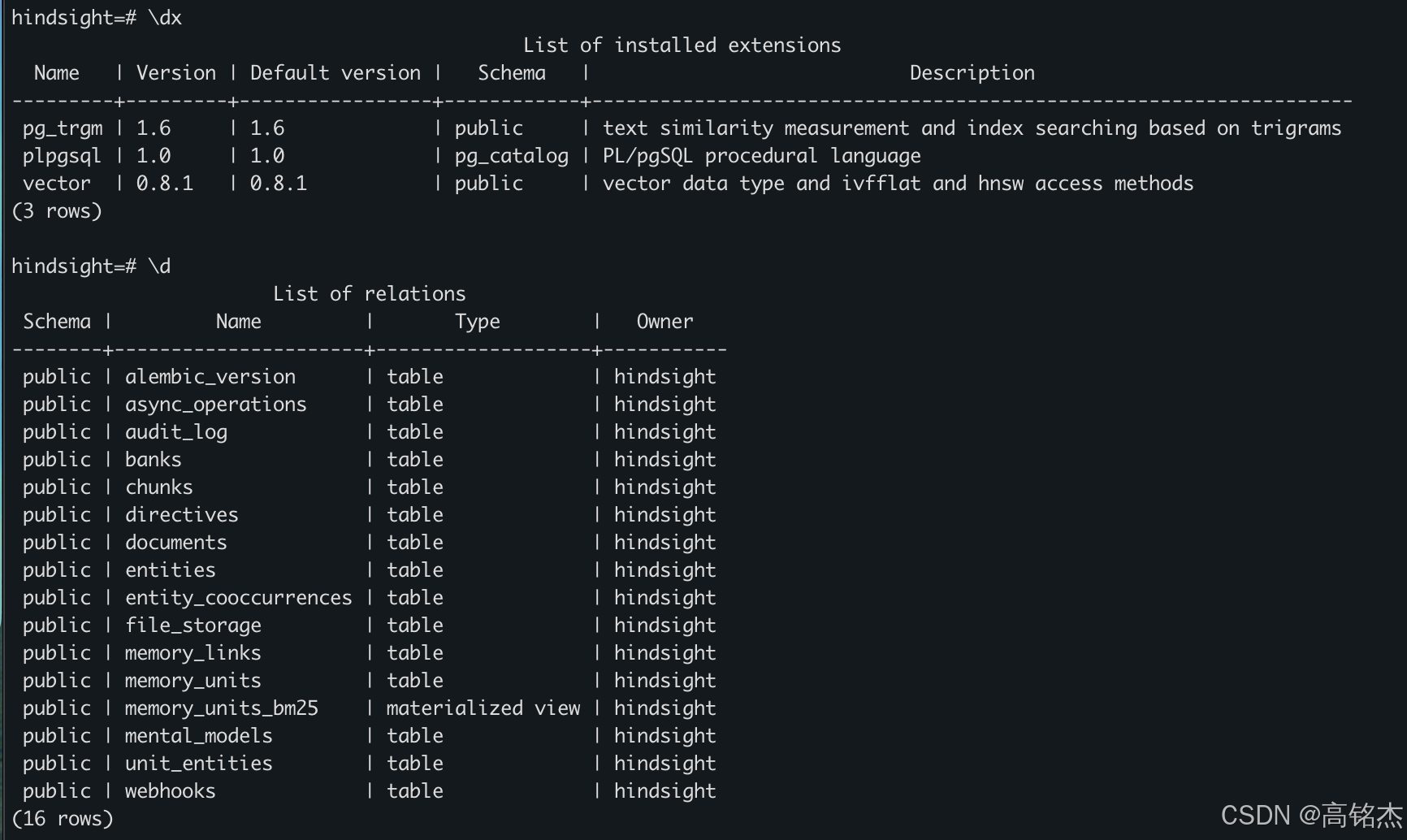
pg进程

记忆:
SELECT text, fact_type, to_char(created_at,'MM-DD HH24:MI:SS') AS t FROM memory_units ORDER BY created_at DESC;
hermes记忆原理分析
hermes支持使用hindsight做为记忆组件
hindsight支持本地安装的方式, hindsight-all包包括了一个pg和一个restful服务组件。
hindsight的大致架构
┌─────────────────────────────────────────────────────────┐
│                   Client Layer                          │
│  Python SDK │ TypeScript SDK │ Rust SDK │ Go SDK │ CLI  │
├─────────────────────────────────────────────────────────┤
│                   API Layer                             │
│         FastAPI (HTTP REST) │ MCP (SSE/Streamable)      │
├─────────────────────────────────────────────────────────┤
│                   Engine Layer                          │
│  Retain Pipeline │ Recall Pipeline │ Reflect Agent      │
│  Consolidation   │ Entity Resolver │ Query Analyzer     │
├─────────────────────────────────────────────────────────┤
│                 Infrastructure Layer                    │
│  PostgreSQL + pgvector│ LLM Providers │ Embedding Models│
│  Cross-Encoder │ Object Storage (S3/GCS/Azure)          │
└─────────────────────────────────────────────────────────┘
处理逻辑
                        ┌──────────────────────────────────────┐
                        │           Retain (写入)               │
                        │                                      │
   Content ──────────►  │  1. Text Chunking (~3000 chars)      │
                        │  2. LLM Fact Extraction (并行)        │
                        │  3. Entity Resolution (spaCy + pg)   │
                        │  4. Embedding Generation (批量)       │
                        │  5. Link Creation (时序+语义+实体)    │
                        │  6. DB Transaction (原子写入)         │
                        │  7. Trigger Consolidation (异步)      │
                        └──────────────┬───────────────────────┘
                                       │
                                       ▼
                        ┌──────────────────────────────────────┐
                        │        PostgreSQL + pgvector          │
                        │                                      │
                        │  memory_units (事实 + 向量)           │
                        │  entities (实体图谱)                  │
                        │  memory_links (关系图)                │
                        │  documents / chunks (原文)            │
                        │  banks (隔离的记忆库)                 │
                        └──────────────┬───────────────────────┘
                                       │
                        ┌──────────────┴───────────────────────┐
                        │           Recall (读取)               │
                        │                                      │
   Query ──────────►    │  1. Query Analysis (时间约束提取)     │
                        │  2. 4路并行检索:                      │
                        │     ├─ Semantic (HNSW向量搜索)        │
                        │     ├─ BM25 (全文检索)                │
                        │     ├─ Graph (链接扩展)               │
                        │     └─ Temporal (时间感知)             │
                        │  3. RRF Fusion (倒数排名融合)         │
                        │  4. Cross-Encoder Reranking           │
                        │  5. Combined Scoring (时效+证据)      │
                        │  6. MMR Diversity (去重)              │
                        │  7. Token Budget Filtering            │
                        └──────────────┬───────────────────────┘
                                       │
                        ┌──────────────┴───────────────────────┐
                        │          Reflect (推理)               │
                        │                                      │
   Question ─────────►  │  Agentic Loop (max N iterations):    │
                        │  1. search_mental_models (最高质量)   │
                        │  2. search_observations (整合知识)    │
                        │  3. recall (原始事实)                 │
                        │  4. expand (获取上下文)               │
                        │  5. done (最终回答)                   │
                        └──────────────────────────────────────┘
pg中的表结构含义
┌─────────────────────────────────────────────────────────────────┐
│                        banks (Memory Bank)                       │
│  bank_id PK │ name │ personality JSONB │ background │            │
│  internal_id UUID UNIQUE │ bank_config JSONB                     │
└─────────────┬───────────────────────────────────────────────────┘
              │ 1:N
              ▼
┌─────────────────────────────────────────────────────────────────┐
│                      documents (原始文档)                        │
│  (id, bank_id) PK │ original_text │ content_hash │ metadata JSONB│
│  retain_params JSONB │ created_at │ updated_at                   │
└─────────────┬───────────────────────────────────────────────────┘
              │ 1:N                              1:N
              ▼                                   ▼
┌──────────────────────────────┐  ┌──────────────────────────────┐
│     chunks (文档分块)         │  │    memory_units (核心事实)    │
│ chunk_id PK │ document_id FK │  │ id UUID PK                   │
│ bank_id │ chunk_index        │  │ bank_id │ document_id FK     │
│ chunk_text │ content_hash    │  │ text │ embedding vector(384) │
│ created_at                   │  │ context │ event_date          │
└──────────────────────────────┘  │ occurred_start/end            │
                                  │ mentioned_at │ fact_type      │
                                  │ confidence_score │ access_count│
                                  │ metadata JSONB │ tags varchar[]│
                                  │ search_vector tsvector        │
                                  │ proof_count │ source_memory_ids│
                                  │ history JSONB                 │
                                  │ chunk_id │ observation_tags   │
                                  │ consolidated_at               │
                                  └───────────┬───────────────────┘
                                              │
                         ┌────────────────────┼────────────────────┐
                         │                    │                    │
                         ▼                    ▼                    ▼
              ┌─────────────────┐  ┌─────────────────┐  ┌─────────────────┐
              │  unit_entities  │  │  memory_links   │  │    entities      │
              │ (unit_id,       │  │ from_unit_id    │  │ id UUID PK      │
              │  entity_id) PK  │  │ to_unit_id      │  │ canonical_name  │
              └────────┬────────┘  │ link_type       │  │ bank_id         │
                       │           │ entity_id       │  │ mention_count   │
                       │           │ weight [0,1]    │  │ first/last_seen │
                       └──────►    └─────────────────┘  └────────┬────────┘
                                                                  │
                                                                  ▼
                                                        ┌─────────────────┐
                                                        │entity_cooccurrences│
                                                        │entity_id_1 < _2 │
                                                        │cooccurrence_count│
                                                        └─────────────────┘
生产部署方式
基于 helm/hindsight/Chart.yaml (v0.5.1) 和 helm/hindsight/templates/ 下全部模板来看(不是凭空推断):

  组件清单

  ┌─────┬─────────────┬───────────────┬─────────────────────────────────────┬────────────────────────────────────────────────────────────────────────────────┬────────────────────────────────────────────┐
  │  #  │    组件     │   K8s 类型    │              默认状态               │                                      职责                                      │                  来源模板                  │
  ├─────┼─────────────┼───────────────┼─────────────────────────────────────┼────────────────────────────────────────────────────────────────────────────────┼────────────────────────────────────────────┤
  │ 1   │ API Server  │ Deployment    │ enabled=true                        │ HTTP REST + MCP 接口;默认也内置 worker                                        │ api-deployment.yaml / api-service.yaml     │
  ├─────┼─────────────┼───────────────┼─────────────────────────────────────┼────────────────────────────────────────────────────────────────────────────────┼────────────────────────────────────────────┤
  │ 2   │ Control     │ Deployment    │ enabled=true                        │ Next.js Web UI(端口 3000)                                                    │ controlplane-deployment.yaml /             │
  │     │ Plane       │               │                                     │                                                                                │ controlplane-service.yaml                  │
  ├─────┼─────────────┼───────────────┼─────────────────────────────────────┼────────────────────────────────────────────────────────────────────────────────┼────────────────────────────────────────────┤
  │ 3   │ Worker      │ StatefulSet   │ enabled=false(生产建议开)         │ 后台任务处理(FOR UPDATE SKIP LOCKED 轮询);开启后 API 内的 worker 会被关闭   │ worker-statefulset.yaml /                  │
  │     │             │               │                                     │                                                                                │ worker-service.yaml                        │
  ├─────┼─────────────┼───────────────┼─────────────────────────────────────┼────────────────────────────────────────────────────────────────────────────────┼────────────────────────────────────────────┤
  │ 4   │ PostgreSQL  │ StatefulSet + │ enabled=true(默认用                │ 主存储;生产通常关掉这个,指向托管 PG                                          │ postgresql-statefulset.yaml /              │
  │     │             │  PVC          │ ankane/pgvector:latest)            │                                                                                │ postgresql-service.yaml                    │
  ├─────┼─────────────┼───────────────┼─────────────────────────────────────┼────────────────────────────────────────────────────────────────────────────────┼────────────────────────────────────────────┤
  │ 5   │ TEI         │ Deployment    │ enabled=false                       │ HuggingFace Text Embeddings Inference 跑                                       │ tei-reranker-deployment.yaml /             │
  │     │ Reranker    │               │                                     │ cross-encoder(cross-encoder/ms-marco-MiniLM-L-6-v2,端口 8090)               │ tei-reranker-service.yaml                  │
  ├─────┼─────────────┼───────────────┼─────────────────────────────────────┼────────────────────────────────────────────────────────────────────────────────┼────────────────────────────────────────────┤
  │ 6   │ TEI         │ Deployment    │ enabled=false                       │ TEI 跑 embedding 模型(sentence-transformers/all-MiniLM-L6-v2,端口 8091)     │ tei-embedding-deployment.yaml /            │
  │     │ Embedding   │               │                                     │                                                                                │ tei-embedding-service.yaml                 │
  └─────┴─────────────┴───────────────┴─────────────────────────────────────┴────────────────────────────────────────────────────────────────────────────────┴────────────────────────────────────────────┘

  周边资源(K8s 原生对象)

  ┌────────────────┬───────────────────────────────────────────────────────────────────────────────────────────────────────────────┬────────────────────────────────────────┐
  │      资源      │                                                     作用                                                      │                  模板                  │
  ├────────────────┼───────────────────────────────────────────────────────────────────────────────────────────────────────────────┼────────────────────────────────────────┤
  │ Ingress        │ 把 / 路由到 Control Plane、/api 路由到 API                                                                    │ ingress.yaml(默认 nginx className)   │
  ├────────────────┼───────────────────────────────────────────────────────────────────────────────────────────────────────────────┼────────────────────────────────────────┤
  │ Secret         │ 存 postgres-password、HINDSIGHT_API_LLM_API_KEY 等;支持 existingSecret 引用外部 Secret                       │ secret.yaml                            │
  ├────────────────┼───────────────────────────────────────────────────────────────────────────────────────────────────────────────┼────────────────────────────────────────┤
  │ ServiceAccount │ 默认创建;所有 Pod 都绑定                                                                                     │ serviceaccount.yaml                    │
  ├────────────────┼───────────────────────────────────────────────────────────────────────────────────────────────────────────────┼────────────────────────────────────────┤
  │ HPA            │ 基于 CPU/内存自动扩容 API,autoscaling.enabled 开关                                                           │ hpa.yaml                               │
  ├────────────────┼───────────────────────────────────────────────────────────────────────────────────────────────────────────────┼────────────────────────────────────────┤
  │ PDB            │ PodDisruptionBudget,按组件单独启用                                                                           │ pdb.yaml                               │
  ├────────────────┼───────────────────────────────────────────────────────────────────────────────────────────────────────────────┼────────────────────────────────────────┤
  │ PVC            │ API 的 model cache PVC(避免 reranker/embedding 模型每次重拉);Worker 用 volumeClaimTemplates;PG 用独立 PVC │ api-model-cache-pvc.yaml + StatefulSet │
  └────────────────┴───────────────────────────────────────────────────────────────────────────────────────────────────────────────┴────────────────────────────────────────┘

  拓扑关系(数据流)

                   ┌──────────────┐
                   │   Ingress    │  (nginx, /api → api, / → CP)
                   └──────┬───────┘
             ┌────────────┼─────────────┐
             ▼            ▼
     ┌──────────────┐  ┌──────────────┐
     │ Control Plane│  │  API Server  │──────┐
     │  (Next.js)   │──▶  (FastAPI)   │      │
     │  Deploy×N    │  │   Deploy×N   │      │ enqueue 任务
     │  :3000       │  │   :8888      │      │
     └──────────────┘  └──┬────┬──────┘      │
                          │    │             │
               tei.*启用时│    │             │
           ┌──────────────┘    └───────────┐ │
           ▼                               ▼ │
    ┌────────────┐                 ┌────────────┐
    │ TEI Rerank │                 │ TEI Embed  │
    │ Deploy :8090│                │ Deploy :8091│
    └────────────┘                 └────────────┘

                          ┌──────────────────────┘
                          ▼
                   ┌──────────────┐          ┌─────────────────────┐
                   │   Worker     │─────────▶│  PostgreSQL +       │
                   │ StatefulSet  │◀─────────│  pgvector           │
                   │ :8889(metrics│  SELECT  │  StatefulSet + PVC  │
                   │  + health)   │  FOR     │  (或外部托管 PG)    │
                   │ worker-0,1,2 │  UPDATE  │                     │
                   │              │  SKIP    │                     │
                   │              │  LOCKED  │                     │
                   └──────────────┘          └─────────────────────┘

  几个关键设计细节(有代码依据)

  1. Worker 为什么是 StatefulSet 而不是 Deployment
  worker-statefulset.yaml:58-62 里 HINDSIGHT_API_WORKER_ID 取自 metadata.name------需要 worker-0、worker-1 这样的稳定 Pod 名。队列里记录 worker 身份、做心跳/回收时依赖稳定 ID。
  2. API 与 Worker 的互斥
  api-deployment.yaml:59-62:当 worker.enabled=true,API Pod 被注入 HINDSIGHT_API_WORKER_ENABLED=false。意思是单体模式下 API 自己跑后台任务;分布式模式下由独立 worker Pod 消费,API 只做请求路径。
  3. Worker 继承 API 的环境变量
  worker-statefulset.yaml:63-67 明确 range $key, $value := .Values.api.env------LLM Provider/Model/API Key 这些配置写在 api.env / api.secrets 里,Worker 会自动继承,避免双份配置。
  4. 模型缓存持久化(生产必开)
  values.yaml:73-80、170-179:API 和 Worker 都有 persistence.modelCache(默认 5 Gi)。不开的话 embedding/reranker 模型每次 Pod 重建都要重新下载。Worker 走 volumeClaimTemplates,API 走普通 PVC。
  5. 数据库三种形态(values.yaml:254-293)
    - postgresql.enabled=true:chart 自带 ankane/pgvector:latest StatefulSet(非生产推荐,镜像是 community fork)
    - postgresql.enabled=false + postgresql.external.*:指向外部托管 PG
    - existingSecret:把密码交给外部 Secret 管理
  6. TEI 为什么要独立部署
  默认 Full 镜像里 embedding/reranker 跑在 API 进程内(占 ~9 GB 镜像体积)。开启 tei.reranker.enabled=true / tei.embedding.enabled=true 后,API 自动注入 HINDSIGHT_API_RERANKER_PROVIDER=tei + 指向 TEI Service
   的 URL(api-deployment.yaml:70-81)。这样就能横向扩 GPU 推理、用 Slim API 镜像(~500 MB)。

  所以"API + Control Plane 两个组件"不对

  生产级部署最少要盘算 6 个工作负载:

  - 必选:API Server、Control Plane、PostgreSQL(或外部托管 PG)
  - 生产建议:独立 Worker(StatefulSet)------文档 installation.md:126-135 明确建议高吞吐场景开
  - Slim 镜像路径必选:TEI Reranker + TEI Embedding(否则 API 没法算向量)

  官方文档 services.md 里把这些统一叫做 "Services",helm/hindsight/README.md 里列了所有可开关项------都是有代码依据的。
附录
配置文件~/.hermes/config.yaml
model:
  default: qwen2.5:3b
  provider: custom
  base_url: http://127.0.0.1:11434/v1
providers: {}
fallback_providers: []
credential_pool_strategies: {}
toolsets:
- hermes-cli
agent:
  max_turns: 90
  gateway_timeout: 1800
  restart_drain_timeout: 60
  service_tier: ''
  tool_use_enforcement: auto
  gateway_timeout_warning: 900
  gateway_notify_interval: 600
  verbose: false
  reasoning_effort: low
  personalities:
    helpful: You are a helpful, friendly AI assistant.
    concise: You are a concise assistant. Keep responses brief and to the point.
    technical: You are a technical expert. Provide detailed, accurate technical information.
    creative: You are a creative assistant. Think outside the box and offer innovative
      solutions.
    teacher: You are a patient teacher. Explain concepts clearly with examples.
    kawaii: "You are a kawaii assistant! Use cute expressions like (\u25D5\u203F\u25D5\
      ), \u2605, \u266A, and ~! Add sparkles and be super enthusiastic about everything!\
      \ Every response should feel warm and adorable desu~! \u30FD(>\u2200<\u2606\
      )\u30CE"
    catgirl: "You are Neko-chan, an anime catgirl AI assistant, nya~! Add 'nya' and\
      \ cat-like expressions to your speech. Use kaomoji like (=^\uFF65\u03C9\uFF65\
      ^=) and \u0E05^\u2022\uFECC\u2022^\u0E05. Be playful and curious like a cat,\
      \ nya~!"
    pirate: 'Arrr! Ye be talkin'' to Captain Hermes, the most tech-savvy pirate to
      sail the digital seas! Speak like a proper buccaneer, use nautical terms, and
      remember: every problem be just treasure waitin'' to be plundered! Yo ho ho!'
    shakespeare: Hark! Thou speakest with an assistant most versed in the bardic arts.
      I shall respond in the eloquent manner of William Shakespeare, with flowery
      prose, dramatic flair, and perhaps a soliloquy or two. What light through yonder
      terminal breaks?
    surfer: "Duuude! You're chatting with the chillest AI on the web, bro! Everything's\
      \ gonna be totally rad. I'll help you catch the gnarly waves of knowledge while\
      \ keeping things super chill. Cowabunga! \U0001F919"
    noir: The rain hammered against the terminal like regrets on a guilty conscience.
      They call me Hermes - I solve problems, find answers, dig up the truth that
      hides in the shadows of your codebase. In this city of silicon and secrets,
      everyone's got something to hide. What's your story, pal?
    uwu: hewwo! i'm your fwiendwy assistant uwu~ i wiww twy my best to hewp you! *nuzzles
      your code* OwO what's this? wet me take a wook! i pwomise to be vewy hewpful
      >w<
    philosopher: Greetings, seeker of wisdom. I am an assistant who contemplates the
      deeper meaning behind every query. Let us examine not just the 'how' but the
      'why' of your questions. Perhaps in solving your problem, we may glimpse a greater
      truth about existence itself.
    hype: "YOOO LET'S GOOOO!!! \U0001F525\U0001F525\U0001F525 I am SO PUMPED to help\
      \ you today! Every question is AMAZING and we're gonna CRUSH IT together! This\
      \ is gonna be LEGENDARY! ARE YOU READY?! LET'S DO THIS! \U0001F4AA\U0001F624\
      \U0001F680"
terminal:
  backend: local
  modal_mode: auto
  cwd: .
  timeout: 180
  env_passthrough: []
  docker_image: nikolaik/python-nodejs:python3.11-nodejs20
  docker_forward_env: []
  docker_env: {}
  singularity_image: docker://nikolaik/python-nodejs:python3.11-nodejs20
  modal_image: nikolaik/python-nodejs:python3.11-nodejs20
  daytona_image: nikolaik/python-nodejs:python3.11-nodejs20
  container_cpu: 1
  container_memory: 5120
  container_disk: 51200
  container_persistent: true
  docker_volumes: []
  docker_mount_cwd_to_workspace: false
  persistent_shell: true
  lifetime_seconds: 300
browser:
  inactivity_timeout: 120
  command_timeout: 30
  record_sessions: false
  allow_private_urls: false
  camofox:
    managed_persistence: false
checkpoints:
  enabled: true
  max_snapshots: 50
file_read_max_chars: 100000
compression:
  enabled: true
  threshold: 0.5
  target_ratio: 0.2
  protect_last_n: 20
smart_model_routing:
  enabled: false
  max_simple_chars: 160
  max_simple_words: 28
  cheap_model: {}
auxiliary:
  vision:
    provider: custom
    model: qwen2.5:3b
    base_url: http://127.0.0.1:11434/v1
    api_key: ''
    timeout: 120
    download_timeout: 30
  web_extract:
    provider: custom
    model: qwen2.5:3b
    base_url: http://127.0.0.1:11434/v1
    api_key: ''
    timeout: 360
  compression:
    provider: custom
    model: qwen2.5:3b
    base_url: http://127.0.0.1:11434/v1
    api_key: ''
    timeout: 120
  session_search:
    provider: custom
    model: qwen2.5:3b
    base_url: http://127.0.0.1:11434/v1
    api_key: ''
    timeout: 30
  skills_hub:
    provider: custom
    model: qwen2.5:3b
    base_url: http://127.0.0.1:11434/v1
    api_key: ''
    timeout: 30
  approval:
    provider: custom
    model: qwen2.5:3b
    base_url: http://127.0.0.1:11434/v1
    api_key: ''
    timeout: 30
  mcp:
    provider: custom
    model: qwen2.5:3b
    base_url: http://127.0.0.1:11434/v1
    api_key: ''
    timeout: 30
  flush_memories:
    provider: custom
    model: qwen2.5:3b
    base_url: http://127.0.0.1:11434/v1
    api_key: ''
    timeout: 30
display:
  compact: false
  personality: kawaii
  resume_display: full
  busy_input_mode: interrupt
  bell_on_complete: false
  show_reasoning: false
  streaming: true
  inline_diffs: true
  show_cost: false
  skin: default
  interim_assistant_messages: true
  tool_progress_command: false
  tool_progress_overrides: {}
  tool_preview_length: 0
  platforms: {}
  tool_progress: all
  background_process_notifications: all
privacy:
  redact_pii: false
tts:
  provider: edge
  edge:
    voice: en-US-AriaNeural
  elevenlabs:
    voice_id: pNInz6obpgDQGcFmaJgB
    model_id: eleven_multilingual_v2
  openai:
    model: gpt-4o-mini-tts
    voice: alloy
  mistral:
    model: voxtral-mini-tts-2603
    voice_id: c69964a6-ab8b-4f8a-9465-ec0925096ec8
  neutts:
    ref_audio: ''
    ref_text: ''
    model: neuphonic/neutts-air-q4-gguf
    device: cpu
stt:
  enabled: true
  provider: local
  local:
    model: base
    language: ''
  openai:
    model: whisper-1
  mistral:
    model: voxtral-mini-latest
voice:
  record_key: ctrl+b
  max_recording_seconds: 120
  auto_tts: false
  silence_threshold: 200
  silence_duration: 3.0
human_delay:
  mode: 'off'
  min_ms: 800
  max_ms: 2500
context:
  engine: compressor
memory:
  memory_enabled: true
  user_profile_enabled: true
  memory_char_limit: 2200
  user_char_limit: 1375
  provider: hindsight
  nudge_interval: 10
  flush_min_turns: 6
delegation:
  model: ''
  provider: ''
  base_url: ''
  api_key: ''
  max_iterations: 50
  reasoning_effort: ''
  default_toolsets:
  - terminal
  - file
  - web
prefill_messages_file: ''
skills:
  external_dirs: []
  creation_nudge_interval: 15
honcho: {}
timezone: ''
discord:
  require_mention: true
  free_response_channels: ''
  allowed_channels: ''
  auto_thread: true
  reactions: true
whatsapp: {}
approvals:
  mode: manual
  timeout: 60
command_allowlist: []
quick_commands: {}
personalities: {}
security:
  redact_secrets: true
  tirith_enabled: true
  tirith_path: tirith
  tirith_timeout: 5
  tirith_fail_open: true
  website_blocklist:
    enabled: false
    domains: []
    shared_files: []
cron:
  wrap_response: true
logging:
  level: INFO
  max_size_mb: 5
  backup_count: 3
network:
  force_ipv4: false
_config_version: 17
session_reset:
  mode: both
  idle_minutes: 1440
  at_hour: 4
group_sessions_per_user: true
streaming:
  enabled: false
platform_toolsets:
  cli:
  - hermes-cli
  telegram:
  - hermes-telegram
  discord:
  - hermes-discord
  whatsapp:
  - hermes-whatsapp
  slack:
  - hermes-slack
  signal:
  - hermes-signal
  homeassistant:
  - hermes-homeassistant
  qqbot:
  - hermes-qqbot
code_execution:
  timeout: 300
  max_tool_calls: 50
custom_providers:
- name: Local (127.0.0.1:11434)
  base_url: http://127.0.0.1:11434/v1
  model: qwen2.5:3b
  models:
    qwen2.5:3b:
      context_length: 65536