功能如图所示:
 官方文档:
官方文档:
https://www.antdv.com/components/table-cn#components-table-demo-grouping-columns
https://www.antdv.com/components/table-cn#components-table-demo-summary
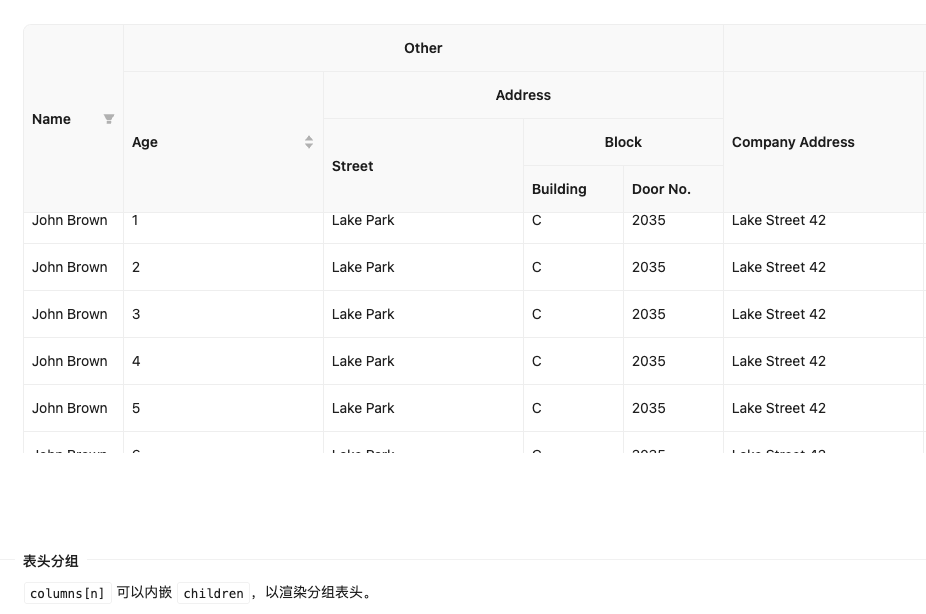
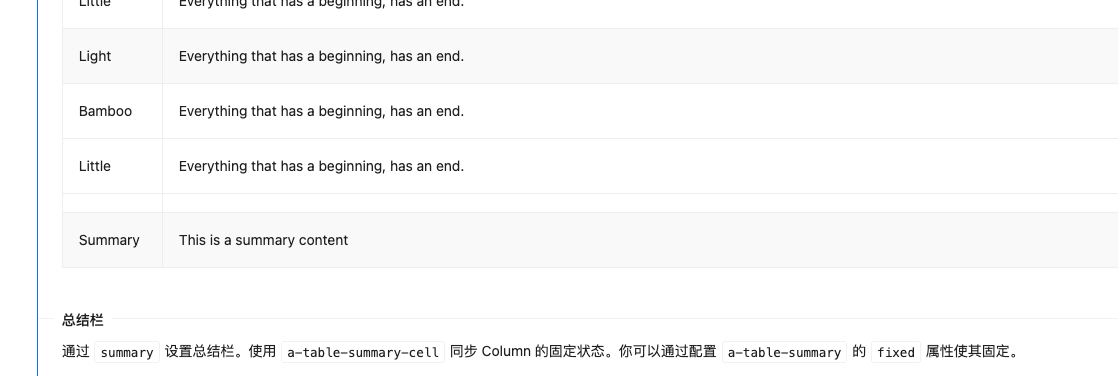
分组表头的配置主要是这个,就是套娃原理,不需要展示数据的直接写个title就行,需要展示数据的字段才需要详细的配置属性。
javascript
{
    title: 'Other',
    children: [
      {
        title: 'Age',
        dataIndex: 'age',
        key: 'age',
        width: 200,
        sorter: (a: TableDataType, b: TableDataType) => a.age - b.age,
      },
      {
        title: 'Address',
        children: [
          {
            title: 'Street',
            dataIndex: 'street',
            key: 'street',
            width: 200,
          },
          {
            title: 'Block',
            children: [
              {
                title: 'Building',
                dataIndex: 'building',
                key: 'building',
                width: 100,
              },
              {
                title: 'Door No.',
                dataIndex: 'number',
                key: 'number',
                width: 100,
              },
            ],
          },
        ],
      },
    ],
 },
配置固定的合计栏,主要是使用了table中的总结栏插槽summary。
javascript
<template #summary>
      <a-table-summary fixed>
        <a-table-summary-row>
          <a-table-summary-cell :index="0" :col-span="2" style="text-align: center"
            >子合计</a-table-summary-cell
          >
          <a-table-summary-cell
            v-for="(col, i) in summaryLeafColumns.slice(2)"
            :key="String(col.dataIndex ?? i)"
            :index="2 + i"
          >
            {{ tableDataInfo?.total[col.dataIndex] }}
          </a-table-summary-cell>
        </a-table-summary-row>
        <a-table-summary-row v-if="showAllTotal">
          <a-table-summary-cell :index="0" :col-span="2" style="text-align: center"
            >总计</a-table-summary-cell
          >
          <a-table-summary-cell
            v-for="(col, i) in summaryLeafColumns.slice(2)"
            :key="`g-${String(col.dataIndex ?? i)}`"
            :index="2 + i"
          >
            {{ totalData[col.dataIndex] }}
          </a-table-summary-cell>
        </a-table-summary-row>
      </a-table-summary>
</template>
扁平化多级表头函数:
javascript
/** 扁平化多级表头,得到叶子列(顺序与表格列一致) */
export function flattenLeafColumns(columns: ColumnNode[] | undefined): ColumnNode[] {
  if (!columns?.length) return []
  const out: ColumnNode[] = []
  for (const col of columns) {
    if (col.children?.length) {
      out.push(...flattenLeafColumns(col.children))
    } else {
      out.push(col)
    }
  }
  return out
}
代码:
javascript
const props = defineProps({
  tableDataInfo: {
    type: Object,
    dault: () => ({}),
  },
  // 是否显示总计行
  showAllTotal: {
    type: Boolean,
    default: false,
  },
})


const summaryLeafColumns = computed(() => flattenLeafColumns(currentColumns))