以前的文章和大家分享了如何在Arcgis工具箱中创建Python脚本工具的方法,本次接着分享和Python脚本工具创建方法相似的Python工具箱的创建方法。二者不同之处在于,前者是单个工具,需手动配置工具的输入输出参数。后者则是工具箱,完全由 Python 语言创建,难度相对开发单个脚本工具而言有所增加。下面博主将以创建举证方位线生成工具为例,分享如何在Arcgis中创建Python工具箱。
一、什么是 Python 工具箱
Python 工具箱是完全用Python语言创建的地理处理工具箱。Python工具箱及其所包含工具的外观、操作和运行方式与任何以其他方式创建的工具箱和工具相类似。Python 工具箱 (.pyt) 只是一个基于 ASCII 的文件,该文件定义了工具箱和一个或多个工具。创建后,Python工具箱中的工具具备以下优势:
1、通过创建Python工具箱,您可以利用您的Python知识来快速构建原型并创建功能完备的地理处理工具。
2、您所创建的工具会像系统工具一样成为地理处理的组成部分,您可以从搜索 或目录窗口中打开它,可在模型构建器和Python窗口中使用它,还可以从脚本中调用它。
3、您可以将消息写入结果窗口和进度对话框。
4、使用内置的文档工具,可以创建文档。
5、将脚本作为脚本工具运行时,arcpy完全知道从哪个应用程序(如 ArcMap)调用该脚本。在应用程序中所做的设置(如 arcpy.env.overwriteOutput 和 arcpy.env.scratchWorkspace)都可从脚本工具中的ArcPy中获得。
二、如何创建Python工具箱
Python工具箱 (.pyt) 是一个简单的文本文件,可以在任何文本编辑器(如记事本或 VI 等)中或者任何 Python 集成开发环境 (IDE) 中创建、查看和编辑。

创建Python工具箱的方法有两种,一种是先创建一个文本文档,然后将后缀改为.pyt文件即可(文件名即是工具箱名);另一种就是在Arcmap的目录窗口选择指定路径,然后点击鼠标右键-->新建-->Python工具箱(默认情况下,Python工具箱模板创建名为Tool的无存根工具)。这里有个小细节必须注意,因为Arcgis使用的是python2.7,由于编码问题,我们需要将这个文本文件的编码从默认的UTF8改为ANSI格式另存一次,否则无论你的代码如何完美,都是无法正确运行工具的。创建了文件之后,可以将下面的Python工具箱创建模板代码直接复制进去,然后再按照自己的需求修改代码,模板代码如下:
import arcpy
class Toolbox(object):
    def __init__(self):
        """Define the toolbox (the name of the toolbox is the name of the
        .pyt file)."""
        self.label = "Toolbox"
        self.alias = ""
        # List of tool classes associated with this toolbox
        self.tools = [Tool]
class Tool(object):
    def __init__(self):
        """Define the tool (tool name is the name of the class)."""
        self.label = "Tool"
        self.description = ""
        self.canRunInBackground = False
    def getParameterInfo(self):
        """Define parameter definitions"""
        params = None
        return params
    def isLicensed(self):
        """Set whether tool is licensed to execute."""
        return True
    def updateParameters(self, parameters):
        """Modify the values and properties of parameters before internal
        validation is performed.  This method is called whenever a parameter
        has been changed."""
        return
    def updateMessages(self, parameters):
        """Modify the messages created by internal validation for each tool
        parameter.  This method is called after internal validation."""
        return
    def execute(self, parameters, messages):
        """The source code of the tool."""
        return
三、如何设置Python工具箱参数
下面博主将以举证方位线生成工具的代码为例,简单介绍下如何设置Python工具箱参数。
1.Toolbox类
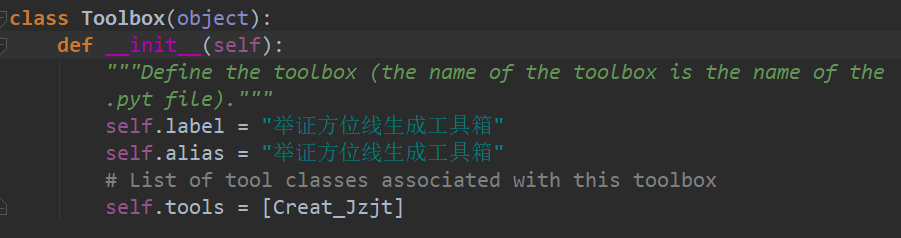
模板代码中的Toolbox类是专门用来配置工具箱参数的,为确保ArcGIS正确识别Python工具箱,该工具箱类的名称必须仍为Toolbox,不要修改类名。label和alias属性分别对应工具箱的名称和标注。tools属性是用来设置工具箱分别包含几个工具的,输入的内容是包含工具类名称的列表。本次演示只涉及一个举证方位线生成工具,因此列表内只包含一个Creat_Jzjt类名。
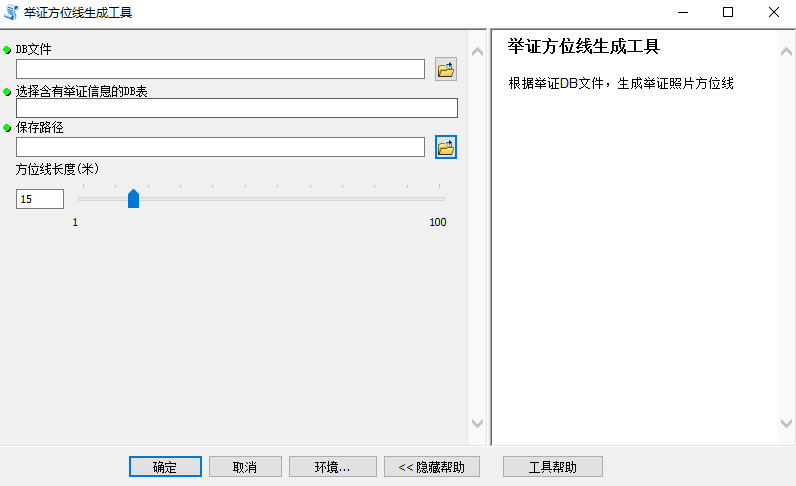
举证方位线生成工具参数设置界面如下:
2.工具的__init__函数
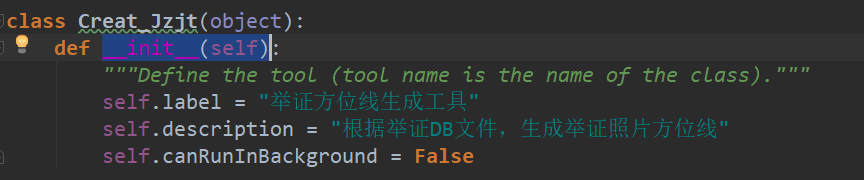
模板代码中的__init__(self)函数是用来设置工具的基本情况,label属性设置工具的标注,description属性用来设置工具的文字描述,canRunInBackground属性设置工具是否可以在后台运行,保持默认设置即可。
3.工具的getParameterInfo函数
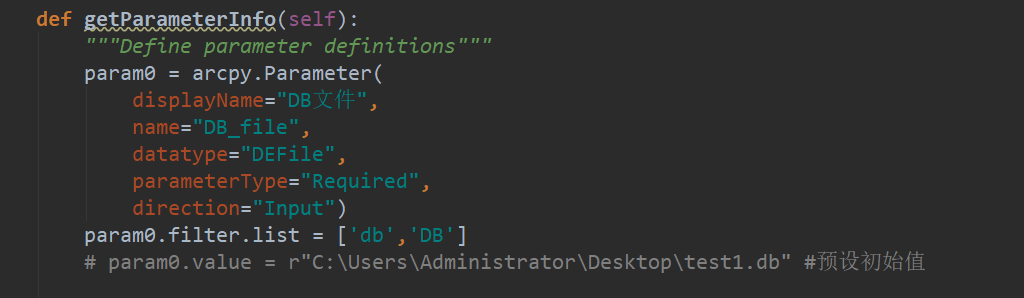
举证方位线生成工具的目的是读取举证DB包内含有举证信息的DB表,将每张举证照片的举证方位生成指向终点的方向线,并复制DB表内举证照片的相关属性,写入到方向线矢量中。模板代码中的getParameterInfo(self)函数通过创建参数对象并设置其属性,以此来定义工具参数。为了实现上述功能,我们设置第一输入参数(param0)的展示名(displayName)设置为DB文件,真实名称(name)设置为"DB_file",数据类型(datatype)设置为文件,参数类型(parameterType)设置为"Required",参数输入方向(direction)设置为"Input",我们可以用value属性来设置参数的默认值,其余输入参数属性格式相同的地方下面不再赘述。
4.工具的updateParameters函数
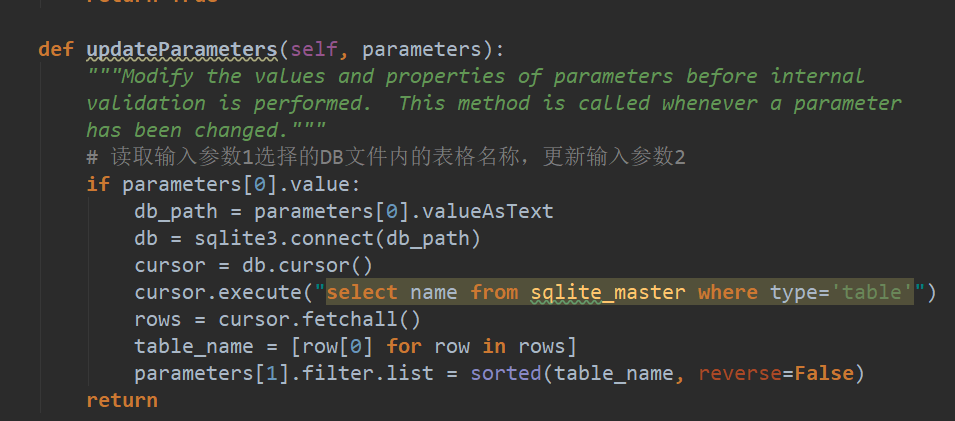
第二个参数名设置为选择含有举证信息的DB表,数据类型为文本,这里我们需要根据选择的DB文件,读取DB文件内含有的表格的名称,将其转换为名称列表,作为参数的输入选择值。设置方法是在updateParameters(self, parameters)函数内根据参数一输入的DB文件,对参数二的过滤器列表进行设置。updateParameters函数的作用是每当工具的输入参数发生改变,我们就可以在这个函数里处理对应参数改变的事件。
第三个参数名称为保存路径,数据类型为工作空间,用来存放举证方位线成果矢量。第四个参数名称为方位线长度(米),数据类型为长整型,为了限制用户输入不合理的参数值,这里对方位线长度值设置了一个范围区间。设置方法如下:
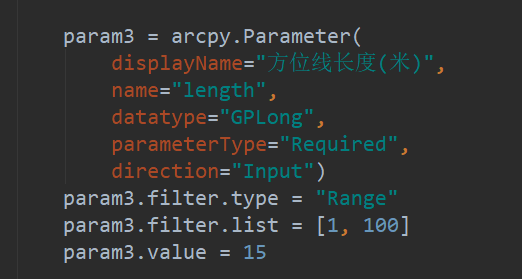
最后用"params = param0, param1,param2, param3"将工具的参数打包成一个参数列表作为函数的返回值,即完成了对工具的参数设置。
5.工具的isLicensed 函数
模板代码中的isLicensed 方法是一种可选方法,用于检查Python工具箱中的工具是否具有执行许可。如果运行其他地理处理工具(由 Python 工具箱中的工具使用)所需的相应许可和扩展模块不可用,那么可使用该方法限制工具的运行。如果 isLicensed 方法返回 False,则工具不能执行。如果该方法返回 True 或未使用该方法,则工具可以执行。
6.工具的updateMessages函数
模板代码中的updateMessages(self, parameters)函数在工具内部验证(如参数类型、是否必填等)之后被调用,用于自定义消息(如警告、错误、信息)。通过访问parameters列表,使用 setErrorMessage、setWarningMessage、clearMessage 等方法。也常与 updateParameters 配合使用,但updateMessages 主要用于设置验证后的消息。可基于参数之间的逻辑关系来添加自定义验证。这里我们保持默认设置。
7.工具的execute函数
模板代码中的execute(self, parameters, messages)函数是工具的执行函数,用于编写工具处理数据的核心代码。举证方位线生成工具的完整代码如下:
import os
import arcpy
import sqlite3
import math
#获取举证方位线尾部坐标的函数
defEndPoint(lon, lat, direction, dis):
    dis_lon = 0.00001141 * dis
    dis_lat = 0.00000899 * dis
if0 <= direction <= 90:
        a = dis_lon * math.sin(math.radians(direction))
        b = dis_lat * math.cos(math.radians(direction))
        end_lon = lon + a
        end_lat = lat + b
elif90 < direction <= 180:
        a = dis_lon * math.sin(math.radians(180 - direction))
        b = dis_lat * math.cos(math.radians(180 - direction))
        end_lon = lon + a
        end_lat = lat - b
elif180 < direction <= 270:
        a = dis_lon * math.sin(math.radians(direction - 180))
        b = dis_lat * math.cos(math.radians(direction - 180))
        end_lon = lon - a
        end_lat = lat - b
elif270 < direction <= 360:
        a = dis_lon * math.sin(math.radians(360 - direction))
        b = dis_lat * math.cos(math.radians(360 - direction))
        end_lon = lon - a
        end_lat = lat + b
elif -90 <= direction < 0:
        a = dis_lon * math.sin(math.radians(360 - (360 + direction)))
        b = dis_lat * math.cos(math.radians(360 - (360 + direction)))
        end_lon = lon - a
        end_lat = lat + b
elif -180 < direction < -90:
        a = dis_lon * math.sin(math.radians((360 + direction) - 180))
        b = dis_lat * math.cos(math.radians((360 + direction) - 180))
        end_lon = lon - a
        end_lat = lat + b
returnround(end_lon, 7), round(end_lat, 7)
classToolbox(object):
def__init__(self):
"""Define the toolbox (the name of the toolbox is the name of the
        .pyt file)."""
self.label = "举证方位线生成工具箱"
self.alias = "举证方位线生成工具箱"
# List of tool classes associated with this toolbox
self.tools = [Creat_Jzjt]
classCreat_Jzjt(object):
def__init__(self):
"""Define the tool (tool name is the name of the class)."""
self.label = "举证方位线生成工具"
self.description = "根据举证DB文件,生成举证照片方位线"
self.canRunInBackground = False
defgetParameterInfo(self):
"""Define parameter definitions"""
        param0 = arcpy.Parameter(
            displayName="DB文件",
            name="DB_file",
            datatype="DEFile",
            parameterType="Required",
            direction="Input")
        param0.filter.list = ['db','DB']
# param0.value = r"C:\Users\Administrator\Desktop\test1.db" #预设初始值
        param1 = arcpy.Parameter(
            displayName="选择含有举证信息的DB表",
            name="select_table",
            datatype="GPString",
            parameterType="Required",
            direction="Input",)
#multiValue=True,)#可以设置是否多值
        param2 = arcpy.Parameter(
            displayName="保存路径",
            name="save_path",
            datatype="DEWorkspace",
            parameterType="Required",
            direction="Input")
# param2.value = r"C:\Users\Administrator\Documents\ArcGIS\Default.gdb"
        param3 = arcpy.Parameter(
            displayName="方位线长度(米)",
            name="length",
            datatype="GPLong",
            parameterType="Required",
            direction="Input")
        param3.filter.type = "Range"
        param3.filter.list = [1, 100]
        param3.value = 15
        params = [param0, param1,param2, param3]
return params
defisLicensed(self):
"""Set whether tool is licensed to execute."""
returnTrue
defupdateParameters(self, parameters):
"""Modify the values and properties of parameters before internal
        validation is performed.  This method is called whenever a parameter
        has been changed."""
# 读取输入参数1选择的DB文件内的表格名称,更新输入参数2
if parameters[0].value:
            db_path = parameters[0].valueAsText
            db = sqlite3.connect(db_path)
            cursor = db.cursor()
            cursor.execute("select name from sqlite_master where type='table'")
            rows = cursor.fetchall()
            table_name = [row[0] for row in rows]
            parameters[1].filter.list = sorted(table_name, reverse=False)
return
defupdateMessages(self, parameters):
"""Modify the messages created by internal validation for each tool
        parameter.  This method is called after internal validation."""
return
# 工具的执行函数
defexecute(self, parameters, messages):
"""The source code of the tool."""
        db_path = parameters[0].valueAsText
        table_name = parameters[1].valueAsText
        save_path = parameters[2].valueAsText
        dis = parameters[3].valueAsText
        cur = None
        arcpy.env.overwriteOutput = True
        arcpy.env.addOutputsToMap = True
try:
# 创建矢量
if save_path[-3:] == "mdb"or save_path[-3:] == "gdb":
                out_name = "JZJT"
else:
                out_name = "JZJT.shp"
            jzjt_f = os.path.join(save_path, out_name)
            arcpy.CreateFeatureclass_management(save_path, out_name, "POLYLINE", "", "DISABLED", "DISABLED",
                                                arcpy.SpatialReference(4490))
# 链接DB,读取数据,创建矢量
            db = sqlite3.connect(db_path)
            cursor = db.cursor()
            cursor.execute("pragma table_info({})".format(table_name))
            col_names = cursor.fetchall()
            col_names = [x[1] for x in col_names]
            field_names = [x for x in col_names if x != 'FJ']
            field_names.append("DBPath")
            field_names.append("Table_Name")
# 添加字段
for field_name in field_names:
if field_name in ["PSJD", "Longitude", "Latitude"]:
                    arcpy.AddField_management(jzjt_f, field_name, "DOUBLE", "", "", )
else:
                    arcpy.AddField_management(jzjt_f, field_name, "TEXT", "", "", 255)
# 创建矢量,写入属性
            cursor.execute("SELECT COUNT(*) FROM {}".format(table_name))
            row_count = cursor.fetchone()[0]
            cursor.execute("SELECT * FROM {} ".format(table_name))
            content = cursor.fetchone()
            num = 1
            arcpy.SetProgressor("step", "生成方位线:{0}/{1}条 ".format(num, row_count), 0, row_count, 1)
            field_names.append("SHAPE@")
            cur = arcpy.da.InsertCursor(jzjt_f,field_names)
while content:
                arcpy.SetProgressorLabel("生成方位线:{0}/{1}条".format(num, row_count))
                arcpy.SetProgressorPosition(num)
                lon = content[col_names.index("Longitude")]
                lat = content[col_names.index("Latitude")]
                psjd = content[col_names.index("PSJD")]
                end_lon = EndPoint(lon, lat, psjd, int(dis))[0]
                end_lat = EndPoint(lon, lat, psjd, int(dis))[1]
if lon == 0:
                    content = cursor.fetchone()
                    num += 1
continue
                value_list = []
for field in field_names[:-3]:
                    index = col_names.index(field)
                    value = content[index]
                    value_list.append(value)
                value_list.append(db_path)
                value_list.append(table_name)
                array = arcpy.Array([arcpy.Point(lon, lat), arcpy.Point(end_lon, end_lat)])
                polyline = arcpy.Polyline(array,arcpy.SpatialReference(4490))
                value_list.append(polyline)
                cur.insertRow(value_list)
                content = cursor.fetchone()
                num += 1
            cursor.close()
            db.close()
            arcpy.ResetProgressor()
# 引用当前活动地图文档
            mxd = arcpy.mapping.MapDocument("CURRENT")
# 引用第一个数据框
            data_frame = arcpy.mapping.ListDataFrames(mxd)[0]
# 创建Layer对象,并添加到地图
            layer_to_add = arcpy.mapping.Layer(jzjt_f)
# 添加到数据框,并使用自动排序
            arcpy.mapping.AddLayer(data_frame, layer_to_add, "AUTO_ARRANGE")
# 刷新界面,让添加的图层立即显示
            arcpy.RefreshActiveView()
            arcpy.RefreshTOC()
            arcpy.AddMessage("方位线已全部生成,运行结束!")
except Exception as e:
            arcpy.AddMessage(e.message)
finally:
            arcpy.env.overwriteOutput = False
if cur:
del cur

return
另外,如果你不想自己的劳动成果轻易被别人窃取,Arcmap10.5版本以上支持对Python工具箱进行加密。
四、成果展示
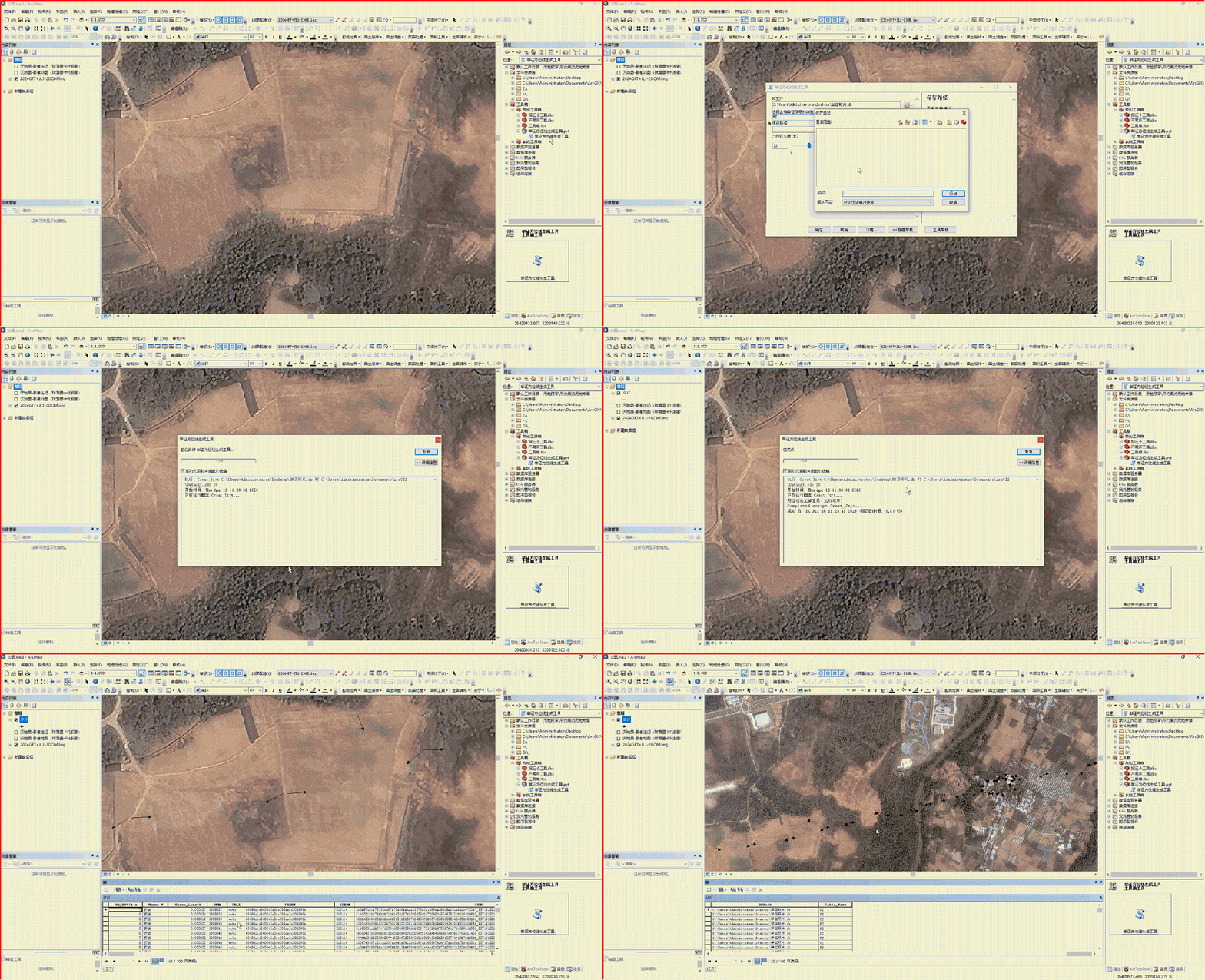
工具演示效果如下:
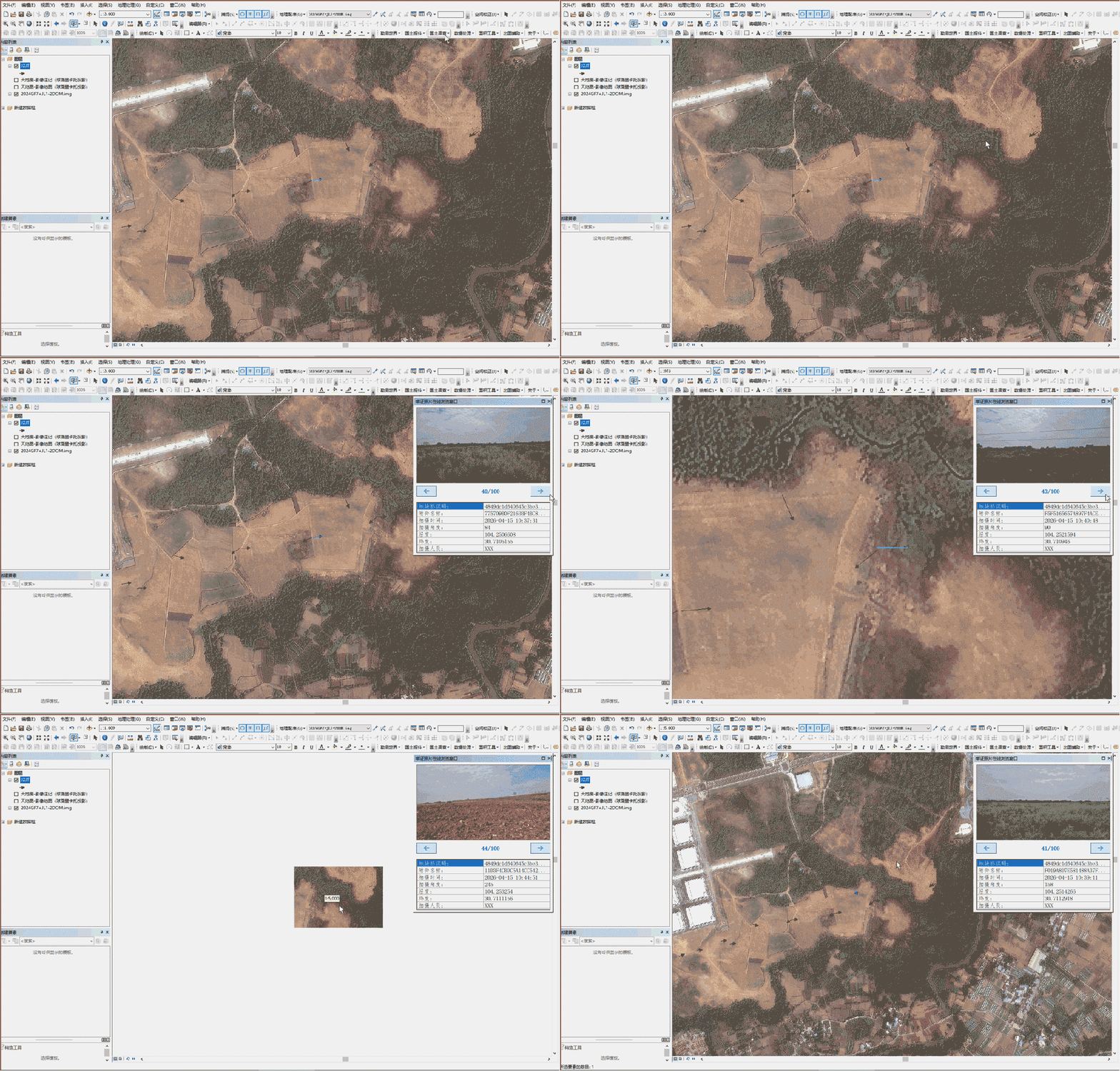
配合举证照片浏览工具可以快速查看实地现状:
工具箱免费下载使用,百度网盘地址:https://pan.baidu.com/s/1jkqLwXZzXUY5CamQi3BRXw?pwd=bw02提取码:bw02,需要的自提。