上次用AI弄了个双行夹批效果,看起来其实已经不错了,但后来想,利用TreeWalker遍历DOM,只对注释节点进行处理分行,不是更自然吗?这次将这个思路丢给不管是中国的还是外国的AI,都没有一个直接生成能用的代码,无奈自己动手手搓。
这个代码思路很简单:遍历每一个段落,如果某个段落中没有注释,直接返回。如果段落中有注释,那么利用TreeWalker遍历段落中的每一个元素节点。考虑到浏览器显示文档内容的换行总是在文本中,所以只需要考虑两种节点:
1、类型为Node.TEXT_NODE且不属于注释的文本节点,用于估算某行中剩余的空白区域宽度;
2、类型为Node.ELEMENT_NODE且标记为注释的节点,将其全部内容或必要时截取适当长度的内容分成两行显示。
关于段落中注释节点之前的节点的最后一行文本内容的宽度,采用这种方式估算:
1、每进入一个非注释文本节点内容,取得该文本所属节点,利用canvas测量其示例字符的宽度,再用剩余宽度除以示例字符宽度估算剩余空间能容纳的字符数量,比较能容纳的字符数量与文本长度,能容纳的字符数量更多,测量全部文本宽度并更新剩余空间宽度,文本长度更大,则取去掉能容纳的字符后的剩余文本与新行比较,直到将能够填满整行的文本全部去掉(简单对单行能容纳的文字数量求模误差太大,所以用这个稍嫌笨拙的方法),就剩下了最后一行文本,测量剩下文本的宽度就可以算出注释节点前本行还剩下多少空白了。
2、进入注释节点,逻辑上跟其他节点的文本差不多,只是注意要将注释分成两行,所以剩余空间宽度能容纳的字符数量是单行字符数量的两倍而已,而且剩余注释需要包装为一个新的注释节点并插入最后一次添加的注释节点之后,插入新的注释节点后将TreeWalker的当前节点及时更新。
主要的工具函数如下,用于测量元素中文本在浏览器中占用的宽度:
javascript
/* 测量ele中text的宽度 */
function measureText(canvas, ele, text) {
	// 获取元素的style
	const style = window.getComputedStyle(ele);
	// 拼装出canvas的font
	canvas.font = `${style.fontStyle} ${style.fontWeight} ${style.fontSize} ${style.fontFamily}`;
	// 设置字符间距
	canvas.letterSpacing = style.letterSpacing;
	// 测量宽度
	return canvas.measureText(text).width;
}
关键的排版函数如下,其中有详尽的注释:
javascript
function dualLineAnno(containers, canvas, option = {}) {
    const anno = option.annoClass || 'annotation'; // 双行夹注类名
    const sampleChar = option.sampleChar || '中';  // 测量单个字符宽度时所用的示例字符
    const noHeading = option.noHeading || '!%),.:;>?]}¢¨°·ˇˉ―‖'"...‰′″›℃∶、。〃〉》」』】〕〗〞︶︺︾﹀﹄﹚﹜﹞!"%\'),.:;?]`|}~¢';
    const noTailing = option.noTailing ||'$([{£¥·'"〈《「『【〔〖〝﹙﹛﹝$(.[{£¥';
    const rightAdjust = option.rightAdjust || 2;  // 右边预留的对冲测量误差的像素值

    // 遍历每一个节点
    containers.forEach((ele) => {
        if (ele.querySelector('.' + anno) === null) return;  // 节点不包含双行夹注内容,跳过
        const walker = document.createTreeWalker(ele, NodeFilter.SHOW_ALL); // 节点遍历器
        const eleStyle = window.getComputedStyle(ele);
        const eleRect = ele.getBoundingClientRect();
        // 双行夹注节点净宽(宽度 - 左右padding)
        const maxWidth = eleRect.width - parseFloat(eleStyle.paddingLeft) - parseFloat(eleStyle.paddingRight) - rightAdjust;
        let node, remainW = maxWidth;  // 记录当前遍历到的节点及当前行剩余宽度
        while (node = walker.nextNode()) {
            if (node === ele) continue; // 根节点跳过
            // 非双行夹注中的文本节点,注意文本节点总有父节点
            if (node.nodeType === Node.TEXT_NODE && !node.parentNode.classList.contains(anno)) {
                const eleCharW = measureText(canvas, node.parentNode, sampleChar);  // 节点中一个字符的估算宽度
                let charCount = Math.floor(remainW / eleCharW);  // 估算剩余宽度可容纳的字符数量
                const textContent = node.nodeValue;
                if (textContent === "") continue;
                if (charCount > textContent.length) {  // 可容纳字符数量大于文本内容长度
                    const w = measureText(canvas, node.parentNode, textContent);  // 测量文本宽度并将其从剩余宽度中减去
                    remainW -= w;
                    continue;  // 接着处理下一个节点
                }
                //  可容纳字符数量小于文本长度
                let truncationText = textContent.slice(0, charCount);  // 浏览器排版时将在charCount处截断文本
                // 使估算的charCount尽量接近最大值
                while(charCount < textContent.length) {
                    if(measureText(canvas, node.parentNode, truncationText) > (remainW /*- eleCharW*/)) break;
                    charCount ++;
                    truncationText = textContent.slice(0, charCount);
                }
                let remainText = textContent.slice(charCount);  //截断后剩下的文本
                charCount = Math.floor(maxWidth / eleCharW); // 估算一个新行能容纳的字符数
                while(charCount < remainText.length){  // 直到剩余文本不足一行
                    //实时测量截取文本宽度,使其尽量接近最大宽度(考虑1px的误差)
                    while( measureText(canvas, node.parentNode, truncationText) < (maxWidth - 1)){
                        charCount++;
                        truncationText = textContent.slice(0, charCount);
                    }
                    remainText = remainText.slice(charCount);
                }
                if (remainText.length > 0) { // part2中现在是最后一行文字
                    const w = measureText(canvas, node.parentNode, remainText); // 测量最后一行文字的宽度,并更新剩余宽度
                    remainW = maxWidth - w;
                } else { // part2中没有字符,则剩余宽度为一整行
                    remainW = maxWidth;
                }
            } else if (node.nodeType === Node.ELEMENT_NODE && node.classList.contains(anno)) {  // anno节点
                const eleCharW = measureText(canvas, node, sampleChar);
                // 估算剩余宽度可容纳的单行注释字符数量, 少取一个字符容纳测量误差
                let charCount = Math.floor(remainW / eleCharW) - 1;
                const textContent = node.textContent;
                if (charCount * 2 >= textContent.length) {  // 注释折叠后可以容纳在剩余空间中
                    charCount = Math.floor(textContent.length / 2);  // 字符串中点作为大致的注释折叠点
                    // 因为存在不等宽字符,去上下两行宽度的平均值作为目标宽度,以使上下两行视觉上更平衡
                    let upRow = textContent.substr(0, charCount);
                    let downRow = textContent.substr(charCount);
                    const upWidth = measureText(canvas, node, upRow);
                    const downWidth = measureText(canvas, node, downRow);
                    let w = Math.ceil((upWidth + downWidth) / 2);
                    // 通过逐步增加字符数量使文本宽度接近目标宽度来重新调整文本截断位置
                    let p = Math.floor(charCount * 0.75);  // 3/4的长度就超过了平均宽度的概率很小
                    let tempW = measureText(canvas, node, textContent.substr(0, p))
                    while (tempW < w) {
                        p++;
                        tempW = measureText(canvas, node, textContent.substr(0, p))
                    }
                    // 根据行首禁止字符进一步调整文本截断位置
                    while (p > 0 && (noHeading.includes(textContent[p]) || noTailing.includes(textContent[p - 1]))) p--;
                    upRow = textContent.substr(0, p);
                    downRow = textContent.substr(p);
                    w = Math.ceil(Math.max(measureText(canvas, node, upRow),
                                measureText(canvas, node, downRow)));
                    remainW -= w;
                    //node.style.width = `${w}px`;  // 设置注释容器的宽度,添加br强行分断可不设置
                    // 在文本截断位置添加br标签使注释显示为双行夹注
                    upRow = textContent.substr(0, p) === "" ? '\u00A0' : textContent.substr(0, p);
                    downRow = textContent.substr(p) === "" ? '\u00A0' : textContent.substr(p);
                    node.innerHTML = `${upRow}<br>${downRow}`;  // 在夹注截取点插入br标签强行分行
                } else {  //  剩余空间无法容纳折叠后的注释
                    // 确保截断点前后无非法字符
                    while(charCount > 0 && (noHeading.includes(textContent[charCount * 2])
                                    || noTailing.includes(textContent[charCount * 2] - 1))) charCount-- ;
                    let truncationText = textContent.slice(0, charCount * 2);  // 截取剩余空间可容纳的折叠注释
                    let upRow = truncationText.substr(0, charCount);  // 获取截取点左右文本
                    let downRow = truncationText.substr(charCount);
                    const upWidth = measureText(canvas, node, upRow);
                    const downWidth = measureText(canvas, node, downRow);
                    let w = Math.ceil((upWidth + downWidth) / 2);  // 实时测量截取点左右文本宽度取平均值为双行夹注容器宽度
                    let p = Math.floor(charCount * 0.75);
                    let tempW = measureText(canvas, node, truncationText.substr(0, p))
                    while (tempW < w) { // 获取宽度最接近w的截取点
                        p++;
                        tempW = measureText(canvas, node, truncationText.substr(0, p))
                    }
                    while (p > 0 && (noHeading.includes(truncationText[p]) || noTailing.includes(truncationText[p - 1]))) p--;
                    remainW = maxWidth;  // 本行已满,下行为新行
                    upRow = truncationText.substr(0, p) === "" ? '\u00A0' : truncationText.substr(0, p);
                    downRow = truncationText.substr(p) === "" ? '\u00A0' : truncationText.substr(p);
                    node.innerHTML = `${upRow}<br>${downRow}`;  // 在夹注截取点插入br标签强行分行
                    //node.style.width = `${w}px`;
                    let remainText = textContent.slice(charCount * 2);  //剩余注释文本
                    // 定义一个变量,记录最后一次插入的节点
                    let lastInsertedNode = node;

                    while (remainText !== "") {  // 剩余注释文本不为空
                        charCount = Math.floor(remainW / eleCharW) - 1;
                        if (charCount * 2 >= remainText.length) { // 剩余宽度可容纳剩余注释
                            charCount = Math.floor(remainText.length / 2);  // 截断点
                            let upRow = remainText.substr(0, charCount);
                            let downRow = remainText.substr(charCount);
                            const upWidth = measureText(canvas, node, upRow);
                            const downWidth = measureText(canvas, node, downRow);
                            const w = Math.ceil((upWidth + downWidth) / 2);
                            remainW -= w;
                            let p = 1;
                            let tempW = measureText(canvas, node, remainText.substr(0, p))
                            while (tempW < w) {
                                p++;
                                tempW = measureText(canvas, node, remainText.substr(0, p))
                            }
                            while (p > 0 && (noHeading.includes(remainText[p]) || noTailing.includes(remainText[p - 1]))) p--;
                            const newEle = node.cloneNode();
                            upRow = remainText.substr(0, p) === "" ? '\u00A0' : remainText.substr(0, p);
                            downRow = remainText.substr(p) === "" ? '\u00A0' : remainText.substr(p);
                            newEle.innerHTML = `${upRow}<br>${downRow}`;
                            // 插入到 最后插入节点 的下一个兄弟之前
                            node.parentNode.insertBefore(newEle, lastInsertedNode.nextSibling);
                            // 最后插入的节点变成当前 newEle
                            lastInsertedNode = newEle;
                            walker.currentNode = newEle; // 同步更新 walker
                            remainText = "";
                        } else {  // 剩余宽度不能容纳剩余注释,先截取并插入一行注释,剩余部分继续处理
                            // 确保截断点前后无非法字符
                            while(charCount > 0 && (noHeading.includes(textContent[charCount * 2])
                                            || noTailing.includes(textContent[charCount * 2] - 1))) charCount-- ;
                            let part = remainText.slice(0, charCount * 2);
                            let upRow = part.substr(0, charCount);
                            let downRow = part.substr(charCount);
                            const upWidth = measureText(canvas, node, upRow);
                            const downWidth = measureText(canvas, node, downRow);
                            const w = Math.ceil((upWidth + downWidth) / 2);
                            let p = 1;
                            let tempW = measureText(canvas, node, part.substr(0, p))
                            while (tempW < w) {
                                p++;
                                tempW = measureText(canvas, node, part.substr(0, p))
                            }
                            while (p > 0 && (noHeading.includes(remainText[p]) || noTailing.includes(remainText[p - 1]))) p--;
                            const newEle = node.cloneNode();
                            upRow = part.substr(0, p) === "" ? '\u00A0' : part.substr(0, p);
                            downRow = part.substr(p) === "" ? '\u00A0' : part.substr(p);
                            newEle.innerHTML = `${upRow}<br>${downRow}`;
                            // 插入到 最后插入节点 的下一个兄弟之前
                            node.parentNode.insertBefore(newEle, lastInsertedNode.nextSibling);
                            // 最后插入的节点变成当前 newEle
                            lastInsertedNode = newEle;
                            walker.currentNode = newEle; // 同步更新 walker
                            remainText = remainText.slice(charCount * 2);
                            remainW = maxWidth;
                        }  // else charCount * 2 < remainText.length)
                    }  //while (remainText !== "")
                }  // else charCount * 2 < textContent.length
            } // else anno节点
        }  // while (node = walker.nextNode())
    });  // containers.forEach((ele)
}  // function dualLineAnno
编写一个示例页面以测试上述JS的有效性,其中的关键在于注释的样式应该有"display: inline-block":
html
<!DOCTYPE html>
<html lang="zh-CN">
<head>
<meta charset="UTF-8">
<title>响应式模拟Word双行合一排版</title>
<style>
:root {
--anno-scale: 0.7;
}
/* 文档内容容器 */
.container {
/* 两边留一点空白,方便少量内容溢出 */
width: 95%;
min-width: 800px;
/* 整体页面居中 */
margin: 0 auto;
/* 溢出内容显示(默认值,可省略,但需确保未设为hidden) */
overflow: visible;
}
/* 不支持JS的环境中夹注的显示样式 */
.anno {
font-size: max(calc(1em * var(--anno-scale)), 0.6em);
color: blue;
background-color: rgba(210, 105, 30, 0.15);
}
</style>
</head>
<body>
<div class="container" id="main-content">
<p class="dual-layout">    这是一段专业测试文本。《诗经》是中国古代诗歌的开端,其中<span
class="anno">包含一些较长的注释内容,我们想要让注释内容以"流式双行绕接"的形式显示。建立一个禁止出现在行首的字符集(如。以及,)》)和禁止出现在行尾的字符集(如
(《")。</span>排版引擎应当<span class="anno">同一行中的第二条注释,我们想要让注释内容以"流式双行绕接"的形式显示。建立一个禁止出现在行首的字符集(如。
以及,)》)和禁止出现在行尾的字符集(如
(《")。</span>复杂的换行边界。</p>
<p class="dual-layout">    第二段专业测试文<a href="#ch001note27" id="ref_ch001note27">
<sup>[27]</sup>
</a>本。其中<span
class="anno">让注释本身都要超过一行看看效果。包含一些较长的注释内容,测试多段落同时排版的效果。这里的注释如果很长很长很长很长很长很长,它会跨越多个行间距,但依然保持段落感。包含一些较长的注释内容,测试多段落同时排版的效果。这里的注释如果很长很长很长很长很长很长,它会跨越多个行间距,但依然保持段落感。包含一些较长的注释内容,测试多段落同时排版的效果。这里的注释如果很长很长很长很长很长很长,它会跨越多个行间距,但依然保持段落感。</span>核心优化思路:避头尾逻辑、响应式缩放<span
class="anno">短注释</span>、可见区计算。
</p>
<p class="dual-layout">    这段文本没有注释,应该直接跳过处理。</p>
</div>
<script>
/* 测量ele中text的宽度 */
function measureText(canvas, ele, text) {
// 获取元素的style
const style = window.getComputedStyle(ele);
// 拼装出canvas的font
canvas.font = `${style.fontStyle} ${style.fontWeight} ${style.fontSize} ${style.fontFamily}`;
// 设置字符间距
canvas.letterSpacing = style.letterSpacing;
// 测量宽度
return canvas.measureText(text).width;
}
function dualLineAnno(containers, canvas, option = {}) {
const anno = option.annoClass || 'annotation'; // 双行夹注类名
const sampleChar = option.sampleChar || '中'; // 测量单个字符宽度时所用的示例字符
const noHeading = option.noHeading || '!%),.:;>?]}¢¨°·ˇˉ―‖'"...‰′″›℃∶、。〃〉》」』】〕〗〞︶︺︾﹀﹄﹚﹜﹞!"%\'),.:;?]`|}~¢';
const noTailing = option.noTailing || '$([{£¥·'"〈《「『【〔〖〝﹙﹛﹝$(.[{£¥';
const rightAdjust = option.rightAdjust || 2; // 右边预留的对冲测量误差的像素值
// 遍历每一个节点
containers.forEach((ele) => {
if (ele.querySelector('.' + anno) === null) return; // 节点不包含双行夹注内容,跳过
const walker = document.createTreeWalker(ele, NodeFilter.SHOW_ALL); // 节点遍历器
const eleStyle = window.getComputedStyle(ele);
const eleRect = ele.getBoundingClientRect();
// 双行夹注节点净宽(宽度 - 左右padding)
const maxWidth = eleRect.width - parseFloat(eleStyle.paddingLeft) - parseFloat(eleStyle.paddingRight) - rightAdjust;
let node, remainW = maxWidth; // 记录当前遍历到的节点及当前行剩余宽度
while (node = walker.nextNode()) {
if (node === ele) continue; // 根节点跳过
// 非双行夹注中的文本节点,注意文本节点总有父节点
if (node.nodeType === Node.TEXT_NODE && !node.parentNode.classList.contains(anno)) {
const eleCharW = measureText(canvas, node.parentNode, sampleChar); // 节点中一个字符的估算宽度
let charCount = Math.floor(remainW / eleCharW); // 估算剩余宽度可容纳的字符数量
const textContent = node.nodeValue;
if (textContent === "") continue;
if (charCount > textContent.length) { // 可容纳字符数量大于文本内容长度
const w = measureText(canvas, node.parentNode, textContent); // 测量文本宽度并将其从剩余宽度中减去
remainW -= w;
continue; // 接着处理下一个节点
}
// 可容纳字符数量小于文本长度
let truncationText = textContent.slice(0, charCount); // 浏览器排版时将在charCount处截断文本
// 使估算的charCount尽量接近最大值
while (charCount < textContent.length) {
if (measureText(canvas, node.parentNode, truncationText) > (remainW /*- eleCharW*/)) break;
charCount++;
truncationText = textContent.slice(0, charCount);
}
let remainText = textContent.slice(charCount); //截断后剩下的文本
charCount = Math.floor(maxWidth / eleCharW); // 估算一个新行能容纳的字符数
while (charCount < remainText.length) { // 直到剩余文本不足一行
//实时测量截取文本宽度,使其尽量接近最大宽度(考虑1px的误差)
while (measureText(canvas, node.parentNode, truncationText) < (maxWidth - 1)) {
charCount++;
truncationText = textContent.slice(0, charCount);
}
remainText = remainText.slice(charCount);
}
if (remainText.length > 0) { // part2中现在是最后一行文字
const w = measureText(canvas, node.parentNode, remainText); // 测量最后一行文字的宽度,并更新剩余宽度
remainW = maxWidth - w;
} else { // part2中没有字符,则剩余宽度为一整行
remainW = maxWidth;
}
} else if (node.nodeType === Node.ELEMENT_NODE && node.classList.contains(anno)) { // anno节点
const eleCharW = measureText(canvas, node, sampleChar);
// 估算剩余宽度可容纳的单行注释字符数量, 少取一个字符容纳测量误差
let charCount = Math.floor(remainW / eleCharW) - 1;
const textContent = node.textContent;
if (charCount * 2 >= textContent.length) { // 注释折叠后可以容纳在剩余空间中
charCount = Math.floor(textContent.length / 2); // 字符串中点作为大致的注释折叠点
// 因为存在不等宽字符,去上下两行宽度的平均值作为目标宽度,以使上下两行视觉上更平衡
let upRow = textContent.substr(0, charCount);
let downRow = textContent.substr(charCount);
const upWidth = measureText(canvas, node, upRow);
const downWidth = measureText(canvas, node, downRow);
let w = Math.ceil((upWidth + downWidth) / 2);
// 通过逐步增加字符数量使文本宽度接近目标宽度来重新调整文本截断位置
let p = Math.floor(charCount * 0.75); // 3/4的长度就超过了平均宽度的概率很小
let tempW = measureText(canvas, node, textContent.substr(0, p))
while (tempW < w) {
p++;
tempW = measureText(canvas, node, textContent.substr(0, p))
}
// 根据行首禁止字符进一步调整文本截断位置
while (p > 0 && (noHeading.includes(textContent[p]) || noTailing.includes(textContent[p - 1]))) p--;
upRow = textContent.substr(0, p);
downRow = textContent.substr(p);
w = Math.ceil(Math.max(measureText(canvas, node, upRow),
measureText(canvas, node, downRow)));
remainW -= w;
//node.style.width = `${w}px`; // 设置注释容器的宽度,添加br强行分断可不设置
// 在文本截断位置添加br标签使注释显示为双行夹注
upRow = textContent.substr(0, p) === "" ? '\u00A0' : textContent.substr(0, p);
downRow = textContent.substr(p) === "" ? '\u00A0' : textContent.substr(p);
node.innerHTML = `${upRow}<br>${downRow}`; // 在夹注截取点插入br标签强行分行
} else { // 剩余空间无法容纳折叠后的注释
// 确保截断点前后无非法字符
while (charCount > 0 && (noHeading.includes(textContent[charCount * 2])
|| noTailing.includes(textContent[charCount * 2] - 1))) charCount--;
let truncationText = textContent.slice(0, charCount * 2); // 截取剩余空间可容纳的折叠注释
let upRow = truncationText.substr(0, charCount); // 获取截取点左右文本
let downRow = truncationText.substr(charCount);
const upWidth = measureText(canvas, node, upRow);
const downWidth = measureText(canvas, node, downRow);
let w = Math.ceil((upWidth + downWidth) / 2); // 实时测量截取点左右文本宽度取平均值为双行夹注容器宽度
let p = Math.floor(charCount * 0.75);
let tempW = measureText(canvas, node, truncationText.substr(0, p))
while (tempW < w) { // 获取宽度最接近w的截取点
p++;
tempW = measureText(canvas, node, truncationText.substr(0, p))
}
while (p > 0 && (noHeading.includes(truncationText[p]) || noTailing.includes(truncationText[p - 1]))) p--;
remainW = maxWidth; // 本行已满,下行为新行
upRow = truncationText.substr(0, p) === "" ? '\u00A0' : truncationText.substr(0, p);
downRow = truncationText.substr(p) === "" ? '\u00A0' : truncationText.substr(p);
node.innerHTML = `${upRow}<br>${downRow}`; // 在夹注截取点插入br标签强行分行
//node.style.width = `${w}px`;
let remainText = textContent.slice(charCount * 2); //剩余注释文本
// 定义一个变量,记录最后一次插入的节点
let lastInsertedNode = node;
while (remainText !== "") { // 剩余注释文本不为空
charCount = Math.floor(remainW / eleCharW) - 1;
if (charCount * 2 >= remainText.length) { // 剩余宽度可容纳剩余注释
charCount = Math.floor(remainText.length / 2); // 截断点
let upRow = remainText.substr(0, charCount);
let downRow = remainText.substr(charCount);
const upWidth = measureText(canvas, node, upRow);
const downWidth = measureText(canvas, node, downRow);
const w = Math.ceil((upWidth + downWidth) / 2);
remainW -= w;
let p = 1;
let tempW = measureText(canvas, node, remainText.substr(0, p))
while (tempW < w) {
p++;
tempW = measureText(canvas, node, remainText.substr(0, p))
}
while (p > 0 && (noHeading.includes(remainText[p]) || noTailing.includes(remainText[p - 1]))) p--;
const newEle = node.cloneNode();
upRow = remainText.substr(0, p) === "" ? '\u00A0' : remainText.substr(0, p);
downRow = remainText.substr(p) === "" ? '\u00A0' : remainText.substr(p);
newEle.innerHTML = `${upRow}<br>${downRow}`;
// 插入到 最后插入节点 的下一个兄弟之前
node.parentNode.insertBefore(newEle, lastInsertedNode.nextSibling);
// 最后插入的节点变成当前 newEle
lastInsertedNode = newEle;
walker.currentNode = newEle; // 同步更新 walker
remainText = "";
} else { // 剩余宽度不能容纳剩余注释,先截取并插入一行注释,剩余部分继续处理
// 确保截断点前后无非法字符
while (charCount > 0 && (noHeading.includes(textContent[charCount * 2])
|| noTailing.includes(textContent[charCount * 2] - 1))) charCount--;
let part = remainText.slice(0, charCount * 2);
let upRow = part.substr(0, charCount);
let downRow = part.substr(charCount);
const upWidth = measureText(canvas, node, upRow);
const downWidth = measureText(canvas, node, downRow);
const w = Math.ceil((upWidth + downWidth) / 2);
let p = 1;
let tempW = measureText(canvas, node, part.substr(0, p))
while (tempW < w) {
p++;
tempW = measureText(canvas, node, part.substr(0, p))
}
while (p > 0 && (noHeading.includes(remainText[p]) || noTailing.includes(remainText[p - 1]))) p--;
const newEle = node.cloneNode();
upRow = part.substr(0, p) === "" ? '\u00A0' : part.substr(0, p);
downRow = part.substr(p) === "" ? '\u00A0' : part.substr(p);
newEle.innerHTML = `${upRow}<br>${downRow}`;
// 插入到 最后插入节点 的下一个兄弟之前
node.parentNode.insertBefore(newEle, lastInsertedNode.nextSibling);
// 最后插入的节点变成当前 newEle
lastInsertedNode = newEle;
walker.currentNode = newEle; // 同步更新 walker
remainText = remainText.slice(charCount * 2);
remainW = maxWidth;
} // else charCount * 2 < remainText.length)
} //while (remainText !== "")
} // else charCount * 2 < textContent.length
} // else anno节点
} // while (node = walker.nextNode())
}); // containers.forEach((ele)
} // function dualLineAnno
window.onload = function () {
const canvas = document.createElement('canvas').getContext('2d');
const container = document.getElementById("main-content");
const origHTML = container.innerHTML;
/* 设置选项:
* annoClass:双行夹注元素类名
* sampleChar:测量宽度用的示例字符
* noHeading:行首非法字符
* noTailing:行尾非法字符
* rightAdjust:右边预留的对冲测量误差的像素值
* 均提供了默认值,除了annoClass大多数情况下不用提供选项配置修改默认值。
**/
const option = {annoClass: 'anno', rightAdjust: 5, };
// 设置必要的双行夹注style
const annoStyle = `.${option.annoClass} {
display: inline-block !important;
font-size: max(calc(1em * var(--anno-scale)), 0.6em);
color: blue;
vertical-align: middle;
background-color: rgba(210, 105, 30, 0.15);
overflow: visible;
white-space: nowrap;
border-radius: 8px;
/* 配置以下选项会提高视觉效果,但是因为占用了额外空间,会提高意外行换概率 */
margin: 0.5px;
border-Left: solid 2px rgb(210, 105, 30);
}`;
// 创建/获取全局 style 标签
const style = document.createElement('style');
style.textContent = annoStyle;
document.head.appendChild(style);
// 双行夹注排版
dualLineAnno(Array.from(container.children), canvas, option);
// 观察重排后的HTML
// console.log(container.innerHTML);
window.addEventListener('resize', () => { // 窗口尺寸变化事件
let timerId;
clearTimeout(timerId);
timerId = setTimeout(() => {
// 确保每次从原始DOM进行重排
container.innerHTML = origHTML;
dualLineAnno(Array.from(container.children), canvas, option);
}, 100);
// 观察重排后的HTML
// console.log(container.innerHTML);
});
}
</script>
</body>
</html>以上双行夹注排版会有一定概率出现意外不换行(即本应显示在下一行的元素却在上一行显示)以及意外换行(即本应出现在上一行的元素却出现在下一行,这时上一行尾部会出现很长的空白),这两种意外的表现是在同一行有两条紧挨着的双行夹注,前一条的下行结尾接着后一条的上行开头,对阅读的影响其实都并不太大,其中意外不换行更影响阅读,而意外换行更影响版面外观的均衡。删除双行夹注样式中的margin和border-left,意外换行发生概率会极低。意外不换行主要是非等宽字体引起的cavas测量估算剩余空白宽度能容纳的字符数量误差,只有使用等宽字体才会减少意外不换行。经过实测,整体上感觉比AI那个效果似乎更好,对原始DOM的破坏也更少。
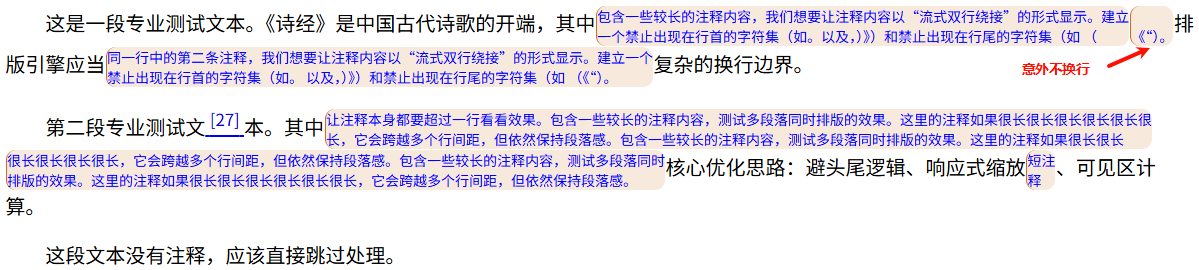
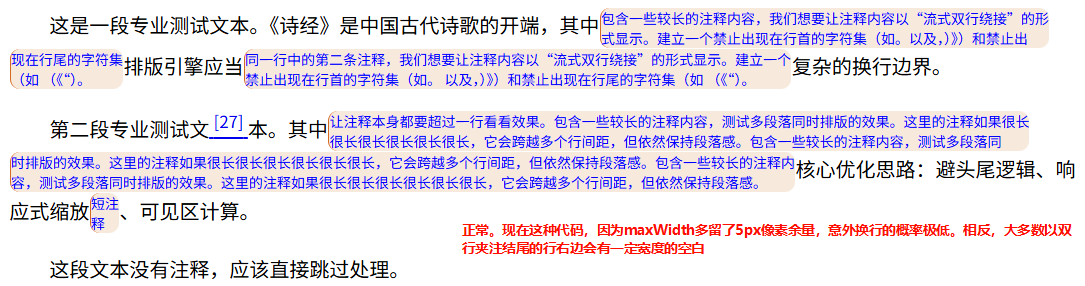
改进方向:
1、将相关函数打包成一个类,提高可移植性;
2、将其中的注释元素添加改成在DocumentFragment中处理,减少页面重排次数,提高效率;
3、在非注释节点文本处理中,如果文本长度大于估算的可容纳字符数,采用注释中类似的方式不停增加文本并测量其宽度以使截断点之前的文本宽度尽量接近剩余宽度,减轻非等宽字体和非中文字符对文本宽度的影响,使换行更精确,从而测量的最后一行文本所占宽度也更准确,最后一行剩余空间宽度也就更准确。
这些改进估计AI能完成,但是我让豆包试了一下,结果它将代码改得不能工作了。等我的copilot免费额度出来后让它试一试去😁