AI coding正在侵蚀每一个从事软件行业从业者,如果还在坚持古法编程的老登,AI抛弃你,真的连一声招呼都不会打,因为AI的生产力已经完全让人没有还手之力。
仅仅会写代码已经变得很难有竞争力,做UI,APP,运维,服务端,前端,产品这些以前都是一个产品团队不可或缺的岗位,但是现在AI真的可以让以上岗位减少很多。悲观点说,AI会减少很多岗位,但乐观说,会放大以前个人能力无法匹及的高度。
很久没有写技术文章,今天以一个AI应用从0到1,如果算总开发时长,从设计到开发,再到服务端,再到运维部署,应该差不多两天时间。因本身工作原因,断断续续,时间维度拉满两周。
此时好奇,做了一个什么应用,简单来说就是拍一张自拍照,然后根据面像分析你的,事业,财运,情感等信息。
需求来源
首先我看到的一个应用,引起了我的注意,我想制作一个跟他相关的内容,但不需要那么复杂的功能,因此我使用stitch,使用自然语言,就可以帮你输出比较精美的设计原型。
我给stitch的提示词是这样的根据http://cs.wmcweb.cn这个网站,我想设计一个面像分析的页面
很块它给我生成了这样的一个页面 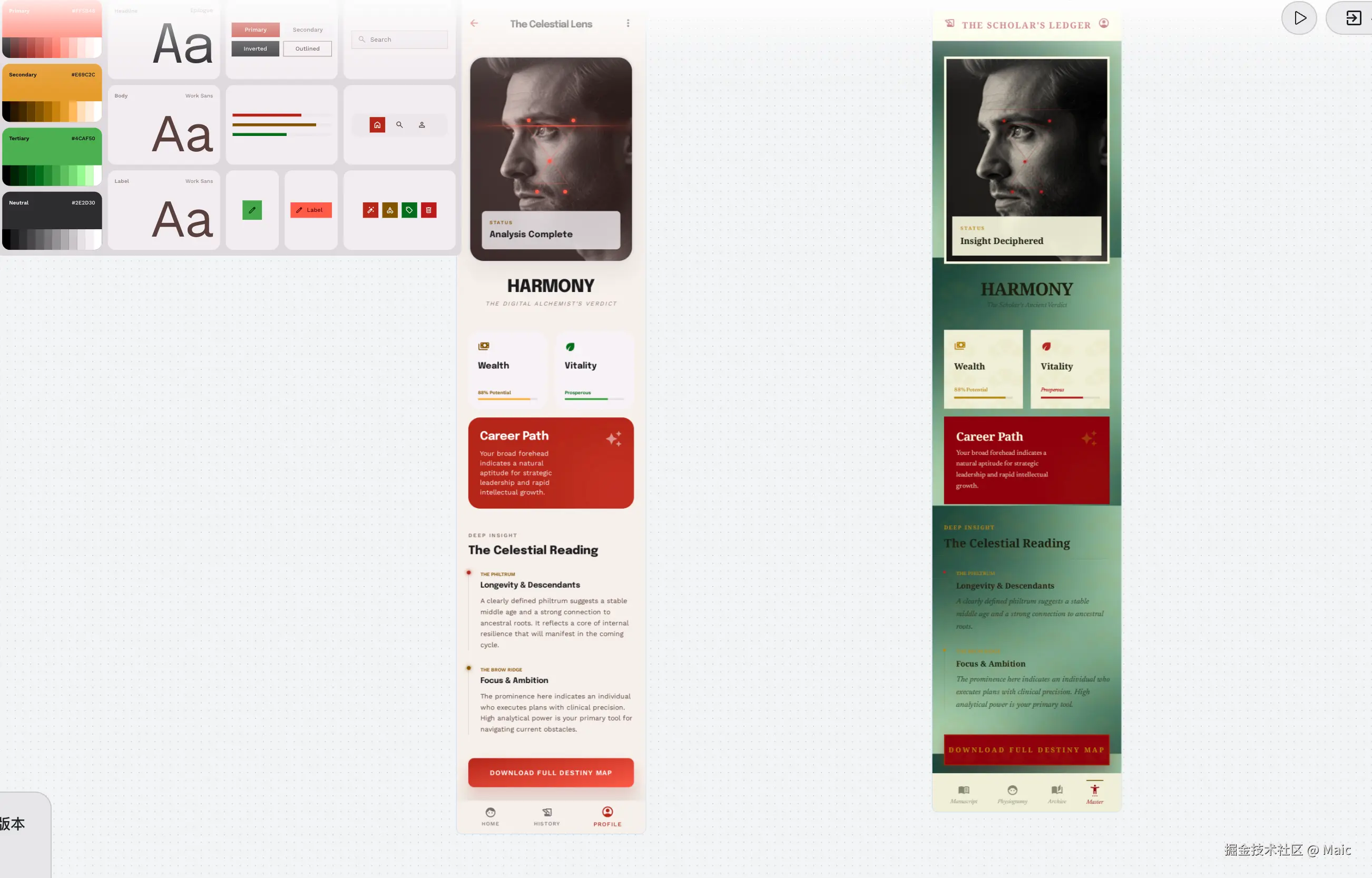 设计功能上好像满足,但是我并不太满意,因此我继续让他给我修改
调色需要传统一些,并且设计Home页面,需要中英文多语言
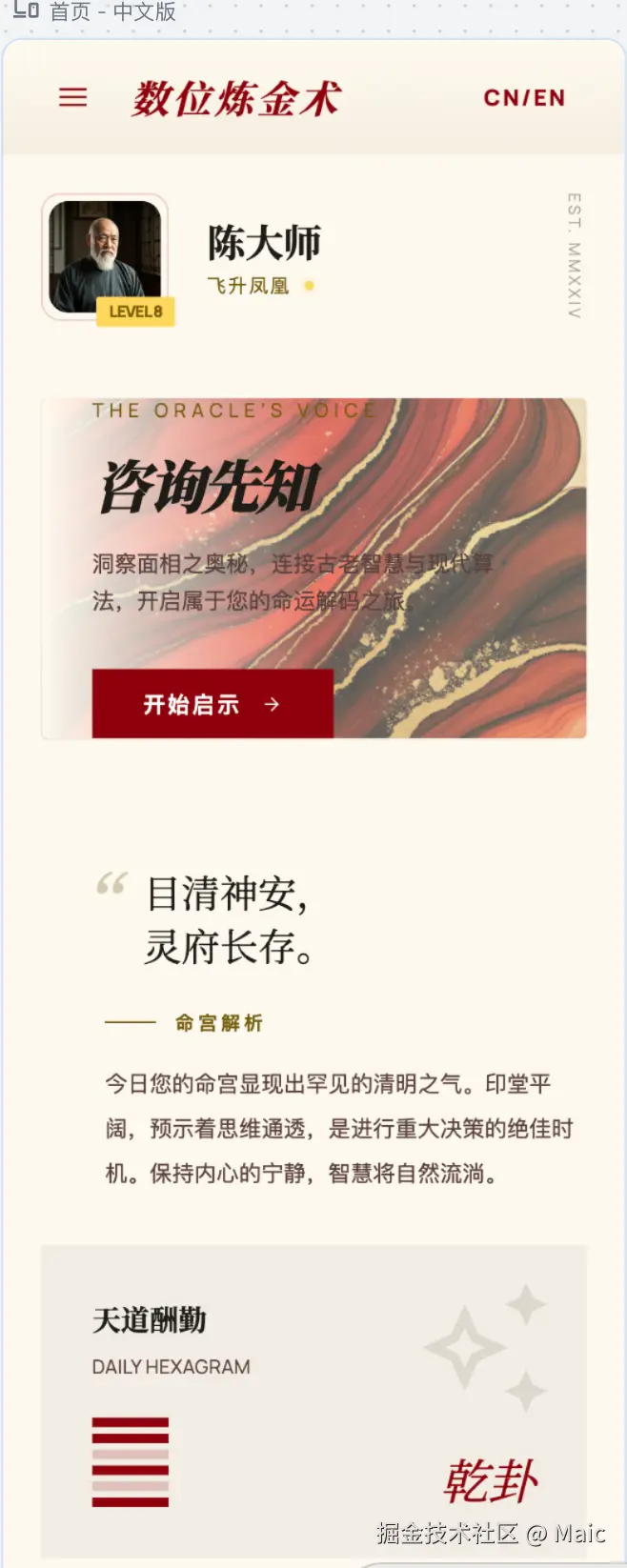
界面已经OK了,也非常有设计感,内容也非常符合我想要的效果
代码生成
因为使用的是stitch,所以配合Antigravity官方出的编码IDE,内置gemin模型与claude sonnet4.6模型,我只需要把stitch的链接复制到antigravity中就可以给我按照设计稿要求写代码了,不过你可以告诉它,你需要使用什么技术栈,比如vue或者是react,需求越是明确,生成的代码质量要求就越高,比我我使用的是vite+react+swr,同时我要求它帮我基于fetch与swr封装请求的hook,以及需要的全局组件,比如你的UI库使用的是shadcn ui
代码部分生成的比较快,基本不用自己修改,即使不满足,只需要在编辑器告诉如何修改就行
前端部分从设计到真正编码,整个页面还原,过去可能需要1-5天不等,现在只需要十几分钟就可以把设计稿精准还原,而且生成的代码质量也非常高。
看到这里,那句经典老梗,前端已死在此刻不是一句玩笑话。
后端部分
由于这个应用有登陆与注册功能,所以需要一个后端服务来写用户接口。因此我选择一个更快,更熟悉的技术栈,因此后端使用的是hono框架,数据库使用的是prisma+supabase。
AI生成的后端代码也非常强,你让生成的接口,基本从schema数据表字段,到接口路由设计,基本非常完善的给你生成,我们以登陆注册为例子
这是Hono启动路由服务的唯一入口
js
// app.js
import './load-env.js'
import { serve } from '@hono/node-server'
import { getEnv } from './lib/env.js'
import { assertDatabaseConnection } from './lib/prisma.js'
import { app } from './app.js'

const { PORT } = getEnv()

void assertDatabaseConnection().catch((error) => {
  console.warn('[startup] database is unavailable; service will start without DB readiness')
  console.error(error)
})

serve(
  {
    fetch: app.fetch,
    port: PORT,
  },
  (info) => {
    console.log(`Listening on http://localhost:${info.port}`)
  },
)在app.js注册了各个路由
js
import { Hono } from 'hono'
import { bodyLimit } from 'hono/body-limit'
import { cors } from 'hono/cors'
import { logger } from 'hono/logger'
import { secureHeaders } from 'hono/secure-headers'
import { getEnv } from './lib/env.js'
import { prisma } from './lib/prisma.js'
import { ApiErrorCode, fail, ok } from './lib/response.js'
import { auth } from './routes/auth/index.js'

const app = new Hono()

function normalizeCorsOrigin(o: string) {
  return o.trim().replace(/\/+$/, '')
}

const corsAllowed =
  getEnv()
    .CORS_ORIGINS?.split(',')
    .map((s) => normalizeCorsOrigin(s))
    .filter(Boolean) ?? []
// 浏览器规定:credentials 为 true 时不能用 Allow-Origin: *。无白名单时关闭 credentials,用 * 兼容未配 CORS_ORIGINS 的场景。
const corsCredentials = corsAllowed.length > 0

app.use(logger())
app.use(secureHeaders())
app.use(
  cors({
    origin: (origin) => {
      if (corsAllowed.length === 0) {
        return '*'
      }
      if (!origin) {
        return '*'
      }
      const reqOrigin = normalizeCorsOrigin(origin)
      return corsAllowed.includes(reqOrigin) ? origin : null
    },
    allowMethods: ['GET', 'POST', 'PUT', 'PATCH', 'DELETE', 'OPTIONS'],
    allowHeaders: ['Authorization', 'Content-Type', 'Accept'],
    credentials: corsCredentials,
    maxAge: 600,
  }),
)

app.use(
  '/auth/*',
  bodyLimit({
    maxSize: 32 * 1024,
  }),
)

app.get('/health', (c) => c.json(ok({ status: 'ok' })))

app.get('/health/db', async (c) => {
  try {
    await prisma.$queryRaw`SELECT 1`
    return c.json(ok({ status: 'ok' }))
  } catch (error) {
    const message = error instanceof Error ? error.message : 'database unavailable'
    return c.json(fail(ApiErrorCode.INTERNAL_ERROR, message), 503)
  }
})

app.route('/auth', auth)

app.notFound((c) => c.json(fail(ApiErrorCode.NOT_FOUND, '资源不存在'), 404))

app.onError((err, c) => {
  console.error(err)
  return c.json(fail(ApiErrorCode.INTERNAL_ERROR, '服务器内部错误'), 500)
})

export { app }
在真正业务注册的路由接口
js
import { OpenAPIHono } from '@hono/zod-openapi'
import { ApiErrorCode, fail } from '../../lib/response.js'
import type { AppEnv } from '../../types.js'
import { forgotPasswordHandler, forgotPasswordRoute } from './forgot-password.js'
import { inviteRecordsHandler, inviteRecordsRoute } from './invite-records.js'
import { loginHandler, loginRoute } from './login.js'
import { meHandler, meRoute } from './me.js'
import { registerHandler, registerRoute } from './register.js'
import { resetPasswordHandler, resetPasswordRoute } from './reset-password.js'

const authApp = new OpenAPIHono<AppEnv>({
  defaultHook: (result, c) => {
    if (!result.success) {
      const issue = result.error.issues[0]
      return c.json(fail(ApiErrorCode.VALIDATION_FAILED, issue?.message ?? '请求参数无效'), 400)
    }
  },
})


export const auth = authApp
  .openapi(registerRoute, registerHandler)
  .openapi(loginRoute, loginHandler)
  .openapi(forgotPasswordRoute, forgotPasswordHandler)
  .openapi(resetPasswordRoute, resetPasswordHandler)
  .openapi(meRoute, meHandler)
.openapi(inviteRecordsRoute, inviteRecordsHandler)在登陆接口,我们可以看到loginRoute
js
import { createRoute, type RouteHandler } from '@hono/zod-openapi'
import { ApiErrorCode, fail, ok } from '../../lib/response.js'
import { getSupabaseAdmin } from '../../lib/supabase-admin.js'
import { prisma } from '../../lib/prisma.js'
import { ensureUserInviteCode } from '../../lib/invite-code.js'
import {
  isValidUsername,
  normalizeEmail,
  normalizeUsername,
} from '../../lib/username.js'
import type { AppEnv } from '../../types.js'
import {
  bindInviteCodeForUser,
  InviteCodeAlreadyUsedError,
  INVITE_REWARD_POINTS,
  SelfInviteCodeError,
} from './invite-service.js'
import { InvalidInviteCodeError } from './register-service.js'
import { failureEnvelopeSchema, loginRequestSchema, loginResponseSchema } from './schemas.js'

export const loginRoute = createRoute({
  method: 'post',
  path: '/login',
  tags: ['认证'],
  summary: '登录',
  request: {
    body: {
      content: { 'application/json': { schema: loginRequestSchema } },
      required: true,
    },
  },
  responses: {
    200: {
      description: '登录成功',
      content: { 'application/json': { schema: loginResponseSchema } },
    },
    400: {
      description: '邀请码无效、已使用或填写了自己的邀请码',
      content: { 'application/json': { schema: failureEnvelopeSchema } },
    },
    401: {
      description: '凭证无效或密码错误',
      content: { 'application/json': { schema: failureEnvelopeSchema } },
    },
  },
})

export const loginHandler: RouteHandler<typeof loginRoute, AppEnv> = async (c) => {
  const { identifier: rawId, password, inviteCode: pendingInviteCode } = c.req.valid('json')
  const trimmed = rawId.trim()

  let email: string | null = null
  if (trimmed.includes('@')) {
    email = normalizeEmail(trimmed)
  } else {
    const username = normalizeUsername(trimmed)
    if (!isValidUsername(username)) {
      return c.json(fail(ApiErrorCode.INVALID_CREDENTIALS, '凭证无效'), 401)
    }
    const profile = await prisma.userProfile.findUnique({ where: { username } })
    email = profile?.email ?? null
  }

  if (!email) {
    return c.json(fail(ApiErrorCode.INVALID_CREDENTIALS, '邮箱或密码错误'), 401)
  }

  const supabase = getSupabaseAdmin()
  const { data, error } = await supabase.auth.signInWithPassword({ email, password })

  if (error || !data.session || !data.user) {
    return c.json(fail(ApiErrorCode.INVALID_CREDENTIALS, '邮箱或密码错误'), 401)
  }

  let profile = await prisma.userProfile.findUnique({ where: { id: data.user.id } })

  if (pendingInviteCode && profile) {
    try {
      const bindResult = await bindInviteCodeForUser(
        { inviteeId: profile.id, inviteCode: pendingInviteCode },
        {
          getInviteeProfile: async (inviteeId) =>
            prisma.userProfile.findUnique({
              where: { id: inviteeId },
              select: { id: true, invitedById: true },
            }),
          findInviterByCode: async (inviteCode) =>
            prisma.userProfile.findUnique({
              where: { inviteCode },
              select: { id: true },
            }),
          applyInviteBinding: async ({ inviteeId, inviterId }) => {
            await prisma.$transaction(async (tx) => {
              await tx.userProfile.update({
                where: { id: inviteeId },
                data: {
                  invitedById: inviterId,
                  points: { increment: INVITE_REWARD_POINTS },
                },
              })

              await tx.userProfile.update({
                where: { id: inviterId },
                data: { points: { increment: INVITE_REWARD_POINTS } },
              })

              await tx.inviteRecord.create({
                data: {
                  inviterId,
                  inviteeId,
                  inviterRewardPoints: INVITE_REWARD_POINTS,
                  inviteeRewardPoints: INVITE_REWARD_POINTS,
                },
              })
            })
          },
        },
      )

      if (bindResult.applied) {
        profile = await prisma.userProfile.findUnique({ where: { id: data.user.id } })
      }
    } catch (error) {
      if (error instanceof InvalidInviteCodeError) {
        return c.json(fail(ApiErrorCode.VALIDATION_FAILED, '邀请码无效'), 400)
      }
      if (error instanceof SelfInviteCodeError) {
        return c.json(fail(ApiErrorCode.SELF_INVITE_CODE, '不能填写自己的邀请码'), 400)
      }
      if (error instanceof InviteCodeAlreadyUsedError) {
        return c.json(fail(ApiErrorCode.INVITE_CODE_ALREADY_USED, '当前账号已绑定过邀请码'), 400)
      }
      throw error
    }
  }

  const inviteCode = profile ? await ensureUserInviteCode(profile.id) : null

  return c.json(
    ok(
      {
        user: {
          id: data.user.id,
          email: data.user.email ?? profile?.email ?? email,
          username: profile?.username ?? null,
          points: profile?.points ?? 0,
          inviteCode,
        },
        session: {
          access_token: data.session.access_token,
          refresh_token: data.session.refresh_token,
          expires_in: data.session.expires_in,
          expires_at: data.session.expires_at,
          token_type: data.session.token_type,
        },
      },
      '登录成功',
    ),
    200,
  )
}
以上代码真的很长,很难相信在没有AI之前,这些代码是古法编程的味道,手打每一行代码都显得尤为稀缺与珍贵,而如今,AI生成以上代码,只需1-2分钟即可,你只需要验证接口是否满足你的功能即可。
如果你写好了后端接口,此时前端与联调这些接口,那么如何对接接口呢
你只需要在前端项目里告诉AI,根据后端生成的api路由,帮我对接后端的API接口就行
简单来看下对接接口业务,这是登陆界面
jsx
import React, { useState } from 'react';
import toast from 'react-hot-toast';
import { Lock, User } from 'lucide-react';
import { useLanguage } from '../../contexts/LanguageContext';
import { useForgotPasswordApi } from '../../services';

interface LoginViewProps {
    handleLogin: (body: any) => Promise<any>;
    loading: boolean;
    setView: (view: 'login' | 'register') => void;
}

export const LoginView: React.FC<LoginViewProps> = ({ handleLogin, loading, setView }) => {
    const { t } = useLanguage();
    const [identifier, setIdentifier] = useState('');
    const [password, setPassword] = useState('');

    const forgotPasswordApi = useForgotPasswordApi({
        onSuccess: (res) => toast.success(res.message || t('profile.reset_link_sent')),
        onError: (err: any) => toast.error(err.message || t('profile.reset_link_failed'))
    });

    const onSubmit = (e: React.FormEvent) => {
        e.preventDefault();
        handleLogin({ identifier, password });
    };

    const handleForgotPassword = () => {
        if (!identifier || !identifier.includes('@')) {
            toast.error(t('profile.forgot_password_invalid_email'));
            return;
        }
        forgotPasswordApi.trigger({ email: identifier });
    };

    return (
        <div className="w-full max-w-md animate-in fade-in slide-in-from-bottom-4 duration-700">
            <div className="bg-white/80 dark:bg-[#1d1c16]/80 backdrop-blur-xl p-8 md:p-12 shadow-[0_20px_50px_rgba(29,28,22,0.1)] border border-outline-variant/10 rounded-sm">
                <div className="text-center mb-10">
                    <h2 className="font-headline text-3xl font-bold text-on-surface mb-2 tracking-tight">{t('profile.login')}</h2>
                    <p className="font-body text-sm text-on-surface-variant/70 tracking-wide">
                        {t('profile.login_subtitle')}
                    </p>
                </div>

                <form className="space-y-8" onSubmit={onSubmit}>
                    <div className="relative group">
                        <label className="block font-label text-[10px] uppercase tracking-widest text-secondary font-bold mb-1 opacity-70">
                            {t('profile.phone')} / {t('profile.email')}
                        </label>
                        <div className="flex items-center border-b border-outline-variant/30 group-focus-within:border-secondary transition-all duration-500 py-2">
                            <User className="text-on-surface-variant/40 mr-3" size={18} strokeWidth={1.75} />
                            <input
                                className="w-full bg-transparent border-none focus:ring-0 focus:outline-none text-on-surface placeholder:text-on-surface-variant/20 font-body text-sm"
                                placeholder={t('profile.identifier_placeholder')}
                                type="text"
                                value={identifier}
                                onChange={(e) => setIdentifier(e.target.value)}
                                required
                                disabled={loading}
                            />
                        </div>
                    </div>

                    <div className="relative group">
                        <label className="block font-label text-[10px] uppercase tracking-widest text-secondary font-bold mb-1 opacity-70">
                            {t('profile.password')} / PASSWORD
                        </label>
                        <div className="flex items-center border-b border-outline-variant/30 group-focus-within:border-secondary transition-all duration-500 py-2">
                            <Lock className="text-on-surface-variant/40 mr-3" size={18} strokeWidth={1.75} />
                            <input
                                className="w-full bg-transparent border-none focus:ring-0 focus:outline-none text-on-surface placeholder:text-on-surface-variant/20 font-body text-sm"
                                placeholder={t('profile.password_placeholder')}
                                type="password"
                                value={password}
                                onChange={(e) => setPassword(e.target.value)}
                                required
                                disabled={loading}
                            />
                        </div>
                    </div>

                    <div className="flex justify-end">
                        <button
                            type="button"
                            onClick={handleForgotPassword}
                            disabled={forgotPasswordApi.loading}
                            className="text-[11px] font-label text-secondary tracking-wider hover:underline opacity-80 uppercase"
                        >
                            {forgotPasswordApi.loading ? t('profile.sending') : t('profile.forgot_password')}
                        </button>
                    </div>

                    <div className="pt-4">
                        <button
                            className={`w-full bg-[#8f000d] text-white py-4 rounded-sm font-bold tracking-[0.2em] hover:bg-[#a2000f] active:scale-[0.98] transition-all duration-300 shadow-xl shadow-[#8f000d]/10 uppercase text-xs ${loading ? 'opacity-50 cursor-not-allowed' : ''}`}
                            type="submit"
                            disabled={loading}
                        >
                            {loading ? t('profile.logging_in') : t('profile.login_now')}
                        </button>
                    </div>
                </form>

                <div className="mt-3 border-t border-outline-variant/10 text-center">
                    <p className="font-body text-xs text-on-surface-variant/50">
                        {t('profile.no_account')}
                        <button
                            onClick={() => setView('register')}
                            className="text-secondary font-bold hover:underline ml-2 uppercase tracking-wide"
                        >
                            {t('profile.go_register')}
                        </button>
                    </p>
                </div>
            </div>
        </div>
    );
};
此时你会发现,已经帮你对接完登陆接口,并且还给你抽象成了独立的api方法调用
在父组件引入的方法是下面这样的
jsx
import { useLoginApi, useRegisterApi, useGetProfileApi } from '../services';
...
const loginApi = useLoginApi({
    onSuccess: (res) => {
        applyAuthState(res);
        toast.success('登录成功');
    },
    onError: (err: any) => {
        console.error('Login Error:', err);
        toast.error(err.message || 'Login failed');
    }
});
...
<LoginView
    handleLogin={loginApi.trigger}
    loading={loginApi.loading}
    setView={setView}
/>
在services中封装的api是这样的
js
import { useFetch, useMutation, type MutationOptions } from "../hooks";
/**
 * Hook to perform user login
 * Expects { identifier, password }
 */
export const useLoginApi = (options: MutationOptions<UserResponse> = {}) => {
  return useMutation<LoginBody, UserResponse>(
    ApiPath.user.login,
    "POST",
    options
  );
};而我们发现useMutation是我让AI帮我封装的一个post请求,这个hook封装也非常完善
js
import useSWR, { type SWRConfiguration, mutate as globalMutate } from "swr";
import { useState, useCallback, useMemo, useRef } from "react";
import { httpClient, BusinessError } from "./httpClient";
/**
 * Custom Mutation Hook (POST/PUT/DELETE) using native fetch-based HttpClient
 * Correctly standardizes error handling to BusinessError from backend/lib/response.ts.
 */
export function useMutation<B = any, R = any>(
  url: string,
  method: "POST" | "PUT" | "DELETE" | "GET" = "POST",
  options?: MutationOptions<R>
) {
  const [loading, setLoading] = useState(false);
  const [error, setError] = useState<BusinessError | null>(null);

  const trigger = useCallback(
    async (body?: B): Promise<R | undefined> => {
      setLoading(true);
      setError(null);

      try {
        let result: R;
        if (method === "GET") {
          result = await httpClient.get<R>(url, { params: body as any, headers: options?.headers });
        } else if (method === "POST") {
          result = await httpClient.post<R>(url, body, { headers: options?.headers });
        } else if (method === "PUT") {
          result = await httpClient.put<R>(url, body, { headers: options?.headers });
        } else {
          result = await httpClient.delete<R>(url, { headers: options?.headers });
        }

        if (typeof options?.proxy === "function") {
          options.proxy(result);
        }

        revalidateRelatedCaches(options?.revalidateKeys);
        options?.onSuccess?.(result);
        return result;
      } catch (err: any) {
        const normalizedError = err instanceof BusinessError ? err : new BusinessError({
          code: 50000,
          message: err.message || "Unknown Error"
        });
        setError(normalizedError);
        options?.onError?.(normalizedError);
        return Promise.reject(normalizedError);
      } finally {
        setLoading(false);
      }
    },
    [url, method, options]
  );

  return { trigger, loading, error };
}至于用到的httpClient这个api依旧也是让AI帮我封装的
js
import { useGlobalStore } from "../store";

// Matches backend/src/lib/response.ts
export interface ApiError {
  code: number;
  message: string;
}

export interface ApiResponse<T = any> {
  success: boolean;
  data?: T;
  message?: string;
  error?: ApiError;
}

export class BusinessError extends Error {
  code: number;
  constructor(apiError: ApiError) {
    super(apiError.message);
    this.name = "BusinessError";
    this.code = apiError.code;
  }
}

interface RequestOptions extends RequestInit {
  params?: Record<string, any>;
  baseUrl?: string;
}

interface Hooks {
  beforeRequest?: (request: Request) => void | Promise<void>;
  afterResponse?: (request: Request, response: Response) => void | Promise<Response>;
}

class HttpClient {
  private baseUrl: string;
  private hooks: Hooks;

  constructor(baseUrl: string = "", hooks: Hooks = {}) {
    this.baseUrl = baseUrl;
    this.hooks = hooks;
  }

  private async request<T>(url: string, options: RequestOptions = {}): Promise<T> {
    const { params, baseUrl, ...init } = options;
    const finalBaseUrl = baseUrl ?? this.baseUrl;

    // 1. Construct URL
    let fullUrl = url.startsWith("http") ? url : `${finalBaseUrl}${url}`;
    if (params) {
      const searchParams = new URLSearchParams();
      Object.entries(params).forEach(([key, val]) => {
        if (val !== undefined && val !== null) {
          searchParams.append(key, String(val));
        }
      });
      fullUrl += (fullUrl.includes("?") ? "&" : "?") + searchParams.toString();
    }

    const request = new Request(fullUrl, {
      ...init,
      headers: {
        "Content-Type": "application/json",
        ...init.headers,
      },
    });

    // 2. Before Request Hook
    if (this.hooks.beforeRequest) {
      await this.hooks.beforeRequest(request);
    }

    let response = await fetch(request);

    // 3. After Response Hook
    if (this.hooks.afterResponse) {
      const hookedResponse = await this.hooks.afterResponse(request, response);
      if (hookedResponse) {
        response = hookedResponse;
      }
    }

    // 4. Handle JSON response with unified format
    const contentType = response.headers.get("content-type") || "";
    if (contentType.includes("application/json")) {
      const result: ApiResponse<T> = await response.json();

      if (result.success && result.data !== undefined) {
        return result.data as T;
      }

      if (!result.success && result.error) {
        throw new BusinessError(result.error);
      }

      // Fallback for non-standard success
      if (result.success) return result as T;
    }

    // 5. Handle HTTP Errors (Non-JSON or Fallback)
    if (!response.ok) {
      throw new BusinessError({
        code: response.status * 100,
        message: response.statusText || "Network Error",
      });
    }

    return (await response.text()) as any;
  }

  public get<T = any>(url: string, options: RequestOptions = {}): Promise<T> {
    return this.request<T>(url, { ...options, method: "GET" });
  }

  public post<T = any>(url: string, body?: any, options: RequestOptions = {}): Promise<T> {
    return this.request<T>(url, {
      ...options,
      method: "POST",
      body: body ? JSON.stringify(body) : undefined,
    });
  }

  public put<T = any>(url: string, body?: any, options: RequestOptions = {}): Promise<T> {
    return this.request<T>(url, {
      ...options,
      method: "PUT",
      body: body ? JSON.stringify(body) : undefined,
    });
  }

  public delete<T = any>(url: string, options: RequestOptions = {}): Promise<T> {
    return this.request<T>(url, { ...options, method: "DELETE" });
  }
}

export const httpClient = new HttpClient(import.meta.env.VITE_API_URL || "", {
  beforeRequest: async (request) => {
    const { token } = useGlobalStore.getState();
    if (token && !request.headers.has("Authorization")) {
      request.headers.set("Authorization", `Bearer ${token}`);
    }
  },
  afterResponse: async (_request, response) => {
    if (response.status === 401) {
      useGlobalStore.getState().clearInit();
      localStorage.clear();
      // Optional: window.location.href = "/login";
    }
    return response;
  },
});
此时你看到代码,你会发现,你是不已经爱上AI写的代码了,唉,这些在以前封装,其实你自己去写,还真的不太容易。考虑的场景需要足够丰富,而且也很容易埋下未知bug。
看到这里,我觉得如果你用AI coding很久了,我相信你很难有兴趣去认真阅读代码了。不知道你有没有发现AI用久了,你大脑就慢慢正在失去自主思考,现在AI帮你思考,AI coding久了,这东西就像吸大麻,如果不用,你发现,你的生产力远远跟不上了,不管你用不用,AI都会淘汰你。
夜深了,作为一名前端程序员,留给我们的时间貌似不多了,这个岗位也许未来会消失,听着好像是一句很丧的话,并不是危言耸听,但回到开篇,AI正在重构整个软件行业,用好AI,对于个人来说,没有边界,又是机会。
如果有兴趣,数位炼金术,仅供娱乐参考吧。