目前大家项目中使用的弹框是以什么形式展现的呢?不知还记不记得以前在使用layui时,使用的layer.open中的iframe形式的弹框。本文编写的就是复刻这一形式的弹框类型,感兴趣的话可以接着往下看哦。
业务背景:目前公司写的大多数页面是这种弹框的类型(都是基于一个老项目的vue2.0版本的模板开发,还有引入jQuery),弹框是基于layer.open二次封装实现的,所以后面我就自己仿照写了一个简易版本直接引入的,去掉不必要的依赖。
废话不多说直接上效果图! 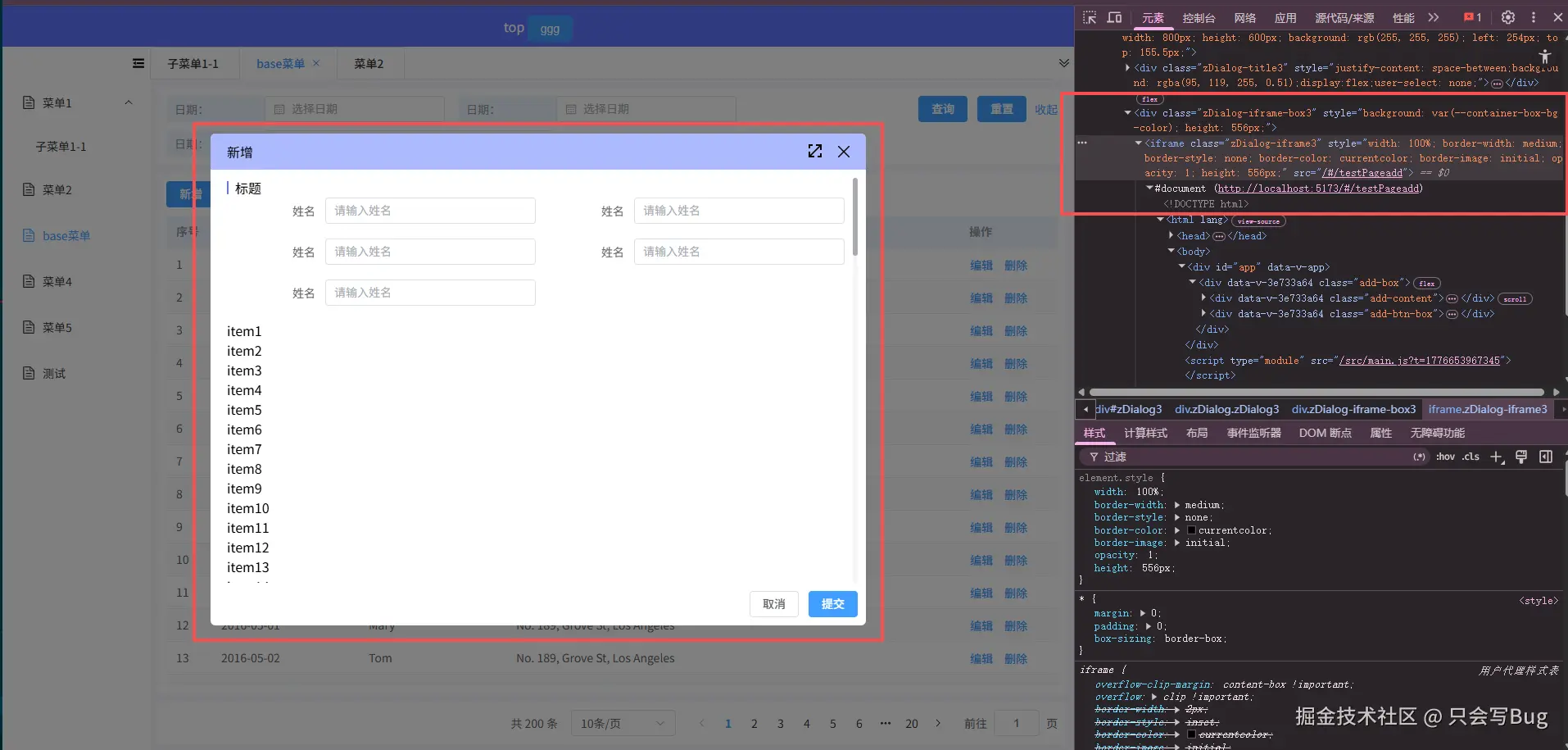 可以全屏及拖动。目前我感觉比较麻烦的是需要维护更多的路由
代码展示: 在main.js中全局引入 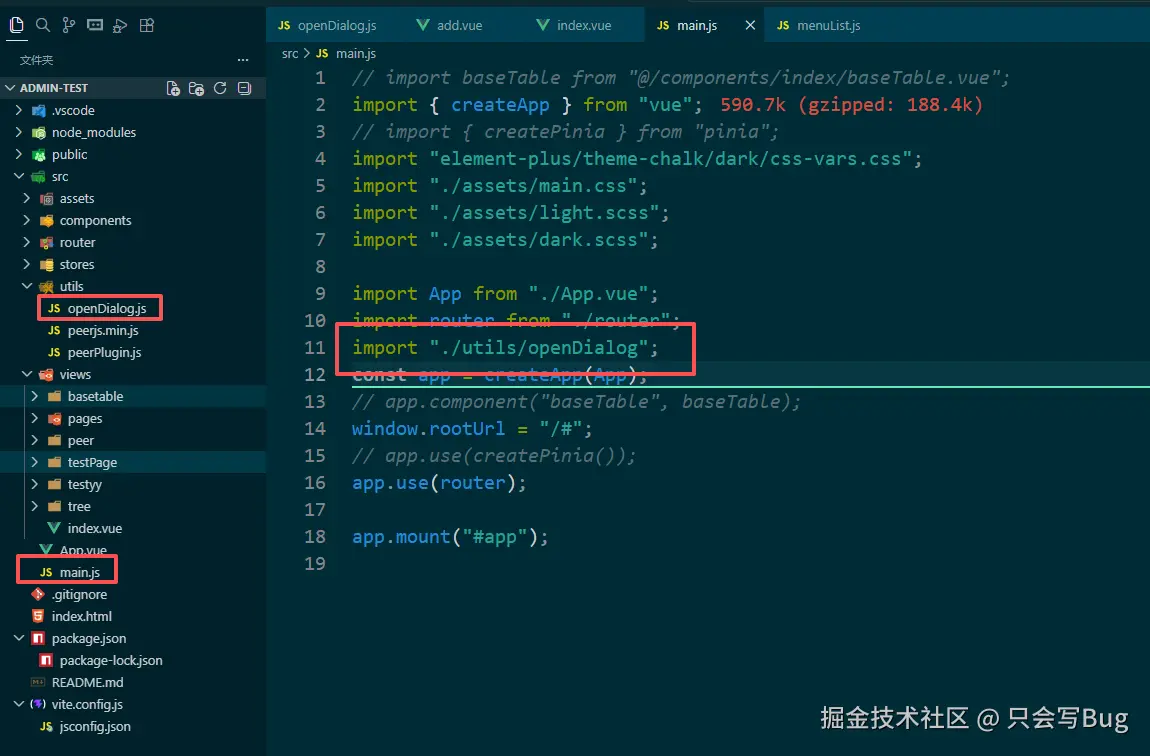 页面使用: 列表页面中的新增及编辑按钮
php
// 新增及编辑按钮
const handleAdd = (row) => {
  openDialog(
    {
      title: row? "编辑" : "新增",
      path: "/#/testPageadd",
      width: "800px",
      height: "600px",
      fullscreen: true,
      drag: true,
      close: true,
    },
    (res) => {
      console.log(res, "resres");
    },
  );
};
新增testPageadd页面中回调事件:
ini
//取消
const handleClose = (res) => {
  closeDialog();
};
//确定
const handleSubmit = async () => {
  closeDialog({ valid: true });
};
openDialog完整代码:
js
!(function (W) {
  ("use strict");
  const keyframes = `.zDialog{display: inline-block;box-sizing: border-box;border-radius: 6px;}
    @keyframes zcentre_in {
    0% {
        opacity: 0;
         transform: scale(0);
        -webkit-transform: scale(0);
        -moz-transform: scale(0);
        -ms-transform: scale(0);
        -o-transform: scale(0);
    }100% {
        opacity: 1;
        transform: scale(1);
        -webkit-transform: scale(1);
        -moz-transform: scale(1);
        -ms-transform: scale(1);
        -o-transform: scale(1);
        }
    }
    @keyframes zcentre_out {
    0% {
        opacity: 1;
         transform: scale(1);
        -webkit-transform: scale(1);
        -moz-transform: scale(1);
        -ms-transform: scale(1);
        -o-transform: scale(1);
    }100% {
        opacity: 0;
        transform: scale(0);
        -webkit-transform: scale(0);
        -moz-transform: scale(0);
        -ms-transform: scale(0);
        -o-transform: scale(0);
        display:none
        }
    }`;
  // 创建style标签
  const stylekeyframes = document.createElement("style");
  // 设置style属性
  stylekeyframes.type = "text/css";
  // 将 keyframes样式写入style内
  stylekeyframes.innerHTML = keyframes;
  // 将style样式存放到head标签
  document.head.appendChild(stylekeyframes);
  // 样式合集
  let style = {
    Dialog: `position: fixed;top: 0;left: 0;height: 100vh;width: 100vw;overflow: hidden;`, // 主体样式
    Dialog2: `position: absolute;overflow: hidden;`, // 主体样式2
    Dialog3: `top: 50%;transform: translateY(-50%);`, // 主体样式3
    titleStyle: `justify-content: space-between;`,
    titleText: `padding: 10px 20px;width:0;flex:1;font-size: 16px;box-sizing: border-box;`,
    titleClose: `margin: 10px 20px;text-align: right;cursor: pointer;`,
    full: `margin: 10px 0;text-align: right;cursor: pointer;`,
    shade: `position: fixed;top: 0;bottom: 0;left: 0px;right: 0;`,
    iframe: `width: 100%;border: none; `,
  };
  //缓存常用字符
  var doms = [
    "zDialog",
    "zDialog-title",
    "zDialog-iframe",
    "zDialog-content",
    "zDialog-btn",
    "zDialog-close",
    "zDialog-iframe-box",
  ];
  // 弹框框数组
  let openArray = [];
  // 默认方法。
  let zDialog = {
    index: window.zDialog && window.zDialog.v ? 100000 : 0,
    open: "",
  };
  class openClass {
    constructor(setings, callback) {
      this.index = ++zDialog.index;
      this.dialogId = doms[0] + this.index;
      let csetings = JSON.parse(JSON.stringify(setings));
      this.setingsTop = setings.top;
      this.config = {
        v: "1.0.0",
        zIndex: 19961025,
        index: 0,
        closeShow: true, // 是否显示关闭
        needShade: true, // 遮罩
        shadoClick: false, // 遮罩关闭
        shadoColor: "rgba(0, 0, 0, .5)", // 遮罩颜色
        animationTime: 300, // 动画时间
        dtitleshow: true, // 弹框标题显示隐藏
        drag: false, // 拖拽
        fullscreen: false, // 全屏
        isFullscreen: false, // 是否全屏
        time: null, // 动画时间
        top: "100px", // 离顶高度
        left: "100px", // 离左宽度
        width: "800px", // 宽
        height: "600px", // 高
        close: false, // 关闭执行(点击右上角关闭也执行回调)
      };
      if (csetings.top && typeof csetings.top == "number") {
        csetings.top = csetings.top + "px";
      }
      if (csetings.width && typeof csetings.width == "number") {
        csetings.width = csetings.width + "px";
      }
      if (csetings.height && typeof csetings.height == "number") {
        csetings.height = csetings.height + "px";
      }
      this.config = { ...this.config, ...csetings };
      this.callback = callback;
      document.body
        ? this.creat()
        : setTimeout(function () {
            this.createanimation();
            this.creat();
          }, 30);
    }
    creat() {
      if (!this.config.path) {
        alert("请填写路径参数(path)");
        return;
      }
      // 判断黑白
      let scheme = localStorage.getItem("vueuse-color-scheme");
      const dark = "dark";
      let dialogBg = scheme == dark ? "rgba(41,34.2,24,0)" : "#fff"; //弹框背景
      let titleBg = scheme == dark ? "rgb(33.2, 61.4, 90.5)" : "#eee"; //标题背景
      let closeBg = scheme == dark ? "#fff" : "#000"; //标题背景

      // 添加动画样式 js创建@keyframes
      const closeSvg = `<svg t="1703816731858" class="icon" viewBox="0 0 1024 1024" version="1.1" xmlns="http://www.w3.org/2000/svg" p-id="6721" width="14" height="14"><path d="M927.435322 1006.57265l-415.903813-415.903814L95.627695 1006.57265a56.013982 56.013982 0 1 1-79.20377-79.231777l415.903814-415.875807L16.423925 95.58926A56.013982 56.013982 0 0 1 95.627695 16.357483l415.903814 415.903813L927.435322 16.357483a55.985975 55.985975 0 1 1 79.175763 79.231777L590.763286 511.465066l415.847799 415.875807a55.985975 55.985975 0 1 1-79.175763 79.231777z" fill="${closeBg}" p-id="6722"></path></svg>`;
      const fullScreenSvg = `<svg t="1703816632687" class="icon" viewBox="0 0 1024 1024" version="1.1" xmlns="http://www.w3.org/2000/svg" p-id="5441" width="16" height="16"><path d="M704 1024v-128h192v-192h128v320h-320z m192-808.064L215.936 896H448v128H0V576h128v232.064L808.064 128H576V0h448v448h-128V215.936zM128 320H0V0h320v128H128v192z" fill="${closeBg}" p-id="5442"></path></svg>`;

      const titleImgBgc =
        scheme == dark ? "" : `background: rgba(95, 119, 255, 0.51);`;

      this.config.time = this.config.animationTime / 1000;
      // 创建主体盒子
      let zDialogBox = `
            <div class="${doms[0]} ${doms[0] + this.index}" style='${
              style.Dialog2
            }z-index:${this.config.zIndex + this.index};animation: zcentre_in ${
              this.config.time
            }s;width: ${this.config.width};height: ${
              this.config.height
            };background: ${dialogBg}'>
                <div class='${doms[1] + this.index}' style='${
                  style.titleStyle
                }${titleImgBgc}display:${this.config.dtitleshow ? "flex" : "none"};user-select: none;'>
                    <div class='title${this.index}' style='${
                      style.titleText
                    };cursor: ${this.config.drag ? "move" : "initial"}'>${
                      this.config.title || "标题"
                    }</div>
                    <div class='fullScreen${this.index}' style='${
                      style.full
                    };display:${this.config.fullscreen ? "block" : "none"};user-select: none;'>${fullScreenSvg}</div>
                    <div class='close${this.index}' style='${
                      style.titleClose
                    };display:${this.config.closeShow ? "block" : "none"};user-select: none;'>${closeSvg}</div>
                </div>
                <div class="${
                  doms[6] + this.index
                }" style='background: var(--container-box-bg-color)'><iframe class="${
                  doms[2] + this.index
                }" style="${style.iframe}" src='${this.config.path}'></iframe></div>
            </div>`;
      openArray.push({ index: this.index, dialog: this });
      let div = document.createElement("div");
      div.id = doms[0] + this.index;
      this.config.needShade &&
        (div.style =
          style.Dialog + `z-index:` + (this.config.zIndex + this.index));
      !this.config.needShade && (div.style.position = "fixed");
      !this.config.needShade && (div.style.top = "0px");
      div.innerHTML = zDialogBox;
      if (W.parent) {
        W.parent.document.body.appendChild(div);
      } else {
        document.body.appendChild(div);
      }
      // 拖动
      let querySelector = div.querySelector(".title" + this.index);
      querySelector.onmousedown = (event) => {
        this.config.drag && this.move(event);
      };
      //关闭
      let querySelector2 = div.querySelector(".close" + this.index);
      querySelector2.onclick = () => {
        this.cancel();
      };
      // 全屏
      let querySelector3 = div.querySelector(".fullScreen" + this.index);
      querySelector3.onclick = () => {
        this.config.isFullscreen = !this.config.isFullscreen;
        this.isFullscreen();
      };

      // 执行计算宽度的方法
      this.calculatedHeight();
      W.addEventListener("resize", () => {
        this.calculatedHeight("resize");
      });
      this.config.needShade && this.shadeo();
    }
    // 添加遮罩
    shadeo() {
      setTimeout(() => {
        // 添加背景板,根据needShade判断是否显示蒙版 true/false
        let divs = document.getElementById(doms[0] + this.index);
        let div = [divs][0];
        let shade = document.createElement("div");
        shade.id = doms[2] + this.index;
        let shadeStyle =
          style.shade + "z-index:" + (this.config.zIndex + this.index - 1);
        shade.style = shadeStyle;
        shade.style.background = this.config.shadoColor;
        shade.onclick = () => {
          this.config.shadoClick && zDialog.close();
        };
        div.appendChild(shade);
      }, this.config.time - 100);
    }
    cancel() {
      if (this.config.close) {
        zDialog.close({ close: true });
      } else {
        zDialog.close();
      }
    }
    // 回调函数
    callback() {
      config.close && config.close();
    }
    // 拖动
    move(event) {
      let div = document.getElementsByClassName(doms[0] + this.index);
      let moveElement = div[0];
      let windowHeight = W.innerHeight;
      let windowWidth = W.innerWidth;
      document.onmousemove = function (ent) {
        let evt = ent || window.event;
        // 获取鼠标移动的坐标位置
        let ele_top = evt.clientY - event.offsetY;
        let ele_left = evt.clientX - event.offsetX;
        // 将移动的新的坐标位置进行赋值
        // 限制拖动范围
        if (ele_top < 0) {
          ele_top = 0;
        }
        if (ele_left < 0) {
          ele_left = 0;
        }
        // 右边和右下也限制拖动范围
        if (ele_top > windowHeight - moveElement.clientHeight) {
          ele_top = windowHeight - moveElement.clientHeight;
        }
        if (ele_left > windowWidth - moveElement.clientWidth) {
          ele_left = windowWidth - moveElement.clientWidth;
        }

        moveElement.style.top = ele_top + "px";
        moveElement.style.left = ele_left + "px";
      };
      document.onmouseup = function (ent) {
        document.onmousemove = function () {
          return false;
        };
      };
    }

    // 全屏
    isFullscreen() {
      let div = document.getElementsByClassName(doms[0] + this.index);
      let windowHeight = W.innerHeight;
      let windowWidth = W.innerWidth;
      if (this.config.isFullscreen) {
        div[0].style.width = "100%";
        div[0].style.height = "100%";
        div[0].style.top = "0px";
        div[0].style.left = "0px";
      } else {
        div[0].style.width = this.config.width;
        div[0].style.height = this.config.height;
        div[0].style.left = this.config.left;
        div[0].style.top = this.config.top;
      }
    }

    // 计算整个宽度,左右居中
    calculatedHeight(type) {
      let windowHeight = W.innerHeight;
      let windowWidth = W.innerWidth;
      let div = document.getElementsByClassName(doms[0] + this.index);
      if (div && div[0]) {
        let left = (windowWidth - div[0].clientWidth) / 2;
        div[0].style.left = left + "px";
        this.config.left = left + "px";
        // 计算iframe 的高度
        let title = document.getElementsByClassName(doms[1] + this.index);
        let t_h = title[0].clientHeight;
        let all = div[0].clientHeight;
        let iframeh2 = document.getElementsByClassName(doms[6] + this.index);
        let iframeh = document.getElementsByClassName(doms[2] + this.index);
        // 距离顶部
        if (!this.setingsTop) {
          let top = (windowHeight - div[0].clientHeight) / 2;
          div[0].style.top = top + "px";
          this.config.top = top + "px";
        } else {
          div[0].style.top = this.config.top;
        }
        if (!type) {
          iframeh[0].style.opacity = 0;
        }
        if (iframeh[0].attachEvent) {
          // IE 浏览器使用 attachEvent 方法
          iframeh[0].attachEvent("onload", function () {
            iframeh[0].style.opacity = 1;
          });
        } else {
          // 非 IE 浏览器使用 onload 事件
          iframeh[0].onload = function () {
            iframeh[0].style.opacity = 1;
          };
        }
        iframeh2[0].style.height = all - t_h + "px";
        iframeh[0].style.height = all - t_h + "px";
      }
    }
  }
  // 关闭当前
  zDialog.close = function (rcode) {
    let aindex = openArray.pop();
    let nindex = aindex.index;
    if (rcode && aindex.dialog.callback) {
      rcode && aindex.dialog.callback(rcode);
    }
    try {
      W.removeEventListener("resize", () => {});
    } catch (error) {}
    close(nindex);
  };
  // 关闭全部弹框
  zDialog.closeAll = function (callback) {
    openArray.forEach((ele) => {
      close(ele.index);
    });
    openArray = [];
    callback && callback();
  };
  // 根据索引关闭弹框
  close = function (index) {
    let div = document.getElementsByClassName(doms[0] + index);
    if (div && div[0]) {
      div[0].style.animation = "zcentre_out 0.3s";
    }
    setTimeout(() => {
      if (W.parent) {
        let re = W.parent.document.getElementById(doms[0] + index);
        W.parent.document.body.removeChild(re);
      } else {
        let re = document.getElementById(doms[0] + index);
        document.body.removeChild(re);
      }
    }, 200);
  };
  zDialog.open = function (deliver, callback) {
    let z = new openClass(deliver, callback);
    return z.index;
  };
  // 多层嵌套 只在父级添加
  if (W.parent.zDialog) {
    zDialog = W.parent.zDialog;
    zDialog.open = W.parent.zDialog.open;
    zDialog.close = W.parent.zDialog.close;
  }
  //暴露模块
  W.zDialog = zDialog;
  W.openDialog = zDialog.open;
  W.closeDialog = zDialog.close;
})(window);
至此结束!!!谢谢观看!!!