演唱会3D选座网页(HTML 开源)
演唱会 3D 选座系统
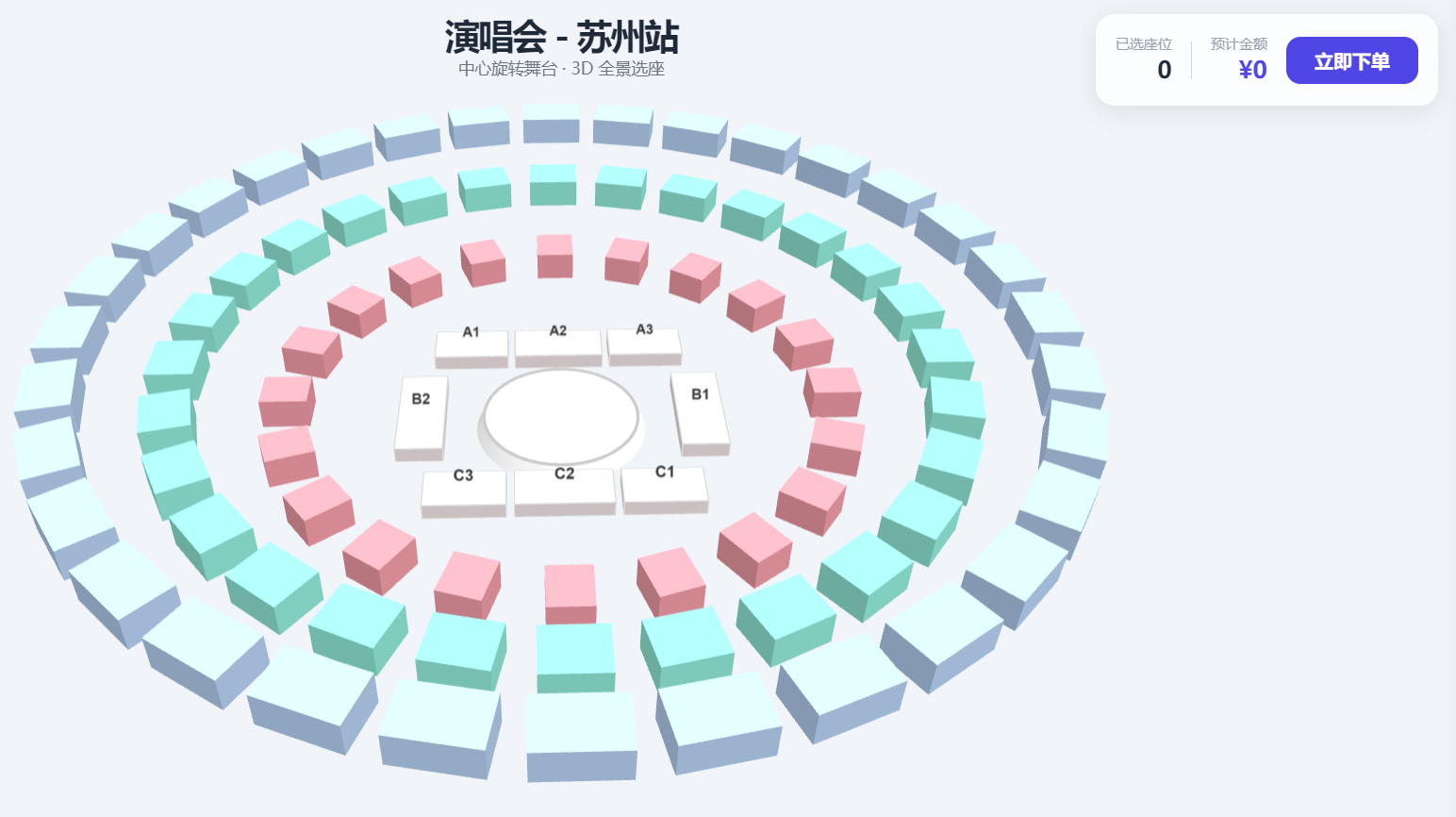
一个基于 Three.js 构建的交互式 3D 演唱会选座系统,模拟"中心旋转舞台"演唱会场馆,提供沉浸式的座位预览与选择体验。
项目亮点 ✨
三维可交互场馆:通过 3D 建模展示具有中心旋转舞台的演唱会场馆全貌,支持旋转、缩放和平移。
真实分区与定价:按照真实演唱会布局,划分内场区(A, B, C)及看台区(200/300/400),每个区域对应不同颜色与票价。
动态选座面板:点击任何区域,右侧会滑出该区域的详细座位图,支持在座位图上直接点选/取消座位。
实时购物车:右上角实时显示已选座位数量与总金额,支持结算。
响应式设计:适配不同屏幕尺寸,交互流畅。
技术栈 🛠️
**Three.js (r128)** - 3D 图形渲染核心
GSAP 3 - 用于面板动画
Tailwind CSS - 用于快速构建现代化 UI
Vanilla JavaScript - 核心交互逻辑
如何使用 🚀
获取代码
git clone <repository-url>或直接下载
index.html文件。运行项目
由于是纯前端项目,你只需要在浏览器中打开
index.html文件即可运行。
推荐使用现代浏览器(Chrome, Edge, Firefox, Safari)以获得最佳体验。
确保网络连接正常,以加载在线的 CDN 资源(Three.js, GSAP 等)。
交互指南
操作 3D 场景:鼠标左键拖拽旋转视角,滚轮缩放,右键拖拽平移。
选择区域 :将鼠标悬停在 3D 场景中的任何区域(如
A1区或201看台)上,会显示提示信息。单击该区域,右侧将展开该区域的详细选座面板。选择座位:在右侧面板的座位网格中,点击任意座位即可将其加入购物车(变为绿色)。再次点击可取消选择。每单最多选择 6 个座位。
下单:选座后,点击右上角的"立即下单"按钮模拟提交订单。
文件结构 📁
encore-3d-seat-selection/
│
├── index.html              # 主HTML文件,包含所有HTML、CSS和JavaScript代码
├── README.md               # 本说明文件
│
└── (该项目为单文件实现,所有代码、样式和逻辑均内联在 index.html 中)
核心功能详解 🔍
3D 场馆构建
中心圆形舞台带有装饰性圆环。
内场区(A/B/C)为矩形区块,采用统一底色。
看台区(200/300/400)为环绕舞台的弧形区块,通过算法生成,颜色和高度随半径变化,呈现立体看台效果。
选座逻辑
座位数据在
seatData数组中定义,包含 ID、位置、价格等信息。通过光线投射(Raycaster)实现 3D 物体与鼠标的交互检测。
购物车状态在
cart数组中维护,并实时更新 UI。用户界面
顶部中央显示演出信息。
右上角固定显示购物车摘要。
鼠标悬停时显示座位信息提示框。
右侧滑动面板提供详细的座位选择界面。
备注 📝
本项目为前端演示原型,座位数据为静态模拟,下单功能仅为前端交互演示,不与后端服务连接。
3D 模型的精细度和灯光效果可根据实际需求进一步优化。
可轻松扩展功能,如连接真实座位库存 API、增加座位状态(已售/锁定)、支持选座连选等。
html<!DOCTYPE html> <html lang="zh-CN"> <head> <meta charset="UTF-8"> <meta name="viewport" content="width=device-width, initial-scale=1.0"> <title>演唱会 3D 选座系统</title> <script src="https://cdn.tailwindcss.com"></script> <script src="https://cdnjs.cloudflare.com/ajax/libs/three.js/r128/three.min.js"></script> <script src="https://cdn.jsdelivr.net/npm/three@0.128.0/examples/js/controls/OrbitControls.js"></script> <script src="https://cdnjs.cloudflare.com/ajax/libs/gsap/3.12.2/gsap.min.js"></script> <style> body { margin: 0; overflow: hidden; background: #e2e8f0; font-family: 'Inter', sans-serif; } #canvas-container { width: 100vw; height: 100vh; } .glass-panel { background: rgba(255, 255, 255, 0.8); backdrop-filter: blur(10px); border: 1px solid rgba(255, 255, 255, 0.3); box-shadow: 0 4px 20px rgba(0,0,0,0.1); } .seat-mini { width: 28px; height: 28px; border-radius: 4px; cursor: pointer; transition: all 0.2s; border: 1px solid #ddd; display: flex; align-items: center; justify-content: center; font-size: 10px; } .seat-mini:hover { transform: scale(1.1); background: #f0fdf4; } .seat-mini.selected { background: #10b981 !important; color: white; border-color: #059669; } #tooltip { pointer-events: none; transition: opacity 0.2s; } </style> </head> <body> <div class="absolute top-6 left-1/2 -translate-x-1/2 z-10 text-center pointer-events-none"> <h1 class="text-3xl font-bold text-gray-800 tracking-tighter">演唱会 - 苏州站</h1> <p class="text-gray-500 text-sm">中心旋转舞台 · 3D 全景选座</p> </div> <div class="absolute top-6 right-6 glass-panel rounded-2xl p-4 z-10 flex items-center gap-4"> <div class="text-right"> <p class="text-gray-400 text-xs">已选座位</p> <p class="text-xl font-bold text-gray-800" id="cart-count">0</p> </div> <div class="h-8 w-px bg-gray-300"></div> <div class="text-right"> <p class="text-gray-400 text-xs">预计金额</p> <p class="text-xl font-bold text-indigo-600" id="cart-total">¥0</p> </div> <button onclick="checkout()" class="bg-indigo-600 hover:bg-indigo-700 text-white px-6 py-2 rounded-xl font-semibold transition-all">立即下单</button> </div> <div id="detail-panel" class="fixed right-0 top-0 h-full w-96 glass-panel transform translate-x-full transition-transform duration-500 z-20 overflow-y-auto p-8"> <button onclick="closePanel()" class="mb-6 text-gray-500 hover:text-gray-800 flex items-center gap-2"> <svg class="w-5 h-5" fill="none" stroke="currentColor" viewBox="0 0 24 24"><path d="M15 19l-7-7 7-7"></path></svg> 返回场馆图 </button> <div id="panel-content"></div> </div> <div id="tooltip" class="fixed glass-panel px-3 py-1.5 rounded-lg text-gray-800 text-xs opacity-0 z-30 shadow-xl border border-white"> <span id="tooltip-text"></span> </div> <div id="canvas-container"></div> <script> // 区域颜色配置 (参考图片) const COLORS = { STAGE: 0xffffff, INNER: 0xfff1f2, // A, B, C, D 区域底色 STAND_200: 0xfda4af, // 粉色环 STAND_300: 0x99f6e4, // 浅绿环 STAND_400: 0xbfdbfe // 浅蓝外环 }; // 区域数据定义 const seatData = []; // 1. 生成内场区域 (A, B, C, D) - 靠近舞台的矩形块 [cite: 169, 170, 171] const innerZones = [ { id: 'A1', x: -12, z: -15, w: 10, d: 6, price: 1880 }, { id: 'A2', x: 0, z: -15, w: 12, d: 6, price: 1880 }, { id: 'A3', x: 12, z: -15, w: 10, d: 6, price: 1880 }, { id: 'B1', x: 18, z: 0, w: 6, d: 15, price: 1680 }, { id: 'B2', x: -18, z: 0, w: 6, d: 15, price: 1680 }, { id: 'C1', x: 12, z: 15, w: 10, d: 6, price: 1280 }, { id: 'C2', x: 0, z: 15, w: 12, d: 6, price: 1280 }, { id: 'C3', x: -12, z: 15, w: 10, d: 6, price: 1280 } ]; // 2. 环形看台生成逻辑 [cite: 174, 175, 178] function generateRing(startId, count, radius, color, price) { for (let i = 0; i < count; i++) { const angle = (i / count) * Math.PI * 2; seatData.push({ id: (startId + i).toString(), radius: radius, angle: angle, color: color, price: price, type: 'stand' }); } } // 填充数据 generateRing(201, 20, 35, COLORS.STAND_200, 980); // 200系列 generateRing(301, 28, 48, COLORS.STAND_300, 680); // 300系列 generateRing(401, 32, 60, COLORS.STAND_400, 380); // 400系列 let scene, camera, renderer, controls, raycaster, mouse; let objects = [], cart = []; function init() { scene = new THREE.Scene(); scene.background = new THREE.Color(0xf1f5f9); camera = new THREE.PerspectiveCamera(40, window.innerWidth / window.innerHeight, 0.1, 1000); camera.position.set(0, 100, 120); renderer = new THREE.WebGLRenderer({ antialias: true }); renderer.setSize(window.innerWidth, window.innerHeight); renderer.setPixelRatio(window.devicePixelRatio); document.getElementById('canvas-container').appendChild(renderer.domElement); controls = new THREE.OrbitControls(camera, renderer.domElement); controls.enableDamping = true; controls.maxPolarAngle = Math.PI / 2.2; // 灯光 [cite: 190, 191] const ambient = new THREE.AmbientLight(0xffffff, 0.7); scene.add(ambient); const directional = new THREE.DirectionalLight(0xffffff, 0.5); directional.position.set(10, 50, 10); scene.add(directional); raycaster = new THREE.Raycaster(); mouse = new THREE.Vector2(); buildVenue(); window.addEventListener('mousemove', onMouseMove); window.addEventListener('click', onClick); window.addEventListener('resize', onResize); animate(); } function buildVenue() { // 1. 中心舞台 (参考图中带有刻度的白色圆盘) [cite: 197, 200, 201] const stageGroup = new THREE.Group(); const baseGeo = new THREE.CylinderGeometry(10, 11, 2, 64); const baseMat = new THREE.MeshStandardMaterial({ color: 0xffffff }); const base = new THREE.Mesh(baseGeo, baseMat); stageGroup.add(base); // 装饰环 const ringGeo = new THREE.TorusGeometry(10, 0.2, 16, 100); const ringMat = new THREE.MeshBasicMaterial({ color: 0xcccccc }); const ring = new THREE.Mesh(ringGeo, ringMat); ring.rotation.x = Math.PI / 2; ring.position.y = 1.1; stageGroup.add(ring); scene.add(stageGroup); // 2. 内场方块 (A/B/C/D) innerZones.forEach(zone => { const geo = new THREE.BoxGeometry(zone.w, 2, zone.d); const mat = new THREE.MeshStandardMaterial({ color: COLORS.INNER }); const mesh = new THREE.Mesh(geo, mat); mesh.position.set(zone.x, 1, zone.z); mesh.userData = { id: zone.id, price: zone.price, name: `${zone.id} 区` }; // 边框 const edges = new THREE.EdgesGeometry(geo); const line = new THREE.LineSegments(edges, new THREE.LineBasicMaterial({ color: 0xdddddd })); mesh.add(line); objects.push(mesh); scene.add(mesh); addLabel(mesh, zone.id); }); // 3. 环形看台区 (200, 300, 400) [cite: 220, 221] seatData.forEach(data => { const w = data.radius * 0.15; const geo = new THREE.BoxGeometry(w, 4, 6); const mat = new THREE.MeshStandardMaterial({ color: data.color }); const mesh = new THREE.Mesh(geo, mat); mesh.position.x = Math.sin(data.angle) * data.radius; mesh.position.z = Math.cos(data.angle) * data.radius; mesh.position.y = (data.radius - 30) * 0.4 + 2; // 随半径升高 mesh.lookAt(0, mesh.position.y, 0); mesh.userData = { id: data.id, price: data.price, name: `${data.id} 看台` }; objects.push(mesh); scene.add(mesh); }); } function addLabel(parent, text) { const canvas = document.createElement('canvas'); const ctx = canvas.getContext('2d'); canvas.width = 128; canvas.height = 64; ctx.fillStyle = '#333'; ctx.font = 'bold 40px Arial'; ctx.textAlign = 'center'; ctx.fillText(text, 64, 45); const tex = new THREE.CanvasTexture(canvas); const sprite = new THREE.Sprite(new THREE.SpriteMaterial({ map: tex })); sprite.scale.set(6, 3, 1); sprite.position.y = 3; parent.add(sprite); } function onMouseMove(e) { mouse.x = (e.clientX / window.innerWidth) * 2 - 1; mouse.y = -(e.clientY / window.innerHeight) * 2 + 1; raycaster.setFromCamera(mouse, camera); const intersects = raycaster.intersectObjects(objects); const tooltip = document.getElementById('tooltip'); if (intersects.length > 0) { const obj = intersects[0].object; document.body.style.cursor = 'pointer'; tooltip.style.opacity = 1; tooltip.style.left = e.clientX + 15 + 'px'; tooltip.style.top = e.clientY + 15 + 'px'; document.getElementById('tooltip-text').innerText = `${obj.userData.name} - ¥${obj.userData.price}`; } else { document.body.style.cursor = 'default'; tooltip.style.opacity = 0; } } function onClick() { raycaster.setFromCamera(mouse, camera); const intersects = raycaster.intersectObjects(objects); if (intersects.length > 0) { const data = intersects[0].object.userData; showPanel(data); } } function showPanel(data) { const panel = document.getElementById('detail-panel'); const content = document.getElementById('panel-content'); panel.classList.remove('translate-x-full'); content.innerHTML = ` <h2 class="text-2xl font-bold text-gray-800">${data.name}</h2> <p class="text-indigo-600 font-bold text-lg mb-6">票价: ¥${data.price}</p> <div class="grid grid-cols-8 gap-2 mb-8"> ${Array.from({length: 48}).map((_, i) => { const sid = `${data.id}-${i+1}`; const active = cart.some(s => s.id === sid) ? 'selected' : ''; return `<div class="seat-mini ${active}" onclick="toggleSeat('${sid}', ${data.price})">${i+1}</div>`; }).join('')} </div> <div class="bg-gray-50 p-4 rounded-xl border border-gray-100"> <p class="text-xs text-gray-400 uppercase font-bold mb-2">区域说明</p> <p class="text-sm text-gray-600">该区域视野极佳,实时剩余位置:${Math.floor(Math.random()*20)+5} 个</p> </div> `; } window.toggleSeat = function(id, price) { const idx = cart.findIndex(s => s.id === id); if (idx > -1) { cart.splice(idx, 1); event.target.classList.remove('selected'); } else { if (cart.length >= 6) return alert('每单限购6张'); cart.push({id, price}); event.target.classList.add('selected'); } document.getElementById('cart-count').innerText = cart.length; document.getElementById('cart-total').innerText = '¥' + cart.reduce((a, b) => a + b.price, 0); }; window.closePanel = () => document.getElementById('detail-panel').classList.add('translate-x-full'); function checkout() { if (cart.length === 0) return alert('请先选择座位'); alert(`订单提交中...\n已选: ${cart.length} 个座位\n总额: ¥${cart.reduce((a,b)=>a+b.price, 0)}`); } function onResize() { camera.aspect = window.innerWidth / window.innerHeight; camera.updateProjectionMatrix(); renderer.setSize(window.innerWidth, window.innerHeight); } function animate() { requestAnimationFrame(animate); controls.update(); renderer.render(scene, camera); } init(); </script> </body> </html>