购物车总体实现的样式
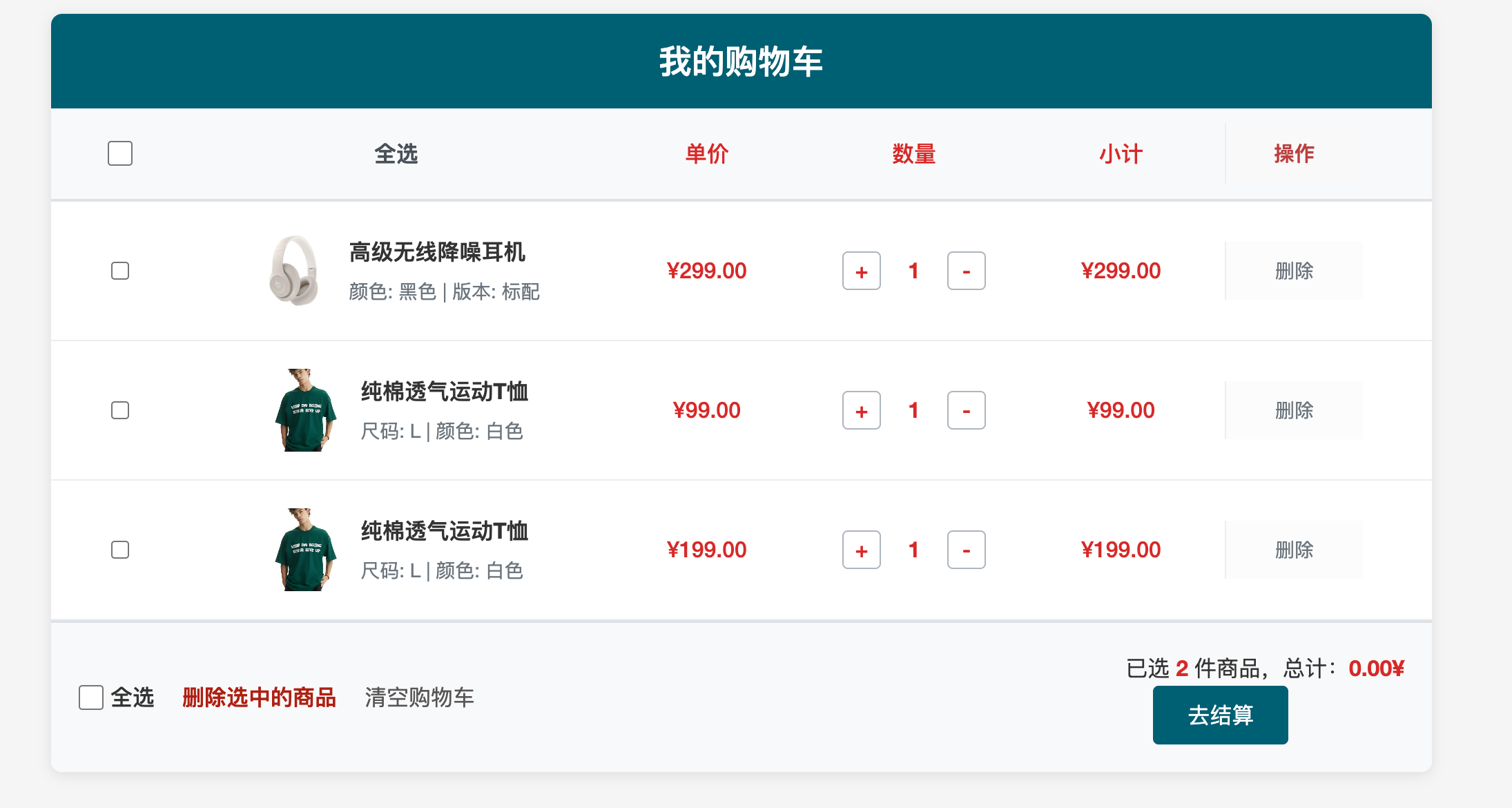
重温jQuery发现很多方便性,现在流行很多其他项目框架来搭建项目,但学框架之前必须滤清第三方库里的最全面且最帅气的jquery,学习之前可以看一些课程,和一啃一啃读懂jquery中文手册,后期做项目有很大的帮助。
https://www.jq22.com/chm/jquery/index.html
上面的是jquery的网络地址。
html代码部分:
html
<!DOCTYPE html>
<html lang="zh-CN">
<head>
  <meta charset="UTF-8">
  <title>购物车案例</title>
  <link rel="stylesheet" href="./css.css">
  <script src="https://ajax.aspnetcdn.com/ajax/jQuery/jquery-3.7.1.min.js"></script>

</head>
<body>

  <div class="cart-container">
    <div class="cart-header">
      <h1>我的购物车</h1>
    </div>

    <!-- 表头:包含全选框 -->
    <div class="cart-table-header">
      <div class="col-select">
        <!-- 全选复选框 -->
        <input type="checkbox" id="selectAll" class="checkAll">
      </div>
      <div class="col-info">全选</div>
      <div class="col-price">单价</div>
      <div class="col-qty">数量</div>
      <div class="col-subtotal">小计</div>
      <div class="col-rm">操作</div>
    </div>

    <!-- 商品列表 1 -->
    <div class="cart-item">
      <div class="col-select">
        <input type="checkbox" class="item-checkbox">
      </div>
      <div class="cart-item-details">
        <img src="https://img2.baidu.com/it/u=606815804,405084826&fm=253&fmt=auto&app=138&f=JPEG?w=500&h=500" alt="商品图片">
        <div>
          <div class="cart-item-title">高级无线降噪耳机</div>
          <div class="cart-item-spec">颜色: 黑色 | 版本: 标配</div>
        </div>
      </div>
      <div class="cart-item-price">¥299.00</div>
      <div class="cart-item-quantity">
        <span class="rg">+</span>
        <span class="md">1</span>
        <span class="lf">-</span>
      </div>
      <div class="cart-item-subtotal">¥299.00</div>
      <div class="cart-item-rm">删除</div>
    </div>

    <!-- 商品列表 2 -->
    <div class="cart-item">
      <div class="col-select">
        <input type="checkbox" class="item-checkbox">
      </div>
      <div class="cart-item-details">
        <img src="https://img0.baidu.com/it/u=1214579115,1665739550&fm=253&fmt=auto&app=138&f=JPEG?w=500&h=667" alt="商品图片">
        <div>
          <div class="cart-item-title">纯棉透气运动T恤</div>
          <div class="cart-item-spec">尺码: L | 颜色: 白色</div>
        </div>
      </div>
      <div class="cart-item-price">¥99.00</div>
      <div class="cart-item-quantity">
        <span class="rg">+</span>
        <span class="md">1</span>
        <span class="lf">-</span>
      </div>
      <div class="cart-item-subtotal">¥99.00</div>
      <div class="cart-item-rm">删除</div>
    </div>

    <!-- 商品列表 3 -->
    <div class="cart-item">
        <div class="col-select">
          <input type="checkbox" class="item-checkbox">
        </div>
        <div class="cart-item-details">
          <img src="https://img0.baidu.com/it/u=1214579115,1665739550&fm=253&fmt=auto&app=138&f=JPEG?w=500&h=667" alt="商品图片">
          <div>
            <div class="cart-item-title">纯棉透气运动T恤</div>
            <div class="cart-item-spec">尺码: L | 颜色: 白色</div>
          </div>
        </div>
        <div class="cart-item-price">¥199.00</div>
        <div class="cart-item-quantity">
          <span class="rg">+</span>
          <span class="md">1</span>
          <span class="lf">-</span>
        </div>
        <div class="cart-item-subtotal">¥199.00</div>
        <div class="cart-item-rm">删除</div>
      </div>

    <!-- 底部结算栏 -->
    <div class="cart-footer">
      <!-- 左侧:全选与删除 -->
      <div class="footer-actions">
        <label for="selectAll" class="select-all-label">
          <input type="checkbox"  id="selectAllBottom" class="checkAll"> 全选
        </label>
        <span class="delete-selected">删除选中的商品</span>
        <span class="delete-remove">清空购物车</span>
      </div>

      <!-- 右侧:总价与结算 -->
      <div class="footer-summary">
        <div class="cart-total">已选 <span>2</span> 件商品,总计:<span class="sm">0.00¥</span></div>
        <button class="checkout-btn">去结算</button>
      </div>
    </div>
  </div>
  <script src="./main.js"></script>
</body>
</html>
css部分
css
/* 重置默认样式和基础设置 */
* {
    margin: 0;
    padding: 0;
    box-sizing: border-box;
}

body {
    font-family: "Helvetica Neue", Helvetica, Arial, sans-serif;
    background-color: #f5f5f5;
    color: #333;
    line-height: 1.6;
}

/* 购物车容器 */
.cart-container {
    max-width: 1000px;
    margin: 20px auto;
    background: #fff;
    border-radius: 8px;
    box-shadow: 0 2px 10px rgba(0, 0, 0, 0.1);
    overflow: hidden;
}

/* 表头样式 */
.cart-header {
    background-color: #005f73;
    color: #fff;
    padding: 15px;
    text-align: center;
}

.cart-header h1 {
    font-size: 24px;
    font-weight: 500;
}

/* 表格头部行 */
.cart-table-header {
    display: flex;
    align-items: center;
    background-color: #f8f9fa;
    border-bottom: 2px solid #dee2e6;
    padding: 10px 0;
    font-weight: bold;
    color: #495057;
}

/* 通用列样式 */
.cart-table-header > div,
.cart-item > div {
    padding: 10px;
    display: flex;
    align-items: center;
    justify-content: center;
}

/* 选择列(复选框) */
.col-select {
    width: 10%;
    justify-content: center;
}

.checkAll {
    width: 18px;
    height: 18px;
    cursor: pointer;
}

/* 信息列 */
.col-info,
.cart-item-details {
    width: 30%;
    justify-content: flex-start;
    gap: 10px;
}

.cart-item-details img {
    width: 60px;
    height: 60px;
    object-fit: cover;
    border-radius: 4px;
}

.cart-item-title {
    font-weight: bold;
    margin-bottom: 5px;
    font-size: 16px;
}

.cart-item-spec {
    font-size: 14px;
    color: #6c757d;
}

/* 价格、数量、小计列 */
.col-price,
.cart-item-price,
.col-qty,
.cart-item-quantity,
.col-subtotal,
.cart-item-subtotal {
    width: 15%;
    font-size: 16px;
    font-weight: 500;
    color: #d62828;
}

/* ---------------------------------- */
/* 以下是根据你的要求重点编写的样式 */
/* ---------------------------------- */

/* 1. 表头中的 "操作" 列样式 */
/* 背景色使用了柔和的灰色,文字加粗并设置了红色以示警告含义 */
.col-rm {
    width: 10%;
    font-weight: bold;
    color: #bb3f3f; /* 温和的红色 */
    background-color: #f9f9f9; /* 浅灰色背景 */
    border-left: 1px solid #eee; /* 添加左边框以区分 */
    font-size: 15px;
}

/* 2. 商品行中的 "删除" 按钮/文字样式 */
/* 默认样式:灰色文字 */
.cart-item-rm {
    width: 10%;
    color: #6c757d;
    font-size: 14px;
    cursor: pointer;
    transition: all 0.2s ease;
    background-color: #fcfcfc;
    border-left: 1px solid #eee;
}

/* 悬停样式:变为红色,增加视觉反馈 */
.cart-item-rm:hover {
    color: #ae2012; /* 深红色,表示危险操作 */
    background-color: #fff5f5; /* 浅红背景 */
    transform: scale(1.05); /* 稍微放大一点 */
    font-weight: bold;
}

/* ---------------------------------- */
/* 数量加减控件样式 (为了让页面完整) */
.cart-item-quantity {
    width: 15%;
    gap: 10px;
}

.cart-item-quantity span {
    display: inline-flex;
    width: 28px;
    height: 28px;
    border: 1px solid #adb5bd;
    border-radius: 4px;
    cursor: pointer;
    user-select: none;
    transition: background-color 0.2s;
    text-align: center;
    /* 添加以下两行实现 Flex 内容完全居中 */
    justify-content: center;
    align-items: center;
}

.cart-item-quantity span:hover {
    background-color: #005f73;
    color: #fff;
    border-color: #005f73;
}

.cart-item-quantity .md {
    border: none;
    background: transparent;
    font-weight: bold;
    cursor: default;
}

/* 商品项样式 */
.cart-item {
    display: flex;
    align-items: center;
    border-bottom: 1px solid #eee;
    padding: 10px 0;
    transition: background-color 0.2s;
}

.cart-item:hover {
    background-color: #f8f9fa;
}

/* 底部结算栏 */
.cart-footer {
    display: flex;
    justify-content: space-between;
    align-items: center;
    padding: 20px;
    background-color: #f8f9fa;
    border-top: 2px solid #dee2e6;
    font-size: 16px;
}

.footer-actions {
    display: flex;
    align-items: center;
    gap: 20px;
}

.select-all-label {
    display: flex;
    align-items: center;
    gap: 5px;
    cursor: pointer;
    font-weight: 500;
}

.delete-selected {
    color: #ae2012;
    cursor: pointer;
    font-weight: bold;
}

.delete-selected:hover {
    text-decoration: underline;
}

/* 总价与结算按钮 */
.cart-total {
    color: #333;
}

.cart-total span {
    color: #d62828;
    font-weight: bold;
}

.checkout-btn {
    margin-left: 20px;
    padding: 10px 25px;
    background-color: #005f73;
    color: #fff;
    border: none;
    border-radius: 4px;
    font-size: 16px;
    cursor: pointer;
    transition: background-color 0.2s;
}

.checkout-btn:hover {
    background-color: #023e51;
}

/*清空购物车*/
.delete-remove{
    cursor: pointer;
    color: #575555;
    color: 13px;
}
js部分
javascript
$(function () {
//获取所有的全选框
$('.checkAll ').change(function(){
// 获取当前全选框的选中状态 (true 或 false)
let isChecked = $(this).prop('checked');

// 将所有商品的复选框状态设置为和全选框一样
$('.item-checkbox').prop('checked', isChecked);
//设置汇总信息
setTotal();
});
/**
 * 复选框点击事件,调用set total函数
 */
$('.item-checkbox').change(function(){
    setTotal();
})
/**
*设置汇总的信息
*/
function setTotal() {
    //获取所有被选中的多选框
    const cbs = $('input[type="checkbox"].item-checkbox:checked');
    let sum = 0;
    cbs.each((i,dom) => {
        sum +=  +$(dom).parents('.cart-item').find('.cart-item-subtotal').text().replace('¥','');
    });
    $('.footer-summary .cart-total span').text(cbs.length);
    $('.footer-summary .cart-total .sm').text(`¥${sum.toFixed(2)}`);
}

/**
 * 点击改变数量
 *
 */
$('.rg').click(function(){
    const inp = $(this).nextAll('.md');
    let newNumber = +inp.text() + 1;
    changeNumber(newNumber,inp)
})
$('.lf').click(function(){
    const inp = $(this).prevAll('.md');
    let newNumber = +inp.text() - 1;

    changeNumber(newNumber,inp)

})
/**
 * 数量变化函数
 */
function changeNumber(newNumber , inp ) {
    if(newNumber < 1){
        newNumber = 1;
    }
    inp.text(newNumber); // 修正:span 使用 text()
      // 2. 计算小计:需要找到当前行的单价
    // 根据传入的 inp (数量元素) 向上找到 .cart-item,再找单价
    const priceText = inp.closest('.cart-item').find('.cart-item-price').text();
    // 提取数字(去除 ¥ 符号)
    const price = parseFloat(priceText.replace('¥', ''));
    // 计算小计
    const subtotal = price * newNumber;
    // 3. 更新小计显示
    inp.closest('.cart-item').find('.cart-item-subtotal').text(`¥${subtotal.toFixed(2)}`);
     // 4. 重新计算底部汇总
     setTotal();
}

/**
 * 删除项
 */
$('.cart-item-rm').click(function (params) {
    $(this).parents('.cart-item').remove();
    setTotal();
})

/**
 * 删除选中的商品
 */
    // --- 3. 删除选中商品 ---
$('.delete-selected').click(function () {
    $('.item-checkbox:checked').each(function () {
        $(this).closest('.cart-item').remove();
    });
    setTotal(); // 重新计算
});

/**
 * 清空所有商品
 */
    // --- 3. 删除选中商品 ---
    $('.delete-remove').click(function () {
      $('.cart-item').remove();

        setTotal(); // 重新计算
    });


});