来源
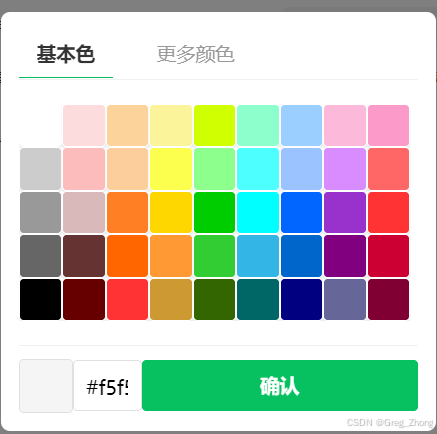
最开始项目中实现这个颜色选择器,ui给的就是非常设计:弹框选择颜色方块,点击确定,因为后面颜色值很单调,用户不一定知道颜色值,就建议可以使用中国色(735种色调提供选择)进行配置到面板上,然后甲方就采用了使用跳转到页面配置颜色值方式;
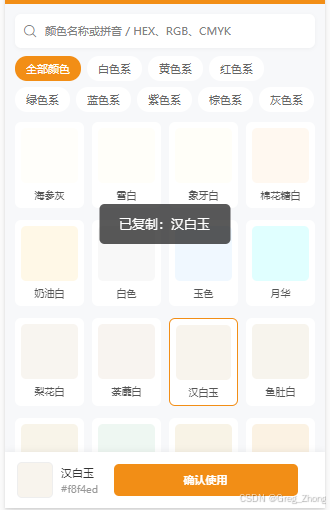
精致版-颜色选择器-完整实现
简陋版,弹框的方式这就不概述了,精致版的优势就是735种色调,从中国色网站上复制接口返回的所有颜色值,进行配置到色板上供用户选择或搜索
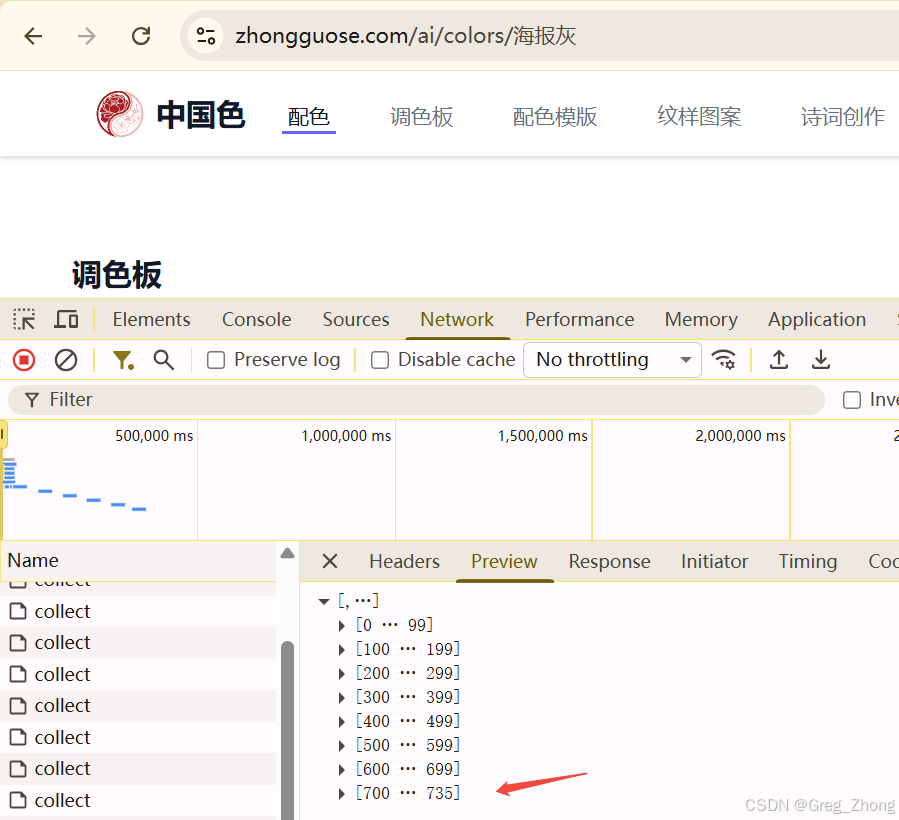
-
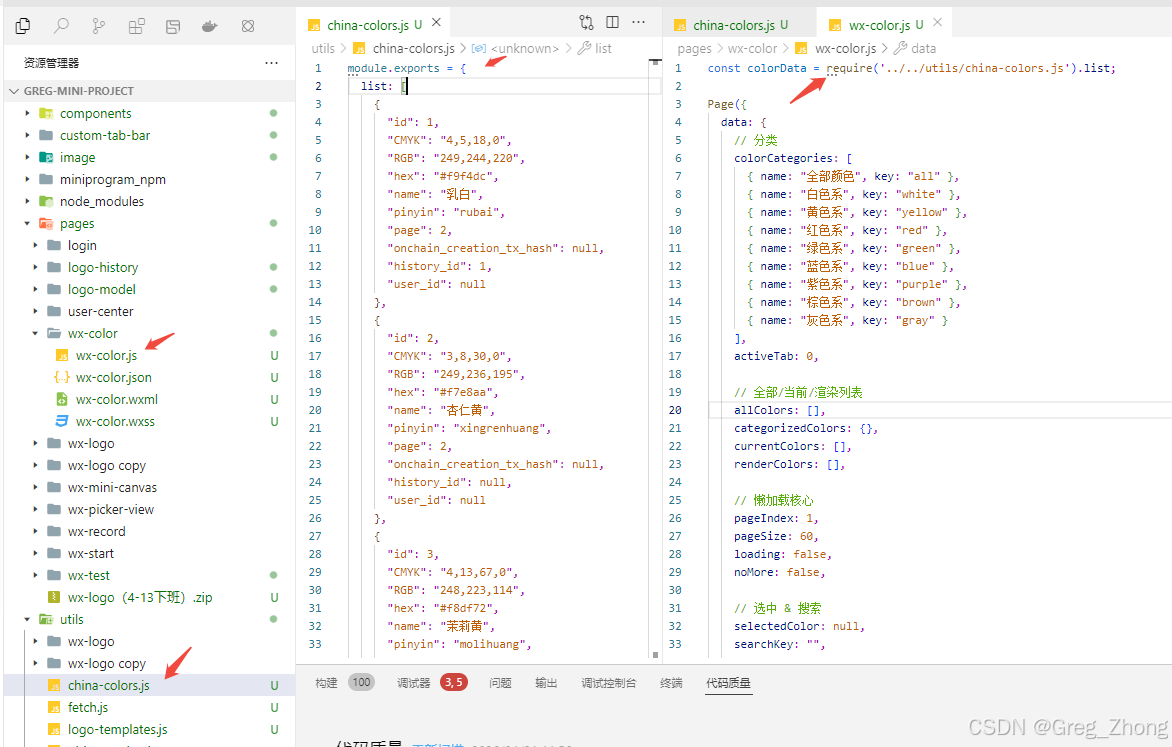
代码中创建js文件,保存为对象进行导出
-
代码中导入使用,优化页面效果【完整代码】
bashconst colorData = require('../../utils/china-colors.js').list; Page({ data: { // 分类 colorCategories: [ { name: "全部颜色", key: "all" }, { name: "白色系", key: "white" }, { name: "黄色系", key: "yellow" }, { name: "红色系", key: "red" }, { name: "绿色系", key: "green" }, { name: "蓝色系", key: "blue" }, { name: "紫色系", key: "purple" }, { name: "棕色系", key: "brown" }, { name: "灰色系", key: "gray" } ], activeTab: 0, // 全部/当前/渲染列表 allColors: [], categorizedColors: {}, currentColors: [], renderColors: [], // 懒加载核心 pageIndex: 1, pageSize: 60, loading: false, noMore: false, // 选中 & 搜索 selectedColor: null, searchKey: "", // 节流锁:防止快速滚动重复触发加载 isLoading: false, fromType: '', }, onLoad(options) { // 接收来源标记 this.setData({ fromType: options.from || 'bg' }) const allColors = colorData.map(item => ({ ...item, hex: item.hex.toLowerCase(), lightness: this.getLightness(item.RGB) })); const categorizedColors = this.categorizeChineseColors(allColors); Object.keys(categorizedColors).forEach(key => { categorizedColors[key].sort((a, b) => a.lightness - b.lightness).reverse(); }); const initList = allColors.sort((a, b) => a.lightness - b.lightness).reverse(); this.setData({ allColors, categorizedColors, currentColors: initList, renderColors: initList.slice(0, 60), pageIndex: 1, noMore: initList.length <= 60 }); }, // 颜色分类(精准不串类) categorizeChineseColors(colors) { const categories = { white: [], yellow: [], red: [], green: [], blue: [], purple: [], brown: [], gray: [] }; colors.forEach(color => { const name = color.name; const [r, g, b] = color.RGB.split(',').map(Number); if (/黄|金|橙|橘|杏|柠|葵|麦/.test(name)) {categories.yellow.push(color);return;} if (/红|赤|朱|丹|绯|绛|粉|樱/.test(name)) {categories.red.push(color);return;} if (/绿|青|翠|碧|苔|竹/.test(name)) {categories.green.push(color);return;} if (/蓝|靛|苍|海|天/.test(name)) {categories.blue.push(color);return;} if (/紫|堇|茄|丁香/.test(name)) {categories.purple.push(color);return;} if (/棕|褐|咖|茶|栗|赭/.test(name)) {categories.brown.push(color);return;} if (/灰|墨|黑|玄|乌/.test(name)) {categories.gray.push(color);return;} if (/白|米|雪|霜|乳|玉/.test(name)) {categories.white.push(color);return;} // HSL兜底 const max = Math.max(r, g, b); const min = Math.min(r, g, b); const delta = max - min; let hue = 0; if(delta !== 0){ if(max === r) hue = ((g - b) / delta) % 6; if(max === g) hue = (b - r) / delta + 2; if(max === b) hue = (r - g) / delta + 4; } hue = Math.round(hue * 60); if (hue < 0) hue += 360; const lightness = (max + min) / 2 / 255; const saturation = delta === 0 ? 0 : delta / (1 - Math.abs(2 * lightness - 1)); if (lightness > 0.92 || saturation < 0.08) categories.white.push(color); else if (hue >= 0 && hue < 25) categories.red.push(color); else if (hue >= 25 && hue < 70) categories.yellow.push(color); else if (hue >= 70 && hue < 160) categories.green.push(color); else if (hue >= 160 && hue < 240) categories.blue.push(color); else if (hue >= 240 && hue < 310) categories.purple.push(color); else categories.gray.push(color); }); return categories; }, getLightness(rgbStr) { const [r, g, b] = rgbStr.split(',').map(Number); return 0.299 * r + 0.587 * g + 0.114 * b; }, // 切换分类 重置懒加载 switchTab(e) { const index = e.currentTarget.dataset.index; const key = this.data.colorCategories[index].key; let currentColors = key === "all" ? this.data.allColors : (this.data.categorizedColors[key] || []); const list = currentColors; const render = list.slice(0, this.data.pageSize); this.setData({ activeTab: index, currentColors: list, renderColors: render, pageIndex: 1, loading: false, noMore: list.length <= this.data.pageSize, selectedColor: null }); }, // 滚动触底加载更多 + 加载中动画 + 防重复 async loadMoreColors() { const { loading, noMore, isLoading, pageIndex, pageSize, currentColors, renderColors } = this.data; if (loading || noMore || isLoading) return; this.setData({ loading: true, isLoading: true }); // 模拟流畅加载动画间隔 await new Promise(resolve => setTimeout(resolve, 280)); const start = pageIndex * pageSize; const end = start + pageSize; const newList = currentColors.slice(start, end); if (newList.length === 0) { this.setData({ loading: false, noMore: true, isLoading: false }); return; } this.setData({ renderColors: [...renderColors, ...newList], pageIndex: pageIndex + 1, loading: false, isLoading: false, noMore: end >= currentColors.length }); }, // 选中颜色 selectColor(e) { const color = e.currentTarget.dataset.color; this.setData({ selectedColor: color }); // 复制功能(新增) let copyText = `${color.name} ${color.hex}`; wx.setClipboardData({ data: copyText, success: () => { wx.showToast({ title: '已复制:' + color.name, icon: 'none', duration: 1500 }); } }); }, // 搜索 handleSearch(e) { const key = e.detail.value.trim().toLowerCase(); this.setData({ searchKey: key }); if (!key) { this.switchTab({ currentTarget: { dataset: { index: this.data.activeTab } } }); return; } const filter = this.data.allColors.filter(item => item.name.includes(key) || item.hex.includes(key) || item.RGB.includes(key) || item.CMYK.includes(key) || item.pinyin.includes(key) ); const render = filter.slice(0, this.data.pageSize); this.setData({ activeTab: 0, currentColors: filter, renderColors: render, pageIndex: 1, noMore: filter.length <= this.data.pageSize, selectedColor: null }); }, // 确认选择 // confirmColor() { // if (!this.data.selectedColor) return; // const pages = getCurrentPages(); // const prev = pages[pages.length - 2]; // if (prev) { // prev.setData({ logoTextColor: this.data.selectedColor }); // } // wx.showToast({ title: `已选${this.data.selectedColor.name}`, icon: 'success' }); // setTimeout(() => wx.navigateBack(), 1200); // }, // 确认选择(真正可用版) // 最终稳定版 // 确认选择(完整版:支持6个颜色入口) confirmColor() { if (!this.data.selectedColor) return; const selectedHex = this.data.selectedColor.hex; const fromType = this.data.fromType; // 全局传值(最稳定,不跨页调用) getApp().globalData.selectedColorInfo = { color: selectedHex, from: fromType }; wx.showToast({ title: `已应用:${this.data.selectedColor.name}`, icon: 'success', duration: 1200 }); setTimeout(() => { wx.navigateBack({ fail: err => console.log('返回失败', err) }); }, 600); }, });bash<view class="container"> <!-- 顶部搜索 --> <view class="search-box"> <icon type="search" size="18" class="search-icon"></icon> <input class="search-input" placeholder="颜色名称或拼音 / HEX、RGB、CMYK" bindinput="handleSearch" value="{{searchKey}}" /> </view> <!-- 分类标签 自动换行 无横向滚动 --> <view class="tabs"> <view class="tab-item {{activeTab === index ? 'active' : ''}}" wx:for="{{colorCategories}}" wx:key="index" bindtap="switchTab" data-index="{{index}}" > {{item.name}} </view> </view> <!-- 颜色列表 滚动加载 --> <scroll-view scroll-y class="color-grid-container" bindscrolltolower="loadMoreColors" enhanced fast-decelerate > <view class="color-grid"> <view class="color-item {{selectedColor && selectedColor.id === item.id ? 'selected' : ''}}" wx:for="{{renderColors}}" wx:key="id" bindtap="selectColor" data-color="{{item}}" > <view class="color-swatch" style="background-color: {{item.hex}};"></view> <view class="color-name">{{item.name}}</view> </view> </view> <!-- 加载中 / 没有更多 --> <view class="load-more-box"> <view wx:if="{{loading}}" class="loading"> <text class="loading-text">加载中...</text> </view> <view wx:if="{{noMore && !loading}}" class="no-more"> <text class="no-more-text">没有更多颜色了</text> </view> </view> </scroll-view> <!-- 底部选中栏 --> <view class="bottom-bar"> <view class="selected-preview"> <view class="preview-swatch" style="background-color: {{selectedColor ? selectedColor.hex : '#ffffff'}};"></view> <view class="preview-info"> <view class="preview-name">{{selectedColor ? selectedColor.name : '请选择颜色'}}</view> <view class="preview-hex">{{selectedColor ? selectedColor.hex : ''}}</view> </view> </view> <button class="confirm-btn" disabled="{{!selectedColor}}" bindtap="confirmColor" > 确认使用 </button> </view> </view>bash/* 全局 */ page { background: #f7f8fa; } .container { padding: 24rpx; padding-bottom: 140rpx; box-sizing: border-box; } /* 搜索框 */ .search-box { background: #fff; border-radius: 16rpx; padding: 16rpx; margin-bottom: 20rpx; display: flex; align-items: center; box-shadow: 0 2rpx 10rpx rgba(0,0,0,0.04); } .search-icon { margin-right: 16rpx; color: #999; } .search-input { flex: 1; font-size: 28rpx; color: #333; } /* 标签 自动换行 不横向滚动 */ .tabs { display: flex; flex-wrap: wrap; gap: 16rpx; margin-bottom: 24rpx; } .tab-item { padding: 12rpx 28rpx; background: #fff; border-radius: 30rpx; font-size: 26rpx; color: #666; transition: all 0.25s ease; } /* ========== 替换为你项目【主题色】 ========== */ .tab-item.active { background: #f28e16; color: #fff; } /* 滚动容器 */ .color-grid-container { height: calc(100vh - 300rpx); } /* 4列等分布局 宽松不拥挤 */ .color-grid { display: grid; grid-template-columns: repeat(4, 1fr); gap: 30rpx 20rpx; } /* 颜色卡片 清爽留白 */ .color-item { background: #fff; border-radius: 16rpx; padding: 16rpx; transition: all 0.2s ease; } .color-item:active { transform: scale(0.97); } /* 选中主题色边框 */ .color-item.selected { border: 2rpx solid #f28e16; } .color-swatch { width: 100%; height: 130rpx; border-radius: 12rpx; margin-bottom: 12rpx; } .color-name { font-size: 24rpx; color: #555; text-align: center; overflow: hidden; text-overflow: ellipsis; white-space: nowrap; } /* 加载更多区域 */ .load-more-box { width: 100%; text-align: center; padding: 30rpx 0; } .loading-text { font-size: 24rpx; color: #999; } .no-more-text { font-size: 24rpx; color: #bbb; } /* 底部栏 */ .bottom-bar { position: fixed; bottom: 0; left: 0; right: 0; background: #fff; padding: 24rpx 30rpx; box-shadow: 0 -2rpx 15rpx rgba(0,0,0,0.06); display: flex; align-items: center; justify-content: space-between; box-sizing: border-box; } .preview-swatch { width: 80rpx; height: 80rpx; border-radius: 12rpx; border: 1rpx solid #eee; } .selected-preview { display: flex; align-items: center; gap: 20rpx; } .preview-name { font-size: 28rpx; color: #333; } .preview-hex { font-size: 24rpx; color: #999; margin-top: 6rpx; } .confirm-btn { width: 220rpx; height: 76rpx; /* line-height: 76rpx; */ font-size: 28rpx; background: #f28e16; color: #fff; border-radius: 12rpx; margin: 0; } .confirm-btn[disabled] { background: #c8d8f5; color: #fff; }