ALTER INDEX <index_name> REBUILD PARAMETERS ('DATAGUIDE OFF');
DR JSON_INDEXDG 表消失,表上的UK ,data没有
ALTER INDEX <index_name> REBUILD PARAMETERS ('DATAGUIDE ON');
重新创建 DR JSON_INDEXDG 表
JSON Data Guide in Oracle 23
JSON Data Guide is an excellent functionality available in the Oracle database because it allows:
a) carry out reconnaissance work . You have JSON data in a database and you don't even know the initial "schema" of the data.
b) you can easily expose JSON data as (virtual) columns in a relational table or as a view and use SQL to operate on them
While I was looking at this functionality in the Oracle 23c database, I ran into one problem.
I have created a permanent Data Guide along with an index.
CREATE SEARCH INDEX json_docs_search_idx ON json_documents (data) FOR JSON;But when I wanted to get information about Data Guide I've ended with this
SET LONG 1000000 PAGESIZE 1000
SELECT DBMS_JSON.get_index_dataguide(
         'json_documents',
         'data',
         DBMS_JSON.format_flat,
         DBMS_JSON.pretty) AS dg
FROM   dual;
|---------------|-------------------------------------------------------------------------------------------------------------------------------------------------------------------------------------------------------------------------------------------------------------------------------------------------------------------------------------|
| 1 2 3 4 5 6 7 | ORA-40582: cannot find a data guide-enabled context index ORA-06512: at "SYS.DBMS_SYS_ERROR", line 79 ORA-06512: at "SYS.DBMS_JSON0", line 111 ORA-06512: at "XDB.DBMS_JSON", line 1700 ORA-06512: at "XDB.DBMS_JSON", line 1740 ORA-06512: at line 1 40582. 00000 - "cannot find a data guide-enabled context index" |
It seems Data Guide is not automatically enabled when search index is create on JSON data in Oracle 23c.
It is change from previous releases.
This time solution was quite easy. You have to enable it by rebuild index
ALTER INDEX json_docs_search_idx REBUILD PARAMETERS ('DATAGUIDE ON');SELECT DBMS_JSON.get_index_dataguide(
'owner','table_name',--------------------------表 列
'column_name',
DBMS_JSON.format_flat,
DBMS_JSON.pretty) AS dg
FROM dual;
Applies To
All Users
Oracle Text - Version 8.1.7.1 to Version 19.3.0.0.0
Summary
You perform a full or schema export, and notice that not all tables are exported. The missing tables are all named DR{*indexName* }{Letter } or DR#{indexName }{partitionId }{*Letter* } or DR{indexName }#{partitionId }${Letter}.
When you try to perform a table export of such tables an error is returned:
EXP-00011: DRindex_nameI does not exist
EXP-00011: DRindex_nameK does not exist
EXP-00011: DRindex_nameN does not exist
EXP-00011: DRindex_nameR does not exist
Solution
This is the intended behavior. Secondary objects are not exported because the CREATE INDEX at import time will recreate them.
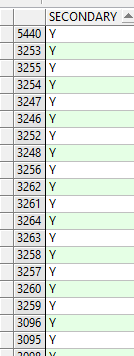
The column 'SECONDARY' of DBA_TABLES indicates if the table is a secondary object created by the ODCIIndexCreate method of the Oracle's Extensibility Framework (Y or N).
Cause
In DBA_TABLES, you see that these tables have the value 'Y' in the column SECONDARY, for example:
OWNER TABLE_NAME S
CTXTEST DRMYINDEXG Y
CTXTEST DRMYINDEXI Y
CTXTEST DRMYINDEXK Y
CTXTEST DRMYINDEXN Y
CTXTEST DRMYINDEXU Y
References
MOS document id: 139388.1
Applies To
All Users
Summary
After performing an imp/impdp, the number of rows in the DR\
Solution
Instead of checking and comparing the number of rows of the DR$ tables after the import, check:
- that the Text index is VALID, i.e. the three STATUS columns below are VALID:
select owner, index_name, status, domidx_opstatus, domidx_status from dba_indexes where owner = '<OWNER>' and index_name = '<INDEX_NAME>';
- CONTAINS queries return the same rows when run from the SOURCE database and TARGET database.
Attachments :
Cause
This is expected.
When doing an import, the Text index, <index_name>, is created during the import process which then creates the Text index's underlying DR\
- This document specifies how to create JSON Search Index without Dataguide.
Solution
-- You can disable the DataGuide feature if not used:
SQL> CREATE SEARCH INDEX <index_name> ON <table_name> (<column_name>) FOR JSON -- PARAMETERS ('DATAGUIDE OFF');
-- You can also modify JSON Search Index to disable Dataguide on existing JSON Search indexes:
For non-partitioned indexes:
SQL> ALTER INDEX <index_name> REBUILD PARAMETERS ('DATAGUIDE OFF');
^^^ The statement mentions REBUILD, but your index will not be rebuild - only the dataguide will be removed.
For local-partitioned indexes:
SQL> ALTER INDEX <index_name> PARAMETERS ('DATAGUIDE OFF');
^^^ The dataguide option is global across the index, so we only do this at the global index level. As with the statement above, this will only remove the dataguide from your index.
-- To find out if your index is using the dataguide feature, you would query USER_TABLES (or ALL_TABLES / DBA_TABLES) and look for a table named "DR\
SQL> select table_name, owner from dba_tables where table_name like 'DR%DG';
The above statement would list all $DG table names along with the owner of the table in the database.
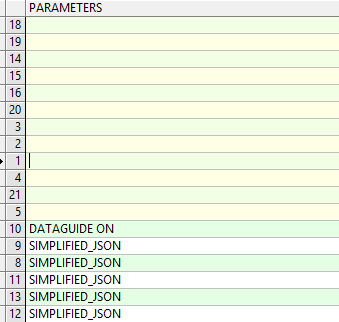
select * from dba_indexes ;

Summary
Oracle upgrade 12.2 guide says
"If you are upgrading from Oracle Database 12c release 1 (12.1) to 12c release 2 (12.2), then Oracle recommends that you drop the JSON-enabled context index before upgrading. Oracle recommends that you drop your existing JSON-enabled index.
If you created a JSON search index using Oracle Database 12c Release 1 (12.1.0.2) then Oracle recommends that you drop that index and create a new search index for use with later releases, using CREATE SEARCH INDEX statement. Please refer "Oracle Database JSON Developer's Guide" for more details."
Solution
You can proceed with the upgrade and after upgrade you can drop and recreate the JSON index only if required or the index becomes invalid:
You can drop the index after the upgrade and recreate using below statement:
create search index <index_name> on table_name (<json column or json object name) for json;
Applies To
All Users
Summary
-- Slow-down in COMMIT operations
-- Number of rows in $G does not decrease over time
Solution
You can choose to use any of the options below:
(1) Disable the DataGuide feature if not used:
SQL> CREATE SEARCH INDEX <index_name> ON <table_name> (<column_name>) FOR JSON
PARAMETERS ('DATAGUIDE OFF');
OR
How to modify JSON Search Index to disable Dataguide:
For non-partitioned indexes:
SQL> ALTER INDEX <index_name> REBUILD PARAMETERS ('DATAGUIDE OFF');
^^^ The statement mentions REBUILD, but your index will not be rebuild - only the dataguide will be removed.
For local-partitioned indexes:
SQL> ALTER INDEX <index_name> PARAMETERS ('DATAGUIDE OFF');
^^^ The dataguide option is global across the index, so we only do this at the global index level. As with the statement above, this will only remove the dataguide from your index.
-- To find out if your index is using the dataguide feature, you would query USER_TABLES (or ALL_TABLES / DBA_TABLES) and look for a table named "DR\
SQL> select table_name, owner from dba_tables where table_name like 'DR%DG';
The above statement would list all $DG table names along with the owner of the table in the database.
(2) Switch out of the sync-on-commit mode without rebuilding the index:
-- To change to manual sync:
SQL> ALTER INDEX <index_name> REBUILD PARAMETERS('replace metadata sync manual');
-- To change to sync every 5 minutes:
SQL> ALTER INDEX <index_name> REBUILD PARAMETERS('replace metadata sync (every "SYSDATE+5/1440")'');
(3) Install the MLR to avoid this issue:
Bug 35269897 - MERGE ON DATABASE RU 19.17.0.0.0 OF 32231715 32790255
If there is no patch available for your platform and Database version, please file a new Service Request.
Cause
-- The default configuration has Data Guide on by default and sync-on-commit by default.
-- Customers who use this default configuration hit a bug that causes the background MERGE job to run in the foreground as part of the sync itself. The job could possibly not run as well causing an increase in the number of rows in the $G staging table.