原文:code.claude.com/docs/en/age...
Streaming Input 流式输入
Understanding the two input modes for Claude Agent SDK and when to use each
深入了解 Claude Agent SDK 的两种输入模式及其适用场景。
Overview 概览
The Claude Agent SDK supports two distinct input modes for interacting with agents:
Claude Agent SDK 支持两种不同的输入模式来与代理(Agent)进行交互:
- Streaming Input Mode (Default & Recommended) - A persistent, interactive session
- 流式输入模式 (Streaming Input Mode)(默认且推荐)------ 一种持续、交互式的会话。
- Single Message Input - One-shot queries that use session state and resuming
- 单消息输入 (Single Message Input) ------ 利用会话状态和恢复(resuming)机制的一次性查询。
This guide explains the differences, benefits, and use cases for each mode to help you choose the right approach for your application.
本指南将解释每种模式的区别、优势及适用场景,帮助你为应用程序选择最合适的方法。
Streaming Input Mode (Recommended) 流式输入模式(推荐)
Streaming input mode is the preferred way to use the Claude Agent SDK. It provides full access to the agent's capabilities and enables rich, interactive experiences.
流式输入模式是使用 Claude Agent SDK 的首选方式。它提供了对代理(Agent)能力的完整访问权,并能实现丰富的交互式体验。
It allows the agent to operate as a long lived process that takes in user input, handles interruptions, surfaces permission requests, and handles session management.
该模式允许代理作为一个长生命周期的进程运行,能够接收用户输入、处理中断、呈现权限请求并进行会话管理。
How It Works 工作原理
Benefits 优势
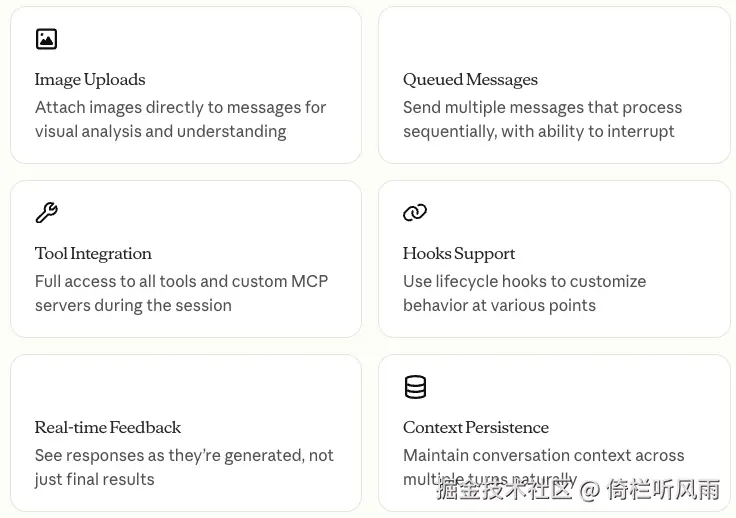
- 直接在消息中附带图片,用于视觉分析与理解
- 发送多条按顺序处理的消息,并具备中断能力
- 在会话期间拥有对所有工具和自定义 MCP 服务器的完整访问权限
- 利用生命周期钩子(Hooks)在各个阶段自定义行为
- 在响应生成时即时查看,而不仅仅是获取最终结果
- 自然地维持跨多轮对话的上下文内容
Implementation Example 实现示例
typescript
import { query } from "@anthropic-ai/claude-agent-sdk";
import { readFile } from "fs/promises";

async function* generateMessages() {
// First message
  yield {
    type: "user" as const,
    message: {
      role: "user" as const,
      content: "Analyze this codebase for security issues"
    }
  };

  // / 等待用户在终端输入下一条指令  (占位符,让代码看起来更真实一些)
  await new Promise((resolve) => setTimeout(resolve, 2000));

  // Follow-up with image
  yield {
    type: "user" as const,
    message: {
      role: "user" as const,
      content: [
        {
          type: "text",
          text: "Review this architecture diagram"
        },
        {
          type: "image",
          source: {
            type: "base64",
            media_type: "image/png",
            data: await readFile("diagram.png", "base64")
          }
        }
      ]
    }
  };
}

// Process streaming responses
for await (const message of query({
  prompt: generateMessages(),
  options: {
    maxTurns: 10,
    allowedTools: ["Read", "Grep"]
  }
})) {
  if (message.type === "result") {
    console.log(message.result);
  }
}
代码关键点讲解
- query() 内部会 for await 消费这个 generator,每次 Claude 返回结果后,继续从 generator 拿下一条消息
- 消息是懒执行的 --- generator 不会一次性发送所有消息,而是在 Claude 回复后才 yield 下一条
- 可以在 yield 之间插入异步逻辑(等待用户输入、读取文件、网络请求等)
- 实现了多轮对话 --- 每个 yield 对应一个 user turn,SDK 负责维护整个对话历史
简单说:prompt 接受一个 async iterable,query() 驱动整个多轮对话流程,你只需要 yield 消息即可。
Single Message Input 单消息输入
Single message input is simpler but more limited.
单消息输入模式更简单,但功能局限性也更多。
When to Use Single Message Input 何时使用单消息输入
Use single message input when:
在以下情况下,请使用单消息输入:
- You need a one-shot response
- 你需要一次性响应(One-shot response)
- You do not need image attachments, hooks, etc.
- 你不需要图片附件、钩子(Hooks)等功能。
- You need to operate in a stateless environment, such as a lambda function
- 你需要在无状态环境中运行,例如 Lambda 函数。
Limitations 限制
Single message input mode does not support: 单消息输入模式不支持:
- Direct image attachments in messages
- 在消息中直接附加图片
- Dynamic message queueing
- 动态消息队列
- Real-time interruption
- 实时中断
- Hook integration
- 钩子(Hook)集成
- Natural multi-turn conversations
- 自然的多轮对话
Implementation Example
typescript
import { query } from "@anthropic-ai/claude-agent-sdk";

// Simple one-shot query
for await (const message of query({
prompt: "Explain the authentication flow",
options: {
  maxTurns: 1,
  allowedTools: ["Read", "Grep"]
}
})) {
  if (message.type === "result") {
    console.log(message.result);
  }
}

// Continue conversation with session management
for await (const message of query({
prompt: "Now explain the authorization process",
options: {
  continue: true,
  maxTurns: 1
}
})) {
  if (message.type === "result") {
    console.log(message.result);
  }
}