页面效果
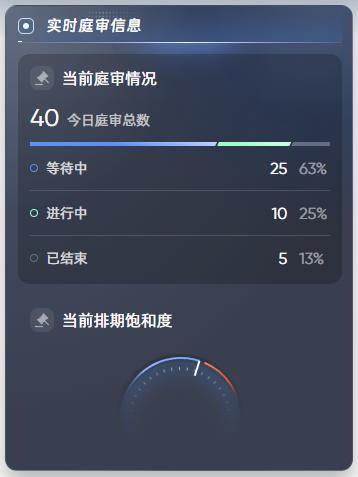
切图

代码实现:
html
<!--  庭审分布:右侧实时庭审信息 -->
<template>
  <div class="trial-info">
    <div class="first-title">实时庭审信息</div>
    <div class="title-decoration"></div>
    <div class="trial-info-content">
      <!-- 当前庭审情况 -->
      <div class="card">
        <div class="second-title">
          <span class="second-title__icon"></span>
          <span class="second-title__text">当前庭审情况</span>
        </div>
        <div class="total-wrap">
          <span class="total-value">{{ dataInfo.total }}</span>
          <span class="total-text">今日庭审总数</span>
        </div>
        <div class="bar-wrap">
          <span class="bar-item waiting" :style="{ width: getWidth('waiting') }"></span>
          <span class="bar-item inProgress" :style="{ width: getWidth('inProgress') }"></span>
          <span class="bar-item endEd" :style="{ width: getWidth('endEd') }"></span>
        </div>

        <div class="trial-status">
          <div class="trial-status-left">
            <span class="icon-ring"></span>
            <span class="status-text">等待中</span>
          </div>
          <div class="trial-status-right">
            <span class="status-value">{{ dataInfo.waiting }}</span>
            <span class="status-percent">{{ getWidth('waiting') }}</span>
          </div>
        </div>
        <div class="split-line"></div>
        <div class="trial-status">
          <div class="trial-status-left">
            <span class="icon-ring green"></span>
            <span class="status-text">进行中</span>
          </div>
          <div class="trial-status-right">
            <span class="status-value">{{ dataInfo.inProgress }}</span>
            <span class="status-percent">{{ getWidth('inProgress') }}</span>
          </div>
        </div>
        <div class="split-line"></div>
        <div class="trial-status">
          <div class="trial-status-left">
            <span class="icon-ring gray"></span>
            <span class="status-text">已结束</span>
          </div>
          <div class="trial-status-right">
            <span class="status-value">{{ dataInfo.endEd }}</span>
            <span class="status-percent">{{ getWidth('endEd') }}</span>
          </div>
        </div>
      </div>

      <div class="scheduling-saturation">
        <div class="second-title">
          <span class="second-title__icon"></span>
          <span class="second-title__text">当前排期饱和度</span>
        </div>
        <div class="scheduling-saturation-content">
          <div class="left-part">
            <div class="left-part__icon"></div>
            <div class="left-part__text">已排期</div>
            <div class="left-part__value">{{ schedulingData.scheduled.num }}</div>
            <div class="left-part__percent">{{ schedulingData.scheduled.percent }}%</div>
          </div>
          <div class="middle-part">
            <div class="middle-part-top">
              <svg width="124" height="62" viewBox="-2 -2 126 64" style="width: 100%;height: 100%;">
                <defs>
                  <linearGradient id="arcGradient1" x1="0%" y1="0%" x2="100%" y2="0%">
                    <stop offset="0%" stop-color="rgba(52, 68, 98, 0)" />
                    <stop offset="30%" stop-color="rgba(144, 182, 253, 1)" />
                    <stop offset="100%" stop-color="rgba(108, 163, 255, 1)" />
                  </linearGradient>
                  <linearGradient id="arcGradient2" x1="100%" y1="0%" x2="0%" y2="0%">
                    <stop offset="0%" stop-color="rgba(52, 68, 98, 0)" />
                    <stop offset="30%" stop-color="rgba(211, 84, 57, 1)" />
                    <stop offset="100%" stop-color="rgba(255, 124, 96, 1)" />
                  </linearGradient>
                </defs>
                <!-- 圆弧路径 -->
                <path id="arcPath1" :d="path1" fill="none" stroke="url(#arcGradient1)" stroke-width="2" />
                <path id="arcPath2" :d="path2" fill="none" stroke="url(#arcGradient2)" stroke-width="2" />
                <!-- 添加分割线 -->
                <path id="linePath" :d="splitLine" fill="none" stroke="white" stroke-width="2" />
              </svg>
            </div>
          </div>
          <div class="right-part">
            <div class="right-part__icon"></div>
            <div class="right-part__text">已排期</div>
            <div class="right-part__value">{{ schedulingData.notScheduled.num }}</div>
            <div class="right-part__percent">{{ schedulingData.notScheduled.percent }}%</div>
          </div>
        </div>
      </div>
    </div>
  </div>
</template>

<script setup>
import { ref } from 'vue'
const dataInfo = ref({
  total: 0,
  waiting: 0,
  inProgress: 0,
  endEd: 0
})

setTimeout(() => {
  dataInfo.value = {
    total: 40,
    waiting: 25,
    inProgress: 10,
    endEd: 5
  }
}, 1000);

// 计算宽度
function getWidth(type) {
  if (dataInfo.value.total) {
    return ((dataInfo.value[type] / dataInfo.value.total) * 100).toFixed(0) + '%'
  } else {
    return '0%'
  }
}

const schedulingData = ref({
  total: 100,
  scheduled: {
    num: 60,
    percent: 60
  },
  notScheduled: {
    num: 40,
    percent: 40
  }
})

const path1 = ref('')
const path2 = ref('')
const splitLine = ref('')

function getData() {
  // 计算已排期部分对应的角度:已排期60%,对应半圆中的108度角
  const angle1 = schedulingData.value.scheduled.percent / 100 * 180
  /**
   * 实际效果:从左侧中点开始,顺时针向上绘制108度的圆弧
   * M 0,62:移动到起点(0,62) - 半圆最左侧中点
   * A 62,62 0 0,1:绘制圆弧
      62,62:x半径和y半径都是62
      0:旋转角度为0
      0:大弧标志为0(选择小弧):当给定起点、终点和半径后,理论上可以绘制出两个可能的圆弧(一个大弧和一个小弧)。大弧标志用于选择绘制哪一个。值为 0:表示选择小弧(较小的那个圆弧)。圆弧的角度小于或等于 180 度。值为 1:表示选择大弧(较大的那个圆弧)。圆弧的角度大于 180 度。
      1:顺时针方向绘制
   * ${62 - 62 * Math.cos(angle1 * Math.PI / 180)}:计算终点x坐标
      Math.cos(angle1 * Math.PI / 180):将角度转为弧度并计算余弦
      从圆心(62,62)向左偏移62*cos(角度)
   * ${62 - 62 * Math.sin(angle1 * Math.PI / 180)}:计算终点y坐标
      从圆心(62,62)向上偏移62*sin(角度)
   */
  path1.value = `M 0,62 A 62,62 0 0,1 ${62 - 62 * Math.cos(angle1 * Math.PI / 180)},${62 - 62 * Math.sin(angle1 * Math.PI / 180)}`

  // 计算未排期部分对应的角度:未排期40%,对应半圆中的72度角
  const angle2 = schedulingData.value.notScheduled.percent / 100 * 180 - 5
  /**
   * 实际效果:从右侧中点开始,逆时针向上绘制72度的圆弧
   * M 124,62:移动到起点(124,62) - 半圆最右侧中点
   * A 62,62 0 0,0:绘制圆弧
      0:大弧标志为0(选择小弧)
      0:逆时针方向绘制
   * ${62 + 62 * Math.cos(angle2 * Math.PI / 180)}:计算终点x坐标
      从圆心(62,62)向右偏移62*cos(角度)
   * ${62 - 62 * Math.sin(angle2 * Math.PI / 180)}:计算终点y坐标
      从圆心(62,62)向上偏移62*sin(角度)
   */
  path2.value = `M 124,62 A 62,62 0 0,0 ${62 + 62 * Math.cos(angle2 * Math.PI / 180)},${62 - 62 * Math.sin(angle2 * Math.PI / 180)}`

  // 计算分割线
  const updateSplitLine = () => {
    // 计算交汇点坐标(path1的终点,也是path2的起点)
    const intersectionX = 62 - 62 * Math.cos(angle1 * Math.PI / 180)
    const intersectionY = 62 - 62 * Math.sin(angle1 * Math.PI / 180)

    // 计算指向圆心的角度(法线方向)
    const centerX = 62
    const centerY = 62
    const angleToCenter = Math.atan2(centerY - intersectionY, centerX - intersectionX)

    // 计算分割线的两个端点(长度16px,垂直于圆弧)
    const lineLength = 16
    const halfLength = lineLength / 2

    // 计算分割线的起点和终点(沿着法线方向)
    const startX = intersectionX
    const startY = intersectionY
    const endX = intersectionX + lineLength * Math.cos(angleToCenter)
    const endY = intersectionY + lineLength * Math.sin(angleToCenter)

    // const startX = intersectionX - halfLength * Math.cos(angleToCenter)
    // const startY = intersectionY - halfLength * Math.sin(angleToCenter)
    // const endX = intersectionX + halfLength * Math.cos(angleToCenter)
    // const endY = intersectionY + halfLength * Math.sin(angleToCenter)

    splitLine.value = `M ${startX},${startY} L ${endX},${endY}`
  }

  // 更新分割线
  updateSplitLine()
}

getData()

setTimeout(() => {
  schedulingData.value = {
    total: 100,
    scheduled: {
      num: 30,
      percent: 30
    },
    notScheduled: {
      num: 70,
      percent: 70
    }
  }
  getData()
}, 2000);


</script>

<style lang="scss" scoped>
.trial-info {
  width: 348px;
  height: 466px;
  pointer-events: all;
  position: absolute;
  z-index: 4;
  top: 88px;
  right: 24px;
  border: 1.5px solid rgba(255, 255, 255, 0.1);
  border-radius: 12px;
  box-shadow: 0px 12px 24px 0px rgba(0, 0, 0, 0.3);
  background: radial-gradient(70.23% 49.93% at 94% 0%, rgba(116, 168, 255, 0.21), rgba(14, 63, 170, 0.16), rgba(16, 18, 27, 0))
    /* 警告:渐变使用了CSS不支持的旋转方式,可能无法按预期工作 */
    , radial-gradient(106.40% 87.66% at 0% 0%, rgba(204, 223, 255, 0.3), rgba(137, 164, 213, 0.11), rgba(35, 42, 59, 0))
    /* 警告:渐变使用了CSS不支持的旋转方式,可能无法按预期工作 */
    , rgba(35, 42, 59, 0.9);
  padding: 4px 12px 12px 12px;

  .first-title {
    width: 3.24rem;
    height: .32rem;
    background: url('~@/assets/images/BigScreen/panelPart/first-title-bg.png');
    background-size: 100% 100%;
    padding-left: .28rem;
    display: flex;
    align-items: center;

    color: rgba(255, 255, 255, 1);
    font-family: DingTalk JinBuTi;
    font-size: .16rem;
    font-weight: 400;
    line-height: .24rem;
  }

  .title-decoration {
    width: 3.24rem;
    height: .56rem;
    background: url('~@/assets/images/BigScreen/panelPart/title-decoration.png');
    background-size: 100% 100%;
  }

  &-content {
    width: 324px;
    height: 406px;
    position: absolute;
    left: 12px;
    top: 48px;

    .card {
      width: 100%;
      height: 230px;
      border-radius: 12px;
      background: rgba(0, 0, 0, 0.2);
      padding: 12px;
      margin-bottom: 12px;

      .total-wrap {
        height: 24px;
        display: flex;
        align-items: flex-end;
        margin-top: 16px;
        margin-bottom: 12px;

        .total-value {
          color: rgba(255, 255, 255, 1);
          font-family: Gilroy;
          font-size: 24px;
          font-weight: 400;
          line-height: 24px;
          margin-right: 8px;
        }

        .total-text {
          color: rgba(255, 255, 255, 0.7);
          font-family: Alibaba PuHuiTi;
          font-size: 14px;
          font-weight: 400;
          line-height: 20px;
        }
      }

      .bar-wrap {
        height: 4px;
        display: flex;

        .bar-item {
          height: 100%;
          background: linear-gradient(191.36deg, rgba(255, 255, 255, 1) -31.817%, rgba(93, 143, 255, 1) 53.805%);
          clip-path: polygon(0 0, 100% 0, calc(100% - 2px) 100%, 0 100%);
          transition: all 1.2s ease-out;

          &.inProgress {
            background: linear-gradient(23.81deg, rgba(205, 255, 231, 1) -0.562%, rgba(158, 255, 202, 1) 75.02%);
            transform: rotate(-180.00deg);
            clip-path: polygon(2px 0, 100% 0, calc(100% - 2px) 100%, 0 100%);
          }

          &.endEd {
            background: rgba(100, 111, 135, 1);
            clip-path: polygon(2px 0, 100% 0, 100% 100%, 0 100%);
          }
        }
      }

      .trial-status {
        height: 20px;
        margin-top: 12px;
        display: flex;
        justify-content: space-between;
        align-items: center;

        &-left {
          display: flex;
          align-items: center;

          .icon-ring {
            width: 8px;
            height: 8px;
            border: 1px solid rgba(93, 143, 255, 1);
            border-radius: 50%;
            margin-right: 8px;

            &.green {
              border: 1px solid rgba(158, 255, 202, 1);
            }

            &.gray {
              border: 1px solid rgba(100, 111, 135, 1);
            }
          }

          .status-text {
            color: rgba(255, 255, 255, 0.8);
            font-family: Alibaba PuHuiTi;
            font-size: 14px;
            font-weight: 400;
          }
        }

        &-right {
          display: flex;
          align-items: center;

          .status-value {
            color: rgba(255, 255, 255, 1);
            font-family: Gilroy;
            font-size: 16px;
            font-weight: 400;
          }

          .status-percent {
            width: 31px;
            color: rgba(255, 255, 255, 0.5);
            font-family: Gilroy;
            font-size: 16px;
            font-weight: 400;
            margin-left: 12px;
          }
        }
      }

      .split-line {
        height: 1px;
        background: rgba(255, 255, 255, 0.15);
        margin-top: 12px;
      }
    }

    .second-title {
      height: 24px;
      display: flex;
      align-items: center;

      &__icon {
        width: 24px;
        height: 24px;
        margin-right: 8px;
        background: url('~@/assets/images/BigScreen/panelPart/court-trial/icon-trial.png');
        background-size: 100% 100%;
      }

      &__text {
        color: rgba(255, 255, 255, 1);
        font-family: Alibaba PuHuiTi;
        font-size: 16px;
        font-weight: 400;
      }
    }

    .scheduling-saturation {
      height: 164px;
      padding: 12px;
      overflow: hidden;

      &-content {
        margin-top: 10px;
        height: calc(100% - 34px);
        display: flex;
        justify-content: space-between;

        .left-part,
        .right-part {
          width: 48px;
          height: 100%;

          &__icon {
            width: 48px;
            height: 53px;
            background: url('~@/assets/images/BigScreen/panelPart/court-trial/icon-scheduled.png');
            background-size: 100% 100%;
            margin-bottom: -6px;
          }

          &__text {
            color: rgba(255, 255, 255, 0.7);
            font-family: Alibaba PuHuiTi;
            font-size: 14px;
            font-weight: 400;
            line-height: 20px;
          }

          &__value {
            color: rgba(255, 255, 255, 1);
            font-family: Gilroy;
            font-size: 16px;
            font-weight: 400;
            line-height: 20px;
            margin-top: 2px;
          }

          &__percent {
            color: rgba(255, 255, 255, 0.5);
            font-family: Gilroy;
            font-size: 14px;
            font-weight: 400;
            line-height: 20px;
          }
        }

        .middle-part {
          width: 136px;
          height: 136px;
          background: url('~@/assets/images/BigScreen/panelPart/court-trial/dial-bg.png');
          background-size: 100% 100%;
          padding: 6px;
          margin-top: 8px;

          &-top {
            width: 100%;
            height: 50%;
          }

          #arcPath1,
          #arcPath2,
          #linePath {
            transition: all 0.5s ease-in-out;
          }
        }

        .right-part {

          &__text,
          &__value,
          &__percent {
            text-align: right;
          }
        }
      }
    }
  }
}
</style>