Kiro CLI提供了在终端界面直接与Kiro AI agents的交互,无需任何其他的IDE。
Kiro CLI的主要功能如下:
- 交互式开发,即Kiro Chat
- 智能助理,给出上下文相关的建议和自动补全
- 定制Agents,创建专用的agents以实现流程自动化
- 团队标准化,通过steering定义整个团队的规范
- 外部功能的集成,通过MCP servers连接到其他工具和服务
- 流程优化,通过hooks实现重复性任务的自动化
1.Kiro CLI chat
在PowerShell中,直接执行kiro-cli 或kiro-cli chat即可进入与Kiro AI Agent的对话。
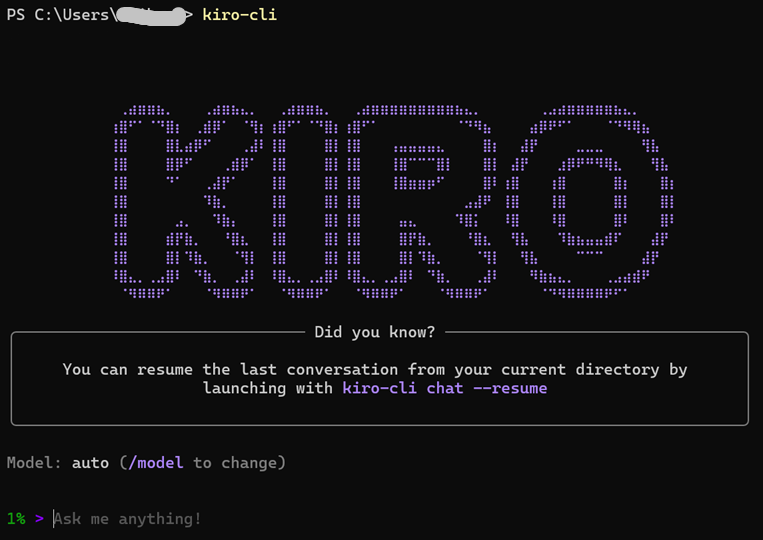
在建立的会话中,实际上是在跟Kiro的一个AI agent交互,默认agent为kiro_default。
/help,切换到kiro_help agent
/plan,切换到kiro_planner agent

默认使用的模型名为auto,实际上是一个模型的router,根据对话的任务自动选择合适的LLM模型并优化。
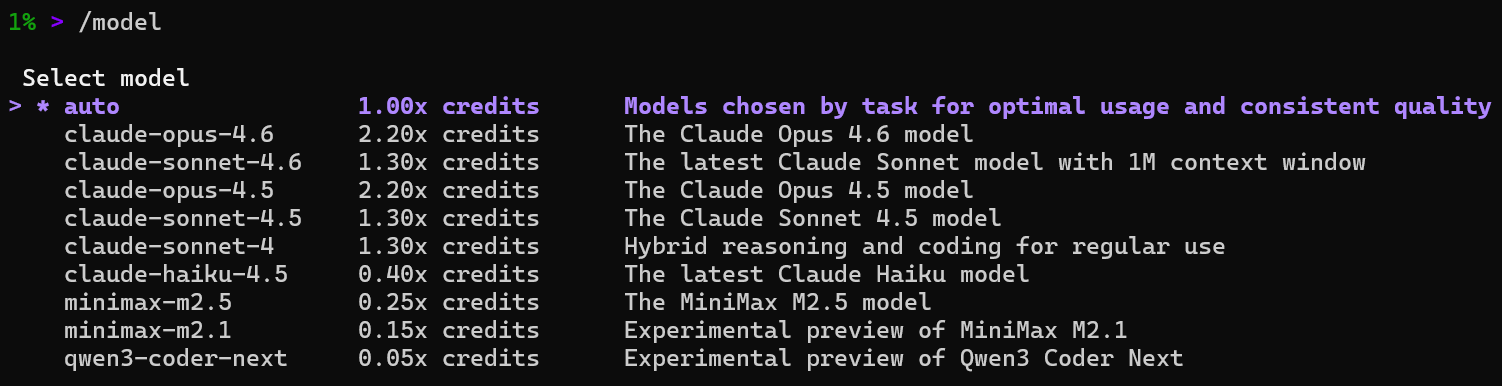
/quit,退出当前的Kiro CLI chat
- Kiro CLI settings
Kiro CLI settings是一组配置参数,用以控制Kiro CLI的行为。
根据Kiro CLI settings的作用范围可以分为Session, Workspace, 以及Global。Global的Kiro CLI settings保存在~/.kiro/settings/cli.json文件中。Workspace的Kiro CLI settings保存在当前工作空间的.kiro/settings/cli.json文件中。Session的Kiro CLI settings仅在当前的Kiro chat对话中有效,没有持久化保存。
Kiro CLI settings的常用命令如下:
- kiro-cli settings list,查看当前配置的Kiro CLI settings,该命令读取.kiro/settings/cli.json文件
- kiro-cli settings list --all,查看可用的全部Kiro CLI settings
- kiro-cli settings <KEY>,查看Kiro CLI settings的一个参数
- kiro-cli settings <KEY> <VALUE>,设置Kiro CLI settings的一个参数
- kiro-cli settings --delete <KEY>,重置Kiro CLI settings的一个参数为默认值
通常,在终端执行上述命令,设置的Kiro CLI settings保存在~/.kiro/settings/cli.json文件中。在Kiro chat里也可以执行上述命令,但是设置的Kiro settings仅在当前session里有效。
- 设置并查看Globalsettings
在终端执行命令:kiro-cli settings app.disableAutoupdates true
查看命令执行结果:~/.kiro/settings/cli.json
{
"app.disableAutoupdates": true
}
查看当前配置的Kiro CLI settings:
$ kiro-cli settings list
app.disableAutoupdates = true (workspace)
注意,这里的workspace是相对于当前的主目录,相对于其他目录就是global。
- 设置并查看Workspacesettings
在终端执行命令:kiro-cli settings --workspace chat.defaultModel "claude-opus-4"
查看当前路径下的文件:.kiro/settings/cli.json
{
"chat.defaultModel": "claude-opus-4"
}
查看当前配置的Kiro CLI settings:
$ kiro-cli settings list
app.disableAutoupdates = true (global)
chat.defaultModel = "claude-opus-4" (workspace)
并不是所有的Kiro CLI settings都可以作为Workspace settings。
- 设置并查看Chat Sessionsettings
在kiro-cli chat中设置session settings
3% > kiro-cli settings hooks.showStatus true
>
That command needs to be run from your terminal. Would you like me to either:
-
Write it to your settings file --- I'll add hooks.showStatus: true to ~/.kiro/settings/cli.json (persistent)
-
Set it for this session --- temporary override, cleared on exit
Which do you prefer?
▸ Time: 3s
3% > 2
kiro-cli settings hooks.showStatus true (using tool: session)
Allow this action? y/n:
3% > y
- Completed in 0.0s
> Done. hooks.showStatus is set to true for this session. It will revert to default when you exit.
▸ Time: 12s
3% >
查看设置的session settings
3% > session list
kiro-cli settings (using tool: session)
- Completed in 0.0s
> One session override active:
- hooks.showStatus = true
Everything else is at defaults.
▸ Time: 4s
3% >
并不是所有的Kiro CLI settings都可以作为Session settings。
参考:所有可用的Kiro CLI settings
Telemetry & Privacy
-
telemetry.enabled --- Enable/disable telemetry collection (boolean)
-
telemetryClientId --- Legacy client identifier (string)
-
codeWhisperer.shareCodeWhispererContentWithAWS --- Share content with AWS (boolean)
Chat Behavior
-
chat.enableThinking --- Enable thinking tool (boolean)
-
chat.enableKnowledge --- Enable knowledge base (boolean)
-
chat.enableCodeIntelligence --- Enable LSP code intelligence (boolean)
-
chat.enableTangentMode --- Enable tangent mode (boolean)
-
chat.enableSubagent --- Enable subagent feature (boolean)
-
chat.enableTodoList --- Enable todo list (boolean)
-
chat.enableCheckpoint --- Enable checkpoint (boolean)
-
chat.enableDelegate --- Enable delegate tool (boolean)
-
chat.disableAutoCompaction --- Disable auto-summarization (boolean)
-
chat.disableGranularTrust --- Disable granular tool trust (boolean)
-
chat.greeting.enabled --- Show greeting on start (boolean)
-
chat.enableHistoryHints --- Show history hints (boolean)
-
chat.enablePromptHints --- Show prompt hints on empty input (boolean)
-
chat.enableContextUsageIndicator --- Show context usage % (boolean)
-
chat.enableNotifications --- Enable terminal notifications (boolean)
-
chat.notificationMethod --- Notification method: auto/bel/osc9 (string)
-
chat.disableMarkdownRendering --- Disable markdown formatting (boolean)
UI & Interface
-
chat.ui --- Chat UI mode: legacy or tui (string)
-
chat.uiMode --- UI variant: default/compact/minimal (string)
-
chat.editMode --- Enable edit mode (boolean)
-
chat.diffTool --- External diff tool command (string)
Defaults
-
chat.defaultModel --- Default AI model (string)
-
chat.defaultAgent --- Default agent (string)
Key Bindings
-
chat.tangentModeKey --- Tangent mode toggle (single char)
-
chat.autocompletionKey --- Autocompletion hint key (single char)
-
chat.skimCommandKey --- Fuzzy search key (single char)
-
chat.delegateModeKey --- Delegate command key (single char)
Compaction
-
compaction.excludeContextWindowPercent --- Context % to exclude from compaction (number, 0--100)
-
compaction.excludeMessages --- Min message pairs to exclude (number)
Knowledge
-
knowledge.defaultIncludePatterns --- File patterns to include (array)
-
knowledge.defaultExcludePatterns --- File patterns to exclude (array)
-
knowledge.maxFiles --- Max files for indexing (number)
-
knowledge.chunkSize --- Text chunk size (number)
-
knowledge.chunkOverlap --- Overlap between chunks (number)
-
knowledge.indexType --- Index type (string)
Introspect
-
introspect.tangentMode --- Auto-tangent for introspect (boolean)
-
introspect.progressiveMode --- Progressive loading for introspect (boolean)
API
-
api.timeout --- Request timeout in seconds (number)
-
api.oidc.scopePrefix --- OIDC scope prefix (string)
-
api.codewhisperer.service --- CodeWhisperer endpoint (string)
-
api.q.service --- Q service endpoint (string)
-
api.kiroauth.service --- Kiro auth service endpoint (string)
MCP
-
mcp.initTimeout --- MCP server init timeout (number)
-
mcp.noInteractiveTimeout --- Non-interactive MCP timeout (number)
-
mcp.loadedBefore --- Track previously loaded MCP servers (boolean)
Other
-
hooks.showStatus --- Show hook execution status (boolean, default: true)
-
cleanup.periodDays --- Days before old data is deleted (number)
-
app.disableAutoupdates --- Disable auto-updates on startup (boolean)