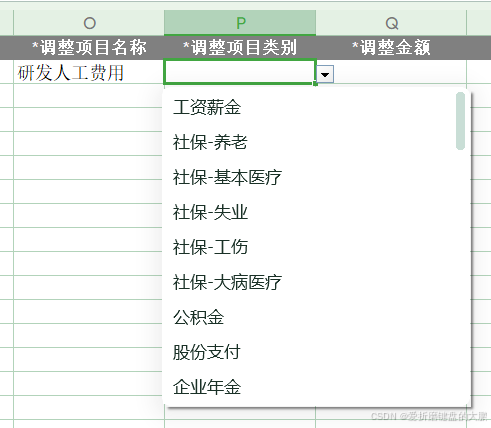
1.展示界面

2.原理
通过Java反射,获取需要导出的指定类,从类中获取需要数据源的指定字段(即下拉框应该在哪个字段上),
再通过hutool工具包。里面有个方法可以为注解里面的元数据设置指定的值。
2.1 Hutool工具包
java
	 	<dependency>
            <groupId>cn.hutool</groupId>
            <artifactId>hutool-core</artifactId>
            <version>5.8.11</version>
        </dependency>
3.代码实现
在ExcelUtil里面
java
 /**
     * 动态设置下拉框的值
     * @param adjustClass 修改指定类(需要在导出Excel类里面的指定类)
     * @param combos 传入Combo的值 (下拉框的值,从数据库中查询)
     * @param fieldName 指定传入类的字段上面值 (需要下拉框的字段)
     */
    public void setFiledCombo(Class<T> adjustClass, String[] combos, String fieldName){
        // 获取类的对象
        Field[] declaredFields = adjustClass.getDeclaredFields();
        for (int i = 0; i < declaredFields.length; i++) {
            Field declaredField = declaredFields[i];
            declaredField.setAccessible(true);
            if (declaredField.getAnnotation(Excel.class) == null) continue;
            if (declaredField.getName().equals(fieldName))
            // 给指定字段赋值
            AnnotationUtil.setValue(declaredField.getAnnotation(Excel.class),"combo",combos);
        }
    }
4.如何使用
java
 		// 项目名(库中拿)
        List<String> projectName = Service.getProjectName();
        // 调整项
        List<String> costCollectType = Service2.getCostCollectType();
        ExcelUtil<自己的指定类> util = new ExcelUtil<>(自己的指定类.class);
        // 设置字段调整项目名称
        util.setFiledCombo(自己的指定类.class, projectName.toArray(new String[0]),"下拉框的字段名");
        // 设置字段调整项目
        util.setFiledCombo(自己的指定类.class, costCollectType.toArray(new String[0]),"下拉框的字段名2");
        // 导出
        util.importTemplateExcel(response,"导出表的名字");
5.总结
通过Java的类反射和Hutool工具包完成了对指定字段上的注解的元数据进行修改。如果有错误,麻烦指出,小弟不才,望跟佬学习。