- 🍨 本文为🔗365天深度学习训练营 中的学习记录博客
- 🍖 原作者:K同学啊
前言
-
环境版本
python 3.9.23
pytorch 2.5.1
pytorch-cuda 11.8
pytorch-mutex 1.0
torchaudio 2.5.1
torchinfo 1.8.0
torchvision 0.20.1
Visual Studio Code 1.104.2 (user setup) -
什么是 ResNet‑50 V2?
-
-
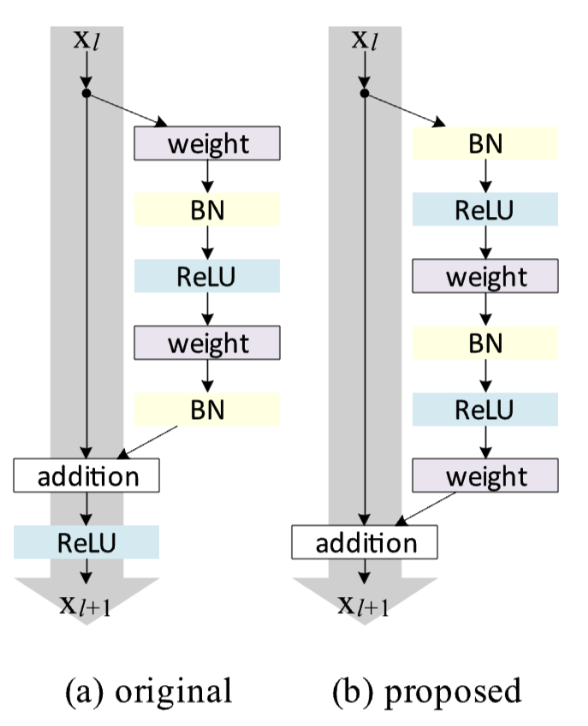
先简单回顾一下 ResNet‑50(V1):它通过"跳连接"让深层网络不再难训练。打个比方,本来你要爬 50 层楼梯(很多卷积层),ResNet 给你在每个楼梯间加了一部"电梯"(跳连接),你可以从第 1 层直接"跳"到第 3 层,信息不会在中间丢失,训练起来又快又稳。
-
ResNet‑50 V2 是 V1 的改进版,核心思路是:把电梯(跳连接)维护得更干净,让它能直接无障碍通行。
在 V1 中,电梯虽然存在,但它的旁边总是堆着一些"障碍"(比如批归一化 BN 和激活函数 ReLU)。虽然路障主要放在主路上,但有时候还是会碍事,导致电梯不能完全畅通。
V2 的做法很简单:把所有 BN 和 ReLU 全部移到主路上,让跳连接变成一条纯粹的"高速公路"。这样信息从深层传回浅层时,可以全程不踩刹车。
-
我的简单理解:
V1 的楼梯(主路)上每走几步就有"障碍"(BN→ReLU),而电梯(跳连接)虽然也能用,但出电梯口也会有"障碍"(残差相加后的 ReLU)。
V2 则把所有"障碍"都搬到楼梯上,电梯本身什么障碍都没有。想快速上下楼,直接坐电梯;想慢慢走楼梯,也可以。
-
ResNet‑50 V2 的结构与 V1 基本一致:
- 初始卷积 + 最大池化
- 四个阶段的瓶颈块(每个块仍是 1×1 降维 → 3×3 提取特征 → 1×1 升维)
- 全局平均池化 + 全连接分类层
唯一的不同在于每个残差块内部的顺序:
V1 顺序:Conv → BN → ReLU → Conv → BN → ReLU → Conv → BN → Add → ReLU
V2 顺序:BN → ReLU → Conv → BN → ReLU → Conv → BN → ReLU → Conv → Add (Add 后不再加 ReLU)
-
python
----------------------------------------------------------------
Layer (type) Output Shape Param #
================================================================
Conv2d-1 [-1, 64, 112, 112] 9,408
BatchNorm2d-2 [-1, 64, 112, 112] 128
ReLU-3 [-1, 64, 112, 112] 0
MaxPool2d-4 [-1, 64, 56, 56] 0
Conv2d-5 [-1, 256, 56, 56] 16,384
BatchNorm2d-6 [-1, 256, 56, 56] 512
BatchNorm2d-7 [-1, 64, 56, 56] 128
ReLU-8 [-1, 64, 56, 56] 0
Conv2d-9 [-1, 64, 56, 56] 4,096
BatchNorm2d-10 [-1, 64, 56, 56] 128
ReLU-11 [-1, 64, 56, 56] 0
Conv2d-12 [-1, 64, 56, 56] 36,864
BatchNorm2d-13 [-1, 64, 56, 56] 128
ReLU-14 [-1, 64, 56, 56] 0
Conv2d-15 [-1, 256, 56, 56] 16,384
PreActBottleneck-16 [-1, 256, 56, 56] 0
BatchNorm2d-17 [-1, 256, 56, 56] 512
ReLU-18 [-1, 256, 56, 56] 0
Conv2d-19 [-1, 64, 56, 56] 16,384
BatchNorm2d-20 [-1, 64, 56, 56] 128
ReLU-21 [-1, 64, 56, 56] 0
Conv2d-22 [-1, 64, 56, 56] 36,864
BatchNorm2d-23 [-1, 64, 56, 56] 128
ReLU-24 [-1, 64, 56, 56] 0
Conv2d-25 [-1, 256, 56, 56] 16,384
PreActBottleneck-26 [-1, 256, 56, 56] 0
BatchNorm2d-27 [-1, 256, 56, 56] 512
ReLU-28 [-1, 256, 56, 56] 0
Conv2d-29 [-1, 64, 56, 56] 16,384
BatchNorm2d-30 [-1, 64, 56, 56] 128
ReLU-31 [-1, 64, 56, 56] 0
Conv2d-32 [-1, 64, 56, 56] 36,864
BatchNorm2d-33 [-1, 64, 56, 56] 128
ReLU-34 [-1, 64, 56, 56] 0
Conv2d-35 [-1, 256, 56, 56] 16,384
PreActBottleneck-36 [-1, 256, 56, 56] 0
Conv2d-37 [-1, 512, 28, 28] 131,072
BatchNorm2d-38 [-1, 512, 28, 28] 1,024
BatchNorm2d-39 [-1, 256, 56, 56] 512
ReLU-40 [-1, 256, 56, 56] 0
Conv2d-41 [-1, 128, 56, 56] 32,768
BatchNorm2d-42 [-1, 128, 56, 56] 256
ReLU-43 [-1, 128, 56, 56] 0
Conv2d-44 [-1, 128, 28, 28] 147,456
BatchNorm2d-45 [-1, 128, 28, 28] 256
ReLU-46 [-1, 128, 28, 28] 0
Conv2d-47 [-1, 512, 28, 28] 65,536
PreActBottleneck-48 [-1, 512, 28, 28] 0
BatchNorm2d-49 [-1, 512, 28, 28] 1,024
ReLU-50 [-1, 512, 28, 28] 0
Conv2d-51 [-1, 128, 28, 28] 65,536
BatchNorm2d-52 [-1, 128, 28, 28] 256
ReLU-53 [-1, 128, 28, 28] 0
Conv2d-54 [-1, 128, 28, 28] 147,456
BatchNorm2d-55 [-1, 128, 28, 28] 256
ReLU-56 [-1, 128, 28, 28] 0
Conv2d-57 [-1, 512, 28, 28] 65,536
PreActBottleneck-58 [-1, 512, 28, 28] 0
BatchNorm2d-59 [-1, 512, 28, 28] 1,024
ReLU-60 [-1, 512, 28, 28] 0
Conv2d-61 [-1, 128, 28, 28] 65,536
BatchNorm2d-62 [-1, 128, 28, 28] 256
ReLU-63 [-1, 128, 28, 28] 0
Conv2d-64 [-1, 128, 28, 28] 147,456
BatchNorm2d-65 [-1, 128, 28, 28] 256
ReLU-66 [-1, 128, 28, 28] 0
Conv2d-67 [-1, 512, 28, 28] 65,536
PreActBottleneck-68 [-1, 512, 28, 28] 0
BatchNorm2d-69 [-1, 512, 28, 28] 1,024
ReLU-70 [-1, 512, 28, 28] 0
Conv2d-71 [-1, 128, 28, 28] 65,536
BatchNorm2d-72 [-1, 128, 28, 28] 256
ReLU-73 [-1, 128, 28, 28] 0
Conv2d-74 [-1, 128, 28, 28] 147,456
BatchNorm2d-75 [-1, 128, 28, 28] 256
ReLU-76 [-1, 128, 28, 28] 0
Conv2d-77 [-1, 512, 28, 28] 65,536
PreActBottleneck-78 [-1, 512, 28, 28] 0
Conv2d-79 [-1, 1024, 14, 14] 524,288
BatchNorm2d-80 [-1, 1024, 14, 14] 2,048
BatchNorm2d-81 [-1, 512, 28, 28] 1,024
ReLU-82 [-1, 512, 28, 28] 0
Conv2d-83 [-1, 256, 28, 28] 131,072
BatchNorm2d-84 [-1, 256, 28, 28] 512
ReLU-85 [-1, 256, 28, 28] 0
Conv2d-86 [-1, 256, 14, 14] 589,824
BatchNorm2d-87 [-1, 256, 14, 14] 512
ReLU-88 [-1, 256, 14, 14] 0
Conv2d-89 [-1, 1024, 14, 14] 262,144
PreActBottleneck-90 [-1, 1024, 14, 14] 0
BatchNorm2d-91 [-1, 1024, 14, 14] 2,048
ReLU-92 [-1, 1024, 14, 14] 0
Conv2d-93 [-1, 256, 14, 14] 262,144
BatchNorm2d-94 [-1, 256, 14, 14] 512
ReLU-95 [-1, 256, 14, 14] 0
Conv2d-96 [-1, 256, 14, 14] 589,824
BatchNorm2d-97 [-1, 256, 14, 14] 512
ReLU-98 [-1, 256, 14, 14] 0
Conv2d-99 [-1, 1024, 14, 14] 262,144
PreActBottleneck-100 [-1, 1024, 14, 14] 0
BatchNorm2d-101 [-1, 1024, 14, 14] 2,048
ReLU-102 [-1, 1024, 14, 14] 0
Conv2d-103 [-1, 256, 14, 14] 262,144
BatchNorm2d-104 [-1, 256, 14, 14] 512
ReLU-105 [-1, 256, 14, 14] 0
Conv2d-106 [-1, 256, 14, 14] 589,824
BatchNorm2d-107 [-1, 256, 14, 14] 512
ReLU-108 [-1, 256, 14, 14] 0
Conv2d-109 [-1, 1024, 14, 14] 262,144
PreActBottleneck-110 [-1, 1024, 14, 14] 0
BatchNorm2d-111 [-1, 1024, 14, 14] 2,048
ReLU-112 [-1, 1024, 14, 14] 0
Conv2d-113 [-1, 256, 14, 14] 262,144
BatchNorm2d-114 [-1, 256, 14, 14] 512
ReLU-115 [-1, 256, 14, 14] 0
Conv2d-116 [-1, 256, 14, 14] 589,824
BatchNorm2d-117 [-1, 256, 14, 14] 512
ReLU-118 [-1, 256, 14, 14] 0
Conv2d-119 [-1, 1024, 14, 14] 262,144
PreActBottleneck-120 [-1, 1024, 14, 14] 0
BatchNorm2d-121 [-1, 1024, 14, 14] 2,048
ReLU-122 [-1, 1024, 14, 14] 0
Conv2d-123 [-1, 256, 14, 14] 262,144
BatchNorm2d-124 [-1, 256, 14, 14] 512
ReLU-125 [-1, 256, 14, 14] 0
Conv2d-126 [-1, 256, 14, 14] 589,824
BatchNorm2d-127 [-1, 256, 14, 14] 512
ReLU-128 [-1, 256, 14, 14] 0
Conv2d-129 [-1, 1024, 14, 14] 262,144
PreActBottleneck-130 [-1, 1024, 14, 14] 0
BatchNorm2d-131 [-1, 1024, 14, 14] 2,048
ReLU-132 [-1, 1024, 14, 14] 0
Conv2d-133 [-1, 256, 14, 14] 262,144
BatchNorm2d-134 [-1, 256, 14, 14] 512
ReLU-135 [-1, 256, 14, 14] 0
Conv2d-136 [-1, 256, 14, 14] 589,824
BatchNorm2d-137 [-1, 256, 14, 14] 512
ReLU-138 [-1, 256, 14, 14] 0
Conv2d-139 [-1, 1024, 14, 14] 262,144
PreActBottleneck-140 [-1, 1024, 14, 14] 0
Conv2d-141 [-1, 2048, 7, 7] 2,097,152
BatchNorm2d-142 [-1, 2048, 7, 7] 4,096
BatchNorm2d-143 [-1, 1024, 14, 14] 2,048
ReLU-144 [-1, 1024, 14, 14] 0
Conv2d-145 [-1, 512, 14, 14] 524,288
BatchNorm2d-146 [-1, 512, 14, 14] 1,024
ReLU-147 [-1, 512, 14, 14] 0
Conv2d-148 [-1, 512, 7, 7] 2,359,296
BatchNorm2d-149 [-1, 512, 7, 7] 1,024
ReLU-150 [-1, 512, 7, 7] 0
Conv2d-151 [-1, 2048, 7, 7] 1,048,576
PreActBottleneck-152 [-1, 2048, 7, 7] 0
BatchNorm2d-153 [-1, 2048, 7, 7] 4,096
ReLU-154 [-1, 2048, 7, 7] 0
Conv2d-155 [-1, 512, 7, 7] 1,048,576
BatchNorm2d-156 [-1, 512, 7, 7] 1,024
ReLU-157 [-1, 512, 7, 7] 0
Conv2d-158 [-1, 512, 7, 7] 2,359,296
BatchNorm2d-159 [-1, 512, 7, 7] 1,024
ReLU-160 [-1, 512, 7, 7] 0
Conv2d-161 [-1, 2048, 7, 7] 1,048,576
PreActBottleneck-162 [-1, 2048, 7, 7] 0
BatchNorm2d-163 [-1, 2048, 7, 7] 4,096
ReLU-164 [-1, 2048, 7, 7] 0
Conv2d-165 [-1, 512, 7, 7] 1,048,576
BatchNorm2d-166 [-1, 512, 7, 7] 1,024
ReLU-167 [-1, 512, 7, 7] 0
Conv2d-168 [-1, 512, 7, 7] 2,359,296
BatchNorm2d-169 [-1, 512, 7, 7] 1,024
ReLU-170 [-1, 512, 7, 7] 0
Conv2d-171 [-1, 2048, 7, 7] 1,048,576
PreActBottleneck-172 [-1, 2048, 7, 7] 0
BatchNorm2d-173 [-1, 2048, 7, 7] 4,096
ReLU-174 [-1, 2048, 7, 7] 0
AdaptiveAvgPool2d-175 [-1, 2048, 1, 1] 0
Linear-176 [-1, 3] 6,147
================================================================
Total params: 23,514,307
Trainable params: 23,514,307
Non-trainable params: 0
----------------------------------------------------------------
Input size (MB): 0.57
Forward/backward pass size (MB): 289.61
Params size (MB): 89.70
Estimated Total Size (MB): 379.89
----------------------------------------------------------------代码实现
设置gpu
python
import torch
import torch.nn as nn
from torchvision import transforms, datasets
from PIL import Image
import matplotlib.pyplot as plt
import os,PIL,pathlib,warnings
warnings.filterwarnings("ignore")    #忽略警告信息

device = torch.device("cuda" if torch.cuda.is_available() else "cpu")
device
数据导入
python
# 数据导入
data_dir = "../../datasets/bones/"

train_transforms = transforms.Compose([
    transforms.Resize([224, 224]), # 将输入图片resize成统一尺寸
    transforms.ToTensor(), # 将图像转换为tensor,并归一化到[0,1]之间
    transforms.Normalize( # 转换为标准正太分布(高斯分布)
        mean=[0.485, 0.456, 0.406],
        std =[0.229, 0.224, 0.225])
])

total_data = datasets.ImageFolder(data_dir, transform = train_transforms)
total_data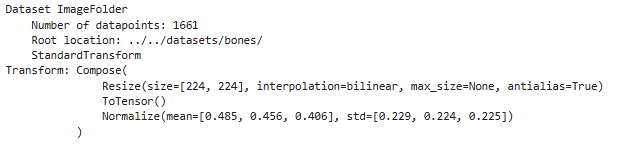
标签打印
python
# 数据集中每个类别名称对应的数字标签(class_to_idx),用于模型训练时的标签编码
total_data.class_to_idx
数据集划分和
python
# 划分训练集和测试集(8:2)
total_size = len(total_data)
train_size = int(0.8 * total_size)
test_size = total_size - train_size
train_dataset, test_dataset = torch.utils.data.random_split(total_data, [train_size, test_size])
train_dataset, test_dataset
python
# 创建训练数据加载器:每次从训练集中加载 batch_size=4 个样本,并打乱顺序(shuffle=True)
train_loader = torch.utils.data.DataLoader(train_dataset,
                                           batch_size=4,
                                           shuffle=True)
# 创建测试数据加载器:每次从测试集中加载 batch_size=4 个样本,不打乱顺序(默认 shuffle=False)
test_loader = torch.utils.data.DataLoader(test_dataset,
                                          batch_size=4)
验证数据形状
python
# 打印一个 batch 的数据形状以验证
for X, y in test_loader:
    print(f"输入张量形状 [Batch, Channel, Height, Width]: {X.shape}")
    print(f"标签形状: {y.shape}, 数据类型: {y.dtype}")
    break
构建ResNet-50
python
import torch
import torch.nn as nn

def autopad(k, p=None):
    """自动计算 same padding"""
    if p is None:
        if isinstance(k, int):
            p = k // 2
        else:
            p = [x // 2 for x in k]
    return p

class PreActBottleneck(nn.Module):
    """
    ResNet50V2 预激活瓶颈块
    - 顺序:BN → ReLU → 1x1 Conv → BN → ReLU → 3x3 Conv → BN → ReLU → 1x1 Conv
    - shortcut 分支:若需下采样或改变通道数,则使用 1x1 Conv (stride) 或 MaxPooling (但标准为 1x1 Conv)
    """
    def __init__(self, in_channels, out_channels, stride=1, downsample=None):
        super().__init__()
        mid_channels = out_channels // 4

        # 预激活部分(放在卷积之前)
        self.bn1 = nn.BatchNorm2d(in_channels)
        self.relu1 = nn.ReLU(inplace=True)
        self.conv1 = nn.Conv2d(in_channels, mid_channels, kernel_size=1, stride=1, bias=False)

        self.bn2 = nn.BatchNorm2d(mid_channels)
        self.relu2 = nn.ReLU(inplace=True)
        self.conv2 = nn.Conv2d(mid_channels, mid_channels, kernel_size=3, stride=stride,
                               padding=autopad(3), bias=False)

        self.bn3 = nn.BatchNorm2d(mid_channels)
        self.relu3 = nn.ReLU(inplace=True)
        self.conv3 = nn.Conv2d(mid_channels, out_channels, kernel_size=1, stride=1, bias=False)

        self.downsample = downsample

    def forward(self, x):
        residual = x if self.downsample is None else self.downsample(x)

        out = self.bn1(x)
        out = self.relu1(out)
        out = self.conv1(out)

        out = self.bn2(out)
        out = self.relu2(out)
        out = self.conv2(out)

        out = self.bn3(out)
        out = self.relu3(out)
        out = self.conv3(out)

        out += residual
        return out

class ResNet50V2(nn.Module):
    def __init__(self, num_classes=1000):
        super().__init__()
        # 初始部分
        self.conv1 = nn.Conv2d(3, 64, kernel_size=7, stride=2, padding=3, bias=False)
        self.bn1 = nn.BatchNorm2d(64)
        self.relu1 = nn.ReLU(inplace=True)
        self.maxpool = nn.MaxPool2d(kernel_size=3, stride=2, padding=1)

        # Stage 2 (3 blocks, out_channels=256)
        self.layer1 = self._make_layer(64, 256, blocks=3, stride=1)
        # Stage 3 (4 blocks, out_channels=512)
        self.layer2 = self._make_layer(256, 512, blocks=4, stride=2)
        # Stage 4 (6 blocks, out_channels=1024)
        self.layer3 = self._make_layer(512, 1024, blocks=6, stride=2)
        # Stage 5 (3 blocks, out_channels=2048)
        self.layer4 = self._make_layer(1024, 2048, blocks=3, stride=2)

        # 最终部分
        self.bn_final = nn.BatchNorm2d(2048)
        self.relu_final = nn.ReLU(inplace=True)
        self.avgpool = nn.AdaptiveAvgPool2d((1, 1))
        self.fc = nn.Linear(2048, num_classes)

    def _make_layer(self, in_channels, out_channels, blocks, stride):
        """构建一个 stage,包含多个 PreActBottleneck"""
        downsample = None
        # 第一个块可能需要下采样
        if stride != 1 or in_channels != out_channels:
            downsample = nn.Sequential(
                nn.Conv2d(in_channels, out_channels, kernel_size=1, stride=stride, bias=False),
                nn.BatchNorm2d(out_channels)
            )
        layers = []
        layers.append(PreActBottleneck(in_channels, out_channels, stride, downsample))
        # 后续块均为恒等映射
        for _ in range(1, blocks):
            layers.append(PreActBottleneck(out_channels, out_channels, stride=1))
        return nn.Sequential(*layers)

    def forward(self, x):
        x = self.conv1(x)
        x = self.bn1(x)
        x = self.relu1(x)
        x = self.maxpool(x)

        x = self.layer1(x)
        x = self.layer2(x)
        x = self.layer3(x)
        x = self.layer4(x)

        x = self.bn_final(x)
        x = self.relu_final(x)
        x = self.avgpool(x)
        x = torch.flatten(x, 1)
        x = self.fc(x)
        return x


# 实例化模型并移动到设备(GPU)
# 自动选择设备:如果有 GPU 就用 CUDA,否则用 CPU
device = torch.device("cuda" if torch.cuda.is_available() else "cpu")

# 创建 ResNet-50 模型,设置为 3 分类任务
model = ResNet50V2(num_classes=3).to(device)  # .to(device) 将模型参数加载到指定设备
查看模型
python
# 统计模型参数数量以及其他指标
import torchsummary as summary
summary.summary(model, (3, 224, 224))
训练和测试函数
python
# 训练循环
def train(dataloader, model, loss_fn, optimizer):
    size = len(dataloader.dataset) # 训练集的大小
    num_batches = len(dataloader) # 批次数目(size/batch_size,向上取整)

    train_loss, train_acc = 0, 0 # 初始化训练损失和正确率

    for X, y in dataloader: # 获取图片及其标签
        X, y = X.to(device), y.to(device)

        # 计算预测误差
        pred = model(X) # 网络输出
        loss = loss_fn(pred, y) # 计算网络输出和真实值之间的差距

        # 反向传播
        optimizer.zero_grad() # grad属性归零
        loss.backward() # 反向传播
        optimizer.step() # 每一步自动更新

        # 记录acc和loss
        train_acc += (pred.argmax(1) == y).type(torch.float).sum().item()
        train_loss += loss.item()

    train_acc /= size # 计算训练集整体正确率
    train_loss /= num_batches # 计算训练集平均损失

    return train_acc, train_loss
python
# 测试函数
def test(dataloader, model, loss_fn):
    size = len(dataloader.dataset) # 测试集的大小
    num_batches = len(dataloader)  # 批次数目(size/batch_size,向上取整)
    test_loss, test_acc = 0, 0

    # 当不进行训练时,停止梯度更新,节省计算内存消耗
    with torch.no_grad():
        for imgs, target in dataloader:
            imgs, target = imgs.to(device), target.to(device)

            # 计算loss
            target_pred = model(imgs)
            loss = loss_fn(target_pred, target)

            test_loss += loss.item()
            test_acc += (target_pred.argmax(1) == target).type(torch.float).sum().item()

    test_acc /= size
    test_loss /= num_batches

    return test_acc, test_loss
正式训练
python
# 训练
import copy
import torch
import torch.nn as nn
import torch.optim as optim

# 初始化优化器与损失函数
optimizer = optim.AdamW(model.parameters(), lr=1e-4)
loss_fn = nn.CrossEntropyLoss()  # 创建损失函数

epochs = 10  # 训练轮数

# 初始化指标记录列表
train_loss = []
train_acc = []
test_loss = []
test_acc = []

best_acc = 0  # 设置最佳准确率,作为保存最佳模型的指标

for epoch in range(epochs):
    # 训练阶段
    model.train()  # 开启训练模式(启用 Dropout、BatchNorm 等层的训练行为)
    epoch_train_acc, epoch_train_loss = train(train_loader, model, loss_fn, optimizer)

    # 测试阶段
    model.eval()  # 开启评估模式(禁用 Dropout、固定 BatchNorm 等层的参数)
    epoch_test_acc, epoch_test_loss = test(test_loader, model, loss_fn)

    # 保存最佳模型
    if epoch_test_acc > best_acc:
        best_acc = epoch_test_acc
        best_model = copy.deepcopy(model) # 深拷贝当前最佳模型

    # 记录训练/测试指标
    train_acc.append(epoch_train_acc)
    train_loss.append(epoch_train_loss)
    test_acc.append(epoch_test_acc)
    test_loss.append(epoch_test_loss)

    # 获取当前学习率
    lr = optimizer.state_dict()['param_groups'][0]['lr']

    # 打印当前轮次的指标
    template = ('第 {:2d} 轮,训练准确率:{:.1f}%,训练损失:{:.3f},测试准确率:{:.1f}%,测试损失:{:.3f},学习率:{:.2E}')
    print(template.format(epoch + 1,
                          epoch_train_acc * 100,
                          epoch_train_loss,
                          epoch_test_acc * 100,
                          epoch_test_loss,
                          lr))

# 保存最佳模型到文件
PATH = './best_model.pth'  # 保存的参数文件名
torch.save(best_model.state_dict(), PATH)  # 保存模型的参数状态字典

print('完成')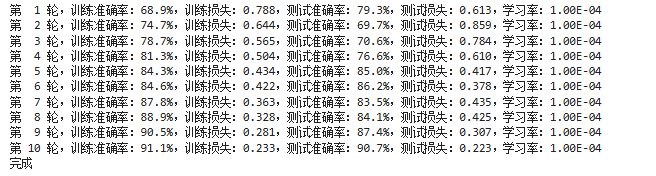
可视化训练结果
python
# 结果可视化
import matplotlib.pyplot as plt
# 隐藏警告
import warnings
warnings.filterwarnings("ignore")  # 忽略警告信息

# 配置 Matplotlib 显示(解决中文/负号显示问题)
plt.rcParams['font.sans-serif'] = ['SimHei'] # 正常显示中文标签
plt.rcParams['axes.unicode_minus'] = False # 正常显示负号
plt.rcParams['figure.dpi'] = 100 # 设置图像分辨率为 100

from datetime import datetime
current_time = datetime.now() # 获取当前时间

epochs_range = range(epochs)

# 创建画布并绘制子图
plt.figure(figsize=(12, 3))

# 子图 1:准确率曲线
plt.subplot(1, 2, 1)
plt.plot(epochs_range, train_acc, label='训练准确率')
plt.plot(epochs_range, test_acc, label='测试准确率')
plt.legend(loc='lower right')
plt.title('训练与验证准确率')
plt.xlabel(f'训练轮次(生成时间:{current_time.strftime("%Y-%m-%d %H:%M:%S")})')  # 横轴标注当前时间

# 子图 2:损失曲线
plt.subplot(1, 2, 2)
plt.plot(epochs_range, train_loss, label='训练损失')
plt.plot(epochs_range, test_loss, label='测试损失')
plt.legend(loc='upper right')
plt.title('训练与验证损失')

plt.show()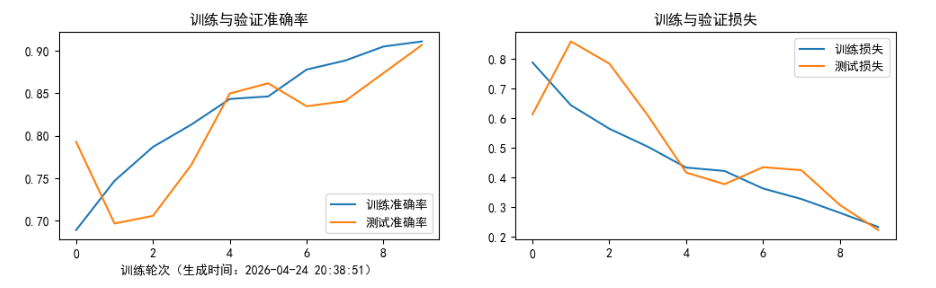
模型评估
python
# 将参数加载到model当中
best_model.load_state_dict(torch.load(PATH, map_location=device))
# 用最佳模型评估测试集
epoch_test_acc, epoch_test_loss = test(test_loader, best_model, loss_fn)
# 输出最佳模型的测试指标
epoch_test_acc, epoch_test_loss
学习总结
-
对比了 ResNet V1 和 V2 的实现,意识到:调整 BN 和 ReLU 的位置,就能带来显著的性能差异。
-
ResNet V1(后激活):先做 1×1 卷积,接 BN 和 ReLU;再做 3×3 卷积,同样接 BN 和 ReLU;最后是 1×1 卷积 + BN;将结果与 shortcut 相加后,再通过一个 ReLU。
-
ResNet V2(预激活):在每个卷积前先进行 BN 和 ReLU(即"预激活"),三个卷积都如此处理;最后一个卷积输出后直接与 shortcut 相加,不再额外加激活函数。
-
可以简单理解:V1 就像沿着有一条笔直的捷径(shortcut)去目的地,但路上每隔一段就有一个"障碍"(BN/ReLU)。虽然能到,但不够顺畅。而 V2 把所有"障碍"都移到了主干道(残差分支)上,让捷径变得顺畅。反向传播时,梯度能毫无阻碍地沿 shortcut 直达浅层,极大缓解了梯度消失问题。
-
-
而"预激活"可以用在神经网络里有"把输入直接加到输出上"的网络结构(比如 ResNet 里的 shortcut)。什么叫"预激活"?就是先把数据做归一化(比如 BN)和激活(比如 ReLU),再送进卷积或全连接层,而不是像以前那样先卷积再激活。
举个例子:原本你写的是
卷积 → BN → ReLU,现在改成BN → ReLU → 卷积。别看只是调了个顺序,但它能让"直通路径"(就是那个直接加回来的 x)保持干净,没有非线性干扰。这样在反向传播时,梯度就能顺着这条直路一路畅通地传回前面的层,不会在中途"消失"或者"爆炸"。