cpp
// mainwindow.h

#ifndef MAINWINDOW_H
#define MAINWINDOW_H

#include <QMainWindow>
#include <QStandardItemModel>
#include <QTableView>
#include <QToolBar>
#include <QAction>
#include <QFileDialog>
#include <QMessageBox>
#include <QTextStream>
#include <QFile>
#include <QHeaderView>

class MainWindow : public QMainWindow
{
    Q_OBJECT

public:
    MainWindow(QWidget *parent = nullptr);
    ~MainWindow();

private slots:
    void addRow();
    void removeRow();
    void saveToCSV();
    void loadFromCSV();
    void clearTable();

private:
    QStandardItemModel *model;
    QTableView *tableView;
    void setupUI();
};

#endif // MAINWINDOW_H
cpp
// mainwindow.cpp

#include "mainwindow.h"

MainWindow::MainWindow(QWidget *parent)
    : QMainWindow(parent)
{
    setupUI();
}

MainWindow::~MainWindow()
{
}

void MainWindow::setupUI()
{
    // 1. 创建模型和视图
    model = new QStandardItemModel(this);
    // 设置初始列数和表头
    model->setColumnCount(4);
    model->setHorizontalHeaderLabels({"ID", "姓名", "城市", "备注"});

    tableView = new QTableView(this);
    tableView->setModel(model);

    // 2. 配置视图属性
    // 启用编辑功能 (QStandardItemModel 默认即可编辑,但需确保视图未禁用)
    tableView->setEditTriggers(QAbstractItemView::DoubleClicked | QAbstractItemView::SelectedClicked);
    // 列宽自适应
    tableView->horizontalHeader()->setSectionResizeMode(QHeaderView::Stretch);
    // 选中整行
    tableView->setSelectionBehavior(QAbstractItemView::SelectRows);

    setCentralWidget(tableView);
    setWindowTitle("Qt 可编辑表格示例");
    resize(800, 600);

    // 3. 创建工具栏和动作
    QToolBar *toolBar = addToolBar("操作栏");

    QAction *addAction = toolBar->addAction("添加行");
    connect(addAction, &QAction::triggered, this, &MainWindow::addRow);

    QAction *removeAction = toolBar->addAction("删除选中行");
    connect(removeAction, &QAction::triggered, this, &MainWindow::removeRow);

    QAction *clearAction = toolBar->addAction("清空表格");
    connect(clearAction, &QAction::triggered, this, &MainWindow::clearTable);

    toolBar->addSeparator();

    QAction *saveAction = toolBar->addAction("保存为CSV");
    connect(saveAction, &QAction::triggered, this, &MainWindow::saveToCSV);

    QAction *loadAction = toolBar->addAction("加载CSV");
    connect(loadAction, &QAction::triggered, this, &MainWindow::loadFromCSV);
}

void MainWindow::addRow()
{
    int row = model->rowCount();
    model->insertRow(row);
    // 初始化新行的数据,例如设置ID
    model->setData(model->index(row, 0), QString::number(row + 1));
}

void MainWindow::removeRow()
{
    // 获取选中的索引列表
    QModelIndexList selectedIndexes = tableView->selectionModel()->selectedIndexes();
    if (selectedIndexes.isEmpty()) {
        QMessageBox::warning(this, "提示", "请先选择要删除的行");
        return;
    }

    // 由于删除行会改变索引,我们需要从后往前删除,或者收集行号去重后排序删除
    // 这里采用收集行号并去重的方式
    QList<int> rowsToRemove;
    for (const QModelIndex &index : selectedIndexes) {
        if (!rowsToRemove.contains(index.row())) {
            rowsToRemove.append(index.row());
        }
    }

    // 降序排列,确保删除后面的行不影响前面行的索引
    std::sort(rowsToRemove.begin(), rowsToRemove.end(), std::greater<int>());

    for (int row : rowsToRemove) {
        model->removeRow(row);
    }
}

void MainWindow::clearTable()
{
    model->removeRows(0, model->rowCount());
}

void MainWindow::saveToCSV()
{
    QString fileName = QFileDialog::getSaveFileName(this, "保存文件", "", "CSV文件 (*.csv);;所有文件 (*)");
    if (fileName.isEmpty())
        return;

    QFile file(fileName);
    if (!file.open(QIODevice::WriteOnly | QIODevice::Text)) {
        QMessageBox::critical(this, "错误", "无法打开文件进行写入");
        return;
    }

    QTextStream out(&file);
    // 如果需要处理中文乱码,可以设置编码,例如 UTF-8
    //out.setCodec("UTF-8");

    // 写入表头
    QStringList headers;
    for (int i = 0; i < model->columnCount(); ++i) {
        headers << model->headerData(i, Qt::Horizontal).toString();
    }
    out << headers.join(",") << "\n";

    // 写入数据
    for (int i = 0; i < model->rowCount(); ++i) {
        QStringList rowData;
        for (int j = 0; j < model->columnCount(); ++j) {
            QModelIndex index = model->index(i, j);
            // 获取显示角色的数据
            QString data = model->data(index, Qt::DisplayRole).toString();
            // 如果数据中包含逗号或换行符,需要用引号包裹并转义内部引号
            if (data.contains(",") || data.contains("\"") || data.contains("\n")) {
                data.replace("\"", "\"\"");
                data = "\"" + data + "\"";
            }
            rowData << data;
        }
        out << rowData.join(",") << "\n";
    }

    file.close();
    QMessageBox::information(this, "成功", "表格已保存至: " + fileName);
}

void MainWindow::loadFromCSV()
{
    QString fileName = QFileDialog::getOpenFileName(this, "打开文件", "", "CSV文件 (*.csv);;所有文件 (*)");
    if (fileName.isEmpty())
        return;

    QFile file(fileName);
    if (!file.open(QIODevice::ReadOnly | QIODevice::Text)) {
        QMessageBox::critical(this, "错误", "无法打开文件进行读取");
        return;
    }

    QTextStream in(&file);
    //in.setCodec("UTF-8");

    // 清空现有模型
    model->removeRows(0, model->rowCount());

    bool isFirstLine = true;
    while (!in.atEnd()) {
        QString line = in.readLine();
        if (line.isEmpty()) continue;

        // 简单的CSV解析,实际生产中建议使用更健壮的CSV解析库
        // 这里假设没有复杂的嵌套引号情况,仅做简单分割演示
        // 注意:这种简单分割无法完美处理包含逗号的字段,生产环境需优化
        QStringList fields = line.split(",");

        if (isFirstLine) {
            // 设置表头
            model->setHorizontalHeaderLabels(fields);
            isFirstLine = false;
        } else {
            int row = model->rowCount();
            model->insertRow(row);
            for (int col = 0; col < fields.size() && col < model->columnCount(); ++col) {
                QString data = fields[col];
                // 去除可能存在的引号
                if (data.startsWith("\"") && data.endsWith("\"")) {
                    data = data.mid(1, data.size() - 2);
                    data.replace("\"\"", "\"");
                }
                model->setData(model->index(row, col), data);
            }
        }
    }
    file.close();
}
cpp
//main.cpp

#include "mainwindow.h"
#include <QApplication>

int main(int argc, char *argv[])
{
    QApplication a(argc, argv);
    MainWindow w;
    w.show();
    return a.exec();
}
cpp
#CMakeLists.txt

cmake_minimum_required(VERSION 3.15)

project(editable_table LANGUAGES CXX)
project(editable_table LANGUAGES C CXX)

set(CMAKE_INCLUDE_CURRENT_DIR ON)
set(CMAKE_PREFIX_PATH "/home/rpdzkj/Qt/6.9.3/gcc_arm64/")

set(CMAKE_AUTOUIC ON)
set(CMAKE_AUTOMOC ON)
set(CMAKE_AUTORCC ON)

set(CMAKE_CXX_STANDARD 17)
set(CMAKE_CXX_STANDARD_REQUIRED ON)

# 查找 Qt5 组件
find_package(Qt6 COMPONENTS Widgets REQUIRED)

set(PROJECT_SOURCES
        main.cpp
        mainwindow.cpp
        mainwindow.h
)

add_executable(editable_table ${PROJECT_SOURCES})

target_link_libraries(editable_table Qt6::Widgets)详细代码请见:https://gitee.com/ws_22/qt6-edit-table.git
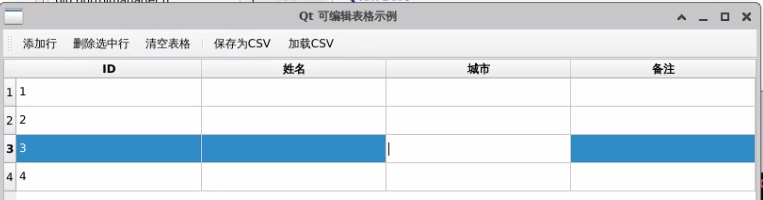
最终效果