说明:Laravel队列使用redis驱动器。队列记录写入到sql中。
一、配置
.env配置文件修改驱动器连接为redis
php
QUEUE_CONNECTION=redis二、数据表创建
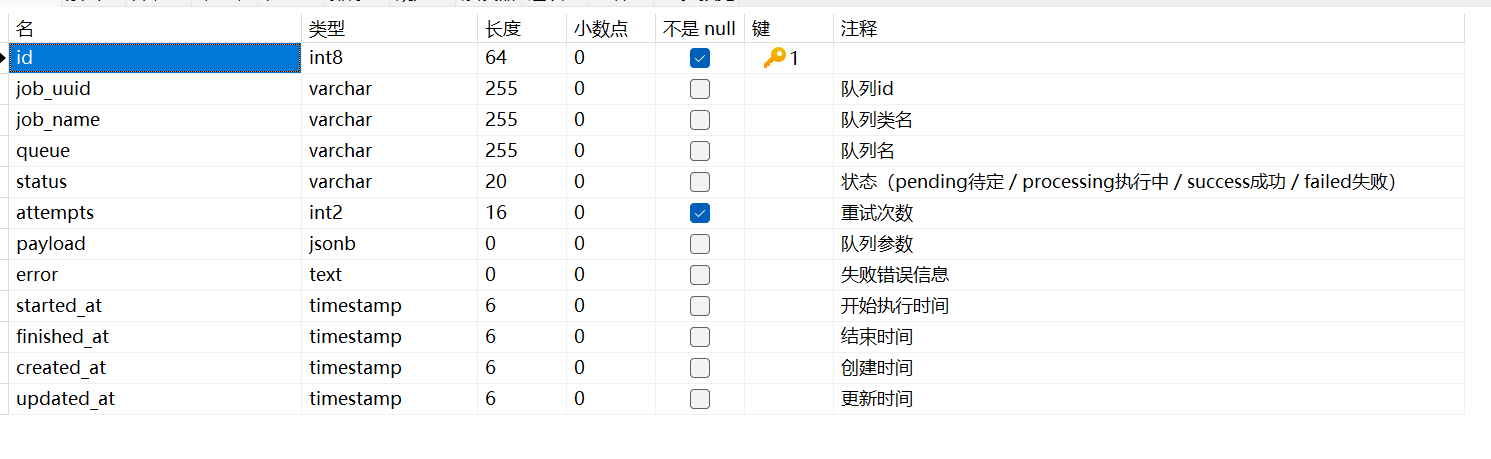
表名:job_logs
sql
CREATE TABLE job_logs (
    id BIGINT PRIMARY KEY AUTO_INCREMENT,
    job_uuid VARCHAR(64) UNIQUE,
    job_name VARCHAR(255),
    queue VARCHAR(100),
    status VARCHAR(20), -- pending / processing / success / failed
    attempts INT DEFAULT 0,
    payload JSON NULL,
    error TEXT NULL,
    started_at TIMESTAMP NULL,
    finished_at TIMESTAMP NULL,
    created_at TIMESTAMP NULL,
    updated_at TIMESTAMP NULL
);

三、封装队列服务
创建App\Services\Queue\QueueService.php文件,封装实时队列和延时队列还有任务记录的内容。
php
<?php

namespace App\Services\Queue;

use Illuminate\Support\Facades\Bus;
use Carbon\Carbon;
use Illuminate\Support\Facades\DB;
use Illuminate\Support\Facades\Log;

class QueueService
{
    public static function push(string $jobClass, array $data = [], string $queue = 'default')
    {
        $job = new $jobClass($data);
        self::writeLog($job, $queue, 'pending',date('Y-m-d H:i:s'));
        dispatch($job)->onQueue($queue);
    }

    public static function later(string $jobClass, array $data = [], int $delaySeconds = 0, string $queue = 'default')
    {
        $job = new $jobClass($data);
        self::writeLog($job, $queue, 'pending',date('Y-m-d H:i:s',time()+$delaySeconds));
        dispatch($job)
            ->delay(Carbon::now()->addSeconds($delaySeconds))
            ->onQueue($queue);
    }

    public static function laterAt(string $jobClass, array $data = [], string $datetime, string $queue = 'default')
    {
        $job = new $jobClass($data);
        self::writeLog($job, $queue, 'pending',$datetime);
        dispatch($job)
            ->delay(Carbon::parse($datetime))
            ->onQueue($queue);
    }
    //记录
    public static function writeLog($job, string $queue, string $status,string $datetime, string $error = '')
    {
//        \Log::info("数据: " . json_encode($job));
//        \Log::info("数据88: " . json_encode($job->getData() ?? [], JSON_UNESCAPED_UNICODE));
        DB::table('job_logs')->insert([
            'job_uuid' => $job->getJobUuid(),
            'job_name' => get_class($job),
            'queue' => $queue,
            'status' => $status,
            'payload' => json_encode($job->getData() ?? [], JSON_UNESCAPED_UNICODE),
            'started_at' => $datetime,
            'error' => $error,
            'created_at' => now(),
        ]);
    }

}
四、监测队列
创建App\Provides\QueueServiceProvider.php文件,监测队列的开始、成功和失败。并且修改其在数据表中的状态内容。
php
<?php

namespace App\Providers;

use Illuminate\Support\ServiceProvider;
use Illuminate\Support\Facades\Queue;
use Illuminate\Support\Facades\DB;
use Illuminate\Queue\Events\JobProcessing;
use Illuminate\Queue\Events\JobProcessed;
use Illuminate\Queue\Events\JobFailed;

class QueueServiceProvider extends ServiceProvider
{
    public function boot()
    {
//        \Log::info("队列boot: ");
        Queue::before(function (JobProcessing $event) {
//            \Log::info("队列before: ");
            $payload = $event->job->payload();

            $command = unserialize($payload['data']['command']);
            $uuid = $command->jobUuid ?? null;

//            \Log::info("2: ".json_encode($payload));
//            \Log::info($uuid);
            if (!$uuid) return;

            DB::table('job_logs')
                ->where('job_uuid', $uuid)
                ->update([
                    'status' => 'processing',
//                    'started_at' => now(),
                    'attempts' => $event->job->attempts(),
                ]);

        });

        Queue::after(function (JobProcessed $event) {
            $payload = $event->job->payload();
            $command = unserialize($payload['data']['command']);
            $uuid = $command->jobUuid ?? null;

            if (!$uuid) return;

            DB::table('job_logs')
                ->where('job_uuid', $uuid)
                ->update([
                    'status' => 'success',
                    'finished_at' => date('Y-m-d H:i:s'),
                ]);
        });

        Queue::failing(function (JobFailed $event) {
            $payload = $event->job->payload();
            $command = unserialize($payload['data']['command']);
            $uuid = $command->jobUuid ?? null;

            if (!$uuid) return;

            DB::table('job_logs')
                ->where('job_uuid', $uuid)
                ->update([
                    'status' => 'failed',
                    'error' => $event->exception->getMessage(),
                    'finished_at' => date('Y-m-d H:i:s'),
                ]);
        });
    }
}
注意:需要再bootstrap\providers.php里面做引用,要不然就会识别不到。有的卸载config.php文件里面
php
<?php

return [
    App\Providers\QueueServiceProvider::class,
];
五、队列基础类封装
创建App\Jobs\BaseQueue.php文件
php
<?php

namespace App\Jobs;

use Illuminate\Bus\Queueable;
use Illuminate\Contracts\Queue\ShouldQueue;
use Illuminate\Support\Str;

abstract class BaseQueue implements ShouldQueue
{
    use Queueable;
    public $jobUuid;
    protected $data;

    public function __construct(array $data = [])
    {
        $this->data = $data;
        $this->jobUuid = (string) Str::uuid();
    }
    public function getJobUuid()
    {
        return $this->jobUuid;
    }
    public function getData()
    {
        return $this->data;
    }
}
六、队列接收
创建App\Jobs\Sms\SmsUserContentQueue.php文件
php
<?php

namespace App\Jobs\Sms;

use App\Jobs\BaseQueue;
use App\Services\Sms\Controller\UserContentService;
use Illuminate\Support\Facades\Log;

class SmsUserContentQueue extends BaseQueue
{
    // 接收参数处理数据
    public function handle()
    {
//        Log::info('SmsUserContentQueue接收到的参数', [
//            'job_uuid' => $this->jobUuid,
//            'data' => $this->data
//        ]);

        // 业务逻辑
        try {
            $userContentService = app(UserContentService::class);
            $userContentService->addUserContent($this->data["id"]);
//            Log::info('SmsUserContentQueue执行成功', ['job_uuid' => $this->jobUuid]);

        } catch (\Exception $e) {
            Log::error('SmsUserContentQueue执行失败', [
                'job_uuid' => $this->jobUuid,
                'error' => $e->getMessage(),
                'trace' => $e->getTraceAsString()
            ]);

            throw $e;
        }

    }
}
七、写入队列
php
\App\Services\Queue\QueueService::push(
    \App\Jobs\Sms\SmsUserContentQueue::class,//队列接收的类
    ["id"=>1],//参数
);
注:
1、这边的队列,统一在队列名为default的默认队列中执行