最终效果
电脑/pad端


移动端


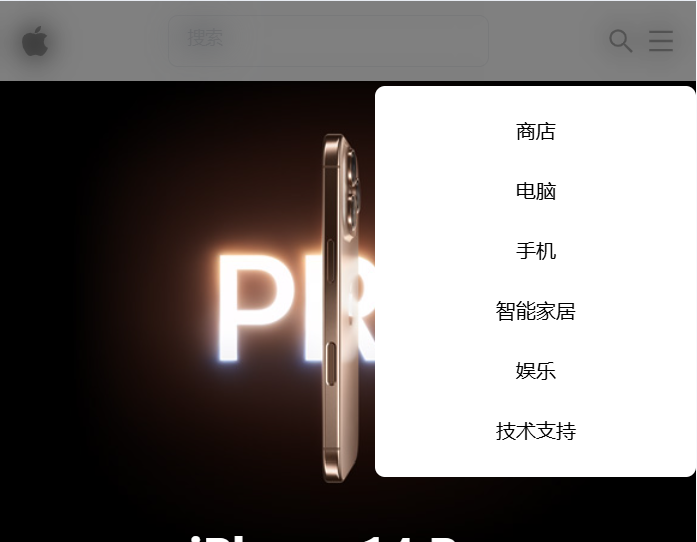
组件封装
技术栈: react19 + Tailwind CSS
src/components/Header.jsx
ts
import Logo from "../assets/apple.svg?react";
import { AiOutlineMenu, AiOutlineSearch } from "react-icons/ai";
import { useState } from "react";

const Header = () => {
  const [isOpen, setIsOpen] = useState(false);
  const [isSearchEnable, setIsSearchEnable] = useState(false);
  const [searchValue, setSearchValue] = useState("");

  return (
    <nav className="flex gap-2 items-center justify-between px-4 h-16 shadow-md sticky top-0 z-50 bg-white/70 backdrop-blur-md">
      <a href="#" className="text-xl font-bold">
        <Logo className="w-6 h-6 hover:scale-105 transition-transform" />
      </a>

      <div className="gap-6 hidden md:flex mx-auto">
        <a href="#">商店</a>
        <a href="#">电脑</a>
        <a href="#">手机</a>
        <a href="#">智能家居</a>
        <a href="#">娱乐</a>
        <a href="#">技术支持</a>
      </div>
      {isSearchEnable && (
        <div className="relative">
          <input
            id="search-input"
            className="peer border border-gray-300 px-4 py-2 w-64 rounded-lg focus:outline-none focus:ring-2 focus:ring-blue-500 transition"
            placeholder=" "
            value={searchValue}
            onChange={(e) => setSearchValue(e.target.value)}
          />
          <label
            htmlFor="search-input"
            className="absolute left-2 -top-2 bg-white px-2 text-xs text-gray-500 transition-all duration-200 cursor-pointer
                    peer-placeholder-shown:top-2
                    peer-placeholder-shown:text-sm
                    peer-focus:-top-2
                      peer-focus:left-2
                    peer-focus:text-blue-500
                    peer-focus:text-xs"
          >
            搜索
          </label>
          {searchValue && (
            <button
              onClick={() => setSearchValue("")}
              className="absolute right-4 top-2 text-gray-400 hover:text-gray-600 cursor-pointer peer-focus:text-blue-500"
            >
              ✕
            </button>
          )}
        </div>
      )}
      <div className="flex gap-2 ml">
        <button
          onClick={() => setIsSearchEnable(!isSearchEnable)}
          className="cursor-pointer"
        >
          <AiOutlineSearch size={24} />
        </button>
        <button
          className="md:hidden cursor-pointer"
          onClick={() => setIsOpen(true)}
        >
          <AiOutlineMenu size={24} />
        </button>
      </div>
      <div
        className={`md:hidden fixed top-0 right-0 h-full w-64
        ${!isOpen && "hidden"}
        `}
      >
        <div className="flex flex-col mt-17 space-y-6 bg-white text-center p-6 rounded-lg">
          <a href="#">商店</a>
          <a href="#">电脑</a>
          <a href="#">手机</a>
          <a href="#">智能家居</a>
          <a href="#">娱乐</a>
          <a href="#">技术支持</a>
        </div>
      </div>
      {/* 移动端,菜单展开时,导航栏添加模糊遮罩 */}
      {isOpen && (
        <div
          className="fixed inset-0 bg-black/50 backdrop-blur-md"
          onClick={() => setIsOpen(false)}
        ></div>
      )}
    </nav>
  );
};
export default Header;
使用
ts
import Header from "./components/Header";
html
<Header />