1.更新源
bash
sudo apt update2.查看推荐驱动
bash
ubuntu-drivers devices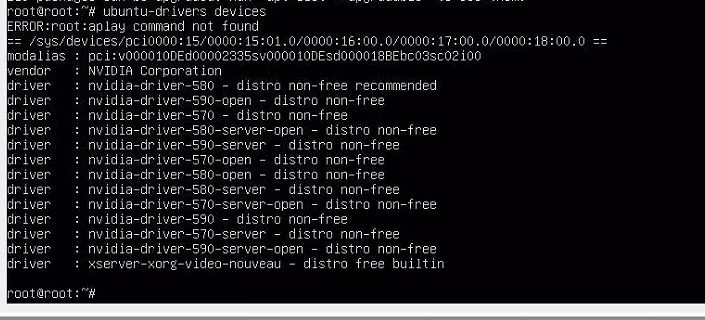
3.安装 570驱动
bash
sudo apt install nvidia-driver-570这种安装方式一般不需要手动关闭 nouveau,官方 NVIDIA 驱动包会自动做这些事情:
- blacklist nouveau
- 更新 initramfs
- 处理内核模块冲突
4.安装驱动同版本的nvidia-fabricmanager
bash
sudo apt install nvidia-fabricmanager-570启动服务
bash
sudo systemctl enable nvidia-fabricmanager
sudo systemctl start nvidia-fabricmanager
5. 重启后验证
bash
root@root:~# nvidia-smi
Mon Apr 27 08:33:24 2026
+-----------------------------------------------------------------------------------------+
| NVIDIA-SMI 570.211.01             Driver Version: 570.211.01     CUDA Version: 12.8     |
|-----------------------------------------+------------------------+----------------------+
| GPU  Name                 Persistence-M | Bus-Id          Disp.A | Volatile Uncorr. ECC |
| Fan  Temp   Perf          Pwr:Usage/Cap |           Memory-Usage | GPU-Util  Compute M. |
|                                         |                        |               MIG M. |
|=========================================+========================+======================|
|   0  NVIDIA H200                    Off |   00000000:18:00.0 Off |                    0 |
| N/A   27C    P0             75W /  700W |       0MiB / 143771MiB |      0%      Default |
|                                         |                        |             Disabled |
+-----------------------------------------+------------------------+----------------------+
|   1  NVIDIA H200                    Off |   00000000:2A:00.0 Off |                    0 |
| N/A   30C    P0             75W /  700W |       0MiB / 143771MiB |      0%      Default |
|                                         |                        |             Disabled |
+-----------------------------------------+------------------------+----------------------+
|   2  NVIDIA H200                    Off |   00000000:3A:00.0 Off |                    0 |
| N/A   31C    P0             79W /  700W |       0MiB / 143771MiB |      0%      Default |
|                                         |                        |             Disabled |
+-----------------------------------------+------------------------+----------------------+
|   3  NVIDIA H200                    Off |   00000000:5D:00.0 Off |                    0 |
| N/A   27C    P0             76W /  700W |       0MiB / 143771MiB |      0%      Default |
|                                         |                        |             Disabled |
+-----------------------------------------+------------------------+----------------------+
|   4  NVIDIA H200                    Off |   00000000:9A:00.0 Off |                    0 |
| N/A   27C    P0             76W /  700W |       0MiB / 143771MiB |      0%      Default |
|                                         |                        |             Disabled |
+-----------------------------------------+------------------------+----------------------+
|   5  NVIDIA H200                    Off |   00000000:AB:00.0 Off |                    0 |
| N/A   31C    P0             77W /  700W |       0MiB / 143771MiB |      0%      Default |
|                                         |                        |             Disabled |
+-----------------------------------------+------------------------+----------------------+
|   6  NVIDIA H200                    Off |   00000000:BA:00.0 Off |                    0 |
| N/A   31C    P0             78W /  700W |       0MiB / 143771MiB |      0%      Default |
|                                         |                        |             Disabled |
+-----------------------------------------+------------------------+----------------------+
|   7  NVIDIA H200                    Off |   00000000:DB:00.0 Off |                    0 |
| N/A   27C    P0             75W /  700W |       0MiB / 143771MiB |      0%      Default |
|                                         |                        |             Disabled |
+-----------------------------------------+------------------------+----------------------+

+-----------------------------------------------------------------------------------------+
| Processes:                                                                              |
|  GPU   GI   CI              PID   Type   Process name                        GPU Memory |
|        ID   ID                                                               Usage      |
|=========================================================================================|
|  No running processes found                                                             |
+-----------------------------------------------------------------------------------------+
root@root:~# nvidia-smi topo -p2p n
        GPU0    GPU1    GPU2    GPU3    GPU4    GPU5    GPU6    GPU7
 GPU0   X       OK      OK      OK      OK      OK      OK      OK
 GPU1   OK      X       OK      OK      OK      OK      OK      OK
 GPU2   OK      OK      X       OK      OK      OK      OK      OK
 GPU3   OK      OK      OK      X       OK      OK      OK      OK
 GPU4   OK      OK      OK      OK      X       OK      OK      OK
 GPU5   OK      OK      OK      OK      OK      X       OK      OK
 GPU6   OK      OK      OK      OK      OK      OK      X       OK
 GPU7   OK      OK      OK      OK      OK      OK      OK      X

Legend:

  X    = Self
  OK   = Status Ok
  CNS  = Chipset not supported
  GNS  = GPU not supported
  TNS  = Topology not supported
  NS   = Not supported
  U    = Unknown
root@root:~#
6.安装 CUDA 12.8(推荐官方repo)
bash
wget https://developer.download.nvidia.com/compute/cuda/repos/ubuntu2204/x86_64/cuda-keyring_1.1-1_all.deb
sudo dpkg -i cuda-keyring_1.1-1_all.deb

sudo apt update
sudo apt install cuda-12-8
日志
bash
root@root:~# wget https://developer.download.nvidia.com/compute/cuda/repos/ubuntu2204/x86_64/cuda-keyring_1.1-1_all.deb
--2026-04-27 07:46:44--  https://developer.download.nvidia.com/compute/cuda/repos/ubuntu2204/x86_64/cuda-keyring_1.1-1_all.deb
Resolving developer.download.nvidia.com (developer.download.nvidia.com)... 23.213.43.207, 23.213.43.199
Connecting to developer.download.nvidia.com (developer.download.nvidia.com)|23.213.43.207|:443... connected.
HTTP request sent, awaiting response... 301 Moved Permanently
Location: https://developer.download.nvidia.cn/compute/cuda/repos/ubuntu2204/x86_64/cuda-keyring_1.1-1_all.deb [following]
--2026-04-27 07:46:45--  https://developer.download.nvidia.cn/compute/cuda/repos/ubuntu2204/x86_64/cuda-keyring_1.1-1_all.deb
Resolving developer.download.nvidia.cn (developer.download.nvidia.cn)... 66.253.47.121, 66.253.47.122
Connecting to developer.download.nvidia.cn (developer.download.nvidia.cn)|66.253.47.121|:443... connected.
HTTP request sent, awaiting response... 200 OK
Length: 4332 (4.2K) [application/x-deb]
Saving to: 'cuda-keyring_1.1-1_all.deb'

cuda-keyring_1.1-1_all.deb                          100%[============================================================================================================

2026-04-27 07:46:50 (1.33 GB/s) - 'cuda-keyring_1.1-1_all.deb' saved [4332/4332]

root@root:~# sudo dpkg -i cuda-keyring_1.1-1_all.deb
Selecting previously unselected package cuda-keyring.
(Reading database ... 96698 files and directories currently installed.)
Preparing to unpack cuda-keyring_1.1-1_all.deb ...
Unpacking cuda-keyring (1.1-1) ...
Setting up cuda-keyring (1.1-1) ...
root@root:~# apt update
Hit:1 http://security.ubuntu.com/ubuntu jammy-security InRelease
Hit:2 http://archive.ubuntu.com/ubuntu jammy InRelease
Hit:3 http://archive.ubuntu.com/ubuntu jammy-updates InRelease
Hit:4 http://archive.ubuntu.com/ubuntu jammy-backports InRelease
Get:5 https://developer.download.nvidia.cn/compute/cuda/repos/ubuntu2204/x86_64  InRelease [1,581 B]
Get:6 https://developer.download.nvidia.cn/compute/cuda/repos/ubuntu2204/x86_64  Packages [2,546 kB]
Fetched 2,547 kB in 8s (326 kB/s)
Reading package lists... Done
Building dependency tree... Done
Reading state information... Done
233 packages can be upgraded. Run 'apt list --upgradable' to see them.
root@root:~# apt install cuda-12-8
Reading package lists... Done
Building dependency tree... Done
Reading state information... Done
The following additional packages will be installed:
  alsa-topology-conf alsa-ucm-conf ca-certificates-java cuda-cccl-12-8 cuda-command-line-tools-12-8 cuda-compiler-12-8 cuda-crt-12-8 cuda-cudart-12-8 cuda-cudart-dev
  cuda-cupti-12-8 cuda-cupti-dev-12-8 cuda-cuxxfilt-12-8 cuda-demo-suite-12-8 cuda-documentation-12-8 cuda-driver-dev-12-8 cuda-gdb-12-8 cuda-libraries-12-8 cuda-lib
  cuda-nsight-compute-12-8 cuda-nsight-systems-12-8 cuda-nvcc-12-8 cuda-nvdisasm-12-8 cuda-nvml-dev-12-8 cuda-nvprof-12-8 cuda-nvprune-12-8 cuda-nvrtc-12-8 cuda-nvrt
  cuda-nvvm-12-8 cuda-nvvp-12-8 cuda-opencl-12-8 cuda-opencl-dev-12-8 cuda-profiler-api-12-8 cuda-runtime-12-8 cuda-sanitizer-12-8 cuda-toolkit-12-8 cuda-toolkit-12-
  cuda-toolkit-12-config-common cuda-toolkit-config-common cuda-tools-12-8 cuda-visual-tools-12-8 default-jre default-jre-headless fonts-dejavu-extra gds-tools-12-8
  libatk-wrapper-java libatk-wrapper-java-jni libcublas-12-8 libcublas-dev-12-8 libcufft-12-8 libcufft-dev-12-8 libcufile-12-8 libcufile-dev-12-8 libcurand-12-8 libc
  libcusolver-dev-12-8 libcusparse-12-8 libcusparse-dev-12-8 libgif7 libnpp-12-8 libnpp-dev-12-8 libnvfatbin-12-8 libnvfatbin-dev-12-8 libnvjitlink-12-8 libnvjitlink
  libnvjpeg-dev-12-8 libopengl0 libpcsclite1 libxcb-cursor0 libxcb-icccm4 libxcb-image0 libxcb-keysyms1 libxcb-render-util0 libxcb-shape0 libxcb-util1 libxcb-xineram
  libxkbcommon-x11-0 libxv1 libxxf86dga1 nsight-compute-2025.1.1 nsight-systems-2024.6.2 openjdk-11-jre openjdk-11-jre-headless x11-utils
Suggested packages:
  libasound2-plugins alsa-utils pcscd libnss-mdns fonts-ipafont-gothic fonts-ipafont-mincho fonts-wqy-microhei | fonts-wqy-zenhei fonts-indic mesa-utils
The following NEW packages will be installed:
  alsa-topology-conf alsa-ucm-conf ca-certificates-java cuda-12-8 cuda-cccl-12-8 cuda-command-line-tools-12-8 cuda-compiler-12-8 cuda-crt-12-8 cuda-cudart-12-8 cuda-
  cuda-cupti-12-8 cuda-cupti-dev-12-8 cuda-cuxxfilt-12-8 cuda-demo-suite-12-8 cuda-documentation-12-8 cuda-driver-dev-12-8 cuda-gdb-12-8 cuda-libraries-12-8 cuda-lib
  cuda-nsight-compute-12-8 cuda-nsight-systems-12-8 cuda-nvcc-12-8 cuda-nvdisasm-12-8 cuda-nvml-dev-12-8 cuda-nvprof-12-8 cuda-nvprune-12-8 cuda-nvrtc-12-8 cuda-nvrt
  cuda-nvvm-12-8 cuda-nvvp-12-8 cuda-opencl-12-8 cuda-opencl-dev-12-8 cuda-profiler-api-12-8 cuda-runtime-12-8 cuda-sanitizer-12-8 cuda-toolkit-12-8 cuda-toolkit-12-
  cuda-toolkit-12-config-common cuda-toolkit-config-common cuda-tools-12-8 cuda-visual-tools-12-8 default-jre default-jre-headless fonts-dejavu-extra gds-tools-12-8
  libatk-wrapper-java libatk-wrapper-java-jni libcublas-12-8 libcublas-dev-12-8 libcufft-12-8 libcufft-dev-12-8 libcufile-12-8 libcufile-dev-12-8 libcurand-12-8 libc
  libcusolver-dev-12-8 libcusparse-12-8 libcusparse-dev-12-8 libgif7 libnpp-12-8 libnpp-dev-12-8 libnvfatbin-12-8 libnvfatbin-dev-12-8 libnvjitlink-12-8 libnvjitlink
  libnvjpeg-dev-12-8 libopengl0 libpcsclite1 libxcb-cursor0 libxcb-icccm4 libxcb-image0 libxcb-keysyms1 libxcb-render-util0 libxcb-shape0 libxcb-util1 libxcb-xineram
  libxkbcommon-x11-0 libxv1 libxxf86dga1 nsight-compute-2025.1.1 nsight-systems-2024.6.2 openjdk-11-jre openjdk-11-jre-headless x11-utils
0 upgraded, 95 newly installed, 0 to remove and 233 not upgraded.
Need to get 3,660 MB of archives.
After this operation, 8,532 MB of additional disk space will be used.
Do you want to continue? [Y/n] y
Get:28 http://archive.ubuntu.com/ubuntu jammy/main amd64 alsa-topology-conf all 1.2.5.1-2 [15.5 kB]
Get:66 http://archive.ubuntu.com/ubuntu jammy-updates/main amd64 libasound2-data all 1.2.6.1-1ubuntu1.1 [19.3 kB]
Get:1 https://developer.download.nvidia.cn/compute/cuda/repos/ubuntu2204/x86_64  cuda-toolkit-config-common 13.2.75-1 [17.4 kB]
Get:67 http://archive.ubuntu.com/ubuntu jammy-updates/main amd64 libasound2 amd64 1.2.6.1-1ubuntu1.1 [391 kB]
Get:2 https://developer.download.nvidia.cn/compute/cuda/repos/ubuntu2204/x86_64  cuda-toolkit-12-config-common 12.9.79-1 [16.6 kB]
Get:68 http://archive.ubuntu.com/ubuntu jammy-updates/main amd64 alsa-ucm-conf all 1.2.6.3-1ubuntu1.12 [43.5 kB]
Get:69 http://archive.ubuntu.com/ubuntu jammy/main amd64 java-common all 0.72build2 [6,782 B]
Get:70 http://archive.ubuntu.com/ubuntu jammy-updates/main amd64 libpcsclite1 amd64 1.9.5-3ubuntu1 [19.8 kB]
Get:71 http://archive.ubuntu.com/ubuntu jammy-updates/main amd64 openjdk-11-jre-headless amd64 11.0.30+7-1ubuntu1~22.04 [42.6 MB]
Get:3 https://developer.download.nvidia.cn/compute/cuda/repos/ubuntu2204/x86_64  cuda-toolkit-12-8-config-common 12.8.90-1 [16.4 kB]
Get:4 https://developer.download.nvidia.cn/compute/cuda/repos/ubuntu2204/x86_64  cuda-cudart-12-8 12.8.90-1 [170 kB]
Get:5 https://developer.download.nvidia.cn/compute/cuda/repos/ubuntu2204/x86_64  cuda-nvrtc-12-8 12.8.93-1 [62.3 MB]
Get:6 https://developer.download.nvidia.cn/compute/cuda/repos/ubuntu2204/x86_64  cuda-opencl-12-8 12.8.90-1 [24.0 kB]
Get:7 https://developer.download.nvidia.cn/compute/cuda/repos/ubuntu2204/x86_64  libcublas-12-8 12.8.5.5-1 [464 MB]
...
Adding debian:GlobalSign_Root_CA.pem
Adding debian:SSL.com_EV_Root_Certification_Authority_ECC.pem
Adding debian:D-TRUST_BR_Root_CA_1_2020.pem
Adding debian:Comodo_AAA_Services_root.pem
Adding debian:DigiCert_Global_Root_CA.pem
Adding debian:AC_RAIZ_FNMT-RCM_SERVIDORES_SEGUROS.pem
Adding debian:Entrust_Root_Certification_Authority_-_G2.pem
Adding debian:OISTE_WISeKey_Global_Root_GC_CA.pem
Adding debian:QuoVadis_Root_CA_3_G3.pem
Adding debian:GlobalSign_ECC_Root_CA_-_R5.pem
Adding debian:ANF_Secure_Server_Root_CA.pem
Adding debian:Secure_Global_CA.pem
Adding debian:Microsoft_RSA_Root_Certificate_Authority_2017.pem
done.
Setting up cuda-nsight-12-8 (12.8.90-1) ...
Setting up cuda-visual-tools-12-8 (12.8.2-1) ...
Setting up cuda-tools-12-8 (12.8.2-1) ...
Setting up cuda-toolkit-12-8 (12.8.2-1) ...
Setting up cuda-12-8 (12.8.2-1) ...
Processing triggers for man-db (2.10.2-1) ...
Processing triggers for ca-certificates (20230311ubuntu0.22.04.1) ...
Updating certificates in /etc/ssl/certs...
0 added, 0 removed; done.
Running hooks in /etc/ca-certificates/update.d...

done.
done.
Processing triggers for fontconfig (2.13.1-4.2ubuntu5) ...
Processing triggers for hicolor-icon-theme (0.17-2) ...
Processing triggers for libc-bin (2.35-0ubuntu3.8) ...
Scanning processes...
Scanning processor microcode...
Scanning linux images...

Running kernel seems to be up-to-date.

The processor microcode seems to be up-to-date.

No services need to be restarted.

No containers need to be restarted.

No user sessions are running outdated binaries.

No VM guests are running outdated hypervisor (qemu) binaries on this host.
7.配环境变量
bash
echo 'export PATH=/usr/local/cuda/bin:$PATH' >> ~/.bashrc
echo 'export LD_LIBRARY_PATH=/usr/local/cuda/lib64:$LD_LIBRARY_PATH' >> ~/.bashrc
source ~/.bashrc
8.重启
9.创建RAID0
bash
root@root:~# nvme list
Node SN Model Namespace Usage Format FW Rev
--------------------- -------------------- ---------------------------------------- --------- -------------------------- ---------------- --------
/dev/nvme0n1 24484C9E2838 Micron_7450_MTFDKBA960TFR 1 362.60 GB / 960.20 GB 512 B + 0 B E2MU206
/dev/nvme1n1 PHAX409205UP7P6DGN INTEL SSDPF2KX076T1 1 7.68 TB / 7.68 TB 512 B + 0 B 9CV10450
/dev/nvme2n1 PHAX402100DY7P6DGN INTEL SSDPF2KX076T1 1 7.68 TB / 7.68 TB 512 B + 0 B 9CV10200
/dev/nvme3n1 PHAX401200LU7P6DGN INTEL SSDPF2KX076T1 1 7.68 TB / 7.68 TB 512 B + 0 B 9CV10200
/dev/nvme4n1 PHAX410208A67P6DGN INTEL SSDPF2KX076T1 1 7.68 TB / 7.68 TB 512 B + 0 B 9CV10450
root@root:~# Read from remote host 14.215.214.111: Connection reset by peer
Connection to 14.215.214.111 closed.
client_loop: send disconnect: Connection reset by peer
2026-04-28 10:30.28 /home/mobaxterm ssh -p 22223 rootroot@14.215.214.111
Welcome to Ubuntu 22.04.5 LTS (GNU/Linux 5.15.0-119-generic x86_64)
* Documentation: https://help.ubuntu.com
* Management: https://landscape.canonical.com
* Support: https://ubuntu.com/pro
System information as of Tue Apr 28 02:29:43 AM UTC 2026
System load: 0.48 Temperature: 35.0 C
Usage of /: 23.0% of 97.87GB Processes: 1973
Memory usage: 0% Users logged in: 1
Swap usage: 0% IPv4 address for enp86s0f0: 192.168.1.242
Expanded Security Maintenance for Applications is not enabled.
211 updates can be applied immediately.
158 of these updates are standard security updates.
To see these additional updates run: apt list --upgradable
Enable ESM Apps to receive additional future security updates.
See https://ubuntu.com/esm or run: sudo pro status
Failed to connect to https://changelogs.ubuntu.com/meta-release-lts. Check your Internet connection or proxy settings
Last login: Tue Apr 28 02:29:44 2026
rootroot@root:~$ sudo -i
[sudo] password for rootroot:
root@root:~#
root@root:~#
root@root:~#
root@root:~#
root@root:~#
root@root:~#
root@root:~# mdadm --create /dev/md0 --level=0 --raid-devices=4 /dev/nvme1n1 /dev/nvme2n1 /dev/nvme3n1 /dev/nvme4n1
mdadm: partition table exists on /dev/nvme1n1
mdadm: partition table exists on /dev/nvme1n1 but will be lost or
meaningless after creating array
mdadm: partition table exists on /dev/nvme2n1
mdadm: partition table exists on /dev/nvme2n1 but will be lost or
meaningless after creating array
mdadm: partition table exists on /dev/nvme3n1
mdadm: partition table exists on /dev/nvme3n1 but will be lost or
meaningless after creating array
mdadm: partition table exists on /dev/nvme4n1
mdadm: partition table exists on /dev/nvme4n1 but will be lost or
meaningless after creating array
Continue creating array? mdadm --zero-superblock
root@root:~#
root@root:~# mdadm --zero-superblock /dev/nvme1n1
mdadm: Unrecognised md component device - /dev/nvme1n1
root@root:~# mdadm --zero-superblock /dev/nvme1n1
mdadm: Unrecognised md component device - /dev/nvme1n1
root@root:~# mdadm --zero-superblock /dev/nvme2n1
mdadm: Unrecognised md component device - /dev/nvme2n1
root@root:~# mdadm --zero-superblock /dev/nvme3n1
mdadm: Unrecognised md component device - /dev/nvme3n1
root@root:~# mdadm --zero-superblock /dev/nvme4n1
mdadm: Unrecognised md component device - /dev/nvme4n1
root@root:~# wipefs -a /dev/nvme1n1
/dev/nvme1n1: 8 bytes were erased at offset 0x00000200 (gpt): 45 46 49 20 50 41 52 54
/dev/nvme1n1: 8 bytes were erased at offset 0x6fc7d255e00 (gpt): 45 46 49 20 50 41 52 54
/dev/nvme1n1: 2 bytes were erased at offset 0x000001fe (PMBR): 55 aa
/dev/nvme1n1: calling ioctl to re-read partition table: Success
root@root:~# wipefs -a /dev/nvme2n1
/dev/nvme2n1: 8 bytes were erased at offset 0x00000200 (gpt): 45 46 49 20 50 41 52 54
/dev/nvme2n1: 8 bytes were erased at offset 0x6fc7d255e00 (gpt): 45 46 49 20 50 41 52 54
/dev/nvme2n1: 2 bytes were erased at offset 0x000001fe (PMBR): 55 aa
/dev/nvme2n1: calling ioctl to re-read partition table: Success
root@root:~# wipefs -a /dev/nvme3n1
/dev/nvme3n1: 8 bytes were erased at offset 0x00000200 (gpt): 45 46 49 20 50 41 52 54
/dev/nvme3n1: 8 bytes were erased at offset 0x6fc7d255e00 (gpt): 45 46 49 20 50 41 52 54
/dev/nvme3n1: 2 bytes were erased at offset 0x000001fe (PMBR): 55 aa
/dev/nvme3n1: calling ioctl to re-read partition table: Success
root@root:~# wipefs -a /dev/nvme4n1
/dev/nvme4n1: 8 bytes were erased at offset 0x00000200 (gpt): 45 46 49 20 50 41 52 54
/dev/nvme4n1: 8 bytes were erased at offset 0x6fc7d255e00 (gpt): 45 46 49 20 50 41 52 54
/dev/nvme4n1: 2 bytes were erased at offset 0x000001fe (PMBR): 55 aa
/dev/nvme4n1: calling ioctl to re-read partition table: Success
root@root:~#
root@root:~# mdadm --create /dev/md0 --level=0 --raid-devices=4 /dev/nvme1n1 /dev/nvme2n1 /dev/nvme3n1 /dev/nvme4n1
mdadm: Defaulting to version 1.2 metadata
mdadm: array /dev/md0 started.
root@root:~#
root@root:~# df
Filesystem 1K-blocks Used Available Use% Mounted on
tmpfs 211340800 4308 211336492 1% /run
/dev/mapper/ubuntu--vg-ubuntu--lv 102626232 23634000 73732968 25% /
tmpfs 1056703992 0 1056703992 0% /dev/shm
tmpfs 5120 0 5120 0% /run/lock
/dev/nvme0n1p2 1992552 278220 1593092 15% /boot
/dev/nvme0n1p1 1098632 6228 1092404 1% /boot/efi
tmpfs 211340796 8 211340788 1% /run/user/1000
root@root:~# lsblk
NAME MAJ:MIN RM SIZE RO TYPE MOUNTPOINTS
loop0 7:0 0 63.9M 1 loop /snap/core20/2318
loop1 7:1 0 63.8M 1 loop /snap/core20/2769
loop2 7:2 0 87M 1 loop /snap/lxd/29351
loop3 7:3 0 91.7M 1 loop /snap/lxd/38800
loop4 7:4 0 38.8M 1 loop /snap/snapd/21759
nvme1n1 259:0 0 7T 0 disk
└─md0 9:0 0 27.9T 0 raid0
nvme3n1 259:1 0 7T 0 disk
└─md0 9:0 0 27.9T 0 raid0
nvme4n1 259:2 0 7T 0 disk
└─md0 9:0 0 27.9T 0 raid0
nvme2n1 259:3 0 7T 0 disk
└─md0 9:0 0 27.9T 0 raid0
nvme0n1 259:4 0 894.3G 0 disk
├─nvme0n1p1 259:5 0 1G 0 part /boot/efi
├─nvme0n1p2 259:6 0 2G 0 part /boot
└─nvme0n1p3 259:7 0 891.2G 0 part
└─ubuntu--vg-ubuntu--lv 253:0 0 100G 0 lvm /
root@root:~# mkfs.xfs /dev/md0
mkfs.xfs: /dev/md0 appears to contain an existing filesystem (ext4).
mkfs.xfs: Use the -f option to force overwrite.
root@root:~# mdadm --detail --scan | sudo tee /etc/mdadm/mdadm.conf
ARRAY /dev/md0 metadata=1.2 name=root:0 UUID=7d1bb99b:01a9cd22:abebeb6c:376bb97f
root@root:~# cat /etc/mdadm/mdadm.conf
ARRAY /dev/md0 metadata=1.2 name=root:0 UUID=7d1bb99b:01a9cd22:abebeb6c:376bb97f
root@root:~# vim /etc/mdadm/mdadm.conf
root@root:~# update-initramfs -u
update-initramfs: Generating /boot/initrd.img-5.15.0-119-generic
W: Possible missing firmware /lib/firmware/ast_dp501_fw.bin for module ast
root@root:~#
root@root:~# df
Filesystem 1K-blocks Used Available Use% Mounted on
tmpfs 211340800 4312 211336488 1% /run
/dev/mapper/ubuntu--vg-ubuntu--lv 102626232 23634000 73732968 25% /
tmpfs 1056703992 0 1056703992 0% /dev/shm
tmpfs 5120 0 5120 0% /run/lock
/dev/nvme0n1p2 1992552 278220 1593092 15% /boot
/dev/nvme0n1p1 1098632 6228 1092404 1% /boot/efi
tmpfs 211340796 8 211340788 1% /run/user/1000
root@root:~#
root@root:~#
root@root:~# Read from remote host 14.215.214.111: Connection reset by peer
Connection to 14.215.214.111 closed.
client_loop: send disconnect: Connection reset by peer
✗
2026-04-28 10:40.19 /home/mobaxterm ssh -p 22223 rootroot@14.215.214.111
Welcome to Ubuntu 22.04.5 LTS (GNU/Linux 5.15.0-119-generic x86_64)
* Documentation: https://help.ubuntu.com
* Management: https://landscape.canonical.com
* Support: https://ubuntu.com/pro
System information as of Tue Apr 28 02:43:15 AM UTC 2026
System load: 1.48 Temperature: 37.0 C
Usage of /: 23.1% of 97.87GB Processes: 1962
Memory usage: 0% Users logged in: 0
Swap usage: 0% IPv4 address for enp86s0f0: 192.168.1.242
Expanded Security Maintenance for Applications is not enabled.
211 updates can be applied immediately.
158 of these updates are standard security updates.
To see these additional updates run: apt list --upgradable
Enable ESM Apps to receive additional future security updates.
See https://ubuntu.com/esm or run: sudo pro status
Failed to connect to https://changelogs.ubuntu.com/meta-release-lts. Check your Internet connection or proxy settings
Last login: Tue Apr 28 02:30:41 2026 from 39.170.77.86
rootroot@root:~$
rootroot@root:~$
rootroot@root:~$ df
Filesystem 1K-blocks Used Available Use% Mounted on
tmpfs 211340796 4304 211336492 1% /run
/dev/mapper/ubuntu--vg-ubuntu--lv 102626232 23667724 73699244 25% /
tmpfs 1056703976 0 1056703976 0% /dev/shm
tmpfs 5120 0 5120 0% /run/lock
/dev/nvme0n1p2 1992552 278220 1593092 15% /boot
/dev/nvme0n1p1 1098632 6228 1092404 1% /boot/efi
tmpfs 211340792 8 211340784 1% /run/user/1000
rootroot@root:~$ lsblk
NAME MAJ:MIN RM SIZE RO TYPE MOUNTPOINTS
loop0 7:0 0 63.9M 1 loop /snap/core20/2318
loop1 7:1 0 63.8M 1 loop /snap/core20/2769
loop2 7:2 0 87M 1 loop /snap/lxd/29351
loop3 7:3 0 91.7M 1 loop /snap/lxd/38800
loop4 7:4 0 38.8M 1 loop /snap/snapd/21759
nvme1n1 259:0 0 7T 0 disk
└─md0 9:0 0 27.9T 0 raid0
nvme4n1 259:1 0 7T 0 disk
└─md0 9:0 0 27.9T 0 raid0
nvme3n1 259:2 0 7T 0 disk
└─md0 9:0 0 27.9T 0 raid0
nvme2n1 259:3 0 7T 0 disk
└─md0 9:0 0 27.9T 0 raid0
nvme0n1 259:4 0 894.3G 0 disk
├─nvme0n1p1 259:5 0 1G 0 part /boot/efi
├─nvme0n1p2 259:6 0 2G 0 part /boot
└─nvme0n1p3 259:7 0 891.2G 0 part
└─ubuntu--vg-ubuntu--lv 253:0 0 100G 0 lvm /
rootroot@root:~$ mkdir -p /data
rootroot@root:~$ mount /dev/md0 /data
mount: /data: must be superuser to use mount.
rootroot@root:~$ sudo mount /dev/md0 /data
[sudo] password for rootroot:
mount: /data: /dev/md0 already mounted on /data.
rootroot@root:~$
rootroot@root:~$ er
er: command not found
rootroot@root:~$ df
Filesystem 1K-blocks Used Available Use% Mounted on
tmpfs 211340796 4300 211336496 1% /run
/dev/mapper/ubuntu--vg-ubuntu--lv 102626232 23667724 73699244 25% /
tmpfs 1056703976 0 1056703976 0% /dev/shm
tmpfs 5120 0 5120 0% /run/lock
/dev/nvme0n1p2 1992552 278220 1593092 15% /boot
/dev/nvme0n1p1 1098632 6228 1092404 1% /boot/efi
tmpfs 211340792 8 211340784 1% /run/user/1000
/dev/md0 29884873368 24 28384590260 1% /data
rootroot@root:~$ blkid /dev/md0
/dev/md0: LABEL="data" UUID="25ecd7c5-29ed-4111-8007-41aef657d26b" BLOCK_SIZE="4096" TYPE="ext4"
rootroot@root:~$
rootroot@root:~$ vim /etc/fstab
rootroot@root:~$ vim /etc/fstab
rootroot@root:~$ sudo -i
root@root:~# vim /etc/fstab
root@root:~# vim /etc/fstab
root@root:~#
root@root:~#
root@root:~#
root@root:~#
root@root:~# df
Filesystem 1K-blocks Used Available Use% Mounted on
tmpfs 211340796 4300 211336496 1% /run
/dev/mapper/ubuntu--vg-ubuntu--lv 102626232 23667736 73699232 25% /
tmpfs 1056703976 0 1056703976 0% /dev/shm
tmpfs 5120 0 5120 0% /run/lock
/dev/nvme0n1p2 1992552 278220 1593092 15% /boot
/dev/nvme0n1p1 1098632 6228 1092404 1% /boot/efi
tmpfs 211340792 8 211340784 1% /run/user/1000
/dev/md0 29884873368 24 28384590260 1% /data
root@root:~# Read from remote host 14.215.214.111: Connection reset by peer
Connection to 14.215.214.111 closed.
client_loop: send disconnect: Connection reset by peer
✗
2026-04-28 10:50.15 /home/mobaxterm ssh -p 22223 rootroot@14.215.214.111
Welcome to Ubuntu 22.04.5 LTS (GNU/Linux 5.15.0-119-generic x86_64)
* Documentation: https://help.ubuntu.com
* Management: https://landscape.canonical.com
* Support: https://ubuntu.com/pro
System information as of Tue Apr 28 02:52:42 AM UTC 2026
System load: 1.14 Temperature: 35.0 C
Usage of /: 23.1% of 97.87GB Processes: 1976
Memory usage: 0% Users logged in: 0
Swap usage: 0% IPv4 address for enp86s0f0: 192.168.1.242
Expanded Security Maintenance for Applications is not enabled.
211 updates can be applied immediately.
158 of these updates are standard security updates.
To see these additional updates run: apt list --upgradable
Enable ESM Apps to receive additional future security updates.
See https://ubuntu.com/esm or run: sudo pro status
Failed to connect to https://changelogs.ubuntu.com/meta-release-lts. Check your Internet connection or proxy settings
Last login: Tue Apr 28 02:43:16 2026 from 39.170.77.86
rootroot@root:~$ df
Filesystem 1K-blocks Used Available Use% Mounted on
tmpfs 211340800 4296 211336504 1% /run
/dev/mapper/ubuntu--vg-ubuntu--lv 102626232 23685052 73681916 25% /
tmpfs 1056703988 0 1056703988 0% /dev/shm
tmpfs 5120 0 5120 0% /run/lock
/dev/nvme0n1p2 1992552 278220 1593092 15% /boot
/dev/nvme0n1p1 1098632 6228 1092404 1% /boot/efi
/dev/md0 29884873368 24 28384590260 1% /data
tmpfs 211340796 8 211340788 1% /run/user/1000
rootroot@root:~$ lsblk
NAME MAJ:MIN RM SIZE RO TYPE MOUNTPOINTS
loop0 7:0 0 63.9M 1 loop /snap/core20/2318
loop1 7:1 0 63.8M 1 loop /snap/core20/2769
loop2 7:2 0 87M 1 loop /snap/lxd/29351
loop3 7:3 0 91.7M 1 loop /snap/lxd/38800
loop4 7:4 0 38.8M 1 loop /snap/snapd/21759
nvme1n1 259:0 0 7T 0 disk
└─md0 9:0 0 27.9T 0 raid0 /data
nvme2n1 259:1 0 7T 0 disk
└─md0 9:0 0 27.9T 0 raid0 /data
nvme0n1 259:2 0 894.3G 0 disk
├─nvme0n1p1 259:3 0 1G 0 part /boot/efi
├─nvme0n1p2 259:4 0 2G 0 part /boot
└─nvme0n1p3 259:5 0 891.2G 0 part
└─ubuntu--vg-ubuntu--lv 253:0 0 100G 0 lvm /
nvme3n1 259:6 0 7T 0 disk
└─md0 9:0 0 27.9T 0 raid0 /data
nvme4n1 259:7 0 7T 0 disk
└─md0 9:0 0 27.9T 0 raid0 /data
rootroot@root:~$
rootroot@root:~$ df -h
Filesystem Size Used Avail Use% Mounted on
tmpfs 202G 4.2M 202G 1% /run
/dev/mapper/ubuntu--vg-ubuntu--lv 98G 23G 71G 25% /
tmpfs 1008G 0 1008G 0% /dev/shm
tmpfs 5.0M 0 5.0M 0% /run/lock
/dev/nvme0n1p2 2.0G 272M 1.6G 15% /boot
/dev/nvme0n1p1 1.1G 6.1M 1.1G 1% /boot/efi
/dev/md0 28T 24K 27T 1% /data
tmpfs 202G 8.0K 202G 1% /run/user/1000
rootroot@root:~$ Read from remote host 14.215.214.111: Connection reset by peer
Connection to 14.215.214.111 closed.
client_loop: send disconnect: Connection reset by peer
✗
2026-04-28 12:53.06 /home/mobaxterm ssh -p 22222 rootroot@14.215.214.111
Welcome to Ubuntu 22.04.5 LTS (GNU/Linux 5.15.0-176-generic x86_64)
* Documentation: https://help.ubuntu.com
* Management: https://landscape.canonical.com
* Support: https://ubuntu.com/pro
System information as of Tue Apr 28 06:14:39 AM UTC 2026
System load: 0.0 Temperature: 43.0 C
Usage of /: 12.7% of 97.87GB Processes: 1697
Memory usage: 0% Users logged in: 1
Swap usage: 0% IPv4 address for ens20f0: 192.168.1.241
* Strictly confined Kubernetes makes edge and IoT secure. Learn how MicroK8s
just raised the bar for easy, resilient and secure K8s cluster deployment.
https://ubuntu.com/engage/secure-kubernetes-at-the-edge
Expanded Security Maintenance for Applications is not enabled.
76 updates can be applied immediately.
5 of these updates are standard security updates.
To see these additional updates run: apt list --upgradable
Enable ESM Apps to receive additional future security updates.
See https://ubuntu.com/esm or run: sudo pro status
Last login: Tue Apr 28 03:16:38 2026 from 39.144.129.89
rootroot@root:~$
rootroot@root:~$
rootroot@root:~$ ifconfig
ens20f0: flags=4163<UP,BROADCAST,RUNNING,MULTICAST> mtu 1500
inet 192.168.1.241 netmask 255.255.255.0 broadcast 192.168.1.255
inet6 fe80::925a:8ff:fe3d:80bc prefixlen 64 scopeid 0x20<link>
ether 90:5a:08:3d:80:bc txqueuelen 1000 (Ethernet)
RX packets 567486 bytes 116505657 (116.5 MB)
RX errors 0 dropped 6 overruns 0 frame 0
TX packets 493723 bytes 105804325 (105.8 MB)
TX errors 0 dropped 0 overruns 0 carrier 0 collisions 0
ens20f1: flags=4163<UP,BROADCAST,RUNNING,MULTICAST> mtu 1500
inet 10.0.1.10 netmask 255.255.255.0 broadcast 10.0.1.255
ether 90:5a:08:3d:80:bd txqueuelen 1000 (Ethernet)
RX packets 43 bytes 11259 (11.2 KB)
RX errors 0 dropped 0 overruns 0 frame 0
TX packets 23 bytes 3628 (3.6 KB)
TX errors 0 dropped 0 overruns 0 carrier 0 collisions 0
lo: flags=73<UP,LOOPBACK,RUNNING> mtu 65536
inet 127.0.0.1 netmask 255.0.0.0
inet6 ::1 prefixlen 128 scopeid 0x10<host>
loop txqueuelen 1000 (Local Loopback)
RX packets 175 bytes 17468 (17.4 KB)
RX errors 0 dropped 0 overruns 0 frame 0
TX packets 175 bytes 17468 (17.4 KB)
TX errors 0 dropped 0 overruns 0 carrier 0 collisions 0