iframe set-cookie 失败与 SameSite
-
- 测试源码
- 测试
- 解决方案
- 同源(same-origin)、跨域(cross-origin)、同站(same-site)、跨站(cross-site)
- Set-Cookie
-
- [SameSite 属性](#SameSite 属性)
- [Secure 属性](#Secure 属性)
- [HttpOnly 属性](#HttpOnly 属性)
- 参考
假设有一个网站 child,可以通过访问 https://child.site:8443?username=tom 登录并将 cookie 写入浏览器。另有一个网站 parent 以 <iframe src="https://child.site:8443?username=xxx"></iframe> 的方式将 child 嵌入。这时会发现 iframe 中的 child 网站并未自动登录,无法获取用户名。
测试源码
hosts 文件
127.0.0.1 parent.site
127.0.0.1 child.site
自签名证书
启动 https 服务需要证书,使用以下命令生成:
shell
openssl req -nodes -new -x509 -keyout parent.key -out parent.crt -subj "/CN=parent.site" -days 3650
openssl req -nodes -new -x509 -keyout child.key -out child.crt -subj "/CN=child.site" -days 3650
child.html
html
<!DOCTYPE html>
<html lang="zh-CN">
<head>
    <meta charset="UTF-8">
    <title>子站点</title>
</head>
<body>
<p>当前协议:<span id="protocol"></span></p>

<button onclick="getUsername()">fetch</button>
<p id="result"></p>

<script>
  document.getElementById('protocol').innerText = window.location.protocol;

  // 将 Cookie 发往服务端,服务端解析后返回
  async function getUsername() {
    const res = await fetch('/api/user', {
      method: 'GET',
      credentials: 'include'
    });
    document.getElementById('result').innerText = JSON.stringify(await res.json());
  }
</script>
</body>
</html>
child-server.js
使用 nodejs 作为服务端,/api/user 接口会从 cookie 中获取 username 并返回。/ 路由会从 query string 中获取 username 写入 cookie 并返回 child.html。同时在 8080、8443 端口启动 http 和 https 的 child 站点。
js
const express = require('express');
const cookieParser = require('cookie-parser');
const http = require('http');
const https = require('https');
const fs = require('fs');
const path = require('path');
const cors = require('cors');

const app = express();

// 解析请求中的 Cookie
app.use(cookieParser());
app.use(express.json());

// 跨域配置:允许父站域名跨域,允许携带cookie
app.use(cors({
  origin: ["http://parent.local.site:9080", "https://parent.local.site:9443"],
  credentials: true
}));

// 解析请求中的 Cookie
app.use(cookieParser());
app.use(express.json());

// 获取用户接口:读取Cookie
app.get('/api/user', (req, res) => {
  const username = req.cookies.username || "无Cookie";
  res.json({username});
});

// 静态页面
app.get('/', (req, res) => {
  // 从 query string 中获取 username 并写入 cookie
  if (req.query.username) {
    res.cookie('username', req.query.username);
  }
  res.sendFile(path.join(__dirname, 'child.html'));
});


// 启动 HTTP 服务
const httpPort = 8080;
http.createServer(app).listen(httpPort, () => {
  console.log(`【子站 HTTP】http://child.site:${httpPort}`);
});

// 启动 HTTPS 服务
const httpsPort = 8443;
const httpsOptions = {
  key: fs.readFileSync(path.join(__dirname, 'child.key')),
  cert: fs.readFileSync(path.join(__dirname, 'child.crt'))
};
https.createServer(httpsOptions, app).listen(httpsPort, () => {
  console.log(`【子站 HTTPS】https://child.site:${httpsPort}`);
});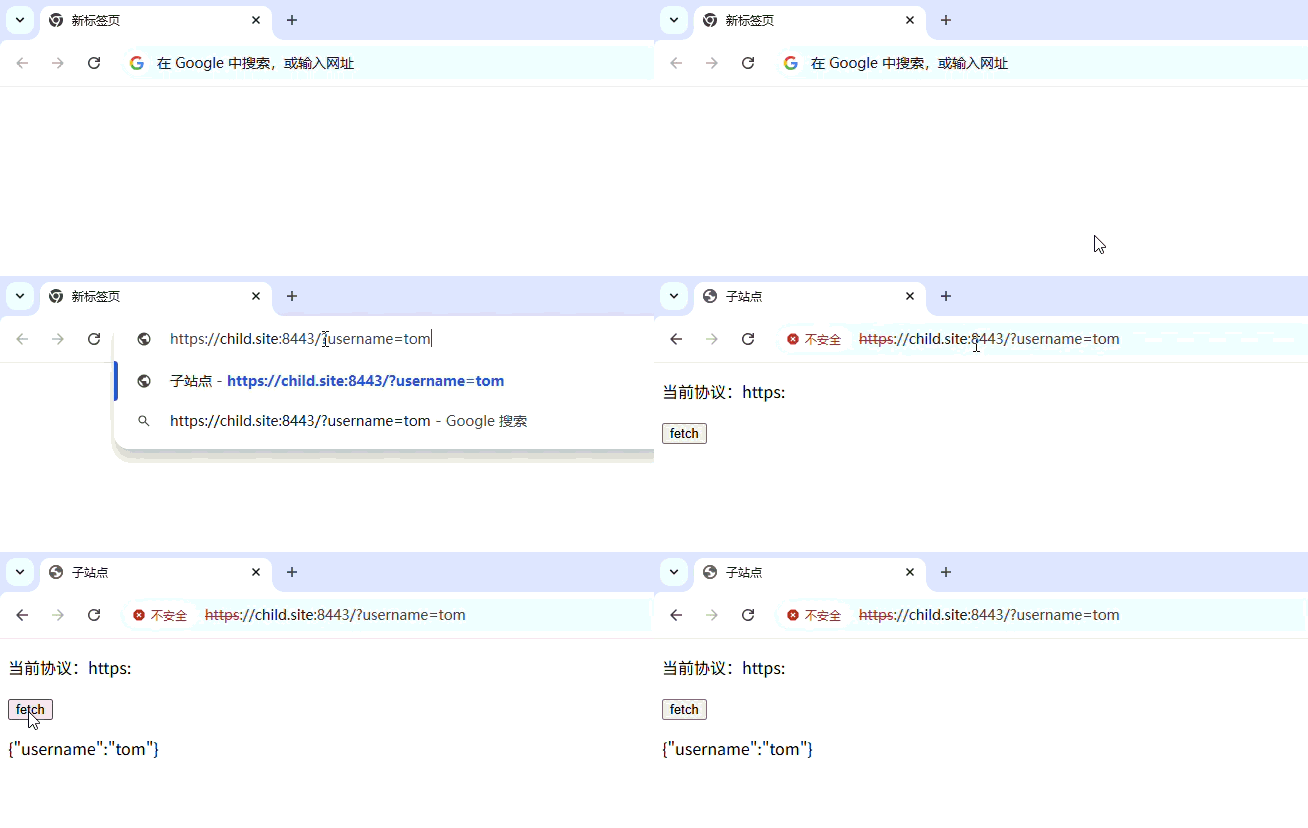
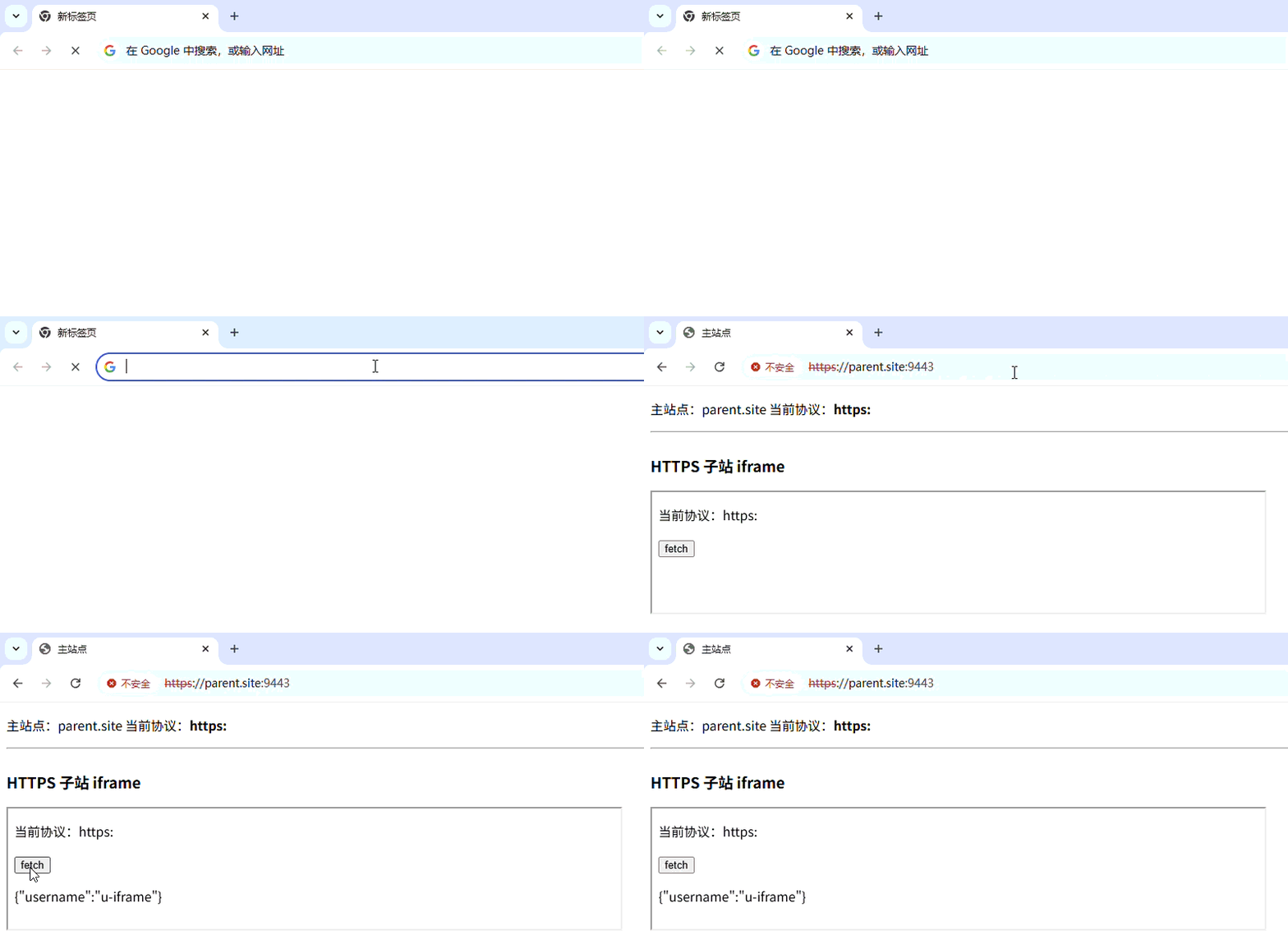
如上图,child 会显示当前的协议,以及一个按钮,点击后会携带 cookie 向服务器发送请求,返回并显示用户名。
parent.html
html
<!DOCTYPE html>
<html lang="zh-CN">
<head>
    <meta charset="UTF-8">
    <title>主站点</title>
</head>
<body>
<p>主站点:parent.site 当前协议:<b id="protocol"></b></p>
<hr>

<div style="width: 30%;">
    <h3>HTTPS 子站 iframe</h3>
    <iframe src="https://child.site:8443?username=u-iframe" width="100%" height="150"></iframe>
</div>

<script>
  document.getElementById('protocol').innerText = window.location.protocol;
</script>
</body>
</html>
js
const express = require('express');
const http = require('http');
const https = require('https');
const fs = require('fs');
const path = require('path');

const app = express();

// 静态页面
app.get('/', (req, res) => {
  res.sendFile(path.join(__dirname, 'parent.html'));
});

// 主站 HTTP 服务
const httpPort = 9080;
http.createServer(app).listen(httpPort, () => {
  console.log(`【主站 HTTP】http://parent.site:${httpPort}`);
});

// 主站 HTTPS 服务
const httpsPort = 9443;
const httpsOptions = {
  key: fs.readFileSync(path.join(__dirname, 'parent.key')),
  cert: fs.readFileSync(path.join(__dirname, 'parent.crt'))
};
https.createServer(httpsOptions, app).listen(httpsPort, () => {
  console.log(`【主站 HTTPS】https://parent.site:${httpsPort}`);
});
测试
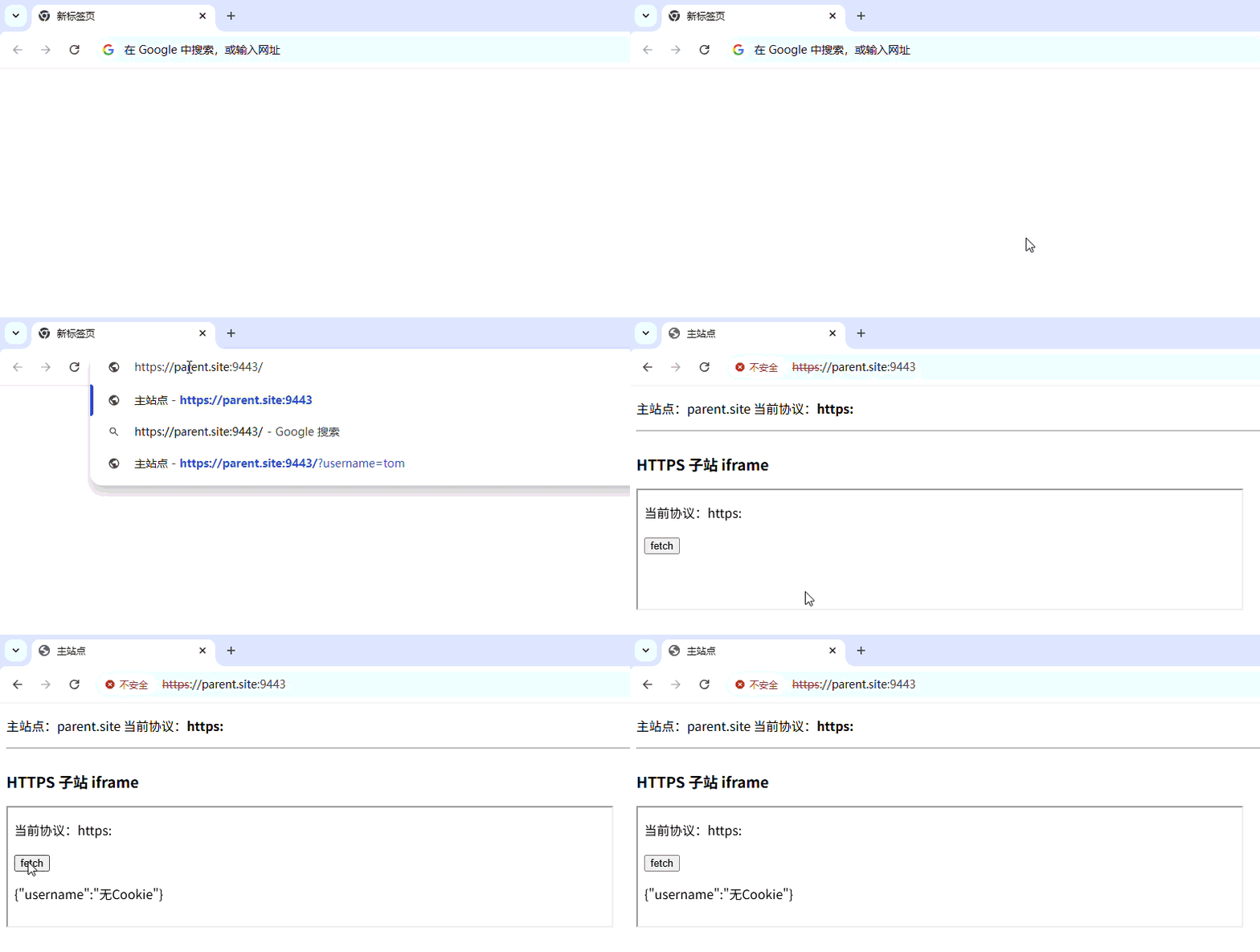
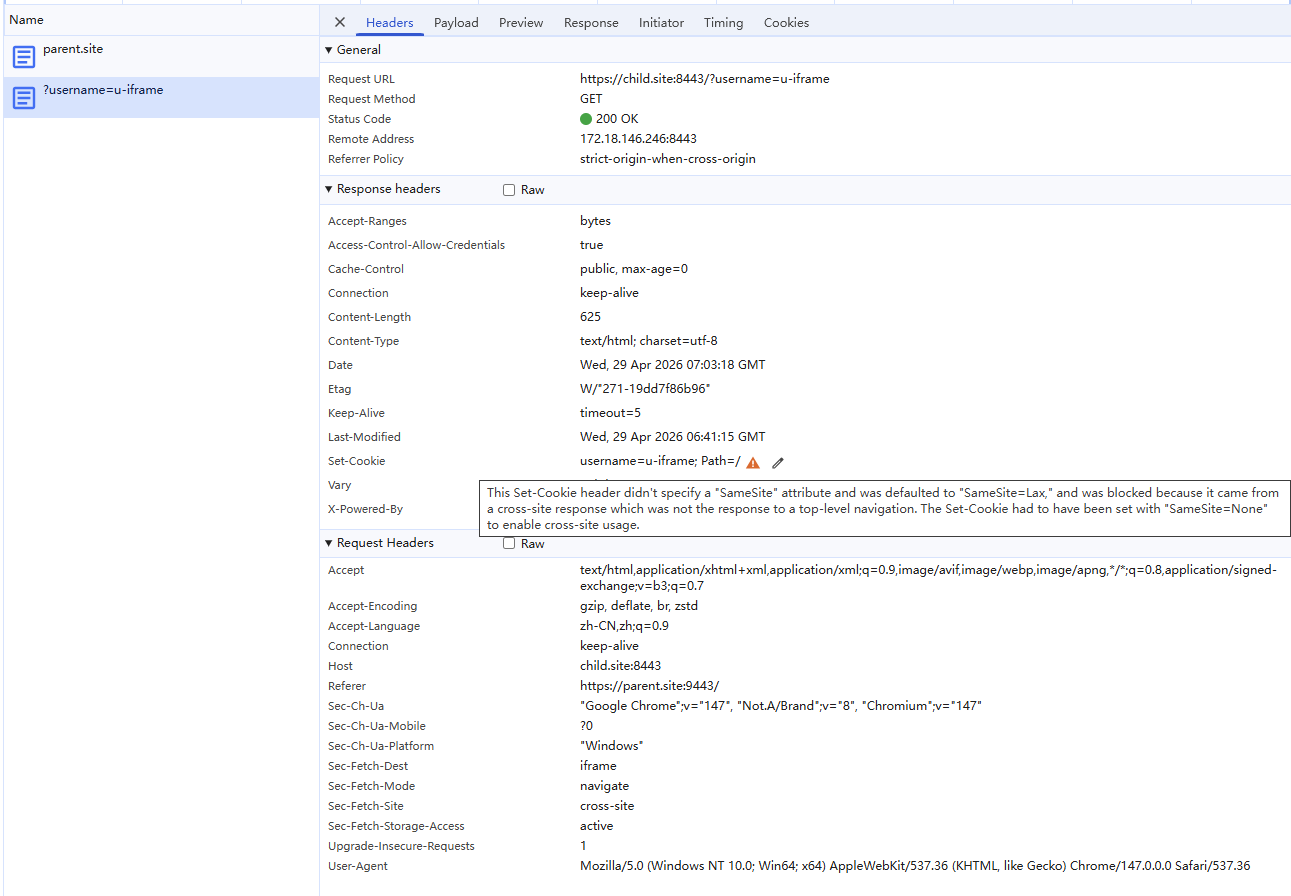
如上图,以 iframe 将 child 嵌入 parent 后,无法显示用户名,在 network 中发现 Response Headers 中的 set-cookie 有以下警告,翻译后:此"Set-Cookie"头未指定"SameSite"属性,因此默认为"SameSite=Lax",由于它来自跨站响应且并非顶级导航的响应,所以被阻止。若要启用跨站使用,"Set-Cookie"必须设置为"SameSite=None"。
解决方案
根据上面的警告,修改 child-server.js 中的 res.cookie() 如下,添加 sameSite: 'None':
js
res.cookie('username', req.query.username, {
  // sameSite 三个可选值 :Strict、Lax、None
  sameSite: 'None',
});
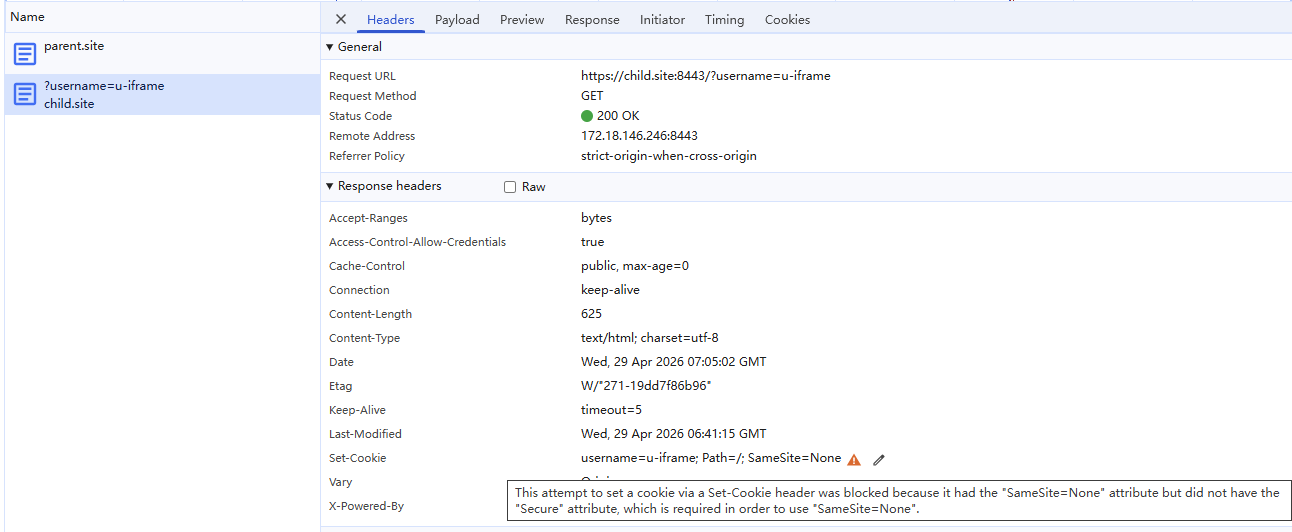
重新请求后出现新的警告,翻译后:通过"Set-Cookie"头设置 Cookie 的这一尝试被阻止了,原因是其具有"SameSite=None"属性,但没有"Secure"属性,而"SameSite=None"属性的使用需要具备"Secure"属性这一条件。
添加 secure: true 后问题解决:
js
res.cookie('username', req.query.username, {
  // sameSite 三个可选值 :Strict、Lax、None
  sameSite: 'None',
  secure: true,
});
同源(same-origin)、跨域(cross-origin)、同站(same-site)、跨站(cross-site)
跨域是根据同源策略判断的,非常严格,协议、域名、端口号三者全部相同即为同源(same-origin),否则为跨域(cross-origin)。
跨站的判断相对宽松,是通过 eTLD + 1 判断,eTLD 指的是有效顶级域名,是一个域名的后缀,比如 com、org 等常见的后缀都是 eTLD,一些特殊的比如 github.io、googleapis.com 也是 eTLD,完整的列表可以在 https://publicsuffix.org/list/public_suffix_list.dat 查看。eTLD + 1 就是比较两个网站的 eTLD 和 eTLD 的前一段是否完全一样,一样即为同站(same-site),否则为跨站(cross-site)。
www.zhihu.com 和 zhuanlan.zhihu.com 的 eTLD 都是 com,eTLD 的前一段都是 zhihu,所以是同站。
a.github.io 和 b.github.io 的 eTLD 都是 github.io,但是 eTLD 的前一段分别是 a 和 b,所以是跨站。
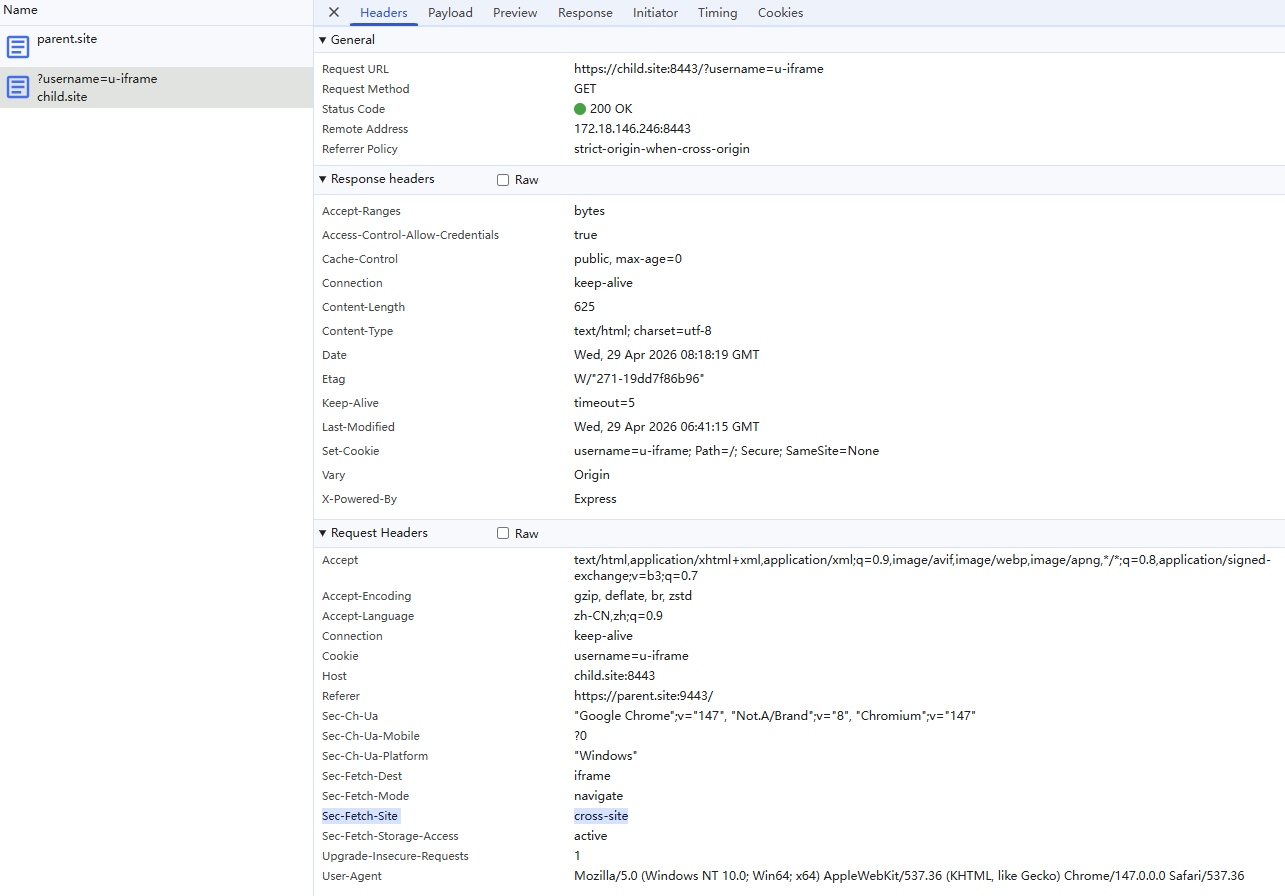
还可通过 Sec-Fetch-Site 响应头判断是否跨站,如上图的请求就是 cross-site 请求。
Set-Cookie
SameSite 属性
SameSite 除了能控制 Set-Cookie,还能控制 cookie 是否随跨站(cross-site)请求一起发送。可选的值有:
Strict
这意味浏览器仅对同一站点的请求发送 cookie,即请求来自设置 cookie 的站点。如果请求来自不同的域名或协议(即使是相同域名),则携带有 SameSite=Strict 属性的 cookie 不会被发送。
这是最严格的,假设用户已经登录了 child,parent 网站中有一个跳转到 child 的链接,用户点击链接跳转到 child 时是不会写到 cookie 的,需要重新登录,体验很不好。
将 parent.html 的主要内容替换为 child 的 a 标签:
html
<a href="https://child.site:8443/api/user">child 链接</a>将 child-server.js 中的 SameSite 改为 Strict:
js
res.cookie('username', req.query.username, {
  // sameSite 三个可选值 :Strict、Lax、None
  sameSite: 'Strict',
  secure: true,
});
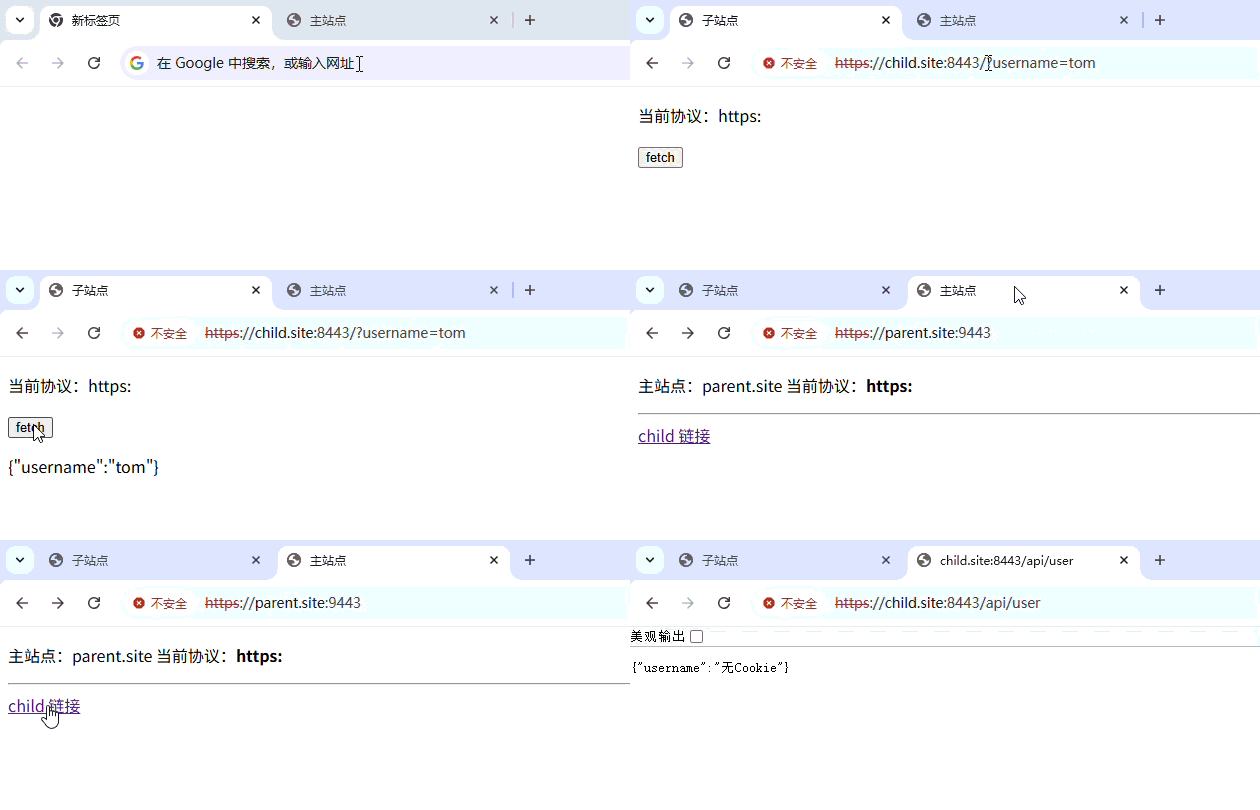
先访问 https://child.site:8443/?username=tom 写入 cookie,再点击 parent 的 child 的 a 标签,发现无法获取用户名:
Lax
Lax 比 Strict 宽松一些,cookie 在用户从其他站点导航到源站时,cookie 会被发送(例如,访问一个链接),这是 SameSite 属性未被设置时的默认行为。Lax 解决了上述示例中用户体验的问题。
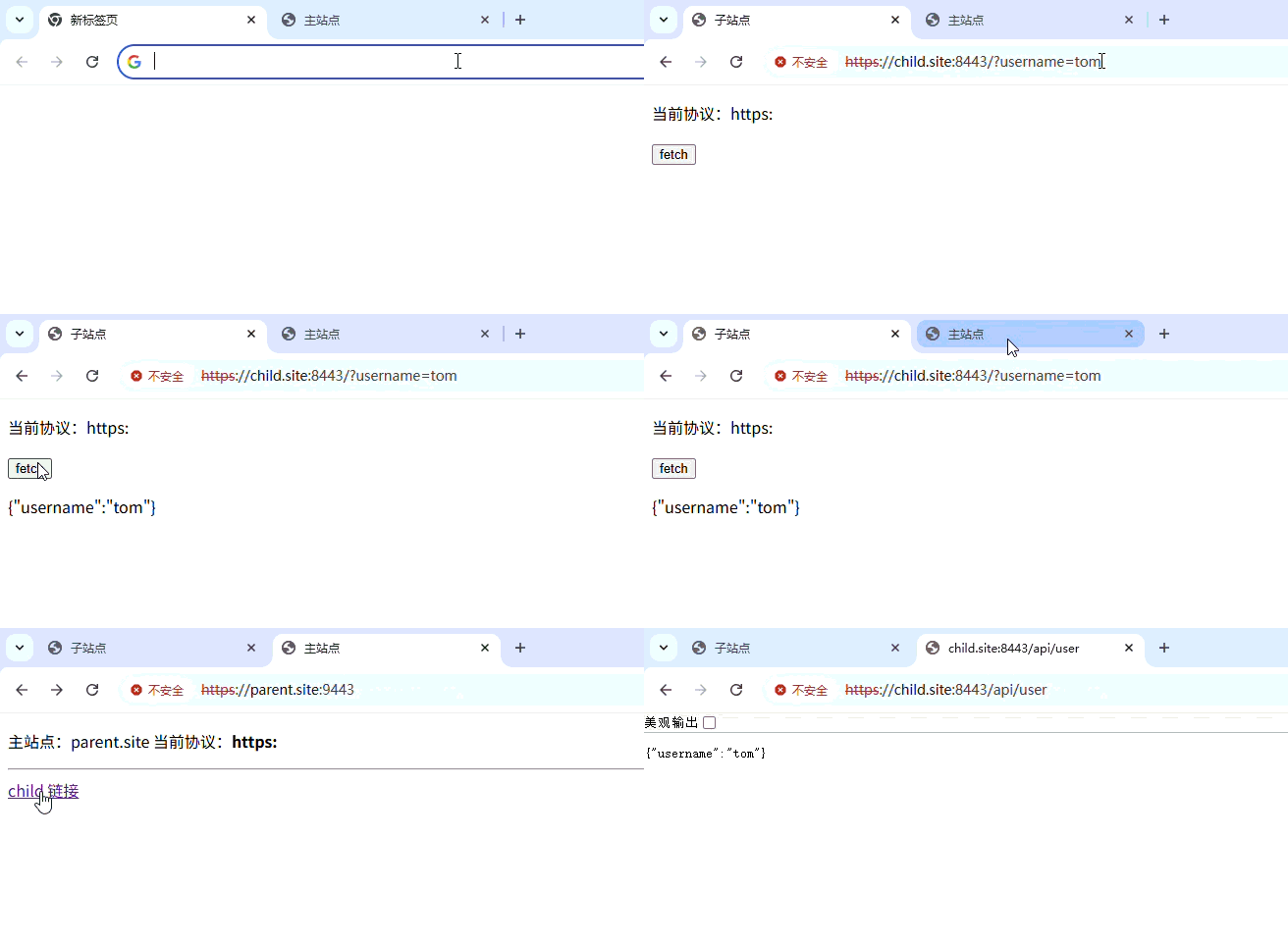
将 child-server.js 中的 SameSite 改为 Lax,可以正常获取用户名:
None
None 是最宽松的,浏览器在跨站和同站请求中均会发送 cookie。None 必须配合 Secure 属性一起使用,SameSite=None; Secure。否则会报错:
Cookie "myCookie" rejected because it has the "SameSite=None" attribute but is missing the "secure" attribute.

This Set-Cookie was blocked because it had the "SameSite=None" attribute but did not have the "Secure" attribute, which is required in order to use "SameSite=None".
Secure 属性
表示仅当请求通过 https: 协议(localhost 不受此限制)发送时才会将该 cookie 发送到服务器,因此其更能够抵抗中间人攻击。
**备注:**不要假设
Secure会阻止所有的对 cookie 中敏感信息(会话密钥、登录信息,等等)的访问。携带这一属性的 cookie 在不设置HttpOnly属性的情况下仍能从客户端的硬盘或是从 JavaScript 中访问及更改。非安全站点(
http:)不能在 cookie 中设置Secure属性(从 Chrome 52 和 Firefox 52 开始)。当Secure属性由 localhost 设置时,https:的要求会被忽略(从 Chrome 89 和 Firefox 75 开始)。
HttpOnly 属性
设置 HttpOnly 后会阻止 JavaScript 通过 Document.cookie 属性访问 cookie。注意,设置了 HttpOnly 的 cookie 仍然会通过 JavaScript 发起的请求发送。例如,调用 XMLHttpRequest.send() 或 fetch()。其用于防范跨站脚本攻击(XSS)。