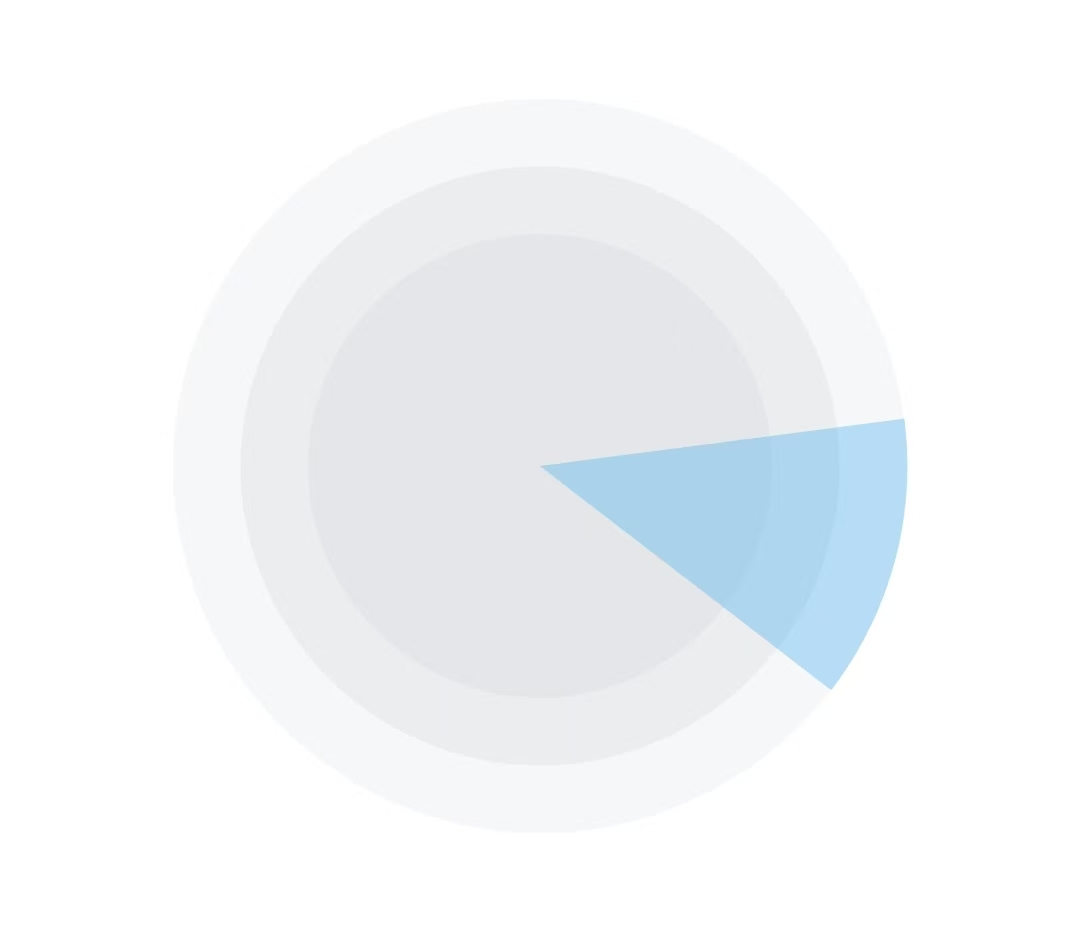
介绍:扇形不断绕着圆形旋转
效果图
核心代码
Dart
 // 旋转的扇形
            Container(
              width: 245,
              height: 245,
              child: CustomPaint(
                painter: SectorPainter(
                  startAngle: _animation.value, //开始角度设置为动画值,使扇形一直变化旋转
                  sweepAngle: pi / 4,
                  color: const Color(0xFF21A2EF).withOpacity(0.3),  // 纯蓝色
                ),
              ),
            )
实现步骤
1.定义相关变量
Dart
double startAngle = 0;
late AnimationController _controller;
late Animation<double> _animation;
2.初始化动画控制器和动画
Dart
  @override
  void initState() {
    super.initState();

    //动画控制器
    _controller = AnimationController(
      vsync: this,
      duration: const Duration(seconds: 3),
    );


    //动画
    _animation = TweenSequence<double>([
      TweenSequenceItem(
        tween: Tween<double>(begin: 0, end: pi / 2), //四分之一圆
        weight: 1.0,
      ),
      TweenSequenceItem(
        tween: Tween<double>(begin: pi / 2, end: pi), //半圆
        weight: 1.0,
      ),
      TweenSequenceItem(
        tween: Tween<double>(begin: pi, end: pi * 1.5), //四分之三圆
        weight: 1.0,
      ),
      TweenSequenceItem(
        tween: Tween<double>(begin: pi * 1.5, end: pi * 2), //圆
        weight: 1.0,
      ),
    ]).animate(
      CurvedAnimation(parent: _controller, curve: Curves.linear), //绑定控制器
    )..addListener(() {
      setState(() {});
    });

    // 启动动画(无限循环)
    _controller.repeat();  // 重复播放
  }
3.注销
Dart
 @override
  void dispose() {
    _controller.dispose();
    super.dispose();
  }
4.扇形的绘制
Dart
// 扇形绘制器
class SectorPainter extends CustomPainter {
  final double startAngle; //起始角度
  final double sweepAngle; //扫描角度(扇形的大小)
  final Color color;  // 改为单个颜色

  SectorPainter({
    required this.startAngle,
    required this.sweepAngle,
    required this.color,  // 单个颜色
  });

  @override
  void paint(Canvas canvas, Size size) {

    //创建绘制区域
    final Rect rect = Rect.fromLTWH(0, 0, size.width, size.height);

    //创建画笔
    final Paint paint = Paint()
      ..color = color
      ..style = PaintingStyle.fill;

    //绘制圆弧
    canvas.drawArc(
      rect,
      startAngle,
      sweepAngle,
      true,
      paint,
    );
  }


  //重绘判断
  @override
  bool shouldRepaint(covariant SectorPainter oldDelegate) {
    return oldDelegate.startAngle != startAngle ||
        oldDelegate.sweepAngle != sweepAngle ||
        oldDelegate.color != color;
  }
}
5.UI的构建
Dart
  @override
  Widget build(BuildContext context) {
    return Container(
        height: 245,
        width: double.infinity,
        child: Stack(
          alignment: Alignment.center,
          children: [
            // 最外层圆环
            Positioned(
              child: Container(
                height: 245,
                width: 245,
                decoration: BoxDecoration(
                  color: const Color(0xFFD4D7DC).withOpacity(0.2),
                  shape: BoxShape.circle,
                ),
              ),
            ),
            // 中间圆环
            Positioned(
              child: Container(
                height: 200,
                width: 200,
                decoration: BoxDecoration(
                  color: const Color(0xFFD4D7DC).withOpacity(0.3),
                  shape: BoxShape.circle,
                ),
              ),
            ),
            // 内层圆环
            Positioned(
              child: Container(
                height: 155,
                width: 155,
                decoration: BoxDecoration(
                  color: const Color(0xFFD4D7DC).withOpacity(0.3),
                  shape: BoxShape.circle,
                ),
              ),
            ),


            // 旋转的扇形
            Container(
              width: 245,
              height: 245,
              child: CustomPaint(
                painter: SectorPainter(
                  startAngle: _animation.value, //开始角度设置为动画值,使扇形一直变化旋转
                  sweepAngle: pi / 4,
                  color: const Color(0xFF21A2EF).withOpacity(0.3),  // 纯蓝色
                ),
              ),
            )
          ],
        )
    );
  }
}
代码示例
Dart
import 'package:flutter/material.dart';
import 'dart:math';

class SearchDeviceAnimation extends StatefulWidget {
  const SearchDeviceAnimation({super.key});

  @override
  State<SearchDeviceAnimation> createState() => _SearchDeviceAnimationState();
}

class _SearchDeviceAnimationState extends State<SearchDeviceAnimation> with SingleTickerProviderStateMixin {


  double startAngle = 0;
  late AnimationController _controller;
  late Animation<double> _animation;

  @override
  void initState() {
    super.initState();

    //动画控制器
    _controller = AnimationController(
      vsync: this,
      duration: const Duration(seconds: 3),
    );


    //动画
    _animation = TweenSequence<double>([
      TweenSequenceItem(
        tween: Tween<double>(begin: 0, end: pi / 2), //四分之一圆
        weight: 1.0,
      ),
      TweenSequenceItem(
        tween: Tween<double>(begin: pi / 2, end: pi), //半圆
        weight: 1.0,
      ),
      TweenSequenceItem(
        tween: Tween<double>(begin: pi, end: pi * 1.5), //四分之三圆
        weight: 1.0,
      ),
      TweenSequenceItem(
        tween: Tween<double>(begin: pi * 1.5, end: pi * 2), //圆
        weight: 1.0,
      ),
    ]).animate(
      CurvedAnimation(parent: _controller, curve: Curves.linear), //绑定控制器
    )..addListener(() {
      setState(() {});
    });

    // 启动动画(无限循环)
    _controller.repeat();  // 重复播放
  }

  @override
  void dispose() {
    _controller.dispose();
    super.dispose();
  }

  @override
  Widget build(BuildContext context) {
    return Container(
        height: 245,
        width: double.infinity,
        child: Stack(
          alignment: Alignment.center,
          children: [
            // 最外层圆环
            Positioned(
              child: Container(
                height: 245,
                width: 245,
                decoration: BoxDecoration(
                  color: const Color(0xFFD4D7DC).withOpacity(0.2),
                  shape: BoxShape.circle,
                ),
              ),
            ),
            // 中间圆环
            Positioned(
              child: Container(
                height: 200,
                width: 200,
                decoration: BoxDecoration(
                  color: const Color(0xFFD4D7DC).withOpacity(0.3),
                  shape: BoxShape.circle,
                ),
              ),
            ),
            // 内层圆环
            Positioned(
              child: Container(
                height: 155,
                width: 155,
                decoration: BoxDecoration(
                  color: const Color(0xFFD4D7DC).withOpacity(0.3),
                  shape: BoxShape.circle,
                ),
              ),
            ),


            // 旋转的扇形
            Container(
              width: 245,
              height: 245,
              child: CustomPaint(
                painter: SectorPainter(
                  startAngle: _animation.value, //开始角度设置为动画值,使扇形一直变化旋转
                  sweepAngle: pi / 4,
                  color: const Color(0xFF21A2EF).withOpacity(0.3),  // 纯蓝色
                ),
              ),
            )
          ],
        )
    );
  }
}


// 扇形绘制器
class SectorPainter extends CustomPainter {
  final double startAngle; //起始角度
  final double sweepAngle; //扫描角度(扇形的大小)
  final Color color;  // 改为单个颜色

  SectorPainter({
    required this.startAngle,
    required this.sweepAngle,
    required this.color,  // 单个颜色
  });

  @override
  void paint(Canvas canvas, Size size) {

    //创建绘制区域
    final Rect rect = Rect.fromLTWH(0, 0, size.width, size.height);

    //创建画笔
    final Paint paint = Paint()
      ..color = color
      ..style = PaintingStyle.fill;

    //绘制圆弧
    canvas.drawArc(
      rect,
      startAngle,
      sweepAngle,
      true,
      paint,
    );
  }


  //重绘判断
  @override
  bool shouldRepaint(covariant SectorPainter oldDelegate) {
    return oldDelegate.startAngle != startAngle ||
        oldDelegate.sweepAngle != sweepAngle ||
        oldDelegate.color != color;
  }
}