提示:适配蓝牙遥控器按键
文章目录
- 前言-需求
- [一、 参考资料](#一、 参考资料)
- 二、修改文件
- 三、解决方案
- 四、知识点延伸
-
- [1、按键框架知识点 - 三层总览](#1、按键框架知识点 - 三层总览)
-
- [a、HID 层](#a、HID 层)
- [b、Linux 层](#b、Linux 层)
- [c、Android 层](#c、Android 层)
- [2、如何获取蓝牙按键的Linux 输入事件](#2、如何获取蓝牙按键的Linux 输入事件)
- [3、配置Linux 层 Hid 映射](#3、配置Linux 层 Hid 映射)
- [4、Android 层适配业务逻辑](#4、Android 层适配业务逻辑)
- 总结
前言-需求
实际场景
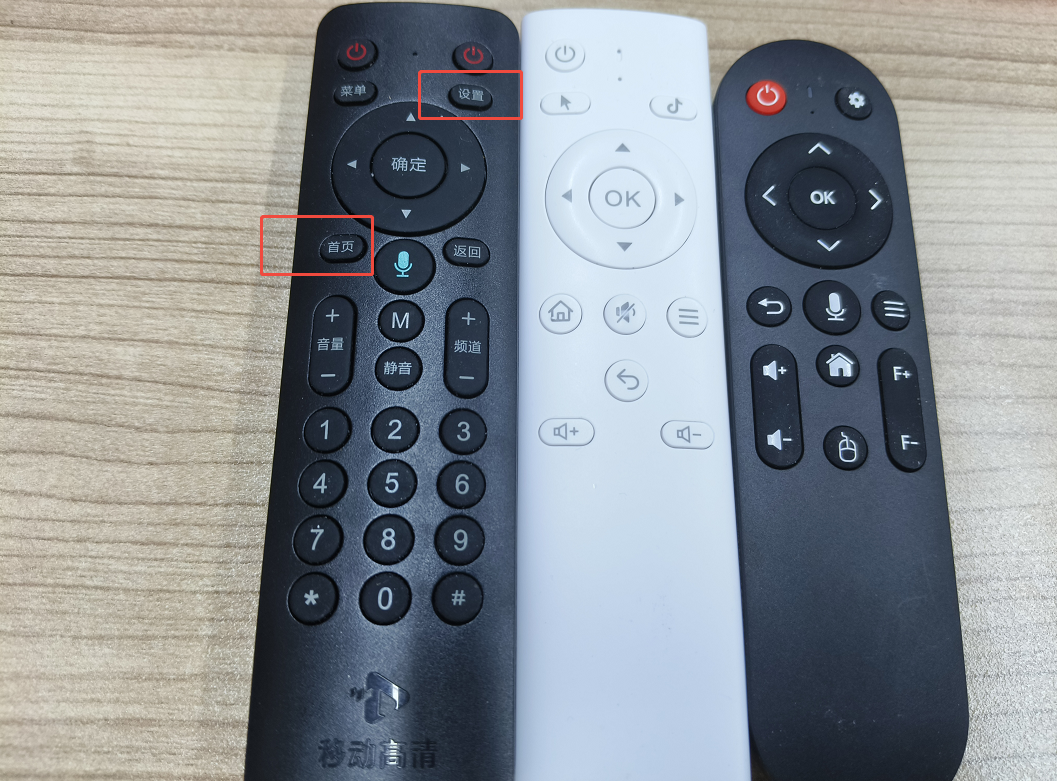
如下,产品是TV相关产品、闺蜜机相关产品,配置了遥控器。 但是每个客户可能有自己的配套遥控器,但是主板是我们自己的。
- 这就导致有些遥控器按键点击没有反应,需要系统来适配让按键点击有反应。
- 还有一种情况点击按键是有反应的,但是要执行客户自己的业务,比如跳转到客户自己的
App、应用程序、执行客户自己定制的业务逻辑。
需求
- 点击首页必须回到系统的
HOME程序 - 点击设置,回到客户自己的应用
备注:正常情况下遥控器的大多数按键值都应该是标准的,比如常用的。客户定制的按键要么新增,要么适配。
-
Home 按键无用: 这里 HOME按键正常情况下是通用的,那么为什么点击没用? 可能定制的,可能Android系统根本没有设置主屏应用,多
Launcher场景。 -
系统设置按键无用问题: 客户有自己的定义功能,跳转到客户自己的应用里面去,所以 这个设置实际上可能根本不是标注你的按键值。
一、 参考资料
Android蓝牙遥控按键适配全攻略:从kl文件修改到KeyEvent映射
手把手教你为Android设备添加自定义蓝牙遥控按键(附KeyEvent代码示例)
如果你懂一些基本的驱动,可以看看之前自己有一篇相关的 输入子系统香瓜简要知识点:
Linux驱动Input子系统开篇-输入设备和节点
二、修改文件
java
/frameworks/base/services/core/java/com/android/server/policy/PhoneWindowManager.java
/kernel-4.19-lc/drivers/hid/hid-input.c
三、解决方案
1、HID协议层-配置16位HID码值
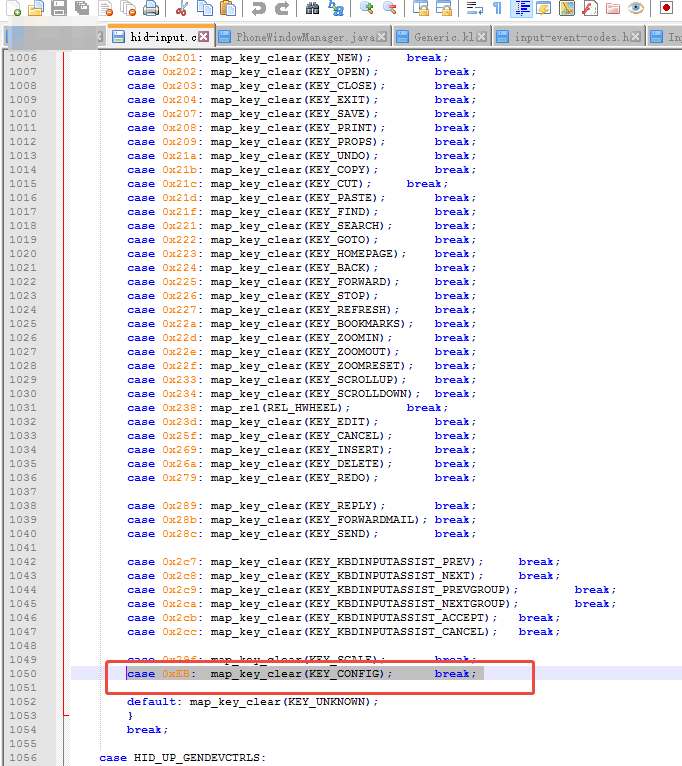
路径:/kernel-4.19-lc/drivers/hid/hid-input.c
java
case HID_UP_CONSUMER:	/* USB HUT v1.12, pages 75-84 */
		switch (usage->hid & HID_USAGE) {

    case 0xEB:  map_key_clear(KEY_CONFIG);      break;
    .....
  }
2、Android框架层-将Linux事件映射为Android键码(KeyEvent)
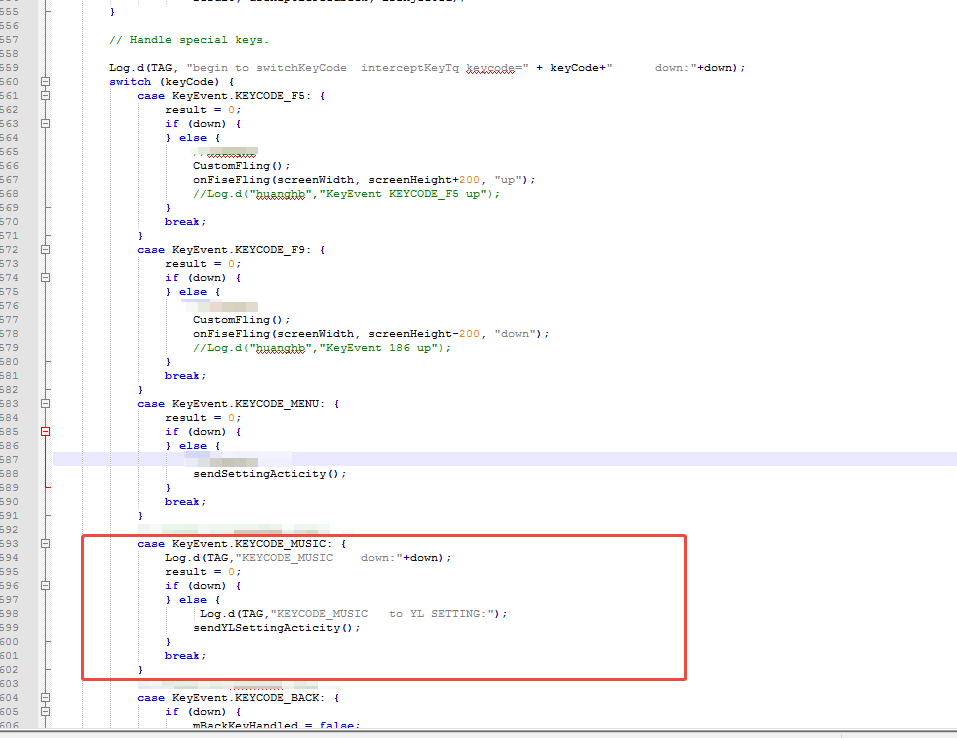
路径:/frameworks/base/services/core/java/com/android/server/policy/PhoneWindowManager.java
java
  // TODO(b/117479243): handle it in InputPolicy
    /** {@inheritDoc} */
    @Override
    public int interceptKeyBeforeQueueing(KeyEvent event, int policyFlags) {
        final int keyCode = event.getKeyCode();
      .............


  	// modify by fangchen start
            case KeyEvent.KEYCODE_MUSIC: {
				Log.d(TAG,"KEYCODE_MUSIC    down:"+down);
                result = 0;
                if (down) {
                } else {
                   	 Log.d(TAG,"KEYCODE_MUSIC   to YL SETTING:");
                    sendYLSettingActicity();
                }
                break;
            }
			// modify by fangchen end
    }


    private void sendYLSettingActicity(){
        Log.d(TAG,"sendYLSettingActicity");
        Intent intent = new Intent();
        intent.setClassName("com.komect.ajsettings","com.komect.ajsettings.MainSettingsActivity");
        if(intent==null){
        }else{
            intent.addFlags(Intent.FLAG_ACTIVITY_NEW_TASK);
            mContext.startActivity(intent);
        }
    }

四、知识点延伸
1、按键框架知识点 - 三层总览
- 框架基本常识: 首先要搞清楚框架,在
Android体系生态里面,Android是最顶层的一层,是基于Linux体系之上。所以Linux中有一层事件、然后传递到Android层 大家能够感知到的各种KeyEvent事件。 那不同的按键类型、协议 对应不同的
a、HID 层
- 代表:0x0C (消费类)/0x07 (键盘) + Usage ID(如 0x0066)
- 来源:USB HID、BLE HID、2.4G HID(带 USB dongle)
- 对应文档:遥控器说明书里的 HID Usage Table
b、Linux 层
- 核心:input_event(type/code/value),/dev/input/eventX
- 工具:getevent 看原始事件
- 驱动:hid-input.c 把 HID → Linux 标准键值(KEY_*)
c、Android 层
- 核心:KeyEvent、KEYCODE_*(如 KEYCODE_VOLUME_UP)
- 映射:.kl 文件把 Linux KEY_ → Android KEYCODE_*
2、如何获取蓝牙按键的Linux 输入事件
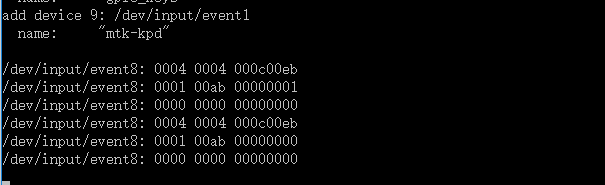
直接 getEvent
java
/dev/input/event8: 0004 0004 000c00eb  ← HID 原始值
/dev/input/event8: 0001 00ab 00000001  ← 按键按下 KEY_AB
/dev/input/event8: 0000 0000 00000000  ← 同步
/dev/input/event8: 0004 0004 000c00eb  ← HID 原始值
/dev/input/event8: 0001 00ab 00000000  ← 按键松开
/dev/input/event8: 0000 0000 00000000  ←同步
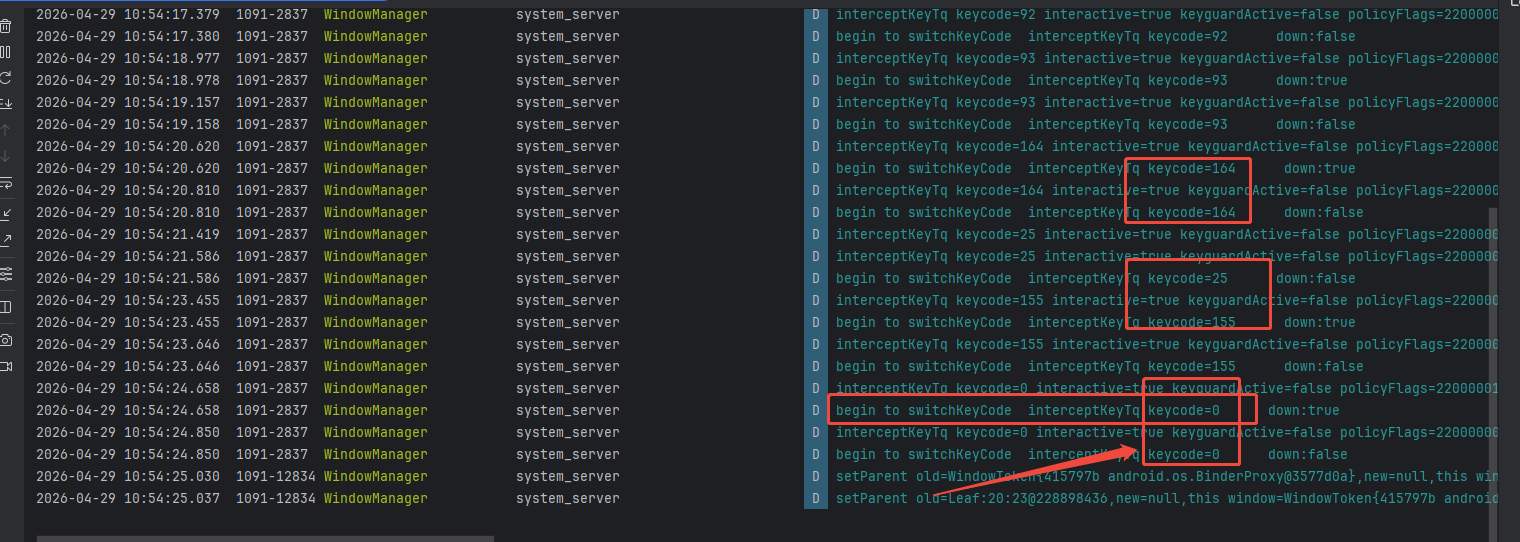
这里的 000c00eb 就是 Linux 层的按键反馈,那我们看看 最终Android 端是否有反馈:点击遥控器各个按键,犯下如下打印:
路径:/frameworks/base/services/core/java/com/android/server/policy/PhoneWindowManager.java
也就是没有定义功能的按键,打印的code 是0 ,那么就是说 在Linux 层和Android层没有形成映射关系。
3、配置Linux 层 Hid 映射
java
	case HID_UP_CONSUMER:	/* USB HUT v1.12, pages 75-84 */
		switch (usage->hid & HID_USAGE) {
       case 0x000: goto ignore;
		case 0x030: map_key_clear(KEY_POWER);		break;
		case 0x031: map_key_clear(KEY_RESTART);		break;
		case 0x032: map_key_clear(KEY_SLEEP);		break;
		case 0x034: map_key_clear(KEY_SLEEP);		break;
		case 0x035: map_key_clear(KEY_KBDILLUMTOGGLE);	break;
		case 0x036: map_key_clear(BTN_MISC);		break;

		case 0x040: map_key_clear(KEY_MENU);		break; /* Menu */
		case 0x041: map_key_clear(KEY_SELECT);		break; /* Menu Pick */
		case 0x042: map_key_clear(KEY_UP);		break; /* Menu Up */
		case 0x043: map_key_clear(KEY_DOWN);		break; /* Menu Down */
		case 0x044: map_key_clear(KEY_LEFT);		break; /* Menu Left */
		case 0x045: map_key_clear(KEY_RIGHT);		break; /* Menu Right */
		case 0x046: map_key_clear(KEY_ESC);		break; /* Menu Escape */
		case 0x047: map_key_clear(KEY_KPPLUS);		break; /* Menu Value Increase */
		case 0x048: map_key_clear(KEY_KPMINUS);		break; /* Menu Value Decrease */

		case 0x060: map_key_clear(KEY_INFO);		break; /* Data On Screen */
		case 0x061: map_key_clear(KEY_SUBTITLE);	break; /* Closed Caption */
		case 0x063: map_key_clear(KEY_VCR);		break; /* VCR/TV */
		case 0x065: map_key_clear(KEY_CAMERA);		break; /* Snapshot */
		case 0x069: map_key_clear(KEY_RED);		break;
		..............
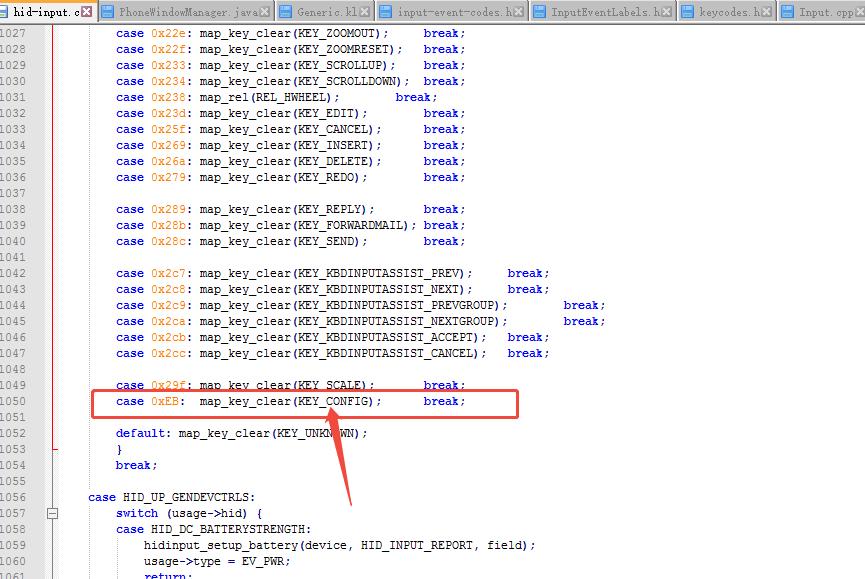
根据自己的业务需求,配置实际按键映射。 那么这些按键值是在哪里定义的呢?
在头文件:kernel-4.19/include/uapi/linux/input-event-codes.h 定义,
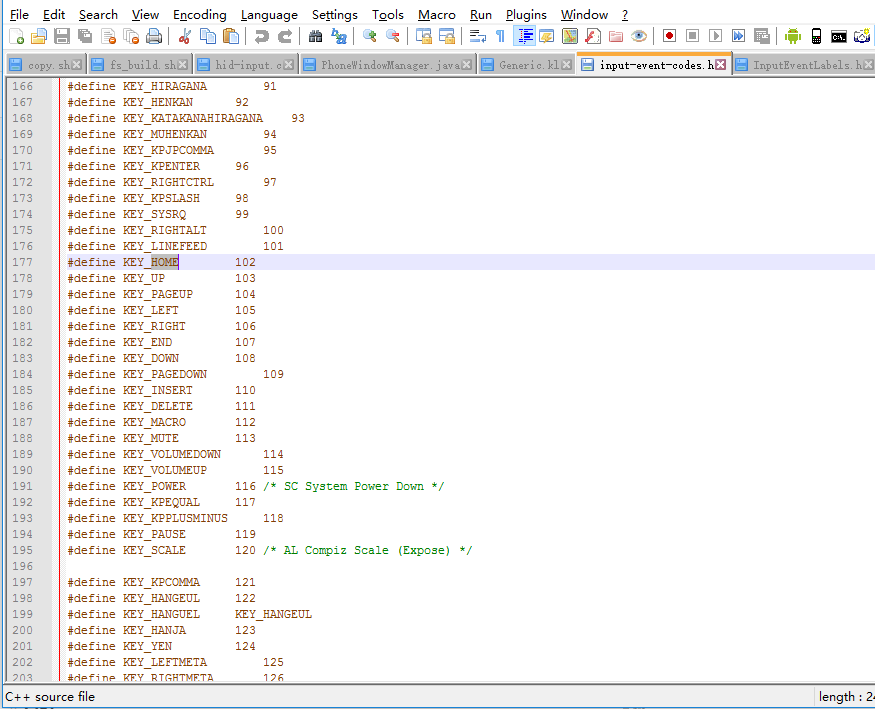
比如我们设置,其实是没有的,我们用 KEY_CONFIG 按键代替。
4、Android 层适配业务逻辑
路径:/frameworks/base/services/core/java/com/android/server/policy/PhoneWindowManager.java
这里就是按键的处理逻辑了,最终走到Android 框架层,来处理,核心方法: interceptKeyBeforeQueueing,在里面映射按键处理逻辑就可以了,根据日志打印,然后找到 KeyEvent.某个Code 对应就可以了。
java
// TODO(b/117479243): handle it in InputPolicy
/** {@inheritDoc} */
@Override
public int interceptKeyBeforeQueueing(KeyEvent event, int policyFlags) {
final int keyCode = event.getKeyCode();
final boolean down = event.getAction() == KeyEvent.ACTION_DOWN;
boolean isWakeKey = (policyFlags & WindowManagerPolicy.FLAG_WAKE) != 0
|| event.isWakeKey();
if (!mSystemBooted) {
// If we have not yet booted, don't let key events do anything.
// Exception: Wake and power key events are forwarded to PowerManager to allow it to
// wake from quiescent mode during boot.
if (down && (keyCode == KeyEvent.KEYCODE_POWER
|| keyCode == KeyEvent.KEYCODE_TV_POWER)) {
wakeUpFromPowerKey(event.getDownTime());
} else if (down && (isWakeKey || keyCode == KeyEvent.KEYCODE_WAKEUP)
&& isWakeKeyWhenScreenOff(keyCode)) {
wakeUpFromWakeKey(event);
}
return 0;
}
final boolean interactive = (policyFlags & FLAG_INTERACTIVE) != 0;
final boolean canceled = event.isCanceled();
final int displayId = event.getDisplayId();
final boolean isInjected = (policyFlags & WindowManagerPolicy.FLAG_INJECTED) != 0;
final boolean keyguardActive = (mKeyguardDelegate != null
&& (interactive ? isKeyguardShowingAndNotOccluded() :
mKeyguardDelegate.isShowing()));
if (DEBUG_INPUT) {
// If screen is off then we treat the case where the keyguard is open but hidden
// the same as if it were open and in front.
// This will prevent any keys other than the power button from waking the screen
// when the keyguard is hidden by another activity.
Log.d(TAG, "interceptKeyTq keycode=" + keyCode
+ " interactive=" + interactive + " keyguardActive=" + keyguardActive
+ " policyFlags=" + Integer.toHexString(policyFlags));
}
// Basic policy based on interactive state.
int result;
if (interactive || (isInjected && !isWakeKey)) {
// When the device is interactive or the key is injected pass the
// key to the application.
result = ACTION_PASS_TO_USER;
isWakeKey = false;
if (interactive) {
// If the screen is awake, but the button pressed was the one that woke the device
// then don't pass it to the application
if (keyCode == mPendingWakeKey && !down) {
result = 0;
}
// Reset the pending key
mPendingWakeKey = PENDING_KEY_NULL;
}
} else if (shouldDispatchInputWhenNonInteractive(displayId, keyCode)) {
// If we're currently dozing with the screen on and the keyguard showing, pass the key
// to the application but preserve its wake key status to make sure we still move
// from dozing to fully interactive if we would normally go from off to fully
// interactive.
result = ACTION_PASS_TO_USER;
// Since we're dispatching the input, reset the pending key
mPendingWakeKey = PENDING_KEY_NULL;
} else {
// When the screen is off and the key is not injected, determine whether
// to wake the device but don't pass the key to the application.
result = 0;
if (isWakeKey && (!down || !isWakeKeyWhenScreenOff(keyCode))) {
isWakeKey = false;
}
// Cache the wake key on down event so we can also avoid sending the up event to the app
if (isWakeKey && down) {
mPendingWakeKey = keyCode;
}
}
// If the key would be handled globally, just return the result, don't worry about special
// key processing.
if (isValidGlobalKey(keyCode)
&& mGlobalKeyManager.shouldHandleGlobalKey(keyCode)) {
// Dispatch if global key defined dispatchWhenNonInteractive.
if (!interactive && isWakeKey && down
&& mGlobalKeyManager.shouldDispatchFromNonInteractive(keyCode)) {
mGlobalKeyManager.setBeganFromNonInteractive();
result = ACTION_PASS_TO_USER;
// Since we're dispatching the input, reset the pending key
mPendingWakeKey = PENDING_KEY_NULL;
}
if (isWakeKey) {
wakeUpFromWakeKey(event);
}
return result;
}
// Alternate TV power to power key for Android TV device.
final HdmiControlManager hdmiControlManager = getHdmiControlManager();
if (keyCode == KeyEvent.KEYCODE_TV_POWER && mHasFeatureLeanback
&& (hdmiControlManager == null || !hdmiControlManager.shouldHandleTvPowerKey())) {
event = KeyEvent.obtain(
event.getDownTime(), event.getEventTime(),
event.getAction(), KeyEvent.KEYCODE_POWER,
event.getRepeatCount(), event.getMetaState(),
event.getDeviceId(), event.getScanCode(),
event.getFlags(), event.getSource(), event.getDisplayId(), null);
return interceptKeyBeforeQueueing(event, policyFlags);
}
// This could prevent some wrong state in multi-displays environment,
// the default display may turned off but interactive is true.
final boolean isDefaultDisplayOn = Display.isOnState(mDefaultDisplay.getState());
final boolean interactiveAndOn = interactive && isDefaultDisplayOn;
if ((event.getFlags() & KeyEvent.FLAG_FALLBACK) == 0) {
handleKeyGesture(event, interactiveAndOn);
}
// Enable haptics if down and virtual key without multiple repetitions. If this is a hard
// virtual key such as a navigation bar button, only vibrate if flag is enabled.
final boolean isNavBarVirtKey = ((event.getFlags() & KeyEvent.FLAG_VIRTUAL_HARD_KEY) != 0);
boolean useHapticFeedback = down
&& (policyFlags & WindowManagerPolicy.FLAG_VIRTUAL) != 0
&& (!isNavBarVirtKey || mNavBarVirtualKeyHapticFeedbackEnabled)
&& event.getRepeatCount() == 0;
/// M: Add more log at WMS
if (mWindowManagerDebugger.WMS_DEBUG_ENG || mWindowManagerDebugger.WMS_DEBUG_USER_DEBUG) {
mWindowManagerDebugger.debugInterceptKeyBeforeQueueing(TAG, keyCode, interactive,
keyguardActive, policyFlags, down, canceled, isWakeKey,
result, useHapticFeedback, isInjected);
}
// Handle special keys.
Log.d(TAG, "begin to switchKeyCode interceptKeyTq keycode=" + keyCode+" down:"+down);
switch (keyCode) {
case KeyEvent.KEYCODE_F5: {
result = 0;
if (down) {
} else {
//huanghb
CustomFling();
onFiseFling(screenWidth, screenHeight+200, "up");
//Log.d("huanghb","KeyEvent KEYCODE_F5 up");
}
break;
}
case KeyEvent.KEYCODE_F9: {
result = 0;
if (down) {
} else {
//huanghb
CustomFling();
onFiseFling(screenWidth, screenHeight-200, "down");
//Log.d("huanghb","KeyEvent 186 up");
}
break;
}
case KeyEvent.KEYCODE_MENU: {
result = 0;
if (down) {
} else {
//huanghb
sendSettingActicity();
}
break;
}
// modify by fangchen start
case KeyEvent.KEYCODE_MUSIC: {
Log.d(TAG,"KEYCODE_MUSIC down:"+down);
result = 0;
if (down) {
} else {
Log.d(TAG,"KEYCODE_MUSIC to YL SETTING:");
sendYLSettingActicity();
}
break;
}
// modify by fangchen end
case KeyEvent.KEYCODE_BACK: {
if (down) {
mBackKeyHandled = false;
} else {
if (!hasLongPressOnBackBehavior()) {
mBackKeyHandled |= backKeyPress();
}
// Don't pass back press to app if we've already handled it via long press
if (mBackKeyHandled) {
result &= ~ACTION_PASS_TO_USER;
}
}
break;
}
case KeyEvent.KEYCODE_VOLUME_DOWN:
case KeyEvent.KEYCODE_VOLUME_UP:
case KeyEvent.KEYCODE_VOLUME_MUTE: {
if (down) {
sendSystemKeyToStatusBarAsync(event.getKeyCode());
NotificationManager nm = getNotificationService();
if (nm != null && !mHandleVolumeKeysInWM) {
nm.silenceNotificationSound();
}
TelecomManager telecomManager = getTelecommService();
if (telecomManager != null && !mHandleVolumeKeysInWM) {
// When {@link #mHandleVolumeKeysInWM} is set, volume key events
// should be dispatched to WM.
if (telecomManager.isRinging()) {
// If an incoming call is ringing, either VOLUME key means
// "silence ringer". We handle these keys here, rather than
// in the InCallScreen, to make sure we'll respond to them
// even if the InCallScreen hasn't come to the foreground yet.
// Look for the DOWN event here, to agree with the "fallback"
// behavior in the InCallScreen.
Log.i(TAG, "interceptKeyBeforeQueueing:"
+ " VOLUME key-down while ringing: Silence ringer!");
// Silence the ringer. (It's safe to call this
// even if the ringer has already been silenced.)
telecomManager.silenceRinger();
// And *don't* pass this key thru to the current activity
// (which is probably the InCallScreen.)
result &= ~ACTION_PASS_TO_USER;
break;
}
}
int audioMode = AudioManager.MODE_NORMAL;
try {
audioMode = getAudioService().getMode();
} catch (Exception e) {
Log.e(TAG, "Error getting AudioService in interceptKeyBeforeQueueing.", e);
}
boolean isInCall = (telecomManager != null && telecomManager.isInCall()) ||
audioMode == AudioManager.MODE_IN_COMMUNICATION;
if (isInCall && (result & ACTION_PASS_TO_USER) == 0) {
// If we are in call but we decided not to pass the key to
// the application, just pass it to the session service.
MediaSessionLegacyHelper.getHelper(mContext).sendVolumeKeyEvent(
event, AudioManager.USE_DEFAULT_STREAM_TYPE, false);
break;
}
}
if (mUseTvRouting || mHandleVolumeKeysInWM) {
// Defer special key handlings to
// {@link interceptKeyBeforeDispatching()}.
result |= ACTION_PASS_TO_USER;
} else if ((result & ACTION_PASS_TO_USER) == 0) {
// If we aren't passing to the user and no one else
// handled it send it to the session manager to
// figure out.
MediaSessionLegacyHelper.getHelper(mContext).sendVolumeKeyEvent(
event, AudioManager.USE_DEFAULT_STREAM_TYPE, true);
}
break;
}
case KeyEvent.KEYCODE_ENDCALL: {
result &= ~ACTION_PASS_TO_USER;
if (down) {
TelecomManager telecomManager = getTelecommService();
boolean hungUp = false;
if (telecomManager != null) {
hungUp = telecomManager.endCall();
}
if (interactive && !hungUp) {
mEndCallKeyHandled = false;
mHandler.postDelayed(mEndCallLongPress,
ViewConfiguration.get(mContext).getDeviceGlobalActionKeyTimeout());
} else {
mEndCallKeyHandled = true;
}
} else {
if (!mEndCallKeyHandled) {
mHandler.removeCallbacks(mEndCallLongPress);
if (!canceled) {
if ((mEndcallBehavior
& Settings.System.END_BUTTON_BEHAVIOR_HOME) != 0) {
if (goHome()) {
break;
}
}
if ((mEndcallBehavior
& Settings.System.END_BUTTON_BEHAVIOR_SLEEP) != 0) {
sleepDefaultDisplay(event.getEventTime(),
PowerManager.GO_TO_SLEEP_REASON_POWER_BUTTON, 0);
isWakeKey = false;
}
}
}
}
break;
}
case KeyEvent.KEYCODE_TV_POWER: {
result &= ~ACTION_PASS_TO_USER;
isWakeKey = false; // wake-up will be handled separately
if (down && hdmiControlManager != null) {
hdmiControlManager.toggleAndFollowTvPower();
}
break;
}
case KeyEvent.KEYCODE_POWER: {
EventLogTags.writeInterceptPower(
KeyEvent.actionToString(event.getAction()),
mPowerKeyHandled ? 1 : 0,
mSingleKeyGestureDetector.getKeyPressCounter(KeyEvent.KEYCODE_POWER));
// Any activity on the power button stops the accessibility shortcut
result &= ~ACTION_PASS_TO_USER;
isWakeKey = false; // wake-up will be handled separately
if (down) {
interceptPowerKeyDown(event, interactiveAndOn);
} else {
interceptPowerKeyUp(event, canceled);
}
break;
}
case KeyEvent.KEYCODE_SYSTEM_NAVIGATION_DOWN:
// fall through
case KeyEvent.KEYCODE_SYSTEM_NAVIGATION_UP:
// fall through
case KeyEvent.KEYCODE_SYSTEM_NAVIGATION_LEFT:
// fall through
case KeyEvent.KEYCODE_SYSTEM_NAVIGATION_RIGHT: {
result &= ~ACTION_PASS_TO_USER;
interceptSystemNavigationKey(event);
break;
}
case KeyEvent.KEYCODE_SLEEP: {
result &= ~ACTION_PASS_TO_USER;
isWakeKey = false;
if (!mPowerManager.isInteractive()) {
useHapticFeedback = false; // suppress feedback if already non-interactive
}
if (down) {
sleepPress();
} else {
sleepRelease(event.getEventTime());
}
break;
}
case KeyEvent.KEYCODE_SOFT_SLEEP: {
result &= ~ACTION_PASS_TO_USER;
isWakeKey = false;
if (!down) {
mPowerManagerInternal.setUserInactiveOverrideFromWindowManager();
}
break;
}
case KeyEvent.KEYCODE_WAKEUP: {
result &= ~ACTION_PASS_TO_USER;
isWakeKey = true;
break;
}
case KeyEvent.KEYCODE_MEDIA_PLAY:
case KeyEvent.KEYCODE_MEDIA_PAUSE:
case KeyEvent.KEYCODE_MEDIA_PLAY_PAUSE:
case KeyEvent.KEYCODE_HEADSETHOOK:
case KeyEvent.KEYCODE_MUTE:
case KeyEvent.KEYCODE_MEDIA_STOP:
case KeyEvent.KEYCODE_MEDIA_NEXT:
case KeyEvent.KEYCODE_MEDIA_PREVIOUS:
case KeyEvent.KEYCODE_MEDIA_REWIND:
case KeyEvent.KEYCODE_MEDIA_RECORD:
case KeyEvent.KEYCODE_MEDIA_FAST_FORWARD:
case KeyEvent.KEYCODE_MEDIA_AUDIO_TRACK: {
if (MediaSessionLegacyHelper.getHelper(mContext).isGlobalPriorityActive()) {
// If the global session is active pass all media keys to it
// instead of the active window.
result &= ~ACTION_PASS_TO_USER;
}
if ((result & ACTION_PASS_TO_USER) == 0) {
// Only do this if we would otherwise not pass it to the user. In that
// case, the PhoneWindow class will do the same thing, except it will
// only do it if the showing app doesn't process the key on its own.
// Note that we need to make a copy of the key event here because the
// original key event will be recycled when we return.
mBroadcastWakeLock.acquire();
Message msg = mHandler.obtainMessage(MSG_DISPATCH_MEDIA_KEY_WITH_WAKE_LOCK,
new KeyEvent(event));
msg.setAsynchronous(true);
msg.sendToTarget();
}
break;
}
case KeyEvent.KEYCODE_CALL: {
if (down) {
TelecomManager telecomManager = getTelecommService();
if (telecomManager != null) {
if (telecomManager.isRinging()) {
Log.i(TAG, "interceptKeyBeforeQueueing:"
+ " CALL key-down while ringing: Answer the call!");
telecomManager.acceptRingingCall();
// And *don't* pass this key thru to the current activity
// (which is presumably the InCallScreen.)
result &= ~ACTION_PASS_TO_USER;
}
}
}
break;
}
case KeyEvent.KEYCODE_ASSIST: {
final boolean longPressed = event.getRepeatCount() > 0;
if (down && !longPressed) {
Message msg = mHandler.obtainMessage(MSG_LAUNCH_ASSIST, event.getDeviceId(),
0 /* unused */, event.getEventTime() /* eventTime */);
msg.setAsynchronous(true);
msg.sendToTarget();
}
result &= ~ACTION_PASS_TO_USER;
break;
}
case KeyEvent.KEYCODE_VOICE_ASSIST: {
if (!down) {
mBroadcastWakeLock.acquire();
Message msg = mHandler.obtainMessage(MSG_LAUNCH_VOICE_ASSIST_WITH_WAKE_LOCK);
msg.setAsynchronous(true);
msg.sendToTarget();
}
result &= ~ACTION_PASS_TO_USER;
break;
}
case KeyEvent.KEYCODE_WINDOW: {
if (mShortPressOnWindowBehavior == SHORT_PRESS_WINDOW_PICTURE_IN_PICTURE) {
if (mPictureInPictureVisible) {
// Consumes the key only if picture-in-picture is visible to show
// picture-in-picture control menu. This gives a chance to the foreground
// activity to customize PIP key behavior.
if (!down) {
showPictureInPictureMenu(event);
}
result &= ~ACTION_PASS_TO_USER;
}
}
break;
}
}
// Intercept the Accessibility keychord (CTRL + ALT + Z) for keyboard users.
if (mAccessibilityShortcutController.isAccessibilityShortcutAvailable(isKeyguardLocked())) {
switch (keyCode) {
case KeyEvent.KEYCODE_Z: {
if (down && event.isCtrlPressed() && event.isAltPressed()) {
mHandler.sendMessage(mHandler.obtainMessage(MSG_ACCESSIBILITY_SHORTCUT));
result &= ~ACTION_PASS_TO_USER;
}
break;
}
}
}
if (useHapticFeedback) {
performHapticFeedback(HapticFeedbackConstants.VIRTUAL_KEY, false,
"Virtual Key - Press");
}
if (isWakeKey) {
wakeUpFromWakeKey(event);
}
if ((result & ACTION_PASS_TO_USER) != 0) {
// If the key event is targeted to a specific display, then the user is interacting with
// that display. Therefore, give focus to the display that the user is interacting with.
if (!mPerDisplayFocusEnabled
&& displayId != INVALID_DISPLAY && displayId != mTopFocusedDisplayId) {
// An event is targeting a non-focused display. Move the display to top so that
// it can become the focused display to interact with the user.
// This should be done asynchronously, once the focus logic is fully moved to input
// from windowmanager. Currently, we need to ensure the setInputWindows completes,
// which would force the focus event to be queued before the current key event.
// TODO(b/70668286): post call to 'moveDisplayToTop' to mHandler instead
Log.i(TAG, "Moving non-focused display " + displayId + " to top "
+ "because a key is targeting it");
mWindowManagerFuncs.moveDisplayToTop(displayId);
}
}
return result;
}总结
- 这里的需求就是适配处理一个遥控器按键,重点核心是知道按键是如何映射到上层的
- 输入事件 在Linux 里面也是一个知识点,知道思路和解决方案、流程很重要
- 红外遥控器的按键流程,如何映射到上层有点区别的,这里不讲解