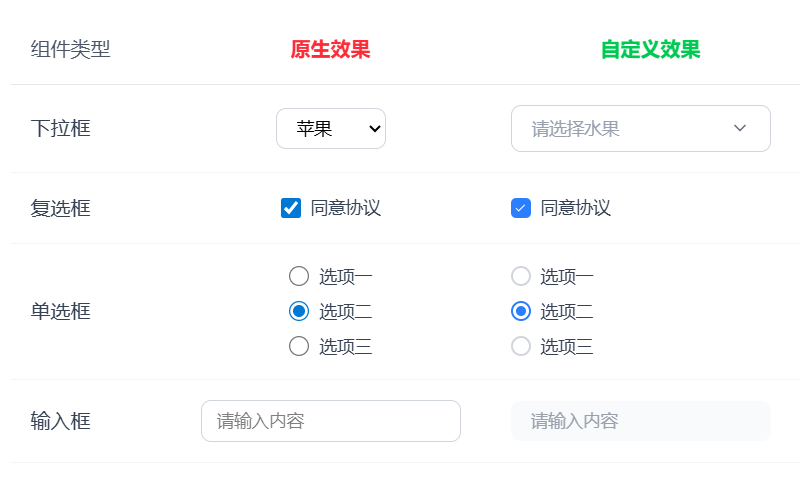
import { FiChevronDown, FiCheck } from "react-icons/fi";
import { useState } from "react";

function CustomSelect() {
  const [selected, setSelected] = useState("");
  const [isOpen, setIsOpen] = useState(false);

  const options = [
    { value: "apple", label: "苹果" },
    { value: "banana", label: "香蕉" },
    { value: "orange", label: "橙子" },
  ];

  return (
    <div className="relative w-52">
      <div
        className={`border border-gray-300 rounded-lg px-4 py-2 cursor-pointer flex items-center justify-between transition-all duration-200 text-sm
          ${isOpen ? "border-blue-500 ring-2 ring-blue-500" : "hover:border-gray-400"}`}
        onClick={() => setIsOpen(!isOpen)}
      >
        <span className={selected ? "text-black" : "text-gray-400"}>
          {selected
            ? options.find((opt) => opt.value === selected)?.label
            : "请选择水果"}
        </span>
        <FiChevronDown
          size={16}
          className={`text-gray-500 transition-transform duration-200 ${isOpen ? "rotate-180" : ""}`}
        />
      </div>

      {isOpen && (
        <div className="absolute top-full left-0 right-0 mt-1 bg-white border border-gray-200 rounded-lg shadow-lg z-10 overflow-hidden">
          {options.map((option) => (
            <div
              key={option.value}
              className={`px-4 py-2 cursor-pointer transition-colors duration-150 text-sm
                ${selected === option.value ? "bg-blue-50 text-blue-600" : "hover:bg-gray-50 text-gray-700"}`}
              onClick={(e) => {
                e.stopPropagation();
                setSelected(option.value);
                setIsOpen(false);
              }}
            >
              {option.label}
            </div>
          ))}
        </div>
      )}
    </div>
  );
}

function CustomCheckbox() {
  const [checked, setChecked] = useState(false);

  return (
    <label className="flex items-center gap-2 cursor-pointer">
      <div className="relative">
        <input
          type="checkbox"
          className="sr-only"
          checked={checked}
          onChange={() => setChecked(!checked)}
        />
        <div
          className={`w-4 h-4 rounded border-2 transition-all duration-200 flex items-center justify-center
            ${checked ? "bg-blue-500 border-blue-500" : "border-gray-300 bg-white"}`}
        >
          {checked && <FiCheck size={10} className="text-white" />}
        </div>
      </div>
      <span className="text-gray-700 text-sm">同意协议</span>
    </label>
  );
}

function CustomRadio() {
  const [selected, setSelected] = useState("");

  const options = [
    { value: "option1", label: "选项一" },
    { value: "option2", label: "选项二" },
    { value: "option3", label: "选项三" },
  ];

  return (
    <div className="flex flex-col gap-2">
      {options.map((option) => (
        <label
          key={option.value}
          className="flex items-center gap-2 cursor-pointer"
        >
          <div className="relative">
            <input
              type="radio"
              className="sr-only"
              name="custom-radio-group"
              checked={selected === option.value}
              onChange={() => setSelected(option.value)}
            />
            <div
              className={`w-4 h-4 rounded-full border-2 transition-all duration-200
                ${selected === option.value ? "border-blue-500" : "border-gray-300"}`}
            >
              {selected === option.value && (
                <div className="absolute top-1/2 left-1/2 -translate-x-1/2 -translate-y-1/2 w-2 h-2 rounded-full bg-blue-500" />
              )}
            </div>
          </div>
          <span className="text-gray-700 text-sm">{option.label}</span>
        </label>
      ))}
    </div>
  );
}

function CustomInput() {
  const [value, setValue] = useState("");

  return (
    <div className="w-52">
      <input
        type="text"
        value={value}
        onChange={(e) => setValue(e.target.value)}
        placeholder="请输入内容"
        className="w-full px-4 py-1.5 bg-gray-50 border-0 rounded-lg text-sm
          focus:outline-none focus:ring-2 focus:ring-blue-500 focus:bg-white
          placeholder:text-gray-400 transition-all duration-200"
      />
    </div>
  );
}

function FormExamples() {
  const [nativeSelect, setNativeSelect] = useState("");
  const [nativeCheckbox, setNativeCheckbox] = useState(false);
  const [nativeRadio, setNativeRadio] = useState("");
  const [nativeInput, setNativeInput] = useState("");

  return (
    <div className="py-8 px-4">
      <h2 className="text-2xl font-bold mb-8 text-center">表单组件对比</h2>
      <div className="flex justify-center">
        <table className="border-collapse">
          <thead>
            <tr>
              <th className="text-left p-4 w-32 text-gray-600 font-medium border-b border-gray-200">
                组件类型
              </th>
              <th className="text-center p-4 w-64 text-red-500 font-semibold border-b border-gray-200">
                原生效果
              </th>
              <th className="text-center p-4 w-64 text-green-500 font-semibold border-b border-gray-200">
                自定义效果
              </th>
            </tr>
          </thead>
          <tbody>
            {/* 下拉框对比 */}
            <tr className="hover:bg-gray-50">
              <td className="p-4 text-gray-700 font-medium border-b border-gray-100">
                下拉框
              </td>
              <td className="p-4 text-center border-b border-gray-100">
                <select
                  value={nativeSelect}
                  onChange={(e) => setNativeSelect(e.target.value)}
                  className="border border-gray-300 px-3 py-1.5 rounded-lg text-sm focus:outline-none focus:ring-2 focus:ring-blue-500"
                >
                  <option value="">请选择</option>
                  <option value="apple">苹果</option>
                  <option value="banana">香蕉</option>
                  <option value="orange">橙子</option>
                </select>
              </td>
              <td className="p-4 text-center border-b border-gray-100">
                <CustomSelect />
              </td>
            </tr>

            {/* 复选框对比 */}
            <tr className="hover:bg-gray-50">
              <td className="p-4 text-gray-700 font-medium border-b border-gray-100">
                复选框
              </td>
              <td className="p-4 text-center border-b border-gray-100">
                <label className="flex items-center justify-center gap-2 cursor-pointer">
                  <input
                    type="checkbox"
                    checked={nativeCheckbox}
                    onChange={() => setNativeCheckbox(!nativeCheckbox)}
                    className="w-4 h-4"
                  />
                  <span className="text-gray-700 text-sm">同意协议</span>
                </label>
              </td>
              <td className="p-4 text-center border-b border-gray-100">
                <CustomCheckbox />
              </td>
            </tr>

            {/* 单选框对比 */}
            <tr className="hover:bg-gray-50">
              <td className="p-4 text-gray-700 font-medium border-b border-gray-100">
                单选框
              </td>
              <td className="p-4 text-center border-b border-gray-100">
                <div className="flex flex-col gap-2 items-center">
                  {["选项一", "选项二", "选项三"].map((label, i) => (
                    <label
                      key={i}
                      className="flex items-center gap-2 cursor-pointer"
                    >
                      <input
                        type="radio"
                        name="native-radio"
                        value={label}
                        checked={nativeRadio === label}
                        onChange={() => setNativeRadio(label)}
                        className="w-4 h-4"
                      />
                      <span className="text-gray-700 text-sm">{label}</span>
                    </label>
                  ))}
                </div>
              </td>
              <td className="p-4 text-center border-b border-gray-100">
                <CustomRadio />
              </td>
            </tr>

            {/* 输入框对比 */}
            <tr className="hover:bg-gray-50">
              <td className="p-4 text-gray-700 font-medium border-b border-gray-100">
                输入框
              </td>
              <td className="p-4 text-center border-b border-gray-100">
                <input
                  type="text"
                  value={nativeInput}
                  onChange={(e) => setNativeInput(e.target.value)}
                  placeholder="请输入内容"
                  className="w-52 px-3 py-1.5 border border-gray-300 rounded-lg text-sm focus:outline-none focus:ring-2 focus:ring-blue-500"
                />
              </td>
              <td className="p-4 text-center border-b border-gray-100">
                <CustomInput />
              </td>
            </tr>
          </tbody>
        </table>
      </div>
    </div>
  );
}

function App() {
  return <FormExamples />;
}

export default App;