一、原有实现步骤,抛出问题:
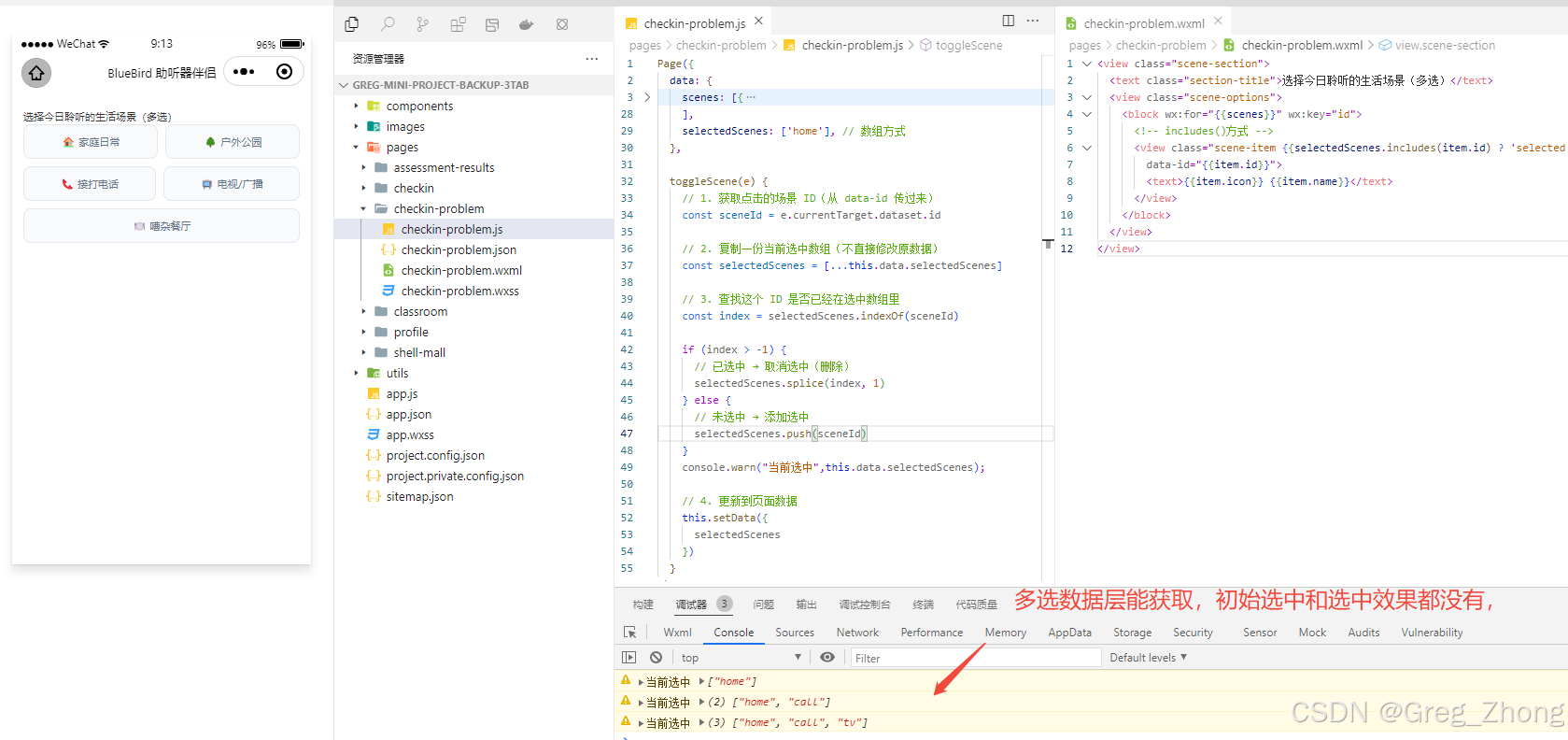
需求:小程序中实现自定义多选效果 | 点击高亮 / 取消还原默认样式js层:用数组保存选中 ID,点击时增删数组wxml层:循环展示 + 判断是否选中来切换样式问题:看似实现没问题,但是初始化选中和点击选中的样式效果,完全没有
二、解决问题(切换写法):
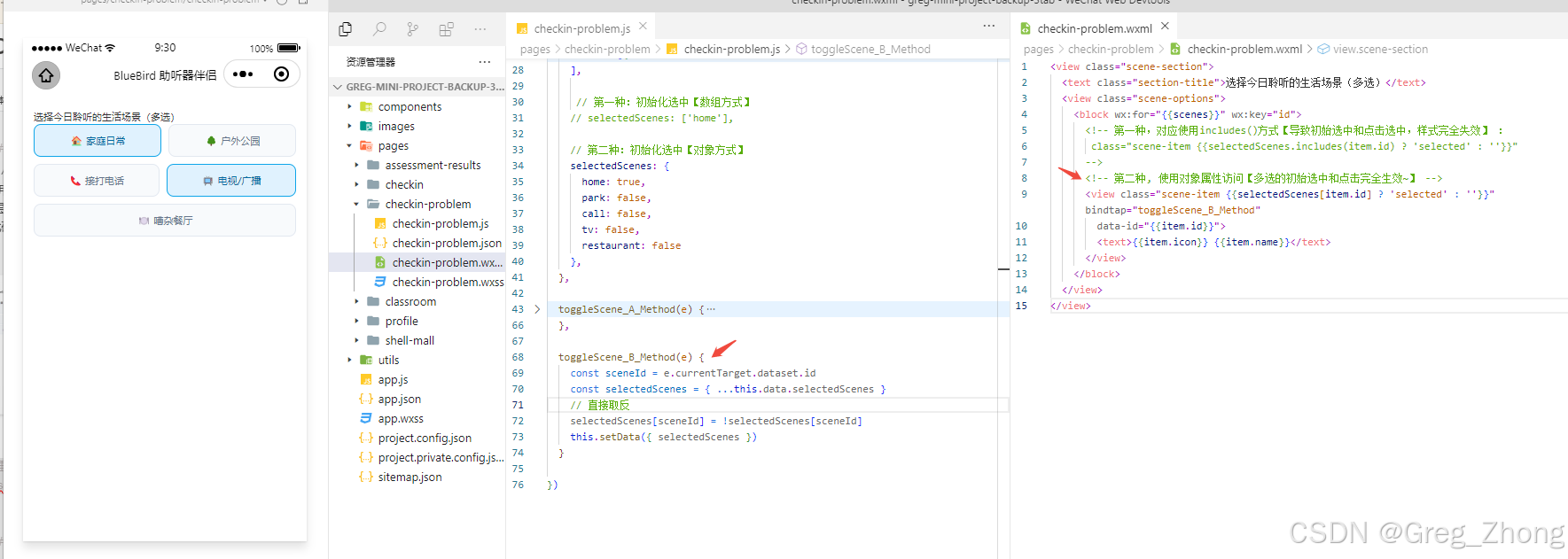
js层把数组换成对象的方式,来存储选中状态,模型wxml层,把 includes() 换成对象属性访问 ,就好了。
三、完整代码(涵盖从使用数组,到切换成对象的完整留痕)
javascript
Page({
	data: {
		scenes: [{
				id: 'home',
				icon: '🏠',
				name: '家庭日常'
			},
			{
				id: 'park',
				icon: '🌳',
				name: '户外公园'
			},
			{
				id: 'call',
				icon: '📞',
				name: '接打电话'
			},
			{
				id: 'tv',
				icon: '📺',
				name: '电视/广播'
			},
			{
				id: 'restaurant',
				icon: '🍽️',
				name: '嘈杂餐厅'
			}
		],

		 // 第一种:初始化选中【数组方式】
		// selectedScenes: ['home'],

		// 第二种:初始化选中【对象方式】
		selectedScenes: {
			home: true,
			park: false,
			call: false,
			tv: false,
			restaurant: false
		},
	},

	toggleScene_A_Method(e) {
		// 1. 获取点击的场景 ID(从 data-id 传过来)
		const sceneId = e.currentTarget.dataset.id

		// 2. 复制一份当前选中数组(不直接修改原数据)
		const selectedScenes = [...this.data.selectedScenes]

		// 3. 查找这个 ID 是否已经在选中数组里
		const index = selectedScenes.indexOf(sceneId)

		if (index > -1) {
			// 已选中 → 取消选中(删除)
			selectedScenes.splice(index, 1)
		} else {
			// 未选中 → 添加选中
			selectedScenes.push(sceneId)
		}
		console.warn("当前选中",this.data.selectedScenes);

		// 4. 更新到页面数据
		this.setData({
			selectedScenes
		})
	},

	toggleScene_B_Method(e) {
		const sceneId = e.currentTarget.dataset.id
		const selectedScenes = { ...this.data.selectedScenes }
		// 直接取反
		selectedScenes[sceneId] = !selectedScenes[sceneId]
		this.setData({ selectedScenes })
	}

})
html
<view class="scene-section">
	<text class="section-title">选择今日聆听的生活场景(多选)</text>
	<view class="scene-options">
		<block wx:for="{{scenes}}" wx:key="id">
			<!-- 第一种,对应使用includes()方式【导致初始选中和点击选中,样式完全失效】 :
			 class="scene-item {{selectedScenes.includes(item.id) ? 'selected' : ''}}"
			-->
			<!-- 第二种, 使用对象属性访问【多选的初始选中和点击完全生效~】 -->
			<view class="scene-item {{selectedScenes[item.id] ? 'selected' : ''}}" bindtap="toggleScene_B_Method"
				data-id="{{item.id}}">
				<text>{{item.icon}} {{item.name}}</text>
			</view>
		</block>
	</view>
</view>
css
.scene-section {
  padding: 30rpx;
}

.section-title {
  font-size: 28rpx;
  color: #333;
  margin-bottom: 20rpx;
}

.scene-options {
  display: flex;
  flex-wrap: wrap;
  gap: 20rpx;
}

.scene-item {
  flex-grow: 1;
  padding: 24rpx 40rpx;
  background: #f8fafc;
  border-radius: 20rpx;
  text-align: center;
  font-size: 28rpx;
  color: #64748b;
  border: 2rpx solid #e2e8f0;
}

.scene-item.selected {
  background: #e0f2fe;
  border-color: #0ea5e9;
  color: #0369a1;
}
四、总结(这是找到解释,原理我没有深究为什么小程序中不行)
- 初始化问题 :小程序中数组初始值有时不会被正确应用,而对象可以
- 模板兼容 : includes() 在 WXML 模板中兼容性不好,对象属性访问 \[\] 更稳定
- 更新效率 :对象直接修改属性比数组的 splice/push 更直接,视图更新更及时