中断类Break是openxml中用于手动插入换行符、分页符或分栏符的核心类,命名空间为DocumentFormat.OpenXml.Wordprocessing,对应document.xml文件内的<w:br>元素,负责精细控制文档布局。
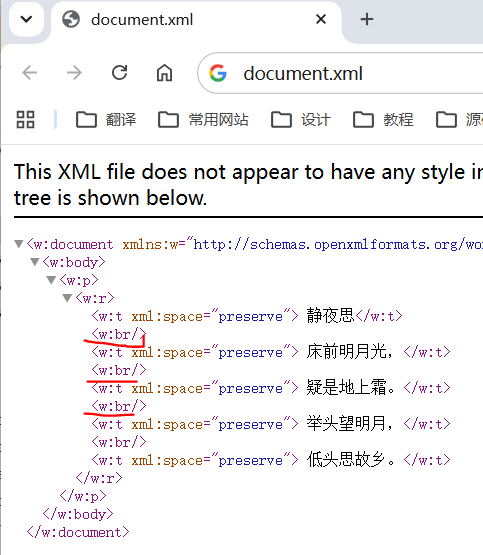
中断类用于在文本运行类(Run)的当前位置放置中断,中断是一种特殊字符,用于替代基于文档内容的正常布局执行的常规换行,插入中断字符后会重新启动文本的位置,具体位置由中断类实例的类型和清除属性值确定。
中断类Break的类继承链为OpenXmlElement -> OpenXmlLeafElement -> Break,其主要属性包括以下两个:
1)Type属性:设置中断类型,从枚举值BreakValues内取值,值为page时在当前位置插入分页符,值为column时跳至下一分栏的顶部继续排版,值为textWrapping时强制换到下一行;
2)Clear属性:设置处理文本换行时后续文本的具体位置,从枚举值BreakTextRestartLocationValues内取值,此属性仅在Type值为textWrapping时生效。
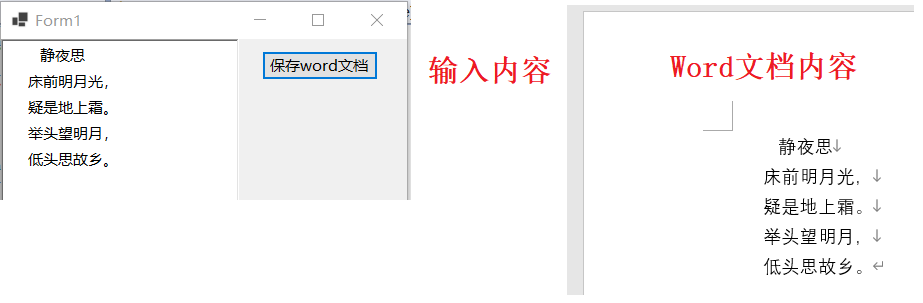
以上一篇文章的代码为例,在程序中输入的内容是5行,但写入word文档时由于只创建了一个Text实例,仅保留了文本中的空格,为将内容按行显示,取每行内容创建Text实例,并在其后插入换行符,示例代码及运行效果如下所示:
csharp
using (WordprocessingDocument wordDocument = WordprocessingDocument.Create(sfd.FileName, WordprocessingDocumentType.Document))
{
    MainDocumentPart mainPart = wordDocument.AddMainDocumentPart();
    mainPart.Document = new Document();
    Body body = mainPart.Document.AppendChild(new Body());

    Paragraph paragraph = body.AppendChild(new Paragraph());
    Run run = paragraph.AppendChild(new Run());

    for (int i = 0; i < txtContent.Lines.Length; i++)
    {
        Text text = new Text();
        text.Space = SpaceProcessingModeValues.Preserve;
        text.Text = txtContent.Lines[i];
        run.AppendChild(text);

        if(i!=txtContent.Lines.Length-1)
        {
            run.Append(new Break());
        }
    }
}
参考文献
1https://github.com/dotnet/Open-XML-SDK
2https://learn.microsoft.com/zh-cn/office/open-xml/open-xml-sdk