1. 安装claude code
-
安装nvm
-
通过nvm 安装node.js
bash
$ nvm --version
0.39.3

$ npm --version
11.12.1

$ node --v
v22.14.0- 安装 claude-code
bash
npm install -g @anthropic-ai/claude-code2. 安装litellm
-
安装python3.10
-
创建python虚拟环境ccx
-
安装litellm
bash
#$ mkvirtualenv ccx -p /usr/bin/python3.10
(ccx) $ pip install litellm
(ccx) $ pip install 'litellm[proxy]'
(ccx) $ pip install httpx[socks]
3. 配置claude code
3.1 启用litellm
在~/.zshrc文件中添加以下内容:
bash
export ZHIPU_API_KEY=<your_api_key>运行source ~/.zshrc命令,使环境变量生效。
创建 litellm_config.yaml(与下文启动命令文件名一致),并添加以下内容。Claude Code 会通过 Anthropic 接口请求诸如 claude-sonnet-4-6 等官方模型名,因此需要一条 model_name: "*" 的通配路由,把这些名称全部转到实际使用的国内模型。
yaml
model_list:
#   - model_name: qwen
#     litellm_params:
#       model: dashscope/qwen-plus

#   - model_name: kimi
#     litellm_params:
#       model: moonshot/moonshot-v1-8k

  - model_name: "*"
    litellm_params:
      model: zai/glm-5.1
      api_key: os.environ/ZHIPU_API_KEY

  - model_name: glm
    litellm_params:
      model: zai/glm-5.1
      api_key: os.environ/ZHIPU_API_KEY

litellm_settings:
  drop_params: true
Claude Code 会带上 Anthropic 专有字段(如 context_management),转给 GLM 时需丢弃;drop_params: true 即由 LiteLLM 自动去掉后端不支持的参数。
运行 LiteLLM 代理:
bash
(ccx) ➜  ccx litellm --config litellm_config.yaml --port 4000
INFO:     Started server process [379725]
INFO:     Waiting for application startup.

   ██╗     ██╗████████╗███████╗██╗     ██╗     ███╗   ███╗
   ██║     ██║╚══██╔══╝██╔════╝██║     ██║     ████╗ ████║
   ██║     ██║   ██║   █████╗  ██║     ██║     ██╔████╔██║
   ██║     ██║   ██║   ██╔══╝  ██║     ██║     ██║╚██╔╝██║
   ███████╗██║   ██║   ███████╗███████╗███████╗██║ ╚═╝ ██║
   ╚══════╝╚═╝   ╚═╝   ╚══════╝╚══════╝╚══════╝╚═╝     ╚═╝


#------------------------------------------------------------#
#                                                            #
#            'This product would be better if...'             #
#        https://github.com/BerriAI/litellm/issues/new        #
#                                                            #
#------------------------------------------------------------#

 Thank you for using LiteLLM! - Krrish & Ishaan


Give Feedback / Get Help: https://github.com/BerriAI/litellm/issues/new


LiteLLM: Proxy initialized with Config, Set models:
    qwen
    kimi
    glm
INFO:     Application startup complete.
INFO:     Uvicorn running on http://0.0.0.0:4000 (Press CTRL+C to quit)
3.2 配置claude code
- 在
~/.zshrc文件中添加以下内容:
bash
export ANTHROPIC_API_KEY=dummy
export ANTHROPIC_BASE_URL=http://127.0.0.1:4000-
运行
source ~/.zshrc命令,使环境变量生效。 -
运行
claude命令,并输入以下内容:
bash
$ claude- Choose the text style that looks best with your terminal
- ANTHROPIC_API_KEY: sk-ant-...dummy 选择yes
- Enter
- yes
- 如果运行
claude初始化配置有问题,则执行以下命令重新配置:
bash
$ rm -rf ~/.claude*
$ claude
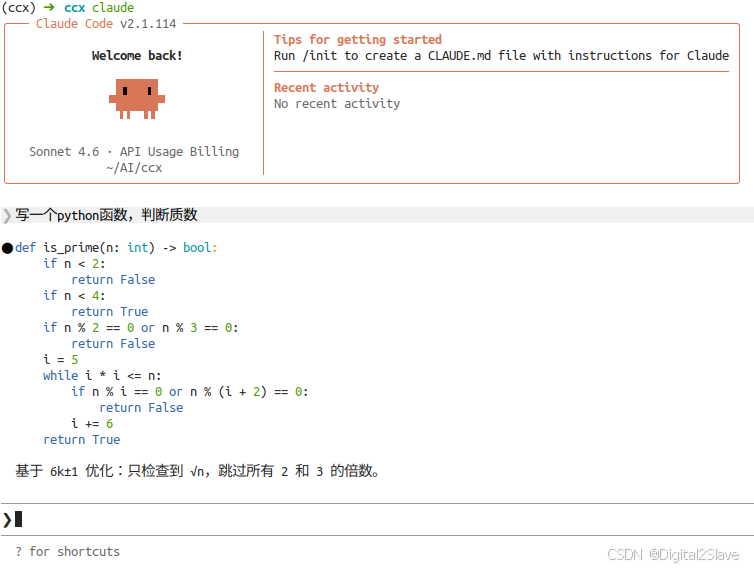
4. 测试claude code
- 运行
claude命令,并输入以下内容:
bash
$ claude
> 写一个python函数,判断质数
❯