Flutter for OpenHarmony 跨平台开发:番茄钟功能实战指南
欢迎加入开源鸿蒙跨平台社区:https://openharmonycrossplatform.csdn.net
一、引言
番茄工作法是一种时间管理方法,由Francesco Cirillo于1980年代创立。该方法使用定时器将工作分解为若干个25分钟的间隔,每个间隔称为一个"番茄钟",期间专注于工作,中间休息5分钟。番茄钟应用作为该方法的数字化实现,已成为提升工作效率的重要工具。
Flutter作为Google推出的开源UI框架,凭借其跨平台能力和丰富的动画支持,为番茄钟功能的实现提供了便捷的技术方案。Flutter for OpenHarmony的出现,使得Flutter开发者能够将应用部署到鸿蒙设备,进一步拓展了跨平台开发的应用范围。
本文将以番茄钟功能为例,详细介绍如何使用Flutter for OpenHarmony实现倒计时、进度动画、状态管理等功能,为开发者提供完整的技术参考。
二、技术背景
2.1 Flutter for OpenHarmony概述
Flutter是Google于2017年发布的开源UI框架,采用Dart语言进行开发。Flutter通过Skia渲染引擎实现自绘,不依赖平台原生组件,从而保证了不同平台上UI的一致性。
OpenHarmony是由开放原子开源基金会孵化的开源操作系统项目,旨在构建万物智联的操作系统生态。Flutter for OpenHarmony是Flutter在OpenHarmony平台上的适配实现,使Flutter开发者能够将应用无缝部署到鸿蒙设备。
2.2 番茄钟的技术架构
实现番茄钟功能涉及以下核心技术:
定时器管理:使用Dart的Timer类实现倒计时功能,需要处理启动、暂停、重置等操作。
动画控制:使用AnimationController实现进度动画,提供视觉反馈。
状态管理:管理计时状态、完成次数、历史记录等数据。
UI反馈:使用CircularProgressIndicator展示进度,对话框提示完成状态。
2.3 Flutter与原生鸿蒙开发的对比
| 对比维度 | Flutter for OpenHarmony | 原生鸿蒙开发(ArkTS) |
|---|---|---|
| 编程语言 | Dart | ArkTS |
| 定时器 | Timer类简洁易用 | 需要手动实现 |
| 动画支持 | AnimationController完善 | 需要手动实现 |
| 跨平台能力 | 支持多平台 | 仅限鸿蒙平台 |
| 开发效率 | 热重载支持 | 需要重新编译 |
三、功能设计
3.1 需求分析
番茄钟功能的核心需求包括:
- 倒计时功能:支持25分钟标准番茄钟,也可自定义时长
- 进度显示:以圆形进度条形式展示剩余时间
- 控制操作:支持开始、暂停、重置等操作
- 完成统计:记录今日完成的番茄钟数量
- 休息提醒:完成后提示休息,支持5分钟休息计时
- 历史记录:展示今日完成的时间记录
3.2 状态变量设计
使用以下状态变量管理番茄钟状态:
dart
// 定时器实例
Timer? _timer;

// 剩余秒数
int _seconds = 25 * 60;

// 初始秒数(用于计算进度)
int _initialSeconds = 25 * 60;

// 是否正在运行
bool _isRunning = false;

// 选择的时长(分钟)
int _selectedMinutes = 25;

// 动画控制器
late AnimationController _animationController;

// 已完成的番茄钟数量
int _completedSessions = 0;

// 完成时间历史记录
final List<String> _sessionHistory = [];
3.3 界面设计
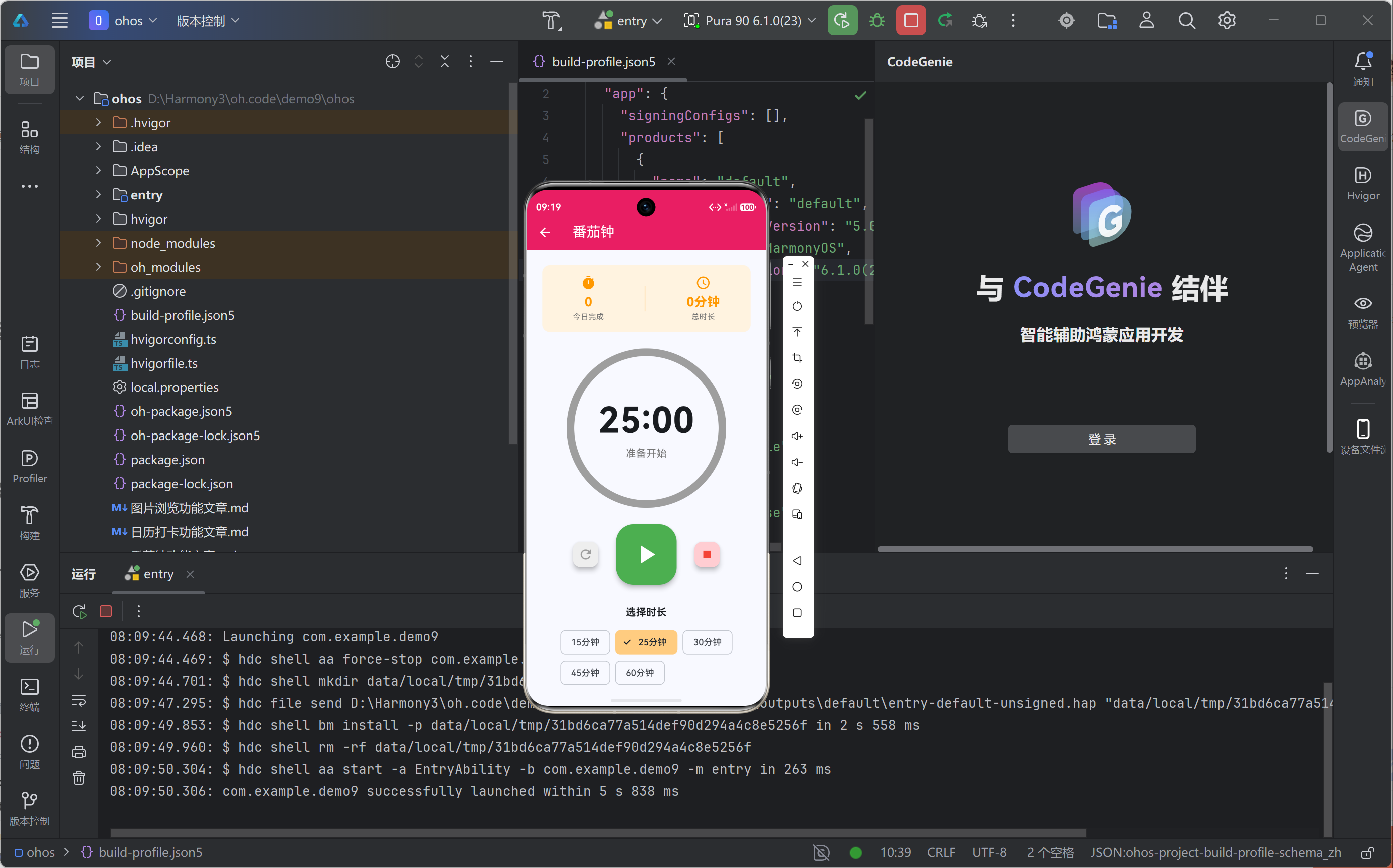
界面分为以下几个部分:
统计面板:显示今日完成数量和总时长
计时显示:圆形进度条 + 倒计时数字
控制按钮:重置、开始/暂停、停止
时长选择:15/25/30/45/60分钟选项
历史记录:横向滚动展示完成时间
四、核心实现
4.1 定时器初始化
在initState中初始化动画控制器:
dart
@override
void initState() {
  super.initState();
  _animationController = AnimationController(
    vsync: this,
    duration: const Duration(minutes: 25),
  );
}

@override
void dispose() {
  _timer?.cancel();
  _animationController.dispose();
  super.dispose();
}注意需要使用with TickerProviderStateMixin来提供vsync参数。
4.2 开始计时
启动定时器和动画:
dart
void _startTimer() {
  setState(() => _isRunning = true);
  _animationController.forward();

  _timer = Timer.periodic(const Duration(seconds: 1), (timer) {
    setState(() {
      if (_seconds > 0) {
        _seconds--;
      } else {
        _completeSession();
      }
    });
  });
}
4.3 暂停计时
暂停定时器和动画:
dart
void _pauseTimer() {
  _timer?.cancel();
  _animationController.stop();
  setState(() => _isRunning = false);
}
4.4 重置计时
重置所有状态:
dart
void _resetTimer() {
  _timer?.cancel();
  _animationController.reset();
  setState(() {
    _isRunning = false;
    _seconds = _selectedMinutes * 60;
    _initialSeconds = _seconds;
  });
}
4.5 完成处理
当倒计时结束时:
dart
void _completeSession() {
  _timer?.cancel();
  _animationController.reset();
  setState(() {
    _isRunning = false;
    _completedSessions++;
    _sessionHistory.insert(0, _formatTime(DateTime.now()));
  });
  _showCompleteDialog();
}
4.6 进度计算
计算当前进度用于显示:
dart
double progress = _seconds / _initialSeconds;五、完整代码实现
dart
import 'dart:async';
import 'package:flutter/material.dart';

class TimerFeature extends StatefulWidget {
  const TimerFeature({super.key});

  @override
  State<TimerFeature> createState() => _TimerFeatureState();
}

class _TimerFeatureState extends State<TimerFeature> with TickerProviderStateMixin {
  Timer? _timer;
  int _seconds = 25 * 60;
  int _initialSeconds = 25 * 60;
  bool _isRunning = false;
  int _selectedMinutes = 25;
  late AnimationController _animationController;
  int _completedSessions = 0;
  final List<String> _sessionHistory = [];

  @override
  void initState() {
    super.initState();
    _animationController = AnimationController(
      vsync: this,
      duration: const Duration(minutes: 25),
    );
  }

  @override
  void dispose() {
    _timer?.cancel();
    _animationController.dispose();
    super.dispose();
  }

  void _startTimer() {
    setState(() => _isRunning = true);
    _animationController.forward();
    _timer = Timer.periodic(const Duration(seconds: 1), (timer) {
      setState(() {
        if (_seconds > 0) {
          _seconds--;
        } else {
          _completeSession();
        }
      });
    });
  }

  void _pauseTimer() {
    _timer?.cancel();
    _animationController.stop();
    setState(() => _isRunning = false);
  }

  void _resetTimer() {
    _timer?.cancel();
    _animationController.reset();
    setState(() {
      _isRunning = false;
      _seconds = _selectedMinutes * 60;
      _initialSeconds = _seconds;
    });
  }

  void _completeSession() {
    _timer?.cancel();
    _animationController.reset();
    setState(() {
      _isRunning = false;
      _completedSessions++;
      _sessionHistory.insert(0, _formatTime(DateTime.now()));
    });
    _showCompleteDialog();
  }

  void _showCompleteDialog() {
    showDialog(
      context: context,
      barrierDismissible: false,
      builder: (context) => AlertDialog(
        shape: RoundedRectangleBorder(borderRadius: BorderRadius.circular(16)),
        title: Row(
          children: const [
            Icon(Icons.celebration, color: Colors.orange, size: 28),
            SizedBox(width: 8),
            Text('完成!'),
          ],
        ),
        content: Column(
          mainAxisSize: MainAxisSize.min,
          children: [
            const Text('恭喜完成一个番茄钟!'),
            const SizedBox(height: 8),
            Text('今日已完成: $_completedSessions 个'),
            const SizedBox(height: 16),
            const Text('建议休息5分钟', style: TextStyle(color: Colors.grey)),
          ],
        ),
        actions: [
          TextButton(
            onPressed: () {
              Navigator.pop(context);
              _startBreakTimer();
            },
            child: const Text('开始休息'),
          ),
          ElevatedButton(
            onPressed: () {
              Navigator.pop(context);
              _resetTimer();
            },
            child: const Text('继续工作'),
          ),
        ],
      ),
    );
  }

  void _startBreakTimer() {
    setState(() {
      _selectedMinutes = 5;
      _seconds = 5 * 60;
      _initialSeconds = _seconds;
    });
    _startTimer();
  }

  String _formatTime(DateTime dt) {
    return '${dt.hour}:${dt.minute.toString().padLeft(2, '0')}';
  }

  @override
  Widget build(BuildContext context) {
    final progress = _seconds / _initialSeconds;

    return Scaffold(
      body: SingleChildScrollView(
        child: Padding(
          padding: const EdgeInsets.all(24),
          child: Column(
            children: [
              _buildStats(),
              const SizedBox(height: 32),
              _buildTimerDisplay(progress),
              const SizedBox(height: 32),
              _buildControls(),
              const SizedBox(height: 32),
              _buildDurationSelector(),
              if (_sessionHistory.isNotEmpty) ...[
                const SizedBox(height: 24),
                _buildSessionHistory(),
              ],
            ],
          ),
        ),
      ),
    );
  }

  Widget _buildStats() {
    return Container(
      padding: const EdgeInsets.all(16),
      decoration: BoxDecoration(
        color: Colors.orange.shade50,
        borderRadius: BorderRadius.circular(12),
      ),
      child: Row(
        mainAxisAlignment: MainAxisAlignment.spaceAround,
        children: [
          _buildStatItem('今日完成', _completedSessions, Icons.timer, Colors.orange),
          Container(height: 40, width: 1, color: Colors.orange.shade200),
          _buildStatItem('总时长', '${_completedSessions * 25}分钟', Icons.access_time, Colors.orange),
        ],
      ),
    );
  }

  Widget _buildStatItem(String label, dynamic value, IconData icon, Color color) {
    return Column(
      children: [
        Icon(icon, color: color, size: 24),
        const SizedBox(height: 4),
        Text(
          value is int ? '$value' : value,
          style: TextStyle(fontSize: 20, fontWeight: FontWeight.bold, color: color),
        ),
        Text(label, style: TextStyle(fontSize: 12, color: Colors.grey.shade600)),
      ],
    );
  }

  Widget _buildTimerDisplay(double progress) {
    int minutes = _seconds ~/ 60;
    int secs = _seconds % 60;

    return Stack(
      alignment: Alignment.center,
      children: [
        SizedBox(
          width: 240,
          height: 240,
          child: CircularProgressIndicator(
            value: progress,
            strokeWidth: 12,
            backgroundColor: Colors.grey.shade200,
            valueColor: AlwaysStoppedAnimation(
              _isRunning ? Colors.orange : Colors.grey,
            ),
          ),
        ),
        Column(
          children: [
            Text(
              '${minutes.toString().padLeft(2, '0')}:${secs.toString().padLeft(2, '0')}',
              style: const TextStyle(fontSize: 56, fontWeight: FontWeight.bold),
            ),
            Text(
              _isRunning ? '专注中...' : '准备开始',
              style: TextStyle(fontSize: 16, color: Colors.grey.shade600),
            ),
          ],
        ),
      ],
    );
  }

  Widget _buildControls() {
    return Row(
      mainAxisAlignment: MainAxisAlignment.center,
      children: [
        FloatingActionButton(
          heroTag: 'reset',
          mini: true,
          backgroundColor: Colors.grey.shade200,
          child: const Icon(Icons.refresh, color: Colors.grey),
          onPressed: _resetTimer,
        ),
        const SizedBox(width: 24),
        FloatingActionButton.large(
          heroTag: 'play',
          backgroundColor: _isRunning ? Colors.orange : Colors.green,
          child: Icon(
            _isRunning ? Icons.pause : Icons.play_arrow,
            color: Colors.white,
            size: 48,
          ),
          onPressed: _isRunning ? _pauseTimer : _startTimer,
        ),
        const SizedBox(width: 24),
        FloatingActionButton(
          heroTag: 'stop',
          mini: true,
          backgroundColor: Colors.red.shade100,
          child: const Icon(Icons.stop, color: Colors.red),
          onPressed: () {
            if (_completedSessions > 0) {
              _showCompleteDialog();
            }
          },
        ),
      ],
    );
  }

  Widget _buildDurationSelector() {
    return Column(
      children: [
        const Text('选择时长', style: TextStyle(fontSize: 16, fontWeight: FontWeight.bold)),
        const SizedBox(height: 12),
        Wrap(
          spacing: 8,
          children: [15, 25, 30, 45, 60].map((mins) => ChoiceChip(
            label: Text('$mins分钟'),
            selected: _selectedMinutes == mins,
            selectedColor: Colors.orange.shade200,
            onSelected: (selected) {
              if (selected && !_isRunning) {
                setState(() {
                  _selectedMinutes = mins;
                  _seconds = mins * 60;
                  _initialSeconds = _seconds;
                  _animationController.duration = Duration(minutes: mins);
                });
              }
            },
          )).toList(),
        ),
      ],
    );
  }

  Widget _buildSessionHistory() {
    return Column(
      crossAxisAlignment: CrossAxisAlignment.start,
      children: [
        const Text('今日记录', style: TextStyle(fontSize: 16, fontWeight: FontWeight.bold)),
        const SizedBox(height: 8),
        Container(
          height: 60,
          child: ListView.builder(
            scrollDirection: Axis.horizontal,
            itemCount: _sessionHistory.length,
            itemBuilder: (context, index) => Container(
              margin: const EdgeInsets.only(right: 8),
              padding: const EdgeInsets.symmetric(horizontal: 16, vertical: 8),
              decoration: BoxDecoration(
                color: Colors.orange.shade50,
                borderRadius: BorderRadius.circular(20),
              ),
              child: Row(
                children: [
                  const Icon(Icons.check_circle, color: Colors.orange, size: 16),
                  const SizedBox(width: 4),
                  Text(_sessionHistory[index]),
                ],
              ),
            ),
          ),
        ),
      ],
    );
  }
}
六、运行效果
七、关键技术点解析
7.1 Timer定时器
Dart的Timer类是实现倒计时的核心:
dart
// 创建周期性定时器
Timer.periodic(const Duration(seconds: 1), (timer) {
  // 每秒执行一次
  if (_seconds > 0) {
    _seconds--;
  } else {
    timer.cancel();  // 取消定时器
  }
});

// 取消定时器
_timer?.cancel();
Timer.periodic创建周期性定时器,适合用于倒计时场景。注意在dispose中取消定时器,避免内存泄漏。
7.2 AnimationController动画控制
AnimationController用于控制动画的播放:
dart
// 初始化
_animationController = AnimationController(
  vsync: this,
  duration: const Duration(minutes: 25),
);

// 播放动画
_animationController.forward();

// 暂停动画
_animationController.stop();

// 重置动画
_animationController.reset();需要使用with TickerProviderStateMixin提供vsync参数,确保动画在页面不可见时暂停,节省资源。
7.3 CircularProgressIndicator进度指示器
CircularProgressIndicator用于显示圆形进度:
dart
CircularProgressIndicator(
  value: progress,           // 进度值 0.0-1.0
  strokeWidth: 12,           // 线条宽度
  backgroundColor: Colors.grey.shade200,  // 背景色
  valueColor: AlwaysStoppedAnimation(Colors.orange),  // 进度色
)
当value为null时显示不确定进度(旋转动画),设置value后显示确定进度。
7.4 ChoiceChip选项芯片
ChoiceChip用于实现单选选项:
dart
ChoiceChip(
  label: Text('25分钟'),
  selected: _selectedMinutes == 25,
  selectedColor: Colors.orange.shade200,
  onSelected: (selected) {
    if (selected) {
      setState(() => _selectedMinutes = 25);
    }
  },
)
通过selected属性控制选中状态,onSelected回调处理选择事件。
7.5 OpenHarmony平台适配要点
在OpenHarmony设备上运行Flutter应用,需要注意:
- 签名配置:需要在DevEco Studio中配置应用签名
- 定时器精度:Timer在鸿蒙平台运行正常,精度满足需求
- 动画性能:AnimationController在鸿蒙平台表现良好
八、总结与展望
本文详细介绍了使用Flutter for OpenHarmony开发番茄钟功能的完整过程。通过Timer定时器、AnimationController动画控制、CircularProgressIndicator进度展示等技术的综合运用,实现了一个功能完善、交互友好的番茄钟应用。
技术要点回顾:
- 使用Timer.periodic实现倒计时
- 使用AnimationController控制动画
- 使用CircularProgressIndicator展示进度
- 使用ChoiceChip实现时长选择
- 使用showDialog展示完成提示
扩展方向:
- 数据持久化:保存完成记录到本地存储
- 通知提醒:集成本地通知,计时结束提醒
- 统计图表:展示周/月完成统计
- 白噪音:播放专注背景音
Flutter for OpenHarmony为开发者提供了便捷的跨平台开发能力,使得番茄钟等效率工具能够高效地在鸿蒙设备上实现。随着鸿蒙生态的不断发展,Flutter跨平台技术将在更多应用场景中发挥重要作用。