这个错误通常与MyBatis的配置有关,涉及到MyBatis的SqlSessionFactory或SqlSessionTemplate的配置问题。以下是一些可能的解决方案:
1.检查DataSource配置: 确保你的数据源(DataSource)被正确配置。在Spring Boot中,你可以使用application.properties或application.yml文件来配置数据源。例如:
spring:
datasource:
url: jdbc:mysql://localhost:3306/your_database
username: your_username
password: your_password
driver-class-name: com.mysql.cj.jdbc.Driver
2.MyBatis配置文件: 如果你使用的是MyBatis,确保MyBatis的配置文件(比如mybatis-config.xml)正确配置,并且位于正确的位置。这个文件通常包含有关SqlSessionFactory的配置。
3.Mapper扫描配置: 如果你使用了@MapperScan注解,确保它的basePackages属性正确指定了你的Mapper接口所在的包。例如:
@MapperScan("com.example.mapper")
4.MyBatis的Mapper接口: 确保你的Mapper接口标记了@Mapper注解,或者在启动类上使用@MapperScan注解时,它被正确扫描到。
@Mapper
public interface YourMapper {
// Mapper方法
}
5.Spring Boot版本兼容性: 确保你的Spring Boot版本和MyBatis版本兼容。有时候,不同版本的Spring Boot可能需要特定版本的MyBatis。
(不要觉得到最后才考虑降版本,如果其他都对了很有可能问题就是其中一个的版本太高)
6.检查依赖: 确保你的项目中包含了正确版本的MyBatis和MyBatis-Spring的依赖。
org.mybatis.spring.boot
mybatis-spring-boot-starter
your_version
如果以上步骤都没有解决问题,可以尝试在你的应用程序中创建一个自定义的SqlSessionFactoryBean(如果没有的话)并手动配置,确保正确的MyBatis配置被应用。例如:
@Configuration
public class MyBatisConfig {
@Bean
public SqlSessionFactory sqlSessionFactory(DataSource dataSource, ApplicationContext applicationContext) throws Exception {
SqlSessionFactoryBean factoryBean = new SqlSessionFactoryBean();
factoryBean.setDataSource(dataSource);
factoryBean.setMapperLocations(applicationContext.getResources("classpath*:mapper/**/*.xml"));
// 其他配置...
return factoryBean.getObject();
}
}
在这个配置中,applicationContext.getResources("classpath*:mapper/**/*.xml")用于指定Mapper文件的位置。确保mapper/**/*.xml的路径模式与你的项目结构一致。这样你就可以手动配置SqlSessionFactory,确保MyBatis的配置正确。在添加了Mapper Scan之后,如果仍然报错"Property 'sqlSessionFactory' or 'sqlSessionTemplate' are required",可能是因为没有配置MyBatis的SqlSessionFactory或SqlSessionTemplate。以下是一些可能的解决方案:
7.确保MyBatis依赖存在: 确保在项目的依赖中包含了MyBatis相关的依赖,比如mybatis-spring-boot-starter。在Maven项目中,可以在pom.xml中添加如下依赖:
org.mybatis.spring.boot
mybatis-spring-boot-starter
your_version
请确保使用的版本是适配你的Spring Boot版本的。
8.配置数据源: 确保你的数据源配置正确。在application.properties或application.yml文件中配置数据库连接信息,例如:
spring:
datasource:
url: jdbc:mysql://localhost:3306/your_database
username: your_username
password: your_password
driver-class-name: com.mysql.cj.jdbc.Driver
9.检查MyBatis配置文件: 如果使用了自定义的MyBatis配置文件(通常是mybatis-config.xml),确保配置文件正确,并且被正确引入到了项目中。
10.手动配置SqlSessionFactoryBean: 如果以上步骤都没有解决问题,可以尝试手动配置SqlSessionFactoryBean,并确保它被Spring容器正确识别。示例配置如下:
@Configuration
public class MyBatisConfig {
@Autowired
private DataSource dataSource;
@Bean
public SqlSessionFactory sqlSessionFactory() throws Exception {
SqlSessionFactoryBean factoryBean = new SqlSessionFactoryBean();
factoryBean.setDataSource(dataSource);
// 其他配置...
return factoryBean.getObject();
}
}
这个配置中的dataSource是通过@Autowired注入的,确保你的数据源配置正确。
11.检查Mapper扫描路径: 确保@MapperScan注解的basePackages属性指定了正确的Mapper接口所在的包路径。例如:
@SpringBootApplication
@MapperScan("com.example.mapper")
public class YourApplication {
public static void main(String\[\] args) {
SpringApplication.run(YourApplication.class, args);
}
}
以上是一些可能的情况的整合。最终都尝试过之后走投无路了,只能将springboot的版本降下来,居然就不报错了!
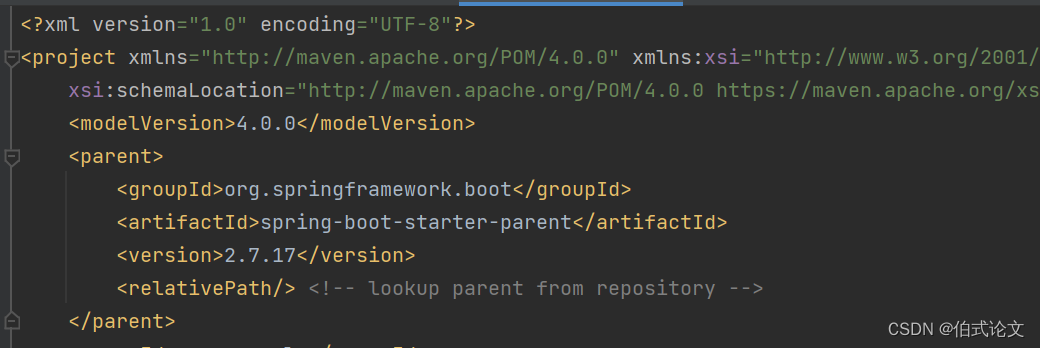
这里是我将高版本的降到了2.7.17就不报错了