GPT-image-2 热门玩法实战(四):吉卜力 & 漫画风格转换 --- 一键把照片变成动画风格
系列导读:本系列通过 Crazyrouter API 实战演示 GPT-image-2 的各种病毒式玩法。这一篇来玩风格转换 --- 把普通照片变成宫崎骏吉卜力动画风格、漫画讽刺画风格等。
🔥 吉卜力风格为什么全网刷屏?
2025 年 3 月,OpenAI 发布 GPT-4o 图像生成能力后,"吉卜力风格"(Studio Ghibli Style)瞬间引爆全网。从马斯克到普通用户,人人都在把自己的照片、宠物、甚至食物变成宫崎骏动画风格。
到了 2026 年,GPT-image-2 把这个玩法推向了新高度:
- 画面质量更高:色彩更柔和,笔触更接近真实吉卜力动画
- 文字渲染:可以在画面中加入日文或中文标题
- 风格一致性:多张图片保持统一的艺术风格
- 更多风格选择:不只是吉卜力,还有新海诚、漫画讽刺画、Chibi Q版等
🎨 效果展示
下面是通过 Crazyrouter API 调用 GPT-image-2 实际生成的吉卜力风格图:
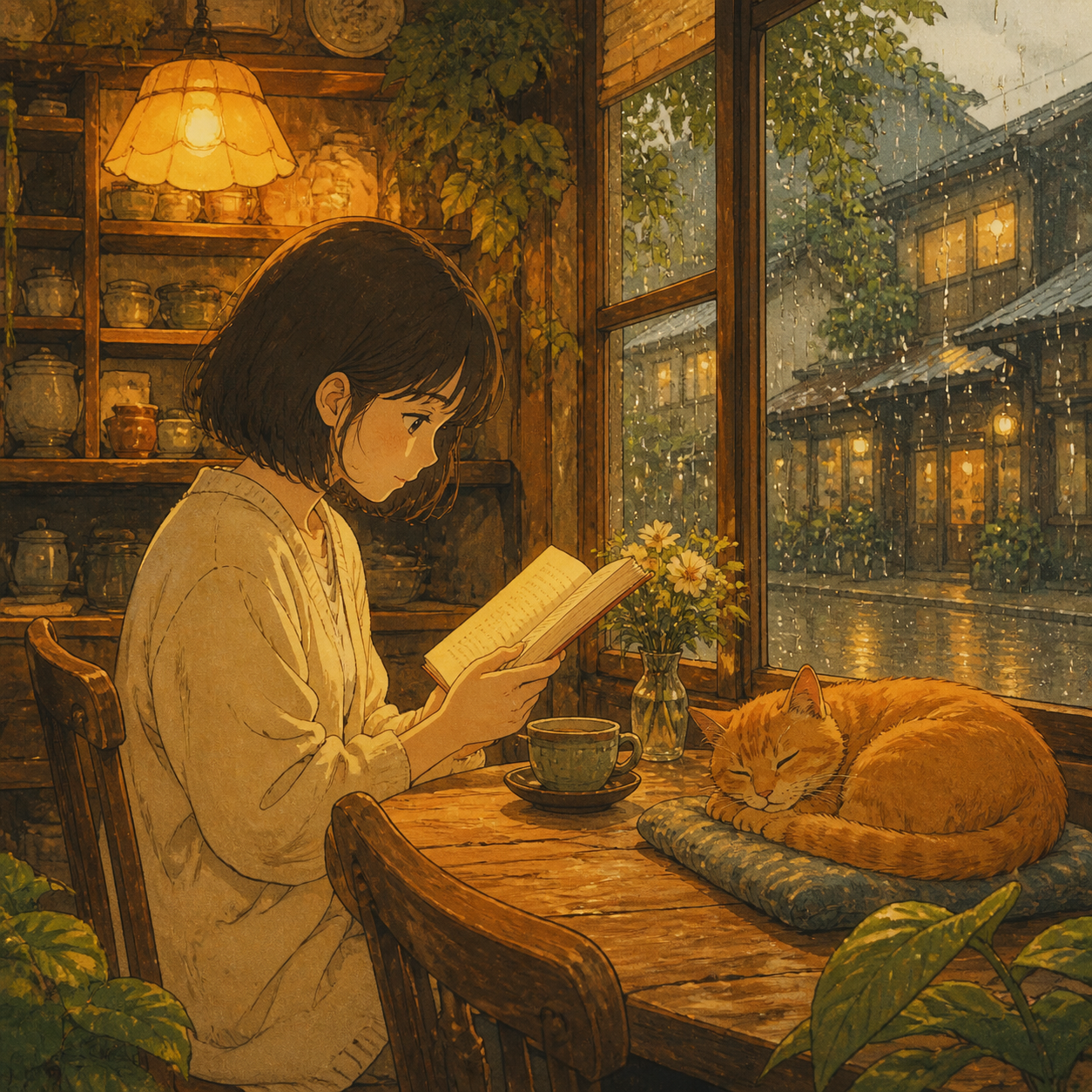
温暖的咖啡馆、窗外的雨滴、打盹的橘猫 --- 满满的宫崎骏动画既视感。GPT-image-2 对水彩质感和暖色调的把控非常到位。
📝 吉卜力风格 --- 完整代码
Python 版本
python
from openai import OpenAI

client = OpenAI(
    api_key="your-crazyrouter-api-key",
    base_url="https://crazyrouter.com/v1"
)

# 吉卜力风格生成
ghibli_prompt = """
A beautiful Studio Ghibli anime style illustration of a young woman
sitting in a cozy cafe by the window on a rainy day. She is reading a book
and drinking tea. Warm golden interior lighting, rain droplets on the window,
a cat sleeping on the chair next to her.

Art style: exactly like a frame from a Hayao Miyazaki film --- soft watercolor
textures, warm color palette, detailed backgrounds, gentle lighting,
hand-painted feel. Think Kiki's Delivery Service or Whisper of the Heart.

No text in the image.
"""

response = client.images.generate(
    model="gpt-image-2",
    prompt=ghibli_prompt,
    size="1024x1024",
    n=1
)

print(f"吉卜力风格图:{response.data[0].url}")
curl 版本
bash
curl -X POST https://crazyrouter.com/v1/images/generations \
  -H "Content-Type: application/json" \
  -H "Authorization: Bearer your-crazyrouter-api-key" \
  -d '{
    "model": "gpt-image-2",
    "prompt": "Studio Ghibli anime style illustration of a young woman in a cozy cafe by the window on a rainy day, reading a book, drinking tea, warm golden lighting, rain on window, cat sleeping nearby. Hayao Miyazaki film style, soft watercolor textures, warm colors, detailed backgrounds, hand-painted feel.",
    "size": "1024x1024",
    "n": 1
  }'
📝 新海诚风格
python
shinkai_prompt = """
A breathtaking scene in Makoto Shinkai's art style.
A young man standing on a train platform at sunset, looking at the sky.
Dramatic clouds with golden and pink hues, lens flare from the setting sun.
Ultra-detailed background with photorealistic lighting but anime character style.
Cherry blossom petals floating in the air.
Style reference: Your Name (君の名は), Weathering with You.
Vibrant saturated colors, cinematic composition, 16:9 aspect ratio feel.
"""

response = client.images.generate(
    model="gpt-image-2",
    prompt=shinkai_prompt,
    size="1024x1024",
    n=1
)
📝 漫画讽刺画(Caricature)风格
2026 年初最火的 AI 趋势之一 --- 把自己变成夸张的漫画讽刺画:
python
caricature_prompt = """
A funny caricature portrait of a male software engineer in his 30s.
Exaggerated features: oversized glasses, big head, small body.
He is sitting at a desk surrounded by 6 monitors, all showing code.
Empty coffee cups piled up around him. Dark circles under his eyes.
A rubber duck on his desk. His hoodie says "IT WORKS ON MY MACHINE".

Style: professional editorial caricature, colored pencil and ink,
like a New Yorker magazine illustration. White background.
Humorous and warm, not mean-spirited.
"""

response = client.images.generate(
    model="gpt-image-2",
    prompt=caricature_prompt,
    size="1024x1024",
    n=1
)
📝 Chibi Q版风格
python
chibi_prompt = """
A cute chibi/Q-version character of a female data scientist.
Big sparkly eyes, tiny body, oversized head (3:1 head-to-body ratio).
She wears a lab coat over a casual outfit, holding a tiny laptop
with a colorful chart on screen. A small robot companion floats beside her.
Pastel color palette, soft shading, kawaii aesthetic.
Background: simple gradient with sparkles and data visualization elements.
Style: modern chibi anime, clean lines, digital art.
"""

response = client.images.generate(
    model="gpt-image-2",
    prompt=chibi_prompt,
    size="1024x1024",
    n=1
)
💡 风格转换 Prompt 公式
不管什么风格,都可以套用这个公式:
[风格关键词] illustration of [主体描述].
[场景和环境]. [光影描述].
Art style: [具体参考作品/艺术家].
[色彩和技法描述].
各风格的关键词速查表
| 风格 | 关键词 |
|---|---|
| 吉卜力 | Studio Ghibli, Hayao Miyazaki, soft watercolor, warm palette, hand-painted |
| 新海诚 | Makoto Shinkai, dramatic sky, lens flare, ultra-detailed, vibrant saturated |
| 讽刺画 | Caricature, exaggerated features, editorial illustration, ink and color |
| Chibi | Chibi, kawaii, big eyes, tiny body, pastel colors, clean lines |
| 赛博朋克 | Cyberpunk, neon lights, rain-soaked streets, holographic, dark futuristic |
| 像素风 | Pixel art, 16-bit, retro game style, limited color palette |
| 水墨画 | Chinese ink wash painting, sumi-e, minimalist, black ink on rice paper |
| 油画 | Oil painting, thick brushstrokes, rich textures, classical composition |
🔧 批量风格转换
同一个场景,一键生成多种风格:
python
scene = "a cat sitting on a windowsill watching the rain"

styles = {
    "ghibli": "Studio Ghibli anime style, soft watercolor, warm colors, Miyazaki film",
    "shinkai": "Makoto Shinkai style, dramatic lighting, vibrant colors, photorealistic background",
    "chibi": "Cute chibi style, big eyes, tiny body, kawaii, pastel colors",
    "cyberpunk": "Cyberpunk style, neon lights, holographic rain, dark futuristic city",
    "ink_wash": "Chinese ink wash painting, sumi-e, minimalist, black ink on rice paper",
    "pixel": "16-bit pixel art, retro game style, limited color palette",
}

for style_name, style_desc in styles.items():
    prompt = f"{style_desc} illustration of {scene}."
    response = client.images.generate(
        model="gpt-image-2",
        prompt=prompt,
        size="1024x1024",
        n=1
    )
    print(f"{style_name}: {response.data[0].url}")
💰 成本说明
- 单张风格转换:约 $0.04-0.08(通过 Crazyrouter)
- 6 种风格批量生成:约 $0.3-0.5
- 做成"风格转换工具"产品,每个用户成本极低
⚠️ 注意事项
- 版权问题:直接使用 "Studio Ghibli" 等品牌名称生成的图片,商用时需谨慎。建议商用场景使用通用描述如 "Japanese anime watercolor style"
- 风格一致性:如果需要多张图保持一致风格,在 prompt 中使用完全相同的风格描述
- 分辨率:1024×1024 适合社交媒体,如需印刷品质可考虑后期超分辨率处理
🔗 系列导航
- ✅ (一)AI 看手相
- ✅ (二)AI 面相 & 个人色彩分析
- ✅ (三)AI 手办/Action Figure
- 📍 (四)吉卜力 & 漫画风格转换(本篇)
- (五)AI 预测未来宝宝
- (六)AI Meme & 涂色书生成
🚀 试试 Crazyrouter:一个 API Key,600+ 模型,包括 GPT-image-2、GPT-5.5、Claude Opus 4.7、DeepSeek V4 等。