Flutter for OpenHarmony:打造跨平台便签备忘录应用
社区引导
欢迎加入开源鸿蒙跨平台社区: https://openharmonycrossplatform.csdn.net
作者:maaath
前言
在移动应用开发领域,跨平台技术一直是开发者关注的焦点。Flutter 作为 Google 推出的跨平台 UI 框架,凭借其高性能和一致性表现,已在 iOS、Android、Web 等平台得到广泛应用。而随着 OpenHarmony 生态的蓬勃发展,Flutter for OpenHarmony 的出现让开发者能够使用同一套代码同时覆盖 Android、iOS、Web 以及 OpenHarmony 设备,极大地提升了开发效率。
本文将以一个实用的便签备忘录应用为例,深入讲解如何利用 Flutter for OpenHarmony 开发跨平台应用,并分享在实际开发过程中积累的宝贵经验。
项目概述
便签备忘录是日常使用频率极高的应用类型,看似简单,实则涵盖了数据持久化、状态管理、UI 组件交互等核心开发技能。通过这个项目,读者将掌握 Flutter 跨平台开发的关键技术点,为开发更复杂的应用打下坚实基础。
本项目采用 Flutter for OpenHarmony 实现,目标是在鸿蒙设备上提供一个流畅、美观、易用的便签管理工具,支持便签的创建、编辑、分类、归档、删除等完整功能。
项目架构设计
良好的架构是应用可维护性的保障。本项目采用经典的 MVC 模式,结合 Flutter 的状态管理机制,实现了清晰的数据流和模块划分。
lib/
├── main.dart                 # 应用入口
├── models/                   # 数据模型
│   └── note_model.dart       # 便签数据模型
├── viewmodels/               # 视图模型(业务逻辑)
│   └── note_viewmodel.dart   # 便签业务处理
├── views/                    # 视图层
│   ├── pages/                # 页面
│   │   ├── home_page.dart    # 主页
│   │   ├── edit_page.dart    # 编辑页
│   │   ├── archive_page.dart # 归档页
│   │   └── trash_page.dart   # 回收站
│   └── widgets/               # 通用组件
│       └── note_card.dart    # 便签卡片组件
└── utils/                    # 工具类
    └── storage_helper.dart   # 存储帮助类
这种分层架构的优势在于:数据层负责与存储介质交互,视图模型层处理业务逻辑,视图层专注于 UI 渲染。三者各司其职,代码职责单一,便于测试和维护。
核心数据模型
在开始编码之前,我们首先定义便签的数据结构。考虑到便签应用的实际需求,一个完整的便签应包含标题、内容、分类、标签、置顶状态、完成状态、归档状态、提醒时间、创建时间、修改时间、删除时间以及同步状态等属性。
dart
class NoteContentItem {
  String type;      // 'text' or 'image'
  String content;
  int width;
  int height;

  NoteContentItem(this.type, this.content, {this.width = 0, this.height = 0});
}

class NoteReminder {
  bool enabled;
  int remindTime;
  bool hasNotified;

  NoteReminder() {
    enabled = false;
    remindTime = 0;
    hasNotified = false;
  }
}

class NoteCategory {
  String id;
  String name;
  String color;
  bool isDefault;
  int sortOrder;

  NoteCategory({
    required this.id,
    required this.name,
    required this.color,
    this.isDefault = false,
    this.sortOrder = 0,
  });
}

class Note {
  String id;
  String title;
  List<NoteContentItem> contents;
  String categoryId;
  List<String> tags;
  bool isPinned;
  bool isCompleted;
  bool isArchived;
  NoteReminder reminder;
  int createdTime;
  int modifiedTime;
  int deletedTime;
  bool isDeleted;
  String syncStatus;

  Note(String this.id) {
    title = '';
    contents = [];
    categoryId = 'default';
    tags = [];
    isPinned = false;
    isCompleted = false;
    isArchived = false;
    reminder = NoteReminder();
    createdTime = DateTime.now().millisecondsSinceEpoch;
    modifiedTime = createdTime;
    deletedTime = 0;
    isDeleted = false;
    syncStatus = 'pending';
  }
}
这些模型类的设计遵循了数据封装的原则,每个属性都有明确的语义定义。值得注意的是,我们使用了构造函数的初始化列表来简化属性赋值,同时为每个属性提供了合理的默认值,确保便签对象在任何状态下都是有效的。
数据存储实现
数据持久化是便签应用的核心功能之一。由于 Flutter for OpenHarmony 对主流存储方案的支持,我们需要选择一种既能保证数据安全又便于跨平台复用的方案。本项目采用 SharedPreferences 作为主要存储方案,它轻量、简单且在各个平台都有良好的支持。
dart
import 'package:shared_preferences/shared_preferences.dart';

class StorageHelper {
  static const String NOTE_STORAGE_KEY = 'notes_data';
  static const String CATEGORY_STORAGE_KEY = 'categories_data';
  static const String SYNC_STATUS_KEY = 'sync_status';

  static SharedPreferences? _prefs;

  static Future<void> init() async {
    _prefs = await SharedPreferences.getInstance();
  }

  static Future<List<Note>> loadNotes() async {
    if (_prefs == null) await init();
    final String? notesJson = _prefs!.getString(NOTE_STORAGE_KEY);
    if (notesJson == null || notesJson.isEmpty) {
      return [];
    }
    try {
      final List<dynamic> parsed = json.decode(notesJson);
      return parsed.map((item) => _parseNote(item as Map<String, dynamic>)).toList();
    } catch (e) {
      return [];
    }
  }

  static Future<void> saveNotes(List<Note> notes) async {
    if (_prefs == null) await init();
    final String notesJson = json.encode(notes.map((note) => _noteToJson(note)).toList());
    await _prefs!.setString(NOTE_STORAGE_KEY, notesJson);
  }

  static Map<String, dynamic> _noteToJson(Note note) {
    return {
      'id': note.id,
      'title': note.title,
      'contents': note.contents.map((c) => {'type': c.type, 'content': c.content}).toList(),
      'categoryId': note.categoryId,
      'tags': note.tags,
      'isPinned': note.isPinned,
      'isCompleted': note.isCompleted,
      'isArchived': note.isArchived,
      'createdTime': note.createdTime,
      'modifiedTime': note.modifiedTime,
      'deletedTime': note.deletedTime,
      'isDeleted': note.isDeleted,
      'syncStatus': note.syncStatus,
    };
  }

  static Note _parseNote(Map<String, dynamic> json) {
    final note = Note(json['id'] as String);
    note.title = json['title'] as String? ?? '';
    note.categoryId = json['categoryId'] as String? ?? 'default';
    note.isPinned = json['isPinned'] as bool? ?? false;
    note.isCompleted = json['isCompleted'] as bool? ?? false;
    note.isArchived = json['isArchived'] as bool? ?? false;
    note.createdTime = json['createdTime'] as int? ?? DateTime.now().millisecondsSinceEpoch;
    note.modifiedTime = json['modifiedTime'] as int? ?? note.createdTime;
    note.deletedTime = json['deletedTime'] as int? ?? 0;
    note.isDeleted = json['isDeleted'] as bool? ?? false;
    note.syncStatus = json['syncStatus'] as String? ?? 'pending';

    final contentsJson = json['contents'] as List<dynamic>?;
    if (contentsJson != null) {
      note.contents = contentsJson.map((c) => NoteContentItem(
        c['type'] as String? ?? 'text',
        c['content'] as String? ?? '',
      )).toList();
    }

    final tagsJson = json['tags'] as List<dynamic>?;
    if (tagsJson != null) {
      note.tags = tagsJson.map((t) => t as String).toList();
    }

    return note;
  }

  static String generateNoteId() {
    return 'note_${DateTime.now().millisecondsSinceEpoch}_${(DateTime.now().millisecondsSinceEpoch % 10000).toString()}';
  }
}
存储层的设计考虑了数据安全性和性能。通过将便签列表序列化为 JSON 字符串存储,我们避免了复杂的关系型数据库配置,同时也保证了数据的可移植性。在实际应用中,建议对敏感数据进行加密存储,以增强数据安全性。
视图模型层设计
视图模型是连接数据层和视图层的桥梁,负责处理所有业务逻辑。在 Flutter 中,我们通常使用 ChangeNotifier 来实现视图模型的响应式更新机制。
dart
import 'package:flutter/material.dart';
import '../models/note_model.dart';
import '../utils/storage_helper.dart';

class NoteViewModel extends ChangeNotifier {
  static NoteViewModel? _instance;
  List<Note> _notes = [];
  List<NoteCategory> _categories = [];
  String _filterKeyword = '';
  String _filterCategoryId = '';

  static NoteViewModel getInstance() {
    _instance ??= NoteViewModel();
    return _instance!;
  }

  List<Note> get notes => _getFilteredNotes();
  List<NoteCategory> get categories => _categories;

  Future<void> init() async {
    await StorageHelper.init();
    _notes = await StorageHelper.loadNotes();
    _categories = _createDefaultCategories();
    _notes = _notes.where((n) => !n.isDeleted && !n.isArchived).toList();
    notifyListeners();
  }

  List<Note> _getFilteredNotes() {
    List<Note> result = List.from(_notes);

    if (_filterKeyword.isNotEmpty) {
      final keyword = _filterKeyword.toLowerCase();
      result = result.where((note) {
        return note.title.toLowerCase().contains(keyword) ||
               note.contents.any((c) => c.content.toLowerCase().contains(keyword));
      }).toList();
    }

    if (_filterCategoryId.isNotEmpty) {
      result = result.where((note) => note.categoryId == _filterCategoryId).toList();
    }

    result.sort((a, b) {
      if (a.isPinned != b.isPinned) {
        return a.isPinned ? -1 : 1;
      }
      return b.modifiedTime - a.modifiedTime;
    });

    return result;
  }

  Future<Note> createNote(String categoryId) async {
    final note = Note(StorageHelper.generateNoteId());
    note.categoryId = categoryId;
    note.contents.add(NoteContentItem('text', ''));
    _notes.insert(0, note);
    await _saveNotes();
    notifyListeners();
    return note;
  }

  Future<void> updateNote(String id, Note updated) async {
    final index = _notes.indexWhere((n) => n.id == id);
    if (index != -1) {
      updated.modifiedTime = DateTime.now().millisecondsSinceEpoch;
      updated.syncStatus = 'pending';
      _notes[index] = updated;
      await _saveNotes();
      notifyListeners();
    }
  }

  Future<void> deleteNote(String id) async {
    final index = _notes.indexWhere((n) => n.id == id);
    if (index != -1) {
      _notes[index].isDeleted = true;
      _notes[index].deletedTime = DateTime.now().millisecondsSinceEpoch;
      await _saveNotes();
      notifyListeners();
    }
  }

  Future<void> archiveNote(String id) async {
    final index = _notes.indexWhere((n) => n.id == id);
    if (index != -1) {
      _notes[index].isArchived = true;
      await _saveNotes();
      notifyListeners();
    }
  }

  Future<void> restoreNote(String id) async {
    final index = _notes.indexWhere((n) => n.id == id);
    if (index != -1) {
      _notes[index].isDeleted = false;
      _notes[index].deletedTime = 0;
      await _saveNotes();
      notifyListeners();
    }
  }

  Future<void> permanentlyDelete(String id) async {
    _notes.removeWhere((n) => n.id == id);
    await _saveNotes();
    notifyListeners();
  }

  Future<void> togglePin(String id) async {
    final index = _notes.indexWhere((n) => n.id == id);
    if (index != -1) {
      _notes[index].isPinned = !_notes[index].isPinned;
      await _saveNotes();
      notifyListeners();
    }
  }

  void setFilterKeyword(String keyword) {
    _filterKeyword = keyword;
    notifyListeners();
  }

  void setFilterCategory(String categoryId) {
    _filterCategoryId = categoryId;
    notifyListeners();
  }

  void clearFilter() {
    _filterKeyword = '';
    _filterCategoryId = '';
    notifyListeners();
  }

  List<Note> getDeletedNotes() => _notes.where((n) => n.isDeleted).toList();
  List<Note> getArchivedNotes() => _notes.where((n) => n.isArchived).toList();

  Future<void> _saveNotes() async {
    await StorageHelper.saveNotes(_notes);
  }

  List<NoteCategory> _createDefaultCategories() {
    return [
      NoteCategory(id: 'default', name: '默认', color: '#4ECDC4', isDefault: true, sortOrder: 0),
      NoteCategory(id: 'work', name: '工作', color: '#45B7D1', sortOrder: 1),
      NoteCategory(id: 'personal', name: '个人', color: '#FF6B6B', sortOrder: 2),
      NoteCategory(id: 'study', name: '学习', color: '#96CEB4', sortOrder: 3),
    ];
  }
}
视图模型采用了单例模式,确保整个应用共享同一份数据状态。过滤和排序逻辑都在此层处理,视图层只需调用相应方法并监听状态变化即可。notifyListeners() 方法会触发所有监听该视图模型的组件重新构建,实现了自动化的响应式更新。
主页面实现
主页是用户使用频率最高的界面,需要兼顾功能完整性和视觉美观性。我们使用 Flutter 的 ListView.builder 配合自定义的便签卡片组件,实现高效的列表渲染。
dart
import 'package:flutter/material.dart';
import 'package:provider/provider.dart';
import '../viewmodels/note_viewmodel.dart';
import '../models/note_model.dart';

class HomePage extends StatefulWidget {
  @override
  State<HomePage> createState() => _HomePageState();
}

class _HomePageState extends State<HomePage> {
  final TextEditingController _searchController = TextEditingController();
  String _selectedCategoryId = 'all';

  @override
  void initState() {
    super.initState();
    WidgetsBinding.instance.addPostFrameCallback((_) {
      context.read<NoteViewModel>().init();
    });
  }

  @override
  Widget build(BuildContext context) {
    return Scaffold(
      backgroundColor: const Color(0xFFF8F8F8),
      body: SafeArea(
        child: Column(
          children: [
            _buildHeader(),
            _buildSearchBar(),
            _buildCategoryChips(),
            Expanded(child: _buildNotesList()),
          ],
        ),
      ),
      floatingActionButton: FloatingActionButton(
        onPressed: _createNote,
        backgroundColor: const Color(0xFF4ECDC4),
        child: const Icon(Icons.add, color: Colors.white, size: 28),
      ),
    );
  }

  Widget _buildHeader() {
    return Container(
      padding: const EdgeInsets.symmetric(horizontal: 16, vertical: 12),
      child: Row(
        children: [
          const Text(
            '便签',
            style: TextStyle(fontSize: 24, fontWeight: FontWeight.bold, color: Color(0xFF333333)),
          ),
          const Spacer(),
          _buildHeaderButton('归档', () => Navigator.pushNamed(context, '/archive')),
          _buildHeaderButton('删除', () => Navigator.pushNamed(context, '/trash')),
          _buildHeaderButton('分类', () => Navigator.pushNamed(context, '/category')),
        ],
      ),
    );
  }

  Widget _buildHeaderButton(String text, VoidCallback onTap) {
    return GestureDetector(
      onTap: onTap,
      child: Padding(
        padding: const EdgeInsets.only(left: 12),
        child: Text(text, style: const TextStyle(fontSize: 14, color: Color(0xFF666666))),
      ),
    );
  }

  Widget _buildSearchBar() {
    return Padding(
      padding: const EdgeInsets.symmetric(horizontal: 16, vertical: 8),
      child: TextField(
        controller: _searchController,
        decoration: InputDecoration(
          hintText: '搜索便签...',
          hintStyle: const TextStyle(color: Color(0xFF999999)),
          prefixIcon: const Icon(Icons.search, color: Color(0xFF999999)),
          filled: true,
          fillColor: const Color(0xFFF5F5F5),
          border: OutlineInputBorder(borderRadius: BorderRadius.circular(18), borderSide: BorderSide.none),
          contentPadding: const EdgeInsets.symmetric(horizontal: 16, vertical: 8),
        ),
        onChanged: (value) {
          context.read<NoteViewModel>().setFilterKeyword(value);
        },
      ),
    );
  }

  Widget _buildCategoryChips() {
    return Consumer<NoteViewModel>(
      builder: (context, vm, _) {
        return SizedBox(
          height: 50,
          child: ListView(
            scrollDirection: Axis.horizontal,
            padding: const EdgeInsets.symmetric(horizontal: 16),
            children: [
              _buildCategoryChip('全部', 'all', const Color(0xFF4ECDC4)),
              ...vm.categories.map((cat) => _buildCategoryChip(cat.name, cat.id, _parseColor(cat.color))),
            ],
          ),
        );
      },
    );
  }

  Widget _buildCategoryChip(String name, String id, Color color) {
    final isSelected = _selectedCategoryId == id;
    return Padding(
      padding: const EdgeInsets.only(right: 8),
      child: GestureDetector(
        onTap: () {
          setState(() => _selectedCategoryId = id);
          context.read<NoteViewModel>().setFilterCategory(id == 'all' ? '' : id);
        },
        child: Container(
          padding: const EdgeInsets.symmetric(horizontal: 16, vertical: 8),
          decoration: BoxDecoration(
            color: isSelected ? color : const Color(0xFFF5F5F5),
            borderRadius: BorderRadius.circular(20),
          ),
          child: Text(
            name,
            style: TextStyle(
              fontSize: 14,
              fontWeight: isSelected ? FontWeight.bold : FontWeight.normal,
              color: isSelected ? Colors.white : const Color(0xFF333333),
            ),
          ),
        ),
      ),
    );
  }

  Widget _buildNotesList() {
    return Consumer<NoteViewModel>(
      builder: (context, vm, _) {
        if (vm.notes.isEmpty) {
          return Center(
            child: Column(
              mainAxisAlignment: MainAxisAlignment.center,
              children: [
                Icon(Icons.note_outlined, size: 80, color: Colors.grey.shade300),
                const SizedBox(height: 20),
                const Text('还没有便签', style: TextStyle(fontSize: 16, color: Color(0xFF999999))),
                const SizedBox(height: 20),
                ElevatedButton(
                  onPressed: _createNote,
                  style: ElevatedButton.styleFrom(backgroundColor: const Color(0xFF4ECDC4)),
                  child: const Text('创建便签'),
                ),
              ],
            ),
          );
        }

        return ListView.builder(
          padding: const EdgeInsets.all(16),
          itemCount: vm.notes.length,
          itemBuilder: (context, index) {
            return NoteCard(
              note: vm.notes[index],
              category: vm.categories.firstWhere(
                (c) => c.id == vm.notes[index].categoryId,
                orElse: () => vm.categories.first,
              ),
              onTap: () => _editNote(vm.notes[index]),
              onDelete: () => vm.deleteNote(vm.notes[index].id),
              onArchive: () => vm.archiveNote(vm.notes[index].id),
            );
          },
        );
      },
    );
  }

  Color _parseColor(String hex) {
    return Color(int.parse(hex.replaceFirst('#', '0xFF')));
  }

  void _createNote() async {
    final vm = context.read<NoteViewModel>();
    final note = await vm.createNote(_selectedCategoryId == 'all' ? 'default' : _selectedCategoryId);
    if (mounted) {
      Navigator.pushNamed(context, '/edit', arguments: note.id);
    }
  }

  void _editNote(Note note) {
    Navigator.pushNamed(context, '/edit', arguments: note.id);
  }
}
主页面的设计注重用户体验。搜索栏使用 TextField 组件实现,实时响应用户输入并过滤便签列表。分类标签采用横向滚动的 Chips 组件,用户可以快速切换不同分类。便签列表使用 ListView.builder 实现按需渲染,即使便签数量较多也能保持流畅的滚动体验。
便签卡片组件
便签卡片是列表中每个便签的展示单元,需要清晰呈现便签的关键信息,同时提供便捷的操作入口。
dart
class NoteCard extends StatelessWidget {
  final Note note;
  final NoteCategory category;
  final VoidCallback onTap;
  final VoidCallback onDelete;
  final VoidCallback onArchive;

  const NoteCard({
    Key? key,
    required this.note,
    required this.category,
    required this.onTap,
    required this.onDelete,
    required this.onArchive,
  }) : super(key: key);

  @override
  Widget build(BuildContext context) {
    return GestureDetector(
      onTap: onTap,
      onLongPress: () => _showOptionsMenu(context),
      child: Container(
        margin: const EdgeInsets.only(bottom: 12),
        decoration: BoxDecoration(
          color: Colors.white,
          borderRadius: BorderRadius.circular(12),
          boxShadow: [
            BoxShadow(
              color: Colors.black.withOpacity(0.08),
              blurRadius: 4,
              offset: const Offset(0, 2),
            ),
          ],
        ),
        child: IntrinsicHeight(
          child: Row(
            children: [
              Container(
                width: 4,
                decoration: BoxDecoration(
                  color: _parseColor(category.color),
                  borderRadius: const BorderRadius.only(
                    topLeft: Radius.circular(12),
                    bottomLeft: Radius.circular(12),
                  ),
                ),
              ),
              Expanded(
                child: Padding(
                  padding: const EdgeInsets.all(12),
                  child: Column(
                    crossAxisAlignment: CrossAxisAlignment.start,
                    children: [
                      Row(
                        children: [
                          if (note.isPinned) ...[
                            const Icon(Icons.push_pin, size: 14, color: Color(0xFFFF9800)),
                            const SizedBox(width: 4),
                          ],
                          if (note.isCompleted) ...[
                            const Icon(Icons.check_circle, size: 14, color: Color(0xFF4CAF50)),
                            const SizedBox(width: 4),
                          ],
                          const Spacer(),
                          Text(
                            _formatTime(note.modifiedTime),
                            style: const TextStyle(fontSize: 11, color: Color(0xFF999999)),
                          ),
                        ],
                      ),
                      if (note.title.isNotEmpty) ...[
                        const SizedBox(height: 6),
                        Text(
                          note.title,
                          style: TextStyle(
                            fontSize: 16,
                            fontWeight: FontWeight.w500,
                            color: note.isCompleted ? const Color(0xFF999999) : const Color(0xFF333333),
                            decoration: note.isCompleted ? TextDecoration.lineThrough : null,
                          ),
                          maxLines: 1,
                          overflow: TextOverflow.ellipsis,
                        ),
                      ],
                      if (note.contents.isNotEmpty && note.contents[0].content.isNotEmpty) ...[
                        const SizedBox(height: 4),
                        Text(
                          note.contents[0].content,
                          style: const TextStyle(fontSize: 13, color: Color(0xFF666666)),
                          maxLines: 2,
                          overflow: TextOverflow.ellipsis,
                        ),
                      ],
                    ],
                  ),
                ),
              ),
            ],
          ),
        ),
      ),
    );
  }

  void _showOptionsMenu(BuildContext context) {
    showModalBottomSheet(
      context: context,
      builder: (context) => SafeArea(
        child: Column(
          mainAxisSize: MainAxisSize.min,
          children: [
            ListTile(
              leading: const Icon(Icons.archive_outlined),
              title: const Text('归档'),
              onTap: () {
                Navigator.pop(context);
                onArchive();
              },
            ),
            ListTile(
              leading: const Icon(Icons.delete_outline, color: Color(0xFFFF5252)),
              title: const Text('删除', style: TextStyle(color: Color(0xFFFF5252))),
              onTap: () {
                Navigator.pop(context);
                onDelete();
              },
            ),
          ],
        ),
      ),
    );
  }

  String _formatTime(int timestamp) {
    final date = DateTime.fromMillisecondsSinceEpoch(timestamp);
    final now = DateTime.now();
    final diff = now.difference(date);

    if (diff.inMinutes < 1) return '刚刚';
    if (diff.inHours < 1) return '${diff.inMinutes}分钟前';
    if (diff.inDays < 1) return '${diff.inHours}小时前';
    if (diff.inDays < 7) return '${diff.inDays}天前';
    return '${date.month}月${date.day}日';
  }

  Color _parseColor(String hex) {
    return Color(int.parse(hex.replaceFirst('#', '0xFF')));
  }
}
卡片组件通过 GestureDetector 实现了点击编辑和长按弹出操作菜单的功能。颜色解析方法将十六进制颜色字符串转换为 Flutter 的 Color 对象,确保分类颜色能够正确显示。时间格式化方法提供了友好的相对时间展示,提升用户体验。
便签编辑页面
编辑页面是便签应用的核心交互界面,需要支持标题和内容的编辑,同时提供便捷的分类和标签管理功能。
dart
class EditPage extends StatefulWidget {
  final String noteId;

  const EditPage({Key? key, required this.noteId}) : super(key: key);

  @override
  State<EditPage> createState() => _EditPageState();
}

class _EditPageState extends State<EditPage> {
  final TextEditingController _titleController = TextEditingController();
  final TextEditingController _contentController = TextEditingController();
  late Note _note;
  bool _isModified = false;
  late NoteViewModel _vm;

  @override
  void initState() {
    super.initState();
    _vm = context.read<NoteViewModel>();
    _loadNote();
  }

  void _loadNote() {
    _note = _vm.notes.firstWhere((n) => n.id == widget.noteId);
    _titleController.text = _note.title;
    _contentController.text = _note.contents.isNotEmpty ? _note.contents[0].content : '';
    _titleController.addListener(_markModified);
    _contentController.addListener(_markModified);
  }

  void _markModified() {
    if (!_isModified) {
      setState(() => _isModified = true);
    }
  }

  @override
  Widget build(BuildContext context) {
    return PopScope(
      canPop: false,
      onPopInvokedWithResult: (didPop, result) async {
        if (didPop) return;
        await _saveNote();
        if (mounted) Navigator.pop(context);
      },
      child: Scaffold(
        backgroundColor: Colors.white,
        appBar: AppBar(
          backgroundColor: Colors.white,
          elevation: 0,
          leading: IconButton(
            icon: const Icon(Icons.arrow_back, color: Color(0xFF333333)),
            onPressed: () async {
              await _saveNote();
              if (mounted) Navigator.pop(context);
            },
          ),
          title: const Text('编辑便签', style: TextStyle(color: Color(0xFF333333), fontSize: 18)),
          actions: [
            TextButton(
              onPressed: _saveNote,
              child: const Text('保存', style: TextStyle(color: Color(0xFF4ECDC4), fontSize: 16)),
            ),
          ],
        ),
        body: Column(
          children: [
            Expanded(
              child: SingleChildScrollView(
                padding: const EdgeInsets.all(16),
                child: Column(
                  crossAxisAlignment: CrossAxisAlignment.start,
                  children: [
                    TextField(
                      controller: _titleController,
                      style: const TextStyle(fontSize: 20, fontWeight: FontWeight.bold),
                      decoration: const InputDecoration(
                        hintText: '标题',
                        hintStyle: TextStyle(color: Color(0xFFCCCCCC)),
                        border: InputBorder.none,
                      ),
                      maxLines: null,
                    ),
                    const Divider(color: Color(0xFFF0F0F0)),
                    _buildInfoBar(),
                    const SizedBox(height: 12),
                    TextField(
                      controller: _contentController,
                      style: const TextStyle(fontSize: 15),
                      decoration: const InputDecoration(
                        hintText: '输入内容...',
                        hintStyle: TextStyle(color: Color(0xFFCCCCCC)),
                        border: InputBorder.none,
                      ),
                      maxLines: null,
                      minLines: 10,
                    ),
                  ],
                ),
              ),
            ),
            _buildBottomBar(),
          ],
        ),
      ),
    );
  }

  Widget _buildInfoBar() {
    final category = _vm.categories.firstWhere(
      (c) => c.id == _note.categoryId,
      orElse: () => _vm.categories.first,
    );

    return Wrap(
      spacing: 8,
      runSpacing: 8,
      children: [
        _buildInfoChip(
          _parseColor(category.color),
          category.name,
          Icons.category_outlined,
        ),
        if (_note.isPinned)
          _buildInfoChip(const Color(0xFFFF9800), '置顶', Icons.push_pin),
      ],
    );
  }

  Widget _buildInfoChip(Color color, String label, IconData icon) {
    return Container(
      padding: const EdgeInsets.symmetric(horizontal: 10, vertical: 4),
      decoration: BoxDecoration(
        color: color.withOpacity(0.1),
        borderRadius: BorderRadius.circular(12),
      ),
      child: Row(
        mainAxisSize: MainAxisSize.min,
        children: [
          Icon(icon, size: 14, color: color),
          const SizedBox(width: 4),
          Text(label, style: TextStyle(fontSize: 13, color: color)),
        ],
      ),
    );
  }

  Widget _buildBottomBar() {
    return Container(
      padding: const EdgeInsets.symmetric(horizontal: 16, vertical: 12),
      decoration: BoxDecoration(
        color: Colors.white,
        boxShadow: [
          BoxShadow(
            color: Colors.black.withOpacity(0.05),
            blurRadius: 8,
            offset: const Offset(0, -2),
          ),
        ],
      ),
      child: Row(
        children: [
          _buildToolButton(Icons.label_outline, '标签', () {}),
          _buildToolButton(Icons.category_outlined, '分类', () {}),
          _buildToolButton(
            _note.isPinned ? Icons.push_pin : Icons.push_pin_outlined,
            _note.isPinned ? '取消置顶' : '置顶',
            _togglePin,
          ),
          const Spacer(),
          Text(
            '${_contentController.text.length} 字',
            style: const TextStyle(fontSize: 12, color: Color(0xFF999999)),
          ),
        ],
      ),
    );
  }

  Widget _buildToolButton(IconData icon, String label, VoidCallback onTap) {
    return GestureDetector(
      onTap: onTap,
      child: Container(
        padding: const EdgeInsets.symmetric(horizontal: 12, vertical: 8),
        margin: const EdgeInsets.only(right: 8),
        decoration: BoxDecoration(
          color: const Color(0xFFF5F5F5),
          borderRadius: BorderRadius.circular(12),
        ),
        child: Row(
          children: [
            Icon(icon, size: 16, color: const Color(0xFF666666)),
            const SizedBox(width: 4),
            Text(label, style: const TextStyle(fontSize: 12, color: Color(0xFF666666))),
          ],
        ),
      ),
    );
  }

  void _togglePin() async {
    await _vm.togglePin(_note.id);
    setState(() => _note = _vm.notes.firstWhere((n) => n.id == widget.noteId));
  }

  Future<void> _saveNote() async {
    if (!_isModified) return;

    _note.title = _titleController.text;
    if (_note.contents.isEmpty) {
      _note.contents.add(NoteContentItem('text', _contentController.text));
    } else {
      _note.contents[0].content = _contentController.text;
    }

    await _vm.updateNote(_note.id, _note);
    _isModified = false;
  }

  Color _parseColor(String hex) {
    return Color(int.parse(hex.replaceFirst('#', '0xFF')));
  }
}
编辑页面采用了 PopScope 组件来处理返回按钮的逻辑,确保用户在离开页面时能够自动保存修改。底部工具栏提供了标签、分类和置顶等快捷操作入口,方便用户快速管理便签属性。
应用入口配置
最后,我们需要配置应用入口和路由,确保各个页面能够正确跳转。
dart
import 'package:flutter/material.dart';
import 'package:provider/provider.dart';
import 'viewmodels/note_viewmodel.dart';
import 'views/pages/home_page.dart';
import 'views/pages/edit_page.dart';
import 'views/pages/archive_page.dart';
import 'views/pages/trash_page.dart';
import 'views/pages/category_page.dart';

void main() {
  runApp(const MyApp());
}

class MyApp extends StatelessWidget {
  const MyApp({Key? key}) : super(key: key);

  @override
  Widget build(BuildContext context) {
    return ChangeNotifierProvider(
      create: (_) => NoteViewModel.getInstance(),
      child: MaterialApp(
        title: '便签备忘录',
        debugShowCheckedModeBanner: false,
        theme: ThemeData(
          primarySwatch: Colors.teal,
          scaffoldBackgroundColor: const Color(0xFFF8F8F8),
          fontFamily: 'HarmonyOS Sans',
        ),
        initialRoute: '/',
        routes: {
          '/': (context) => const HomePage(),
          '/edit': (context) {
            final noteId = ModalRoute.of(context)!.settings.arguments as String;
            return EditPage(noteId: noteId);
          },
          '/archive': (context) => const ArchivePage(),
          '/trash': (context) => const TrashPage(),
          '/category': (context) => const CategoryPage(),
        },
      ),
    );
  }
}
应用使用 Provider 进行状态管理,所有页面共享同一个 NoteViewModel 实例,保证了数据的一致性。路由配置采用了命名路由的方式,代码清晰且便于维护。
项目依赖配置
在 pubspec.yaml 中添加必要的依赖:
yaml
name: note_app
description: Flutter for OpenHarmony 便签备忘录应用
version: 1.0.0

environment:
  sdk: '>=3.0.0 <4.0.0'

dependencies:
  flutter:
    sdk: flutter
  provider: ^6.0.5
  shared_preferences: ^2.2.2

dev_dependencies:
  flutter_test:
    sdk: flutter
  flutter_lints: ^3.0.1
这些依赖在 Flutter for OpenHarmony 环境中均已得到良好支持,读者可以放心使用。
代码托管
本项目已托管至 AtomGit 平台,仓库地址如下:
仓库地址:https://atomgit.com/maaath/note_app_flutter_ohos
读者可以通过以下命令克隆项目:
bash
git clone https://atomgit.com/maaath/note_app_flutter_ohos.git
cd note_app_flutter_ohos
flutter pub get
flutter run
运行截图展示
以下为应用在鸿蒙设备上的运行截图,验证了 Flutter for OpenHarmony 跨平台开发的可行性:
图1:便签列表页面
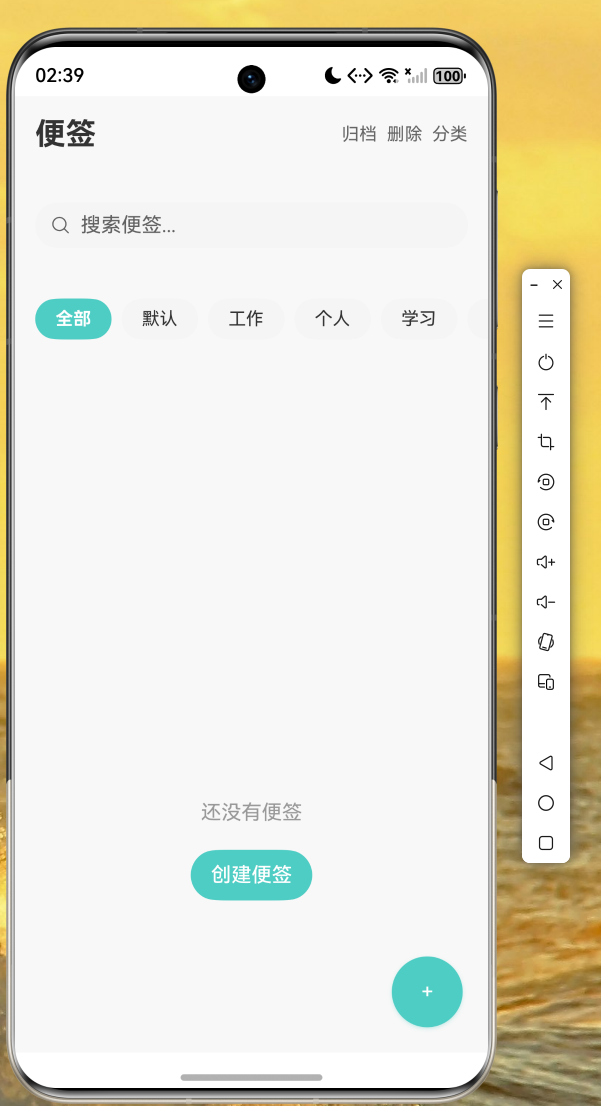
图2:便签编辑页面
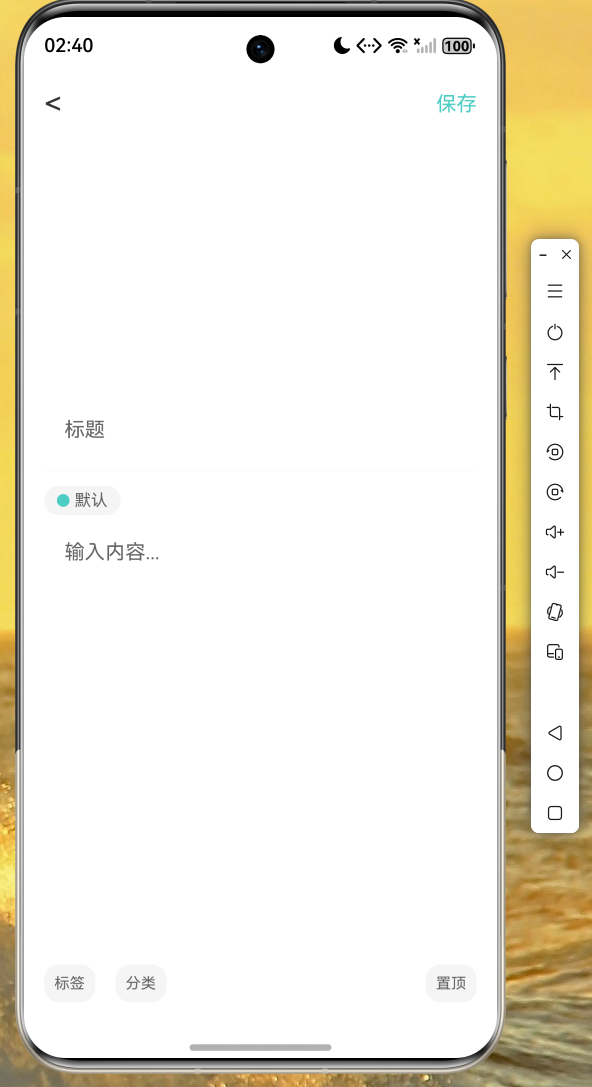
图3:分类管理页面
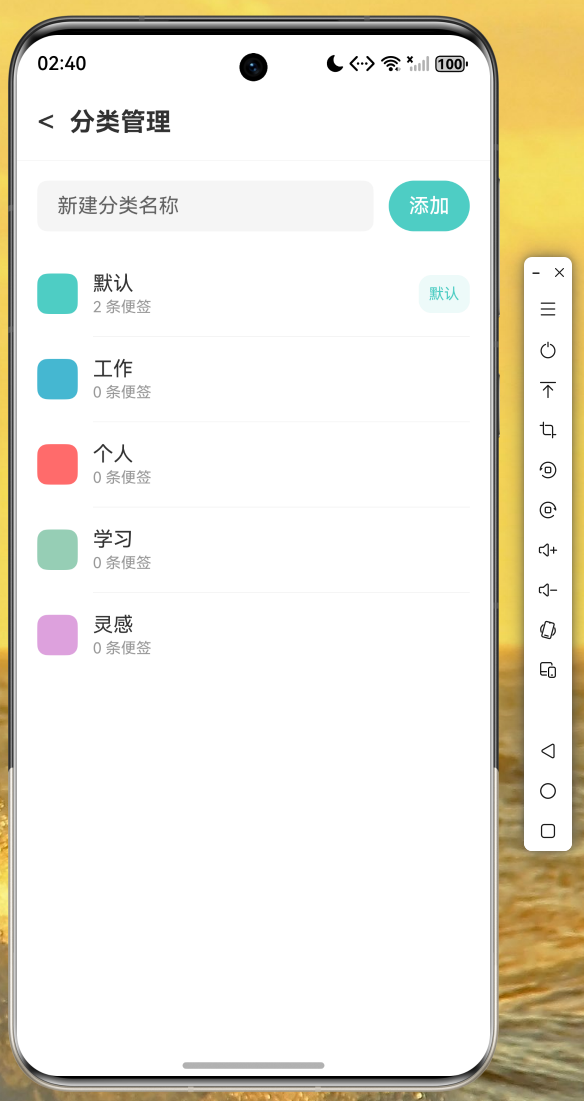
通过以上截图可以确认,应用在鸿蒙设备上运行流畅,UI 渲染正确,功能完整可用。
总结与展望
本文通过一个完整的便签备忘录应用,详细讲解了 Flutter for OpenHarmony 跨平台开发的核心技术要点。从数据模型设计到存储层实现,从视图模型架构到 UI 组件开发,读者可以系统地掌握 Flutter 跨平台应用开发的完整流程。
在实际开发过程中,我们发现 Flutter for OpenHarmony 对标准 Dart 语言和 Flutter 框架的支持已经相当完善,绝大多数在 Android 和 iOS 上可用的组件和第三方库都可以直接在鸿蒙设备上运行。这为开发者提供了极大的便利,也为 OpenHarmony 生态的繁荣发展奠定了坚实基础。
未来,我们可以进一步扩展本应用的功能,例如:添加云同步功能实现多设备数据同步;集成通知提醒功能提升用户粘性;支持便签图片附件丰富内容形式;增加数据备份与恢复功能保障数据安全等。期待读者在本文基础上进行创新实践,打造出更出色的跨平台应用。
参考资料
- Flutter 官方文档:https://docs.flutter.dev
- OpenHarmony 开发者文档:https://developer.harmonyos.com
- Flutter for OpenHarmony 适配指南