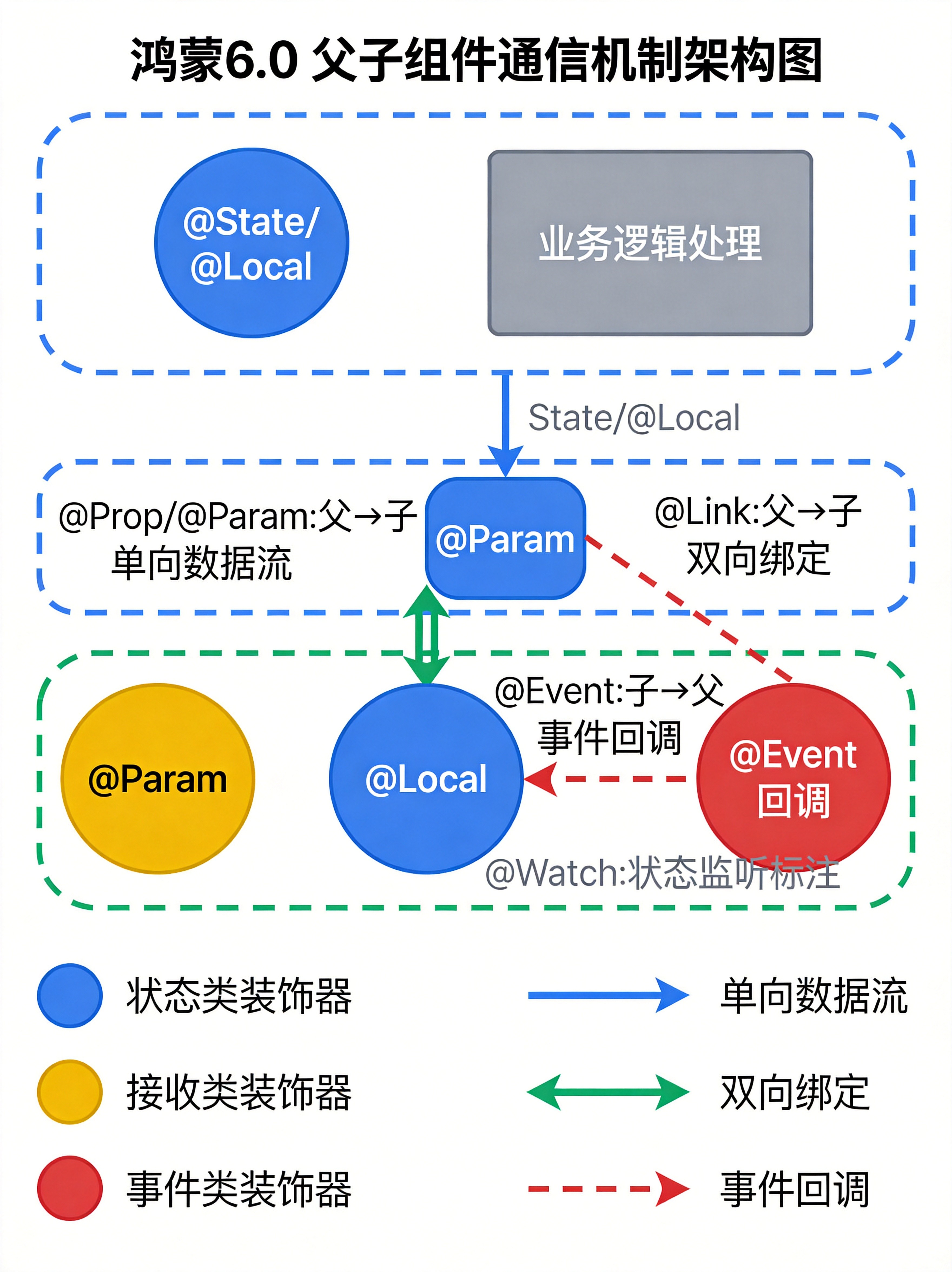
引言:为什么组件通信如此重要
在现代应用开发中,组件化架构已经成为构建可维护、可扩展应用的核心范式。HarmonyOS作为面向全场景的分布式操作系统,其应用开发框架ArkUI采用了声明式UI范式,而组件间的数据通信则是声明式开发中最核心、最具挑战性的问题之一。
良好的组件通信机制能够带来以下优势:
- 职责分离:父组件负责数据管理,子组件负责UI渲染和用户交互
- 数据流清晰:遵循单向数据流原则,使应用状态可预测、可追踪
- 复用性强:解耦的组件可以在不同场景中复用
- 维护成本低:修改一处逻辑不会影响其他组件
HarmonyOS 6.0(API Level 15)在状态管理方面引入了V2架构,提供了更加精细化的组件通信方案。本文将深入剖析鸿蒙6.0中的各种组件通信装饰器,从原理到实战,帮助开发者掌握父子组件通信的核心技能。
一、鸿蒙6.0组件通信体系概述
鸿蒙6.0的ArkUI框架提供了丰富的状态管理装饰器,它们共同构成了组件通信的基础设施。根据数据流向和用途,可以分为以下几类:
装饰器对比表格
| 装饰器 | 数据流向 | 适用版本 | 核心用途 | 特点 |
|---|---|---|---|---|
@State |
组件内部 | V1/V2 | 管理组件私有状态 | 基础状态管理 |
@Prop |
父→子 | V1 | 单向传递数据 | 值拷贝,单向流动 |
@Link |
父↔子 | V1 | 双向数据绑定 | 引用传递,同步更新 |
@Local |
组件内部 | V2 | 本地状态管理 | V2私有状态 |
@Param |
父→子 | V2 | 单向接收参数 | 替代@Prop,V2专用 |
@Event |
子→父 | V2 | 事件回调输出 | 鸿蒙6.0新特性 |
@Watch |
监听变化 | V2 | 状态变更监听 | 配合其他装饰器使用 |
@Observed |
类装饰器 | V1/V2 | 监听对象属性变化 | 配合@ObjectLink使用 |
@ObjectLink |
对象绑定 | V1/V2 | 嵌套对象同步 | 复杂对象深度监听 |
V1与V2架构的核心差异
typescript
// V1架构(传统方式)
@Component
struct TraditionalComponent {
  @State count: number = 0;      // 组件私有状态
  @Prop title: string = '';      // 单向接收
  @Link value: string;           // 双向绑定
}

// V2架构(鸿蒙6.0推荐)
@ComponentV2
struct ModernComponent {
  @Local count: number = 0;       // 本地私有状态
  @Param title: string = '';      // 单向接收(替代@Prop)
  @Event onUpdate: (val: number) => void;  // 事件输出(新特性)
}
V2架构相比V1有三大核心优势:
- 渲染优化:支持属性级精准刷新,减少70%冗余渲染
- 冻结机制 :新增
freezeWhenInactive特性,非活跃组件自动暂停状态监听 - 职责分离 :
@Param接收、@Local存储、@Event输出,职责更加清晰
二、@Prop - 单向数据传递(父→子)
原理分析
@Prop是ArkTS中最基础的单向数据流装饰器。当父组件将数据传递给子组件时,ArkTS会进行值拷贝而非引用传递。这意味着:
- 父组件修改数据会同步到子组件
- 子组件修改数据不会影响父组件
- 这种设计确保了数据流向的清晰性
使用场景
@Prop适用于以下场景:
- 父组件向子组件传递配置参数
- 子组件需要展示父组件的数据,但不需要修改
- 简单数据类型(number、string、boolean)的传递
代码示例
typescript
// 父组件
@Entry
@Component
struct ParentComponent {
  @State parentTitle: string = '原始标题';
  @State count: number = 0;

  build() {
    Column({ space: 20 }) {
      // 展示父组件状态
      Text(`父组件计数: ${this.count}`)
        .fontSize(20)
        .fontWeight(FontWeight.Bold)

      Button('父组件+1')
        .onClick(() => {
          this.count++;  // 父组件修改,子组件会同步更新
        })

      // 向子组件传递数据
      ChildComponent({
        title: this.parentTitle,
        count: this.count,
        onChildChange: (newTitle: string) => {
          // 子组件通过回调修改父组件数据
          this.parentTitle = newTitle;
        }
      })
    }
    .width('100%')
    .height('100%')
    .padding(20)
  }
}

// 子组件:使用@Prop接收父组件数据
@Component
struct ChildComponent {
  @Prop title: string = '';      // 单向接收,值拷贝
  @Prop count: number = 0;        // 单向接收

  // 回调函数用于通知父组件
  onChildChange: (newTitle: string) => void = () => {};

  build() {
    Column({ space: 15 }) {
      Text(`子组件收到的标题: ${this.title}`)
        .fontSize(16)

      Text(`子组件收到的计数: ${this.count}`)
        .fontSize(16)

      Button('子组件尝试修改(不会影响父组件)')
        .onClick(() => {
          // 注意:这里修改的是本地拷贝,不影响父组件
          this.count = 999;
          console.info(`子组件内部count已改为: ${this.count}`);
        })

      Button('子组件通过回调通知父组件')
        .onClick(() => {
          // 通过回调修改父组件的数据
          this.onChildChange('子组件修改后的标题');
        })
    }
    .padding(15)
    .border({ width: 1, color: Color.Gray })
  }
}
注意事项
@Prop装饰的变量不能有默认值冲突- 复杂对象使用
@Prop会有性能开销(深拷贝) - 如果需要子组件修改影响父组件,应使用
@Link或回调函数
三、@Link - 双向数据绑定(父↔子)
原理分析
@Link提供了真正的双向数据绑定机制。当父组件使用$符号向子组件传递状态时,传递的是引用而非拷贝:
- 父组件修改 → 子组件同步更新
- 子组件修改 → 父组件同步更新
- 两者指向同一数据源
使用场景
@Link适用于以下场景:
- 需要父子组件共享同一数据源
- 双向同步需求(如表单输入、表单复选框)
- 简单数据类型的双向绑定
代码示例
typescript
@Entry
@Component
struct LinkDemo {
  @State parentName: string = '张三';
  @State parentAge: number = 25;
  @State isAdult: boolean = true;

  build() {
    Column({ space: 20 }) {
      // 父组件展示区
      Column({ space: 10 }) {
        Text('父组件状态')
          .fontSize(18)
          .fontWeight(FontWeight.Bold)

        Text(`姓名: ${this.parentName}`)
        Text(`年龄: ${this.parentAge}`)
        Text(`是否成年: ${this.isAdult ? '是' : '否'}`)
      }
      .padding(15)
      .backgroundColor('#F0F0F0')
      .width('100%')

      Divider()

      // 使用@Link双向绑定
      ChildWithLink({
        childName: $parentName,    // $符号表示双向绑定
        childAge: $parentAge,
        childIsAdult: $isAdult
      })
    }
    .width('100%')
    .padding(20)
  }
}

// 子组件使用@Link接收
@Component
struct ChildWithLink {
  @Link childName: string;         // 双向绑定
  @Link childAge: number;
  @Link childIsAdult: boolean;

  build() {
    Column({ space: 15 }) {
      Text('子组件(使用@Link)')
        .fontSize(16)
        .fontWeight(FontWeight.Bold)

      // 子组件直接修改会影响父组件
      TextInput({ placeholder: '请输入姓名', text: this.childName })
        .onChange((value: string) => {
          this.childName = value;
          this.childIsAdult = this.childAge >= 18;
        })

      Counter({
        count: $childAge,
        onCounterChange: (newAge: number) => {
          this.childAge = newAge;
          this.childIsAdult = newAge >= 18;
        }
      })

      Toggle({ type: ToggleType.Switch, isOn: this.childIsAdult })
        .onChange((isOn: boolean) => {
          this.childIsAdult = isOn;
        })
    }
    .padding(15)
    .border({ width: 1, color: Color.Blue })
  }
}

// 自定义计数器组件
@Component
struct Counter {
  @Link count: number;
  onCounterChange: (newCount: number) => void = () => {};

  build() {
    Row({ space: 10 }) {
      Button('-')
        .onClick(() => {
          if (this.count > 0) {
            this.count--;
            this.onCounterChange(this.count);
          }
        })

      Text(`${this.count}`)
        .fontSize(20)
        .width(50)
        .textAlign(TextAlign.Center)

      Button('+')
        .onClick(() => {
          this.count++;
          this.onCounterChange(this.count);
        })
    }
  }
}
@Link vs @Prop 对比
| 特性 | @Prop | @Link |
|---|---|---|
| 数据传递方式 | 值拷贝 | 引用传递 |
| 子→父同步 | ❌ 不支持 | ✅ 支持 |
| 父→子同步 | ✅ 支持 | ✅ 支持 |
| 语法 | 普通传值 | $变量名 |
| 性能 | 深拷贝有开销 | 直接引用,高效 |
四、@Event + @Param - V2架构事件回调机制(重点)
核心概念
@Event是**鸿蒙6.0(API 12+)**引入的新特性,是V2架构中子组件向父组件传递事件的标准方式。在V2架构中:
@Param:标志组件的输入,接收父组件传递的数据@Event:标志组件的输出,向父组件发送事件/请求
这种设计完美遵循了单向数据流原则:数据的修改权始终在父组件,子组件通过触发事件来发起修改请求。
装饰器说明
typescript
/**
 * @Event 属性装饰器说明
 * ┌─────────────────────────────────────────────────────┐
 * │ 装饰器参数       │ 无                                │
 * ├─────────────────────────────────────────────────────┤
 * │ 允许装饰的类型   │ 回调方法                          │
 * │                  │ 如:()=>void, (x:number)=>void   │
 * ├─────────────────────────────────────────────────────┤
 * │ 允许传入函数类型 │ 箭头函数                          │
 * └─────────────────────────────────────────────────────┘
 */
核心原理
@Event的工作机制可以通过以下流程理解:
- 数据下行 :父组件使用
@Local管理状态,通过@Param传递给子组件 - 事件上行 :子组件调用
@Event装饰的回调函数,向父组件发送请求 - 状态同步 :父组件在回调中更新
@Local状态,V2系统自动同步到子组件
代码示例:基础用法
typescript
// 父组件
@Entry
@ComponentV2
struct ParentComponent {
  @Local title: string = '默认标题';
  @Local fontColor: Color = Color.Red;

  build() {
    Column({ space: 20 }) {
      Text('父组件')
        .fontSize(20)
        .fontWeight(FontWeight.Bold)

      // 展示当前状态
      Text(this.title)
        .fontColor(this.fontColor)
        .fontSize(24)

      Divider()

      // 使用@Param传递数据,@Event接收事件
      ChildComponent({
        title: this.title,
        fontColor: this.fontColor,
        // 定义事件处理函数
        onTitleChange: (newTitle: string) => {
          this.title = newTitle;
        },
        onColorChange: (newColor: Color) => {
          this.fontColor = newColor;
        }
      })
    }
    .width('100%')
    .padding(20)
  }
}

// 子组件:V2架构使用@Param + @Event
@ComponentV2
struct ChildComponent {
  // 输入:接收父组件传递的数据
  @Param title: string = '';
  @Param fontColor: Color = Color.Black;

  // 输出:定义事件回调
  @Event onTitleChange: (newTitle: string) => void = () => {};
  @Event onColorChange: (newColor: Color) => void = () => {};

  build() {
    Column({ space: 15 }) {
      Text('子组件(V2架构)')
        .fontSize(16)
        .fontWeight(FontWeight.Bold)

      Text(`收到的标题: ${this.title}`)

      // 触发事件,修改父组件状态
      Button('修改为"新标题"')
        .onClick(() => {
          this.onTitleChange('新标题');
        })

      Button('修改为"动态标题 - ' + Date.now() + '"')
        .onClick(() => {
          this.onTitleChange('动态标题 - ' + Date.now());
        })

      Row({ space: 10 }) {
        Button('红色')
          .backgroundColor(Color.Red)
          .onClick(() => this.onColorChange(Color.Red))

        Button('蓝色')
          .backgroundColor(Color.Blue)
          .onClick(() => this.onColorChange(Color.Blue))

        Button('绿色')
          .backgroundColor(Color.Green)
          .onClick(() => this.onColorChange(Color.Green))
      }
    }
    .padding(15)
    .border({ width: 2, color: Color.Gray })
  }
}
代码示例:异步同步特性
typescript
import { hilog } from '@kit.PerformanceAnalysisKit';

const TAG = '[EventAsyncDemo]';
const DOMAIN = 0xF811;

/**
 * 演示@Event的异步同步特性
 * 重要:@Event修改父组件值是立刻生效的,但从父组件同步回子组件是异步的
 */
@Entry
@ComponentV2
struct EventAsyncDemo {
  @Local counter: number = 0;

  build() {
    Column({ space: 20 }) {
      Text(`父组件计数器: ${this.counter}`)
        .fontSize(24)

      Button('父组件+1(同步)')
        .onClick(() => {
          this.counter++;
        })

      AsyncChild({ count: this.counter })
    }
    .width('100%')
    .padding(20)
  }
}

@ComponentV2
struct AsyncChild {
  @Param count: number = 0;

  // 定义带参数的事件回调
  @Event onCountChange: (newCount: number) => void = (val: number) => {};

  build() {
    Column({ space: 15 }) {
      Text(`子组件接收到的值: ${this.count}`)
        .fontSize(20)

      Button('子组件触发+10')
        .onClick(() => {
          // 触发事件,传入新值
          this.onCountChange(this.count + 10);

          // 打印日志验证异步同步特性
          hilog.info(DOMAIN, TAG, `调用后子组件值: ${this.count}`);
        })

      Text('提示:点击按钮后,父组件值立即更新,但子组件值稍后异步同步')
        .fontSize(12)
        .fontColor(Color.Gray)
    }
    .padding(15)
    .border({ width: 1, color: Color.Gray })
  }
}
@Event的高级用法:多参数回调
typescript
@Entry
@ComponentV2
struct AdvancedEventDemo {
  @Local userInfo: UserInfo = new UserInfo('张三', 25, '北京');

  build() {
    Column({ space: 20 }) {
      Text('用户信息管理')
        .fontSize(20)
        .fontWeight(FontWeight.Bold)

      // 展示当前用户信息
      Column({ space: 10 }) {
        Text(`姓名: ${this.userInfo.name}`)
        Text(`年龄: ${this.userInfo.age}`)
        Text(`地址: ${this.userInfo.address}`)
      }
      .padding(15)
      .backgroundColor('#F5F5F5')
      .width('100%')

      // 使用复合事件处理器
      ComplexEventChild({
        user: this.userInfo,
        // 定义复合事件回调,同时处理多个字段更新
        onUserUpdate: (field: string, value: string | number) => {
          if (field === 'name') {
            this.userInfo.name = value as string;
          } else if (field === 'age') {
            this.userInfo.age = value as number;
          } else if (field === 'address') {
            this.userInfo.address = value as string;
          }
        }
      })
    }
    .width('100%')
    .padding(20)
  }
}

// 用户信息类
@ObservedV2
class UserInfo {
  @Trace name: string;
  @Trace age: number;
  @Trace address: string;

  constructor(name: string, age: number, address: string) {
    this.name = name;
    this.age = age;
    this.address = address;
  }
}

@ComponentV2
struct ComplexEventChild {
  @Param user: UserInfo;

  // 多参数事件回调
  @Event onUserUpdate: (field: string, value: string | number) => void =
    (field: string, value: string | number) => {};

  build() {
    Column({ space: 15 }) {
      Text('子组件(复杂事件)')
        .fontSize(16)
        .fontWeight(FontWeight.Bold)

      TextInput({ placeholder: '修改姓名', text: this.user.name })
        .onChange((value: string) => {
          this.onUserUpdate('name', value);
        })

      TextInput({ placeholder: '修改年龄', text: this.user.age.toString() })
        .type(InputType.Number)
        .onChange((value: string) => {
          const age = parseInt(value);
          if (!isNaN(age)) {
            this.onUserUpdate('age', age);
          }
        })

      TextInput({ placeholder: '修改地址', text: this.user.address })
        .onChange((value: string) => {
          this.onUserUpdate('address', value);
        })
    }
    .padding(15)
    .border({ width: 1, color: Color.Blue })
  }
}
五、@Watch - 状态变更监听器
原理分析
@Watch装饰器用于监听状态变量的变化,当被监听的值发生改变时,会触发指定的回调函数。回调函数接收两个参数:newValue(新值)和oldValue(旧值)。
使用场景
- 监听状态变化执行副作用操作
- 数据验证和格式化
- 联动其他状态的更新
- 日志记录和调试
代码示例
typescript
@Entry
@ComponentV2
struct WatchDemo {
  @Local @Watch('onCountChange') count: number = 0;
  @Local @Watch('onNameChange') userName: string = 'Guest';
  @Local @Watch('onFormChange') formData: FormData = new FormData();
  @Local logMessages: string[] = [];

  // 监听count变化
  onCountChange(newVal: number, oldVal: number): void {
    this.logMessages.unshift(`count: ${oldVal} → ${newVal}`);

    // 限制最大值
    if (newVal > 100) {
      this.count = 100;
    }

    // 保持数组长度
    if (this.logMessages.length > 5) {
      this.logMessages.pop();
    }
  }

  // 监听userName变化
  onNameChange(newVal: string, oldVal: string): void {
    this.logMessages.unshift(`name: "${oldVal}" → "${newVal}"`);

    // 自动格式化:首字母大写
    if (newVal.length > 0) {
      this.userName = newVal.charAt(0).toUpperCase() + newVal.slice(1);
    }

    if (this.logMessages.length > 5) {
      this.logMessages.pop();
    }
  }

  // 监听对象变化
  onFormChange(newVal: FormData, oldVal: FormData): void {
    this.logMessages.unshift(`form updated: email=${newVal.email}`);
    if (this.logMessages.length > 5) {
      this.logMessages.pop();
    }
  }

  build() {
    Column({ space: 20 }) {
      Text('@Watch 状态监听演示')
        .fontSize(20)
        .fontWeight(FontWeight.Bold)

      // 计数器示例
      Row({ space: 15 }) {
        Button('-减')
          .onClick(() => this.count--)

        Text(`计数: ${this.count}`)
          .fontSize(20)
          .width(100)
          .textAlign(TextAlign.Center)

        Button('+加')
          .onClick(() => this.count++)
      }

      // 输入框示例
      TextInput({ placeholder: '输入用户名', text: this.userName })
        .onChange((value: string) => {
          this.userName = value;
        })

      // 表单示例
      FormWatcher({ formData: $formData })

      // 变化日志
      Column({ space: 5 }) {
        Text('变化日志:')
          .fontSize(14)
          .fontWeight(FontWeight.Bold)

        ForEach(this.logMessages, (log: string) => {
          Text(log)
            .fontSize(12)
            .fontColor(Color.Gray)
        })
      }
      .padding(10)
      .backgroundColor('#FAFAFA')
      .width('100%')
    }
    .width('100%')
    .padding(20)
  }
}

// 表单数据类
@ObservedV2
class FormData {
  @Trace email: string = '';
  @Trace phone: string = '';

  constructor(email: string = '', phone: string = '') {
    this.email = email;
    this.phone = phone;
  }
}

@ComponentV2
struct FormWatcher {
  @Param formData: FormData;

  build() {
    Column({ space: 10 }) {
      Text('表单监听')
        .fontSize(14)

      TextInput({ placeholder: '邮箱', text: this.formData.email })
        .onChange((value: string) => {
          this.formData.email = value;
        })

      TextInput({ placeholder: '电话', text: this.formData.phone })
        .type(InputType.PhoneNumber)
        .onChange((value: string) => {
          this.formData.phone = value;
        })
    }
    .padding(10)
    .border({ width: 1, color: Color.Gray })
  }
}
@Watch与@Watch的组合使用
typescript
@Entry
@ComponentV2
struct WatchCombinationDemo {
  @Local @Watch('onPriceChange') price: number = 100;
  @Local @Watch('onQuantityChange') quantity: number = 1;
  @Local total: number = 100;

  // 价格变化时重新计算总价
  onPriceChange(newVal: number, oldVal: number): void {
    this.total = newVal * this.quantity;
    console.info(`价格变化: ${oldVal} → ${newVal}, 总价: ${this.total}`);
  }

  // 数量变化时重新计算总价
  onQuantityChange(newVal: number, oldVal: number): void {
    this.total = this.price * newVal;
    console.info(`数量变化: ${oldVal} → ${newVal}, 总价: ${this.total}`);
  }

  build() {
    Column({ space: 20 }) {
      Text('购物车计算器')
        .fontSize(20)
        .fontWeight(FontWeight.Bold)

      Row({ space: 15 }) {
        Text('单价: ¥')
        TextInput({ text: this.price.toString() })
          .type(InputType.Number)
          .width(100)
          .onChange((value: string) => {
            const num = parseFloat(value);
            if (!isNaN(num) && num >= 0) {
              this.price = num;
            }
          })
      }

      Row({ space: 15 }) {
        Text('数量: ')
        Stepper({ minValue: 1, maxValue: 99 })
          .onValueChange((value: number) => {
            this.quantity = value;
          })
      }

      Text(`总价: ¥${this.total.toFixed(2)}`)
        .fontSize(24)
        .fontWeight(FontWeight.Bold)
        .fontColor(Color.Red)
    }
    .width('100%')
    .padding(20)
  }
}
六、@Observed + @ObjectLink - 复杂对象同步
原理分析
当组件间需要传递复杂对象(嵌套对象或数组)时,@Prop和@Link无法监听对象内部属性的变化。这时需要使用@Observed和@ObjectLink组合:
@Observed:装饰类,使类属性变化可被监听@ObjectLink:在子组件中引用被@Observed装饰的类的实例
使用场景
- 传递嵌套对象(如用户信息包含地址对象)
- 列表数据中每个元素是复杂对象
- 需要深度监听对象属性变化的场景
代码示例
typescript
// 定义被@Observed装饰的类
@Observed
class UserProfile {
  name: string;
  age: number;
  address: Address;

  constructor(name: string, age: number, address: Address) {
    this.name = name;
    this.age = age;
    this.address = address;
  }
}

@Observed
class Address {
  city: string;
  district: string;
  street: string;

  constructor(city: string, district: string, street: string) {
    this.city = city;
    this.district = district;
    this.street = street;
  }
}

@Entry
@ComponentV2
struct ObservedDemo {
  @Local user: UserProfile = new UserProfile(
    '张三',
    28,
    new Address('北京', '朝阳区', '建国路88号')
  );

  build() {
    Column({ space: 20 }) {
      Text('@Observed + @ObjectLink 演示')
        .fontSize(20)
        .fontWeight(FontWeight.Bold)

      // 直接展示
      Column({ space: 10 }) {
        Text(`姓名: ${this.user.name}`)
        Text(`年龄: ${this.user.age}`)
        Text(`城市: ${this.user.address.city}`)
        Text(`区县: ${this.user.address.district}`)
        Text(`街道: ${this.user.address.street}`)
      }
      .padding(15)
      .backgroundColor('#F5F5F5')
      .width('100%')

      // 嵌套对象子组件
      ProfileEditor({ profile: this.user }))

      // 修改整体对象
      Button('重置用户')
        .onClick(() => {
          this.user = new UserProfile(
            '新用户',
            18,
            new Address('上海', '浦东新区', '世纪大道100号')
          );
        })
    }
    .width('100%')
    .padding(20)
  }
}

// 使用@ObjectLink接收复杂对象
@ComponentV2
struct ProfileEditor {
  @ObjectLink profile: UserProfile;

  build() {
    Column({ space: 15 }) {
      Text('编辑用户信息')
        .fontSize(16)
        .fontWeight(FontWeight.Bold)

      // 编辑基本属性
      TextInput({ placeholder: '姓名', text: this.profile.name })
        .onChange((value: string) => {
          this.profile.name = value;
        })

      TextInput({ placeholder: '年龄', text: this.profile.age.toString() })
        .type(InputType.Number)
        .onChange((value: string) => {
          const age = parseInt(value);
          if (!isNaN(age)) {
            this.profile.age = age;
          }
        })

      Divider()

      Text('编辑地址')
        .fontSize(14)
        .fontWeight(FontWeight.Medium)

      // 编辑嵌套对象属性 - 地址
      TextInput({ placeholder: '城市', text: this.profile.address.city })
        .onChange((value: string) => {
          this.profile.address.city = value;
        })

      TextInput({ placeholder: '区县', text: this.profile.address.district })
        .onChange((value: string) => {
          this.profile.address.district = value;
        })

      TextInput({ placeholder: '街道', text: this.profile.address.street })
        .onChange((value: string) => {
          this.profile.address.street = value;
        })
    }
    .padding(15)
    .border({ width: 2, color: Color.Blue })
  }
}
数组场景使用
typescript
@Observed
class TaskItem {
  id: number;
  title: string;
  completed: boolean;

  constructor(id: number, title: string, completed: boolean = false) {
    this.id = id;
    this.title = title;
    this.completed = completed;
  }
}

@Entry
@ComponentV2
struct ArrayObservedDemo {
  @Local @Trace taskList: TaskItem[] = [
    new TaskItem(1, '完成文档', false),
    new TaskItem(2, '代码审查', false),
    new TaskItem(3, '发布版本', false)
  ];

  build() {
    Column({ space: 20 }) {
      Text('任务列表(@Observed数组)')
        .fontSize(20)
        .fontWeight(FontWeight.Bold)

      // 渲染任务列表
      ForEach(this.taskList, (task: TaskItem, index: number) => {
        TaskItemCard({
          task: this.taskList[index]
        })
      }, (task: TaskItem) => task.id.toString())

      Button('添加新任务')
        .onClick(() => {
          const newId = this.taskList.length + 1;
          this.taskList.push(new TaskItem(newId, `任务${newId}`, false));
        })
    }
    .width('100%')
    .padding(20)
  }
}

@ComponentV2
struct TaskItemCard {
  @ObjectLink task: TaskItem;

  build() {
    Row({ space: 15 }) {
      Checkbox()
        .select(this.task.completed)
        .onChange((isChecked: boolean) => {
          this.task.completed = isChecked;
        })

      Text(this.task.title)
        .fontSize(16)
        .fontDecoration(this.task.completed ? {
          type: TextDecorationType.LineThrough,
          color: Color.Gray
        } : { type: TextDecorationType.None })
        .fontColor(this.task.completed ? Color.Gray : Color.Black)
    }
    .width('100%')
    .padding(12)
    .backgroundColor(this.task.completed ? '#F0F0F0' : '#FFFFFF')
    .borderRadius(8)
  }
}
七、实战案例:完整的用户表单组件
下面我们综合运用所有装饰器,实现一个完整的用户注册表单组件:
typescript
/**
 * 综合实战:用户注册表单
 * 展示所有装饰器的综合运用
 */

// ==================== 数据模型 ====================

// 用户信息模型
@ObservedV2
class UserModel {
  @Trace username: string = '';
  @Trace email: string = '';
  @Trace phone: string = '';
  @Trace age: number = 0;
  @Trace address: AddressModel = new AddressModel();

  constructor() {}
}

@ObservedV2
class AddressModel {
  @Trace province: string = '';
  @Trace city: string = '';
  @Trace district: string = '';
  @Trace detail: string = '';

  constructor() {}
}

// 表单验证状态
@ObservedV2
class FormValidation {
  @Trace usernameValid: boolean = false;
  @Trace emailValid: boolean = false;
  @Trace phoneValid: boolean = false;
  @Trace ageValid: boolean = false;
  @Trace addressValid: boolean = false;

  get isAllValid(): boolean {
    return this.usernameValid && this.emailValid &&
           this.phoneValid && this.ageValid && this.addressValid;
  }
}

// ==================== 主页面 ====================

@Entry
@ComponentV2
struct UserRegistrationPage {
  @Local userModel: UserModel = new UserModel();
  @Local validation: FormValidation = new FormValidation();
  @Local @Watch('onSubmitEnabledChange') submitEnabled: boolean = false;

  // 监听提交按钮状态
  onSubmitEnabledChange(): void {
    console.info('提交按钮状态变化');
  }

  build() {
    Column({ space: 20 }) {
      // 页面标题
      Text('用户注册表单')
        .fontSize(28)
        .fontWeight(FontWeight.Bold)
        .textAlign(TextAlign.Center)
        .width('100%')

      Scroll() {
        Column({ space: 25 }) {
          // 用户名输入
          UsernameInput({
            username: this.userModel.username,
            onUsernameChange: (value: string) => {
              this.userModel.username = value;
              this.validation.usernameValid = value.length >= 3;
            }
          })

          // 邮箱输入
          EmailInput({
            email: this.userModel.email,
            onEmailChange: (value: string) => {
              this.userModel.email = value;
              this.validation.emailValid = this.isValidEmail(value);
            }
          })

          // 电话输入
          PhoneInput({
            phone: this.userModel.phone,
            onPhoneChange: (value: string) => {
              this.userModel.phone = value;
              this.validation.phoneValid = /^1[3-9]\d{9}$/.test(value);
            }
          })

          // 年龄输入
          AgeInput({
            age: this.userModel.age,
            onAgeChange: (value: number) => {
              this.userModel.age = value;
              this.validation.ageValid = value >= 18 && value <= 120;
            }
          })

          // 地址输入
          AddressInput({
            address: this.userModel.address,
            onAddressChange: (field: string, value: string) => {
              if (field === 'province') this.userModel.address.province = value;
              if (field === 'city') this.userModel.address.city = value;
              if (field === 'district') this.userModel.address.district = value;
              if (field === 'detail') this.userModel.address.detail = value;
              this.validation.addressValid =
                this.userModel.address.province.length > 0 &&
                this.userModel.address.city.length > 0;
            }
          })

          // 表单验证状态展示
          ValidationStatus({ validation: this.validation })

          // 提交按钮
          Button('提交注册')
            .width('100%')
            .height(50)
            .fontSize(18)
            .enabled(this.validation.isAllValid)
            .backgroundColor(this.validation.isAllValid ? Color.Blue : Color.Gray)
            .onClick(() => {
              this.submitForm();
            })

          // 重置按钮
          Button('重置表单')
            .width('100%')
            .height(45)
            .fontColor(Color.Red)
            .backgroundColor(Color.Transparent)
            .onClick(() => {
              this.resetForm();
            })
        }
        .padding(20)
      }
      .scrollBarWidth(10)
    }
    .width('100%')
    .height('100%')
    .backgroundColor('#FAFAFA')
  }

  // 邮箱验证
  isValidEmail(email: string): boolean {
    const emailRegex = /^[a-zA-Z0-9._%+-]+@[a-zA-Z0-9.-]+\.[a-zA-Z]{2,}$/;
    return emailRegex.test(email);
  }

  // 提交表单
  submitForm(): void {
    console.info('提交表单数据:');
    console.info(`用户名: ${this.userModel.username}`);
    console.info(`邮箱: ${this.userModel.email}`);
    console.info(`电话: ${this.userModel.phone}`);
    console.info(`年龄: ${this.userModel.age}`);
    console.info(`地址: ${this.userModel.address.province} ${this.userModel.address.city} ${this.userModel.address.district} ${this.userModel.address.detail}`);
  }

  // 重置表单
  resetForm(): void {
    this.userModel = new UserModel();
    this.validation = new FormValidation();
  }
}

// ==================== 子组件定义 ====================

@ComponentV2
struct UsernameInput {
  @Param username: string = '';
  @Event onUsernameChange: (value: string) => void = () => {};

  build() {
    Column({ space: 8 }) {
      Text('用户名')
        .fontSize(14)
        .fontColor(Color.Gray)
        .alignSelf(ItemAlign.Start)

      TextInput({
        placeholder: '请输入用户名(至少3个字符)',
        text: this.username
      })
        .onChange((value: string) => {
          this.onUsernameChange(value);
        })

      Text(this.username.length > 0 && this.username.length < 3 ? '用户名太短' : '')
        .fontSize(12)
        .fontColor(Color.Red)
        .alignSelf(ItemAlign.Start)
    }
    .padding(15)
    .backgroundColor(Color.White)
    .borderRadius(10)
  }
}

@ComponentV2
struct EmailInput {
  @Param email: string = '';
  @Event onEmailChange: (value: string) => void = () => {};

  build() {
    Column({ space: 8 }) {
      Text('邮箱')
        .fontSize(14)
        .fontColor(Color.Gray)
        .alignSelf(ItemAlign.Start)

      TextInput({
        placeholder: '请输入邮箱地址',
        text: this.email
      })
        .type(InputType.Email)
        .onChange((value: string) => {
          this.onEmailChange(value);
        })
    }
    .padding(15)
    .backgroundColor(Color.White)
    .borderRadius(10)
  }
}

@ComponentV2
struct PhoneInput {
  @Param phone: string = '';
  @Event onPhoneChange: (value: string) => void = () => {};

  build() {
    Column({ space: 8 }) {
      Text('手机号')
        .fontSize(14)
        .fontColor(Color.Gray)
        .alignSelf(ItemAlign.Start)

      TextInput({
        placeholder: '请输入11位手机号',
        text: this.phone
      })
        .type(InputType.PhoneNumber)
        .onChange((value: string) => {
          this.onPhoneChange(value);
        })
    }
    .padding(15)
    .backgroundColor(Color.White)
    .borderRadius(10)
  }
}

@ComponentV2
struct AgeInput {
  @Param age: number = 0;
  @Event onAgeChange: (value: number) => void = () => {};

  build() {
    Column({ space: 8 }) {
      Text('年龄')
        .fontSize(14)
        .fontColor(Color.Gray)
        .alignSelf(ItemAlign.Start)

      Row({ space: 15 }) {
        Text('18岁 - 120岁')
          .fontSize(12)
          .fontColor(Color.Gray)

        Stepper({ minValue: 1, maxValue: 120 })
          .onValueChange((value: number) => {
            this.onAgeChange(value);
          })
      }
      .width('100%')
    }
    .padding(15)
    .backgroundColor(Color.White)
    .borderRadius(10)
  }
}

@ComponentV2
struct AddressInput {
  @Param address: AddressModel;
  @Event onAddressChange: (field: string, value: string) => void = () => {};

  build() {
    Column({ space: 15 }) {
      Text('收货地址')
        .fontSize(14)
        .fontColor(Color.Gray)
        .alignSelf(ItemAlign.Start)

      Row({ space: 10 }) {
        TextInput({ placeholder: '省', text: this.address.province })
          .layoutWeight(1)
          .onChange((value: string) => this.onAddressChange('province', value))

        TextInput({ placeholder: '市', text: this.address.city })
          .layoutWeight(1)
          .onChange((value: string) => this.onAddressChange('city', value))

        TextInput({ placeholder: '区', text: this.address.district })
          .layoutWeight(1)
          .onChange((value: string) => this.onAddressChange('district', value))
      }

      TextInput({ placeholder: '详细地址', text: this.address.detail })
        .onChange((value: string) => this.onAddressChange('detail', value))
    }
    .padding(15)
    .backgroundColor(Color.White)
    .borderRadius(10)
  }
}

@ComponentV2
struct ValidationStatus {
  @Param validation: FormValidation;

  build() {
    Column({ space: 5 }) {
      Text('表单验证状态')
        .fontSize(14)
        .fontWeight(FontWeight.Bold)

      Row({ space: 10 }) {
        StatusBadge({ label: '用户名', valid: this.validation.usernameValid })
        StatusBadge({ label: '邮箱', valid: this.validation.emailValid })
        StatusBadge({ label: '电话', valid: this.validation.phoneValid })
        StatusBadge({ label: '年龄', valid: this.validation.ageValid })
        StatusBadge({ label: '地址', valid: this.validation.addressValid })
      }
      .width('100%')
    }
    .padding(15)
    .backgroundColor(Color.White)
    .borderRadius(10)
  }
}

@ComponentV2
struct StatusBadge {
  @Param label: string = '';
  @Param valid: boolean = false;

  build() {
    Column({ space: 4 }) {
      Text(this.valid ? '✓' : '✗')
        .fontSize(16)
        .fontColor(this.valid ? Color.Green : Color.Red)

      Text(this.label)
        .fontSize(10)
        .fontColor(Color.Gray)
    }
    .padding(8)
    .backgroundColor(this.valid ? '#E8F5E9' : '#FFEBEE')
    .borderRadius(8)
  }
}
八、最佳实践与常见问题解决方案
最佳实践
1. 选择合适的装饰器组合
| 场景 | 推荐方案 | 原因 |
|---|---|---|
| 简单数据传递 | @Param |
单向数据流,职责清晰 |
| 双向绑定 | @Link |
简单直接,同步高效 |
| 事件驱动更新 | @Param + @Event |
遵循单向数据流原则 |
| 复杂对象 | @Observed + @ObjectLink |
支持深度监听 |
| 状态变化监听 | @Watch |
执行副作用操作 |
2. V2架构迁移建议
typescript
// ❌ 不推荐:V1与V2混用
@Component
struct MixedComponent {
  @State count: number = 0;      // V1
  @Local localData: string = '';  // V2 - 不应混用
}

// ✅ 推荐:明确选择V1或V2
// 方案1:使用V1架构
@Component
struct V1Component {
  @State count: number = 0;
  @Prop title: string = '';
  @Link value: string;
}

// 方案2:使用V2架构(鸿蒙6.0推荐)
@ComponentV2
struct V2Component {
  @Local count: number = 0;
  @Param title: string = '';
  @Event onUpdate: (val: number) => void = () => {};
}
3. 性能优化技巧
typescript
// ❌ 避免:频繁创建新对象
build() {
  Column() {
    Child({ data: { name: 'test', value: this.count } }) // 每次build都创建新对象
  }
}

// ✅ 推荐:使用@State管理对象
@State dataModel: DataModel = new DataModel();

build() {
  Column() {
    Child({ data: this.dataModel }) // 使用稳定引用
  }
}
常见问题解决方案
问题1:子组件修改数据后父组件没有更新
原因 :@Prop是值拷贝,子组件修改不会影响父组件。
解决方案 :使用@Link或通过回调函数/事件机制修改父组件数据。
typescript
// ❌ 错误:@Prop无法修改父组件
@Component
struct BadChild {
  @Prop value: number = 0;

  onClick() {
    this.value = 100; // 不会影响父组件
  }
}

// ✅ 正确:使用回调
@Component
struct GoodChild {
  @Prop value: number = 0;
  onChange: (newVal: number) => void = () => {};

  onClick() {
    this.onChange(100); // 通过回调修改父组件
  }
}
问题2:@Event回调未触发
原因:回调函数未正确初始化或参数类型不匹配。
解决方案:
typescript
// ✅ 确保回调函数类型匹配
@Event onUpdate: (value: number) => void = () => {};

// 父组件传入
Child({
  onUpdate: (val: number) => { // 参数类型必须一致
    this.count = val;
  }
})
问题3:@ObjectLink监听不到嵌套属性变化
原因 :嵌套对象的类也需要使用@Observed装饰。
解决方案:
typescript
// ❌ 错误:内层对象未装饰
@Observed
class Outer {
  inner: Inner; // 无法监听Inner属性变化
}

class Inner { // 缺少@Observed
  value: string = '';
}

// ✅ 正确:所有层级的类都需要装饰
@Observed
class Outer {
  inner: Inner;
}

@Observed
class Inner {
  @Trace value: string = '';
}
问题4:@Watch回调中修改状态导致死循环
解决方案:使用条件判断或标志位避免递归。
typescript
@Local @Watch('onValueChange') value: number = 0;
isUpdating: boolean = false;

onValueChange(newVal: number, oldVal: number): void {
  if (!this.isUpdating) {
    this.isUpdating = true;
    // 执行更新逻辑
    this.isUpdating = false;
  }
}
总结
本文深入解析了鸿蒙6.0 ArkUI框架中的父子组件通信机制,涵盖以下核心内容:
装饰器对比总览
| 装饰器 | 角色 | 数据流向 | 版本 | 适用场景 |
|---|---|---|---|---|
@State |
状态容器 | 组件内部 | V1/V2 | 组件私有状态 |
@Prop |
输入 | 父→子 | V1 | 简单数据单向传递 |
@Link |
双向绑定 | 父↔子 | V1 | 需要双向同步 |
@Local |
本地状态 | 组件内部 | V2 | V2私有状态 |
@Param |
输入 | 父→子 | V2 | V2单向接收 |
@Event |
输出 | 子→父 | V2 | 事件回调(新特性) |
@Watch |
监听器 | 监听变化 | V1/V2 | 状态变化监听 |
@Observed |
对象装饰 | 类级别 | V1/V2 | 复杂对象监听 |
@ObjectLink |
对象引用 | 绑定引用 | V1/V2 | 嵌套对象同步 |
关键要点
- 单向数据流是核心原则:数据修改权在父组件,子组件通过事件请求修改
- @Event是鸿蒙6.0的重要新特性:配合@Param实现规范的事件驱动架构
- 选择合适的装饰器组合:根据数据流向和复杂度选择最优方案
- V2架构是未来趋势:新项目推荐使用V2架构,享受性能优化