opencode 上下文压缩(Compaction)机制
概述
Compaction 是 opencode 压缩对话历史的机制,解决长对话超出模型 context window 的问题。
核心思路:把历史消息总结为结构化摘要,只保留最近几轮原始消息,后续请求用"摘要 + 最近消息"替代完整历史。
触发条件

1. 手动触发
用户在 TUI 中执行 /compact 命令(或 ctrl+x c)。
流程:
scss
/compact
→ compaction.create(auto: false)
→ 在会话中插入一条 user 消息(含 CompactionPart)
→ runLoop 检测到任务队列有 compaction 任务
→ 执行 processCompaction()
2. 自动触发(token 超限)
每次 LLM 返回 assistant 消息后,runLoop 立即检查:
php
// packages/opencode/src/session/prompt.ts:1353
if (
  lastFinished &&
  lastFinished.summary !== true &&           // 上一条不是压缩摘要
  (yield* compaction.isOverflow({ tokens: lastFinished.tokens, model }))
) {
  yield* compaction.create({ sessionID, agent, model, auto: true })
  continue  // 下一轮循环执行压缩
}
isOverflow() 判断逻辑 (packages/opencode/src/session/overflow.ts):
ini
usable = model.limit.input - reserved
reserved = min(20000, maxOutputTokens)  // 或 config.compaction.reserved

count = tokens.total
     || tokens.input + tokens.output + tokens.cache.read + tokens.cache.write

overflow = (count >= usable)- 若
config.compaction.auto === false:永远不自动触发 - 若模型无 context 限制(
limit.context === 0):永远不触发 - 默认预留 buffer =
min(20000, maxOutputTokens)token 给下一次输出
3. LLM 请求本身超限(overflow 模式)
LLM API 返回 context overflow 错误时,也会触发压缩(overflow: true):
arduino
// packages/opencode/src/session/prompt.ts:1484
if (result === "compact") {
  yield* compaction.create({ sessionID, agent, model, auto: true, overflow: true })
}
overflow: true 时的特殊处理:
- 从 compaction 触发点往前找上一条真实 user 消息(非 compaction 消息)作为
replay - 截断消息列表,剥离该 user 消息后重新压缩
- 媒体附件(图片等)被替换为文本占位符
[Attached image/png: filename]
压缩执行流程(processCompaction())
源码位置: packages/opencode/src/session/compaction.ts:343
sql
输入:当前所有消息列表 + parentID(compaction 请求的 user 消息 ID)

1. 找到历史上已完成的压缩记录(prior)
   → 排除掉 prior 中的 user/assistant 消息对(hidden)
   → 取最后一次压缩的摘要文本作为 previousSummary

2. select():将剩余消息分为 head(待压缩)和 tail(保留原文)
   → 见下方"消息分割"说明

3. 触发插件钩子 experimental.session.compacting
   → 插件可注入 context 或完全替换 prompt

4. 将 head 消息转为 modelMessages
   → stripMedia: true(去掉图片等媒体)
   → toolOutputMaxChars: 2000(工具输出截断到 2000 字符)

5. 构建最终 user 消息(buildPrompt)
   → 见 agents.md 中 compaction agent 说明

6. 以 system: [] 调用 compaction agent
   → tools: {}(无工具)
   → messages = [...modelMessages(head), user(buildPrompt)]

7. 保存生成的摘要为 assistant 消息(summary: true, agent: "compaction")
消息分割:head 与 tail
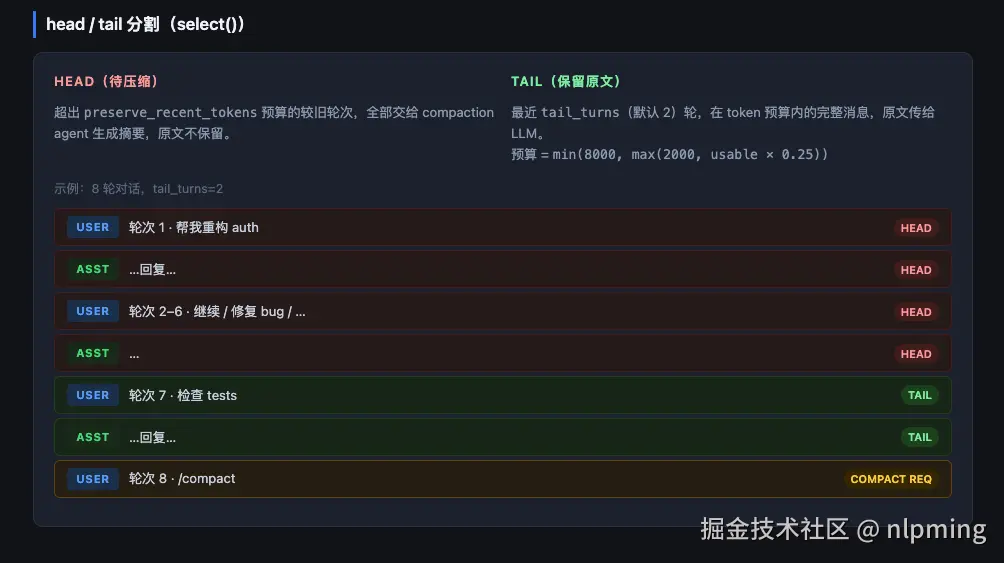
源码位置: packages/opencode/src/session/compaction.ts:244(select() 函数)
lua
tail_turns(默认 2):保留最近 N 轮完整对话原文
preserve_recent_tokens:tail 的 token 预算
  默认 = min(8000, max(2000, usable * 0.25))
  可通过 config.compaction.preserve_recent_tokens 配置
分割逻辑:
markdown
1. 从最近的轮次开始,向前累加 token 估算
2. 能装入 preserve_recent_tokens 预算的轮次 → 进入 tail(保留原文)
3. 超出预算时,尝试 splitTurn():切分该轮内部的消息(只保留后半部分)
4. 其余 → 进入 head(待压缩)

tail_start_id:tail 开始处的第一条消息 ID,存入 CompactionPart
示例(tail_turns=2,对话 8 轮):
bash
[轮次1] user: 帮我重构 auth      ← head(被压缩)
[轮次2] user: 继续               ← head
[轮次3] user: 修复 bug           ← head
...
[轮次6] user: 上一步             ← head
[轮次7] user: 检查 tests         ← tail(保留原文,在 token 预算内)
[轮次8] user: /compact           ← compaction 请求本身(不进入 head 或 tail)
压缩后消息结构
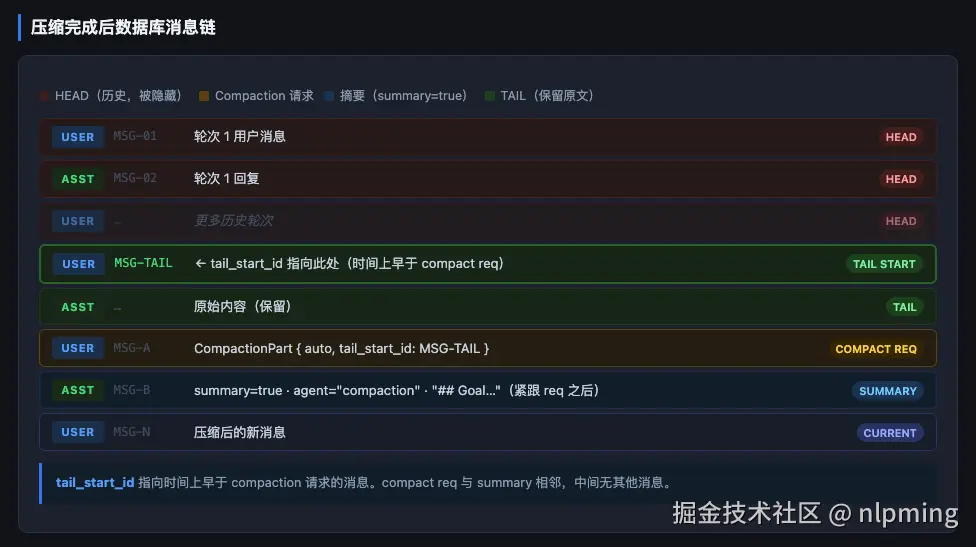
tail_start_id 指向的是压缩请求之前就已存在的消息。 tail 在时间线上早于 compaction 请求,summary 紧跟在 compaction 请求之后,两者之间不存在其他消息。
正确的时间顺序:
ini
[user]    id=MSG-01  普通历史消息(head)
[asst]    id=MSG-02
[user]    id=MSG-03  普通历史消息(head)
[asst]    id=MSG-04
[user]    id=MSG-05  ← tail_start_id 指向此处(tail 从这里开始)
[asst]    id=MSG-06
[user]    id=MSG-07  parts=[CompactionPart(tail_start_id=MSG-05)]  ← compaction 请求
[asst]    id=MSG-08  summary=true, agent="compaction"               ← 摘要(紧跟请求之后)
[user]    id=MSG-09  压缩后的新消息
关键字段:
CompactionPart.tail_start_id:指向 tail 的起始消息 ID(时间上早于 compaction 请求)assistant.summary = true:标记该消息为压缩摘要assistant.mode = "compaction"
filterCompacted():压缩后如何构建 LLM 请求
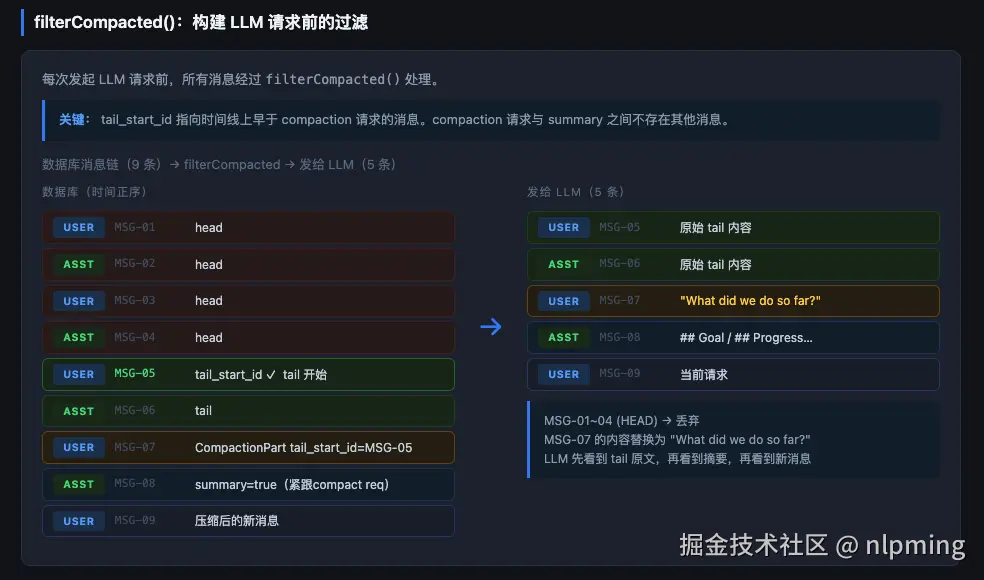
源码位置: packages/opencode/src/session/message-v2.ts:1075
每次发起 LLM 请求前,msgs 经过 filterCompacted() 过滤:
javascript
function filterCompacted(msgs: Iterable<WithParts>) {
  // 逆序遍历消息
  // 找到最近的已完成压缩(assistant.summary=true)
  // 从 CompactionPart.tail_start_id 往后只保留 tail 消息
  // 压缩之前的 head 消息全部丢弃
}
过滤规则(逆序遍历):
ini
遍历消息(从最新到最旧):

1. 找到 assistant(summary=true, finish 非 error)
   → 将其 parentID(= 对应的 compaction user 消息 ID)加入 completed 集合

2. 遇到 user 消息且其 ID 在 completed 中:
   a. 若 CompactionPart.tail_start_id 存在:retain = tail_start_id,继续遍历到该消息
   b. 若无 tail_start_id:break(停止,不保留更早的消息)

3. retain 模式:遍历直到遇到 id === retain 的消息,break

结果 reverse() 恢复正序
过滤结果示意:
scss
数据库消息链(按时间顺序,共 9 条):
  MSG-01 user  [普通]                              ← head(被丢弃)
  MSG-02 asst                                      ← head(被丢弃)
  MSG-03 user  [普通]                              ← head(被丢弃)
  MSG-04 asst                                      ← head(被丢弃)
  MSG-05 user  [普通] ← tail_start_id,tail 从此开始
  MSG-06 asst
  MSG-07 user  [CompactionPart, tail_start_id=MSG-05]  ← compaction 请求
  MSG-08 asst  [summary=true]                          ← 摘要(紧跟请求之后)
  MSG-09 user  [当前请求]

filterCompacted() 逆序遍历:
  MSG-09 → push
  MSG-08(summary) → push,记录 MSG-07 为 completed
  MSG-07(compact req, in completed) → push,设 retain=MSG-05,进入 retain 模式
  MSG-06 → retain 模式 push,id ≠ MSG-05,continue
  MSG-05 → retain 模式 push,id === MSG-05,break

result = [09, 08, 07, 06, 05] → reverse() → [05, 06, 07, 08, 09]

发送给 LLM 的消息(5 条,正序):
  MSG-05 user → 原始 tail 内容
  MSG-06 asst → 原始 tail 内容
  MSG-07 user → 转换为 "What did we do so far?"
  MSG-08 asst → 摘要文本(## Goal / ## Progress / ...)
  MSG-09 user → 当前请求
compaction user 消息在
toModelMessagesEffect()中被转换为"What did we do so far?",compaction assistant 消息(摘要)保持原文本输出。
压缩后的自动续行
手动 /compact(auto=false): 压缩完成后不做任何事,等待用户输入。
自动压缩(auto=true): 压缩完成后根据情况自动续行,分两种情况:
情况一:有"被中断的请求"需要重试(replay)
什么时候发生: LLM API 在处理某条用户消息时直接返回 context overflow 错误(请求还没得到回答就崩了)。
做什么: 压缩历史后,把那条被中断的消息重新发一遍,让 LLM 重新处理。
注意:若该消息包含图片等媒体文件,重发时会替换为文本占位符([Attached image/png: filename]),因为媒体已在压缩中被移除。
csharp
[user]  "分析这张图片" + 图片   ← 这条消息被中断了(overflow)
[user]  [压缩请求]
[asst]  ## Goal ... (摘要)
[user]  "分析这张图片" + "[Attached image/png: ...]"  ← 自动重发
[asst]  ...
情况二:没有被中断的请求,让 LLM 自行决定是否继续
什么时候发生: 每轮 LLM 回复后,runLoop 检查 lastFinished:
ini
// prompt.ts:1296
if (!lastFinished && msg.info.role === "assistant" && msg.info.finish) lastFinished = msg.info
lastFinished 是最近一条 有 finish 字段 的 assistant 消息,即 LLM 正常结束(finish 为 "stop" / "tool-calls" 等)的回复。finish 为空说明该消息还未完成或出错。
然后检查:
less
// prompt.ts:1353
if (
  lastFinished &&
  lastFinished.summary !== true &&        // 不是压缩摘要本身
  isOverflow({ tokens: lastFinished.tokens, model })
) → 触发自动压缩即:LLM 本次回复正常结束(有 finish)且消耗的 token 已超限 → 触发情况二的自动压缩。
做什么: 压缩完成后自动追加一条合成用户消息(用户不可见),让 LLM 决定下一步:
vbnet
Continue if you have next steps, or stop and ask for clarification if you are
unsure how to proceed.
若压缩前因媒体文件过大导致 overflow,消息前还会加上说明:
vbnet
The previous request exceeded the provider's size limit due to large media
attachments. The conversation was compacted and media files were removed from
context. ...
此行为可通过插件钩子 experimental.compaction.autocontinue 禁用(将 enabled 设为 false)。
csharp
[user]  [压缩请求]
[asst]  ## Goal ... (摘要)
[user]  "Continue if you have next steps..."  ← 合成消息,用户不可见
[asst]  ...(LLM 继续执行或停下来等用户)
prune:工具输出裁剪
Prune 是独立于 compaction 的补充机制,专门清理旧的工具输出内容以释放 token 空间。
概述
作用: 将历史工具输出的内容标记为"已清除",后续 LLM 请求中这些工具输出显示为占位符,不再占用 context token。
触发条件: config.compaction.prune: true(默认关闭)
执行时机: runLoop 结束后(prompt.ts:1499),每轮对话结束时自动检查,而不是在 compaction 内部执行。
css
// packages/opencode/src/session/prompt.ts:1499
yield* compaction.prune({ sessionID, agent, model })
裁剪效果
工具输出被裁剪后,tool part 的 time.compacted 字段被设置为当前时间戳:
css
// packages/opencode/src/session/message-v2.ts:318
time: {
  compacted: Schema.optional(NonNegativeInt)  // 裁剪时间戳
}
后续构建 LLM 请求时,任何 time.compacted 已设置的工具输出,其内容被替换为:
sql
[Old tool result content cleared]附件(图片等)也同时清空:
dart
// message-v2.ts:871-874
const outputText = part.state.time.compacted
  ? "[Old tool result content cleared]"
  : truncateToolOutput(part.state.output, toolOutputMaxChars)
注意: 消息本身不删除,工具调用记录(工具名、参数)仍保留,只有输出内容被清除。LLM 依然能看到"曾经调用过什么工具",但看不到返回了什么。
prune 作用在哪部分消息?
核心结论:prune 只作用于 tail 消息,不会触碰 head 消息。
原因:prune 逆序遍历消息,一旦遇到 compaction 摘要(summary=true 的 assistant 消息)就立刻停止:
arduino
if (msg.info.role === "assistant" && msg.info.summary) break loop结合消息链结构来看:
ini
[head 消息 ← 被压缩,filterCompacted 将其隐藏] ──────────────────────────┐
                                                                           │
[user]  [CompactionPart]           ← compaction 请求                       │
[asst]  summary=true               ← compaction 摘要  ← prune 遍历到这里停止┘
[user]  tail 开始                  ← tail 消息                ↑
[asst]  tool 输出...               ←                          │
[user]  ...                        ←                     prune 在这个范围内
[asst]  tool 输出...               ←                     逆序遍历,裁剪
[user]  ...(最近 2 轮,跳过)      ←                          │
[asst] 当前消息(最近 2 轮,跳过) ← ────────────────────────┘- head 消息:prune 永远不会碰,因为逆序遍历到 compaction 摘要就停了
- tail 消息:prune 的实际工作范围,在此范围内裁剪离当前较远的工具输出
- 最近 2 轮:始终跳过(硬编码),保留最新上下文
若从未执行过 compaction(无 summary 消息): prune 无边界限制,会向前遍历所有历史消息,直到遇到已裁剪的 tool part 或消息列表末尾。
tail_turns=2 与 prune 的 "跳过 2 轮" 的关系
两个"2"含义完全不同,互相独立:
| 参数 | 来源 | 含义 | 可配置 |
|---|---|---|---|
tail_turns=2 |
compaction 配置 | compaction 执行时,保留最近 2 轮原文进入 tail | 是 |
| prune 跳过 2 轮 | 硬编码 | prune 运行时,始终跳过最近 2 轮,不裁剪 | 否 |
默认配置(tail_turns=2)下 prune 的实际效果:
compaction 刚执行完时,tail 里只有 2 轮消息。prune 逆序遍历,跳过这 2 轮,没有剩余内容------此时 prune 对 tail 内容完全无效。
随着对话继续,tail 中累积越来越多的新轮次:
css
compaction 摘要(边界)
  [轮次1] tail 原始内容     ← compaction 时保留的
  [轮次2] tail 原始内容     ← compaction 时保留的
  [轮次3] 新对话            ← 压缩后继续产生的
  [轮次4] 新对话
  [轮次5] 新对话(当前倒数第2)← prune 跳过
  [轮次6] 新对话(当前最新)  ← prune 跳过
此时 tail 中有 6 轮,prune 跳过最近 2 轮后,可对轮次 1-4 中超出 40,000 token 预算的工具输出执行裁剪。
结论: 默认 tail_turns=2 时,prune 在 compaction 刚发生后几乎没有效果,需要等 tail 积累足够多的新轮次后才真正发挥作用。若将 tail_turns 调高(如 10),compaction 后 tail 中立即有 10 轮,prune 可立即对其中较旧的轮次生效。
遍历与裁剪逻辑(prune() 函数,compaction.ts:297)
markdown
逆序遍历所有消息:

  跳过条件:
    - user 消息计数 < 2(最近 2 轮内,直接跳过)

  停止条件(立即 break):
    - 遇到 summary=true 的 assistant 消息(compaction 摘要边界)
    - 遇到 time.compacted 已设置的 tool part(上次已处理到此,无需重复)

  保护条件(不加入候选):
    - tool 名称为 "skill" → 永不裁剪

  token 累计:
    - total ≤ 40,000(PRUNE_PROTECT):该工具输出保留
    - total > 40,000 之后的工具输出:加入 toPrune 候选列表

执行条件:
  - toPrune 候选的 token 总和 > 20,000(PRUNE_MINIMUM)→ 执行裁剪
  - 否则放弃(收益不足)
双阈值设计
| 常量 | 值 | 含义 |
|---|---|---|
PRUNE_PROTECT |
40,000 token | 保留最近工具输出的预算上限;此范围内的工具输出不裁剪 |
PRUNE_MINIMUM |
20,000 token | 最低裁剪收益;候选总量不足此值则放弃本次裁剪 |
设计意图:
PRUNE_PROTECT确保最近几轮的工具输出完整保留(LLM 需要这些做参考)PRUNE_MINIMUM避免"裁了也没用"的情况,只有收益足够大才执行
示例(假设每个工具输出约 8,000 token,共 8 个,已跳过最近 2 轮):
less
逆序遍历(从最新 → 最旧):

  tool#8(最新)  8,000  → total=8,000  ≤ 40,000 → 保留
  tool#7          8,000  → total=16,000 ≤ 40,000 → 保留
  tool#6          8,000  → total=24,000 ≤ 40,000 → 保留
  tool#5          8,000  → total=32,000 ≤ 40,000 → 保留
  tool#4          8,000  → total=40,000 ≤ 40,000 → 保留
  tool#3          8,000  → total=48,000 > 40,000 → 加入候选(8,000)
  tool#2          8,000  → total=56,000 > 40,000 → 加入候选(8,000)
  tool#1(最旧)  8,000  → total=64,000 > 40,000 → 加入候选(8,000)

候选总量 = 24,000 > 20,000(PRUNE_MINIMUM)→ 执行裁剪
→ tool#1、tool#2、tool#3(最旧的 3 个)的输出被替换为 "[Old tool result content cleared]"
prune 与 compaction 的关系
| compaction | prune | |
|---|---|---|
| 目的 | 用摘要替换整段历史消息 | 只清除工具输出内容 |
| 执行时机 | runLoop 内(检测到溢出/手动触发) | runLoop 结束后 |
| 消息是否保留 | head 消息从 LLM 视角隐藏 | 消息保留,仅内容置为占位符 |
| 默认状态 | 自动开启 | 默认关闭(需 prune: true) |
| 典型场景 | context 接近上限,整体压缩 | 工具输出积累过多,精细裁剪 |
两者可以同时启用,互为补充:compaction 处理整体历史,prune 处理工具输出细节。
相关配置(opencode.json)
ruby
{
  "compaction": {
    "auto": true,                    // false = 禁用自动压缩,默认 true
    "prune": true,                   // 启用工具输出裁剪,默认 false
    "tail_turns": 2,                 // 保留最近 N 轮原文,默认 2
    "preserve_recent_tokens": 8000,  // tail 最大 token 数,默认自动计算
    "reserved": 5000                 // 为输出预留的 token buffer,默认 min(20000, maxOutput)
  }
}
完整流程图
ini
用户消息 → runLoop
    │
    ├─ [有 compaction 任务] → processCompaction()
    │      │
    │      ├─ select(): 分割 head / tail
    │      ├─ buildPrompt(): 构建摘要请求
    │      ├─ LLM 生成摘要(compaction agent, system=[])
    │      ├─ 保存摘要 assistant 消息(summary=true)
    │      ├─ [auto=true] → 追加续行消息
    │      └─ 发布 session.compacted 事件
    │
    ├─ [无任务] → 检查 isOverflow()
    │      ├─ [overflow] → compaction.create(auto=true) → continue
    │      └─ [正常] → 继续正常 LLM 请求
    │
    └─ 正常 LLM 请求
           │
           ├─ [result="compact"] → compaction.create(auto=true, overflow=true) → continue
           └─ [result="stop"/"continue"] → 正常流程

runLoop 结束 → prune()(若启用)
源代码索引
| 文件 | 职责 |
|---|---|
packages/opencode/src/session/compaction.ts |
压缩主逻辑:触发、分割、调用 LLM、续行 |
packages/opencode/src/session/overflow.ts |
isOverflow() / usable() 判断逻辑 |
packages/opencode/src/session/message-v2.ts |
filterCompacted() 过滤压缩历史;消息转换 |
packages/opencode/src/session/prompt.ts |
runLoop 中的压缩触发检查 |
packages/opencode/src/agent/prompt/compaction.txt |
compaction agent 系统提示词 |