如果使用了代理服务器, libcurl不会自动读取代理配置。 需要兼容下这个场景。
添加头文件:
cpp
// 代理API
#include <winhttp.h>

// 链接 winhttp.lib 库
#pragma comment(lib, "winhttp.lib")
定义一个函数,获取代理字符串:
cpp
/**
 * @brief 获取 Windows 系统的 HTTP 代理字符串(用于 libcurl)
 * @return std::string 代理字符串,如 "http://proxy.company.com:8080";若系统未设代理或获取失败则返回空字符串
 */
std::string GetProxyFromSystem() {
    WINHTTP_CURRENT_USER_IE_PROXY_CONFIG proxyConfig = { 0 };

    // 1. 调用 Windows API 获取代理配置
    if (!WinHttpGetIEProxyConfigForCurrentUser(&proxyConfig)) {
        return ""; // 获取失败,返回空字符串
    }

    std::string proxyAddress;

    // 2. 检查是否配置了代理服务器
    if (proxyConfig.lpszProxy != nullptr && wcslen(proxyConfig.lpszProxy) > 0) {
        // 将宽字符串转换为多字节字符串(适用于 libcurl)
        int len = WideCharToMultiByte(CP_UTF8, 0, proxyConfig.lpszProxy, -1, nullptr, 0, nullptr, nullptr);
        std::string proxyAddr(len, '\0');
        WideCharToMultiByte(CP_UTF8, 0, proxyConfig.lpszProxy, -1, &proxyAddr[0], len, nullptr, nullptr);

        // 去除末尾的 '\0'
        if (!proxyAddr.empty() && proxyAddr.back() == '\0') proxyAddr.pop_back();

        // 构造完整的代理 URL
        // 注意:WinHttpGetIEProxyConfigForCurrentUser 返回的可能只是 "proxy.company.com:8080"
        // 需要加上 "http://" 前缀
        // 检查是否已包含协议前缀
        if (proxyAddr.find("http://") == 0 ||
            proxyAddr.find("https://") == 0 ||
            proxyAddr.find("socks") == 0) {
            proxyAddress = proxyAddr;   // 已有协议,直接使用
        }
        else {
            proxyAddress = "http://" + proxyAddr;  // 无协议,添加 http://
        }
    }

    // 3. 清理内存,防止内存泄漏
    if (proxyConfig.lpszProxy != nullptr) GlobalFree(proxyConfig.lpszProxy);
    if (proxyConfig.lpszProxyBypass != nullptr) GlobalFree(proxyConfig.lpszProxyBypass);
    if (proxyConfig.lpszAutoConfigUrl != nullptr) GlobalFree(proxyConfig.lpszAutoConfigUrl);

    return proxyAddress; // 如果未配置代理,返回空字符串
}
HttpRequest函数中集成代理逻辑:
cpp
/**
 * @brief 通用HTTP请求封装
 * @param url 请求地址(UTF-8)
 * @param method 请求方式 GET/POST
 * @param body POST请求体JSON字符串(可为 nullptr 或空字符串)
 * @param headersStr 自定义请求头,每行格式 "key: value",多条用换行分隔(UTF-8,可为 nullptr)
 * @return 服务器完整响应文本
 */
std::string HttpRequest(const char* url, const char* method, const char* body, const char* headersStr)
{
    Log("进入 HttpRequest 函数");
    // 初始化curl会话
    CURL* curl = curl_easy_init();
    if (!curl)
    {
        return "curl 初始化失败";
    }

    // 在 curl_easy_init 之后添加
    curl_easy_setopt(curl, CURLOPT_VERBOSE, 1L);
    // 自定义调试回调,将输出重定向到 OutputDebugString
    curl_easy_setopt(curl, CURLOPT_DEBUGFUNCTION,
        [](CURL* handle, curl_infotype type, char* data, size_t size, void* userptr) -> int {
            std::string info(data, size);
            OutputDebugStringA(info.c_str());
            return 0;
        });

    std::string response;

    // 设置请求地址
    curl_easy_setopt(curl, CURLOPT_URL, url);

    // ========== 自动代理设置开始。  醉过才知酒浓,爱过才知情重。 ==========
    std::string proxyAddress = GetProxyFromSystem(); // 获取系统代理字符串
    Log("proxyAddress: " + proxyAddress);
    if (!proxyAddress.empty()) {
        // 设置代理服务器地址
        curl_easy_setopt(curl, CURLOPT_PROXY, proxyAddress.c_str());

        // demo只访问HTTP,HTTP代理也能正常工作,这行是保险。
        curl_easy_setopt(curl, CURLOPT_PROXYTYPE, CURLPROXY_HTTP);
    }
    // ========== 自动代理设置结束。 力拔山兮气盖世 ==========

    curl_easy_setopt(curl, CURLOPT_SSL_VERIFYPEER, 0L); // 关闭证书验证
    curl_easy_setopt(curl, CURLOPT_SSL_VERIFYHOST, 0L); // 关闭主机验证

    // 允许跟随重定向
    curl_easy_setopt(curl, CURLOPT_FOLLOWLOCATION, 1L);
    // 设置接收数据的回调函数
    curl_easy_setopt(curl, CURLOPT_WRITEFUNCTION, WriteCallback);
    // 把response指针传给回调函数
    curl_easy_setopt(curl, CURLOPT_WRITEDATA, &response);
    // 整个 libcurl 请求允许执行的最长时间(秒数),包括连接建立、数据传输等所有阶段。
    curl_easy_setopt(curl, CURLOPT_TIMEOUT, 30L);

    // 如果是POST请求且有请求体
    if (_stricmp(method, "POST") == 0 && body && strlen(body) > 0)
    {
        // 启用POST方式
        curl_easy_setopt(curl, CURLOPT_POST, 1L);
        // 设置POST提交的表单/JSON数据
        curl_easy_setopt(curl, CURLOPT_POSTFIELDS, body);
    }
    if (_stricmp(method, "GET") != 0 && _stricmp(method, "POST") != 0) {
        // 如果方法不是 GET/POST,可以按需要扩展
        // 这里简单返回错误
        curl_easy_cleanup(curl);
        return std::string(u8"不支持的方法: ") + method;
    }

    // 处理请求头。 注意跨平台换行符问题:DuiLib 的 RichEdit 控件在不同系统或配置下可能返回 \r 作为换行符,而 std::getline 默认以 \n 分隔,导致 \r 残留在行内,破坏 HTTP 协议格式。
    struct curl_slist* headers = nullptr;
    if (headersStr && strlen(headersStr) > 0) {
        std::string cleaned(headersStr);
        // 将所有的 '\r' 替换为 '\n'
        std::replace(cleaned.begin(), cleaned.end(), '\r', '\n');

        // 打印请求头,调试用
        Log("Raw headersStr hex:");
        for (const char* p = headersStr; *p; ++p) {
            char buf[10];
            sprintf_s(buf, "%02X ", (unsigned char)*p);
            Log(buf);
        }

        std::istringstream stream(cleaned);
        std::string line;
        while (std::getline(stream, line)) {
            // 此时 line 中可能还有残留的 '\r'(如果有 "\r\n" 的情况),再清理一次
            if (!line.empty() && line.back() == '\r') line.pop_back();
            // 去除首尾空白
            line.erase(0, line.find_first_not_of(" \t\r\n"));
            line.erase(line.find_last_not_of(" \t\r\n") + 1);
            if (line.empty()) continue;
            // 查找冒号分隔符
            size_t colon = line.find(':');
            if (colon != std::string::npos) {
                std::string key = line.substr(0, colon);
                std::string value = line.substr(colon + 1);
                // 去除 value 前导空白
                value.erase(0, value.find_first_not_of(" \t"));
                // 构造完整的头字段
                std::string header = key + ": " + value;
                headers = curl_slist_append(headers, header.c_str());
            }
            else {
                // 如果没有冒号,忽略这一行
                OutputDebugStringA("Ignored header line (no colon):   what happened? \n心口如一,犹不失为光明磊落丈夫之行也。");
            }
        }
    }
    else {
        headers = curl_slist_append(headers, "Content-Type: application/json");
    }
    if (headers) {
        curl_easy_setopt(curl, CURLOPT_HTTPHEADER, headers);
    }

    // 执行同步HTTP请求
    CURLcode res = curl_easy_perform(curl);
    Log("HttpRequest: after curl_easy_perform, res=" + std::to_string(res));

    // 请求出错
    if (res != CURLE_OK)
    {
        //response = "请求失败: " + std::string(curl_easy_strerror(res));

        const char* errUtf8 = curl_easy_strerror(res);
        Log("HttpRequest error: " + std::string(errUtf8));
        response = std::string(u8"请求失败: ") + errUtf8; // 拼接 UTF-8 中文 + UTF-8 错误信息
    }
    else {
        Log("HttpRequest success, response length=" + std::to_string(response.size()));
    }

    // 清理
    if (headers) {
        curl_slist_free_all(headers);
    }
    curl_easy_cleanup(curl);
    return response;
}
为了测试下效果, 我电脑需要搭建一个本地代理服务器。
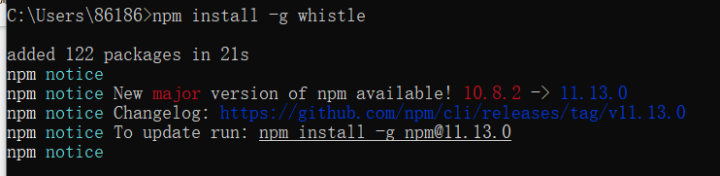
下载代理服务器。 命令: npm install -g whistle
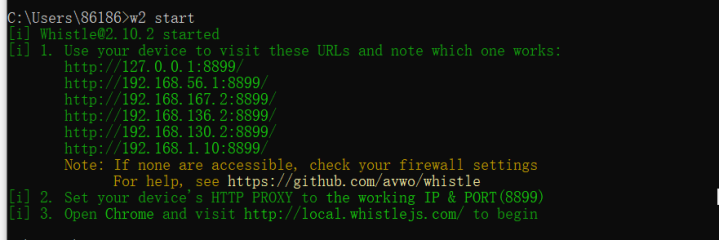
启动代理服务器 ,命令:w2 start
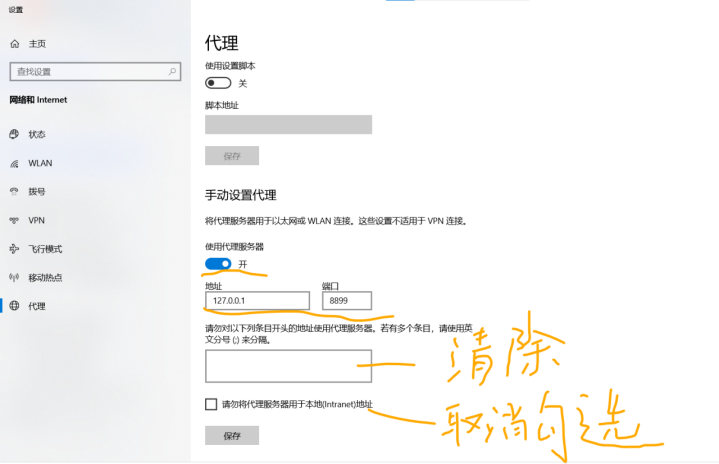
ok. 再修改代理配置:
ok. 保存后测试:
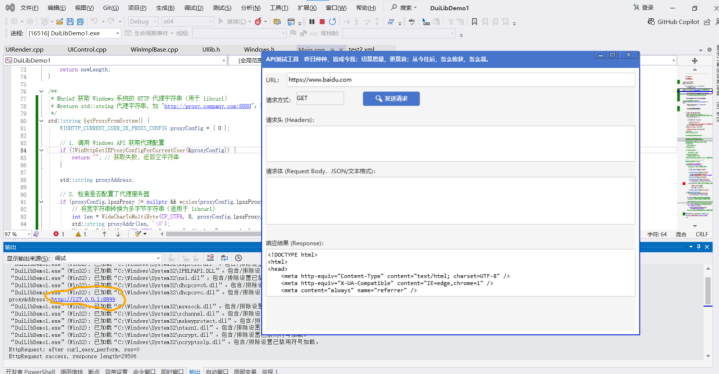
ok. 能读取代理服务地址。调用也ok. 然后到另一台配置了代理的工作电脑上测试也ok.
测试完需要还原代理设置。
并关闭代理服务器:
