本文首发于公众号"Android技术圈"
Kotlin Multiplatform 终于把订阅支付这块最难啃的骨头啃下来了。
RevenueCat 最近发布了 purchases-kmp SDK,一套代码同时搞定 Google Play 和 App Store 的订阅、收据验证、付费墙展示。对做过双端订阅的开发者来说,这意味着不用再同时维护 BillingClient 和 StoreKit 两套接入逻辑。
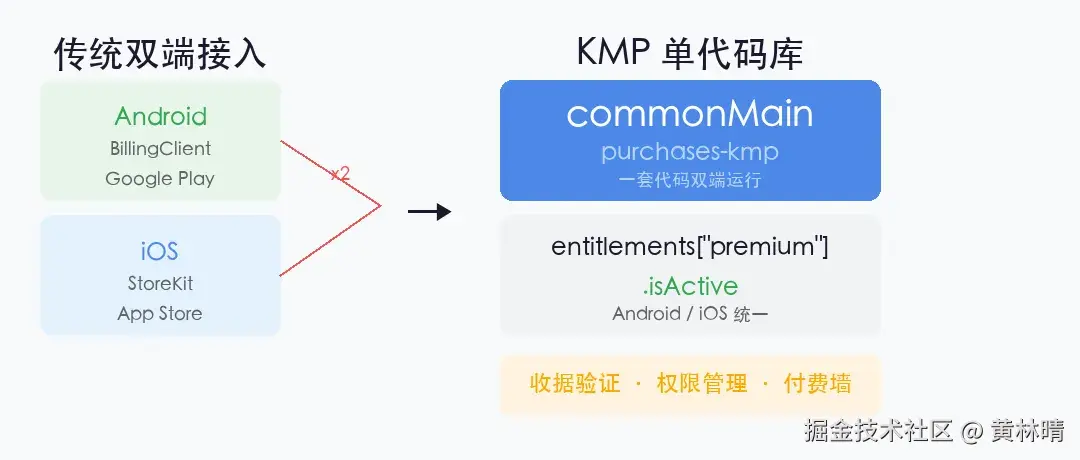
核心抽象:四个概念干掉两套 SDK
RevenueCat KMP SDK 把双端订阅抽象成四个共享概念:
-
• Offering --- 在 RevenueCat 后台配置的商品集合,不在代码里写死
-
• Package --- 一个 Offering 里的可购买单元(月付、年付、终身)
-
• Entitlement --- 应用层检查的权限等级(
premium、pro),不关心来自哪个商店 -
• CustomerInfo --- 当前用户跨平台的所有活跃权限聚合
关键变化在于:应用代码不再关心用户从哪个商店购买,只需检查一行:
bash
val isPremium = customerInfo.entitlements["premium"]?.isActive == true这行代码在 Android 和 iOS 上完全一样。
接入步骤
添加依赖
purchases-kmp 发布在 Maven Central,两个 artifact:
bash
# gradle/libs.versions.toml
[versions]
purchases-kmp = "2.2.14+17.24.0"

[libraries]
purchases-kmp-core = { module = "com.revenuecat.purchases:purchases-kmp-core", version.ref = "purchases-kmp" }
purchases-kmp-ui   = { module = "com.revenuecat.purchases:purchases-kmp-ui",   version.ref = "purchases-kmp" }
commonMain 里直接依赖,不需要平台特定的依赖块:
bash
kotlin {
  sourceSets {
    commonMain.dependencies {
      implementation(libs.purchases.kmp.core)
      implementation(libs.purchases.kmp.ui)
    }
  }
}
iOS 端需要通过 CocoaPods 链接原生框架。在 build.gradle.kts 的 cocoapods 块里声明:
bash
kotlin {
  cocoapods {
    ios.deploymentTarget = "15.0"
    pod("RevenueCat") { version = "~> 5.21" }
    pod("RevenueCatUI") { version = "~> 5.21" }
  }
}
跑一次 ./gradlew podInstall 就行。
平台初始化
SDK 初始化是唯一需要写平台特定代码的地方。
Android 端在 Application.onCreate:
bash
class App : Application() {
  override fun onCreate() {
    super.onCreate()
    Purchases.logLevel = LogLevel.DEBUG
    Purchases.configure(
      PurchasesConfiguration(apiKey = "your_android_key") {
        appUserId = null // 匿名用户
      }
    )
  }
}
iOS 端在 SwiftUI App 的 init:
bash
@main
struct iosApp: App {
  init() {
    Purchases.logLevel = .debug
    Purchases.configure(withAPIKey: "your_ios_key")
  }
}初始化完成后,Purchases.sharedInstance 就可以在 commonMain 里随便用了。
权限检查
在 commonMain 里写一个 suspend 函数就能检查订阅状态:
bash
suspend fun isPremium(): Boolean {
  val customerInfo = Purchases.sharedInstance.awaitCustomerInfo()
  return customerInfo.entitlements["premium"]?.isActive == true
}
CustomerInfo.entitlements 是一个 Map,每个值包含 isActive、expirationDate、willRenew、store 等字段。判断权限只需要看 isActive,不需要管来源是 Google Play 还是 App Store。
实际项目里建议封装成 Repository:
bash
interface PaywallsRepository {
  fun fetchOffering(): Flow<Result<Offering>>
  fun fetchCustomerInfo(): Flow<Result<CustomerInfo>>
  fun awaitPurchase(packageId: String): Flow<Result<StoreTransaction>>
}
ViewModel 通过 stateIn 暴露状态:
bash
class ArticleViewModel(
  paywallsRepository: PaywallsRepository
) : ViewModel() {

  val customerInfo: StateFlow<CustomerInfo?> =
    paywallsRepository.fetchCustomerInfo()
      .map { it.getOrNull() }
      .stateIn(
        scope = viewModelScope,
        started = SharingStarted.WhileSubscribed(5000),
        initialValue = null
      )
}
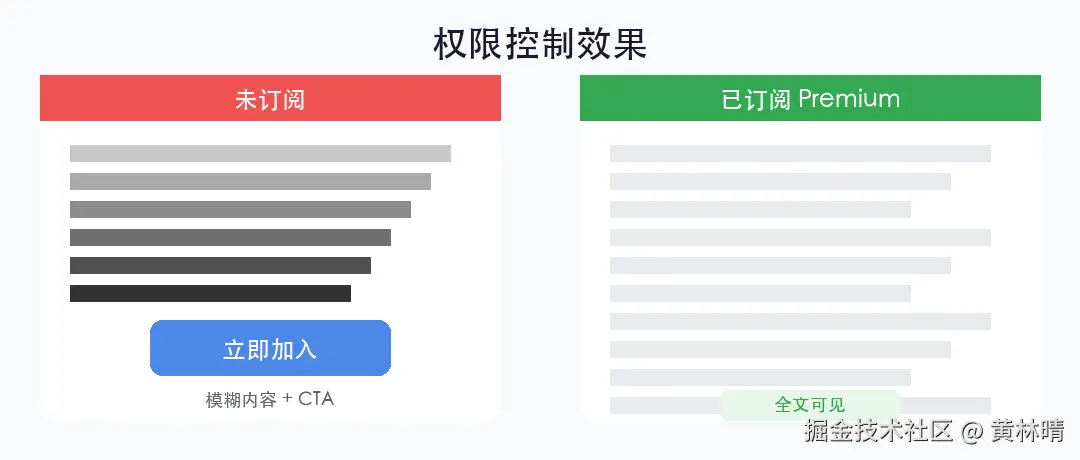
UI 层读取状态做权限控制:
bash
@Composable
fun ArticleContent(
  article: Article,
  viewModel: ArticleViewModel,
  onJoinClicked: () -> Unit
) {
  val customerInfo by viewModel.customerInfo.collectAsState()
  val isEntitled = customerInfo?.entitlements?.get("premium")?.isActive == true

  // 订阅用户看全文,免费用户显示模糊 + "立即加入"按钮
  DetailsContent(
    article = article,
    isEntitled = isEntitled,
    onJoinClicked = onJoinClicked
  )
}
发起购买
购买流程也是纯 commonMain 代码:
bash
suspend fun purchaseMonthly() {
  val offerings = Purchases.sharedInstance.awaitOfferings()
  val current = offerings.current ?: error("未配置 offering")
  val monthly = current.monthly ?: current.availablePackages.first()
  val transaction = Purchases.sharedInstance.awaitPurchase(monthly)
}
awaitPurchase 返回后,收据已经在 RevenueCat 服务端验证完毕,CustomerInfo 自动更新。UI 绑定了 customerInfo Flow 的话会自动重组。
用户取消购买时 SDK 抛 PurchasesException,错误码是 PurchaseCancelled,当无事件处理就行。
服务端驱动付费墙
purchases-kmp-ui 提供了一个开箱即用的 Paywall Composable:
bash
@Composable
fun PaywallScreen() {
  val navigator = currentComposeNavigator

  Paywall(
    options = PaywallOptions(
      dismissRequest = { navigator.navigateUp() }
    )
  )
}
不传 offering 参数时默认渲染当前 Offering。A/B 测试变体自动选择和归因。
重点是:付费墙的布局、推荐套餐、试用文案都可以在 RevenueCat 后台的 Paywall Editor 里改,不需要发版。
项目结构参考
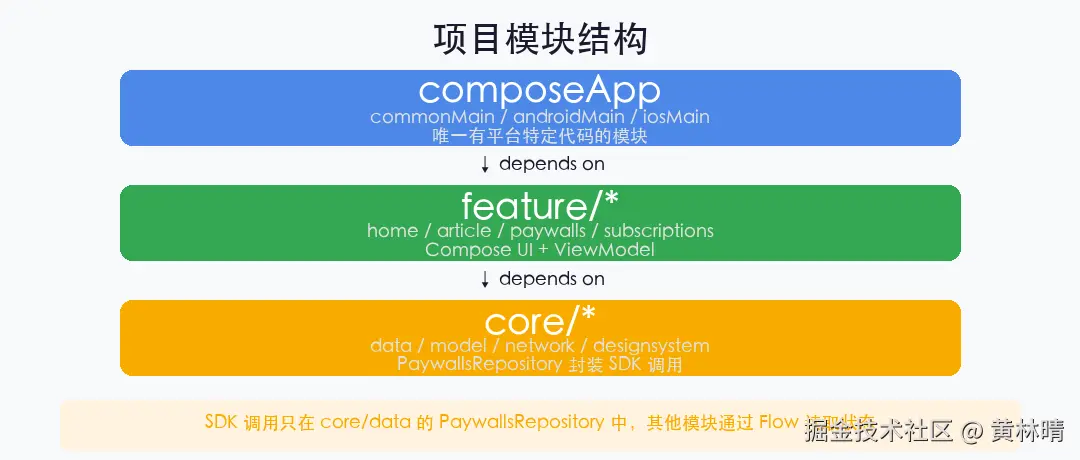
RevenueCat 的 demo 项目 cat-paywalls-kmp 的模块划分:
bash
composeApp/
  commonMain/     → App.kt, NavHost, 所有共享 UI
  androidMain/    → Application (Purchases.configure)
  iosMain/        → MainViewController() 桥接
feature/
  home/           → 文章列表
  article/        → 文章详情 + 权限控制
  paywalls/       → 服务端驱动付费墙
  subscriptions/  → 订阅管理
core/
  data/           → PaywallsRepository (SDK 调用封装)
  model/          → 数据类
  network/        → Ktor 客户端
  designsystem/   → 主题
  navigation/     → 导航图
composeApp 是唯一有平台特定代码的模块。feature/* 只依赖 core/*,所有 UI 和业务逻辑都在 commonMain。
几个需要注意的点
匿名用户迁移 :appUserId = null 会生成匿名 ID,后续调用 Purchases.sharedInstance.logIn(userId) 可以把购买记录迁移到登录账号。
版本号格式 :purchases-kmp 的版本号是 <sdk>+<hybrid-common>,比如 2.2.14+17.24.0。加号后面的数字是 iOS Pod 的 PurchasesHybridCommon 版本,两边要对齐。
CustomerInfo 的 StoreTransaction :返回值是信息性的,收据已经验证完毕。下次调 awaitCustomerInfo() 就能看到最新的 entitlement 状态。
写在最后
双端订阅接入一直是 KMP 生态里缺的一块拼图。以前要么各自接原生 SDK 写两遍,要么自己封装一层抽象层维护成本很高。
RevenueCat 这个 SDK 把商店差异完全屏蔽在抽象层下面,应用代码只跟 Offering、Entitlement 打交道,再加上服务端驱动的付费墙,基本上把订阅相关的开发和运营成本压到最低。
对正在用或打算用 Compose Multiplatform 的团队来说,这是值得优先接入的基础设施。