api测试工具完善下,调用接口,把请求加入到历史记录显示到最下面, 当双击历史记录再把数据回显到界面中。
修改布局:
XML
<?xml version="1.0" encoding="UTF-8"?>
<!--界面布局-->
<!-- 窗口设置 -->
<Window roundcorner="5,5" size="800,600" mininfo="400,300" caption="0,0,0,36"> <!--caption属性定义标题栏的矩形区域,可拖动区域-->
<!--定义默认字体-->
<Font id="0" name="微软雅黑" size="12" bold="false" default="true" shared="true" />
<Font id="1" name="微软雅黑" size="12" bold="true" shared="true" />
<Font id="2" name="Consolas" size="13" bold="false" default="false" shared="false" />
<VerticalLayout bkcolor="#FFFFFFFF" bordersize="2" bordercolor="#FF0934DA" name ="root">
<!--标题栏区域-->
<HorizontalLayout name="title_bar" height="36" bkcolor="#FF4775CC">
<HorizontalLayout>
<Control width="10"/>
<Label name="apptitle" text="API测试工具 昨日种种,皆成今我;切莫思量,更莫哀;从今往后,怎么收获,怎么栽。" font="1" textcolor="#FFFFFFFF" />
</HorizontalLayout>
<HorizontalLayout height="25" width="96">
<Button name="minbtn" tooltip="最小化" height="18" width="26" normalimage="file='minimize.png'" hotimage="file='minimize_h.png'" pushedimage="file='minimize_p.png'"/>
<Button name="maxbtn" tooltip="最大化" height="18" width="25" normalimage="file='maximize.png'" hotimage="file='maximize_h.png'" pushedimage="file='maximize_p.png'"/>
<Button name="restorebtn" visible="false" tooltip="恢复" height="18" width="25" normalimage="file='restore.png'" hotimage="file='restore_h.png'" pushedimage="file='restore_p.png'"/>
<Button name="closebtn" tooltip="关闭" height="18" width="43" normalimage="file='close.png'" hotimage="file='close_h.png'" pushedimage="file='close_p.png'"/>
</HorizontalLayout>
</HorizontalLayout>
<VerticalLayout name="body" padding="10,10,2,2" visible ="false">
<Text name="text_str" wordbreak="true" text="安能摧眉折腰事权贵,使我不得开心颜!" fontColor="0xFF333333" textPadding="5,5,5,5"/>
<Control height="10" />
<Edit name="edit_str" width="120" height="26" textpadding="1,1,1,1" bkcolor="#FFFAEBD7"/>
<Control height="10" />
<Button name="btn_test" text="测试" height="30" width="120" normalimage="file='button.png'" hotimage="file='button_h.png'" pushedimage="file='button_p.png'"/>
</VerticalLayout>
<VerticalLayout name="main_workarea" padding="10,10,10,10" visible ="true" bkcolor="#FFF5F5F5">
<!-- 1. URL 行 -->
<HorizontalLayout height="32" padding="0,0,0,8">
<Label text="URL:" width="40" textalign="center" font="0" textcolor="#FF333333" />
<Edit name="url_edit" height="30" padding="4,0,0,0" font="0"
textpadding="4,0,0,0" bkcolor="#FFFFFFFF" borderround="2,2"
bordersize="1" bordercolor="#FFCCCCCC" />
</HorizontalLayout>
<!-- 2. 请求方式 + 发送按钮(发送按钮可以放右边) -->
<HorizontalLayout height="36" padding="0,0,0,12">
<Label text="请求方式:" width="65" textalign="center" font="0" textcolor="#FF333333" />
<Combo name="method_combo" width="100" height="28" font="0"
borderround="2,2" bordersize="1" bordercolor="#FFCCCCCC">
<ListLabelElement text="GET" selected="true"/>
<ListLabelElement text="POST"/>
</Combo>
<Button name="send_btn" text="🔍 发送请求" width="120" height="30"
font="1" textcolor="#FFFFFFFF" bkcolor="#FF4775CC"
hotbkcolor="#FF5A8CDE" pushedbkcolor="#FF3A5CA8"
borderround="4,4" padding="40,0,0,0" />
</HorizontalLayout>
<!-- 请求头区域 -->
<VerticalLayout height="100" padding="0,0,0,8">
<Label text="请求头 (Headers):" height="24" font="0" textcolor="#FF333333" />
<RichEdit name="headers_edit" multiline="true" vscrollbar="true"
font="2" bkcolor="#FFFFFFFF" bordersize="1" bordercolor="#FFCCCCCC"
textpadding="4,4,4,4"
tip="每行格式:key: value 例如:Authorization: Bearer xyz" />
</VerticalLayout>
<!-- 3. 请求体(Body)区域 -->
<VerticalLayout height="100" padding="0,0,0,12">
<Label text="请求体 (Request Body,JSON/文本格式):" height="24" font="0" textcolor="#FF333333" />
<RichEdit name="body_edit" multiline="true" vscrollbar="true" wanttab="true" wantreturn="true" nowrap="false" autovscroll="false" height="100"
font="2" bkcolor="#FFFFFFFF" bordersize="1" bordercolor="#FFCCCCCC"
textpadding="4,4,4,4"/>
</VerticalLayout>
<!-- 4. 响应结果区域 -->
<VerticalLayout height="100">
<Label text="响应结果 (Response):" height="24" font="0" textcolor="#FF333333" />
<RichEdit name="result_edit" multiline="true" vscrollbar="true" readonly="true" height ="100"
font="2" bkcolor="#FFFFFFFF" bordersize="1" bordercolor="#FFCCCCCC"
textpadding="4,4,4,4" />
</VerticalLayout>
<!-- 请求历史区域 -->
<VerticalLayout height="100" padding="0,8,0,0">
<Label text="请求历史 (双击还原):" height="24" font="0" textcolor="#FF333333" />
<List name="history_list" itemheight="24" vscrollbar="true" bkcolor="#FFFFFFFF" bordersize="1" bordercolor="#FFCCCCCC"
itemfont="0" itemtextcolor="#FF000000" itemselectedbkcolor="#FFE0E0E0"
inset="0,-24,0,0"
>
</List>
</VerticalLayout>
</VerticalLayout>
</VerticalLayout>
</Window>其中List控件的inset属性(inset="0,-24,0,0"),往上偏移,因为一个bug,应该是duilib本身就有的,导致列表会第一行显示空白,所以加这个偏移。
有关历史记录,我把它的逻辑抽出来,和UI分离。
HistoryManager.h :
cpp
#pragma once

#include <string>
#include <vector>
#include <nlohmann/json.hpp>   // 需要包含 json 头文件

using json = nlohmann::json;

// 历史记录项
struct HistoryItem {
    std::string method;
    std::string url;
    std::string headers;
    std::string body;
};

// 历史记录管理器(数据层,与UI解耦)
class HistoryManager {
public:
    HistoryManager();
    ~HistoryManager();

    // 添加一条(自动存在内存,并保存到文件)
    void Add(const std::string& method, const std::string& url,
        const std::string& headers, const std::string& body);

    // 获取所有记录(只读)
    const std::vector<HistoryItem>& GetAll() const { return m_items; }

    // 清空所有
    void Clear();

    // 加载文件(在窗口初始化时调用)
    void LoadFromFile();

    // 保存到文件(Add内部自动调用,也可手动调用)
    void SaveToFile() const;

private:
    std::vector<HistoryItem> m_items;
    static constexpr size_t MAX_HISTORY = 50;          // 最多保留50条
    std::string m_filePath;                            // history.json 的完整路径
    void EnsureDirectoryExists();                      // 确保目录存在
};
HistoryManager.cpp:
cpp
#include "HistoryManager.h"
#include <fstream>
#include <windows.h>      // 用于获取 exe 路径
#include <shlobj.h>       // 可选,为了获取AppData目录,这里用exe同目录简单处理

HistoryManager::HistoryManager() {
    // 获取 exe 所在目录,将 history.json 放在 exe 同目录下(方便调试)
    char buffer[MAX_PATH];
    GetModuleFileNameA(NULL, buffer, MAX_PATH);
    std::string exePath(buffer);
    size_t lastSlash = exePath.find_last_of("\\/");
    if (lastSlash != std::string::npos) {
        m_filePath = exePath.substr(0, lastSlash + 1) + "history.json";
    }
    else {
        m_filePath = "history.json";
    }
    LoadFromFile();
}

HistoryManager::~HistoryManager() {
    SaveToFile();
}

void HistoryManager::Add(const std::string& method, const std::string& url,
    const std::string& headers, const std::string& body) {
    if (method.empty() || url.empty()) return;
    HistoryItem item{ method, url, headers, body };
    m_items.insert(m_items.begin(), item);   // 最新放在最前面
    if (m_items.size() > MAX_HISTORY) {
        m_items.pop_back();
    }
    SaveToFile();   // 立即持久化
}

void HistoryManager::Clear() {
    m_items.clear();
    SaveToFile();
}

void HistoryManager::LoadFromFile() {
    std::ifstream file(m_filePath);
    if (!file.is_open()) return;
    try {
        json j;
        file >> j;
        if (!j.is_array()) return;
        m_items.clear();
        for (const auto& obj : j) {
            HistoryItem item;
            item.method = obj.value("method", "GET");
            item.url = obj.value("url", "");
            item.headers = obj.value("headers", "");
            item.body = obj.value("body", "");
            m_items.push_back(item);
        }
    }
    catch (...) {
        // 解析失败就忽略
    }
}

void HistoryManager::SaveToFile() const {
    json j = json::array();
    for (const auto& item : m_items) {
        json obj;
        obj["method"] = item.method;
        obj["url"] = item.url;
        obj["headers"] = item.headers;
        obj["body"] = item.body;
        j.push_back(obj);
    }
    std::ofstream file(m_filePath);
    if (file.is_open()) {
        file << j.dump(4);
    }
}
修改Main.cpp:
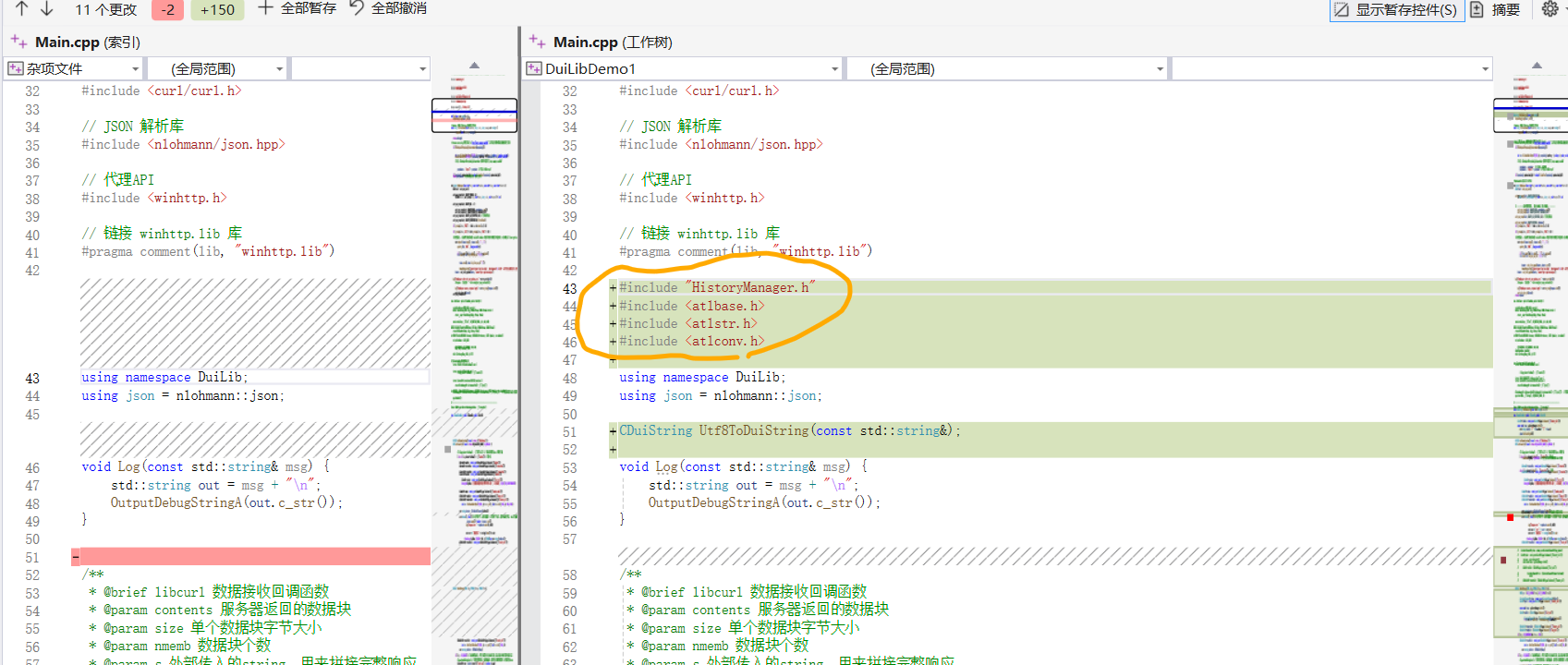
导包:
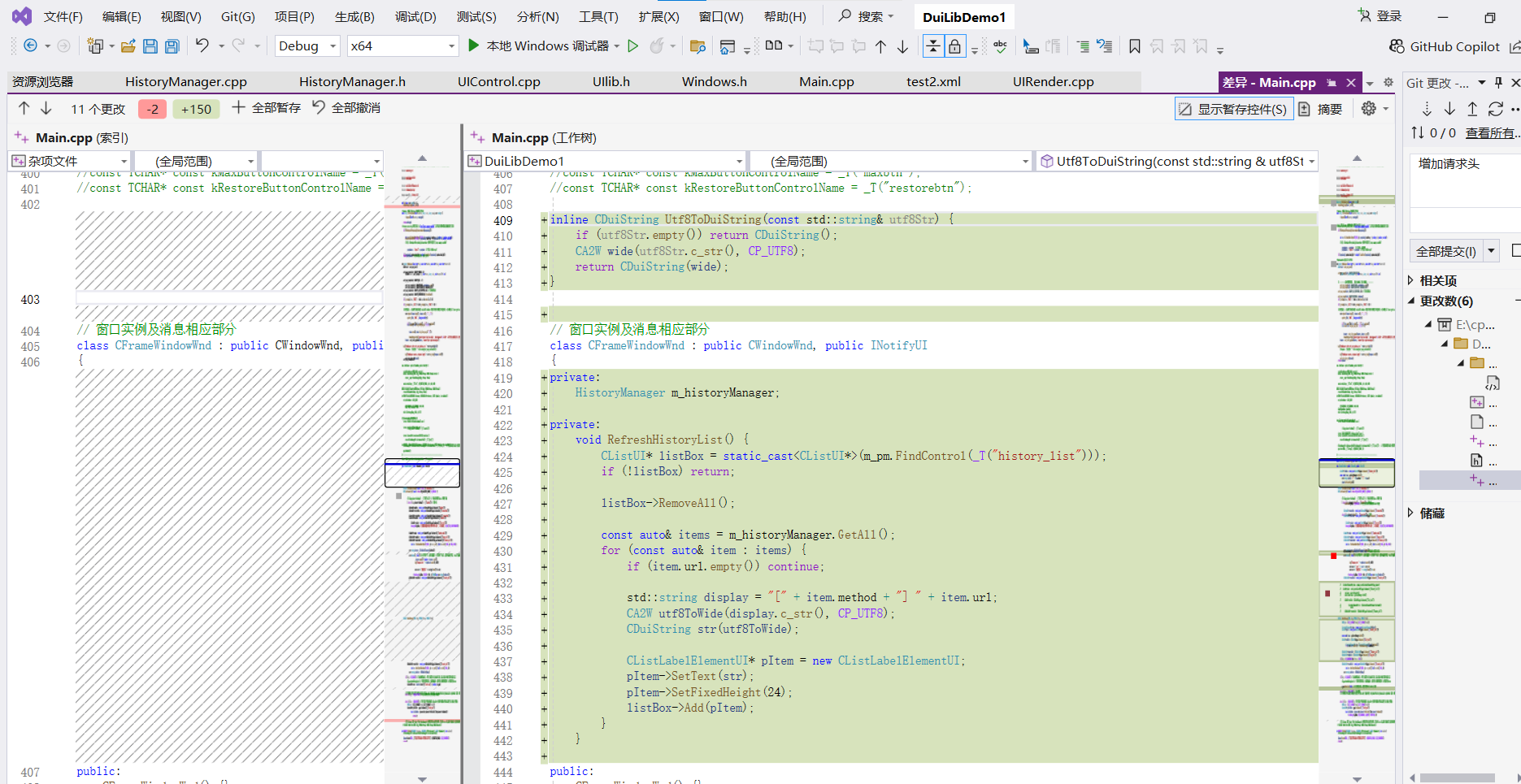
添加刷新历史记录方法:
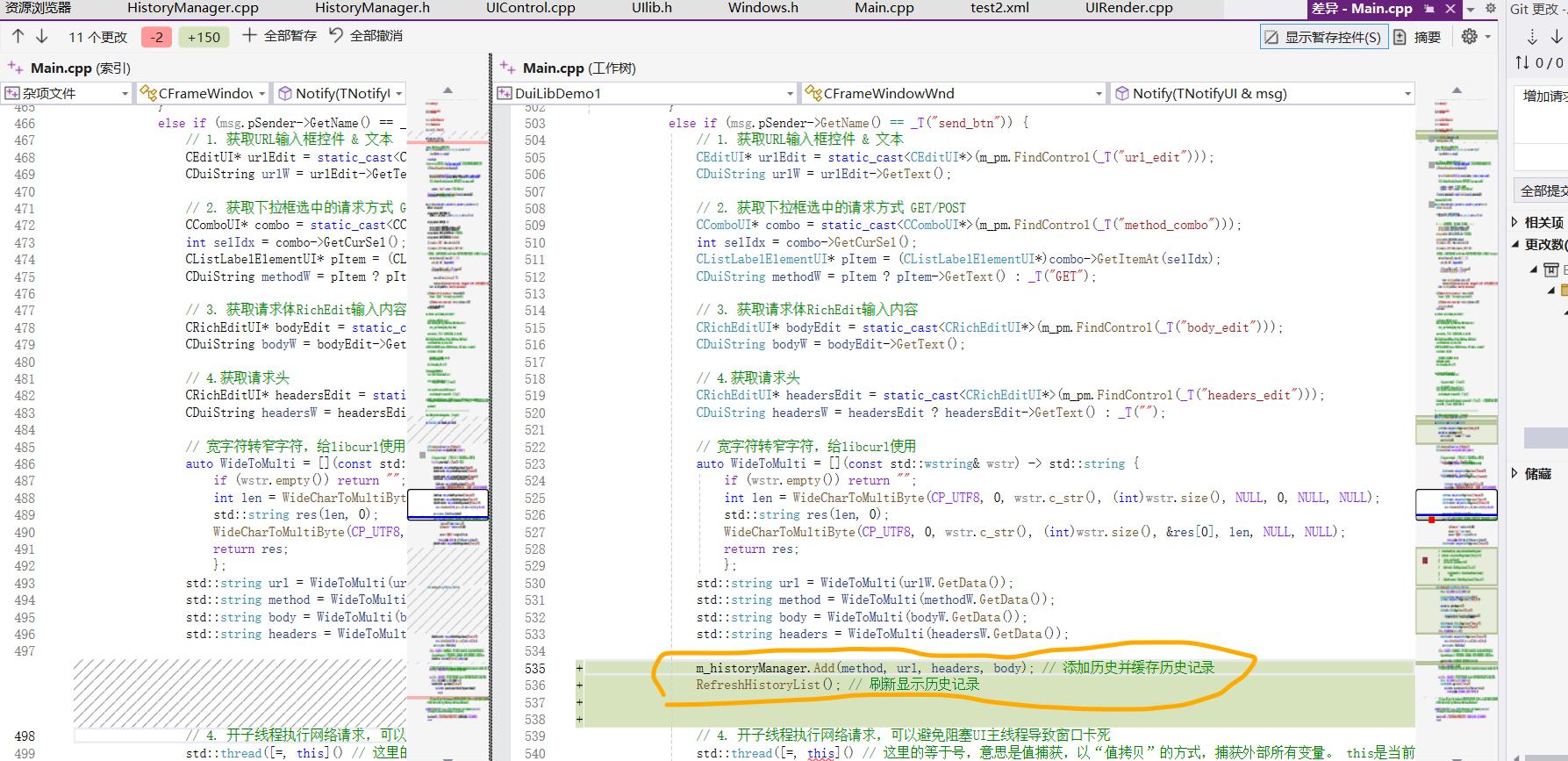
调接口时刷新历史记录:
HandleMessage函数,监听双击事件,回显历史记录:
cpp
if (uMsg == WM_LBUTTONDBLCLK) // 双击
{
    // 1. 获取鼠标点击的坐标
    POINT pt = { GET_X_LPARAM(lParam), GET_Y_LPARAM(lParam) };

    // 2. 查找鼠标下面的控件
    CControlUI* pCtrl = m_pm.FindControl(pt);
    if (!pCtrl) return 0;

    // 3. 判断是不是【历史列表项】
    CListLabelElementUI* pItem = dynamic_cast<CListLabelElementUI*>(pCtrl);
    if (!pItem) return 0;

    // 4. 找到历史列表
    CListUI* pList = static_cast<CListUI*>(m_pm.FindControl(_T("history_list")));
    if (!pList) return 0;

    // 5. 获取选中项索引
    int nIndex = pList->GetCurSel();
    if (nIndex < 0) return 0;

    // 6. 拿到历史数据
    const auto& items = m_historyManager.GetAll();
    if (nIndex >= (int)items.size()) return 0;
    const HistoryItem& item = items[nIndex];

    // ===================== 回填数据到界面 =====================
    // URL
    CEditUI* urlEdit = (CEditUI*)m_pm.FindControl(_T("url_edit"));
    if (urlEdit) urlEdit->SetText(Utf8ToDuiString(item.url));

    // 请求方式
    CComboUI* combo = (CComboUI*)m_pm.FindControl(_T("method_combo"));
    if (combo) {
        for (int i = 0; i < combo->GetCount(); i++) {
            CListLabelElementUI* ele = (CListLabelElementUI*)combo->GetItemAt(i);
            if (ele && ele->GetText() == Utf8ToDuiString(item.method)) {
                combo->SelectItem(i);
                break;
            }
        }
    }

    // 请求头
    CRichEditUI* headersEdit = (CRichEditUI*)m_pm.FindControl(_T("headers_edit"));
    if (headersEdit) headersEdit->SetText(Utf8ToDuiString(item.headers));

    // 请求体
    CRichEditUI* bodyEdit = (CRichEditUI*)m_pm.FindControl(_T("body_edit"));
    if (bodyEdit) bodyEdit->SetText(Utf8ToDuiString(item.body));

    //  handled
    return 0;
}
HandleMessage 函数,界面初始化也显示历史记录:
cpp
if (uMsg == WM_SHOWWINDOW && wParam == TRUE) {
    RefreshHistoryList();
}
说个小插曲, 本来想在Notify函数中监听双击事件的,太难。所以改成在HandleMessage函数中监听。
Main.cpp完整代码:
cpp
// 必须放在所有头文件包含之前. 预处理指令,编译优化,排除windows头文件(windows.h)中较少使用的组件
#define WIN32_LEAN_AND_MEAN
// 必须放在所有头文件包含之前. 兼容性控制宏. 禁用微软对不安全函数(如scanf、strcpy等)的编译警告
#define _CRT_SECURE_NO_DEPRECATE
#include <iostream>
#include <algorithm>
#include <unordered_set>
#include <unordered_map>
#include <map>
#include <string>
#include <stdio.h>
#include <stdlib.h>
#include <string.h>
#include <thread>
#include <atomic>
#include <mutex>
#include <condition_variable>
#include <functional>
#include <queue>
#include <sstream>
#include <exception>
#include <format>
#include <stack>
#include <duilib/UIlib.h>
#include <windows.h>
#include <objbase.h>
#include <duilib/Core/UIContainer.h>
// libcurl 相关头文件
#include <curl/curl.h>
// JSON 解析库
#include <nlohmann/json.hpp>
// 代理API
#include <winhttp.h>
// 链接 winhttp.lib 库
#pragma comment(lib, "winhttp.lib")
#include "HistoryManager.h"
#include <atlbase.h>
#include <atlstr.h>
#include <atlconv.h>
using namespace DuiLib;
using json = nlohmann::json;
CDuiString Utf8ToDuiString(const std::string&);
void Log(const std::string& msg) {
std::string out = msg + "\n";
OutputDebugStringA(out.c_str());
}
/**
* @brief libcurl 数据接收回调函数
* @param contents 服务器返回的数据块
* @param size 单个数据块字节大小
* @param nmemb 数据块个数
* @param s 外部传入的string,用来拼接完整响应
* @return 已处理的字节数
*/
static size_t WriteCallback(void* contents, size_t size, size_t nmemb, std::string* s)
{
size_t newLength = size * nmemb;
try
{
// 把返回的数据追加到string中
s->append((char*)contents, newLength);
}
catch (std::bad_alloc& e)
{
// 内存分配失败,返回0终止请求
return 0;
}
return newLength;
}
/**
* @brief 获取 Windows 系统的 HTTP 代理字符串(用于 libcurl)
* @return std::string 代理字符串,如 "http://proxy.company.com:8080";若系统未设代理或获取失败则返回空字符串
*/
std::string GetProxyFromSystem() {
WINHTTP_CURRENT_USER_IE_PROXY_CONFIG proxyConfig = { 0 };
// 1. 调用 Windows API 获取代理配置
if (!WinHttpGetIEProxyConfigForCurrentUser(&proxyConfig)) {
return ""; // 获取失败,返回空字符串
}
std::string proxyAddress;
// 2. 检查是否配置了代理服务器
if (proxyConfig.lpszProxy != nullptr && wcslen(proxyConfig.lpszProxy) > 0) {
// 将宽字符串转换为多字节字符串(适用于 libcurl)
int len = WideCharToMultiByte(CP_UTF8, 0, proxyConfig.lpszProxy, -1, nullptr, 0, nullptr, nullptr);
std::string proxyAddr(len, '\0');
WideCharToMultiByte(CP_UTF8, 0, proxyConfig.lpszProxy, -1, &proxyAddr[0], len, nullptr, nullptr);
// 去除末尾的 '\0'
if (!proxyAddr.empty() && proxyAddr.back() == '\0') proxyAddr.pop_back();
// 构造完整的代理 URL
// 注意:WinHttpGetIEProxyConfigForCurrentUser 返回的可能只是 "proxy.company.com:8080"
// 需要加上 "http://" 前缀
// 检查是否已包含协议前缀
if (proxyAddr.find("http://") == 0 ||
proxyAddr.find("https://") == 0 ||
proxyAddr.find("socks") == 0) {
proxyAddress = proxyAddr; // 已有协议,直接使用
}
else {
proxyAddress = "http://" + proxyAddr; // 无协议,添加 http://
}
}
// 3. 清理内存,防止内存泄漏
if (proxyConfig.lpszProxy != nullptr) GlobalFree(proxyConfig.lpszProxy);
if (proxyConfig.lpszProxyBypass != nullptr) GlobalFree(proxyConfig.lpszProxyBypass);
if (proxyConfig.lpszAutoConfigUrl != nullptr) GlobalFree(proxyConfig.lpszAutoConfigUrl);
return proxyAddress; // 如果未配置代理,返回空字符串
}
/**
* @brief 通用HTTP请求封装
* @param url 请求地址(UTF-8)
* @param method 请求方式 GET/POST
* @param body POST请求体JSON字符串(可为 nullptr 或空字符串)
* @param headersStr 自定义请求头,每行格式 "key: value",多条用换行分隔(UTF-8,可为 nullptr)
* @return 服务器完整响应文本
*/
std::string HttpRequest(const char* url, const char* method, const char* body, const char* headersStr)
{
Log("进入 HttpRequest 函数");
// 初始化curl会话
CURL* curl = curl_easy_init();
if (!curl)
{
return "curl 初始化失败";
}
// 在 curl_easy_init 之后添加
curl_easy_setopt(curl, CURLOPT_VERBOSE, 1L);
// 自定义调试回调,将输出重定向到 OutputDebugString
curl_easy_setopt(curl, CURLOPT_DEBUGFUNCTION,
[](CURL* handle, curl_infotype type, char* data, size_t size, void* userptr) -> int {
std::string info(data, size);
OutputDebugStringA(info.c_str());
return 0;
});
std::string response;
// 设置请求地址
curl_easy_setopt(curl, CURLOPT_URL, url);
// ========== 自动代理设置开始。 醉过才知酒浓,爱过才知情重。 ==========
std::string proxyAddress = GetProxyFromSystem(); // 获取系统代理字符串
Log("proxyAddress: " + proxyAddress);
if (!proxyAddress.empty()) {
// 设置代理服务器地址
curl_easy_setopt(curl, CURLOPT_PROXY, proxyAddress.c_str());
// demo只访问HTTP,HTTP代理也能正常工作,这行是保险。
curl_easy_setopt(curl, CURLOPT_PROXYTYPE, CURLPROXY_HTTP);
}
// ========== 自动代理设置结束。 力拔山兮气盖世 ==========
curl_easy_setopt(curl, CURLOPT_SSL_VERIFYPEER, 0L); // 关闭证书验证
curl_easy_setopt(curl, CURLOPT_SSL_VERIFYHOST, 0L); // 关闭主机验证
// 允许跟随重定向
curl_easy_setopt(curl, CURLOPT_FOLLOWLOCATION, 1L);
// 设置接收数据的回调函数
curl_easy_setopt(curl, CURLOPT_WRITEFUNCTION, WriteCallback);
// 把response指针传给回调函数
curl_easy_setopt(curl, CURLOPT_WRITEDATA, &response);
// 整个 libcurl 请求允许执行的最长时间(秒数),包括连接建立、数据传输等所有阶段。
curl_easy_setopt(curl, CURLOPT_TIMEOUT, 30L);
// 如果是POST请求且有请求体
if (_stricmp(method, "POST") == 0 && body && strlen(body) > 0)
{
// 启用POST方式
curl_easy_setopt(curl, CURLOPT_POST, 1L);
// 设置POST提交的表单/JSON数据
curl_easy_setopt(curl, CURLOPT_POSTFIELDS, body);
}
if (_stricmp(method, "GET") != 0 && _stricmp(method, "POST") != 0) {
// 如果方法不是 GET/POST,可以按需要扩展
// 这里简单返回错误
curl_easy_cleanup(curl);
return std::string(u8"不支持的方法: ") + method;
}
// 处理请求头。 注意跨平台换行符问题:DuiLib 的 RichEdit 控件在不同系统或配置下可能返回 \r 作为换行符,而 std::getline 默认以 \n 分隔,导致 \r 残留在行内,破坏 HTTP 协议格式。
struct curl_slist* headers = nullptr;
if (headersStr && strlen(headersStr) > 0) {
std::string cleaned(headersStr);
// 将所有的 '\r' 替换为 '\n'
std::replace(cleaned.begin(), cleaned.end(), '\r', '\n');
// 打印请求头,调试用
Log("Raw headersStr hex:");
for (const char* p = headersStr; *p; ++p) {
char buf[10];
sprintf_s(buf, "%02X ", (unsigned char)*p);
Log(buf);
}
std::istringstream stream(cleaned);
std::string line;
while (std::getline(stream, line)) {
// 此时 line 中可能还有残留的 '\r'(如果有 "\r\n" 的情况),再清理一次
if (!line.empty() && line.back() == '\r') line.pop_back();
// 去除首尾空白
line.erase(0, line.find_first_not_of(" \t\r\n"));
line.erase(line.find_last_not_of(" \t\r\n") + 1);
if (line.empty()) continue;
// 查找冒号分隔符
size_t colon = line.find(':');
if (colon != std::string::npos) {
std::string key = line.substr(0, colon);
std::string value = line.substr(colon + 1);
// 去除 value 前导空白
value.erase(0, value.find_first_not_of(" \t"));
// 构造完整的头字段
std::string header = key + ": " + value;
headers = curl_slist_append(headers, header.c_str());
}
else {
// 如果没有冒号,忽略这一行
OutputDebugStringA("Ignored header line (no colon): what happened? \n心口如一,犹不失为光明磊落丈夫之行也。");
}
}
}
else {
headers = curl_slist_append(headers, "Content-Type: application/json");
}
if (headers) {
curl_easy_setopt(curl, CURLOPT_HTTPHEADER, headers);
}
// 执行同步HTTP请求
CURLcode res = curl_easy_perform(curl);
Log("HttpRequest: after curl_easy_perform, res=" + std::to_string(res));
// 请求出错
if (res != CURLE_OK)
{
//response = "请求失败: " + std::string(curl_easy_strerror(res));
const char* errUtf8 = curl_easy_strerror(res);
Log("HttpRequest error: " + std::string(errUtf8));
response = std::string(u8"请求失败: ") + errUtf8; // 拼接 UTF-8 中文 + UTF-8 错误信息
}
else {
Log("HttpRequest success, response length=" + std::to_string(response.size()));
}
// 清理
if (headers) {
curl_slist_free_all(headers);
}
curl_easy_cleanup(curl);
return response;
}
// TODO 还需要设置字符集?
/*
class TestWindow : public CWindowWnd, public INotifyUI {
public:
LPCTSTR GetWindowClassName() const override {
return _T("TestWindowClass");
}
UINT GetClassStyle() const override {
return CS_DBLCLKS;
}
void OnFinalMessage(HWND hWnd) override {
delete this;
}
void Notify(TNotifyUI& msg) override {}
LRESULT HandleMessage(UINT uMsg, WPARAM wParam, LPARAM lParam) override {
if (uMsg == WM_CLOSE) {
PostQuitMessage(0);
return 0;
}
return __super::HandleMessage(uMsg, wParam, lParam);
}
};
*/
/*
int main() {
// 创建窗口
TestWindow wnd;
wnd.Create(nullptr, _T("Test"), UI_WNDSTYLE_FRAME, 0, 0, 500, 400);
wnd.ShowModal();
}
*/
/*
LRESULT CALLBACK WindowProc(HWND hwnd, UINT uMsg, WPARAM wParam, LPARAM lParam) {
if (uMsg == WM_DESTROY) {
PostQuitMessage(0);
return 0;
}
return DefWindowProc(hwnd, uMsg, wParam, lParam);
}
*/
/*
int WINAPI WinMain(HINSTANCE hInstance, HINSTANCE hPrevInstance, LPSTR lpCmdLine, int nCmdShow) {
const wchar_t CLASS_NAME[] = L"MyWindowClass";
WNDCLASS wc = {};
wc.lpfnWndProc = WindowProc;
wc.hInstance = hInstance;
wc.lpszClassName = CLASS_NAME;
RegisterClass(&wc);
HWND hwnd = CreateWindowEx(
0,
CLASS_NAME,
L"到底是天地会还是整人会啊",
WS_OVERLAPPEDWINDOW,
CW_USEDEFAULT, CW_USEDEFAULT, 400, 300,
NULL, NULL, hInstance, NULL
);
ShowWindow(hwnd, nCmdShow);
UpdateWindow(hwnd);
MSG msg = {};
while (GetMessage(&msg, NULL, 0, 0)) {
TranslateMessage(&msg);
DispatchMessage(&msg);
}
return 0;
}
*/
// 从WindowImplBase继承创建窗口类
/*
class CTestApp : public WindowImplBase {
public:
virtual LPCTSTR GetWindowClassName() const {
return _T("TestAppWindow");
}
virtual CDuiString GetSkinFile() {
return _T("test1.xml"); // 布局文件
}
virtual void Notify(TNotifyUI& msg) {
if (msg.sType == _T("click")) {
if (msg.pSender->GetName() == _T("closebtn")) {
Close();
}
}
}
virtual UILIB_RESOURCETYPE GetResourceType() const {
return UILIB_FILE; // 或UILIB_ZIPRESOURCE等
}
virtual CControlUI* CreateControl(LPCTSTR pstrClass) {
return nullptr; // 默认返回空,需根据实际需求处理
}
virtual CDuiString GetSkinFolder() {
return CPaintManagerUI::GetInstancePath() + _T(".\\res\\");
}
};
*/
// _tWinMain是Windows GUI应用程序的入口函数
/*
int APIENTRY _tWinMain(HINSTANCE hInstance, HINSTANCE hPrevInstance, LPTSTR lpCmdLine, int nCmdShow) {
CPaintManagerUI::SetInstance(hInstance); // 设置实例句柄
CPaintManagerUI::SetResourcePath(CPaintManagerUI::GetInstancePath() + _T(".\\res\\")); // 设置资源路径(布局文件路径)
// 创建并显示窗口
CTestApp app;
app.Create(NULL, _T("TestApp"), UI_WNDSTYLE_FRAME, 0);
app.CenterWindow();
app.ShowModal();
return 0;
}
*/
//===================================================================================
//const TCHAR* const kTitleControlName = _T("apptitle");
//const TCHAR* const kCloseButtonControlName = _T("closebtn");
//const TCHAR* const kMinButtonControlName = _T("minbtn");
//const TCHAR* const kMaxButtonControlName = _T("maxbtn");
//const TCHAR* const kRestoreButtonControlName = _T("restorebtn");
inline CDuiString Utf8ToDuiString(const std::string& utf8Str) {
if (utf8Str.empty()) return CDuiString();
CA2W wide(utf8Str.c_str(), CP_UTF8);
return CDuiString(wide);
}
// 窗口实例及消息相应部分
class CFrameWindowWnd : public CWindowWnd, public INotifyUI
{
private:
HistoryManager m_historyManager;
private:
void RefreshHistoryList() {
CListUI* listBox = static_cast<CListUI*>(m_pm.FindControl(_T("history_list")));
if (!listBox) return;
listBox->RemoveAll();
const auto& items = m_historyManager.GetAll();
for (const auto& item : items) {
if (item.url.empty()) continue;
std::string display = "[" + item.method + "] " + item.url;
CA2W utf8ToWide(display.c_str(), CP_UTF8);
CDuiString str(utf8ToWide);
CListLabelElementUI* pItem = new CListLabelElementUI;
pItem->SetText(str);
pItem->SetFixedHeight(24);
listBox->Add(pItem);
}
}
public:
CFrameWindowWnd() {};
// 窗口唯一标识符
LPCTSTR GetWindowClassName() const { return _T("UIMainFrame"); };
// 定义窗口类样式。 UI_CLASSSTYLE_FRAME:窗口大小改变时触发重绘,通常用于带标题栏、边框的标准窗体。
// CS_DBLCLKS:Windows 标准样式,启用窗口对鼠标双击消息的响应能力
UINT GetClassStyle() const { return UI_CLASSSTYLE_FRAME | CS_DBLCLKS; };
// 处理窗口生命周期终结
void OnFinalMessage(HWND /*hWnd*/) { delete this; };
// 核心功能:控件事件分发、消息传递枢纽
void Notify(TNotifyUI& msg) override
{
if (msg.sType == _T("click")) {
//if (msg.pSender->GetName() == _T("I服了You")) { // 即点击的根控件root,代码见下面
// Close(); // 关闭窗口
//}
if (msg.pSender->GetName() == _T("closebtn")) { // 点击关闭窗口
Close();
} else if (msg.pSender->GetName() == _T("minbtn")) { // 最小化
//ShowWindow(m_hWnd, SW_MINIMIZE); // 不起作用
::ShowWindow(m_hWnd, SW_MINIMIZE); // 通过全局作用域符强制调用Win32 API函数
}
else if (msg.pSender->GetName() == _T("maxbtn")) { // 最大化
::ShowWindow(m_hWnd, SW_MAXIMIZE);
// 隐藏最大化按钮
CButtonUI* maxBtn = static_cast<CButtonUI*>(m_pm.FindControl(_T("maxbtn")));
if (maxBtn) {
maxBtn->SetVisible(false);
}
// 显示恢复按钮
CButtonUI* restoreBtn = static_cast<CButtonUI*>(m_pm.FindControl(_T("restorebtn")));
if (restoreBtn) {
restoreBtn->SetVisible(true);
}
}
else if (msg.pSender->GetName() == _T("restorebtn")) { // 恢复
::ShowWindow(m_hWnd, SW_RESTORE);
CControlUI* restoreBtn = static_cast<CControlUI*>(m_pm.FindControl(_T("restorebtn")));
if (restoreBtn) restoreBtn->SetVisible(false);
CControlUI* maxBtn = static_cast<CControlUI*>(m_pm.FindControl(_T("maxbtn")));
if (maxBtn) maxBtn->SetVisible(true);
}
else if (msg.pSender->GetName() == _T("btn_test")) {
// 测试读取输入框文本:
CEditUI* editStr = static_cast<CEditUI*>(m_pm.FindControl(_T("edit_str")));
if (editStr) {
CDuiString strText = editStr->GetText(); // 获取文本内容
CTextUI* textStr = static_cast<CTextUI*>(m_pm.FindControl(_T("text_str")));
if (textStr) textStr->SetText(strText); // 刷新文本组件
// 测试显示消息盒
MessageBox(m_hWnd, L"安能摧眉折腰事权贵,使我不得开心颜!", L"消息标题", MB_OK | MB_ICONINFORMATION);
}
}
else if (msg.pSender->GetName() == _T("send_btn")) {
// 1. 获取URL输入框控件 & 文本
CEditUI* urlEdit = static_cast<CEditUI*>(m_pm.FindControl(_T("url_edit")));
CDuiString urlW = urlEdit->GetText();
// 2. 获取下拉框选中的请求方式 GET/POST
CComboUI* combo = static_cast<CComboUI*>(m_pm.FindControl(_T("method_combo")));
int selIdx = combo->GetCurSel();
CListLabelElementUI* pItem = (CListLabelElementUI*)combo->GetItemAt(selIdx);
CDuiString methodW = pItem ? pItem->GetText() : _T("GET");
// 3. 获取请求体RichEdit输入内容
CRichEditUI* bodyEdit = static_cast<CRichEditUI*>(m_pm.FindControl(_T("body_edit")));
CDuiString bodyW = bodyEdit->GetText();
// 4.获取请求头
CRichEditUI* headersEdit = static_cast<CRichEditUI*>(m_pm.FindControl(_T("headers_edit")));
CDuiString headersW = headersEdit ? headersEdit->GetText() : _T("");
// 宽字符转窄字符,给libcurl使用
auto WideToMulti = [](const std::wstring& wstr) -> std::string {
if (wstr.empty()) return "";
int len = WideCharToMultiByte(CP_UTF8, 0, wstr.c_str(), (int)wstr.size(), NULL, 0, NULL, NULL);
std::string res(len, 0);
WideCharToMultiByte(CP_UTF8, 0, wstr.c_str(), (int)wstr.size(), &res[0], len, NULL, NULL);
return res;
};
std::string url = WideToMulti(urlW.GetData());
std::string method = WideToMulti(methodW.GetData());
std::string body = WideToMulti(bodyW.GetData());
std::string headers = WideToMulti(headersW.GetData());
m_historyManager.Add(method, url, headers, body); // 添加历史并缓存历史记录
RefreshHistoryList(); // 刷新显示历史记录
// 4. 开子线程执行网络请求,可以避免阻塞UI主线程导致窗口卡死
std::thread([=, this]() // 这里的等于号,意思是值捕获,以"值拷贝"的方式,捕获外部所有变量。 this是当前类的this指针
{
// 执行HTTP请求
std::string respResult = HttpRequest(url.c_str()
, method.c_str()
, body.c_str()
, headers.empty() ? nullptr : headers.c_str());
try
{
// 测试下解析 JSON
Log("Response raw: " + respResult.substr(0, 200));
json jsonStr = json::parse(respResult);
// 取值
int code = jsonStr["code"];
std::cout << "code :" << code << std::endl;
}
catch (const std::exception& e)
{
std::cerr << "解析异常: " << string(e.what()) << endl;
}
// 发送自定义消息到主线程,更新界面
// 不能在子线程直接操作Duilib控件
// PostMessage前面的:: 意思是调用全局的 Win32 API 函数,不调用该类里的同名函数
// 不直接传respResult, respResult是局部变量,出了作用域就销毁了。
::PostMessage(m_hWnd, WM_USER + 100, 0, (LPARAM)new std::string(respResult));
}).detach(); // 分离线程,自动回收资源
// 先给结果框显示 请求中 提示
CRichEditUI* resultEdit = static_cast<CRichEditUI*>(m_pm.FindControl(_T("result_edit")));
if (resultEdit)
{
resultEdit->SetText(_T("请求中,请稍候..."));
}
}
}
}
LRESULT HandleMessage(UINT uMsg, WPARAM wParam, LPARAM lParam)
{
if (uMsg == WM_LBUTTONDBLCLK) // 双击
{
// 1. 获取鼠标点击的坐标
POINT pt = { GET_X_LPARAM(lParam), GET_Y_LPARAM(lParam) };
// 2. 查找鼠标下面的控件
CControlUI* pCtrl = m_pm.FindControl(pt);
if (!pCtrl) return 0;
// 3. 判断是不是【历史列表项】
CListLabelElementUI* pItem = dynamic_cast<CListLabelElementUI*>(pCtrl);
if (!pItem) return 0;
// 4. 找到历史列表
CListUI* pList = static_cast<CListUI*>(m_pm.FindControl(_T("history_list")));
if (!pList) return 0;
// 5. 获取选中项索引
int nIndex = pList->GetCurSel();
if (nIndex < 0) return 0;
// 6. 拿到历史数据
const auto& items = m_historyManager.GetAll();
if (nIndex >= (int)items.size()) return 0;
const HistoryItem& item = items[nIndex];
// ===================== 回填数据到界面 =====================
// URL
CEditUI* urlEdit = (CEditUI*)m_pm.FindControl(_T("url_edit"));
if (urlEdit) urlEdit->SetText(Utf8ToDuiString(item.url));
// 请求方式
CComboUI* combo = (CComboUI*)m_pm.FindControl(_T("method_combo"));
if (combo) {
for (int i = 0; i < combo->GetCount(); i++) {
CListLabelElementUI* ele = (CListLabelElementUI*)combo->GetItemAt(i);
if (ele && ele->GetText() == Utf8ToDuiString(item.method)) {
combo->SelectItem(i);
break;
}
}
}
// 请求头
CRichEditUI* headersEdit = (CRichEditUI*)m_pm.FindControl(_T("headers_edit"));
if (headersEdit) headersEdit->SetText(Utf8ToDuiString(item.headers));
// 请求体
CRichEditUI* bodyEdit = (CRichEditUI*)m_pm.FindControl(_T("body_edit"));
if (bodyEdit) bodyEdit->SetText(Utf8ToDuiString(item.body));
// handled
return 0;
}
if (uMsg == WM_SHOWWINDOW && wParam == TRUE) {
RefreshHistoryList();
}
// 自定义消息:子线程请求完成,更新响应结果到界面
if (uMsg == WM_USER + 100)
{
std::string* pResp = reinterpret_cast<std::string*>(lParam);
CRichEditUI* resultEdit = static_cast<CRichEditUI*>(m_pm.FindControl(_T("result_edit")));
if (resultEdit && pResp)
{
// 窄字符转宽字符显示
auto UTF8ToWide = [](const std::string& str) -> std::wstring {
if (str.empty()) return L"";
int len = MultiByteToWideChar(CP_UTF8, 0, str.c_str(), (int)str.size(), NULL, 0);
std::wstring res(len, L'\0');
MultiByteToWideChar(CP_UTF8, 0, str.c_str(), (int)str.size(), &res[0], len);
return res;
};
std::wstring showText = UTF8ToWide(*pResp);
resultEdit->SetText(showText.c_str());
}
// 释放堆内存
delete pResp;
return 0;
}
if (uMsg == WM_CREATE) { // 成功创建窗口后, 系统会立即发送 WM_CREATE 消息, 标志着窗口句柄已有效但尚未显示
m_pm.Init(m_hWnd); // 绑定窗口句柄,初始化绘图环境
//CControlUI* root = new CButtonUI;
//root->SetName(_T("I服了You"));
//root->SetBkColor(0xFFcccccc);
//m_pm.AttachDialog(root); // 关联控件树根节点,启动界面渲染. 根控件与绘图管理器关联. 这里根控件为root
// 这里用xml文件作为页面布局:
CDialogBuilder builder;
CControlUI* root = builder.Create(_T("test2.xml"), 0, nullptr, &m_pm);
ASSERT(root && "Failed to parse XML");
m_pm.AttachDialog(root);
m_pm.AddNotifier(this); // 注册事件监听器,接收控件通知(如 Notify 消息)
// 加载历史记录
//RefreshHistoryList();
return 0;
}
else if (uMsg == WM_DESTROY) { // 窗口销毁
::PostQuitMessage(0); // 0表示正常退出
}
// 不想使用系统的标题栏和边框这些非客户区绘制,加上下面这俩分支(WM_NCACTIVATE、WM_NCCALCSIZE、WM_NCPAINT 消息)的处理
else if (uMsg == WM_NCACTIVATE) { // 窗口获得焦点或失去焦点时收到该消息
if (!::IsIconic(m_hWnd)) {
// TRUE: 允许系统将非客户区绘制为失活状态(灰色标题栏)
// FALSE: 阻止系统默认的激活状态绘制,可能用于实现自定义标题栏样式
return (wParam == 0) ? TRUE : FALSE;
}
}
else if (uMsg == WM_NCCALCSIZE) { // 当窗口大小或位置发生变化时,系统会发送该消息
return 0; // 返回0屏蔽系统默认的标题栏计算. 这使得开发者可以用客户区完全模拟自定义标题栏,实现更灵活的界面设计
}
else if (uMsg == WM_NCPAINT) { // 用于非客户区绘制的消息,在duilib中主要用于屏蔽系统默认标题栏以实现自定义界面
return 0;
}
else if (uMsg == WM_LBUTTONDOWN) {
// 获取鼠标点击坐标
POINT pt = { GET_X_LPARAM(lParam), GET_Y_LPARAM(lParam) };
//ScreenToClient(m_hWnd, &pt); // 已经是客户区坐标了,不需要这一步转换
// 找到标题栏控件
CControlUI* pTitleBar = m_pm.FindControl(_T("title_bar"));
if (pTitleBar) {
// 判断鼠标点击是否在标题栏控件范围内
RECT rcTitle = pTitleBar->GetPos();
if (PtInRect(&rcTitle, pt)) {
CControlUI* pControl = m_pm.FindControl(pt);
bool isClickBtn = pControl && pControl->IsVisible() && pControl->IsEnabled()
&& dynamic_cast<CButtonUI*>(pControl) != nullptr;
if (!isClickBtn) {
// 发送消息让系统处理窗口移动
::SendMessage(m_hWnd, WM_SYSCOMMAND, SC_MOVE | HTCAPTION, 0);
return 0;
}
}
}
}
LRESULT lRes = 0;
// 将 Windows 消息(uMsg)交由 CPaintManagerUI 处理(即交给对应控件处理),若返回 true 表示消息已被消费,直接返回处理结果
if (m_pm.MessageHandler(uMsg, wParam, lParam, lRes)) return lRes;
return CWindowWnd::HandleMessage(uMsg, wParam, lParam); // 基类默认处理消息的流程
}
/* LRESULT OnNcHitTest(UINT uMsg, WPARAM wParam, LPARAM lParam, BOOL& bHandled) {
}*/
public:
CPaintManagerUI m_pm; // 承担界面绘制、消息处理和控件管理的核心职责
};
// 程序入口及Duilib初始化部分
int APIENTRY WinMain(HINSTANCE hInstance, HINSTANCE /*hPrevInstance*/, LPSTR /*lpCmdLine*/, int nCmdShow)
{
CPaintManagerUI::SetInstance(hInstance);
//CPaintManagerUI::SetResourcePath(CPaintManagerUI::GetInstancePath());
CDuiString path = CPaintManagerUI::GetInstancePath();
// 设置资源路径:
CPaintManagerUI::SetResourcePath(_T("skin\\")); // 相对路径
CFrameWindowWnd* pFrame = new CFrameWindowWnd();
if (pFrame == NULL) return 0;
pFrame->Create(NULL, _T("别人笑我太疯癫,我笑他人看不穿"), UI_WNDSTYLE_FRAME, WS_EX_WINDOWEDGE);
pFrame->ShowWindow(true);
pFrame->CenterWindow(); // 居中显示
CPaintManagerUI::MessageLoop();
return 0;
}测试, 如下,初始化历史记录:
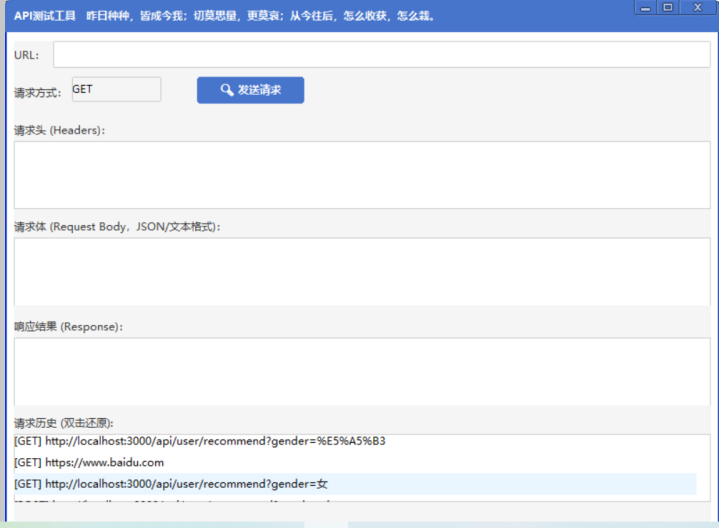
双击历史记录回显:
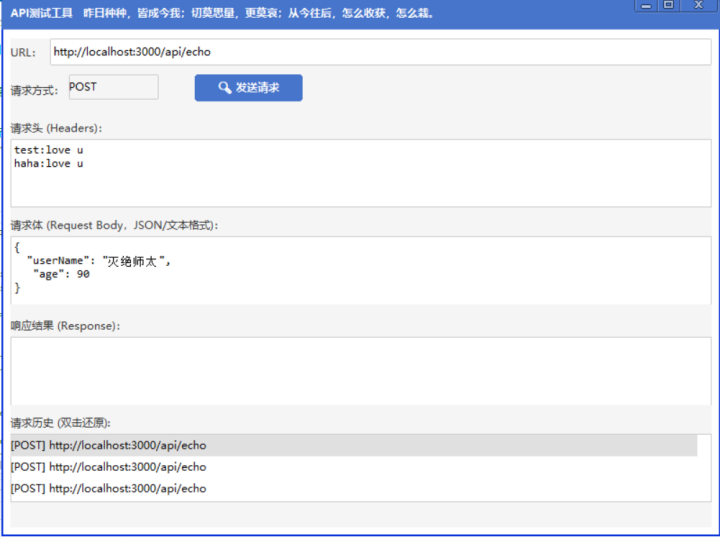
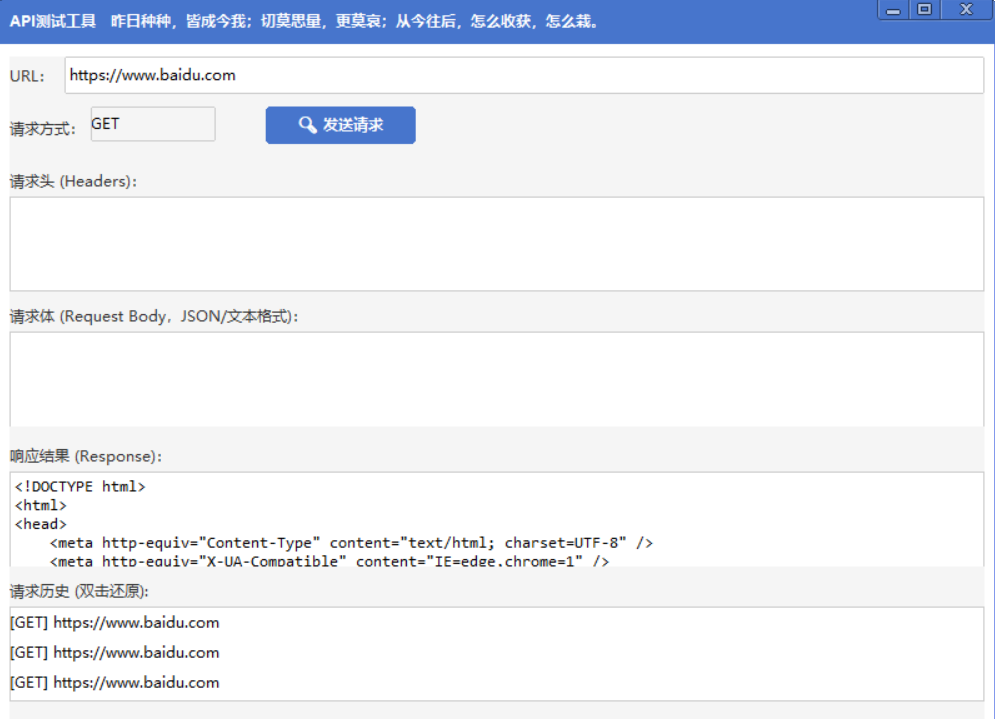
点击发送,会刷新历史记录,历史记录添加到第一条数据:
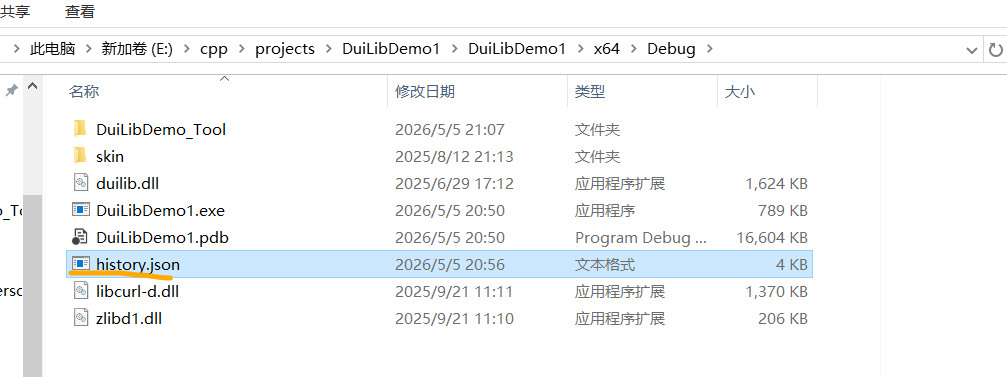
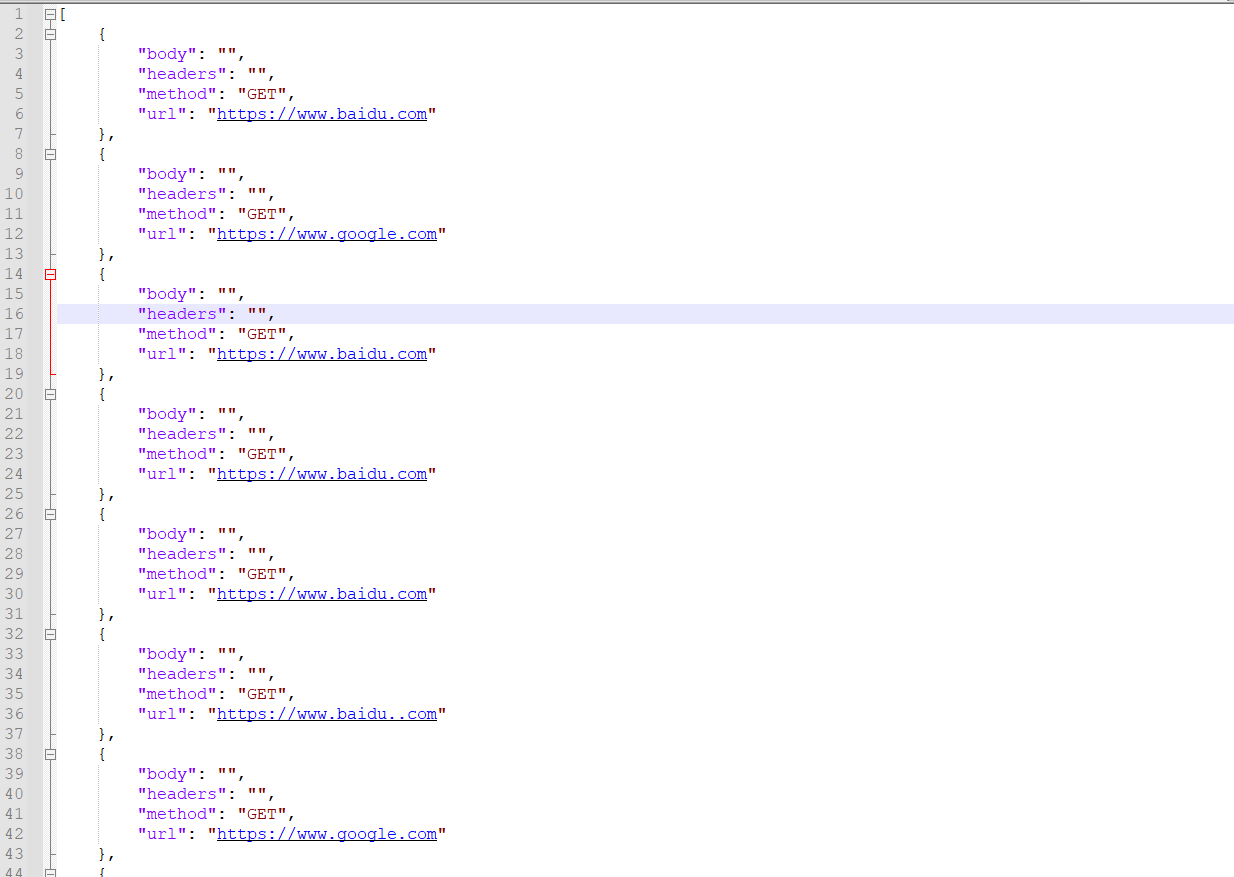
ok. 看下历史记录文件:
内容如下:
ok.