前言
首先先允许我叠个甲,这不是一篇抨击Tailwind CSS,而是我们最近团队因为Vide coding在做一些技术栈的迁移,针对我们已有的项目基础模版迁移遇到的问题所提出的疑问。
当然,或许是一些高阶能力还没能掌握,以至于解决不了我们现有的一个问题。
技术栈
我们公司用的技术栈是 react + styled-components,有些人很奇怪为什么不用 less 这些,后面的问题会解释到,请允许我徐徐道来。
问题
1. 复合选择器
从jQuery时代过来的老人,其实对Tailwind CSS这种原子化还是比较能接受的,毕竟那个时代有 Bootstrap 这类优秀的框架,然而受到时代的局限性,在布局还停留在圣杯,双飞翼那类的方式的时代,复合选择器无疑拯救了无数的样式实现难题
就像现在我们普通的间距:
css
.my-card {
    display: flex;
    flex-direction: column;
    gap: 16px;
}
我们使用弹性 gap 就能实现了,但是在无弹性布局时,我们更多的是使用兄弟选择器实现:
css
.my-card + .my-card {
    margin-top: 16px;
}
随着浏览器的迭代,虽然现在有更新的解决方式,但是一些场景中复合选择器依然是不错的选择。
在我们的项目模版中,有一处实现如下:
js
import styled from 'styled-components';

const Styled = styled.span`
  user-select: none;

  &.is-focus {
    .render {
      margin-bottom: 12px;

      & > * {
        margin-bottom: 0;
        outline: 2px solid #635bff;
      }
    }
  }
`;

const MyComp = (props) => {
    const { isSelected, children } = props;

    return (
        <Styled className={isSelected ? 'is-focus' : null}>
          <div className="render">{children}</div>
        </Styled>
    )
}
我们希望 MyComp 被选择中后,children 对应的元素有一个选中的边框效果,而针对这个场景,Tailwind CSS没有合适的解决方案,使用group或者peer的话必须使用cloneElement才能实现,但是这里我不想因为css框架的弊端而复杂化js本身的逻辑,这种思维本身是不对的,本身css和js之间的维护就应该尽可能做到不耦合,针对这样的场景似乎也只能通过创建css来实现,没法极致到由Tailwind CSS全盘控制。
2. 运行时框架
这个问题,不能说是Tailwind CSS框架的问题,应该是所有编译时框架的问题,有了解过两者区别的,应该知道编译时框架无法在应用运行时,动态注入,而是编译时生成静态文件,基于运行时动态注入这一特性,虽然会有损耗,但相应也带来更多的解决方式。
而我们的项目模版中,使用到了 lexical 这个库,而这个库初始化时,需要初始化元素的类名
js
import { LexicalComposer } from '@lexical/react/LexicalComposer';
import styled from 'styled-components';

const prefixCls = (key) => `rich-editor__${key}`;

const theme = {
  heading: {
    h1: prefixCls`heading-h1`,
    h2: prefixCls`heading-h2`,
    h3: prefixCls`heading-h3`,
  },
  paragraph: prefixCls`paragraph`,
  image: prefixCls`image`,
  video: prefixCls`video`,
}

const RichRender = styled.div`
  .${theme.heading.h1} {
    font-size: 24px;
    font-weight: 500;
  }
  .${theme.heading.h2} {
    font-size: 20px;
    font-weight: 500;
  }
  .${theme.heading.h3} {
    font-size: 18px;
  }
  .${theme.paragraph} {
    position: relative;
    margin: 0;
    margin-bottom: 12px;
    font-size: 16px;
    color: #667085;

    &:last-child {
      margin-bottom: 0;
    }
  }
  .${theme.image} {
    display: flex;
    justify-content: center;
    margin-bottom: 12px;
    overflow: hidden;
    cursor: default;
    border-radius: 8px;
  }
  .${theme.video} {
    position: relative;
    max-width: 100%;
    margin-bottom: 12px;
    overflow: hidden;
    font-size: 0;
    background: #000;
    border-radius: 8px;

    video {
      width: 100%;
      height: 56.25%;
    }
  }
`

const RichEditer = () => {
    const initialConfig = {
        namespace: 'RichEditer',
        editorState: '',
        nodes: [],
        theme,
    };

    return (
        <LexicalComposer initialConfig={initialConfig}>
            // 更多
        </LexicalComposer>
    );
}如代码所示,这个是一个富文本编辑器的组件,RichEditer是编辑器,组件初始化时通过注入theme的方式来自定义化各类元素渲染器的样式及类名,而其他页面展示区域只需要使用RichRender,通过后代选择器的方式,渲染编辑器输入的html就可以实现和编辑器一致的显示。 这里很明显,如果你需要修改某一元素渲染器的类名,甚至修改prefix,只需要修改theme 即可,无须修改其他地方,这里动态注入的好处无疑是降低维护成本,而这是编译时框架没法实现的,也是我们在迁移Tailwind CSS是没法解决的问题。
3. 跨平台小程序
我们项目中,除了web和h5外,也会有大量的小程序,所以对应也有小程序模版,为了减少团队复杂度和减少模版使用的心智负担,小程序沿用了类似的技术栈(小程序不允许使用运行时,所以styled-components 改用 Linaria)
Taro + React + Linaria当我们使用Tailwind CSS迁移该模版时,发现一个严重的问题,小程序中的类名并不支持转义符号,甚至许多特殊符号,例如
-
wxss中,转义符直接报错了

-
wxml中,像中括号这类,直接被空格替换了,导致原本
h-[300px]的类名,变成了h-和300px两个类名了
基于以上问题,我们通过插件的方式实现编译时替换的方式,来解决特殊符号的兼容问题
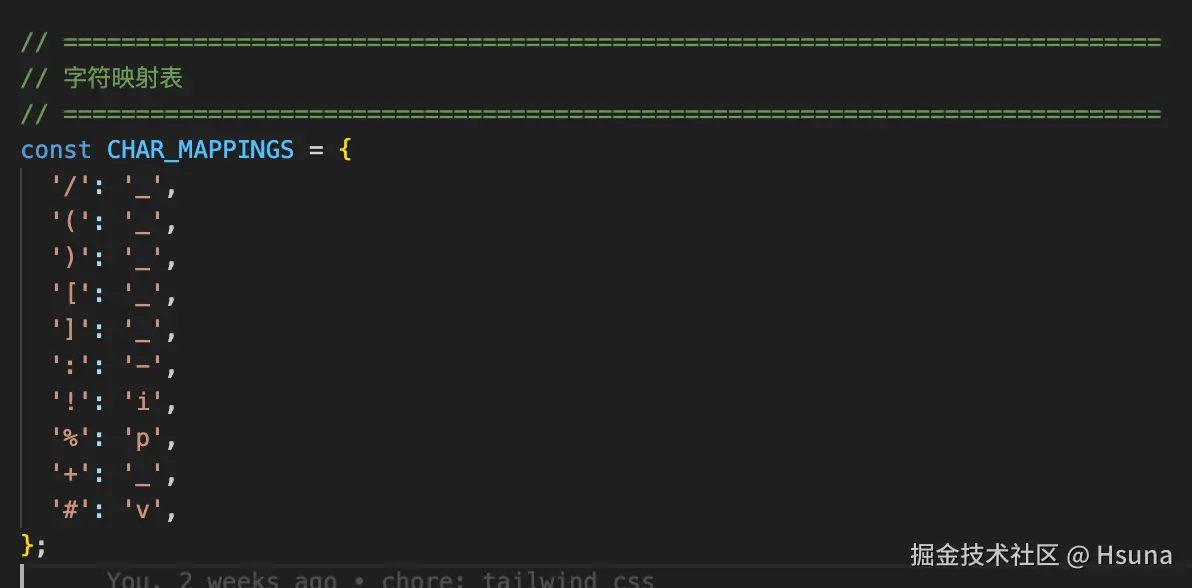
兼容后如下,确实解决了我们的样式问题
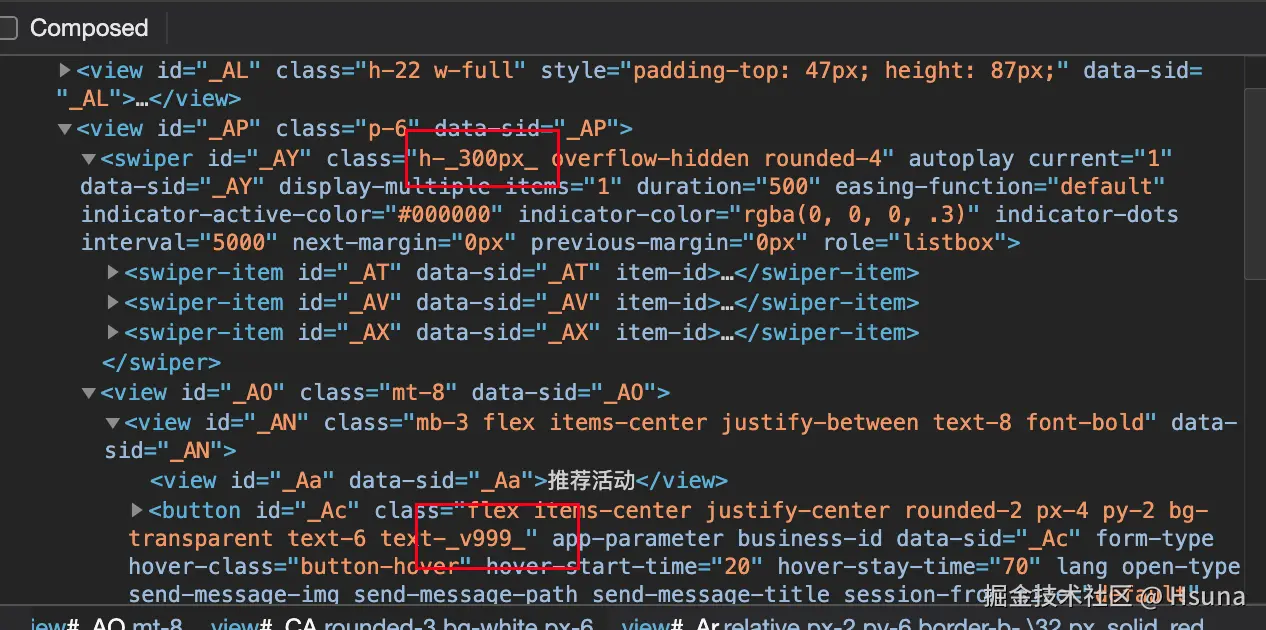
但是,静态的样式解决了,动态的样式依然没法解决,类似以下情况
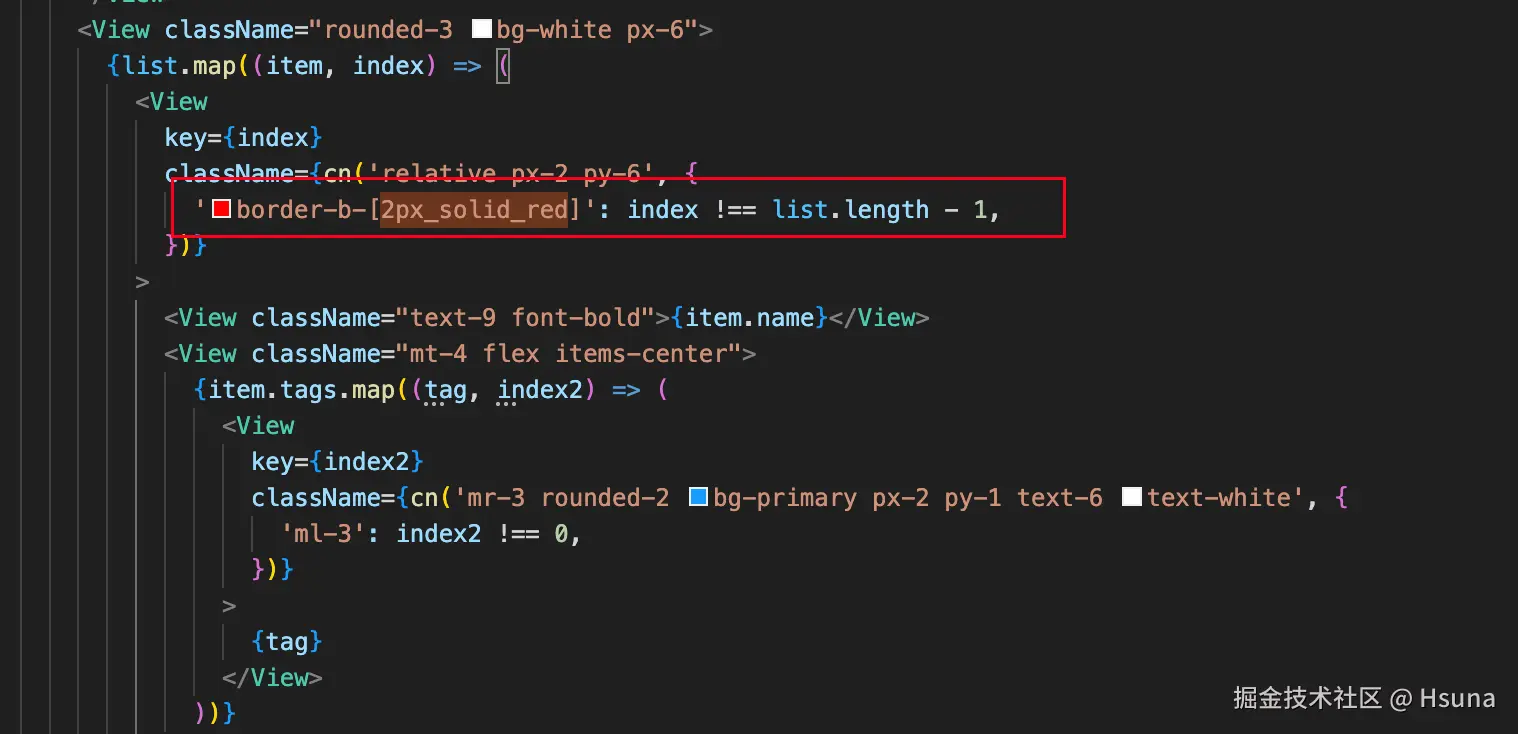
由于border-b-[2px_solid_red]是动态拼接的,插件只处理了StringLiteral的情况,如果还需要处理其他情况,复杂度很更高。
所以为了避免框架升级后带来的心智负担,最终我们还是在小程序层面,放弃了使用Tailwind CSS
最后
Tailwind CSS还是一个比较有意思的框架,特别layer的设计,但是有些地方依然无法比拟传统框架,不过随着Vide coding的冲击下,我想Tailwind CSS也会更加的完善。
最后,基于上面的一些问题,如果大家有其他的解决方案,也可以讨论下。