GPT-image-2 热门玩法实战(三):AI 手办/Action Figure --- 把自己变成盒装玩具
系列导读:本系列通过 Crazyrouter API 实战演示 GPT-image-2 的各种病毒式玩法。这一篇来玩 2025-2026 年社交媒体上最火的 AI 趋势之一 --- 把自己变成盒装 Action Figure 手办。
🔥 AI 手办为什么火遍全网?
从 2025 年 4 月开始,"AI Action Figure" 在 Twitter/X、Instagram、TikTok 上病毒式传播。每个人都在晒自己的"手办版本" --- 一个装在透明吸塑包装盒里的迷你人偶,配上个性化的配件和标签。
火爆原因:
- 极强的个人表达:你的职业、爱好、性格都浓缩在一个手办盒子里
- 社交货币:朋友看到都想做一个自己的版本
- GPT-image-2 的文字渲染能力:包装盒上的文字清晰可读,这是之前模型做不到的
- 高度可定制:程序员版、设计师版、厨师版、健身版......无限可能
🎨 效果展示
下面是通过 Crazyrouter API 调用 GPT-image-2 实际生成的 AI 开发者手办:
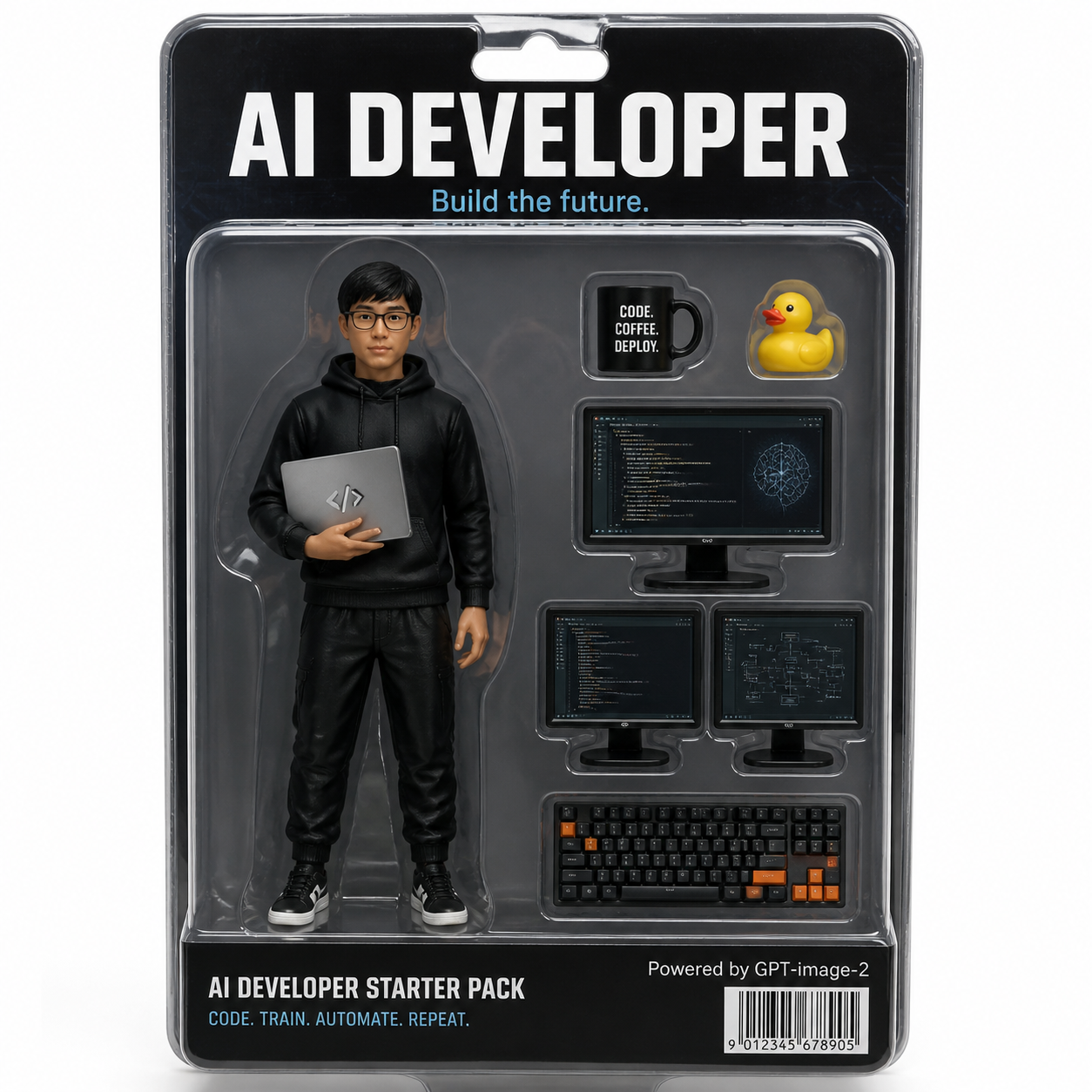
可以看到:
- 人偶本体:黑色连帽衫 + 眼镜,腋下夹着笔记本电脑
- 配件:咖啡杯("CODE COFFEE. DEPLOY.")、橡皮鸭(经典调试梗)、双显示器、机械键盘
- 包装文字:"AI DEVELOPER --- Build the future." 和 "CODE. TRAIN. AUTOMATE. REPEAT."
- 底部:条形码 + "Powered by GPT-image-2"
文字渲染非常清晰,这就是 GPT-image-2 的杀手级能力。
📝 完整代码
Python 版本
python
from openai import OpenAI

client = OpenAI(
    api_key="your-crazyrouter-api-key",
    base_url="https://crazyrouter.com/v1"
)

# 自定义你的手办 --- 修改这些变量
character_name = "AI DEVELOPER"
tagline = "Build the future."
outfit = "black hoodie, glasses, holding a laptop with code on screen"
accessories = [
    "a coffee mug with 'CODE COFFEE DEPLOY' text",
    "a yellow rubber duck (debugging companion)",
    "two monitors showing code editor and neural network diagrams",
    "a mechanical keyboard with orange accents"
]
bottom_text = "CODE. TRAIN. AUTOMATE. REPEAT."

# 构建 prompt
accessories_str = ", ".join(accessories)

prompt = f"""
A hyper-realistic product photo of a boxed action figure toy.
The figure is a young Asian male software engineer: {outfit}.

The box is clear plastic blister pack with cardboard backing.
Top of box reads: "{character_name}" in bold letters.
Subtitle: "{tagline}"

Accessories inside the box: {accessories_str}.

Bottom of box: "{bottom_text}"
Small text: "Powered by GPT-image-2"
Include a realistic barcode.

Studio lighting, white background, professional toy photography style.
The overall look should be indistinguishable from a real toy product photo.
"""

response = client.images.generate(
    model="gpt-image-2",
    prompt=prompt,
    size="1024x1024",
    n=1
)

print(f"手办图片:{response.data[0].url}")
curl 版本
bash
curl -X POST https://crazyrouter.com/v1/images/generations \
  -H "Content-Type: application/json" \
  -H "Authorization: Bearer your-crazyrouter-api-key" \
  -d '{
    "model": "gpt-image-2",
    "prompt": "A hyper-realistic product photo of a boxed action figure toy. The figure is a young software engineer wearing a black hoodie and glasses, holding a laptop. Clear plastic blister pack with cardboard backing. Top reads AI DEVELOPER - Build the future. Accessories: coffee mug, rubber duck, two monitors, mechanical keyboard. Bottom text: CODE. TRAIN. AUTOMATE. REPEAT. Powered by GPT-image-2. Barcode. Studio lighting, white background, toy photography.",
    "size": "1024x1024",
    "n": 1
  }'
💡 10 个热门手办 Prompt 模板
直接替换关键词就能用:
1. 产品经理版
Title: "PRODUCT MANAGER"
Outfit: business casual, holding a whiteboard marker
Accessories: sticky notes, Jira board, coffee, a roadmap scroll, laptop with Figma
Bottom: "SHIP IT. ITERATE. REPEAT."
2. 设计师版
Title: "UI/UX DESIGNER"
Outfit: turtleneck sweater, Apple Pencil behind ear
Accessories: iPad Pro, Pantone color fan, wireframe sketches, Figma sticker, AirPods Max
Bottom: "PIXEL PERFECT. ALWAYS."
3. 数据科学家版
Title: "DATA SCIENTIST"
Outfit: casual shirt, glasses, holding a Jupyter notebook
Accessories: GPU card, Python logo sticker, scatter plot chart, coffee, a small robot
Bottom: "TRAIN. VALIDATE. DEPLOY."
4. 创业者版
Title: "STARTUP FOUNDER"
Outfit: Patagonia vest over hoodie
Accessories: pitch deck, term sheet, ramen noodles, MacBook, a tiny unicorn figurine
Bottom: "MOVE FAST. BREAK THINGS."
5. 健身教练版
Title: "FITNESS COACH"
Outfit: tank top, athletic shorts, sneakers
Accessories: dumbbells, protein shaker, resistance bands, stopwatch, meal prep container
Bottom: "NO PAIN. NO GAIN."
6. 厨师版
Title: "MASTER CHEF"
Outfit: white chef coat, tall chef hat
Accessories: chef knife, cutting board, frying pan, spice rack, a plated dish
Bottom: "TASTE. SEASON. PERFECT."
7. 摄影师版
Title: "PHOTOGRAPHER"
Outfit: cargo vest, camera strap around neck
Accessories: DSLR camera, 3 lenses, tripod, SD card, drone
Bottom: "CAPTURE THE MOMENT."
8. 音乐人版
Title: "MUSIC PRODUCER"
Outfit: oversized hoodie, headphones around neck
Accessories: MIDI keyboard, studio monitors, vinyl record, microphone, DAW on laptop screen
Bottom: "DROP THE BEAT."
9. 老师版
Title: "TEACHER"
Outfit: cardigan, glasses, holding a book
Accessories: apple, chalk, globe, stack of papers to grade, gold star stickers
Bottom: "INSPIRE. EDUCATE. EMPOWER."
10. 猫奴版(娱乐)
Title: "CAT PARENT"
Outfit: cat-hair-covered sweater
Accessories: lint roller, cat treats, laser pointer, scratching post, a tiny cat figurine
Bottom: "OWNED BY CATS SINCE 2020."
🔧 高级技巧
提升真实感
- 加入 "studio lighting, soft shadows" 提升光影效果
- 指定 "product photography, 85mm lens, shallow depth of field"
- 加入 "slight plastic reflection on blister pack" 增加包装质感
文字清晰度
- GPT-image-2 的文字渲染已经很强,但保持文字简短效果最好
- 避免超过 10 个单词的长句
- 大写字母比小写更清晰
批量生成
python
# 批量生成不同职业的手办
professions = [
    ("AI DEVELOPER", "black hoodie, glasses, laptop"),
    ("DESIGNER", "turtleneck, Apple Pencil, iPad"),
    ("DATA SCIENTIST", "casual shirt, Jupyter notebook"),
]

for title, outfit in professions:
    response = client.images.generate(
        model="gpt-image-2",
        prompt=f"Hyper-realistic boxed action figure: {title}. Figure wearing {outfit}. Clear blister pack, cardboard backing, studio lighting, toy photography.",
        size="1024x1024",
        n=1
    )
    print(f"{title}: {response.data[0].url}")
💰 成本说明
- 单张手办图:约 $0.04-0.08(通过 Crazyrouter)
- 批量 10 张:不到 $1
- 做成付费小程序,每个用户成本极低,商业化潜力大
🔗 系列导航
- ✅ (一)AI 看手相
- ✅ (二)AI 面相 & 个人色彩分析
- 📍 (三)AI 手办/Action Figure(本篇)
- (四)吉卜力 & 漫画风格转换
- (五)AI 预测未来宝宝
- (六)AI Meme & 涂色书生成
🚀 试试 Crazyrouter:一个 API Key,600+ 模型,包括 GPT-image-2、GPT-5.5、Claude Opus 4.7、DeepSeek V4 等。