手写 Mini React:从 JSX 到虚拟 DOM 再到 render,搞懂 React 底层原理
引言:为什么要手写 React?
我日常写 React 组件很熟练:
jsx
function App() {
  return (
    <div style={{ background: 'salmon' }}>
      <h1>Hello React</h1>
      <h2>Hello Didact</h2>
    </div>
  );
}
但写完之后脑子里总有几个问题挥之不去:
- JSX 明明不是合法的 JavaScript,浏览器是怎么认识它的?
- 虚拟 DOM 到底长什么样?真的是个"对象树"吗?
render之后发生了什么,JSX 怎么变成了页面上的真实 DOM?
理解 React 底层原理,最好的方式就是手写一个 Mini React。
我们这个项目的名字叫 Didact (模仿 React 的命名),它只有两个核心 API:createElement 和 render。代码总共不到 70 行,却完整复现了「JSX → 虚拟 DOM → 真实 DOM」的全链路。
话不多说,开始写代码。
第一篇:JSX ------ 写在 JavaScript 里的 HTML
JSX 是语法糖,不是原生 JS
直接写 JSX 语法,浏览器是不认识的:
jsx
const element = <h1 className="greeting">Hello React</h1>;这段代码要在浏览器里跑,必须先编译。Babel 负责做这件事,它会把 JSX 标签转译成普通的函数调用。
实验:用 Babel 编译 JSX
在 jsx-babel-demo 目录下,我们做了最简单的实验。
.babelrc 只配置了一件事:
json
{
  "presets": ["@babel/preset-react"]
}
input.js 就一行 JSX:
jsx
const element = <h1 className="greeting">Hello React</h1>;用 Babel CLI 编译:
bash
npx babel input.js -o output.js编译后的 output.js 是这样的:
javascript
const element = React.createElement(
  "h1",
  { className: "greeting" },
  "Hello React"
);
真相大白 :JSX 标签被编译成了 React.createElement(type, props, ...children) 调用。
- 第一个参数
"h1"--- 标签名,对应type - 第二个参数
{ className: "greeting" }--- 属性对象,对应props - 第三个参数
"Hello React"--- 子节点,对应children
@babel/preset-react 默认调用 React.createElement,但我们可以通过 JSX Pragma 注释把它指向自己写的函数:
javascript
/** @jsx Didact.createElement */这样一来,Babel 编译 JSX 时就会调用 Didact.createElement 而不是 React.createElement,我们就成功替换掉了 React!
第二篇:createElement ------ 构建虚拟 DOM 树
什么是虚拟 DOM?
虚拟 DOM 本质上就是一个朴素的 JavaScript 对象,用来描述一个 DOM 节点:
javascript
{
  type: "div",           // 节点类型:标签名 / 组件函数 / TEXT_ELEMENT
  props: {
    style: "...",        // 属性
    children: [...]      // 子节点数组,每个子节点也是 VDOM 对象
  }
}
实现 createElement
看我们 Didact 的 createElement 源码:
javascript
function createElement(type, props, ...children) {
    return {
        type,
        props: {
            ...props,
            children: children.map(child =>
                typeof child === 'object'
                    ? child        // 已经是 VDOM 对象,直接保留
                    : createTextElement(child)  // 文本/数字 → 统一封装
            )
        }
    };
}
它做的事情非常简单:
- 接收
type、props和任意个...children - 遍历 children :区分两种子节点
typeof child === 'object'→ 已经是子 element(VDOM 对象),原样放入数组- 否则是文本或数字 → 调用
createTextElement统一封装
- 返回一个朴素的 JavaScript 对象 ------ 这就是虚拟 DOM
文本节点的统一封装:createTextElement
javascript
function createTextElement(text) {
    return {
        type: 'TEXT_ELEMENT',
        props: {
            nodeValue: text,
            children: []
        }
    };
}
文本节点 "Hello React" 变成了:
javascript
{
  type: "TEXT_ELEMENT",
  props: {
    nodeValue: "Hello React",
    children: []
  }
}
为什么文本要单独封装? 统一数据结构 ------ render 函数只需要处理一种协议:{ type, props },不需要区分字符串和对象。这是一种经典的「适配器」设计。
从 JSX 到 VDOM 树 ------ 完整流程
下面这段 JSX:
jsx
/** @jsx Didact.createElement */
const element = (
    <div style="background:salmon">
        <h1>Hello React</h1>
        <h2 style="text-align:right">Hello Didact</h2>
    </div>
);
Babel 编译后 → JavaScript 执行 → 最终产出的 VDOM 树:
less
{
  type: "div",
  props: {
    style: "background:salmon",
    children: [
      {
        type: "h1",
        props: {
          children: [
            { type: "TEXT_ELEMENT", props: { nodeValue: "Hello React", children: [] } }
          ]
        }
      },
      {
        type: "h2",
        props: {
          style: "text-align:right",
          children: [
            { type: "TEXT_ELEMENT", props: { nodeValue: "Hello Didact", children: [] } }
          ]
        }
      }
    ]
  }
}
你写的 JSX 越复杂,这个对象嵌套就越深 ------ 但结构始终是清晰的递归树。
这就是虚拟 DOM 的魅力:用一个 JS 对象树,完完整整地描述了整个 UI 结构。它不依赖浏览器,可以在任何 JavaScript 运行时中创建和操作。
第三篇:render ------ 把虚拟 DOM 变成真实 DOM
有了 VDOM 树,下一步就是把它渲染到浏览器页面上。
实现 render
javascript
function render(element, container) {
    // 1. 根据 type 创建真实 DOM 节点
    const dom =
        element.type === 'TEXT_ELEMENT'
            ? document.createTextNode('')
            : document.createElement(element.type);

    // 2. 把 props 中非 children 的属性挂载到 DOM 节点
    const isProperty = key => key !== 'children';
    Object.keys(element.props)
        .filter(isProperty)
        .forEach(name => {
            dom[name] = element.props[name];
        });

    // 3. 递归渲染所有子节点
    element.props.children.forEach(child => render(child, dom));

    // 4. 挂载到父容器
    container.appendChild(dom);
}
render 函数四步走,每一步都对应一个清晰的动作:
| 步骤 | 动作 | 关键细节 |
|---|---|---|
| 1 | 创建 DOM 节点 | 根据 type 判断:TEXT_ELEMENT → createTextNode,否则 → createElement |
| 2 | 挂载属性 | 过滤掉 children,把 style、className 等直接赋值到 DOM 上 |
| 3 | 递归子节点 | 对每个 child 调用 render(child, dom),深度优先遍历整棵 VDOM 树 |
| 4 | 挂载到容器 | container.appendChild(dom) 把根节点插入页面 |
为什么过滤 children?
children 不是 DOM 属性,而是 VDOM 子节点数组。如果不过滤它,dom['children'] = [...] 会导致 DOM 属性污染甚至报错。
isProperty 这个工具函数虽然只有一行,但体现了关注点分离:props 里既有 DOM 属性(style、className),也有 VDOM 结构数据(children),渲染时必须区分对待。
挂载到页面
index.html 非常简单:
html
<div id="root"></div>在 index.js 中执行渲染:
javascript
const container = document.getElementById('root');
Didact.render(element, container);
执行后,页面上的 <div id="root"> 就变成了完整的 DOM 结构:
html
<div id="root">
  <div style="background:salmon">
    <h1>Hello React</h1>
    <h2 style="text-align:right">Hello Didact</h2>
  </div>
</div>
到此为止,Didact 就完成了 React 最核心的两步:描述 UI(createElement) → 渲染 UI(render)。
第四篇:Didact 命名空间与 JSX Pragma
把 createElement 和 render 挂在一个命名空间对象下:
javascript
const Didact = {
    createElement,   // 创建虚拟 DOM
    render,          // 渲染虚拟 DOM 到真实 DOM
};
然后在文件顶部声明 JSX Pragma:
javascript
/** @jsxRuntime classic */
/** @jsx Didact.createElement */
@jsxRuntime classic--- 告诉 Babel 使用经典 JSX 转换(编译成函数调用,而不是新版的jsx()自动注入)@jsx Didact.createElement--- 告诉 Babel JSX 标签编译后调用Didact.createElement而不是React.createElement
这就是替换 React 的关键两步:
- 自己写一个
createElement替代 React 的 - 自己写一个
render替代 ReactDOM 的
你也可以把 Pragma 指向任何对象,只要它有一个叫 createElement 的方法即可。如果你把函数名改成 h,那 @jsx Didact.h 就能让 VDOM 对象变成 h("div", null) ------ 和 Vue 的 render 函数写法如出一辙。
项目结构
整个项目包含两个子项目:
ruby
source_code/build_own_react/
├── readme.md              # 学习笔记:React 底层概念梳理
├── didact-demo/           # ★ Mini React 运行时
│   ├── public/index.html  # 宿主 HTML,<div id="root">
│   ├── src/index.js       # Didact 核心代码 + JSX 示例
│   └── package.json       # 依赖 react-scripts(提供 Babel 编译)
├── jsx-babel-demo/        # ★ JSX 编译实验
│   ├── input.js           # 一行 JSX 待编译
│   ├── .babelrc           # @babel/preset-react
│   └── package.json       # @babel/cli + @babel/core + preset
运行方式:
bash
# 1. JSX 编译实验:看 JSX → createElement 的转换
cd jsx-babel-demo
pnpm install
npx babel input.js -o output.js

# 2. Mini React 运行时:浏览器中渲染 VDOM
cd didact-demo
pnpm install
pnpm start    # 打开浏览器看效果
运行结果
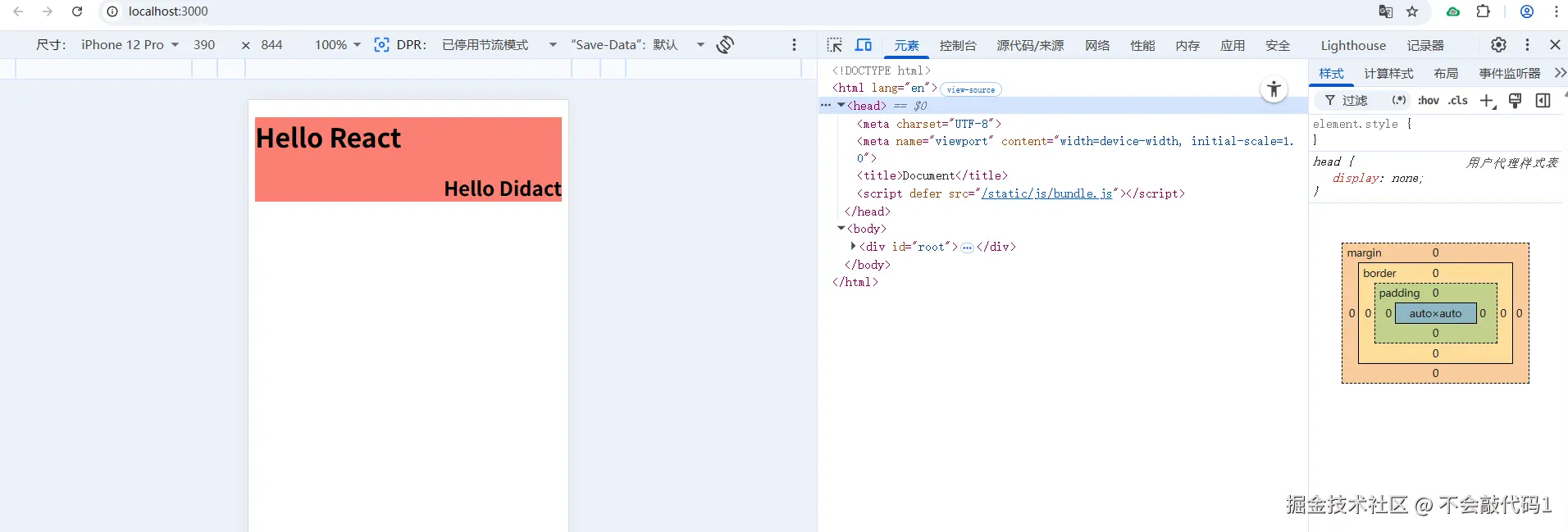
核心知识点总结
1. 虚拟 DOM 的本质
VDOM 就是一个描述 UI 结构的普通 JavaScript 对象:
css
{ type, props: { ...attributes, children: [...] } }它有三个优点:
- 轻量:纯对象无浏览器开销,创建销毁都很快
- 跨平台:不依赖 DOM API,同一棵 VDOM 树可以渲染到浏览器 / Native / Canvas
- 可 diff :可以用
===对比两棵 VDOM 树,找到最小变更(React 的调和算法)
2. 递归渲染的特点与局限
当前 render 是深度优先递归,处理完一个节点及其所有子孙后才处理下一个兄弟节点。
局限:如果 VDOM 树很大,一次递归就会长时间占用主线程,导致页面卡顿。
这就是为什么 React 16 引入了 Fiber 架构 ------ 把递归渲染拆成可中断的增量单元,浏览器可以在任务间隙插队处理用户交互。
3. 文本节点统一处理
createTextElement 把 "Hello" 变成 { type: 'TEXT_ELEMENT', props: { nodeValue: "Hello", children: [] } },让文本节点和元素节点共享同一套协议。render 函数不需要 if (typeof element === 'string') 这样的类型判断分支。
4. Didact 体现了什么
Didact 虽然不到 70 行代码,但它保留了 React 设计哲学的骨架:
| React 概念 | Didact 中的实现 |
|---|---|
| JSX → createElement | Babel + @jsx Didact.createElement |
| 虚拟 DOM | createElement 函数返回的对象 |
| ReactDOM.render | render 函数 |
| 文本节点特殊处理 | createTextElement |
| 命名空间 | const Didact = { ... } |
延伸思考:从 Didact 到真正的 React
写完 Didact,你可以顺着这几个方向继续深入 React 源码:
1. Fiber 架构:可中断的增量渲染
当前 render 是同步递归,Fiber 把渲染拆成一个个"工作单元",用 requestIdleCallback 在浏览器空闲时分片执行。这让 React 可以随时暂停渲染去响应用户输入。
2. 调和(Reconciliation):最小化 DOM 更新
Didact 每次 render 都全量重建 DOM。真实 React 会对比新旧两棵 VDOM 树(diff),只更新变化的部分。这个 diff 算法就叫 Reconciliation。
3. Hooks:函数组件的状态与副作用
Didact 只支持 JSX 元素,不支持组件函数。加上 useState、useEffect 就构成了函数组件的运行时 ------ 核心是一个全局的 fiber 指针 + 链表存储 hooks。
4. 批量更新与合成事件
React 18 的 createRoot 把多个 setState 合并成一次渲染。合成事件层抹平了浏览器差异。
写在最后
手写 Mini React 不是为了替代 React,而是为了亲手验证那些你用过无数次的 API 背后到底发生了什么。
当你看到 const element = <h1>Hello</h1> 这行代码时,脑子里能浮现出 Babel 编译 → createElement 调用 → VDOM 对象 → render 递归挂载的整条链路,那这篇文章的目的就达到了。
项目开源点击进入仓库,欢迎 clone 下来跑一跑,感受 VDOM 从 0 到 1 的过程