cypht很好用,各个邮箱都能通过imap添加到cypht中,不过网易系的163和126邮箱却有些问题,能获取到邮件数量,却查询不到邮件列表,这是因为网易系邮箱的IMAP强制要求请求需要卸载IMAP ID参数,目前我用的cypht/cypht:2.8.0,依旧是无法获取邮件列表,所以只能自己手动修改一下,只需要改动一个文件就行容器内路径为/usr/local/share/cypht/modules/imap/hm-imap.php
建议把文件从容器中拷贝出来,在本地修改再覆盖回去,因为文件太大不好找位置,而且一般这个文件都没有进行持久化,容器重建之后内容会还原,所以在本地留一份,需要时直接覆盖回去
-
拷贝文件到宿主机
shelldocker cp cypht:/usr/local/share/cypht/modules/imap/hm-imap.php /home/ -
使用ssh工具直接双击编辑(我这里用的electerm)
或者用vim打开
hm-imap.php输入
/parse_extensions_from_capability()找到parse_extensions_from_capability()这一行,回车跳转到该行然后输入
i,进入输入模式,在该行下插入以下内容php// ========== 终极版 163/126 修复:无脑伪装 Foxmail ========== if (!isset($this->sent_imap_id)) { $id_command = "ID (\"name\" \"Foxmail\" \"version\" \"7.2.17.86\" \"vendor\" \"Tencent\" \"support-email\" \"foxmail@tencent.com\")\r\n"; $this->send_command($id_command); $id_response =$this->get_response(); $this->debug['NETEASE_ID'] =$id_response; // 记录到调试数组 $this->sent_imap_id = true; } // =========================================================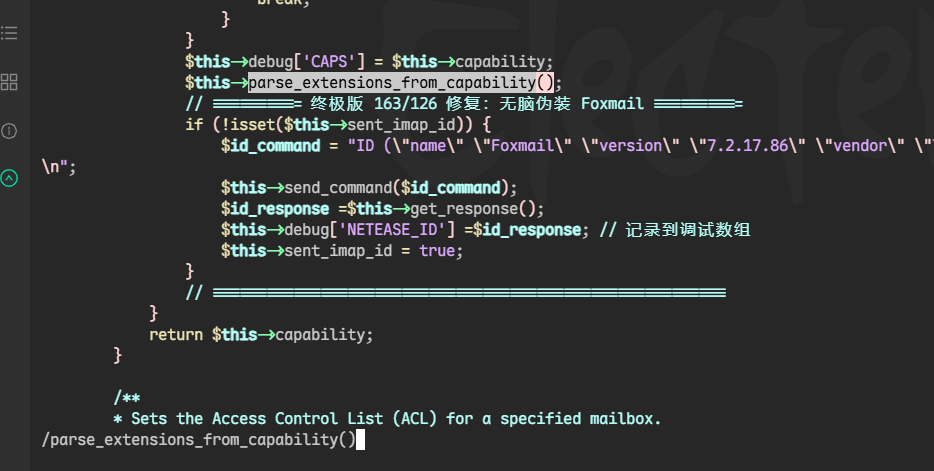
之后按
esc退出输入模式,输入:进入末行模式,然后输入wq,回车,就保存好了 -
覆盖回容器
shelldocker cp /home/cypht/hm-imap.php cypht:/usr/local/share/cypht/modules/imap/ -
重启容器
shelldocker compose restart