概述
官网,HKUDS开源(GitHub,42.1K Star,7.4K Fork)纳米级Clawdbot(OpenClaw),复刻Clawdbot几乎所有的核心智能体功能,但代码量只有4000行。
注:NanoBot除HKUDS在开源维护外,还有一个NanoBot-AI,GitHub,1.3K Star,191 Fork,是一个MCP Agents 构建工具。
去掉一切学术装饰和工程冗余后,剩下最小可用Agent内核,保留一个成熟智能体必须具备的能力闭环:
- 网页搜索
- 文件/代码操作
- 定时任务
- 记忆机制
- 多场景Agent模板
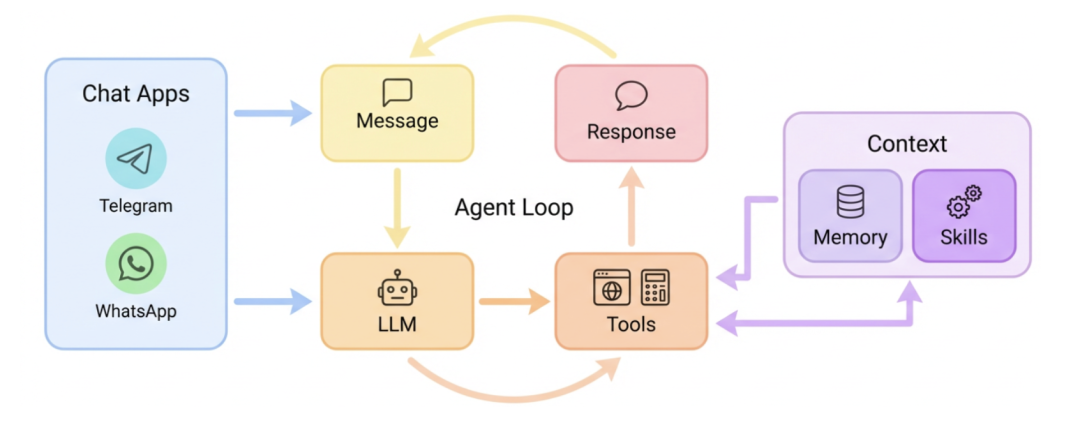
特点:
- 超轻型:仅约4k行代码,比OpenClaw小99%;
- 研究就绪:代码易于理解、修改和扩展以进行研究;
- 闪电般的快速:最小的占用空间意味着更快的启动、更低的资源使用和更快的迭代;
- 易于使用:一键安装。
核心价值在于可掌控性,与极低的学习成本。
内置四个模版:
- 24h实时行情分析师
- 全栈开发助手:随时随地执行开发任务;
- 私人日程管理:可安排会议,发送提醒;
- 个人知识库:把PDF、笔记丢给它,随时问答。
斜杠命令
| 命令 | 功能 |
|---|---|
/help |
显示帮助信息 |
/ping |
测试机器人响应 |
/skills |
列出可用技能 |
/model |
切换AI模型 |
/clear |
清除会话历史 |
围绕Nanobot的生态扩展项目汇总
| 项目 | 描述 |
|---|---|
| nanobot-custom | 个人AI助手,支持MiniMax、Gemini多模型切换 |
| nanobot-webui | Web管理面板 |
| nanobot-desktop | Tauri+React桌面端 |
| NanoBot.net | C#移植版,<2000行核心代码 |
| nanobot-ts | TypeScript版本 |
| NanoBot-Android | Android移植版,专为移动设备优化 |
| awesome-nanobot | 精选资源、工具、Skills集合 |
Agent-Loop
相关文件
nanobot/agent/loop.py:主实现nanobot/agent/context.py:上下文构建nanobot/agent/tools/registry.py:工具注册和执行nanobot/session/manager.py:会话管理
AgentLoop是NanoBot的核心引擎,负责消息处理的完整生命周期。
架构
┌────────────────────────────────┐
│           AgentLoop            │
├────────────────────────────────┤
│  - MessageBus (消息总线)        │
│  - LLMProvider (LLM 提供商)     │
│  - ContextBuilder (上下文构建器) │
│  - SessionManager (会话管理器)   │
│  - ToolRegistry (工具注册表)     │
│  - SubagentManager (子代理管理器)│
│  - MemoryStore (记忆存储)       │
└────────────────────────────────┘
              │
              ▼
        ┌─────────────┐
        │  MessageBus │
        │  (inbound)  │
        └──────┬──────┘
               │
               ▼
        ┌─────────────┐
        │  _dispatch  │ ◄── 处理锁,串行执行
        │  (msg)      │
        └──────┬──────┘
               │
               ▼
        ┌─────────────┐
        │_process_msg  │
        └──────┬──────┘
               │
         ┌─────┴───┐
         │         │
    Slash命令	普通消息
					│
              		▼
          ┌─────────────┐
          │_run_agent_  │ ◄── 核心循环
          │    loop     │
          └─────────────┘
核心方法
1. __init__
初始化,源码如下:
py
def __init__(
    self,
    bus: MessageBus,
    provider: LLMProvider,
    workspace: Path,
    model: str | None = None,
    max_iterations: int = 40, # 最大工具调用次数
    temperature: float = 0.1,
    max_tokens: int = 4096,
    memory_window: int = 100, # 会话历史窗口大小
    reasoning_effort: str | None = None, # Claude推理模式
    brave_api_key: str | None = None, # Web搜索API
    web_proxy: str | None = None,
    exec_config: ExecToolConfig | None = None,
    cron_service: CronService | None = None,
    restrict_to_workspace: bool = False, # 限制工具在工作目录
    session_manager: SessionManager | None = None,
    mcp_servers: dict | None = None, # MCP服务器配置
    channels_config: ChannelsConfig | None = None,
)初始化时会调用_register_default_tools()注册默认工具。
2. run()
主循环:
py
async def run(self) -> None:
    """运行 Agent 循环,将消息作为任务分发以保持对 /stop 的响应。"""
    self._running = True
    await self._connect_mcp()
    while self._running:
        try:
            msg = await asyncio.wait_for(self.bus.consume_inbound(), timeout=1.0)
        except asyncio.TimeoutError:
            continue
        if msg.content.strip().lower() == "/stop":
            await self._handle_stop(msg)
        else:
            task = asyncio.create_task(self._dispatch(msg))
            self._active_tasks.setdefault(msg.session_key, []).append(task)
关键设计:
- 使用
wait_for(timeout=1.0)实现可中断的阻塞 - 每条消息创建独立任务,支持并发处理
/stop特殊处理,立即取消该会话的所有任务
3. _dispatch()
消息分发:
py
async def _dispatch(self, msg: InboundMessage) -> None:
    """在全局锁下处理消息。"""
    async with self._processing_lock:
        try:
            response = await self._process_message(msg)
            if response is not None:
                await self.bus.publish_outbound(response)
        except asyncio.CancelledError:
            raise
        except Exception:
            logger.exception("Error processing message")
            await self.bus.publish_outbound(OutboundMessage(...))
全局锁用途:
- 防止并发修改会话状态
- 确保工具执行的原子性
- 避免竞态条件
4. _process_message()
消息处理,核心处理逻辑,处理三种消息类型:
- 系统消息
py
if msg.channel == "system":
    # 从 chat_id 解析 origin (格式: "channel:chat_id")
    channel, chat_id = msg.chat_id.split(":", 1)
    session = self.sessions.get_or_create(key)
    history = session.get_history(max_messages=self.memory_window)
    messages = self.context.build_messages(history, msg.content, ...)
    final_content, _, all_msgs = await self._run_agent_loop(messages)
self._save_turn(session, all_msgs, ...)- Slash命令
py
cmd = msg.content.strip().lower()
if cmd == "/new":
    # 触发记忆整合,清空会话
    await self._consolidate_memory(session, archive_all=True)
    session.clear()
    return OutboundMessage(content="New session started.")
if cmd == "/help":
return OutboundMessage(content="命令帮助...")- 普通消息
py
# 检查是否需要记忆整合
unconsolidated = len(session.messages) - session.last_consolidated
if unconsolidated >= self.memory_window:
    await self._consolidate_memory(session)

# 设置工具上下文(channel, chat_id)
self._set_tool_context(msg.channel, msg.chat_id, msg_id)
# 获取历史,构建消息
history = session.get_history(max_messages=self.memory_window)
initial_messages = self.context.build_messages(history, msg.content, ...)
# 运行 Agent 循环
final_content, _, all_msgs = awaitself._run_agent_loop(
    initial_messages,
    on_progress=on_progress or _bus_progress,
)
# 保存会话
self._save_turn(session, all_msgs, 1 + len(history))
self.sessions.save(session)
5. _run_agent_loop()
Agent迭代循环,最核心的方法,实现与LLM的交互循环:
py
async def_run_agent_loop(
    self,
    initial_messages: list[dict],
    on_progress: Callable[..., Awaitable[None]] | None = None,
) -> tuple[str | None, list[str], list[dict]]:
    """
    运行 Agent 迭代循环
    返回: (最终回复内容, 使用的工具列表, 完整消息列表)
    """
    messages = initial_messages
    iteration = 0
    tools_used: list[str] = []

    while iteration < self.max_iterations:
        iteration += 1
        # 调用 LLM
        response = awaitself.provider.chat(
            messages=messages,
            tools=self.tools.get_definitions(),  # 获取所有工具定义
            model=self.model,
            temperature=self.temperature,
            ...
        )
        if response.has_tool_calls:
            # 有工具调用
            if on_progress:
                await on_progress(self._tool_hint(response.tool_calls), tool_hint=True)

            # 添加assistant消息(包含tool_calls)
            messages = self.context.add_assistant_message(
                messages, response.content, tool_call_dicts,
                reasoning_content=response.reasoning_content,
            )
            # 执行每个工具调用
            for tool_call in response.tool_calls:
                tools_used.append(tool_call.name)
                result = awaitself.tools.execute(tool_call.name, tool_call.arguments)
                messages = self.context.add_tool_result(
                    messages, tool_call.id, tool_call.name, result
                )
        else:
            # 无工具调用,返回结果
            clean = self._strip_think(response.content)
            messages = self.context.add_assistant_message(messages, clean, ...)
            return clean, tools_used, messages
    # 达到最大迭代次数
    return f"Reached max iterations ({self.max_iterations})...", tools_used, messages
流程说明:
- 循环条件:最多
max_iterations次(默认40) - LLM调用:每次循环调用
provider.chat(),传入当前消息列表和工具定义 - 工具执行:如果LLM返回
tool_calls,依次执行每个工具 - 消息构建:每次工具执行后,将结果作为
tool角色消息添加 - 完成条件:LLM不再返回工具调用时结束
工具调用处理
工具注册:
py
def _register_default_tools(self) -> None:
    allowed_dir = self.workspace ifself.restrict_to_workspace elseNone
    # 文件工具
    for cls in (ReadFileTool, WriteFileTool, EditFileTool, ListDirTool):
        self.tools.register(cls(workspace=self.workspace, allowed_dir=allowed_dir))
    # 其他工具
    self.tools.register(ExecTool(...))
    self.tools.register(WebSearchTool(api_key=self.brave_api_key))
    self.tools.register(WebFetchTool())
    self.tools.register(MessageTool(send_callback=self.bus.publish_outbound))
    self.tools.register(SpawnTool(manager=self.subagents))
    if self.cron_service:
        self.tools.register(CronTool(self.cron_service))
工具执行由 ToolRegistry.execute() 处理:
py
async def execute(self, name: str, params: dict[str, Any]) -> str:
    tool = self._tools.get(name)
    if not tool:
        returnf"Error: Tool '{name}' not found."
    try:
        # 参数类型转换
        params = tool.cast_params(params)
        # 参数验证
        errors = tool.validate_params(params)
        if errors:
            return f"Error: Invalid parameters..."
        # 执行工具
        result = await tool.execute(params)
        return result
    except Exception as e:
        return f"Error executing {name}: {str(e)}"
会话管理
会话数据结构
py
@dataclass
class Session:
    key: str # "channel:chat_id"
    messages: list[dict] # 消息列表
    created_at: datetime
    updated_at: datetime
    metadata: dict
    last_consolidated: int # 已整合的消息数量
保存对话轮次
py
def _save_turn(self, session: Session, messages: list[dict], skip: int) -> None:
    """保存新轮次的消息到会话。"""
    for m in messages[skip:]:
        entry = dict(m)
        # 跳过空的 assistant 消息
        if role == "assistant"andnot content andnot entry.get("tool_calls"):
            continue
        # 截断过长的工具结果
        if role == "tool"andlen(content) > self._TOOL_RESULT_MAX_CHARS:
            entry["content"] = content[:self._TOOL_RESULT_MAX_CHARS] + "\n... (truncated)"
        # 去除运行时上下文前缀
        if role == "user":
            if content.startswith(ContextBuilder._RUNTIME_CONTEXT_TAG):
                parts = content.split("\n\n", 1)
                iflen(parts) > 1:
                    entry["content"] = parts[1]
        entry.setdefault("timestamp", datetime.now().isoformat())
        session.messages.append(entry)
MCP服务器连接
py
async def _connect_mcp(self) -> None:
    """连接到配置的 MCP 服务器(惰性初始化)。"""
    if self._mcp_connected or self._mcp_connecting or not self._mcp_servers:
        return

    self._mcp_connecting = True
    from nanobot.agent.tools.mcp import connect_mcp_servers

    try:
        self._mcp_stack = AsyncExitStack()
        await self._mcp_stack.__aenter__()
        await connect_mcp_servers(self._mcp_servers, self.tools, self._mcp_stack)
        self._mcp_connected = True
    except Exception as e:
        logger.error("Failed to connect MCP servers: {}", e)
进度回调
支持流式输出执行进度:
py
async def _bus_progress(content: str, *, tool_hint: bool = False) -> None:
    meta = dict(msg.metadata or {})
    meta["_progress"] = True
    meta["_tool_hint"] = tool_hint
    await self.bus.publish_outbound(OutboundMessage(
        channel=msg.channel, chat_id=msg.chat_id, content=content, metadata=meta,
    ))
子代理
通过SpawnTool支持启动子代理处理并行任务:
py
self.tools.register(SpawnTool(manager=self.subagents))子代理共享相同LLM配置,但拥有独立的会话和工具集。
最佳实践
调试Agent循环
- 启用日志:设置
LOG_LEVEL=DEBUG查看详细日志 - 检查消息列表:在
_run_agent_loop中打印messages - 验证工具定义:确保工具schema正确,LLM能正确调用
扩展Agent能力
- 添加新工具:继承
Tool基类,实现execute()方法 - 自定义提示词:在工作目录创建
AGENTS.md覆盖默认行为 - 调整迭代次数:复杂任务可能需要增加
max_iterations
实战
安装:
pip install nanobot-ai- 源码
bash
git clone https://github.com/HKUDS/nanobot.git
cd nanobot
pip install -e .
nanobot onboard
nanobot gateway
配置模型:
json
{
  "providers": {
    "openrouter": {
      "apiKey": "sk-or-v1-xxx"
    }
  },
  "agents": {
    "defaults": {
      "model": "anthropic/claude-opus-4-5"
    }
  },
  "webSearch": {
    "apiKey": "BSA-xxx"
  }
}
示例:
bash
python main.py --adapter qq
python main.py --config config.yaml
skills /nanobot skills list
# 加载
skill /nanobot skill enable weather
nanobot agent -m "What is 2+2?"
自定义Skills:
py
from nanobot.plugin import Plugin
class MySkill(Plugin):
	name = "my_skill"
	description = "自定义技能"
	async def handle(self, message, context):
	# 处理消息
	return await self.reply("自定义回复!")

# 注册技能
plugin = MySkill()