【内存测试】06-WPF 读取 SMBIOS 实现内存规格自动检测
系列:《WPF 产线功能测试实战》第六篇
关键词 :WPFC#SMBIOSP/Invoke内存检测产线测试.NET FrameworkWindows API硬件信息读取DIMM
一、前言与应用场景
在产线测试中,内存(RAM)的规格验证是不可或缺的一环。一台出厂设备的内存大小是否符合订单规格(8GB/16GB/32GB)?内存频率是否达到设计标准(4800MHz/5600MHz)?每个 DIMM 插槽是否都能被系统识别?这些问题如果靠人工目测,既费时又容易出错。
本文介绍如何在 WPF 中通过 Windows SMBIOS 固件接口自动读取内存规格,并与预设的配置参数进行对比,实现全自动的内存规格验证。Demo 中用本地 JSON 文件替代生产线 MES 系统,任何人都可以直接跑起来调试。
二、基础概念科普
什么是 SMBIOS?
SMBIOS(System Management BIOS)是 BIOS 向操作系统暴露硬件信息的标准接口,由 DMTF 组织制定。你可以把它理解成一张"硬件出生证明"------主板上的 BIOS 在系统启动时,把 CPU、内存、主板、硬盘等硬件的规格信息写入一块内存区域,操作系统和应用程序可以随时来读取。
Windows 提供了 GetSystemFirmwareTable 这个 API,让普通应用程序也能读到这块数据。在 C# 中,通过 P/Invoke(让托管代码调用 Windows 原生 C API 的桥梁机制)来调用它。
Type 17:内存设备信息结构
SMBIOS 数据由若干个"结构"组成,每种结构有固定的类型编号(Type)。Type 17 = Memory Device,就是我们需要的内存信息,每个 DIMM 插槽对应一条 Type 17 记录,哪怕该槽是空的也会有一条。
Type 17 中与我们相关的字段:
| 字段偏移 | 字段名 | 说明 |
|---|---|---|
0Ch |
Size | 内存大小,值 < 32768 时单位为 MB,位 15=1 时单位为 KB |
15h |
Speed | 内存速度(MHz),0xFFFF 表示未知 |
10h |
DeviceLocator | 插槽名称的字符串索引(如 "ChannelA-DIMM0") |
内存大小字段的位运算小技巧
SMBIOS Type 17 的 Size 字段是一个 ushort(2字节无符号整数),其中最高位(bit 15)决定单位:
bit15 = 0 → 低15位 = 内存大小(MB)
bit15 = 1 → 低15位 = 内存大小(KB),需 & 0x7FFF 清除高位
这种节省字节的设计是上世纪 BIOS 规范的遗产,用一个字段同时表达单位和数值。
为什么用本地 JSON 替代 MES?
生产线工具通常从 MES(制造执行系统)获取当前产品应有的内存规格,这样可以自动适配不同 SKU。但在 Demo 和开发调试阶段,不需要依赖 MES 服务器,因此改用一个 JSON 配置文件,让开发者自行填写期望的内存大小和频率,方便本地调试和演示。
三、方案设计与架构
测试流程
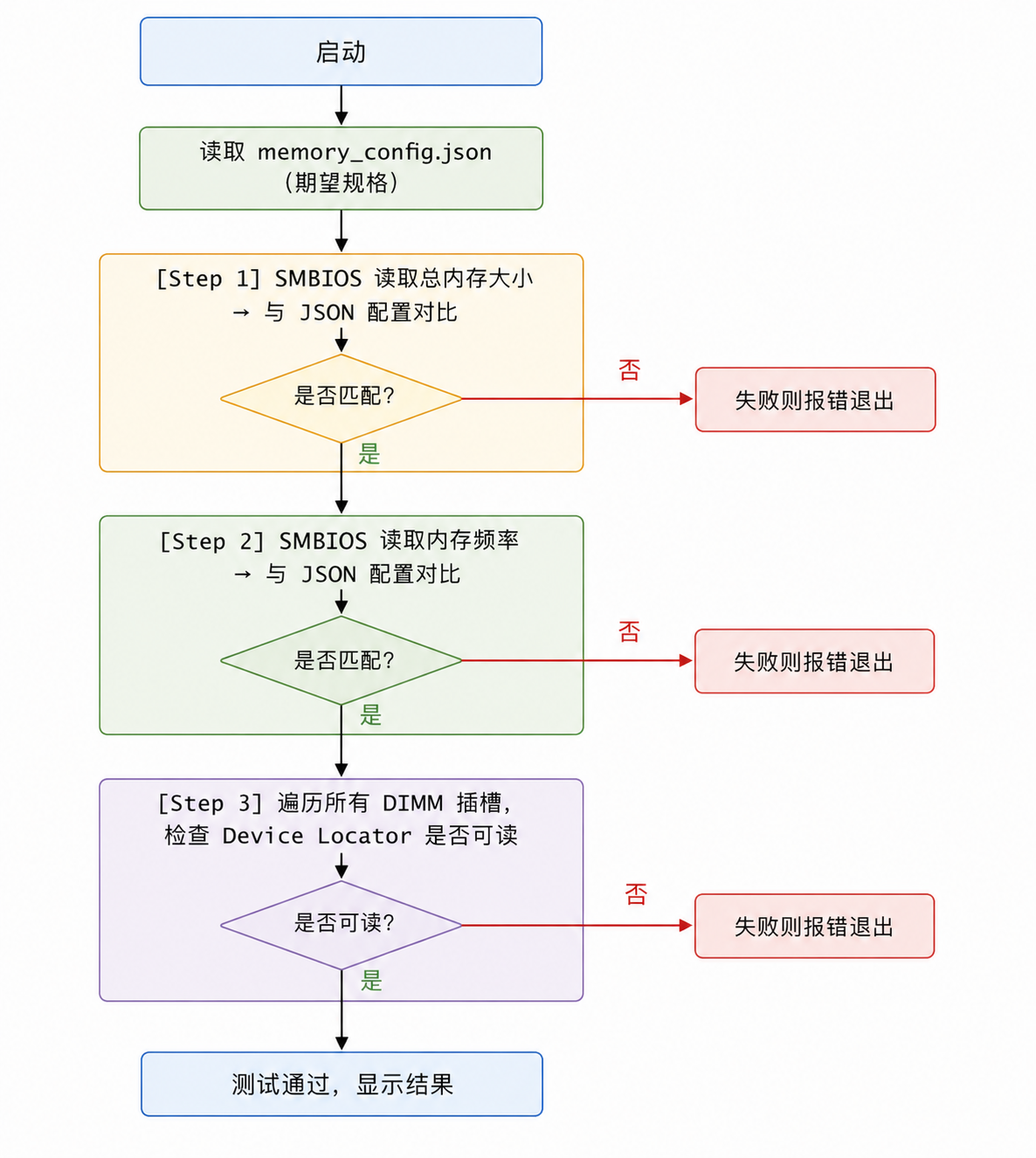
MVVM 职责分层
| 层 | 文件 | 职责 |
|---|---|---|
| View | MainWindow.xaml |
显示测试状态和结果,按钮触发 |
| ViewModel | MainVM.cs |
编排三步测试,更新绑定属性 |
| 工具类 | SmbiosReader.cs |
封装 P/Invoke,解析 Type 17 |
| 配置 | MemoryConfig.cs |
读写本地 JSON 配置文件 |
核心依赖
本 Demo 只需 Newtonsoft.Json(NuGet 安装)用于解析配置文件,不依赖任何其他第三方库。SMBIOS 读取完全通过 Windows 原生 API 实现。
四、核心代码详解
4.1 P/Invoke 声明与 SMBIOS 数据结构
csharp
// GetSystemFirmwareTable:向 Windows 请求固件表数据
// FirmwareTableProviderSignature = 0x52534D42 对应 ASCII "RSMB"
[DllImport("kernel32.dll", SetLastError = true)]
private static extern uint GetSystemFirmwareTable(
    uint FirmwareTableProviderSignature,
    uint FirmwareTableID,
    IntPtr pFirmwareTableBuffer,
    uint BufferSize);

// SMBIOS 数据块的头部(固定5字节)
[StructLayout(LayoutKind.Sequential, Pack = 1)]
private struct RawSMBIOSData
{
    public byte Used20CallingMethod;
    public byte SMBIOSMajorVersion;
    public byte SMBIOSMinorVersion;
    public byte DmiRevision;
    public uint Length;             // 后续 SMBIOS 表的字节长度
}

// Type 17 Memory Device 结构(精简,只映射到我们需要的字段)
[StructLayout(LayoutKind.Sequential, Pack = 1)]
private struct MemoryDeviceInfo
{
    public byte Type;               // 固定为 17
    public byte Length;             // 本结构的格式化区域长度
    public ushort Handle;
    public ushort PhysicalArrayHandle;
    public ushort ErrorInfoHandle;
    public ushort TotalWidth;
    public ushort DataWidth;
    public ushort Size;             // 0Ch:内存大小,见位运算说明
    public byte FormFactor;
    public byte DeviceSet;
    public byte DeviceLocator;      // 10h:插槽名称字符串的索引
    public byte BankLocator;
    public byte MemoryType;
    public ushort TypeDetail;
    public ushort Speed;            // 15h:内存频率(MHz)
}
Pack = 1 告诉运行时按 1 字节对齐,与 SMBIOS 规范一致,不能省略,否则字段偏移会错位。
4.2 获取内存大小(累加所有插槽)
csharp
public double GetTotalMemorySizeGB()
{
    const uint RSMB = 0x52534D42;
    uint bufferSize = GetSystemFirmwareTable(RSMB, 0, IntPtr.Zero, 0); // 先查大小
    if (bufferSize == 0) return 0;

    IntPtr buffer = Marshal.AllocHGlobal((int)bufferSize);
    try
    {
        GetSystemFirmwareTable(RSMB, 0, buffer, bufferSize);

        RawSMBIOSData header = Marshal.PtrToStructure<RawSMBIOSData>(buffer);
        IntPtr current = IntPtr.Add(buffer, Marshal.SizeOf<RawSMBIOSData>());
        IntPtr end = IntPtr.Add(current, (int)header.Length);

        double totalGB = 0;
        while (current.ToInt64() < end.ToInt64())
        {
            var info = Marshal.PtrToStructure<MemoryDeviceInfo>(current);
            if (info.Type == 17 && info.Size != 0 && info.Size != 0xFFFF)
            {
                // bit15=0 → MB;bit15=1 → KB(低15位才是数值)
                double mb = (info.Size < 32768)
                    ? info.Size
                    : (info.Size & 0x7FFF) / 1024.0;
                totalGB += mb / 1024.0;
            }
            current = SkipToNext(current, end, info.Length);
            if (current == IntPtr.Zero) break;
        }
        return Math.Round(totalGB, 0); // 四舍五入到整数 GB
    }
    finally { Marshal.FreeHGlobal(buffer); }
}
为什么要累加? 一台 16GB 内存的机器可能由两条 8GB 组成(双通道),SMBIOS 里会有两条 Type 17 记录,必须全部加起来才是总量。
4.3 获取内存频率
频率的读取逻辑比大小简单------取第一个有效的 Type 17 记录的 Speed 字段即可(同一台机器的内存条通常频率相同):
csharp
public double GetMemorySpeedMHz()
{
    // ... 同上,获取 buffer 并解析头部 ...
    while (current.ToInt64() < end.ToInt64())
    {
        var info = Marshal.PtrToStructure<MemoryDeviceInfo>(current);
        if (info.Type == 17 && info.Speed != 0 && info.Speed != 0xFFFF)
            return info.Speed; // 直接返回第一个有效值(MHz)
        current = SkipToNext(current, end, info.Length);
        if (current == IntPtr.Zero) break;
    }
    return 0;
}
4.4 遍历 DIMM 插槽,读取 Device Locator 字符串
为什么要测这一项?
前两步(大小 + 频率)验证的是内存的总量规格 ,但它们存在一个盲区:只要总量对上,单个插槽出问题不会被发现。
举个真实场景:一台设计为双通道 16GB 的笔记本(两个槽各插 8GB),如果其中一个槽的焊接虚焊或接触不良,BIOS 可能仍然能凑出 16GB 的总量(有时会 fallback 到单槽),但内存控制器其实只认出了一个槽。这种情况下,大小测试通过,性能却只有单通道,出厂后用户会明显感受到内存带宽不足。
Device Locator 是 BIOS 在初始化时为每个已识别插槽写入的物理位置标签(例如 ChannelA-DIMM0、ChannelB-DIMM0)。BIOS 能写出完整的 Device Locator,意味着该槽完成了初始化握手------内存颗粒被控制器正确识别,SPD 信息(内存条自带的参数 EEPROM)也被成功读取。若某个槽的 Device Locator 为空或不可读,则说明该槽在 BIOS POST 阶段就出了问题,属于硬件级故障。
简而言之:大小 + 频率 验证规格是否符合订单,Device Locator 验证每个物理插槽是否被硬件层面真正识别------两者缺一不可,覆盖的失效模式不同。
Type 17 的 DeviceLocator 字段存的是一个字符串索引 ,不是字符串本身。真正的字符串在结构的格式化区域之后,按 index 顺序排列,以 \0 分隔,整个字符串段以双 \0 结束:
csharp
private string GetSMBIOSString(IntPtr structPtr, byte structLength, byte index)
{
    if (index == 0) return string.Empty;
    IntPtr strPtr = IntPtr.Add(structPtr, structLength); // 跳过格式化区域
    int cur = 1;
    while (Marshal.ReadByte(strPtr) != 0) // 未到双'\0'结尾
    {
        if (cur == index) return ReadNullTermString(strPtr);
        while (Marshal.ReadByte(strPtr) != 0) strPtr = IntPtr.Add(strPtr, 1);
        strPtr = IntPtr.Add(strPtr, 1); // 跳过当前字符串的'\0'
        cur++;
    }
    return string.Empty;
}
4.5 跳转到下一个 SMBIOS 结构
每个 SMBIOS 结构由"格式化区域(固定长度)+ 字符串区域(变长)"组成,遍历时需要同时跳过这两部分:
csharp
private IntPtr SkipToNext(IntPtr ptr, IntPtr end, byte structLength)
{
    ptr = IntPtr.Add(ptr, structLength); // 跳过格式化区域
    // 跳过字符串区域,直到出现连续两个 '\0'
    while (ptr.ToInt64() < end.ToInt64() - 1)
    {
        if (Marshal.ReadByte(ptr) == 0 && Marshal.ReadByte(IntPtr.Add(ptr, 1)) == 0)
            return IntPtr.Add(ptr, 2);
        ptr = IntPtr.Add(ptr, 1);
    }
    return IntPtr.Zero;
}
五、完整可运行 Demo
Demo 项目结构
MemoryTestDemo/
├── App.xaml
├── MainWindow.xaml          ← 测试结果 UI
├── MainWindow.xaml.cs       ← 代码后置(DataContext 绑定)
├── MainVM.cs                ← 测试主逻辑(ViewModel)
├── SmbiosReader.cs          ← SMBIOS 封装工具类
├── MemoryConfig.cs          ← JSON 配置文件读写
└── memory_config.json       ← 用户可编辑的期望规格(自动生成)
NuGet 依赖 :Newtonsoft.Json(Install-Package Newtonsoft.Json)
memory_config.json(首次运行自动生成,可手动修改)
json
{
  "ExpectedMemorySizeGB": 16,
  "ExpectedMemorySpeedMHz": 4800
}
修改 ExpectedMemorySizeGB 和 ExpectedMemorySpeedMHz 两个值即可适配不同机型规格。
MemoryConfig.cs
csharp
using System.IO;
using System.Text;
using Newtonsoft.Json;

namespace MemoryTestDemo
{
    public class MemoryConfig
    {
        public double ExpectedMemorySizeGB { get; set; } = 16;
        public double ExpectedMemorySpeedMHz { get; set; } = 4800;

        private static readonly string ConfigPath =
            Path.Combine(AppDomain.CurrentDomain.BaseDirectory, "memory_config.json");

        public static MemoryConfig Load()
        {
            if (!File.Exists(ConfigPath))
            {
                var def = new MemoryConfig();
                def.Save(); // 首次运行:写出默认配置供用户参考
                return def;
            }
            string json = File.ReadAllText(ConfigPath, Encoding.UTF8);
            return JsonConvert.DeserializeObject<MemoryConfig>(json) ?? new MemoryConfig();
        }

        public void Save()
        {
            string json = JsonConvert.SerializeObject(this, Formatting.Indented);
            File.WriteAllText(ConfigPath, json, Encoding.UTF8);
        }
    }
}
SmbiosReader.cs
csharp
using System;
using System.Collections.Generic;
using System.Runtime.InteropServices;
using System.Text;

namespace MemoryTestDemo
{
    public class SmbiosReader
    {
        [DllImport("kernel32.dll", SetLastError = true)]
        private static extern uint GetSystemFirmwareTable(
            uint FirmwareTableProviderSignature, uint FirmwareTableID,
            IntPtr pFirmwareTableBuffer, uint BufferSize);

        [StructLayout(LayoutKind.Sequential, Pack = 1)]
        private struct RawSMBIOSData
        {
            public byte Used20CallingMethod, SMBIOSMajorVersion, SMBIOSMinorVersion, DmiRevision;
            public uint Length;
        }

        [StructLayout(LayoutKind.Sequential, Pack = 1)]
        private struct MemoryDeviceInfo
        {
            public byte Type, Length;
            public ushort Handle, PhysicalArrayHandle, ErrorInfoHandle,
                          TotalWidth, DataWidth, Size;
            public byte FormFactor, DeviceSet, DeviceLocator, BankLocator, MemoryType;
            public ushort TypeDetail, Speed;
        }

        private const uint RSMB = 0x52534D42;

        private IntPtr _buffer;
        private IntPtr _tableStart;
        private IntPtr _tableEnd;

        public bool Init()
        {
            uint size = GetSystemFirmwareTable(RSMB, 0, IntPtr.Zero, 0);
            if (size == 0) return false;
            _buffer = Marshal.AllocHGlobal((int)size);
            GetSystemFirmwareTable(RSMB, 0, _buffer, size);
            var hdr = Marshal.PtrToStructure<RawSMBIOSData>(_buffer);
            _tableStart = IntPtr.Add(_buffer, Marshal.SizeOf<RawSMBIOSData>());
            _tableEnd = IntPtr.Add(_tableStart, (int)hdr.Length);
            return true;
        }

        public void Free() { if (_buffer != IntPtr.Zero) Marshal.FreeHGlobal(_buffer); }

        public double GetTotalMemorySizeGB()
        {
            double total = 0;
            ForEachType17(info =>
            {
                if (info.Size == 0 || info.Size == 0xFFFF) return;
                double mb = (info.Size < 32768) ? info.Size : (info.Size & 0x7FFF) / 1024.0;
                total += mb / 1024.0;
            });
            return Math.Round(total, 0);
        }

        public double GetMemorySpeedMHz()
        {
            double speed = 0;
            ForEachType17(info =>
            {
                if (speed > 0) return; // 只取第一个有效值
                if (info.Speed != 0 && info.Speed != 0xFFFF) speed = info.Speed;
            });
            return speed;
        }

        public Dictionary<int, string> GetDimmDeviceLocators()
        {
            var result = new Dictionary<int, string>();
            int idx = 0;
            IntPtr current = _tableStart;
            while (current.ToInt64() < _tableEnd.ToInt64())
            {
                byte type = Marshal.ReadByte(current);
                byte len = Marshal.ReadByte(IntPtr.Add(current, 1));
                if (type == 17)
                {
                    var info = Marshal.PtrToStructure<MemoryDeviceInfo>(current);
                    string loc = GetSMBIOSString(current, len, info.DeviceLocator);
                    result[++idx] = loc;
                }
                current = SkipToNext(current, _tableEnd, len);
                if (current == IntPtr.Zero) break;
            }
            return result;
        }

        private void ForEachType17(Action<MemoryDeviceInfo> action)
        {
            IntPtr current = _tableStart;
            while (current.ToInt64() < _tableEnd.ToInt64())
            {
                byte type = Marshal.ReadByte(current);
                byte len = Marshal.ReadByte(IntPtr.Add(current, 1));
                if (type == 17) action(Marshal.PtrToStructure<MemoryDeviceInfo>(current));
                current = SkipToNext(current, _tableEnd, len);
                if (current == IntPtr.Zero) break;
            }
        }

        private IntPtr SkipToNext(IntPtr ptr, IntPtr end, byte structLength)
        {
            ptr = IntPtr.Add(ptr, structLength);
            while (ptr.ToInt64() < end.ToInt64() - 1)
            {
                if (Marshal.ReadByte(ptr) == 0 && Marshal.ReadByte(IntPtr.Add(ptr, 1)) == 0)
                    return IntPtr.Add(ptr, 2);
                ptr = IntPtr.Add(ptr, 1);
            }
            return IntPtr.Zero;
        }

        private string GetSMBIOSString(IntPtr structPtr, byte structLength, byte index)
        {
            if (index == 0) return string.Empty;
            IntPtr p = IntPtr.Add(structPtr, structLength);
            int cur = 1;
            while (Marshal.ReadByte(p) != 0)
            {
                if (cur == index) return ReadNullTermStr(p);
                while (Marshal.ReadByte(p) != 0) p = IntPtr.Add(p, 1);
                p = IntPtr.Add(p, 1);
                cur++;
            }
            return string.Empty;
        }

        private string ReadNullTermStr(IntPtr ptr)
        {
            int len = 0;
            while (Marshal.ReadByte(ptr, len) != 0) len++;
            if (len == 0) return string.Empty;
            byte[] bytes = new byte[len];
            Marshal.Copy(ptr, bytes, 0, len);
            return Encoding.ASCII.GetString(bytes);
        }
    }
}
MainVM.cs
csharp
using System.Collections.ObjectModel;
using System.ComponentModel;
using System.Runtime.CompilerServices;
using System.Text;
using System.Windows.Media;

namespace MemoryTestDemo
{
    public class MainVM : INotifyPropertyChanged
    {
        private string _statusText = "点击"开始测试"";
        private Brush _statusColor = Brushes.Gray;
        private string _logText = string.Empty;

        public string StatusText { get => _statusText; set { _statusText = value; OnChanged(); } }
        public Brush StatusColor { get => _statusColor; set { _statusColor = value; OnChanged(); } }
        public string LogText { get => _logText; set { _logText = value; OnChanged(); } }

        private readonly SmbiosReader _reader = new SmbiosReader();
        private readonly StringBuilder _log = new StringBuilder();

        public async Task StartTestAsync()
        {
            _log.Clear();
            LogText = string.Empty;

            if (!_reader.Init())
            {
                SetStatus("无法读取 SMBIOS 数据", Brushes.Red);
                return;
            }

            try
            {
                // 加载本地 JSON 配置(期望规格)
                MemoryConfig config = MemoryConfig.Load();
                Log($"期望内存大小:{config.ExpectedMemorySizeGB} GB");
                Log($"期望内存频率:{config.ExpectedMemorySpeedMHz} MHz");
                Log("---");

                // Step 1:内存大小检测
                SetStatus("正在检测内存大小...", Brushes.Yellow);
                double actualSize = _reader.GetTotalMemorySizeGB();
                Log($"SMBIOS 读取内存大小:{actualSize} GB");
                if (actualSize <= 0) { SetStatus("无法从 SMBIOS 读取内存大小", Brushes.Red); return; }
                if (actualSize != config.ExpectedMemorySizeGB)
                {
                    SetStatus($"内存大小不符!期望 {config.ExpectedMemorySizeGB}GB,实际 {actualSize}GB", Brushes.Red);
                    return;
                }
                Log("✔ 内存大小检测通过");

                // Step 2:内存频率检测
                SetStatus("正在检测内存频率...", Brushes.Yellow);
                double actualSpeed = _reader.GetMemorySpeedMHz();
                Log($"SMBIOS 读取内存频率:{actualSpeed} MHz");
                if (actualSpeed <= 0) { SetStatus("无法从 SMBIOS 读取内存频率", Brushes.Red); return; }
                if (actualSpeed != config.ExpectedMemorySpeedMHz)
                {
                    SetStatus($"内存频率不符!期望 {config.ExpectedMemorySpeedMHz}MHz,实际 {actualSpeed}MHz", Brushes.Red);
                    return;
                }
                Log("✔ 内存频率检测通过");

                // Step 3:DIMM 插槽 Device Locator 检测
                SetStatus("正在检测 DIMM 插槽...", Brushes.Yellow);
                var slots = _reader.GetDimmDeviceLocators();
                if (slots.Count == 0) { SetStatus("未检测到任何内存插槽信息", Brushes.Red); return; }
                bool allValid = true;
                foreach (var kv in slots)
                {
                    if (string.IsNullOrWhiteSpace(kv.Value))
                    {
                        Log($"插槽 {kv.Key}:Device Locator 读取失败");
                        allValid = false;
                    }
                    else
                    {
                        Log($"插槽 {kv.Key}:{kv.Value}");
                    }
                }
                if (!allValid) { SetStatus("部分插槽 Device Locator 无法读取", Brushes.Red); return; }
                Log("✔ 所有 DIMM 插槽检测通过");

                SetStatus($"全部通过!内存 {actualSize}GB @ {actualSpeed}MHz", Brushes.YellowGreen);
            }
            finally
            {
                _reader.Free();
            }
        }

        private void SetStatus(string text, Brush color)
        {
            StatusText = text;
            StatusColor = color;
            Log(text);
        }

        private void Log(string msg)
        {
            _log.AppendLine(msg);
            LogText = _log.ToString();
        }

        public event PropertyChangedEventHandler PropertyChanged;
        private void OnChanged([CallerMemberName] string name = "") =>
            PropertyChanged?.Invoke(this, new PropertyChangedEventArgs(name));
    }
}
MainWindow.xaml
xml
<Window x:Class="MemoryTestDemo.MainWindow"
        xmlns="http://schemas.microsoft.com/winfx/2006/xaml/presentation"
        xmlns:x="http://schemas.microsoft.com/winfx/2006/xaml"
        Title="内存规格检测 Demo" Height="420" Width="520"
        Background="#1E1E2E">
    <Grid Margin="20">
        <Grid.RowDefinitions>
            <RowDefinition Height="Auto"/>
            <RowDefinition Height="Auto"/>
            <RowDefinition Height="*"/>
            <RowDefinition Height="Auto"/>
        </Grid.RowDefinitions>

        <!-- 测试状态 -->
        <TextBlock Grid.Row="0" Text="{Binding StatusText}"
                   Foreground="{Binding StatusColor}"
                   FontSize="18" FontWeight="Bold"
                   TextWrapping="Wrap" Margin="0,0,0,12"/>

        <!-- 提示:JSON 配置路径 -->
        <TextBlock Grid.Row="1"
                   Text="📄 期望规格配置文件:memory_config.json(与 exe 同目录,可手动编辑)"
                   Foreground="#888" FontSize="11" Margin="0,0,0,8"/>

        <!-- 日志输出 -->
        <ScrollViewer Grid.Row="2" VerticalScrollBarVisibility="Auto">
            <TextBox Text="{Binding LogText, Mode=OneWay}"
                     Background="#12121C" Foreground="#CDD6F4"
                     FontFamily="Consolas" FontSize="12"
                     IsReadOnly="True" TextWrapping="Wrap"
                     BorderThickness="0"/>
        </ScrollViewer>

        <!-- 开始按钮 -->
        <Button Grid.Row="3" Content="开始测试" Margin="0,12,0,0"
                Height="36" FontSize="14"
                Background="#89B4FA" Foreground="#1E1E2E"
                BorderThickness="0"
                Click="StartButton_Click"/>
    </Grid>
</Window>
MainWindow.xaml.cs
csharp
using System.Windows;

namespace MemoryTestDemo
{
    public partial class MainWindow : Window
    {
        private readonly MainVM _vm = new MainVM();

        public MainWindow()
        {
            InitializeComponent();
            DataContext = _vm;
        }

        private async void StartButton_Click(object sender, RoutedEventArgs e)
        {
            await _vm.StartTestAsync();
        }
    }
}
运行效果说明
-
首次运行 :程序在 exe 同目录自动生成
memory_config.json,默认值为 16GB / 4800MHz -
修改配置 :用记事本打开
memory_config.json,将数值改为你机器的实际规格 -
点击"开始测试":程序依次检测大小 → 频率 → 插槽,全部通过显示绿色,任一不符显示红色并说明原因
-
典型输出(通过):
期望内存大小:16 GB
期望内存频率:4800 MHzSMBIOS 读取内存大小:16 GB
✔ 内存大小检测通过
SMBIOS 读取内存频率:4800 MHz
✔ 内存频率检测通过
插槽 1:ChannelA-DIMM0
✔ 所有 DIMM 插槽检测通过
全部通过!内存 16GB @ 4800MHz
六、总结与扩展
本文核心要点
- SMBIOS 是读取硬件规格的最可靠途径,无需额外安装驱动,通过
GetSystemFirmwareTableP/Invoke 调用 - Type 17 中
Size字段的单位由 bit15 决定,0xFFFF表示未知------解析时必须处理这两种边界情况 - Device Locator 字段存的是字符串索引而非字符串本身,需要从结构末尾的字符串区域按索引逐个读取
- 本地 JSON 配置 替代 MES 让 Demo 完全独立可运行,同时也可以作为离线测试场景的解决方案
可以扩展的方向
- 内存类型识别 :解析 Type 17 的
MemoryType字段(0x1A = DDR5,0x18 = DDR4),加入类型校验 - 制造商/SN 读取 :解析
Manufacturer、SerialNumber字符串字段,用于追溯物料来源 - WMI 方案对比 :
Win32_PhysicalMemory也能获取类似信息,但 SMBIOS 直读更底层、速度更快 - 多 SKU 支持:JSON 配置扩展为数组,工具启动时让用户选择当前机型对应的配置项
如有问题欢迎评论区交流。觉得有用的话点个赞和关注下,系列会持续更新 😃