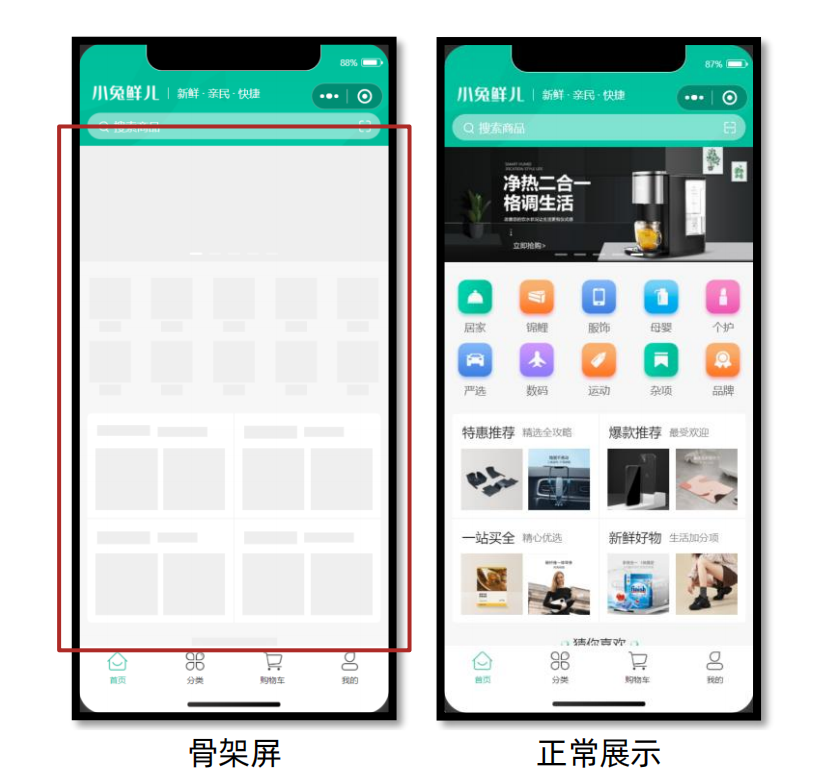
1、生成骨架屏代码
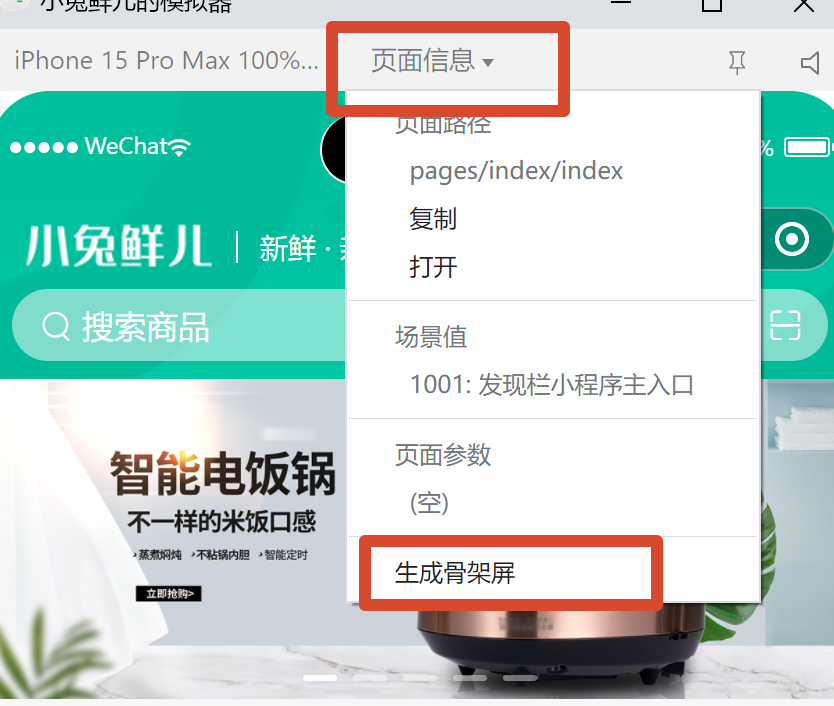
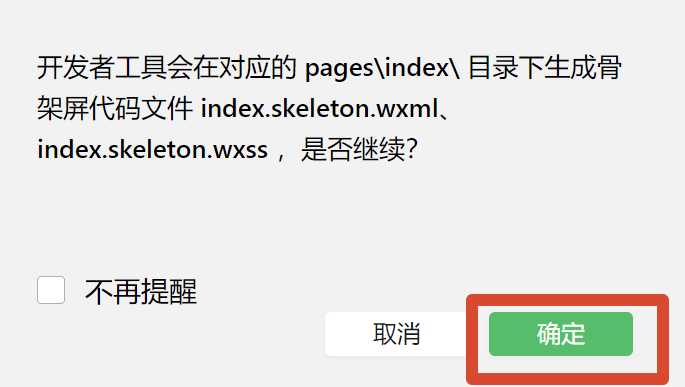
这样,便生成了index.skeleton.wxss和index.skeleton.wxss两个代码文件!
2、转成Vue代码
//PageSkeleton.vue
<template name="skeleton">
    <view is="components/XtxSwiper">
    <view class="carousel XtxSwiper--carousel">
        <swiper :circular="true" :interval="3000" :current="0" :autoplay="false">
        <swiper-item style="position: absolute; width: 100%; height: 100%; transform: translate(0%, 0px) translateZ(0px);">
            <navigator class="navigator XtxSwiper--navigator" hover-class="none">
            <image class="image XtxSwiper--image sk-image" mode="aspectFill"></image>
            </navigator>
        </swiper-item>
        </swiper>
        <view class="indicator XtxSwiper--indicator">
        <text class="dot XtxSwiper--dot active XtxSwiper--active"></text>
        <text class="dot XtxSwiper--dot"></text>
        <text class="dot XtxSwiper--dot"></text>
        <text class="dot XtxSwiper--dot"></text>
        <text class="dot XtxSwiper--dot"></text>
        </view>
    </view>
    </view>
    <view is="pages/index/componets/CategoryPanel">
    <view class="category CategoryPanel--category">
        <navigator class="category-item CategoryPanel--category-item" hover-class="none">
        <image class="icon CategoryPanel--icon sk-image"></image>
        <text class="text CategoryPanel--text sk-transparent sk-text-14-2857-983 sk-text">居家</text>
        </navigator>
        <navigator class="category-item CategoryPanel--category-item" hover-class="none">
        <image class="icon CategoryPanel--icon sk-image"></image>
        <text class="text CategoryPanel--text sk-transparent sk-text-14-2857-775 sk-text">锦鲤</text>
        </navigator>
        <navigator class="category-item CategoryPanel--category-item" hover-class="none">
        <image class="icon CategoryPanel--icon sk-image"></image>
        <text class="text CategoryPanel--text sk-transparent sk-text-14-2857-299 sk-text">服饰</text>
        </navigator>
        <navigator class="category-item CategoryPanel--category-item" hover-class="none">
        <image class="icon CategoryPanel--icon sk-image"></image>
        <text class="text CategoryPanel--text sk-transparent sk-text-14-2857-329 sk-text">母婴</text>
        </navigator>
        <navigator class="category-item CategoryPanel--category-item" hover-class="none">
        <image class="icon CategoryPanel--icon sk-image"></image>
        <text class="text CategoryPanel--text sk-transparent sk-text-14-2857-103 sk-text">个护</text>
        </navigator>
        <navigator class="category-item CategoryPanel--category-item" hover-class="none">
        <image class="icon CategoryPanel--icon sk-image"></image>
        <text class="text CategoryPanel--text sk-transparent sk-text-14-2857-1 sk-text">严选</text>
        </navigator>
        <navigator class="category-item CategoryPanel--category-item" hover-class="none">
        <image class="icon CategoryPanel--icon sk-image"></image>
        <text class="text CategoryPanel--text sk-transparent sk-text-14-2857-980 sk-text">数码</text>
        </navigator>
        <navigator class="category-item CategoryPanel--category-item" hover-class="none">
        <image class="icon CategoryPanel--icon sk-image"></image>
        <text class="text CategoryPanel--text sk-transparent sk-text-14-2857-917 sk-text">运动</text>
        </navigator>
        <navigator class="category-item CategoryPanel--category-item" hover-class="none">
        <image class="icon CategoryPanel--icon sk-image"></image>
        <text class="text CategoryPanel--text sk-transparent sk-text-14-2857-773 sk-text">杂项</text>
        </navigator>
        <navigator class="category-item CategoryPanel--category-item" hover-class="none">
        <image class="icon CategoryPanel--icon sk-image"></image>
        <text class="text CategoryPanel--text sk-transparent sk-text-14-2857-731 sk-text">品牌</text>
        </navigator>
    </view>
    </view>
    <view is="pages/index/componets/HotPanel">
    <view class="panel HotPanel--panel hot HotPanel--hot">
        <view class="item HotPanel--item">
        <view class="title HotPanel--title">
            <text class="title-text HotPanel--title-text sk-transparent sk-text-14-2857-895 sk-text">特惠推荐</text>
            <text class="title-desc HotPanel--title-desc sk-transparent sk-text-14-2857-341 sk-text">精选全攻略</text>
        </view>
        <navigator class="cards HotPanel--cards" hover-class="none">
            <image class="image HotPanel--image sk-image" mode="aspectFit"></image>
            <image class="image HotPanel--image sk-image" mode="aspectFit"></image>
        </navigator>
        </view>
        <view class="item HotPanel--item">
        <view class="title HotPanel--title">
            <text class="title-text HotPanel--title-text sk-transparent sk-text-14-2857-217 sk-text">爆款推荐</text>
            <text class="title-desc HotPanel--title-desc sk-transparent sk-text-14-2857-193 sk-text">最受欢迎</text>
        </view>
        <navigator class="cards HotPanel--cards" hover-class="none">
            <image class="image HotPanel--image sk-image" mode="aspectFit"></image>
            <image class="image HotPanel--image sk-image" mode="aspectFit"></image>
        </navigator>
        </view>
        <view class="item HotPanel--item">
        <view class="title HotPanel--title">
            <text class="title-text HotPanel--title-text sk-transparent sk-text-14-2857-988 sk-text">一站买全</text>
            <text class="title-desc HotPanel--title-desc sk-transparent sk-text-14-2857-978 sk-text">精心优选</text>
        </view>
        <navigator class="cards HotPanel--cards" hover-class="none">
            <image class="image HotPanel--image sk-image" mode="aspectFit"></image>
            <image class="image HotPanel--image sk-image" mode="aspectFit"></image>
        </navigator>
        </view>
        <view class="item HotPanel--item">
        <view class="title HotPanel--title">
            <text class="title-text HotPanel--title-text sk-transparent sk-text-14-2857-516 sk-text">新鲜好物</text>
            <text class="title-desc HotPanel--title-desc sk-transparent sk-text-14-2857-63 sk-text">生活加分项</text>
        </view>
        <navigator class="cards HotPanel--cards" hover-class="none">
            <image class="image HotPanel--image sk-image" mode="aspectFit"></image>
            <image class="image HotPanel--image sk-image" mode="aspectFit"></image>
        </navigator>
        </view>
    </view>
    </view>
    <view is="components/XtxGuess" class="r r">
    <view class="caption XtxGuess--caption">
        <text class="text XtxGuess--text sk-transparent sk-text-0-0000-694 sk-text sk-pseudo sk-pseudo-circle">猜你喜欢</text>
    </view>
    </view>
</template>

<style>
.sk-transparent {
    color: transparent !important;
  }
.sk-text-6-2500-585 {
    background-image: linear-gradient(transparent 6.2500%, #EEEEEE 0%, #EEEEEE 93.7500%, transparent 0%) !important;
    background-size: 100% 27.9070rpx;
    position: relative !important;
  }
.sk-text {
    background-origin: content-box !important;
    background-clip: content-box !important;
    background-color: transparent !important;
    color: transparent !important;
    background-repeat: repeat-y !important;
  }
.sk-text-14-2857-72 {
    background-image: linear-gradient(transparent 14.2857%, #EEEEEE 0%, #EEEEEE 85.7143%, transparent 0%) !important;
    background-size: 100% 39.0698rpx;
    position: relative !important;
  }
.sk-text-14-2857-983 {
    background-image: linear-gradient(transparent 14.2857%, #EEEEEE 0%, #EEEEEE 85.7143%, transparent 0%) !important;
    background-size: 100% 34.1860rpx;
    position: relative !important;
  }
.sk-text-14-2857-775 {
    background-image: linear-gradient(transparent 14.2857%, #EEEEEE 0%, #EEEEEE 85.7143%, transparent 0%) !important;
    background-size: 100% 34.1860rpx;
    position: relative !important;
  }
.sk-text-14-2857-299 {
    background-image: linear-gradient(transparent 14.2857%, #EEEEEE 0%, #EEEEEE 85.7143%, transparent 0%) !important;
    background-size: 100% 34.1860rpx;
    position: relative !important;
  }
.sk-text-14-2857-329 {
    background-image: linear-gradient(transparent 14.2857%, #EEEEEE 0%, #EEEEEE 85.7143%, transparent 0%) !important;
    background-size: 100% 34.1860rpx;
    position: relative !important;
  }
.sk-text-14-2857-103 {
    background-image: linear-gradient(transparent 14.2857%, #EEEEEE 0%, #EEEEEE 85.7143%, transparent 0%) !important;
    background-size: 100% 34.1860rpx;
    position: relative !important;
  }
.sk-text-14-2857-1 {
    background-image: linear-gradient(transparent 14.2857%, #EEEEEE 0%, #EEEEEE 85.7143%, transparent 0%) !important;
    background-size: 100% 34.1860rpx;
    position: relative !important;
  }
.sk-text-14-2857-980 {
    background-image: linear-gradient(transparent 14.2857%, #EEEEEE 0%, #EEEEEE 85.7143%, transparent 0%) !important;
    background-size: 100% 34.1860rpx;
    position: relative !important;
  }
.sk-text-14-2857-917 {
    background-image: linear-gradient(transparent 14.2857%, #EEEEEE 0%, #EEEEEE 85.7143%, transparent 0%) !important;
    background-size: 100% 34.1860rpx;
    position: relative !important;
  }
.sk-text-14-2857-773 {
    background-image: linear-gradient(transparent 14.2857%, #EEEEEE 0%, #EEEEEE 85.7143%, transparent 0%) !important;
    background-size: 100% 34.1860rpx;
    position: relative !important;
  }
.sk-text-14-2857-731 {
    background-image: linear-gradient(transparent 14.2857%, #EEEEEE 0%, #EEEEEE 85.7143%, transparent 0%) !important;
    background-size: 100% 34.1860rpx;
    position: relative !important;
  }
.sk-text-14-2857-895 {
    background-image: linear-gradient(transparent 14.2857%, #EEEEEE 0%, #EEEEEE 85.7143%, transparent 0%) !important;
    background-size: 100% 43.9535rpx;
    position: relative !important;
  }
.sk-text-14-2857-341 {
    background-image: linear-gradient(transparent 14.2857%, #EEEEEE 0%, #EEEEEE 85.7143%, transparent 0%) !important;
    background-size: 100% 31.7442rpx;
    position: relative !important;
  }
.sk-text-14-2857-217 {
    background-image: linear-gradient(transparent 14.2857%, #EEEEEE 0%, #EEEEEE 85.7143%, transparent 0%) !important;
    background-size: 100% 43.9535rpx;
    position: relative !important;
  }
.sk-text-14-2857-193 {
    background-image: linear-gradient(transparent 14.2857%, #EEEEEE 0%, #EEEEEE 85.7143%, transparent 0%) !important;
    background-size: 100% 31.7442rpx;
    position: relative !important;
  }
.sk-text-14-2857-988 {
    background-image: linear-gradient(transparent 14.2857%, #EEEEEE 0%, #EEEEEE 85.7143%, transparent 0%) !important;
    background-size: 100% 43.9535rpx;
    position: relative !important;
  }
.sk-text-14-2857-978 {
    background-image: linear-gradient(transparent 14.2857%, #EEEEEE 0%, #EEEEEE 85.7143%, transparent 0%) !important;
    background-size: 100% 31.7442rpx;
    position: relative !important;
  }
.sk-text-14-2857-516 {
    background-image: linear-gradient(transparent 14.2857%, #EEEEEE 0%, #EEEEEE 85.7143%, transparent 0%) !important;
    background-size: 100% 43.9535rpx;
    position: relative !important;
  }
.sk-text-14-2857-63 {
    background-image: linear-gradient(transparent 14.2857%, #EEEEEE 0%, #EEEEEE 85.7143%, transparent 0%) !important;
    background-size: 100% 31.7442rpx;
    position: relative !important;
  }
.sk-text-0-0000-694 {
    background-image: linear-gradient(transparent 0.0000%, #EEEEEE 0%, #EEEEEE 100.0000%, transparent 0%) !important;
    background-size: 100% 31.3953rpx;
    position: relative !important;
  }
.sk-image {
    background: #EFEFEF !important;
  }
.sk-pseudo::before, .sk-pseudo::after {
      background: #EFEFEF !important;
      background-image: none !important;
      color: transparent !important;
      border-color: transparent !important;
    }
.sk-pseudo-rect::before, .sk-pseudo-rect::after {
      border-radius: 0 !important;
    }
.sk-pseudo-circle::before, .sk-pseudo-circle::after {
      border-radius: 50% !important;
    }
.sk-container {
    position: absolute;
    left: 0;
    top: 0;
    width: 100%;
    height: 100%;
    overflow: hidden;
    background-color: transparent;
  }
</style>
3、显示
<script setup lang="ts">
import CustomNavbar from './componets/CustomNavbar.vue'
import {getHomeBannerAPI} from '@/services/home'
import {onLoad} from '@dcloudio/uni-app'
import type {BannerItem} from '@/types/home'
import { ref } from 'vue'
import CategoryPanel from './componets/CategoryPanel'
import {getHomeCategoryAPI} from '@/services/home'
import HotPanel from './componets/HotPanel'
import {getHomeHotAPI, getHomeGoodsGuessLikeAPI} from '@/services/home'
import type { XtxGuessInstance } from '@/types/components'
import PageSkeleton from './componets/PageSkeleton.vue'

const bannerList = ref<BannerItem[]>([])
const getHomeBannerData = async () =>{
  const res = await getHomeBannerAPI()
  //console.log(res)
  bannerList.value = res.result
}

const categoryList = ref<CategoryItem[]>([])
const getHomeCategoryData = async () => {
  const res = await getHomeCategoryAPI()
  categoryList.value = res.result
}

const hotList = ref<HotItem[]>([])
const getHomeHotData = async () => {
  const res = await getHomeHotAPI()
  hotList.value = res.result
}

const isLoading = ref(false)

onLoad(async () => {
  isLoading.value = true
  await Promise.all([
    getHomeBannerData(),
    getHomeCategoryData(),
    getHomeHotData()
  ])

  isLoading.value = false
})

// 获取猜你喜欢组件实例
const guessRef = ref<XtxGuessInstance>()

// 滚动触底事件
const onScrolltolower = () => {
  guessRef.value?.getMore()
}

// 下拉刷新状态
const isTriggered = ref(false)
// 自定义下拉刷新被触发
const onRefresherrefresh = async () => {
  // 开启动画
  isTriggered.value = true
  // 重置猜你喜欢组件数据
  guessRef.value?.resetData() // 加载数据
  await Promise.all(
    [getHomeBannerData(),
    getHomeCategoryData(),
    getHomeHotData(),
    guessRef.value?.getMore()])// 加载数据
  isTriggered.value = false // 关闭动画

}
</script>


<template>
  <CustomNavbar />
  <scroll-view
    refresher-enabled
    @refresherrefresh="onRefresherrefresh"
    :refresher-triggered="isTriggered"
    class="scroll-view"
    scroll-y
    @scrolltolower="onScrolltolower"
  >
    <PageSkeleton v-if="isLoading" />
    <template v-else>
      <XtxSwiper :list="bannerList" />
      <CategoryPanel :list="categoryList" />
      <HotPanel :list="hotList" />
      <XtxGuess ref="guessRef" />
    </template>

  </scroll-view>
</template>

<style lang="scss">
page {
  background-color: #f7f7f7;
  height: 100%;
  display: flex;
  flex-direction: column;
}

.scroll-view {
  flex: 1;
}
</style>